End User Device Monitoring | Datadog

Get Started with Datadog

END USER DEVICE MONITORING

Run IT operations with the full picture from signal to fix

See your fleet's performance, trace each disruption, and measure AI tool adoption, all in the platform your infrastructure teams already run.

Run IT operations with  the full picture from signal to fix

Benefits

Stay ahead of issues that disrupt work

Keep teams up and running on the laptops and desktops they depend on. Spot problems early, get a clear path to resolution, and monitor which AI tools are in use internally.

Know which devices come first

Prioritize your time with fleet-wide visibility into device health, new issues, and the percentage of devices affected.

Find where disruption starts

Pinpoint what’s slowing employees down across devices, Wi-Fi, and apps with process, signal, and latency data

Fix a recurring problem once

See what percentage of devices are affected by the same crash or symptom and identify a common fix.

Triage with the full context

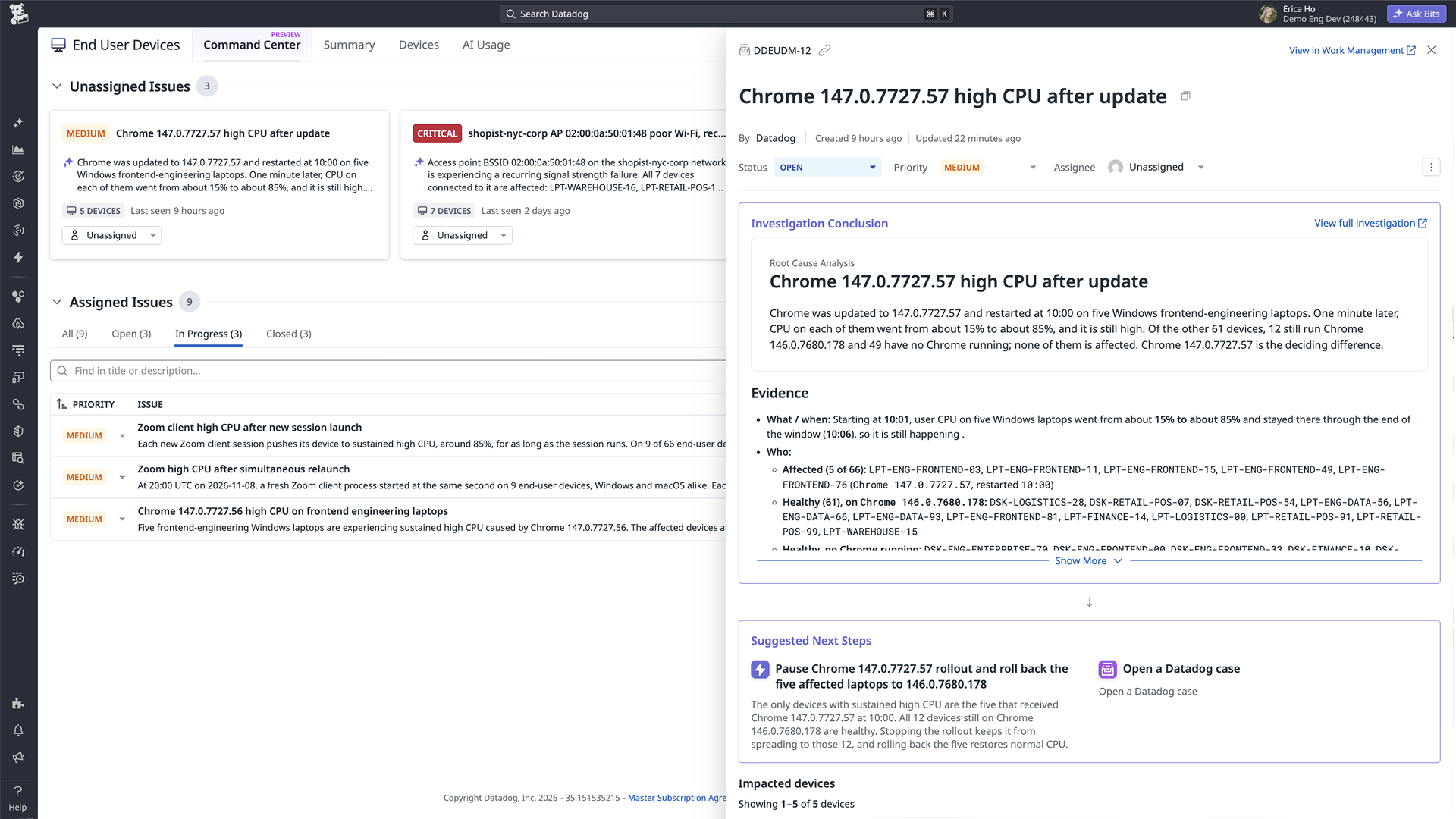
Get one ticket per issue, rather than per user, with Bits AI identifying the priority, root cause, and next steps.

Connect every disruption to its cause

Go beyond tickets. Datadog ties reported and unreported issues to device health, Wi-Fi, and app data to show you what’s disrupting employees.

end user device monitoring architecture

Built for your role

Built for the teams that keep employees working

Whether you manage the fleet or answer the tickets, see disruptions early, know what’s behind them, and keep work moving, all from the same device data.

Find fleet problems without waiting for tickets

  • Spot devices quietly degrading, from filling disks to dwindling memory, before tickets arrive
  • Identify devices with CPU, memory, or disk constraints to prioritize refreshes and replacements
  • Plan license and hardware purchases with a fleet-wide view of installed software and versions
  • Manage a bad update or app crash as one issue with all affected devices listed
  • See which AI tools are used on which devices to assess adoption against company policies
Image

Go from ticket to cause in one conversation

  • Find what’s slowing a device down with live processes ranked by CPU and memory, without a screen share
  • Distinguish device slowdowns from Wi-Fi or access point issues using signal strength, noise, and roaming data
  • Confirm which apps crashed or hung without asking employees to reproduce the issue
  • Start with detected issues, affected devices, and suggested next steps already documented
  • Escalate with processes, logs, and events captured just before the issue, giving the next team the evidence they need
Image

Features

From first signal to verified fix

Know what needs attention

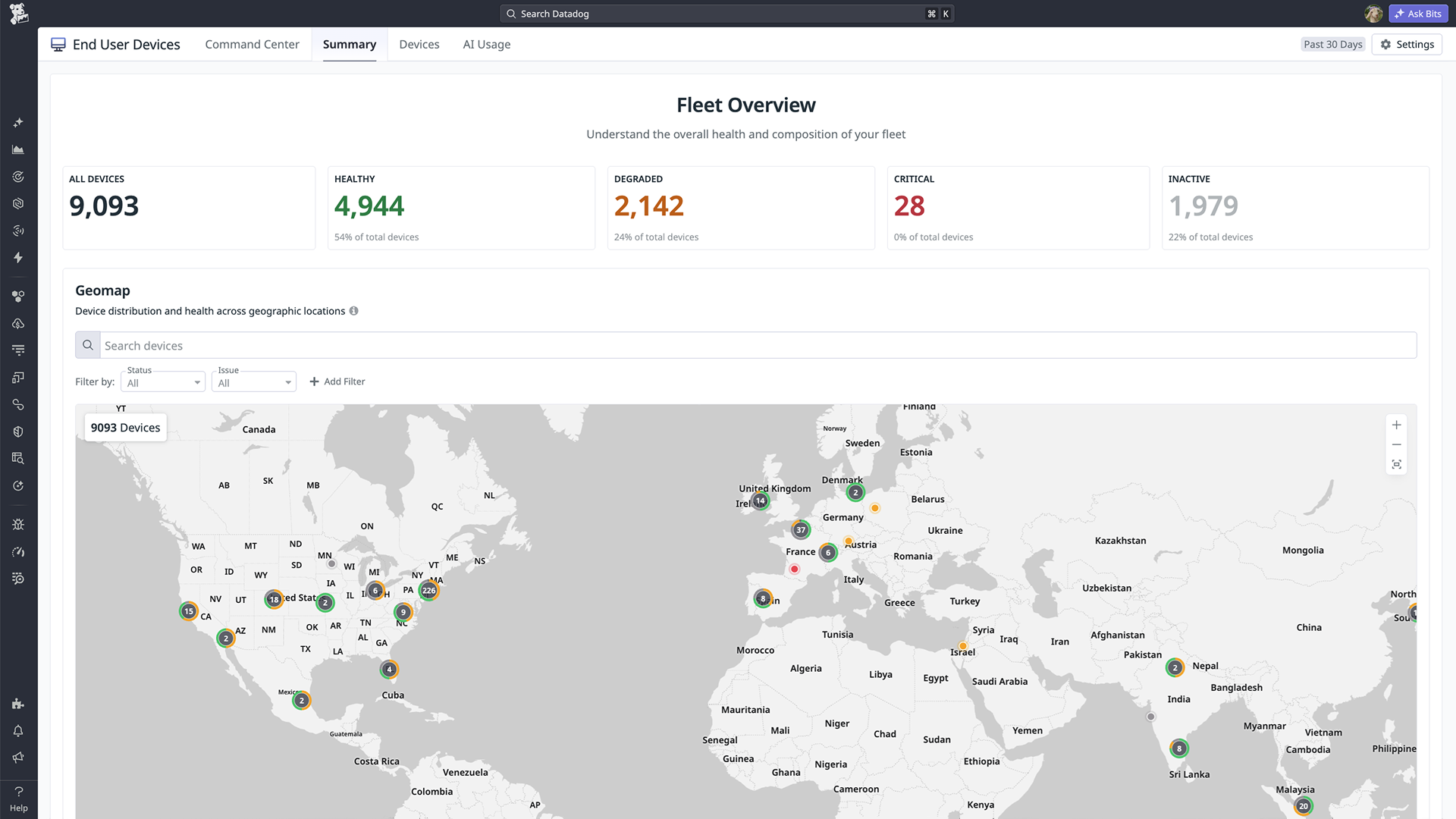
Find every device across your entire fleet

Group devices by health status, device type, OS version, and location to prioritize what to fix or replace first, from degraded to inactive.

Catch silent declines that build gradually

Spot when a device’s CPU, memory, and disk began to decline over 15 months, and what it was running, narrowing the search for causes.

Stop replacing employee devices blindly

See which devices have an app or OS update and which are behind, and review any one before approving an app or upgrade request.

Diagnose any disruption

Rank your fleet by what to fix or replace

See each employee device’s live processes, ranked by CPU and memory, to find the app slowing it down before asking the employee.

Know when the connection is the culprit

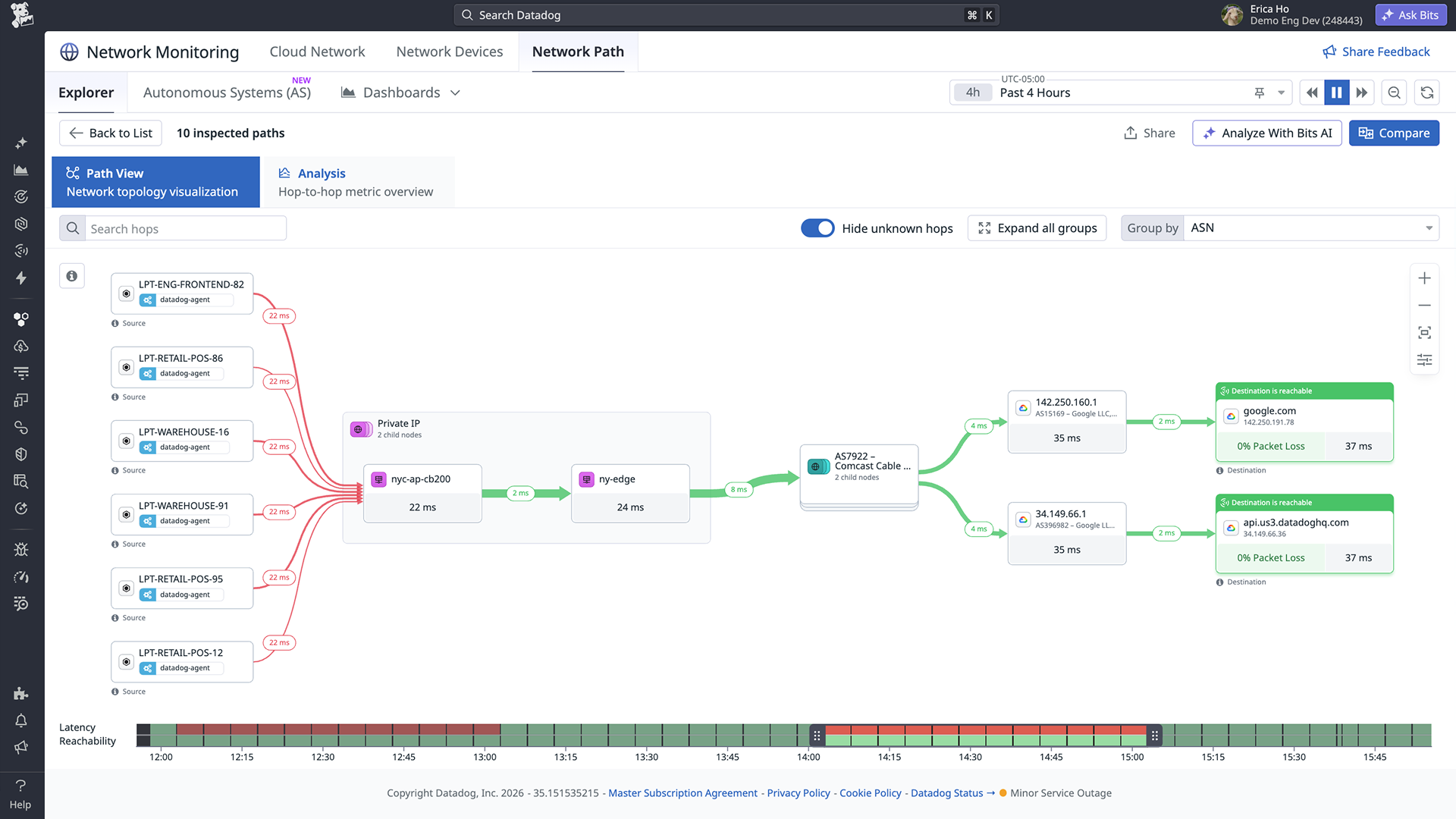
Follow an employee device’s route to apps like Zoom and Slack, and check whether the router, the ISP, or the app itself adds delay.

Flag weak Wi-Fi and the devices it reaches

Track signal strength, noise, and roaming on an employee device, then see whether weak Wi-Fi stops there or hits other devices nearby.

Catch widespread problems

See which apps crash, and for how many

Track app crashes and hangs across every Windows or Mac device, and whether one app is failing for one employee or for many.

Spot shadow AI tools before they spread

See which AI apps run on each employee device and flag tools outside your approved set before they turn into a licensing problem.

Confirm a fix reached everyone it affected

Check other employee devices on the same access point to see if a fix reached them too, not only the one that reported the problem.

Triage with AI guidance

Begin with the likely cause already found

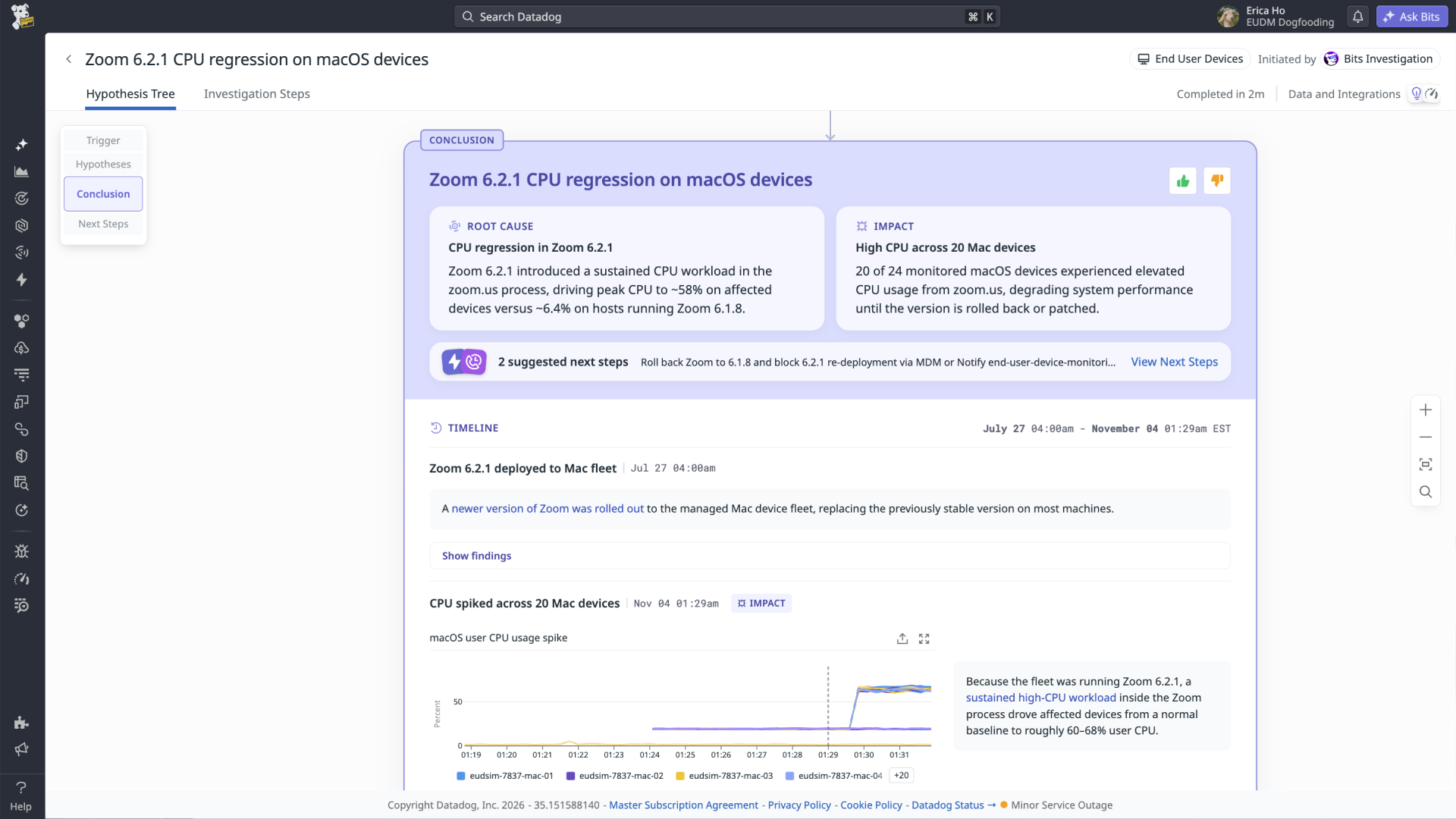
Open every issue to its likely cause, with the evidence behind it and suggested next steps, already investigated when you arrive.

Hand off issues without losing its history

Assign each issue, change its priority, and push it to Jira or ServiceNow with its full history, ready for the next team to pick up.

Dive deeper into any issue with Bits Chat

Ask follow-up questions or get a detailed, step-by-step plan, starting from what the investigation found instead of from scratch.

Get the technical details

Learn how to deploy and configure EUDM with step-by-step guides and reference material.

PRICING

Priced only for the devices you monitor

See how employee laptops, desktops, apps, and AI tools are performing and being used. Fix issues faster, decide which devices need to be replaced, and plan licenses to buy.

From basic plans to bespoke offerings, Datadog offers the right level of support & services for any organization.

End User Device Management includes:

  • Windows and Mac-compatible integrations
  • Custom Metrics and basic dynamic Network Path allotments
FAQs

Frequently asked about End User Device Monitoring

What is Datadog End-User Device Monitoring?

End User Device Monitoring is Datadog’s solution for monitoring the health and performance of employee laptops and desktops, both physical and virtual. The Datadog Agent collects system metrics, Wi-Fi data, logs, and installed software from each device, and traces the network path from the device to the SaaS apps employees use. IT teams find underperforming devices, troubleshoot disruptions, and plan hardware and license needs in the same platform their infrastructure teams already use.

Resources

Get started

Fix it before they file a ticket