
Erica Ho

Natasha Silva
Technical Content Writer
When an endpoint issue spreads across devices, it could stem from hardware, a software update, network conditions, or a SaaS provider. Pinpointing the source often means correlating device metrics, application logs, and network data from multiple tools and views. This slows down response times, requires system knowledge not every team member has, and makes it difficult to stay ahead of problems.
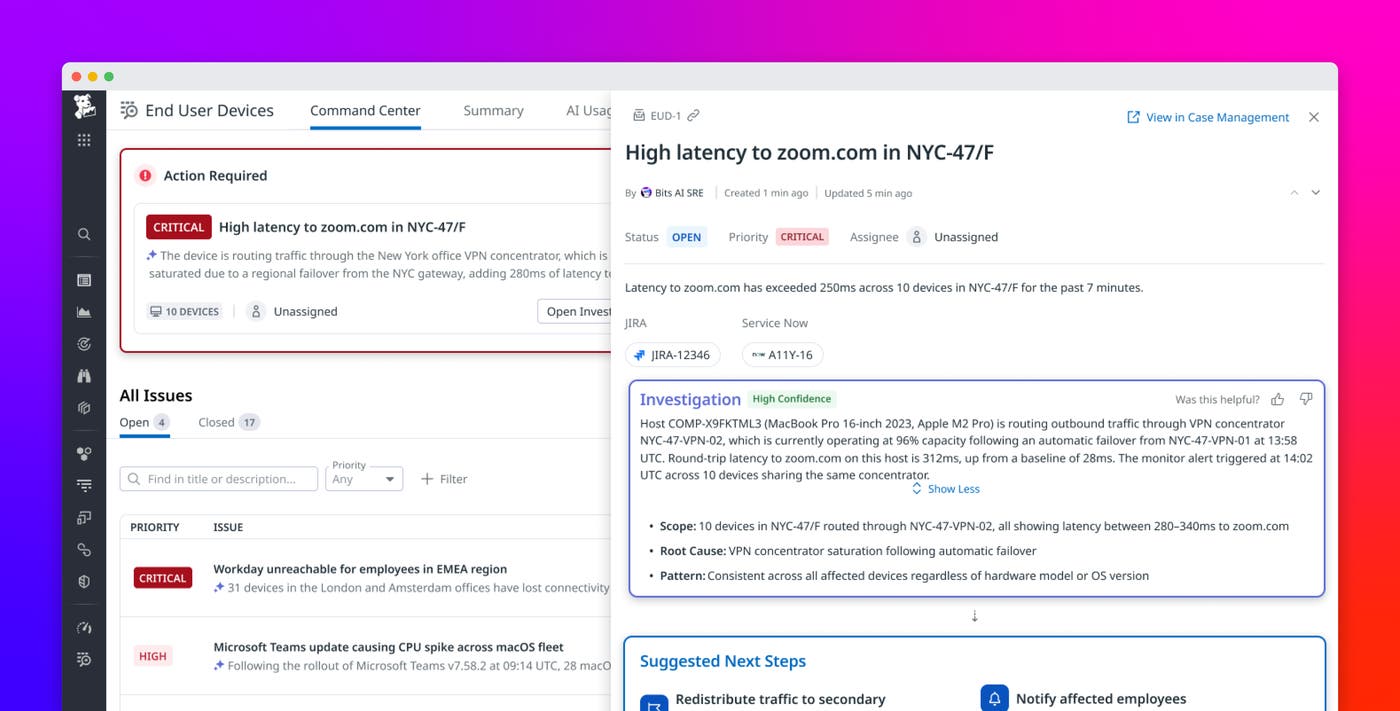
Datadog End User Device Monitoring (EUDM) introduces Command Center, a new landing page for IT teams that manage employee devices and endpoint health. Powered by Bits Investigation, Command Center surfaces active problems across the fleet, ranked by severity, so you immediately know where to focus.
This post shows how Command Center helps you:
Identify fleet-wide endpoint problems
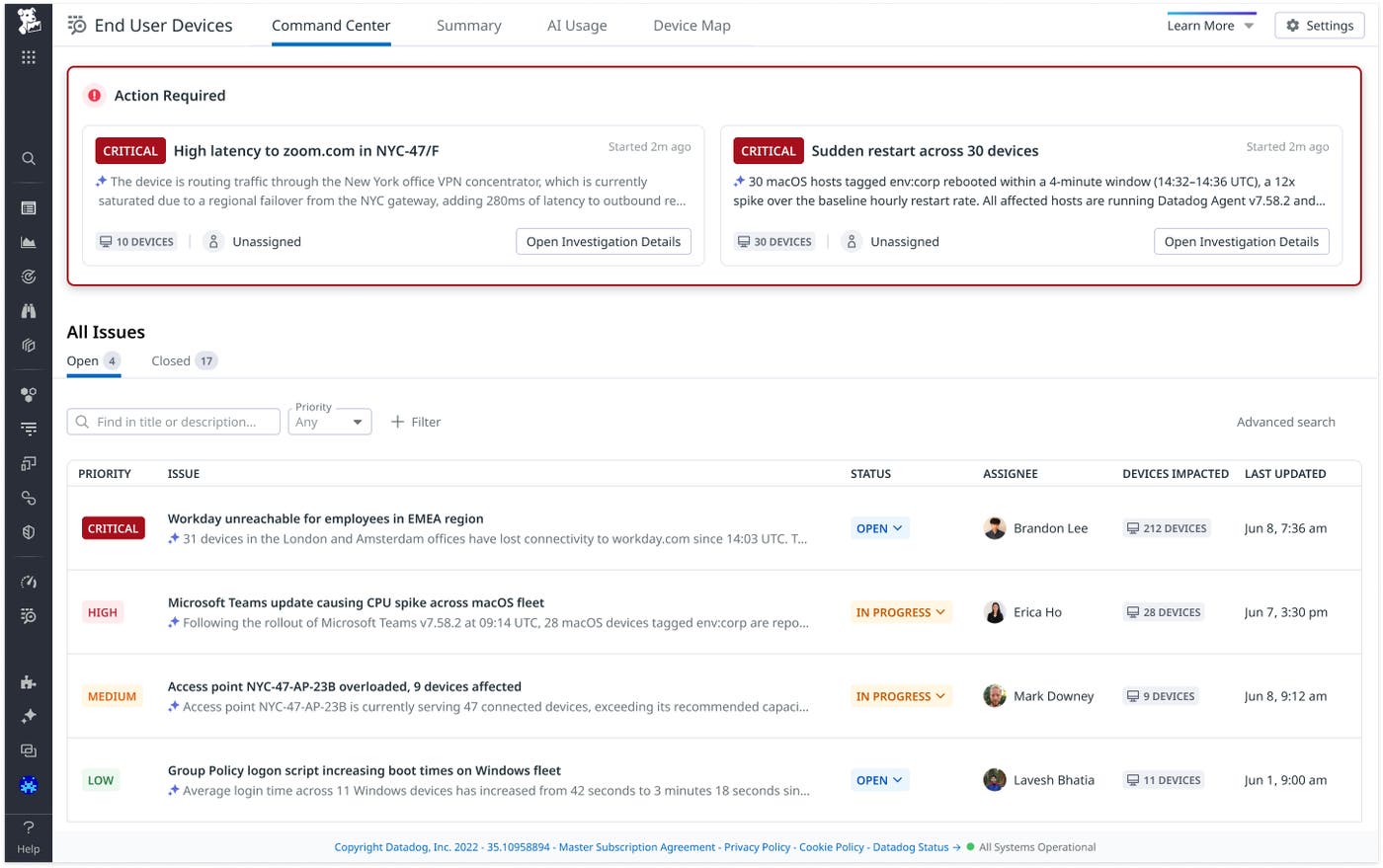
Command Center provides a centralized view of endpoint health for IT teams managing large fleets. Without it, you might only learn about a widespread problem after receiving multiple support tickets. The Command Center feed presents a single ranked card the moment Bits Investigation detects the issue, so you’re not manually connecting dots across seemingly unrelated tickets.
Each issue appears as a concise, human-readable card that summarizes the problem. Cards include the number of affected devices, a severity indicator, and a short root cause description drawn from the underlying Bits Investigation. Together, these details help you understand the scope and impact of an issue without digging into raw data.
Issues are organized by status so you can track ongoing work without losing context. When there are no active problems, a clear empty state confirms that your fleet is healthy, along with a timestamp showing when the system last scanned for issues.
Skip the investigation and act on automated findings
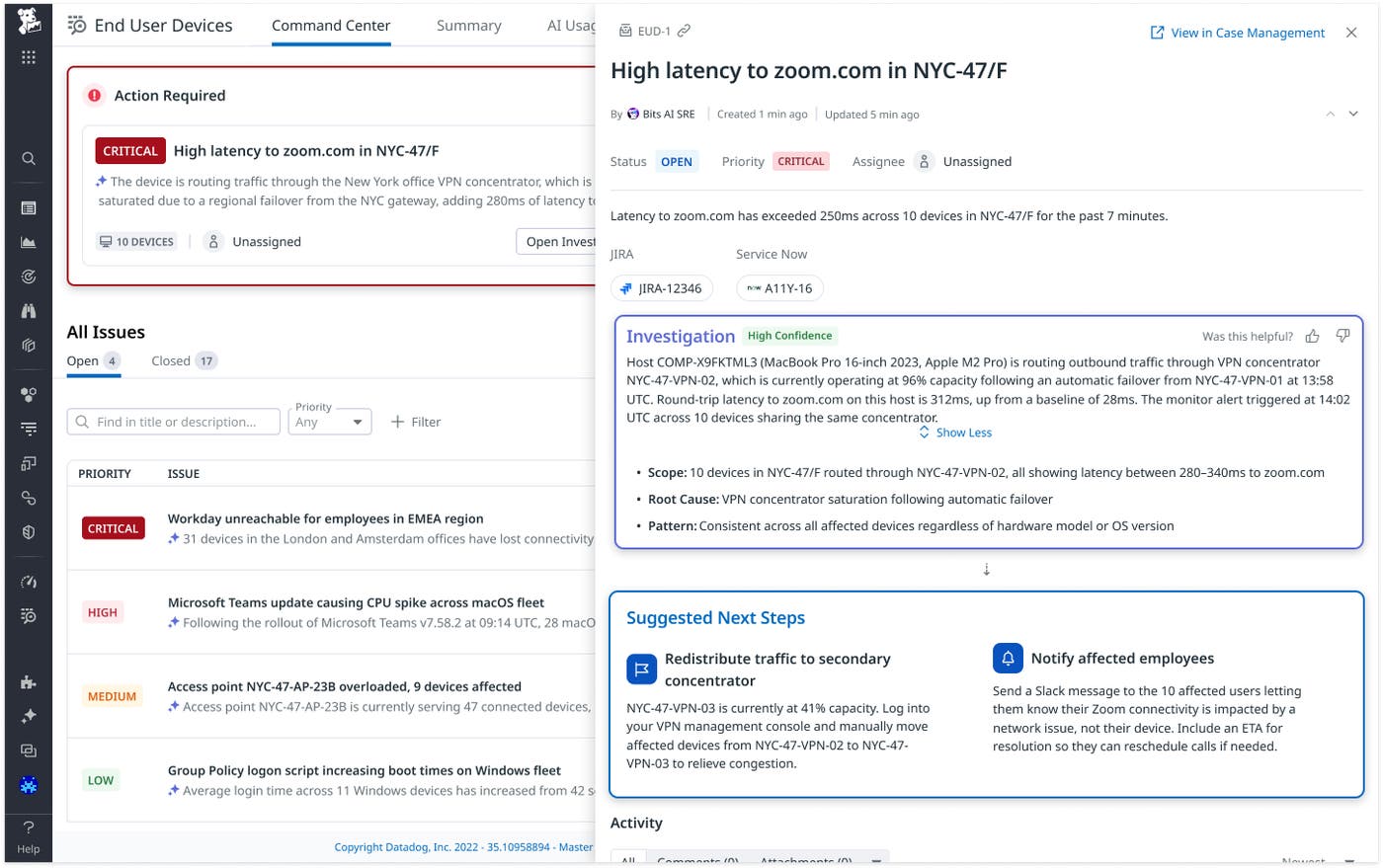
Every issue in EUDM is backed by an automated investigation from Bits Investigation. When a monitor fires, it runs the same diagnostic steps you would take and correlates signals across device performance, network conditions, and application behavior. By the time the issue is surfaced, the groundwork has already been done.
Issue cards are only generated from conclusive investigations. This prevents unconfirmed findings from appearing in your feed. Bits Investigation also looks for similar open cases. When it finds one that has been updated within the past 30 days, it updates that case rather than creating a duplicate.
When Bits Investigation identifies a root cause, the issue card includes a detailed investigation trail that shows what checks Bits Investigation performed and how it reached the conclusion. Less experienced team members can use the investigation trail to learn how endpoint issues are diagnosed, while more experienced team members can provide feedback on the accuracy of the investigation as context for future investigations.
Command Center also shows recommended next steps directly within each card. Whether you need to open an incident, trigger a workflow, or notify your team, you can take action immediately from the card.
Manage endpoint issues end to end
Resolving an endpoint issue typically means tracking status in a ticketing system while keeping remediation steps and device data in separate tools. Because the Command Center is built on top of Datadog Case Management, each issue is also a fully functional case. From the issue card in EUDM, you can update ownership, set priorities, assign due dates, and link related work in external systems such as Jira or ServiceNow. This keeps triage, tracking, and remediation connected to the original endpoint issue from detection to resolution.
For more complex investigations, you can open the case in a dedicated view to add notes, attach files, or log manual actions. When Bits Investigation updates its findings, the issue card refreshes to reflect the latest scope, including device counts, timestamps, and when the case last changed. Once resolved, you can close the issue directly from the same interface.
Address common scenarios across devices, networks, and applications
Command Center covers common endpoint scenarios spanning three categories: network and SaaS performance, device and application health, and AI tool usage.
For network and SaaS performance, Command Center identifies whether slowdowns originate from a user’s home network, corporate infrastructure, ISP, or the SaaS provider itself. It can also detect problems like VPN endpoints degrading video call quality or outages affecting business-critical applications.
On the device and application side, Command Center flags regressions caused by software updates, repeated crashes from faulty releases, and performance issues introduced by configuration changes such as group policies. For example, if devices start crashing at an elevated rate after a fleet-wide software update, Command Center can raise the issue and tie it to a specific release. You can use Command Center to pinpoint whether a problem stems from hardware, software, or configuration.
For AI tool usage, Command Center detects usage on unapproved applications across your fleet, giving you early visibility into shadow AI adoption before it creates security or compliance exposure.
For each scenario, monitors detect anomalies, Bits Investigation investigates the root cause, and Command Center presents the results with context and recommended actions. This gives you a repeatable workflow for moving from anomaly detection to investigation and response.
Investigate and resolve endpoint issues from a single place
Datadog EUDM Command Center gives you a single place to manage fleet-wide endpoint problems from detection to resolution. Automatic detection and diagnosis reduce manual investigation, so you can focus on fixing them.
To get started, explore the EUDM documentation and read about how Bits AI powers automated investigations.
To investigate and resolve endpoint issues with Command Center, join the End User Device Monitoring Preview.
If you don’t already have a Datadog account, sign up for a free 14-day trial.
