

Candace Shamieh
Technical Content Writer

Alex Barksdale
Senior Software Engineer

James Eastham
Senior Technical Advocate

Olivier Nzia
Software Engineer
Serverless should be the first execution model teams evaluate for AI agent workloads. Many agents spend much of their lifetime waiting, and always-on compute forces teams to pay for every idle minute. In a study of more than 35,000 production coding-agent sessions, the median session ran LLM or tool calls for only 20% of its lifetime. The rest of the time, it sat idle between steps, with its sandbox still allocated.
According to Gartner’s 2026 CIO and Technology Executive Survey, AI agents have the most aggressive adoption curve of all technologies measured, but momentum is outpacing platform maturity, making it difficult to run agents at scale. When Google Cloud surveyed over 1,400 senior IT leaders for their 2026 State of AI Infrastructure report, 83% said they would need infrastructure upgrades to support production-grade agentic AI. Teams can interpret a readiness problem as a reason to provision persistent compute, adopt a new cluster, expand an existing platform, or even choose a different deployment topology. Serverless offers a less invasive path to scale agentic AI.
In a serverless model, the platform provisions capacity as requests arrive and scales to zero when they stop, so teams can add agent workloads without managing a cluster. While some agents require dedicated capacity, many of them can run serverless. Longer runs can use durable serverless workflows to save progress and release compute during a wait, then resume once the next step is ready.
In this post, we’ll explain how to test the serverless default against your own agent workloads and adjust your approach as production data becomes available. We’ll cover how to:
Compose longer or resumable agent runs as a durable serverless workflow
Compare its production behavior and cost with warm or dedicated capacity
Estimate whether your AI agent workload needs continuously available compute
Treating agent workloads as if they all belong in the same category can cause teams to provision continuously available compute before they know whether the workload requires it. By creating a workload execution profile, you can determine if the agent needs dedicated workers or can run safely on demand.
Create a workload execution profile for the placement decision
An execution profile records the workload characteristics and runtime requirements that inform where and how the agent’s workload should run. Workload placement describes the process of choosing the execution model for an agent workflow or an individual step, such as on-demand compute, minimum instances, a warm service, or a dedicated worker pool.
Creating an execution profile clarifies which resources must remain available when no agent step is actively running. For example, if only durable state and a trigger for the next step need to be available, a serverless workflow may be the best fit.
We recommend including the following inputs in your execution profile:
Trigger and arrival pattern
Response pattern, such as synchronous, asynchronous, or streaming
Peak arrival rate and burst duration
Peak concurrency
Response-time objective, such as the maximum acceptable time to first output or completion
Active compute time per run
Total elapsed time per run
Compute utilization over the expected operating window
Maximum step duration
Memory and CPU requirements
Accelerator, local storage, persistent connection, and private network requirements
The inputs in your execution profile show you when demand arrives and how quickly it accumulates. If you only rely on daily averages, you may choose an execution model that doesn’t suit the workload.
For example, a workload that receives 1,000 events per day averages less than one event per minute, making it seem like a small, always-on worker is sufficient. The daily average obscures the fact that all 1,000 events arrive in a nightly batch. When the batch arrives, the worker can become overwhelmed or fail to process the batch within the required time frame. By analyzing the peak arrival rate, burst duration, and how long demand remains at zero, you can determine whether on-demand compute is suitable. In this case, on-demand is a good fit if the serverless platform can absorb the burst and downstream systems can handle the resulting concurrency.
Separate active compute from total elapsed time
The ratio of active compute time per run to total elapsed time per run is an early workload placement signal. A low ratio strengthens the case for on-demand execution, while a high ratio can indicate that dedicated workers may be more economical, especially when paired with steady arrivals. The following animation shows a single agent run in which on-demand compute runs only in short bursts, while an always-on worker stays provisioned for the entire run, including the long waits between steps.
For a new agent workload, build the initial execution profile from expected traffic, the representative prototype, or load-test runs. If you’re using Datadog, Agent Observability and APM traces can help you measure the total elapsed time per run and the duration of individual steps at the model, tool, and application level. Serverless Monitoring can measure the execution duration of each serverless component, which contributes to the run’s active compute time. It can also report invocation volume, concurrency, CPU, and memory. If you’re using AWS Lambda, enhanced metrics also report CPU utilization and CPU time. After deployment, update the execution profile with production measurements.
Compose longer or resumable agent runs as durable serverless workflows
An agent run that completes within a single invocation may not require durable orchestration. In those cases, using a function or serverless container avoids unnecessary cost and complexity. If runs span multiple steps or need to pause and resume, a durable serverless workflow can be the optimal choice.
A durable serverless workflow combines components with different roles. For example:
An orchestrator records progress and decides when each unit is eligible to run.
Serverless execution primitives, such as functions, serverless containers, or managed jobs, perform the active work.
External stores retain artifacts and application data that outlives the execution process.
We recommend dividing the agent run into bounded units of work. Each unit of work should have defined inputs, outputs, and completion or failure conditions. After each bounded unit of work finishes or a workflow pauses, the orchestrator can record its progress. The workflow can later resume from the checkpoint instead of restarting the entire run. If a step fails, the orchestrator can retry it without rerunning the steps already completed. Design each step so that a retry doesn’t repeat external side effects, such as sending a duplicate email or charging a customer twice. The following screenshot from Datadog Serverless Monitoring shows an AWS Step Functions workflow divided into bounded steps, with the input, output, and status that the orchestrator recorded when the deliveryShipper step completed.
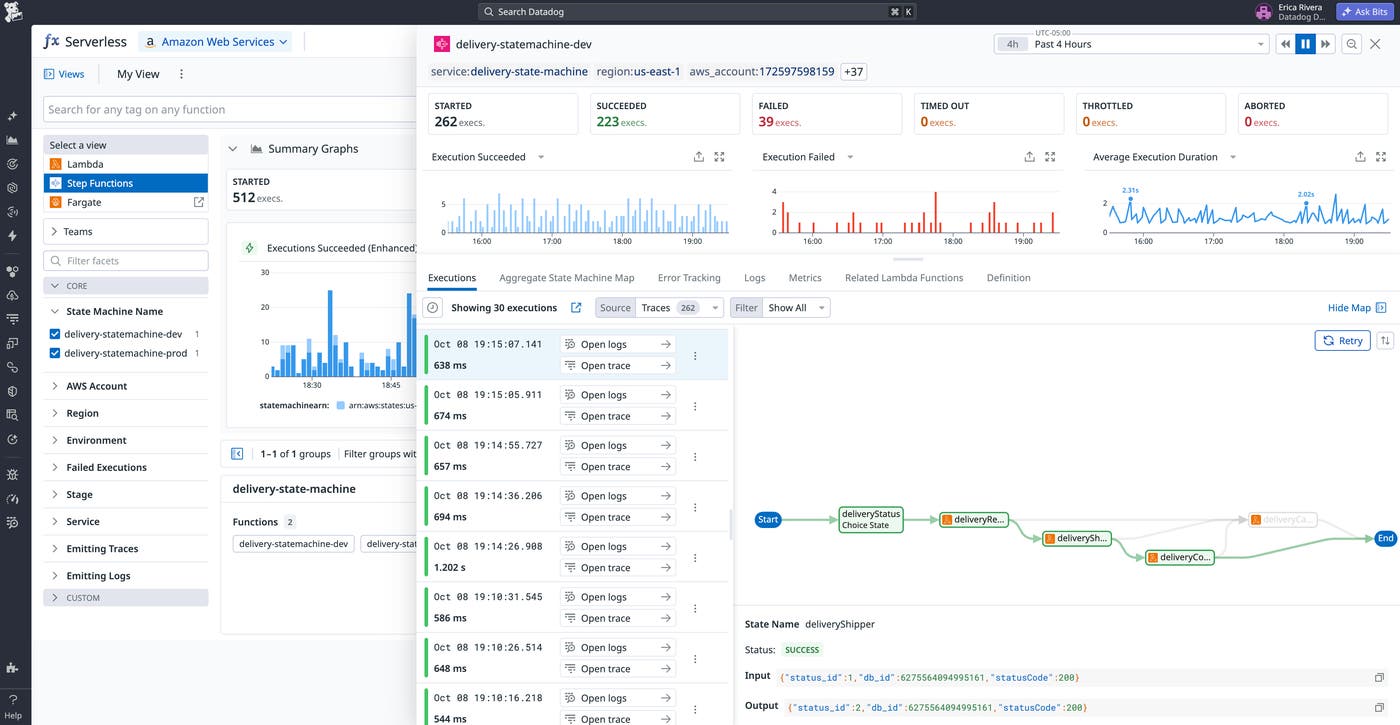
To decide where the workflow can pause, map the agent run from trigger to completion and classify each wait as a tool response, rate-limit backoff, or human approval. The workflow can release compute at a wait if it can save its state and resume from a timer, event, or callback. If a step must keep a process running, such as to stream a response or maintain a persistent connection, it can’t pause and may require warm capacity instead.
Cloud and managed services provide different programming models for durable serverless workflows. AWS Step Functions and Google Cloud Workflows coordinate steps through a state machine or external workflow definition. Azure Durable Functions and AWS Lambda durable functions let developers express both steps and waits in application code. In both models, workflow progress persists independently of the compute process that performs an individual step. If you’re using these services, Datadog Serverless Monitoring can correlate workflow executions with the telemetry data from functions, so you can determine if errors or latency originated in an individual step or at the orchestration layer.
Separate the agent framework from the workflow’s durable orchestration
Many teams use agent frameworks, such as LangChain or Vercel AI SDK, to accelerate deployment. Datadog’s State of AI Engineering report found that agent framework adoption has nearly doubled from 2025 to 2026. Agent frameworks can vary widely in scope, with some managing model calls, tool selection, and the agent loop, while others support checkpointing or persistent workflow state.
When an external durable orchestrator coordinates the workflow, we recommend that it owns the workflow state, scheduling, and resumption, while the agent framework handles model and tool interactions within each bounded step. This separation of duties allows the framework process to end without losing the workflow’s progress and prevents an in-agent loop from staying alive for the entire workflow.
Compare on-demand execution with warm and dedicated capacity for AI agent workloads
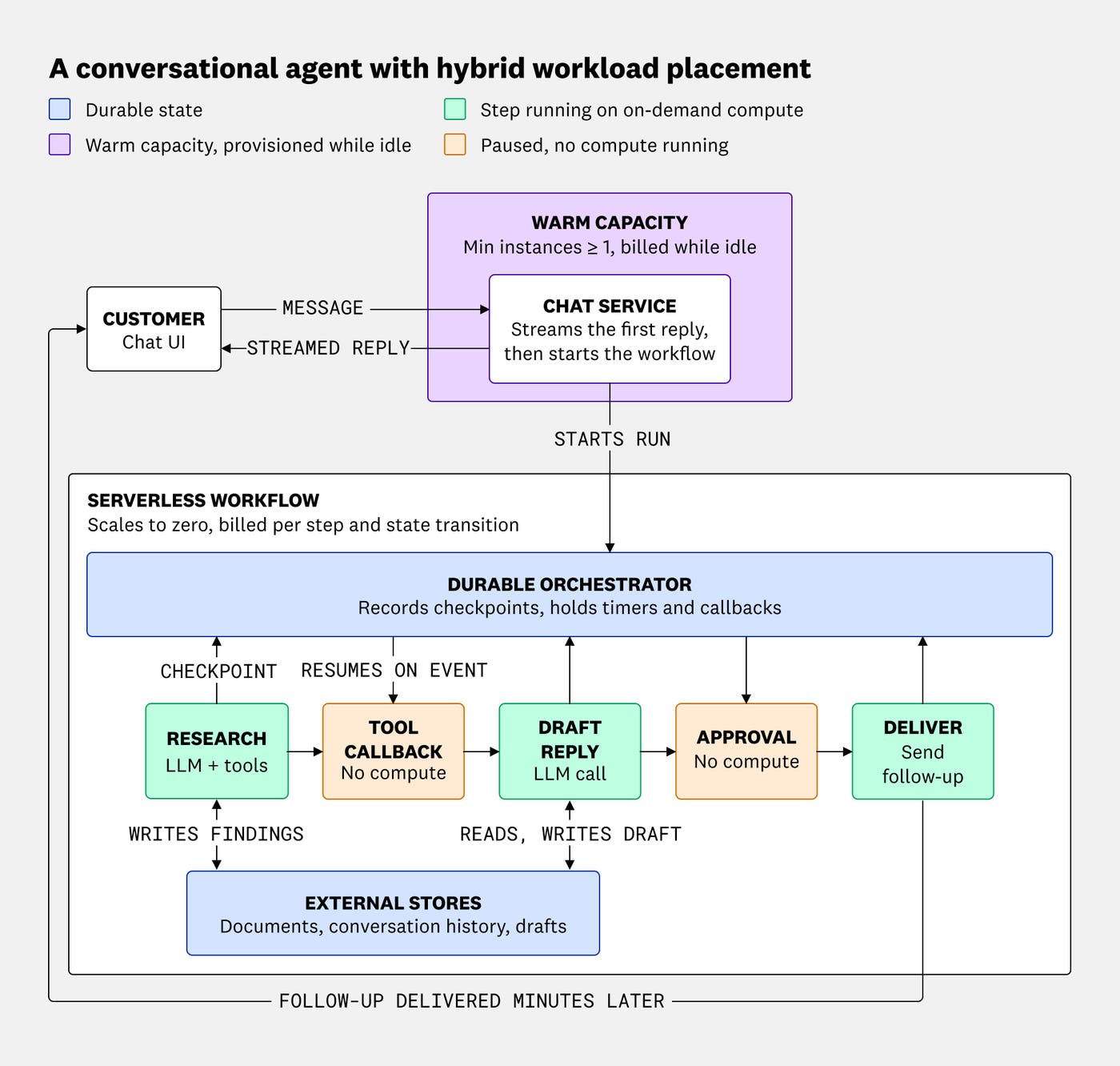
The execution profile can help you compare each workload placement option against the same demand. On-demand costs generally increase with active compute time and workflow activity, while warm and dedicated capacity incur costs while provisioned compute is idle. The following diagram shows a conversational agent that uses both placements: a chat service on warm capacity streams the first reply, and the rest of the run executes as a durable serverless workflow that incurs no compute costs while it waits.
When comparing on-demand execution with warm and dedicated capacity, include compute duration, orchestration transitions, state storage, network transfer, and telemetry data. You can exclude model and tool charges if they remain unchanged across placements, but include the charges when retries, failures, or repeated work cause one placement to generate more calls.
Instead of invocation prices, compare cost per successful run. Add the costs generated by every attempted execution during the same operating window, including successful, failed, and abandoned runs. Then divide the total by the number of runs that reached the workload’s completion condition.
For example, let’s say a research agent starts 100 runs during a 1-day operating window. 80 runs produce a completed report, 15 fail after incurring compute and orchestration costs, and 5 are abandoned while waiting for approval. Together, the 100 runs generate $12 in execution-related costs. Because only 80 reach the defined completion condition, the cost per successful run is $12 ÷ 80, or $0.15. Dividing the same cost by all 100 initiated runs would produce $0.12 and hide the cost of unsuccessful work.
If meeting the response-time objective requires instances to remain ready, include the cost of minimum capacity. The platform can still scale automatically above this baseline, but it can’t reduce compute to zero during idle periods. As a result, the deployment combines a fixed baseline cost with usage-based costs. We recommend reevaluating the comparison if sustained utilization increases. Consistently busy compute reduces the economic advantage of on-demand allocation and can make a right-sized worker pool more economical.
Use production evidence to change the placement of your AI agent workload
Once in production, monitor the agent’s behavior as it executes in a serverless workflow. By comparing production metrics with your execution profile, you can identify when the architecture should change to address emerging latency or runtime constraints.
Before you change a step’s placement, confirm the source of the problem. For example, if a trace shows that unnecessary retrieval calls or model turns account for most of the delay, keeping the worker warm won’t address that source of latency. By contrast, if compute startup consumes a substantial amount of the response-time budget, warm capacity can help.
If you’re using Datadog, APM and Agent Observability can show an agent run’s latency breakdown in a single trace. The following recording starts with an agent run’s latency breakdown in a Datadog APM flame graph, then opens one of its model calls in Agent Observability to show the call’s full input and output, including the tool calls the agent made.
APM shows how long each step of the agent run takes. Agent Observability captures the full input and output of every operation the agent executes, including model calls, tool calls, and retrievals. You can also view the model, token usage, and estimated cost of each model call.
Match each operating signal to a placement response
When reviewing signals, analyze startup latency, active compute time, sustained concurrency, and cost per successful run together. Interpret each signal according to the workload’s response-time objective and relevant capacity or cost limits. For example, while a 500-millisecond startup delay may be acceptable for an overnight analysis, it can adversely affect the user experience during a customer interaction. The following table lists common operating signals, what each one suggests about the workload, and how you might adjust its placement in response.
| Signal | Interpretation | Potential response |
|---|---|---|
| Startup time consumes a significant share of the response-time objective | The step must begin on already initialized compute | Configure minimum instances or move the path to a warm service |
| Active compute is a small share of total workflow duration | The workload spends a significant amount of its lifetime waiting | Continue releasing compute between steps |
| Concurrency remains high for long periods and idle time remains low | Demand is predictable enough for a dedicated worker pool | Compare on-demand and dedicated capacity over the same demand window |
| Cost per successful run remains higher than a right-sized worker estimate | On-demand pricing or orchestration overhead may not suit the workload | Test the consistently busy path on dedicated capacity |
| A workflow step’s accelerator, cache, connection, or execution-duration requirements exceed the provider’s limits | The current placement can’t satisfy the step’s runtime requirements | Move the constrained step while leaving the remaining steps in the serverless workflow |
Move only the steps that require a different placement
The operating signals can apply to one step rather than the entire workflow. If startup latency, sustained compute use, or a runtime constraint affects a specific step, move that step to warm or dedicated capacity while keeping the durable orchestration and intermittent steps serverless.
For example, a conversational agent could use a warm service to stream its initial response and start a durable serverless workflow for follow-up research. This addresses the latency-sensitive path without keeping compute active as the longer-running work waits for models, tools, or human input. Continue comparing production measurements with the execution profile as traffic, provider pricing, and workload requirements change. You can expand or reduce warm and dedicated capacity when those measurements support a different placement.
Key takeaways for running AI agents on serverless
Serverless is a strong starting point for agent workloads that use compute intermittently. Durable execution allows workflows to preserve progress during pauses and release compute between steps. Warm or dedicated capacity becomes appropriate when measured latency, sustained utilization, or runtime requirements justify it.
Begin with one representative agent workload and create its execution profile. Use that profile to evaluate serverless placement, then compare production behavior and cost per successful run with the alternatives. When a constraint affects an individual step, change that step’s placement while keeping the remaining workflow serverless.
To start evaluating your deployment, use Datadog Serverless Monitoring to monitor execution performance and Agent Observability to investigate model and tool activity. To start monitoring the systems and workflows that support your AI agents, sign up for a 14-day free trial.
