

Bowen Chen
Senior Technical Content Writer

Yosra Chelbi
Software Engineer

Nader Khalil
Software Engineer

Dmitrii Ulianin
Software Engineer
At Datadog, we want to expose our engineers to high-quality AI tools and workflows. However, token usage can be expensive, and finding a balance between AI cloud spend and the return on investment can be difficult. But what if engineers could maintain their current AI workflows using the same tools, but at a lower cost? Similar to rightsizing cloud infrastructure, tuning the configurations of AI tools—such as model type and effort level—can yield cost savings without hurting performance objectives.
In this blog post, we’ll discuss a handful of easy configuration changes surfaced by our platform team that yield us over $1 million in monthly AI spend.
How Datadog surfaces AI cost savings opportunities
In order for us to identify opportunities for AI cost savings, we needed to first understand the complete composition of our existing AI cloud spend. This meant tracking costs across AI vendors (including Anthropic, Cursor, and OpenAI), their different model offerings, and how API usage mapped back to individual usage and workflows.
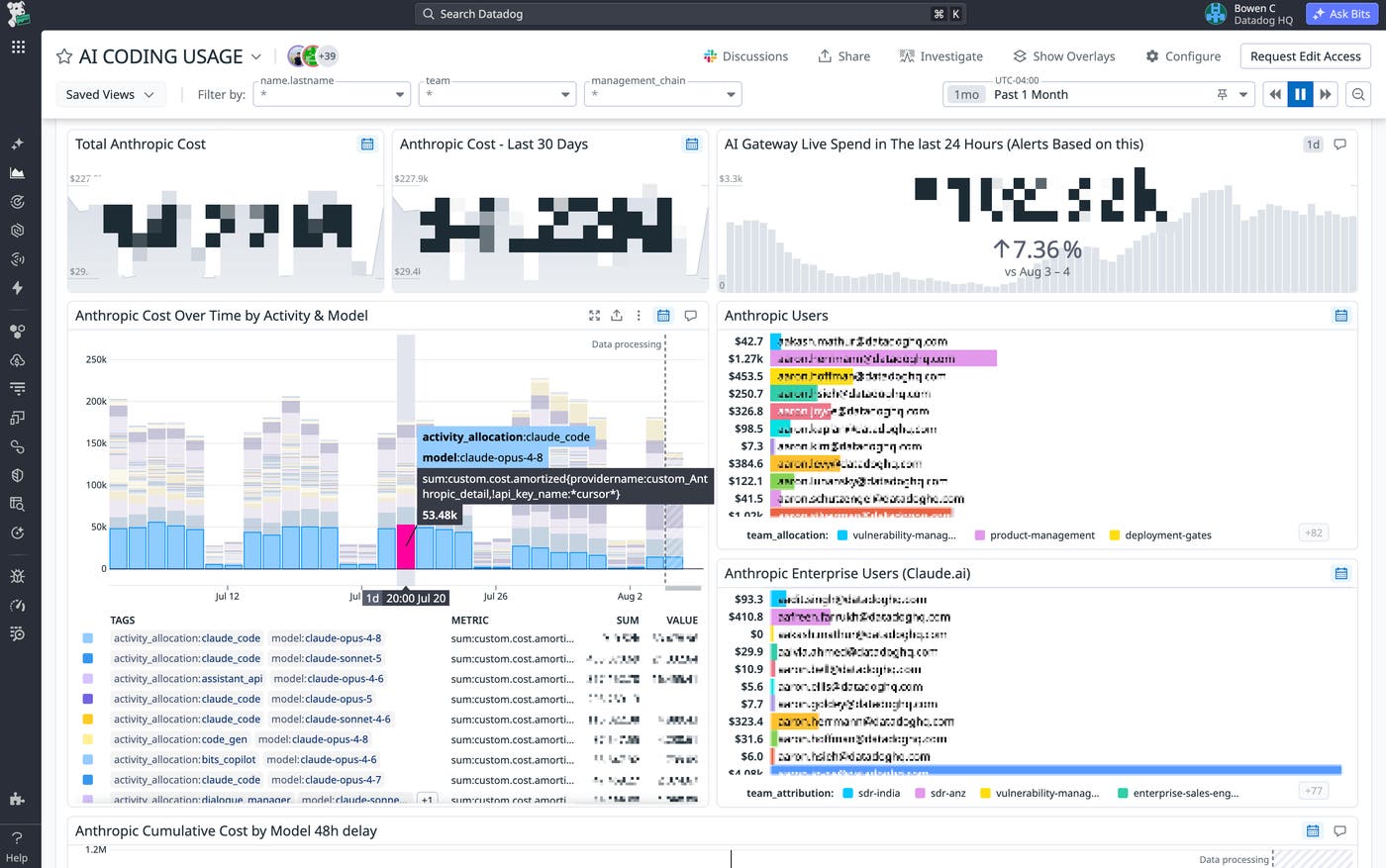
We track this data using the AI Costs feature in Datadog Cloud Cost Management. AI cost data supports normalized tags for provider, model name, and token category, helping us identify inputs, outputs, or tokens related to caching and search operations. Every Claude Code request is run through an AI gateway, where the requests are tagged with their team or product of origin. Doing this gives us a more granular view into where our AI costs originate from; for example, we can see if this spend comes from developers working in Claude Code, assistant APIs, Datadog’s agent skills, or other sources of activity. The gateway sends a trace of each request to Agent Observability that displays the user, team, model, token counts, and estimated cost of the request. All of our AI cost data is compiled into a dashboard that our AI Developer Experience team uses to identify areas of high spend and cost trends that can translate into savings opportunities.
Why we migrated our default model from Claude Opus to Sonnet
Once we began tracking live and historical AI cost data, we noticed that Claude Opus models made up a large portion of our AI spend. Claude Sonnet models at face-value pricing offered a 60% cost reduction for both input and output tokens compared to Opus. Prior to this change, the default model for Claude Code and our agent skills was Opus 4.8. Migrating to Sonnet would offer significant cost savings, but we first needed to measure how this change would impact the performance and output of our agent skills.
We didn’t need to measure the engineering capability of different agents and models on standard engineering tasks. Rather, we needed to measure an agent’s ability to work on Datadog engineering tasks. This meant working with our frameworks, conventions, libraries, and golden paths. To do this, our AI developer experience team built an agentic evaluation platform that provided teams with a self-service workflow to write, test, and add agent evaluations. Each evaluation run is published to Agent Observability Experiments, where teams can inspect its score and agent trajectory, compare runs, and track performance as context changes over time. Developers can then use this information to inform agent selection when building their own features, or during org-wide wide changes such as migrating the default model for Datadog’s agent skills.
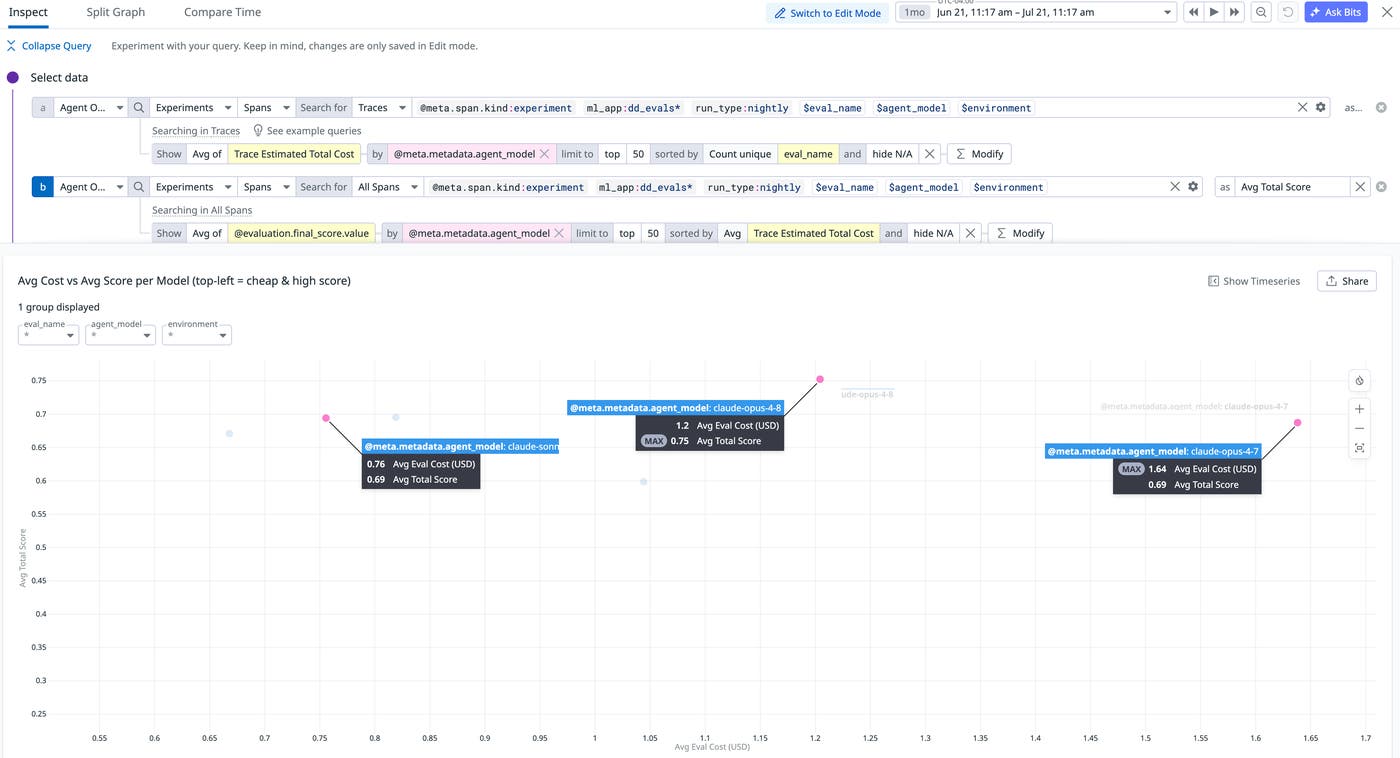
After running different models across over 140 different evaluations, we calculate their average cost and performance score on a nightly basis. Performance is judged on weighted scores between deterministic results and LLM evaluations across categories. While Opus 4.8 ranked the highest in performance score, it also carried the highest cost per evaluation. Accounting for Sonnet 4.6’s benchmarks, the migration represented an 8% loss of proficiency in executing Datadog workflows while reducing AI costs by 36.7%. Ultimately, we decided that this tradeoff was worth it and proceeded with the migration. When monitoring the cost impact of this migration over the past month, over $687,000 in cost savings was attributed to this change. To estimate these savings, we modeled what our AI spend would have been under pre-migration usage patterns while holding Claude Code request volume constant. We used Agent Observability traces to determine request counts by model, then calculated the projected cost using per-model spend data from CCM.
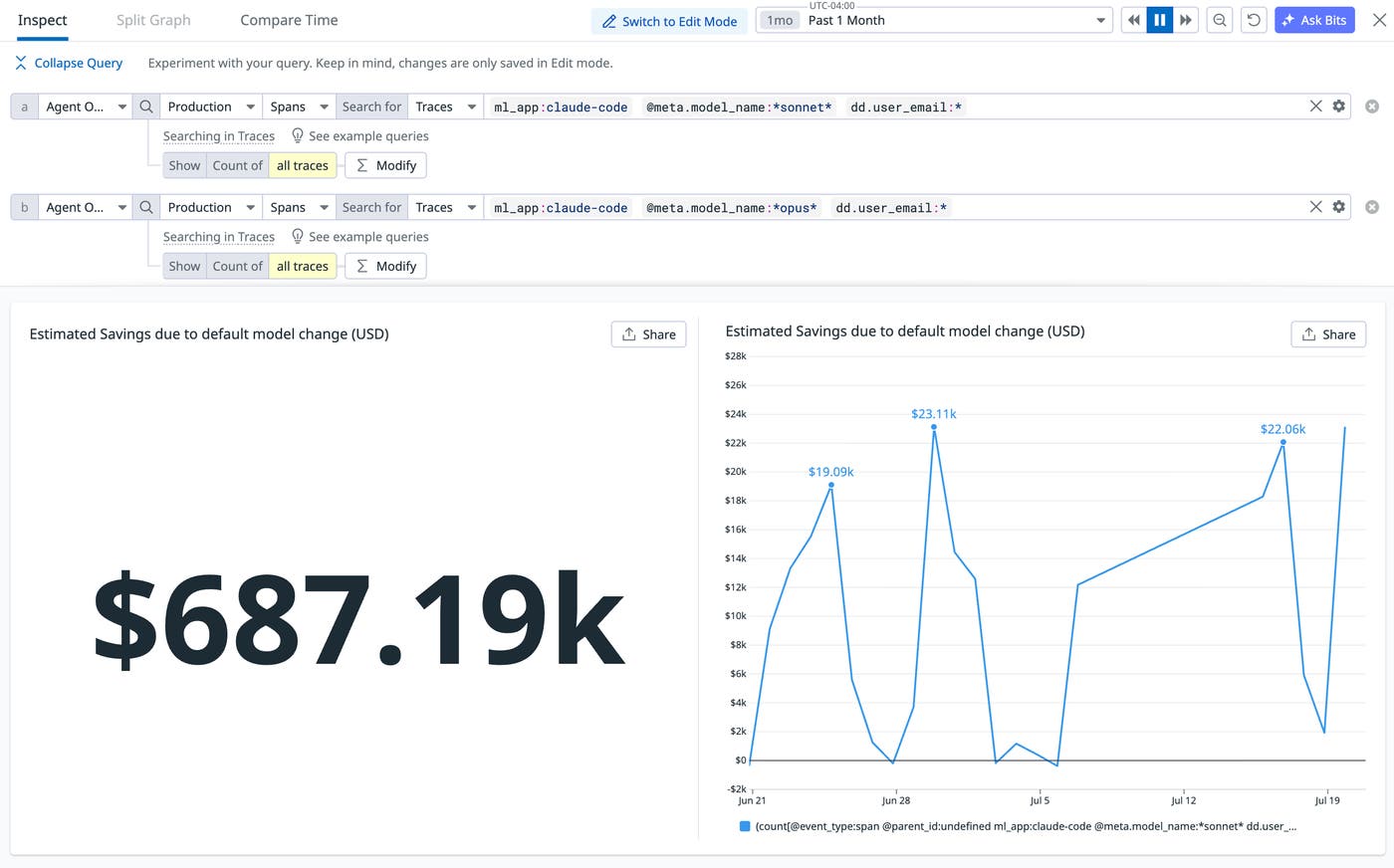
More importantly, creating an agent evaluation suite enabled us to repeat this process of informed decision-making each time we identified an AI cost savings opportunity. Using a similar methodology, we also changed the default effort level for Claude Code CLI from high to medium, which yielded us over $288,000 in monthly savings.
Creating automated AI cost alerts and spending guardrails with Datadog
Another cost saving strategy we’ve implemented is to create automated cost alerts that notify users of expensive AI usage patterns and direct them to internal documentation that outlines different methods for reducing spend. We accomplish this using a combination of Datadog Cloud Cost monitors and notification workflows orchestrated by Datadog Workflow Automation.
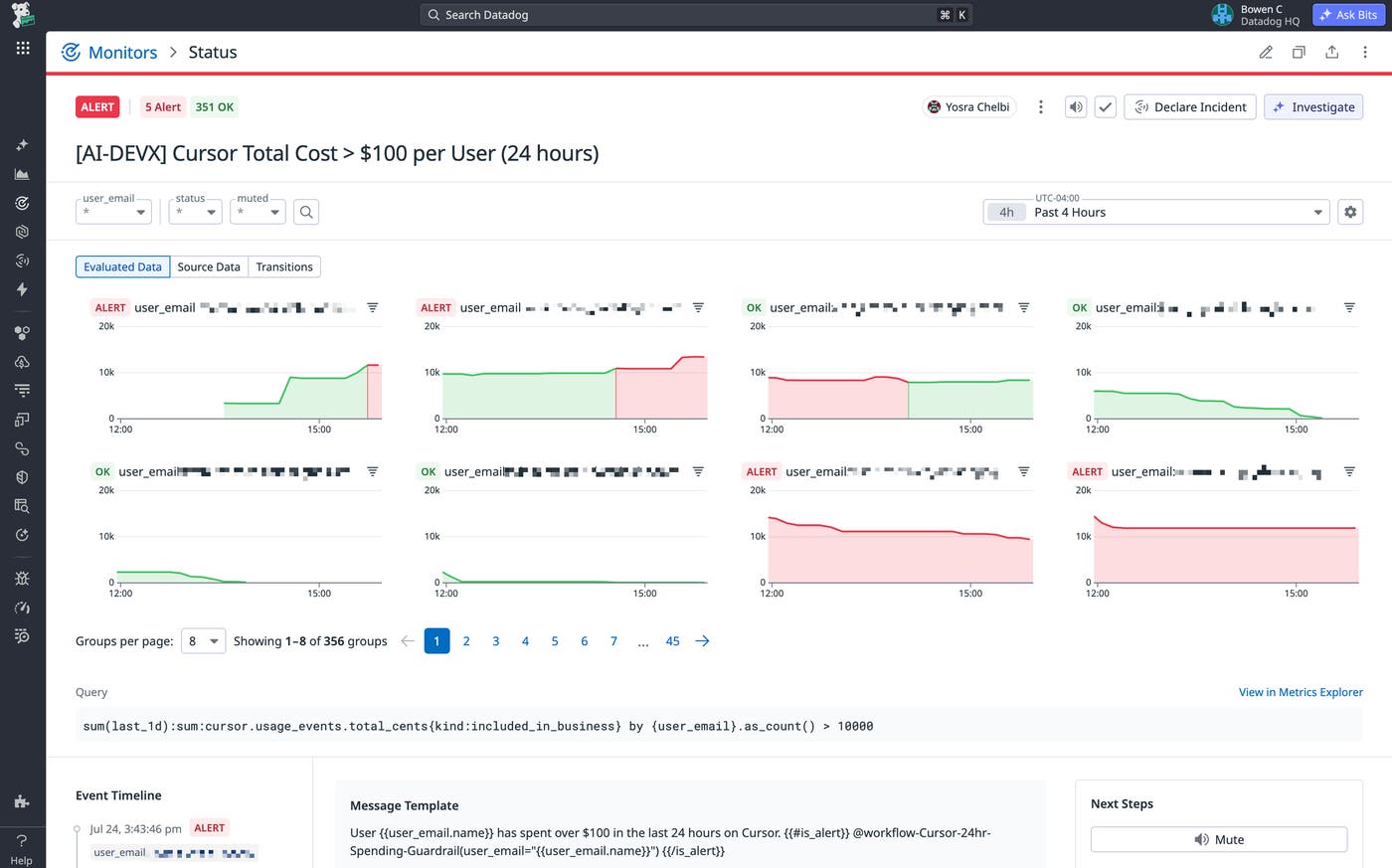
Once our different cost alert monitors are configured, we can create spending guardrail workflows that trigger when our monitors enter an alert state. For example, in the workflow below, when a user’s Cursor spend crosses a daily threshold, the workflow fetches the user’s email, identifies the corresponding user profile in Datadog’s Slack workspace, and sends them a message that directs them to different cost savings strategies.
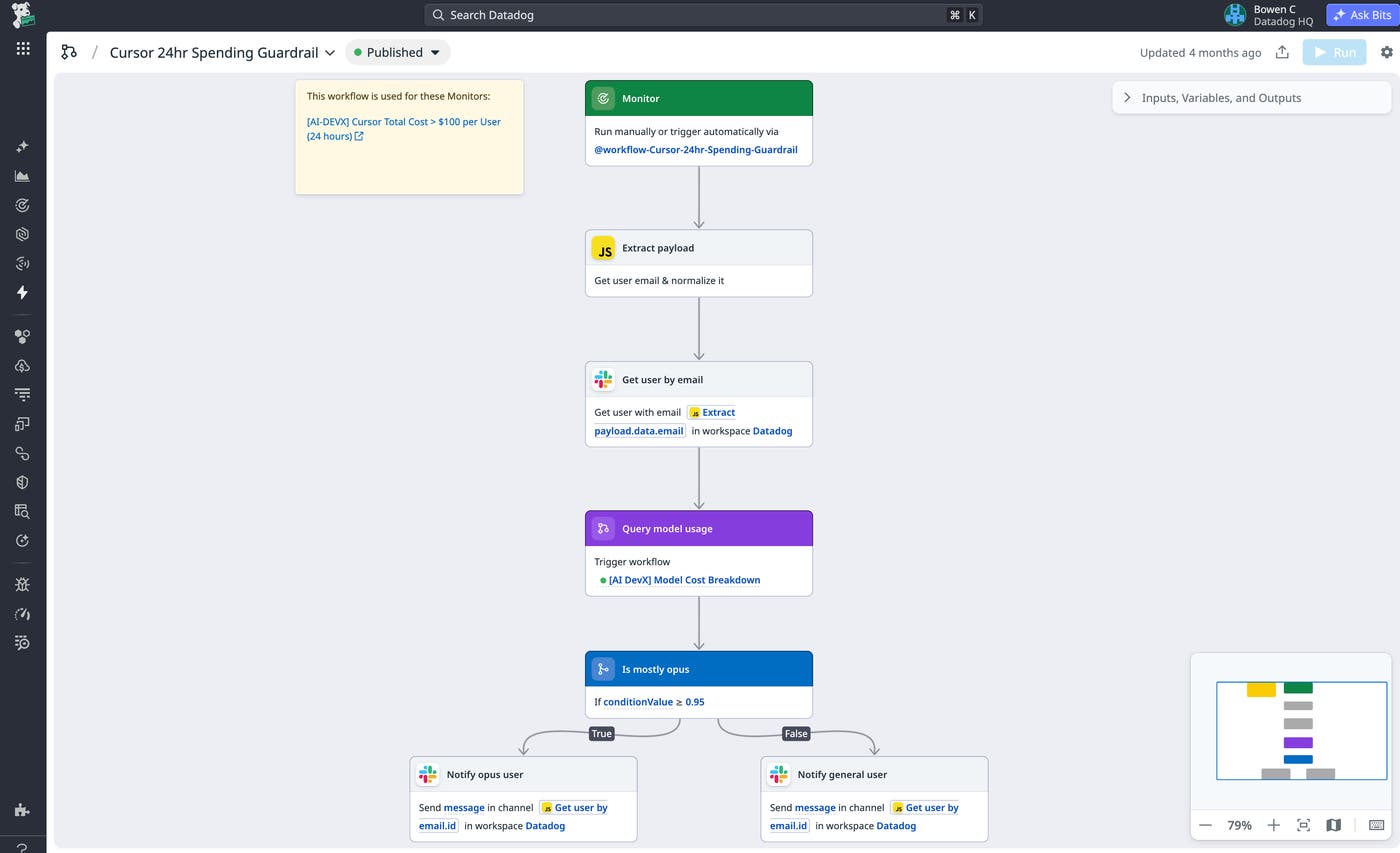
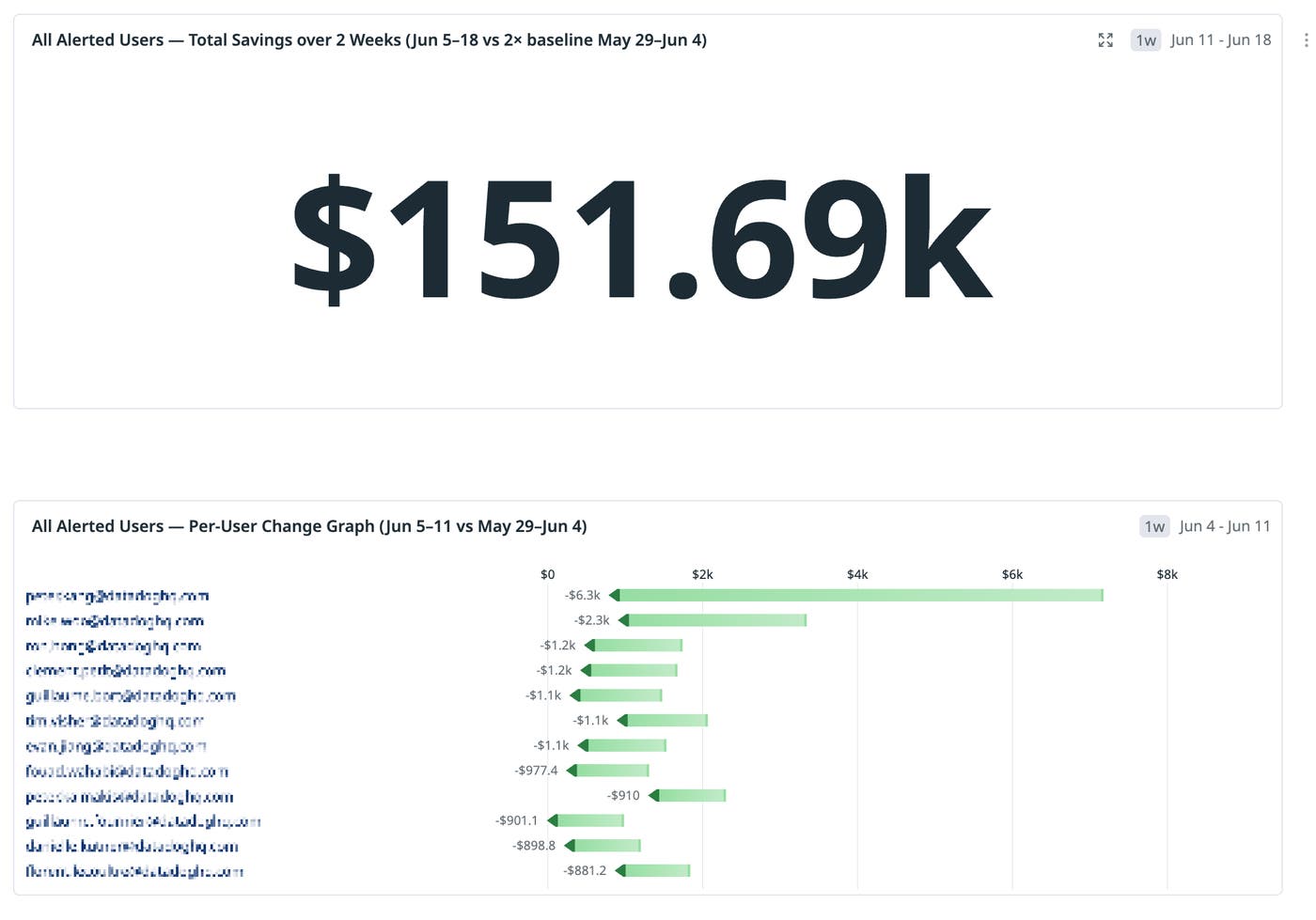
To evaluate the impact of our AI cost alerts and savings workflows, we created a case study using cost alerts configured on Anthropic provisioned keys. This alert was rolled out to a new population of users who had not previously triggered any existing cost alert. During the first week of rollout, 768 distinct users triggered this alert and were sent internal cost savings strategies via automated workflows (such as the one shown above). When comparing the week before and after users received the alert, we observed more than $150,000 in reduced AI spend.
Reducing token costs with context optimization
When you start a Claude Code session and ask the agent to perform a task, there are several factors that contribute to the end-to-end cost of your request. At a high level, these costs include:
The input tokens that make up the initial context
Any additional tokens consumed as the agent reads files, invokes skills or tools, and gathers context to complete the task
The output tokens generated to return the final response
Context optimization refers to reducing token costs throughout an agent request by restricting the context processed by the LLM only to what is necessary, while still maintaining its quality of response. For example, if you ask Claude Code to explain how the deployment workflow for your service works, it may retrieve thousands of lines of source code, internal documentation, and other context from your repository, even though only a subset of that information is ultimately needed to generate the final response. Open source tools such as Headroom help address this challenge by optimizing the outputs of agent tools before they are passed back to the LLM. Depending on the type of data, this can involve filtering irrelevant search results, deduplicating repetitive content such as duplicate log entries, or compressing structured data by eliminating repeated semantic structure (for example, fields that appear in every object within a JSON response).
Headroom documents its own benchmarks for performance, accuracy, and cost savings, but we wanted to measure how it performed against our own evaluations before shipping it to engineers. We ran our evals with and without Headroom, tracked the results in Agent Observability Experiments, and observed a cost reduction of 47% without significant drops in performance. This gave us confidence to start A/B tests with a small pilot group of Datadog engineers. The following results show a one-week snapshot taken from a sample size of over 1,000 engineers.
| Metric | Baseline group | Testing group | Delta |
|---|---|---|---|
| Cost ($) per user | 156.70 | 114.40 | -27.0% |
| Input tokens per user | 203,201,549 | 123,397,245 | -39.3% |
| Output tokens per user | 1,011,091 | 650,273 | -35.7% |
| Tool-result size (bytes) per result | 3,490 | 2,953 | -15.4% |
As you can see in the test results above, the Headroom testing group consumed a little more than half the input and output tokens per user that the baseline group did. Most significantly, the cost per user for the testing group was 27% lower than the baseline group. Based on the success of this pilot program, we plan to roll out Headroom for increasingly larger groups of engineers and monitor their metrics while also exploring other cost optimization options.
Start tracking your AI spend with Datadog
Tracking our engineering costs and the impact of the changes we make to reduce spend is a continuous process. The agent evaluations we discussed in this post are not just used leading up to the decision to implement an engineering change. We run these benchmarks on a daily basis and publish the results to Agent Observability Experiments so that we are constantly aware of the performance and cost tradeoffs that come with each agent.
You can begin monitoring your organization’s AI spend and surfacing cost savings opportunities as we discussed in this post by using Datadog Cloud Cost Management’s AI costs and Datadog Agent Observability. If you want to learn more about where your token costs are coming from and how to make them more visible, check out our post on tracking agentic token costs in production.
Datadog Agent Observability is free for Datadog customers submitting up to 40,000 LLM spans per month. If you’re new to Datadog, sign up for our 14-day free trial to get started.
