
Katherine Broner

Alex Meyer
AI adoption is accelerating across organizations, and spending often follows a similar pattern: rapid growth, multiple providers, and limited visibility into where costs originate. Each provider exposes billing data differently, with distinct schemas, dimensions, and interfaces. FinOps and engineering teams often spend significant time consolidating fragmented data, only to end up with partial attribution and limited context about who or what generated the AI spending.
With the AI Costs feature, Datadog Cloud Cost Management (CCM) introduces a unified approach to AI cost visibility and attribution across providers such as OpenAI, Anthropic, GitHub Copilot, Amazon Bedrock, Google Gemini, and Vertex AI. Instead of reconciling separate billing and usage exports, teams can analyze AI spend alongside infrastructure costs, apply consistent tagging across providers, and map usage back to the users and services that generated it. CCM provides a single platform that replaces manual workflows and offers a clearer picture of how AI usage translates into cost.
In this post, we’ll explore how to:
Gain unified visibility of AI spend across providers
Organizations often rely on multiple AI providers at the same time, which means that cost data is spread across separate billing dashboards, exports, and APIs. A unified view is critical for FinOps teams that track spend trends and engineers who investigate usage patterns.
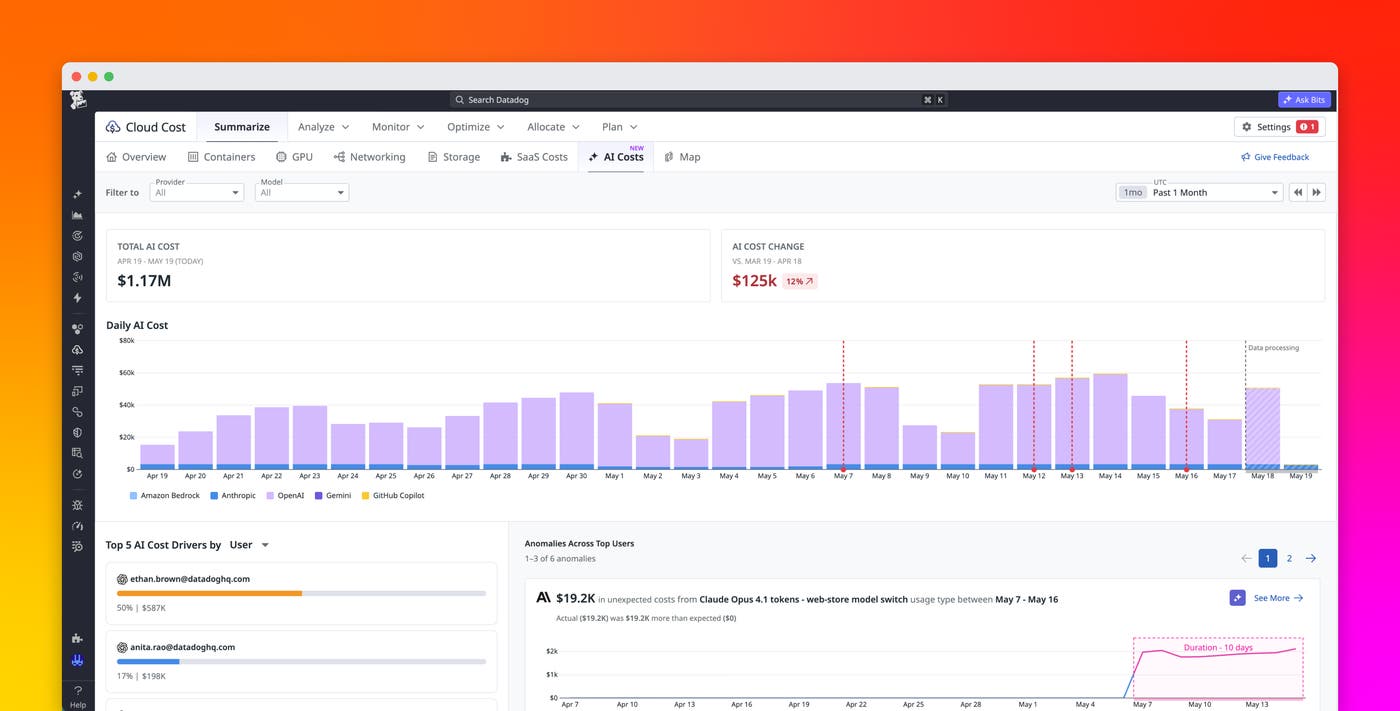
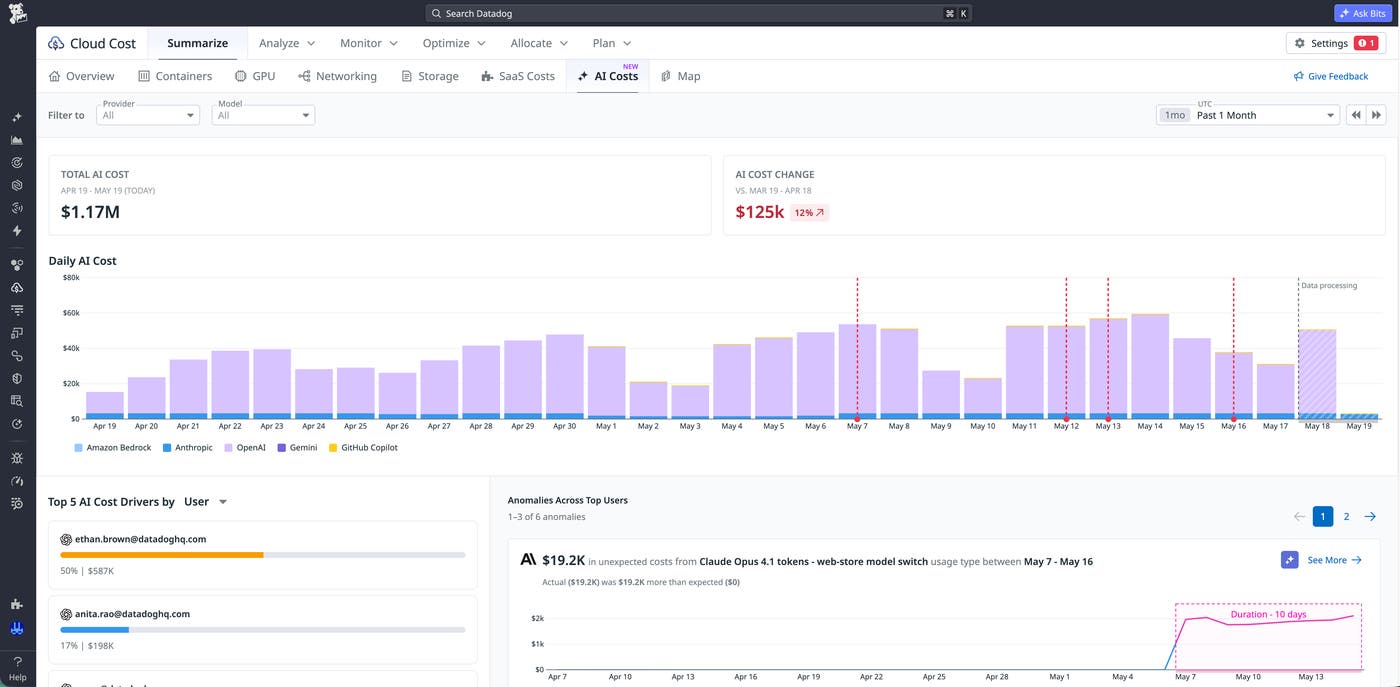
Datadog CCM provides a centralized destination for AI cost analysis with two complementary views: a unified AI cost landing page and prebuilt provider-specific dashboards. The unified AI cost landing page aggregates total spend across providers, displaying daily trends, provider-level breakdowns, top cost drivers, and anomalies detected across the full dataset. FinOps and SRE teams can quickly identify changes in spend without switching between tools.
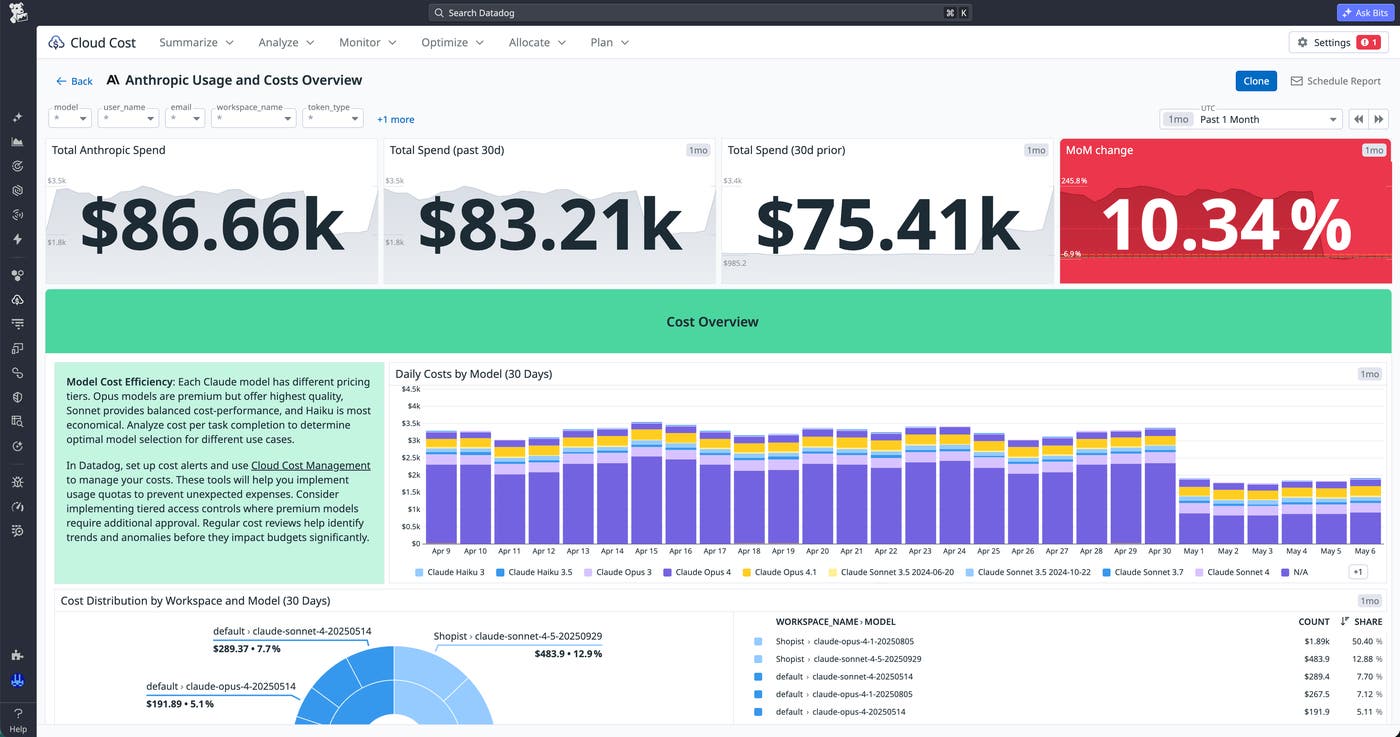
The provider-specific dashboards complement the overview by combining cost data with usage signals such as token consumption, model distribution, and request volume. Engineers can then correlate increases in spend with factors like increased usage, changes in model selection, or shifts in traffic patterns.
Because CCM already aggregates infrastructure costs from AWS, Microsoft Azure, Google Cloud, and Oracle Cloud Infrastructure (OCI), teams can evaluate AI spend alongside observability data that shows how their services are using AI. A more complete view of total cost of ownership becomes possible without exporting data or building separate reporting pipelines.
Standardize tagging across providers in the CCM Explorer
Each AI provider structures cost data differently, which makes cross-provider analysis difficult. One provider might expose model-level dimensions, while another emphasizes token usage or workspace-level billing. Without normalization, queries require provider-specific logic and produce inconsistent results.
Datadog CCM addresses the problem with tag normalization at the data layer. CCM maps cost data from all supported providers to a consistent set of tags, enabling teams to group and filter by attributes such as provider, project, model, token type, token category, and token direction. Teams can query AI spend across providers without adjusting queries for each data source.
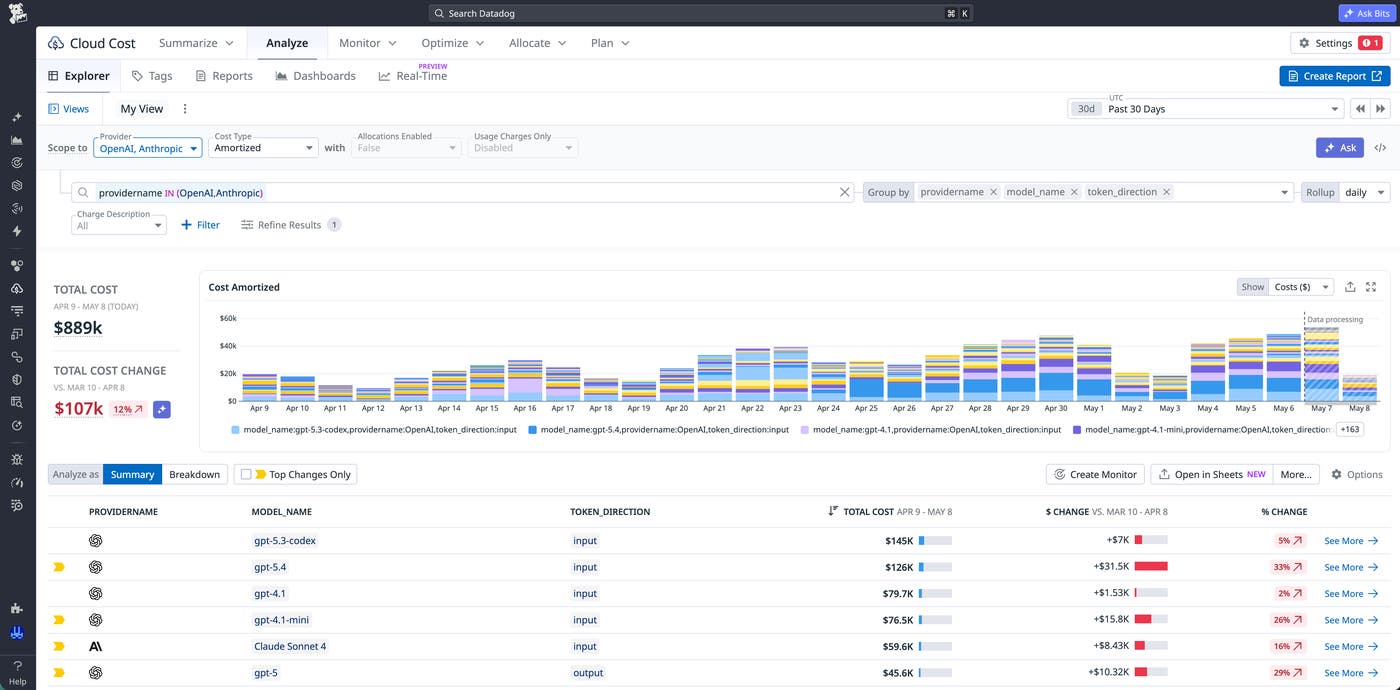
CCM’s consistent tagging model also improves collaboration between teams. Engineers, FinOps practitioners, and executive leaders can rely on shared dimensions when they analyze cost data, which reduces confusion and eliminates the need for parallel reporting logic.
Automatically attribute AI spend to specific users
AI spend often appears unattributed because native provider billing data is incomplete, typically breaking down costs to only the model, project, or workspace level. There are no API keys or users in the bill itself, so there’s no way to trace usage back to the people or services responsible for it. Manual attribution workflows, often managed in spreadsheets, require ongoing upkeep and still leave portions of spend unattributed or incorrectly assigned.
CCM includes out-of-the-box (OOTB) allocation rules that automatically attribute AI spend proportionally based on Datadog SaaS observability metrics, so teams don’t have to build or maintain their own mappings. OOTB allocation rules analyze the cost data already available in CCM and apply consistent attribution without requiring additional instrumentation or new data sources.
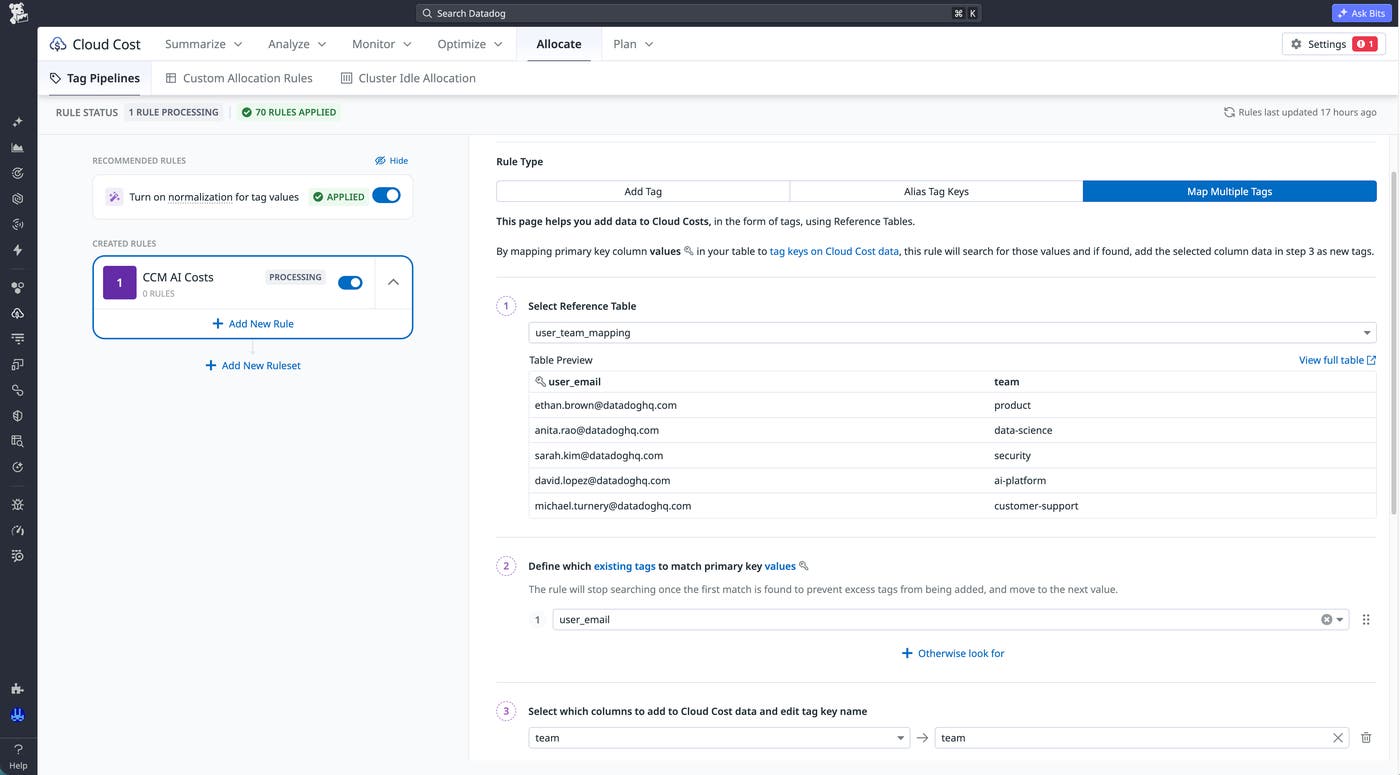
For example, OOTB allocation rules can break down an OpenAI workspace’s cost to the specific API keys and users driving the spend. From there, FinOps teams can configure Tag Pipelines to map user email addresses to the teams, services, or business units they belong to, connecting raw provider billing to the owners who are accountable for the spend. OOTB allocation rules are currently available for OpenAI and Anthropic.
Create reports that enhance business accountability
Attribution of AI spend to individual users or sources is necessary, but it doesn’t create accountability on its own. Organizations also need a way to aggregate attributed cost data into meaningful views (for example, by team, service, and project) to support budgeting and optimization decisions.
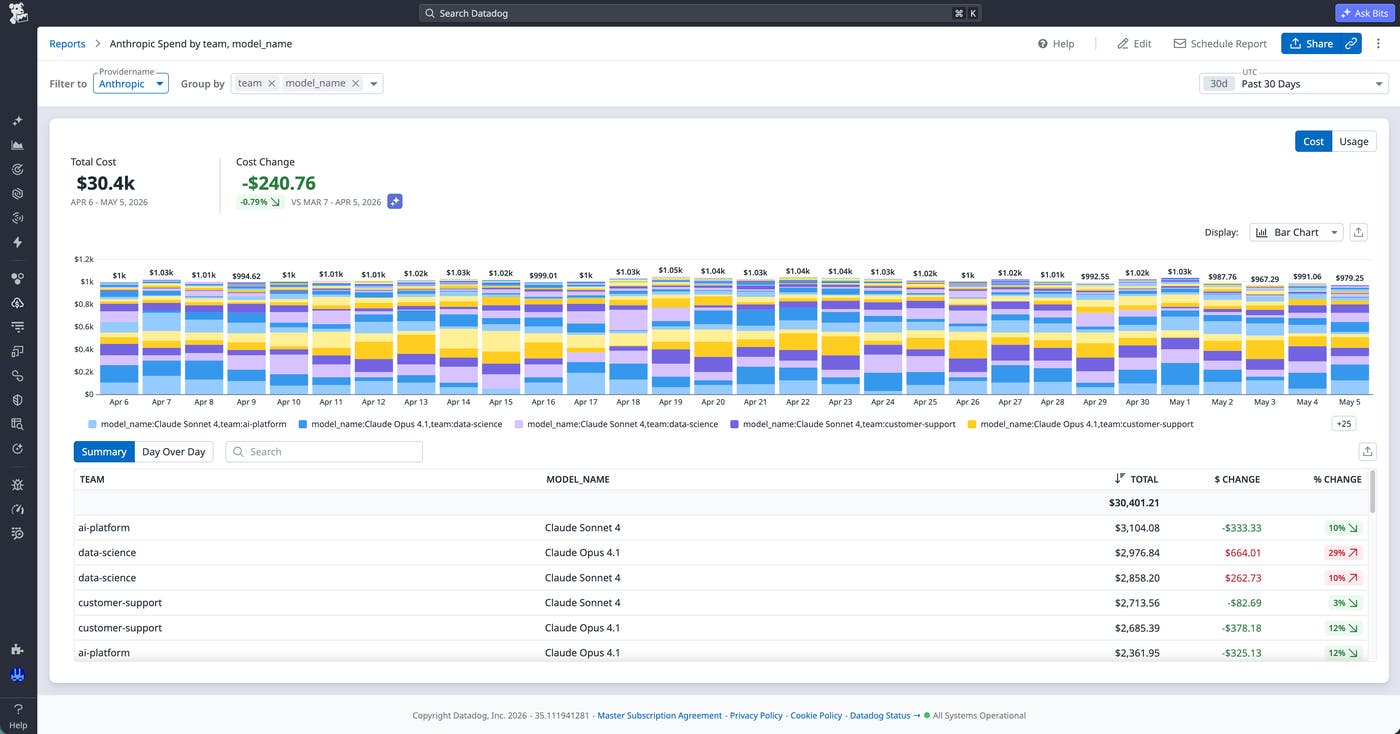
Once the OOTB allocation rules are applied and users are mapped to teams, FinOps teams can build CCM reports to highlight spend by team, service, or project. Leaders can use this information to guide budget forecasting and identify inefficiencies. Engineers can use the same data to optimize usage patterns and reduce unnecessary spend. No one needs to learn a new tool or export data manually.
Get started with AI cost management in Datadog CCM
Datadog Cloud Cost Management brings AI spend into a unified platform, where teams can analyze, standardize, and attribute costs with consistent workflows. By combining cross-provider visibility, normalized tagging, automated attribution, and reporting, you can understand which services, users, and teams are responsible for AI spend and use that context to guide budgeting and optimization decisions. To learn more, check out the CCM AI Costs documentation.
If you’re new to Datadog, you can sign up for a 14-day free trial to start visualizing your AI costs in CCM.
