
Jason Hunsberger
Senior Product Manager

Jenny Park
Product Manager
Security analysts investigating suspicious activity often need to answer a question that the initial detection cannot fully address: Who is behind it? A security signal might identify an email address or cloud account, but that identifier alone may not reveal the person responsible, their role, or whether the activity aligns with their typical responsibilities. When a person has multiple associated accounts, analysts also need to determine whether an isolated detection is part of a broader pattern of risk.
Datadog Cloud SIEM helps analysts connect security activity to the people behind it. With Entity Packs, User Inventory, and Entity Risks (formerly Risk Insights), analysts can identify the person directly from a signal, review activity and risk across their linked accounts, and prioritize users for investigation. This context helps teams distinguish legitimate activity from potential threats and investigate related activity across accounts.
In this post, we’ll follow a Cloud SIEM investigation from an initial security signal through user identification, risk analysis, and notification configuration. We’ll show how to:
Bring identity context into Cloud SIEM with Entity Packs
Entity Packs bring identity information from Google Workspace, Microsoft Entra ID, and Okta into Cloud SIEM, giving analysts directory context when investigating security activity. By keeping user identities and attributes current, Entity Packs reduce the need to maintain user lists manually or consult a separate identity directory during triage.
For example, a security signal involving a Microsoft 365 account might contain an email address but provide little information about the account’s owner. Directory attributes such as the person’s department, job title, and office location can help an analyst determine whether the activity warrants further investigation. Entity Packs make this context available through User Inventory and directly within security signals.
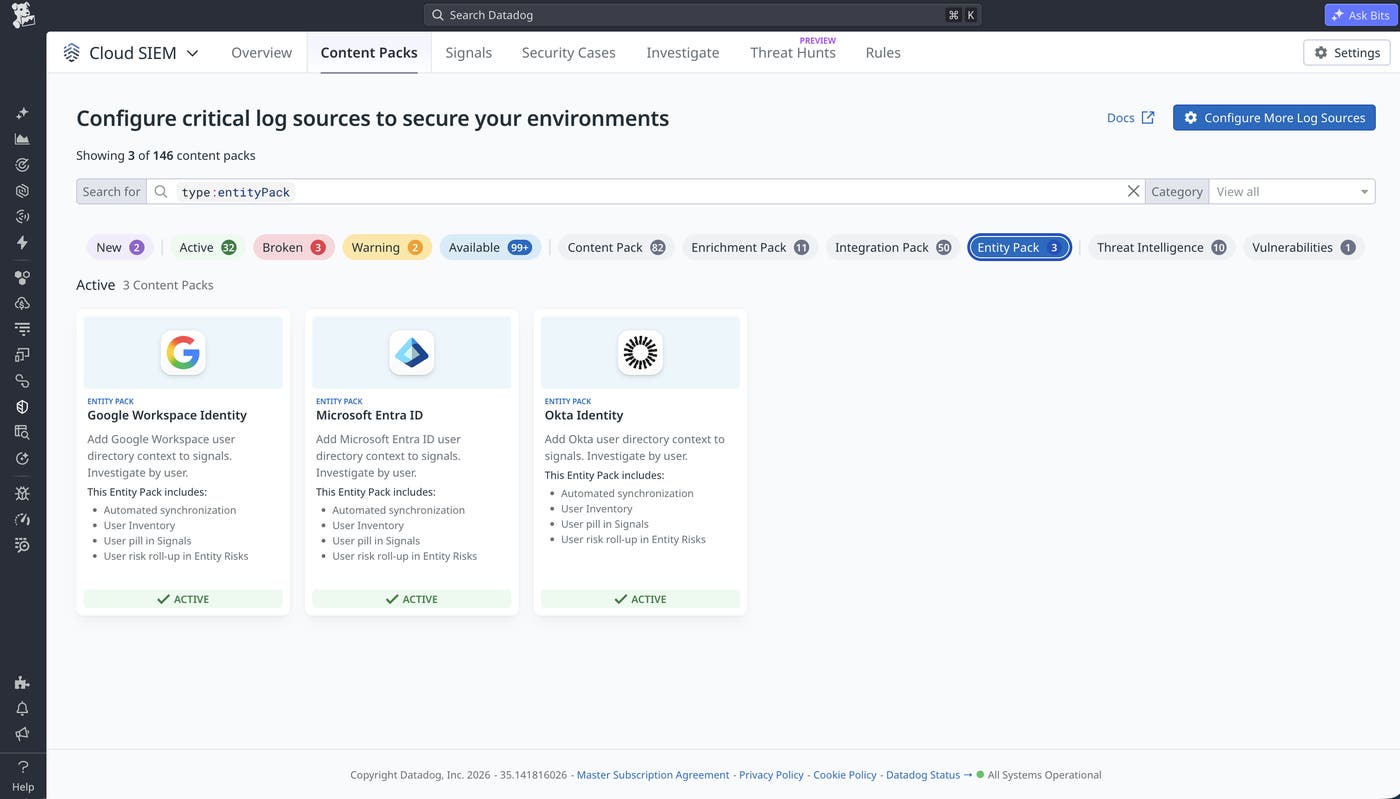
Cloud SIEM uses an entity resolution system to connect directory identities to the accounts and activity represented in security data. In SaaS and cloud environments, activity often appears under a federated identity or assumed role, making it difficult to identify the person behind it. Entity resolution traces those identity and role assumption chains back to the human user, so teams can see who took action.
Analysts can view user attributes directly in a security signal to identify who’s involved, then open User Inventory to review that person’s activity and risk score across linked accounts. Directory information helps establish who is involved, while logs and detections provide the evidence needed to understand what happened. Together, this context helps analysts assess whether the signal reflects legitimate activity, an isolated threat, or a broader attack.
Identify the person behind a suspicious security signal
Cloud SIEM’s embedded user pill helps analysts identify the person associated with a security signal while remaining in the signal investigation.
Consider a security analyst reviewing a high-severity signal titled “Microsoft 365 Exchange inbox rule name associated with business email compromise attacks.” The detection indicates that an Exchange inbox rule has a name associated with business email compromise techniques. However, the analyst still needs to determine whether the rule reflects legitimate administrative activity or potentially malicious behavior.
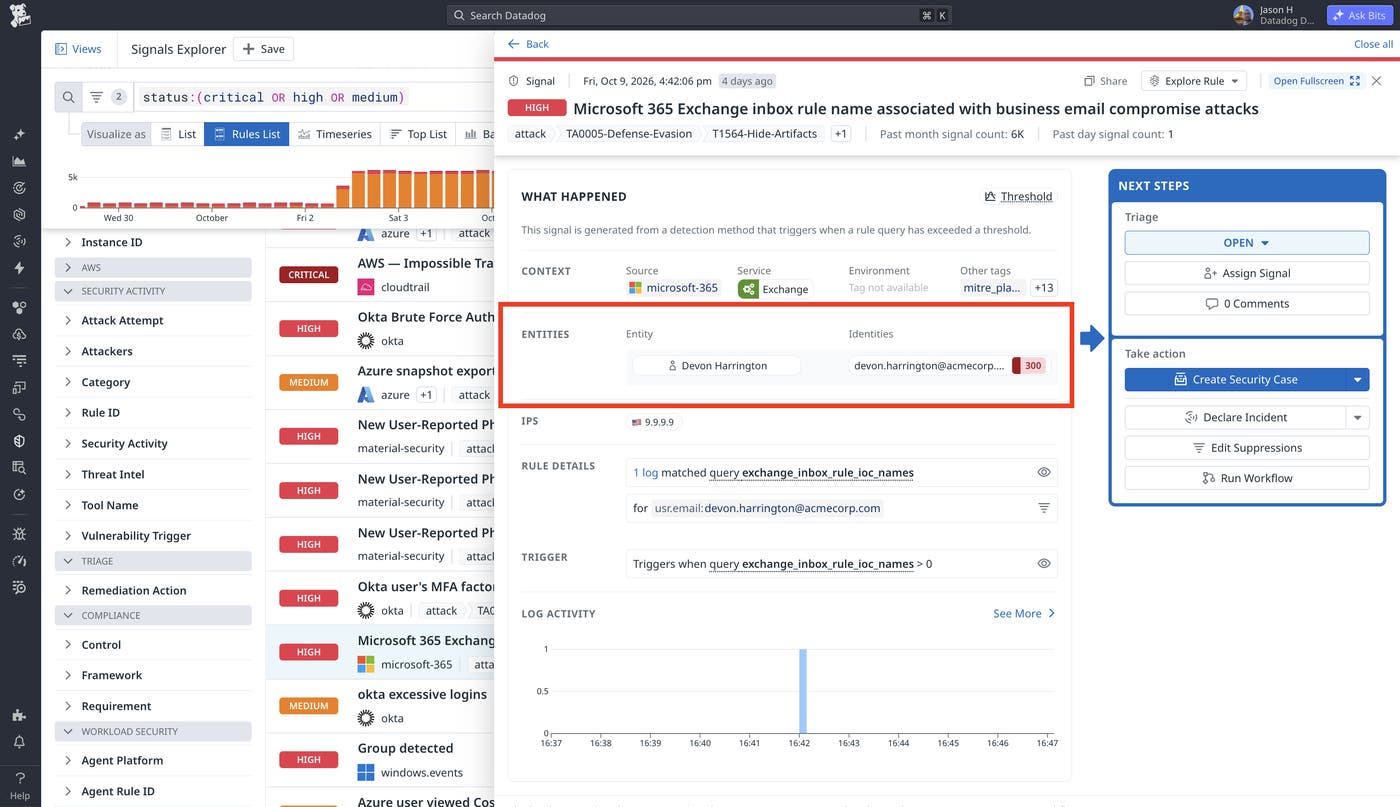
The signal identifies an email address associated with Devon Harrington. By opening the user pill, the analyst can inspect Devon’s directory information without leaving the signal.
The user pill identifies Devon as a member of the IT Security department who works in a senior identity and access administration role. It also displays information from Microsoft Entra ID, including the account creation date, password-change information, and office location.
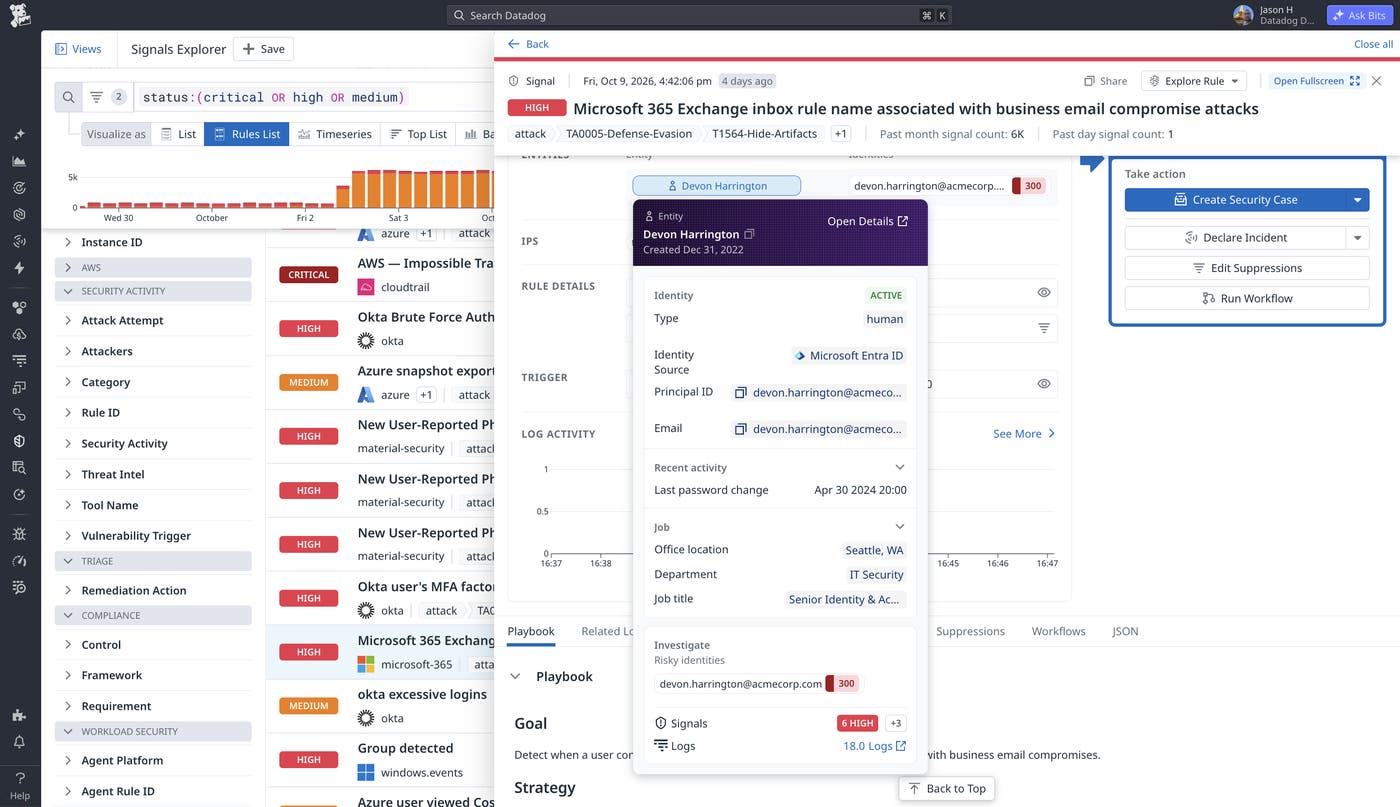
Devon’s identity administration role gives the analyst context to assess whether the observed activity fits his typical responsibilities. From the user pill, the analyst can follow links to related signals and logs to determine whether the inbox rule reflects expected administrative work or is associated with other suspicious activity.
Investigate related activity with User Inventory
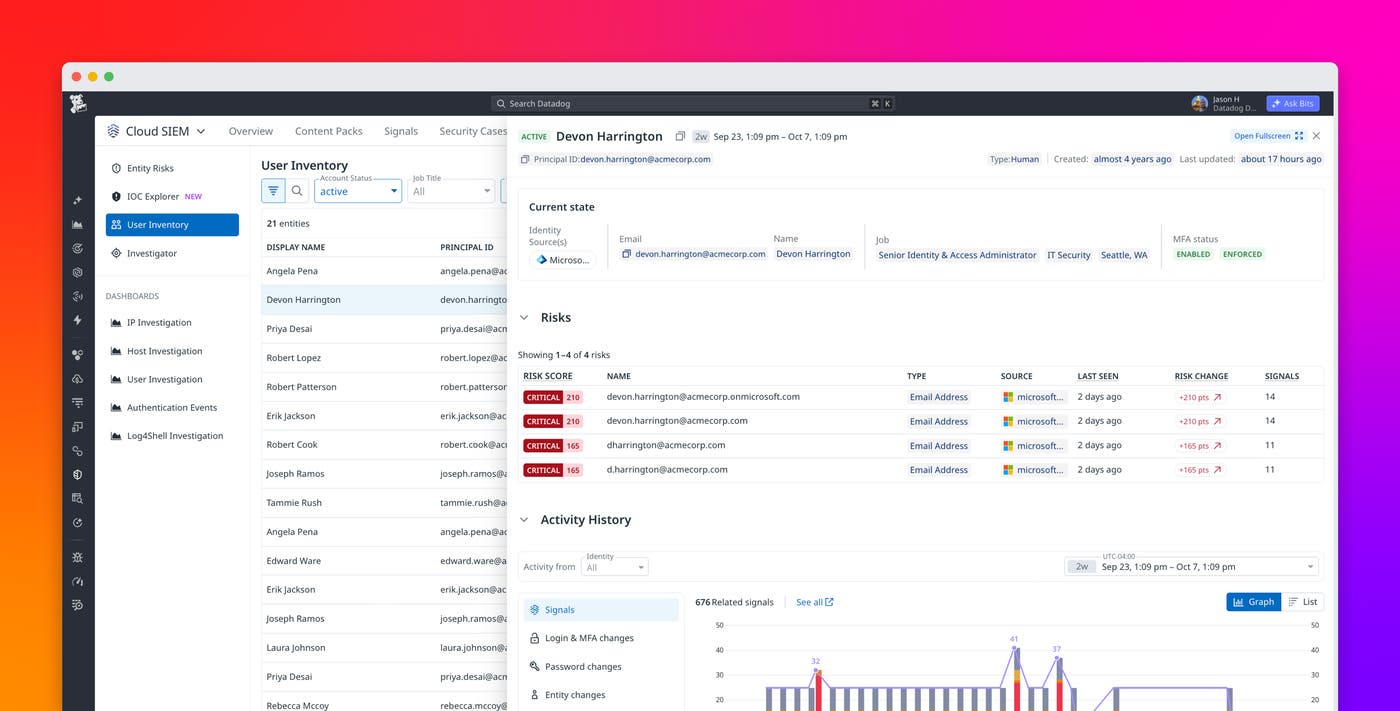
User Inventory brings a person’s identity attributes, associated risks, and activity history into a single investigation view. Analysts can use it to move beyond an individual security signal and examine the broader activity associated with a user.
Following Devon from the Exchange signal into User Inventory reveals considerably more activity than the original detection suggested. Over the selected two-week period, Devon’s activity history contains 319 related security signals, including high-severity signals on multiple days.
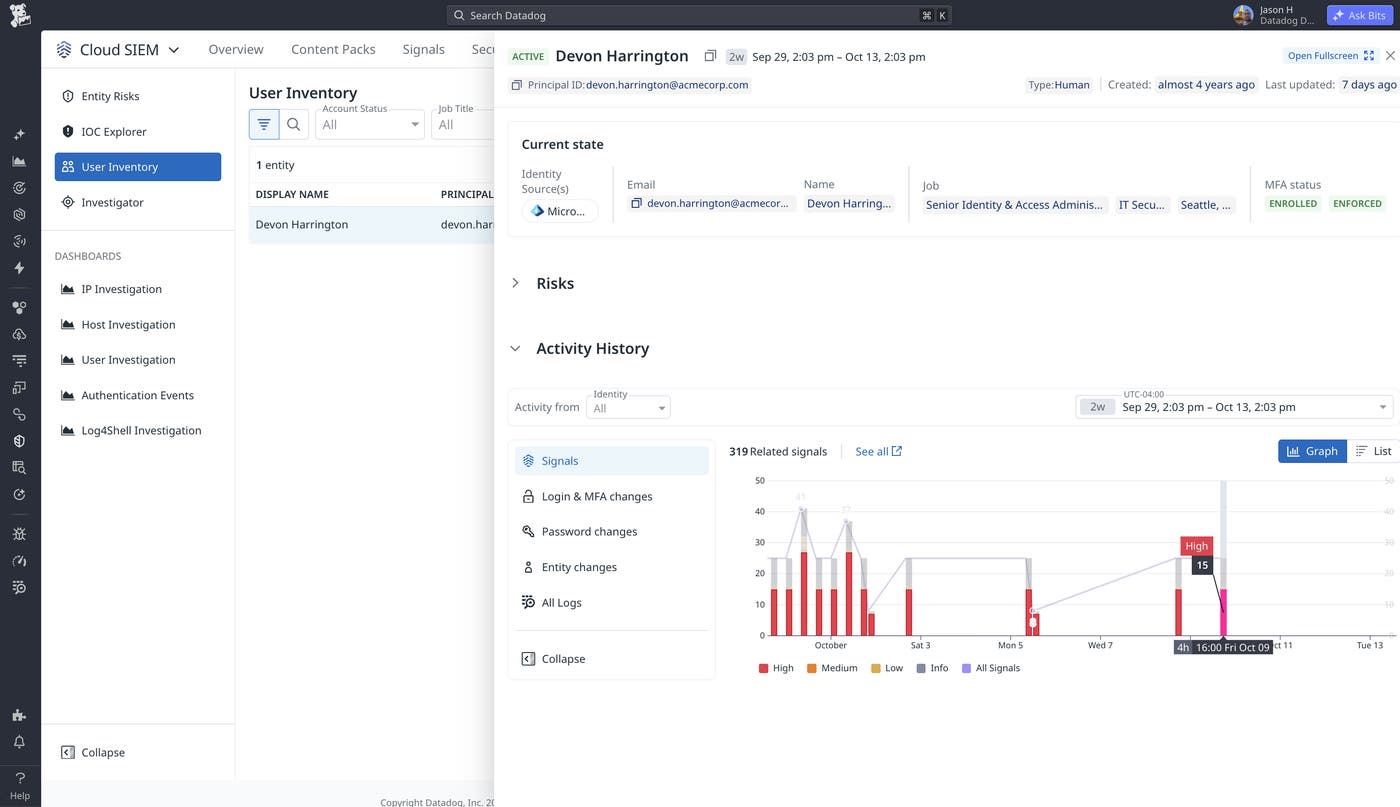
The activity history helps the analyst understand the scale and distribution of the detections. The analyst can examine when signals occurred and use the available investigation links to inspect the underlying activity.
User Inventory also connects Devon to four associated email identities. Expanding the Risks section reveals that all four have critical risk scores:
Two accounts have scores of 300.
Two accounts have scores of 255.
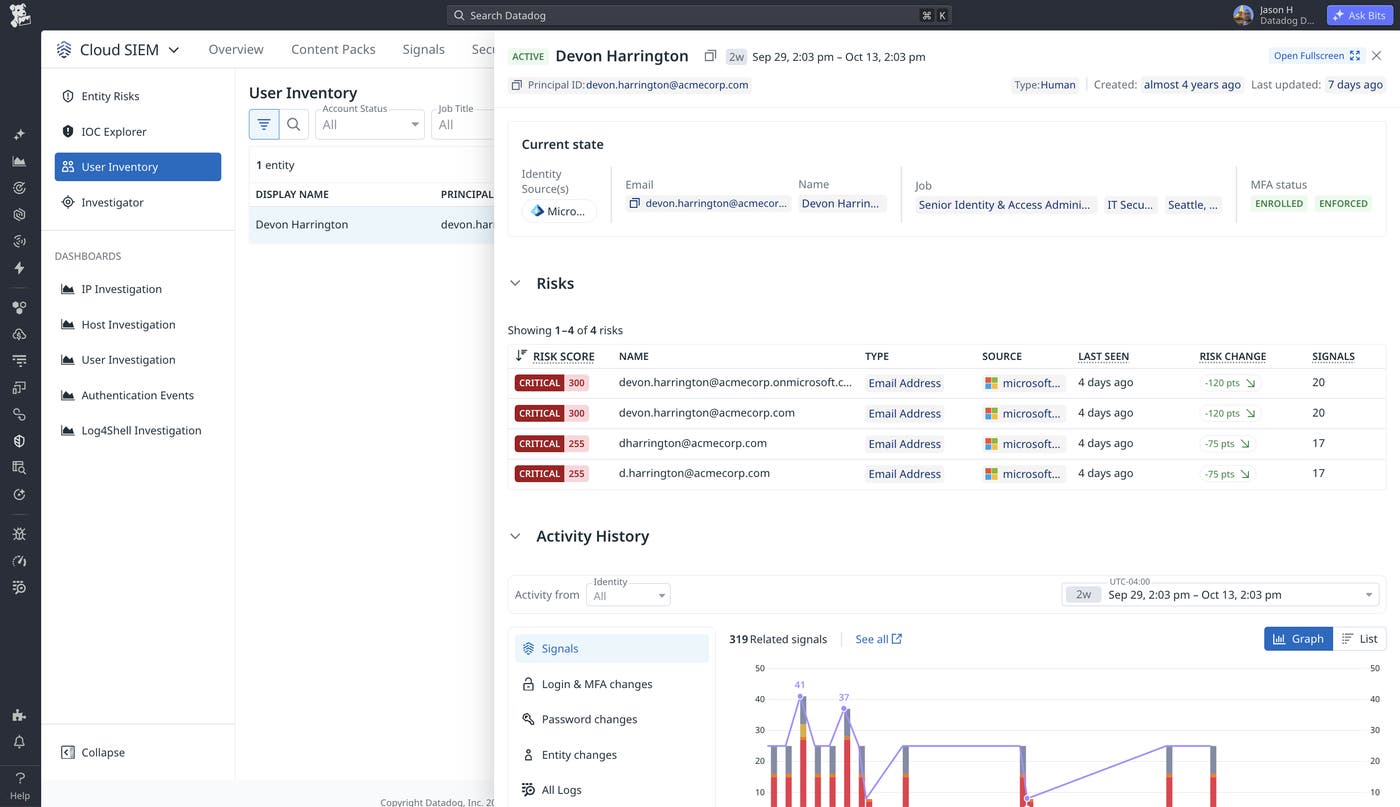
The analyst can now examine Devon’s associated accounts together, rather than treating each email identity as an unrelated investigation.
One account, devon.harrington@acmecorp.com, matches the address associated with the original Exchange signal. Its risk score is 300, with 20 contributing security signals. The analyst selects this account to understand which detections are driving its critical risk classification.
Examine the detections contributing to account risk
Entity Risks helps analysts understand why an account has accumulated risk by displaying the detections contributing to its score. Analysts can examine the contributing rule groups and follow their underlying signals to investigate the activity.
In Devon’s case, the selected email account devon.harrington@acmecorp.com has 64 related signals, of which 20 contribute to its critical risk score of 300.
The Risk Contributors view groups those contributing signals into three detections:
Microsoft 365 Unified Audit Logging Disabled: Eight high-severity signals contribute 120 points.
Microsoft 365 Exchange inbox rule name associated with business email compromise attacks: Six high-severity signals contribute 90 points.
Consent given to application associated with business email compromise attacks in Microsoft 365: Six high-severity signals contribute 90 points.
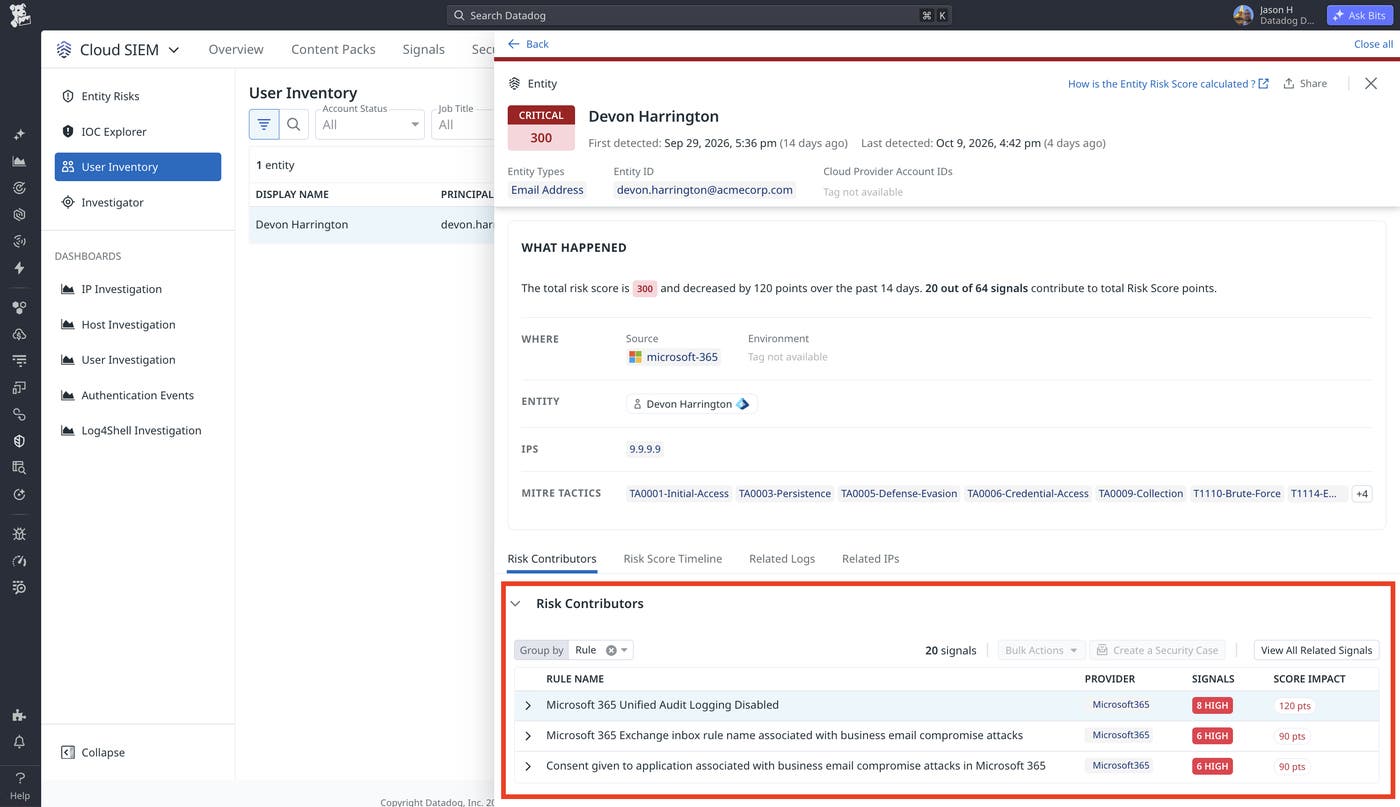
The original inbox-rule signal is therefore one part of a larger set of findings. The account is also associated with detections that involve disabled audit logging and application consent activity.
Each finding raises a different investigation question. The analyst needs to determine why audit logging was disabled, which application received consent, and whether the inbox rule was expected for Devon’s account.
The investigation so far began with a signal and followed its associated identity into User Inventory and Entity Risks. Cloud SIEM also supports the reverse workflow: starting with the users who have accumulated the greatest risk and investigating the accounts responsible for their scores.
Prioritize users by their combined risk
The Entity Risks explorer helps security teams prioritize investigations by bringing risk from associated accounts together at the user level. This approach can surface people whose activity warrants attention across multiple accounts, even when the analyst has not started from a specific security signal.
In the Entity Risks explorer, analysts can review entities ranked by their accumulated risk. In our example, Devon Harrington appears at the top of the list with a combined user risk score of 1,110. Two other users, Avery Walsh and Jordan Mitchell, have scores of 720 and 235, respectively.
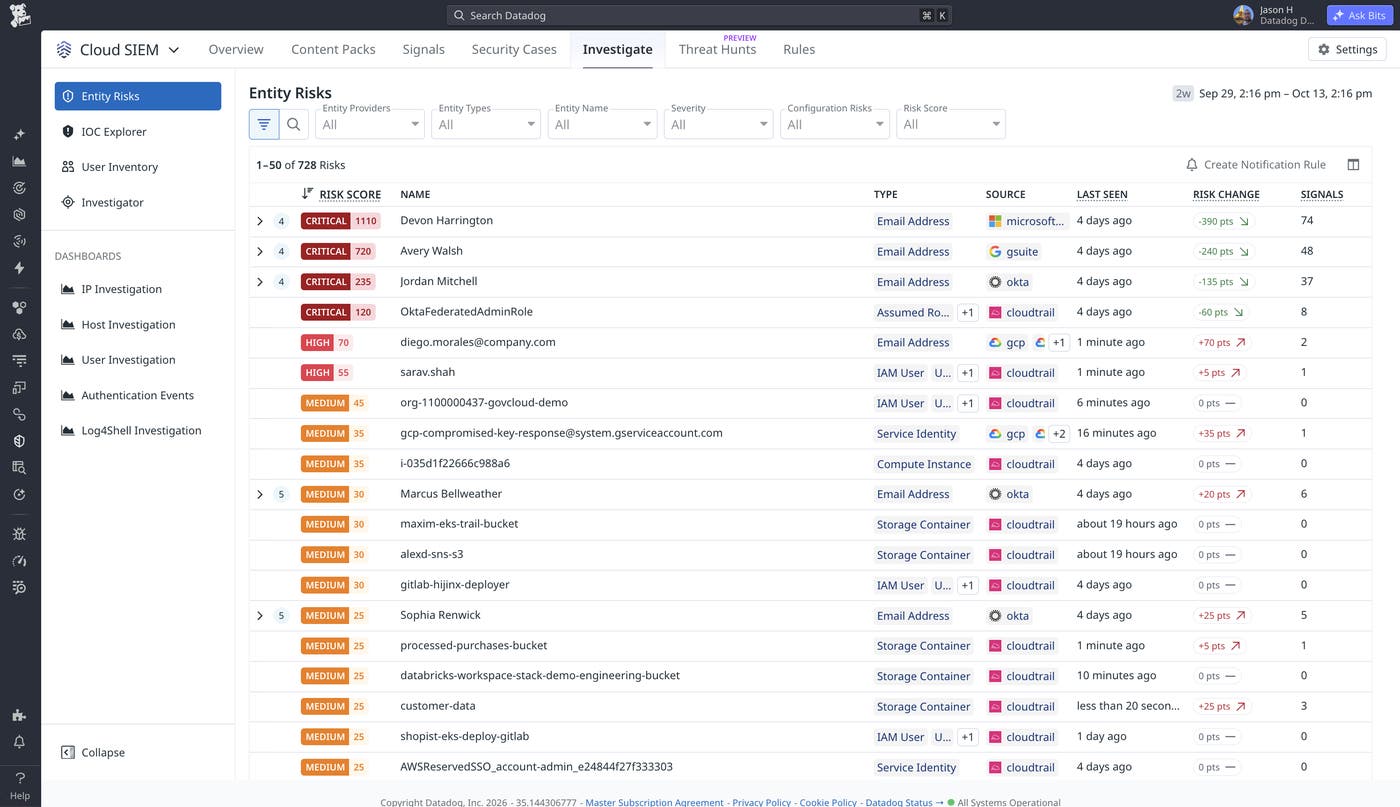
Devon’s risk score reflects activity across his associated accounts. By surfacing risk at the person level, Entity Risks helps an analyst recognize concerning activity across accounts and prioritize Devon for investigation, even before encountering the original Exchange signal.
Expanding Devon’s row reveals his linked accounts, their risk scores, and contributing signals. Analysts can select an account to review its risk contributors and follow the underlying security signals.
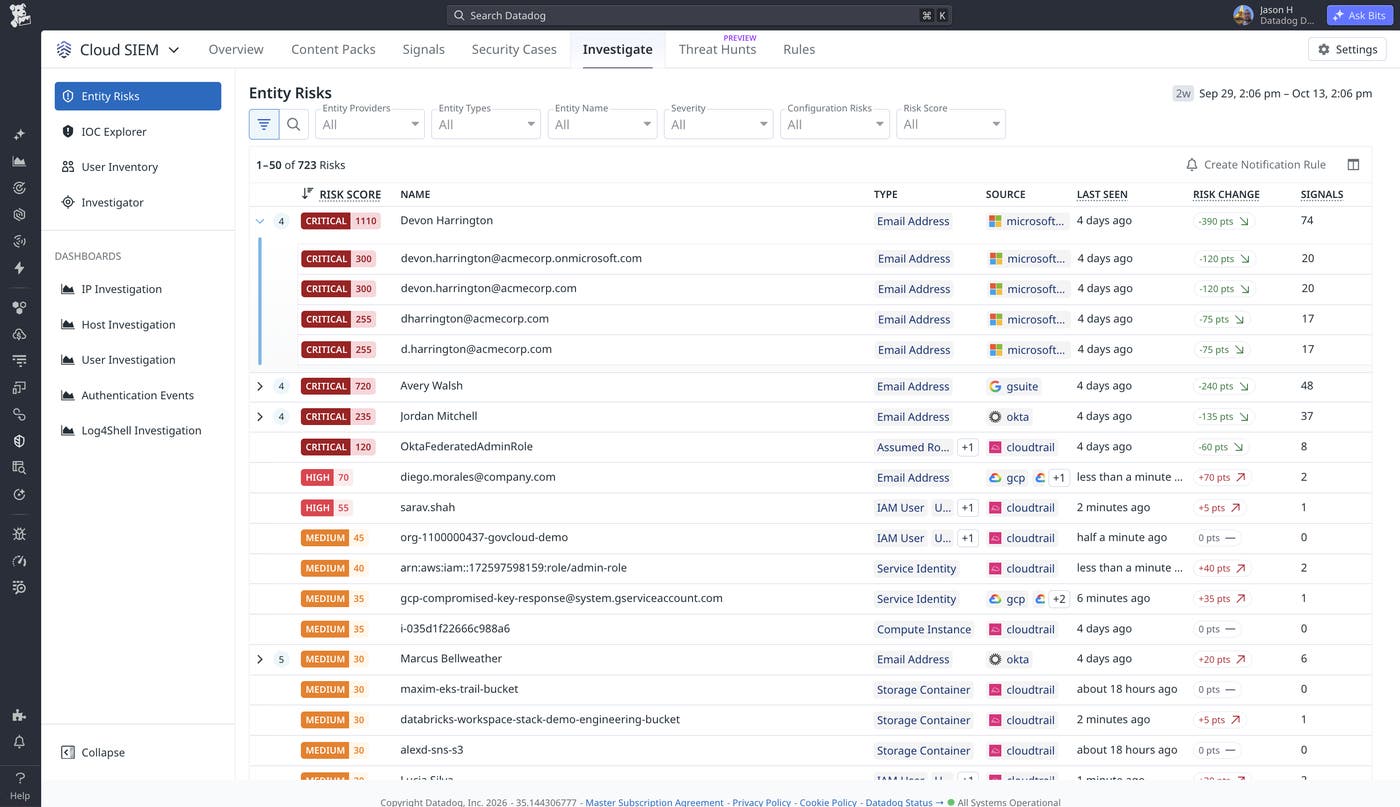
Both investigation paths lead to the same underlying evidence. Analysts can start with a suspicious signal to identify the person behind it, or use Entity Risks to identify users whose combined account risk warrants attention.
The next step is making that prioritization useful between manual visits to the explorer.
Configure notifications for risky users
Entity Risks notifications help security teams identify users who meet configured risk conditions, reducing the need to repeatedly check the explorer for changes.
Cloud SIEM provides notification rules in the Entity Risks settings. Teams can configure rules for individual entities or select User identity to evaluate risk across a person’s associated accounts.
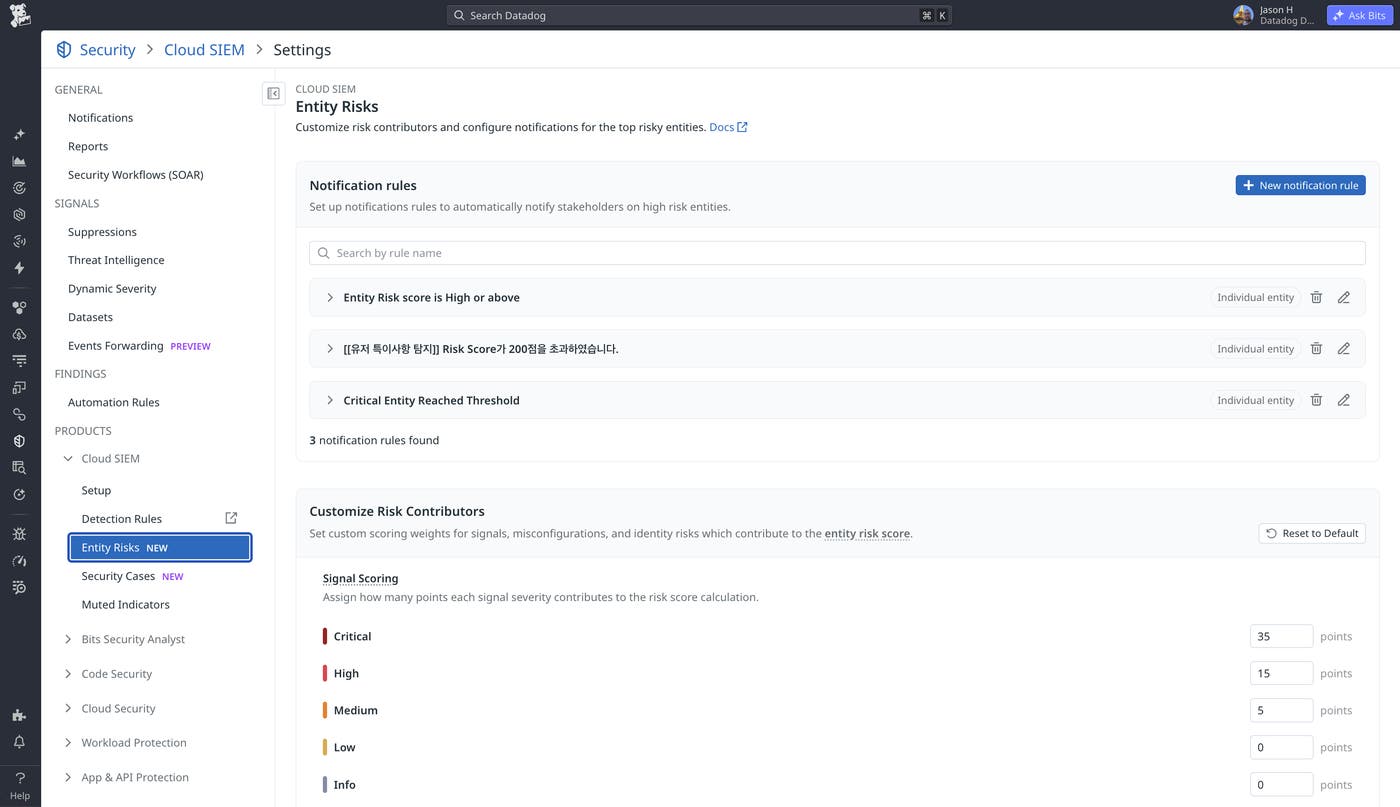
Continuing our example, after investigating Devon’s activity, an analyst may want to know when Devon or other users in IT Security warrant attention, without repeatedly checking the Entity Risks explorer.
The analyst configures a notification rule for users in the IT Security department with a severity of HIGH or above. The preview includes Devon and Jordan Mitchell, confirming which users fall within scope.
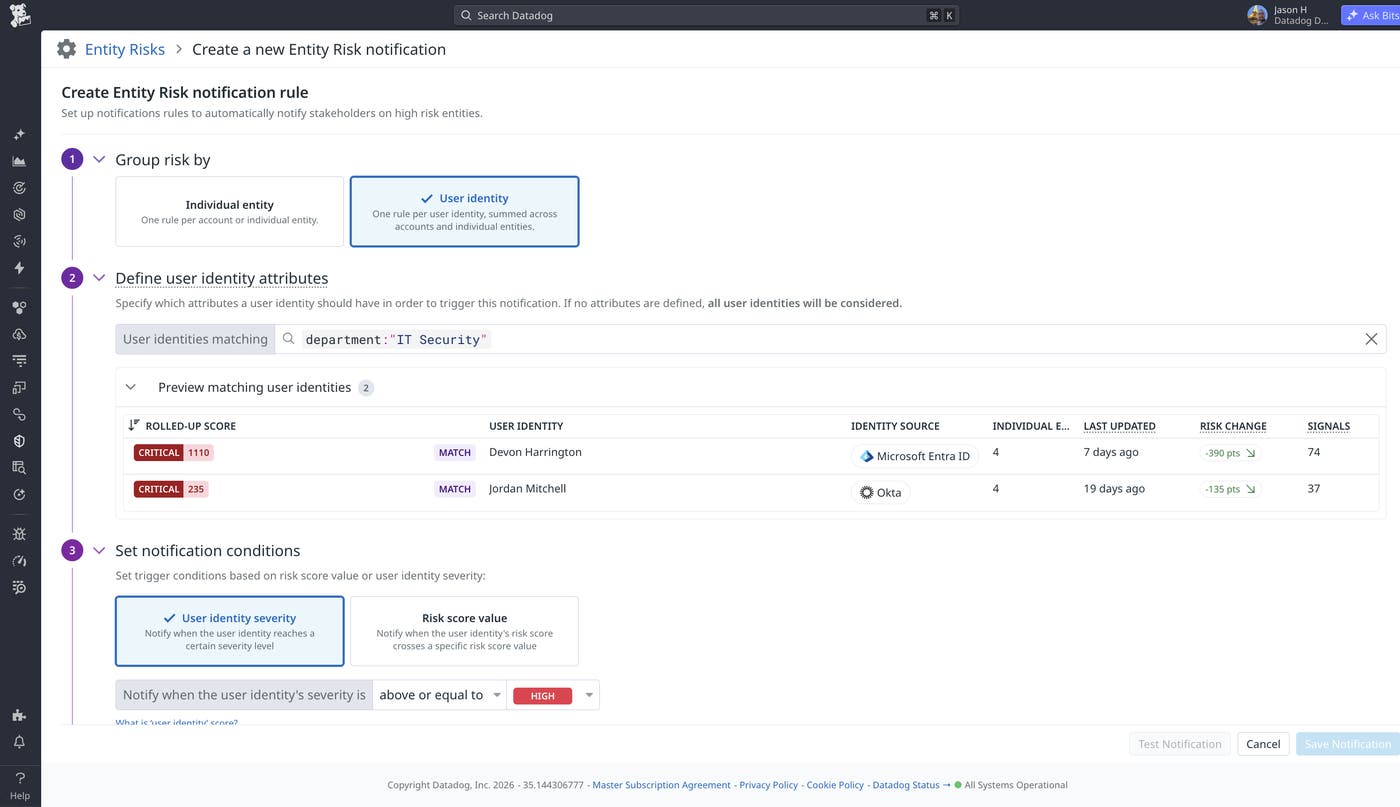
Once saved, the rule notifies the analyst when users meet the configured condition, helping analysts identify people who warrant investigation even when the concerning activity spans multiple accounts.
Follow the person behind the risk with Cloud SIEM
Entity Packs, User Inventory, and Entity Risks help security teams connect suspicious activity to the people behind it, investigate risk across associated accounts, and prioritize users based on the evidence contributing to their scores. Analysts can begin with a security signal or a ranked view of risky users, then follow the associated accounts and detections to guide their investigation.
Entity Risks builds on the capabilities available in what was previously known as Risk Insights, extending risk analysis with directory context, linked-account user risk, and user-level notifications.
To start investigating user-level risks, configure a supported Entity Pack and make sure your analysts have the SIEM Entities Read permission. To learn more about the underlying risk prioritization capabilities, read our introduction to risk prioritization and entity analytics in Cloud SIEM. For setup instructions and supported identity sources, see the Entity Packs documentation, User Inventory documentation, and Entity Risks documentation.
If you don’t already have a Datadog account, sign up for a 14-day free trial to explore security investigations with Cloud SIEM.
