

Ahmed Ahmed
Product Manager

Anusha Podila
Senior Product Marketing Manager

Eddie Cai
Technical Content Writer
Running Datadog Bring Your Own Cloud (BYOC) on Kubernetes means maintaining the engine that indexes and queries logs and, when used, its ingestion pipelines. With separate Helm deployments, you install and upgrade these components independently and coordinate their configuration and image versions. Each additional pipeline adds another deployment to maintain.
Datadog Operator support for BYOC is now in Preview for new deployments on Amazon EKS. The new Kubernetes custom resource, DatadogBYOCCluster, lets you define the engine and optional ingestion pipelines in one place. The Operator connects the components, applies shared settings, and keeps the managed resources aligned with your configuration.
In this post, we’ll show you how to:
Deploy BYOC and its ingestion pipelines through one resource
The Operator manages the BYOC engine components and any ingestion pipelines declared in the same resource. You can manage their configuration together as part of your Kubernetes workflow. Pipelines are optional, so you can deploy the engine without having the Operator create them.
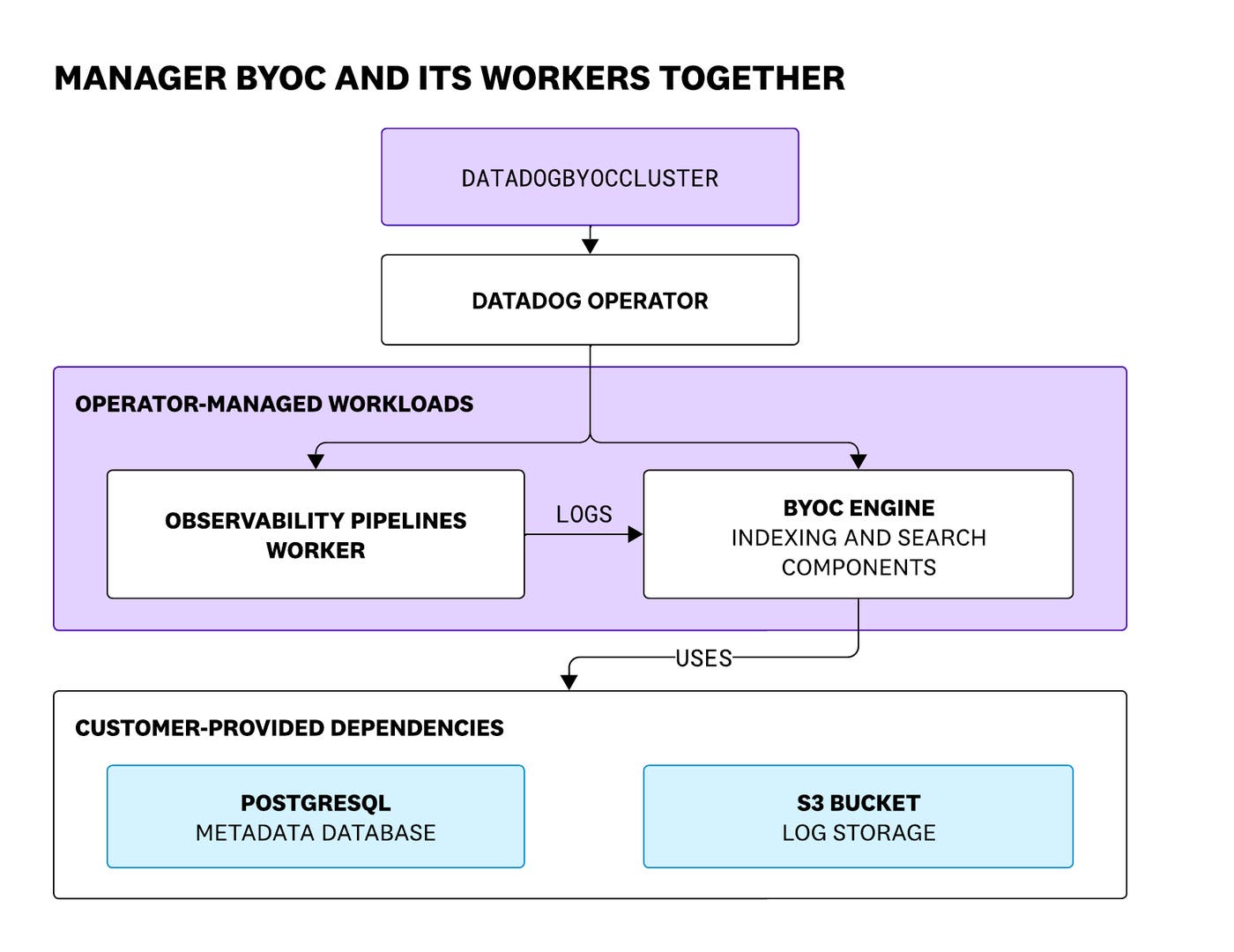
The Operator connects declared ingestion pipelines to the BYOC engine and applies shared settings, reducing configuration you need to repeat. Each pipeline can retain its own resource and replica settings. Your team gets a shared baseline as it adds pipelines.
The Operator provides default images for the BYOC engine and ingestion pipelines. Operator upgrades update these defaults. To keep either image at a specific version across upgrades, set its tag or digest in spec.imageOverrides. You can pin each image independently. Check compatibility between the engine and ingestion pipelines before overriding their versions.
Configure multiple ingestion pipelines in one place
You can declare multiple named ingestion pipelines under spec.components.pipelines in the same DatadogBYOCCluster. Each pipeline can have its own pipeline ID, ports, replica count, and resource settings. Adding a pipeline becomes another entry in the resource, without a separate Helm release for that pipeline.
First, create each pipeline in Datadog and then use its pipeline ID in the resource. The following excerpt defines two ingestion pipelines: one accepting OpenTelemetry Protocol (OTLP) traffic over gRPC and another accepting logs from the Datadog Agent. Include these entries in your complete cluster manifest:
spec: components: pipelines: - name: otlp pipelineID: "<OTLP_PIPELINE_ID>" replicas: 2 ports: - name: otlp-grpc port: 4317
- name: agent pipelineID: "<AGENT_PIPELINE_ID>" replicas: 1 ports: - name: datadog-agent port: 8282The Operator also keeps related port settings together. Declaring a supported named port, such as otlp-grpc or datadog-agent, generates the container port, Kubernetes Service port, and listen-address environment variable. Match each port to the source configured in its pipeline.
Check deployment health and automate routine operations
The Operator derives queue and cache settings from the resources you allocate to the Indexer and Searcher. Indexer memory limits determine ingestion queue budgets, while Searcher memory limits determine the sizes of several search caches. The Operator also uses the Indexer’s persistent volume capacity to size its local split cache. You choose the underlying resources, and the Operator calculates the related settings when it builds the node configuration.
Changes to the DatadogBYOCCluster resource trigger updates to the managed workloads. The Operator keeps these resources aligned with your declaration, so you can manage configuration changes in one place. Direct edits to managed resources are reverted.
Inspect workload availability
After applying your configuration, use kubectl to inspect the BYOC resource, its component and ingestion-pipeline pods:
kubectl get datadogbyoccluster,pods -n byocThe following illustrative output shows two replicas of the OTLP ingestion pipeline and one replica of the Datadog Agent ingestion pipeline:
NAME SIGNAL AVAILABLE RECONCILED AGEdatadogbyoccluster.datadoghq.com/byoc-demo logs True True 18m
NAME READY STATUS RESTARTS AGEpod/byoc-demo-control-plane-7c8f9b6d5f-m4q2z 1/1 Running 0 18mpod/byoc-demo-indexer-0 1/1 Running 0 18mpod/byoc-demo-janitor-6d9f7b8c5d-p2k4n 1/1 Running 0 18mpod/byoc-demo-metastore-5b7c8d9f6b-r3m5q 1/1 Running 0 18mpod/byoc-demo-pipeline-otlp-0 1/1 Running 0 18mpod/byoc-demo-pipeline-otlp-1 1/1 Running 0 18mpod/byoc-demo-pipeline-agent-0 1/1 Running 0 18mpod/byoc-demo-searcher-0 1/1 Running 0 18mAdd -o wide to show the reason for the Available condition.
The Operator reports configuration problems and workload availability through the DatadogBYOCCluster resource’s status. You can inspect this status using kubectl:
kubectl get datadogbyoccluster byoc-demo -n byoc -o yamlThe Reconciled condition indicates whether managed resources match the declared configuration, while Available indicates whether the configured engine components and ingestion pipelines are available. Check that the conditions reflect the resource’s current generation, then inspect their reasons and messages to identify what needs investigation. To verify ingestion, send a test log and confirm that it appears in the cluster’s BYOC index in Log Explorer.
Plan your BYOC deployment
Datadog Operator support for BYOC covers new AWS deployments that use a reverse connection to Datadog. Use Operator v1.33.0 or later with Datadog Operator Helm chart v2.33.0 or later. The BYOC controller requires explicit enablement. You provide the Kubernetes cluster, Amazon S3 bucket, PostgreSQL database, credentials, and associated infrastructure; the Operator manages the BYOC workloads within that environment.
A shared deployment declaration gives your team one place to coordinate component versions, pipeline resources, and common settings. To get started, follow the BYOC installation guide for Datadog Operator and consult the DatadogBYOCCluster configuration reference to define your pipelines and shared settings.
If you’re new to Datadog, sign up for a free 14-day trial.
