

Fouad Wahabi
Software Engineering Lead

Vincent Cornet
Senior Applied Scientist

Alex Barksdale
Senior Software Engineer
Datadog Agent Observability includes Patterns, a feature that clusters an application’s production LLM traffic into similar topics. Before clustering, Patterns uses an LLM to summarize each sampled interaction. We found that summarization accounted for about 80% of a Patterns run’s p99 cost and 50% of its p90 latency. Writing each summary is a simple task. Patterns reads one interaction, follows a short clustering instruction, and writes a sentence. Patterns’ own LLM calls are recorded in Agent Observability, so we already had many examples of the summarizer at work.
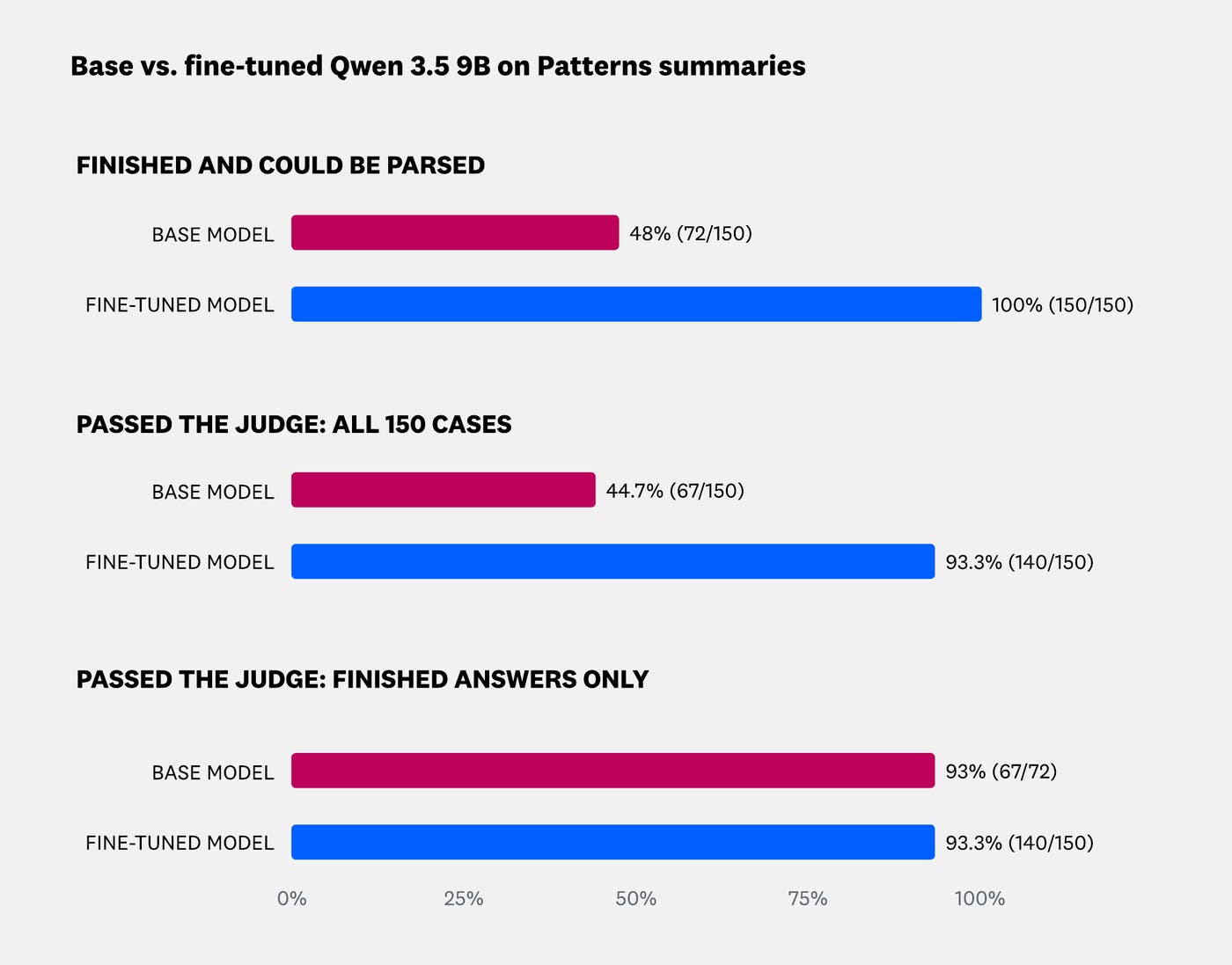
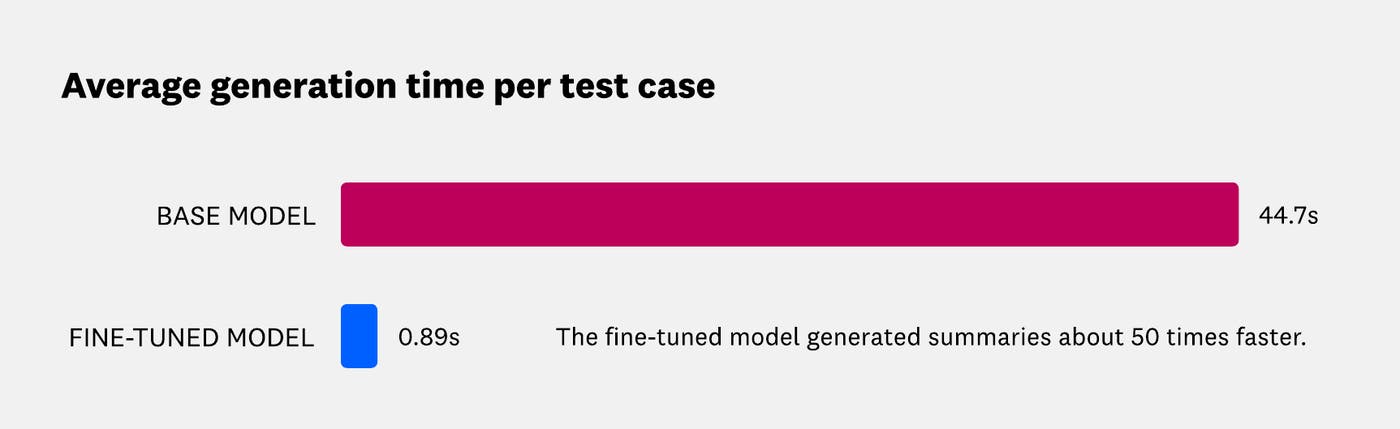
We used pup finetune, a new extension of Datadog’s Pup CLI, to turn those LLM spans into a training dataset. We then fine-tuned Qwen 3.5 9B on Baseten’s Loops SDK and compared it with the base model using Datadog Offline Experiments. A coding agent drove the workflow through the pup finetune skill, and it stopped for our approval before every paid step. On 150 held-out test cases, the fine-tuned model’s answers passed our LLM judge 93% of the time, compared with 45% for the base model, which often ran out of tokens before it wrote a summary. The average generation time per case fell from about 45 seconds to under one second.
In this post, we’ll explain:
How a coding agent drove the workflow with the pup finetune skill
How we built a training dataset from our production LLM spans
How we benchmarked the base model and fine-tuned it on Baseten
How we checked the fine-tuned model with Offline Experiments
Why summarization slowed down Patterns
Patterns helps teams analyze their agents’ production interactions and find where offline evaluation datasets have gaps. You can steer the analysis with a clustering instruction, such as “Cluster based on the user intent.” Each sampled span or trace is first condensed into a short summary that follows that instruction. Clustering then runs on a combination of text embeddings and LLM calls on those summaries.
A Patterns run can sample thousands of agent traces, each of which can contain several megabytes of prompts, tool calls, and responses. Sending each one to a frontier model made summarization the most expensive stage of the pipeline, and one of the slowest. The diagram below shows the Patterns pipeline. Summarization accounts for about 80% of p99 cost and about 50% of p90 latency, before any clustering happens.
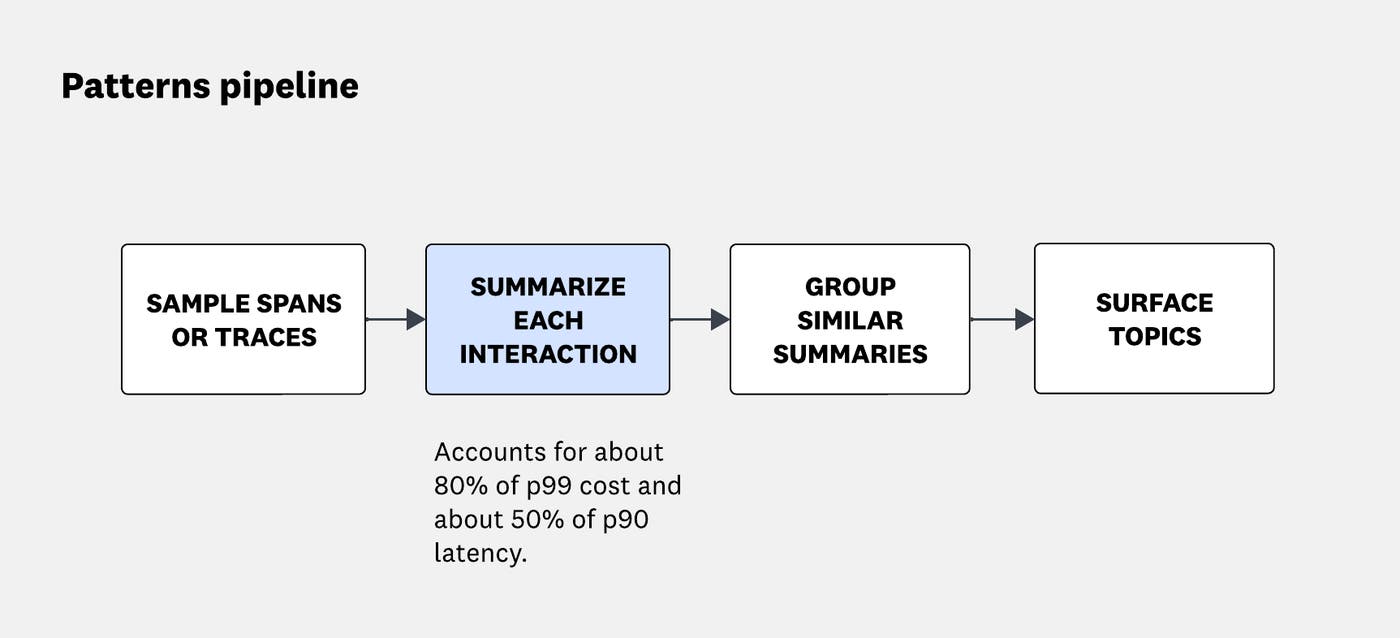
Summarizing one interaction against one instruction is a repetitive task with a clear expected output. A smaller model that has seen many examples of the task should be able to do it accurately, more quickly, and at lower cost.
How a coding agent drove the workflow with the pup finetune skill
Fine-tuning takes many steps, and each one has its own decisions. You choose which spans to pull, which rows to keep, which base model to start from, when to stop training, and how to compare the result with the base model. We built pup finetune so that a coding agent can run those steps while you make the decisions.
The skill guides the agent through each step
Run pup finetune skill install to install the datadog-finetune skill for your coding agent. It uses npx skills add for the agents you choose, such as Claude Code, or copies the skill into the project. Then you describe the goal:
Use the datadog-finetune skill to fine-tune a model on the LLM spans of ml_app <ML_APP>.The skill walks the agent through these steps in order, with a check after each one:
Check the setup.
Explore the spans.
Pull and review a dataset.
Push it to Datadog.
Benchmark and train.
Evaluate.
Deploy.
Once the fine-tuned model is deployed on Baseten, Agent Observability records your application’s calls to it as LLM spans. You can watch how the model performs in production, and when you train again, you pull those traces into the next dataset.
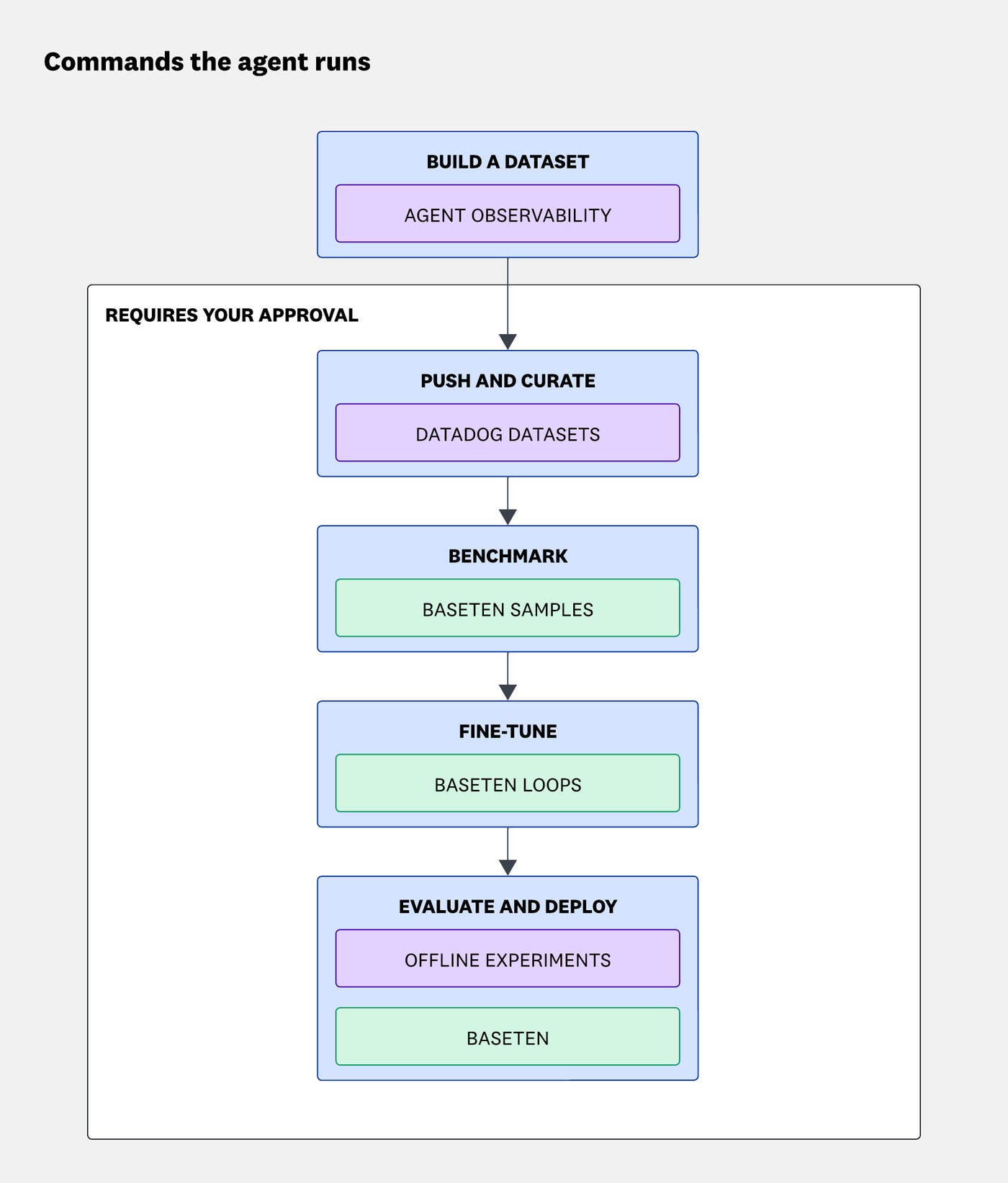
Every pup finetune command returns JSON with the exact next command, so the agent always knows what to run. It also reads failures from the result instead of guessing.
The skill keeps you in control of cost and data
The skill guides the agent through the workflow. For paid or remote commands, it won’t add --confirm without your explicit approval. Before sending traces to a model provider, it asks for permission and never asks for API keys in the chat. The agent uses application names, models, and threshold you provide or that appear in earlier results, rather than guessing them. It treats trace content as data, so instructions inside a trace can’t steer its actions.
Before every paid step, the agent shows you a preview in the same four-line format and waits for your answer:
Runs: <what --confirm does>Sends to: <every recipient of the data>Cost: <what the provider bills for, and the caps>Command: <the exact command>Run it?For the Patterns summarizer, the agent built and reviewed the dataset, ran the benchmark, and trained and evaluated the model. We approved each paid step. The sections below follow the same order.
How we built a training dataset from our production LLM spans
Every call the Patterns summarizer makes is recorded in Agent Observability as an LLM span. The interaction and the clustering instruction go in, and the summary comes out. To build the dataset, the agent ran pup finetune dataset pull, which reads those spans. It turns each one into a training conversation with the same input messages and the summary as the target answer.
pup finetune dataset pull datasets/patterns-summaries --ml-app <PATTERNS_APP> --from 30d --target-count <ROWS> --max-rows-per-trace <N>We mixed several clustering instructions
A model trained on one instruction learns that instruction. We wanted our model to learn the summarization task, so we built the dataset from Patterns runs that used several different clustering instructions. Each example pairs an interaction and its instruction with the summary the frontier model wrote for that combination.
We kept test traces out of the training set
The pup finetune extension assigns rows to training, validation, and test splits by trace, so all the rows of one trace land in the same split, and repeated copies of the same request share a split too. This prevented leakage between the training data and the test set, which would have made the results look better than they were. You can also cap rows per trace so that a few very busy traces don’t dominate the dataset.
The agent makes rows easy to review
The pup finetune dataset sample --markdown command writes a readable review file with each sampled conversation in full. The agent can walk you through the samples, propose whether to keep or drop each one, and record the decisions you make. For larger reviews, several judge models can label rows against a rubric.
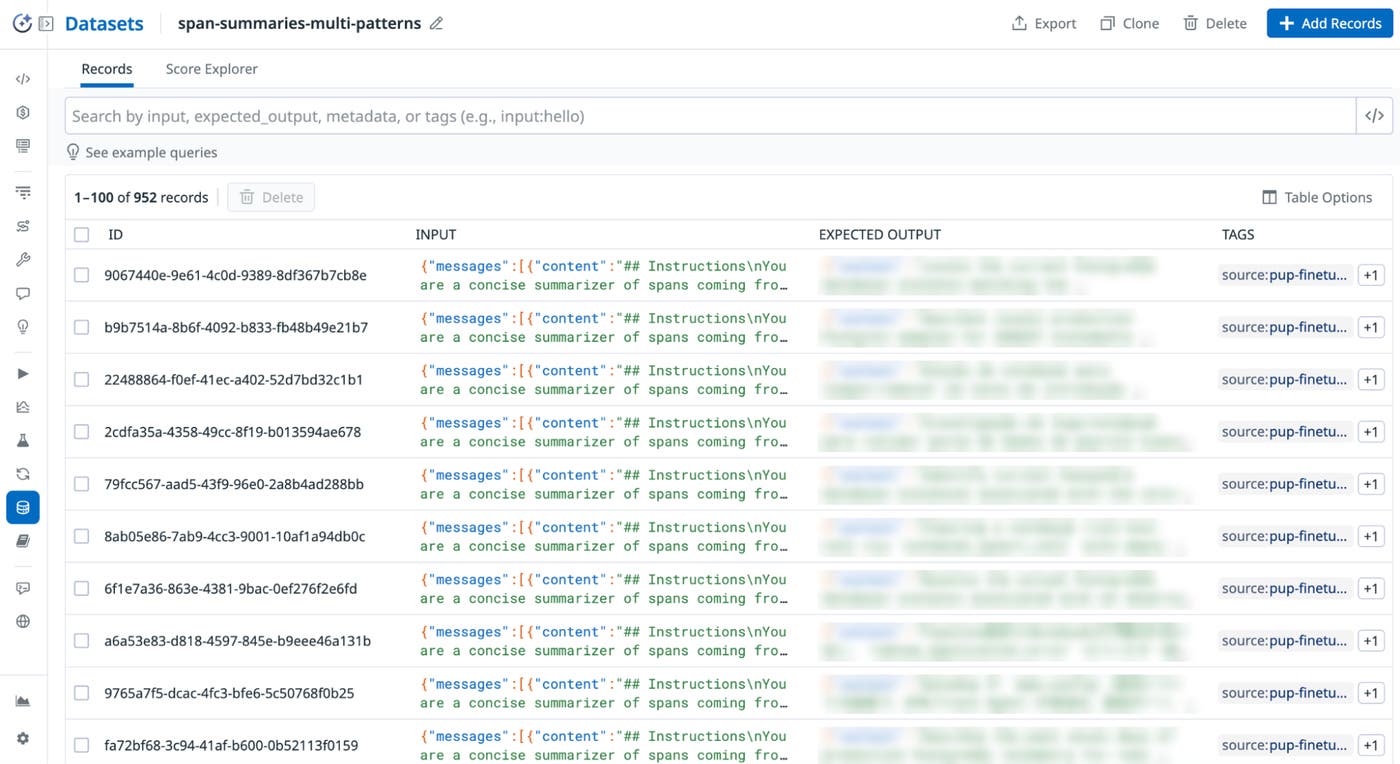
Once the rows look right, pup finetune dataset push turns them into a versioned dataset in Agent Observability. From there, you can curate the dataset in the Datadog UI like any other evaluation dataset. Then pup finetune dataset fetch brings the curated version back for training.
The example below shows a dataset pushed by pup finetune. Each record holds the input messages and the expected answer.
How we benchmarked the base model and fine-tuned it on Baseten
Before paying for training, we wanted to know how well the base model performed without fine-tuning. The pup finetune benchmark command replays held-out test cases with one or more base models on Baseten. An LLM judge then decides whether each answer is an acceptable substitute for the recorded one. Each failed case comes back with its cause, so the agent can report why the base model failed.
The base model often ran out of tokens before it answered
We found that the base model’s problem was its token budget, not the quality of its summaries. Qwen 3.5 9B often spent the whole budget on reasoning before it wrote a summary. When it did finish, its summaries were good, but generation was slow.
This pointed to a problem that fine-tuning is well suited to. The model could already do the task, but not the way we needed it to. It had to answer directly, with a short summary like the ones our current summarizer writes.
We trained a LoRA adapter on Baseten
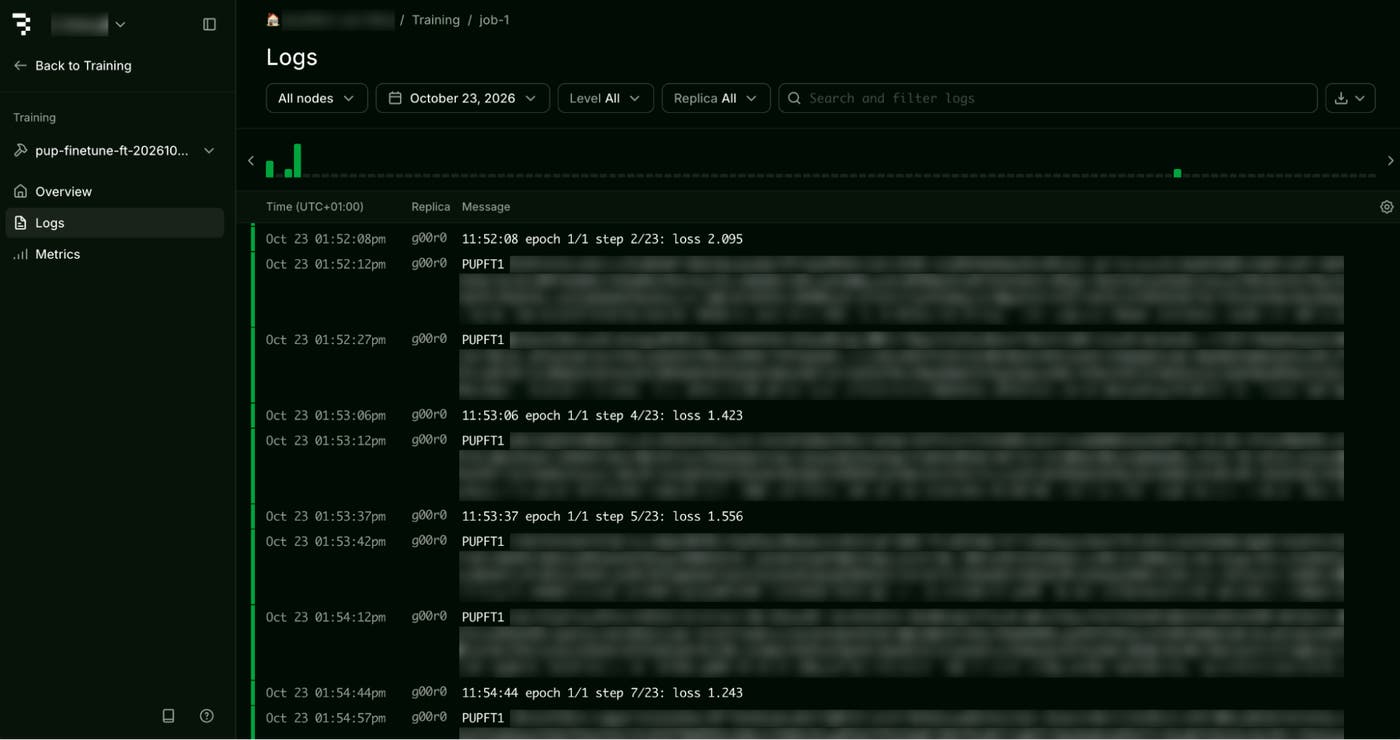
The pup finetune train command fine-tunes a LoRA (low-rank adaptation) adapter using Baseten Loops, Baseten’s training API. After each epoch, it measures loss on the validation split, ends training early when validation loss stops improving, and keeps the checkpoint from the best epoch.
Every paid step in pup finetune starts with a preview that shows what will be billed and where the data will go. The agent runs the step only after you approve it. You can also cap a training run with --max-train-tokens, or with --max-spend-usd. The --max-spend-usd flag caps a spend estimate based on an hourly rate you provide, not the provider’s bill.
The example below shows training logs in the Baseten UI, from a two-epoch demo run on a synthetic dataset. Each epoch reports its training and validation loss and saves a checkpoint. The run keeps the epoch with the best validation loss.
How we checked the fine-tuned model with Offline Experiments
The pup finetune evaluate command replays every test case with both the base model and the fine-tuned model. A judge decides whether each new summary is an acceptable substitute for the one the frontier model wrote. Before scoring, the judge has to pass a check. On up to four test cases, it must accept the recorded answer and reject two deliberately corrupted versions of it.
The fine-tuned model finished every answer
We evaluated both models on 150 held-out test cases, drawn from five traces that were kept out of training. Every fine-tuned answer finished and could be parsed (150 of 150), compared with 48% of base answers (72 of 150). The fine-tuned model’s answers passed the judge 93.3% of the time (140 of 150), compared with 44.7% for the base model (67 of 150).
On dedicated Baseten samplers, the average generation time per case also fell from 44.7 seconds to 0.89 seconds, about 50 times faster.
We compared both runs in Offline Experiments
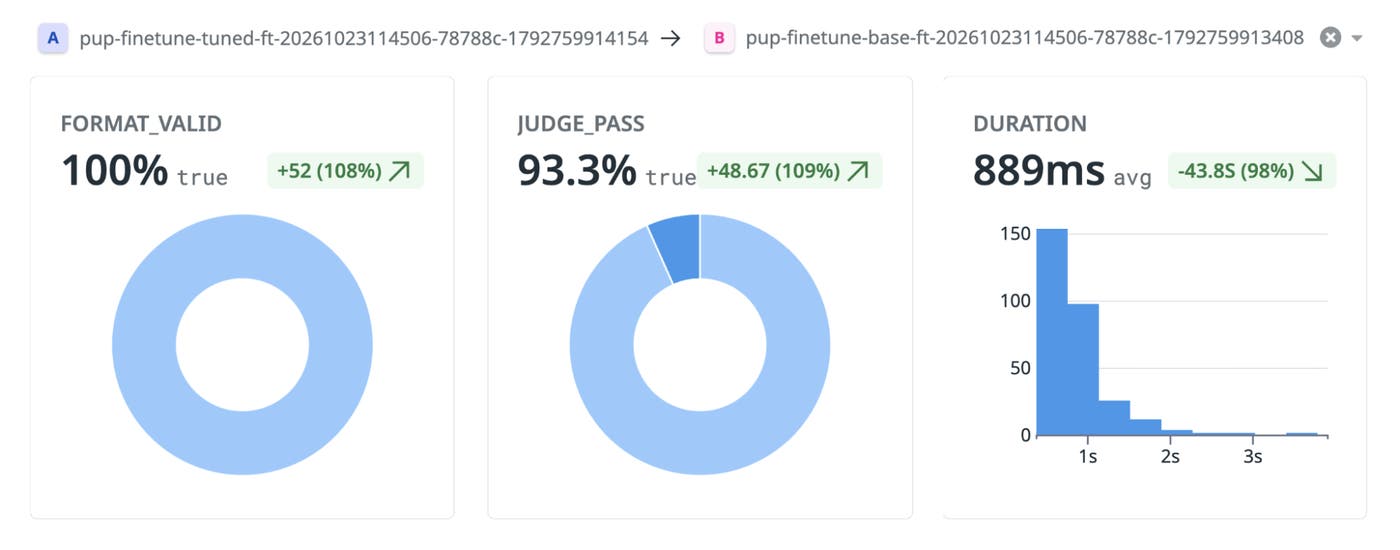
Both runs were published to Datadog as experiments on the dataset we pushed, so we could compare them side by side and inspect individual cases. When the judge fails an answer, the experiment also records the judge’s reason. Answers that hit the token limit are marked as cut off.
The example below compares the fine-tuned run with the base run in Offline Experiments. Every answer was valid, 93.3% passed the judge, and the average duration dropped by 43.8 seconds.
The fine-tuned model also generalized across different clustering instructions, which suggests it learned to summarize rather than to follow one specific instruction.
What we learned about fine-tuning on our own traces
Our summarizer’s spans gave us the raw material for the dataset, because Patterns’ LLM calls were already instrumented. Benchmarking first showed that the base model’s problem was finishing, not summarizing: 78 of its 83 failures ran out of tokens or couldn’t be parsed. After fine-tuning, every answer finished within the token limit, with a pass rate matching the base model’s on the answers it did finish. The average generation time also fell to under a second.
Letting a coding agent drive pup finetune through the skill also changed where our time went. The agent ran the commands, read each result, and checked each step, while we spent our time on the decisions: which rows to keep, which model to train, and whether the results held up.
Get started with pup finetune
You can view the pup finetune extension on GitHub. To try it with your own coding agent, run pup finetune skill install and ask the agent to fine-tune a model on your application’s LLM spans. If you haven’t instrumented your apps and agents yet, start with the Agent Observability quickstart guide.
Are you a startup? Eligible companies get a year of free Datadog credits. Apply to the Datadog for Startups program.
If you’re not yet a Datadog customer, sign up for a free 14-day trial.
