
Loïc Bruneau
Product Manager

Kevin Hu
Staff Product Manager

Alexa Levine
Senior Product Marketing Manager

Candace Shamieh
Technical Content Writer
Sensitive data proliferates every time it’s copied. A customer table in PostgreSQL may be replicated to Snowflake for analytics, exported to CSV for a partner, and stored in Amazon S3 as a backfill that nobody remembers to clean up. Each copy acquires its own ownership and access controls, making it difficult to track where customer email addresses and card numbers actually reside.
Traditional security tracking struggles to keep up with how quickly data moves. Compliance audits only show where personal data was stored at a specific point in time. Standalone scanning tools report findings to security teams, who then must identify the responsible engineering team before taking action. In contrast, the monitoring tools used by engineering teams can keep up with the pace of data, but are typically disconnected from security tracking tools and rarely share context. Engineering teams can easily tell you how fast their database responds, whether last night’s pipeline landed on time, and which tables a new copy came from, because they watch those stores in monitoring tools every day.
We built Datadog Data Security Posture Management (DSPM) to keep the map of your sensitive data up to date and fully integrated with the rest of your telemetry data. Now available in Preview, DSPM discovers personally identifiable information (PII), financial data, and secrets at rest in Snowflake, PostgreSQL, and Amazon S3. DSPM findings conveniently appear in two locations: on the pages for the stores that engineers already monitor in Datadog, and in our Data Security explorer, with a direct link to the responsible engineering team. Since DSPM is built on products you already use, like Data Observability, Database Monitoring (DBM), and Agentless Scanning, findings start to arrive immediately.
In this post, we’ll discuss how Datadog DSPM:
Puts sensitive data on the same map as the rest of your infrastructure
Scans each data store with the Datadog products you already run
Takes you from a data store to the exact column or file that matched
Put sensitive data on the same map as the rest of your infrastructure
Datadog puts security products in the platform where teams already monitor their infrastructure, so developers, operators, and security engineers can work from one shared view instead of passing findings between tools. DSPM extends that view even further so you know what’s inside your data stores.
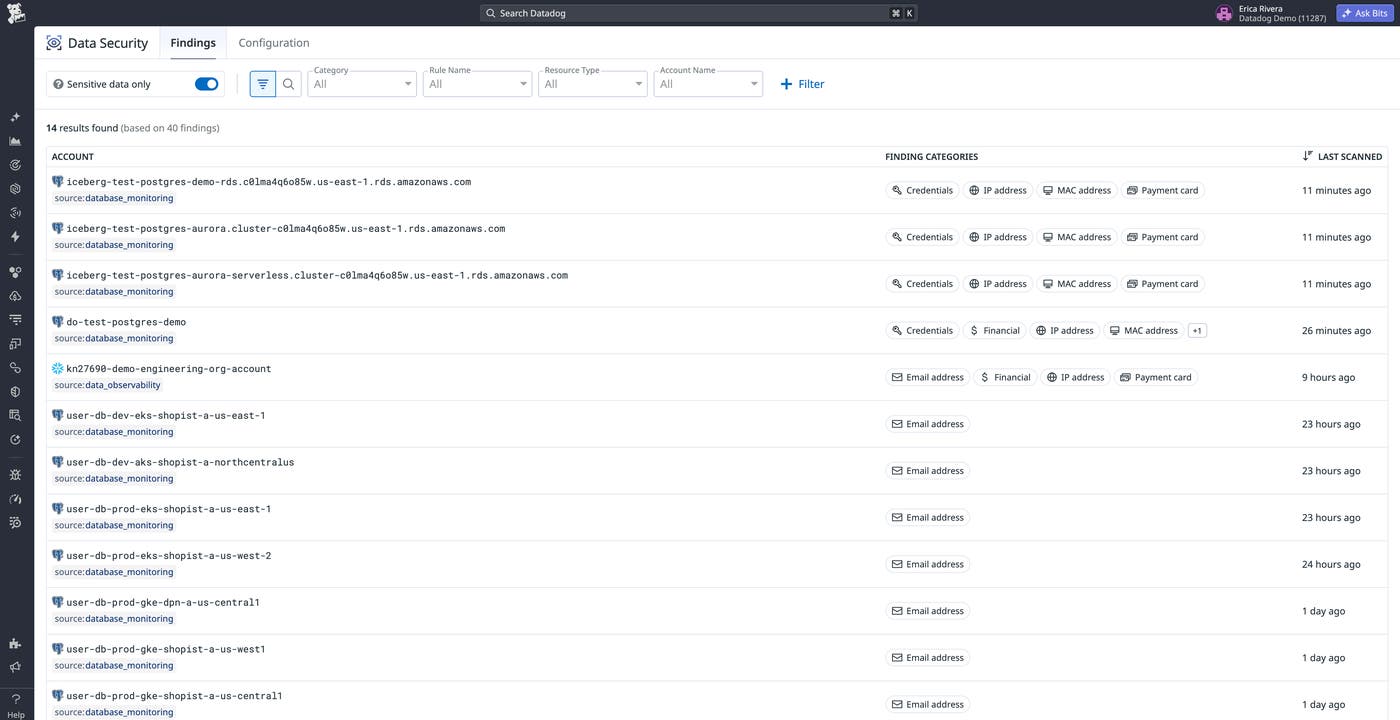
For data engineers, a Snowflake table containing card numbers is flagged directly in the Data Catalog, alongside freshness and lineage checks. Database owners can view findings on the Databases page. Security engineers can view findings from all sources in our Data Security explorer. The following screenshot shows the top level of the explorer, where each account lists the categories of sensitive data found and when it was last scanned.
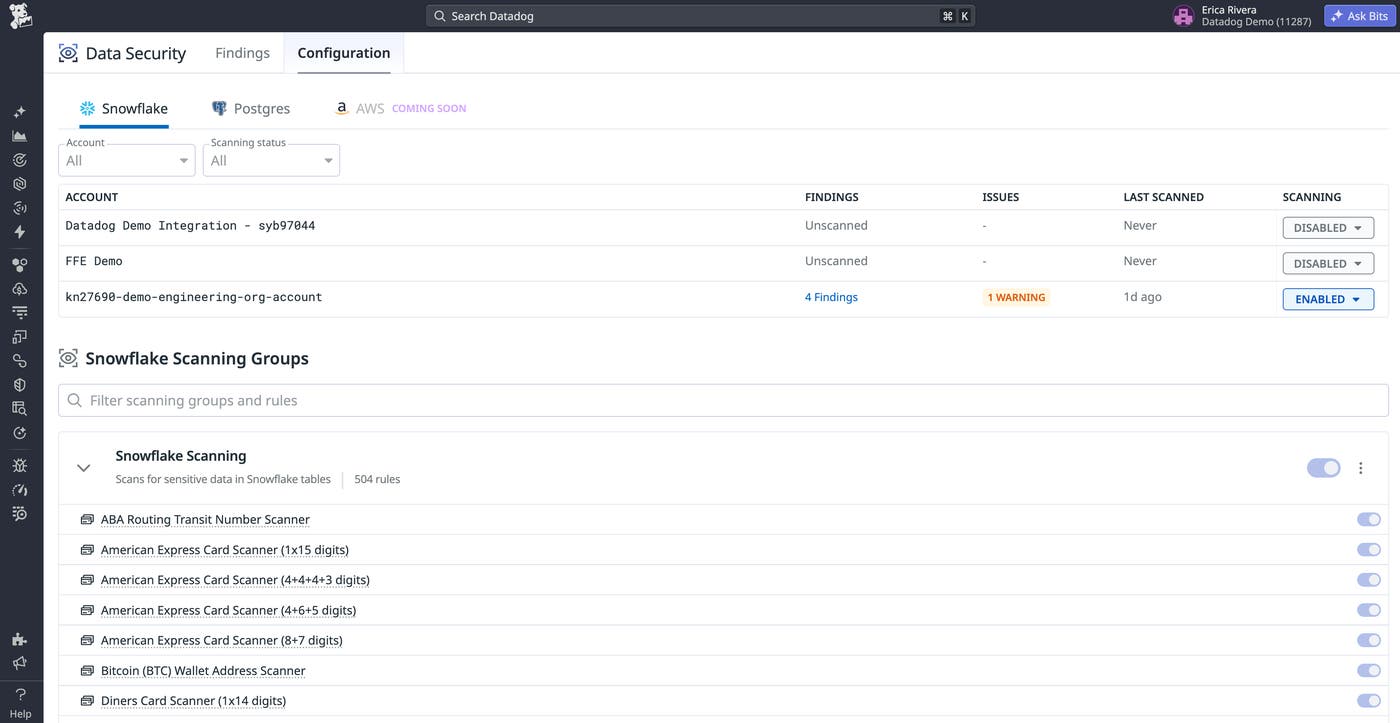
DSPM keeps your sensitive data classified consistently across sources. It uses the same out-of-the-box (OOTB) detection rules as Sensitive Data Scanner to identify and redact sensitive data in logs, traces, and Real User Monitoring (RUM) events. For example, a rule that flags card numbers in a log line will also flag them in a Snowflake column. The following screenshot shows the Snowflake scanning group, which applies these OOTB rules to every account that has scanning enabled.
DSPM works alongside Datadog Cloud Security to centralize data and configuration findings in the same platform. For example, a public S3 bucket is a misconfiguration, but if it contains card numbers, it qualifies as an incident. Differentiating between these two scenarios requires visibility into both storage contents and configurations.
Scan each data store with the Datadog products you already run
DSPM scans the stores you’ve already configured in Data Observability, DBM, and Cloud Security. DSPM only retains the findings, such as the rule, location, and match count, without storing the data itself. The following diagram shows the scanning path for each data store, including which scans run inside your environment and what each path sends to Datadog.
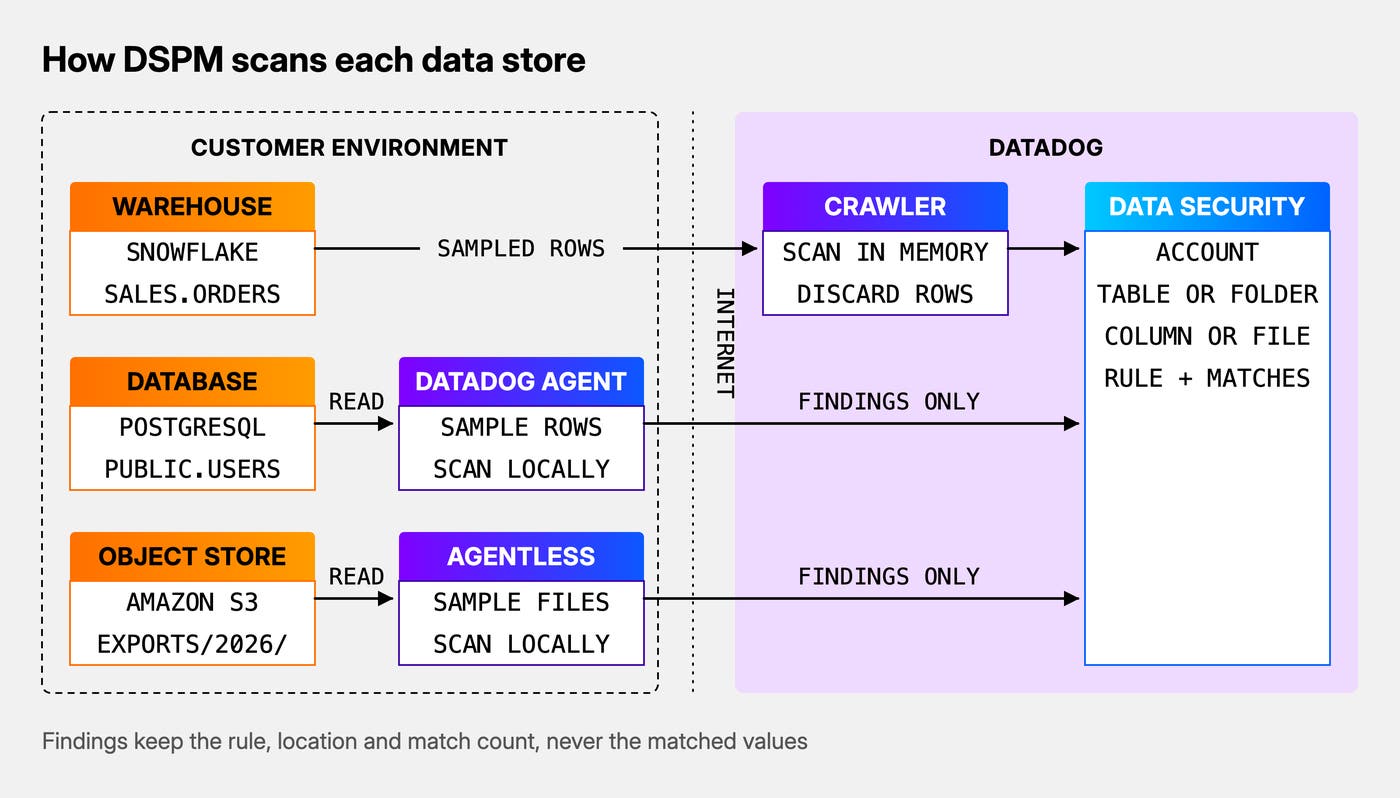
The diagram shows the three paths DSPM uses to scan data stores. First, for Snowflake, DSPM sends sampled rows from each table to a Datadog-hosted crawler, which scans them in memory and then discards them. Next, for PostgreSQL, the Datadog Agent samples rows and scans them inside your environment, sending only findings to Datadog. Finally, for Amazon S3, Agentless Scanning samples files, scans them in your AWS account, and subsequently sends the findings to Datadog. All three paths feed the Data Security explorer, which organizes findings by account, table or folder, and column or file, along with the rule that matched and the number of matches.
For Snowflake, DSPM uses your existing Data Observability connection without any new grants. For PostgreSQL, DSPM runs in your existing Datadog Agent for DBM. If the database user can’t read a table, DSPM identifies the required grant. If your Agents are managed with Fleet Automation, DSPM can configure them automatically. For Amazon S3, DSPM uses Agentless Scanning to sample objects in common formats such as CSV, JSON, and Parquet. You can restrict scanning to specific buckets.
Go from a data store to the exact column or file that matched
Datadog helps platform teams locate sensitive data. For example, if you need to find which data stores contain payment data, the Data Security explorer provides a list of Snowflake accounts, PostgreSQL databases, and S3 buckets with sensitive data, along with the number of matches for each.
DSPM enables you to open a Snowflake account and view its tables. S3 buckets are displayed as a folder tree organized by bucket prefixes. Each table shows the number of rows or objects scanned, the number matched, and the last scan date.
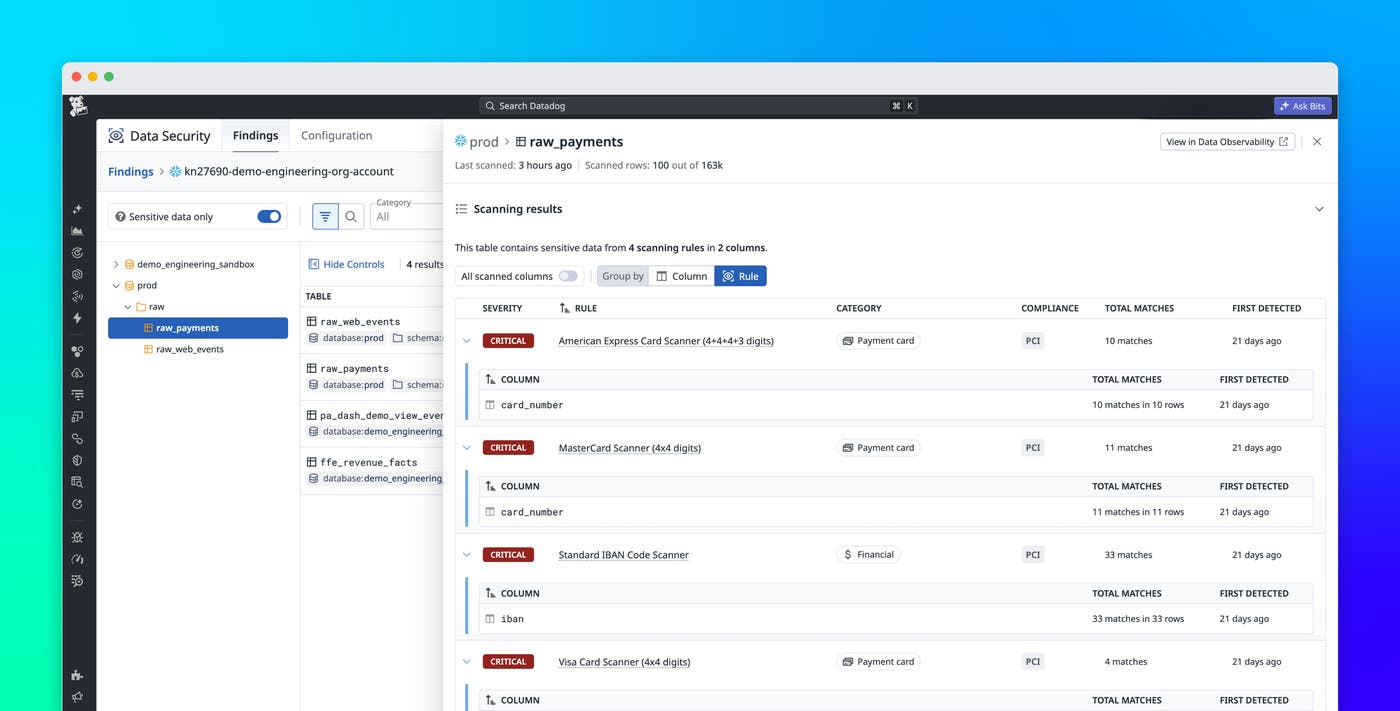
For example, in the image below, the raw.payments table stands out. Its side panel highlights two flagged columns: card_number, which matched rules for American Express, Mastercard, and Visa card numbers, and iban, which matched the IBAN rule. The panel lists each triggered rule, the relevant compliance frameworks, and the match count, without displaying the values themselves.
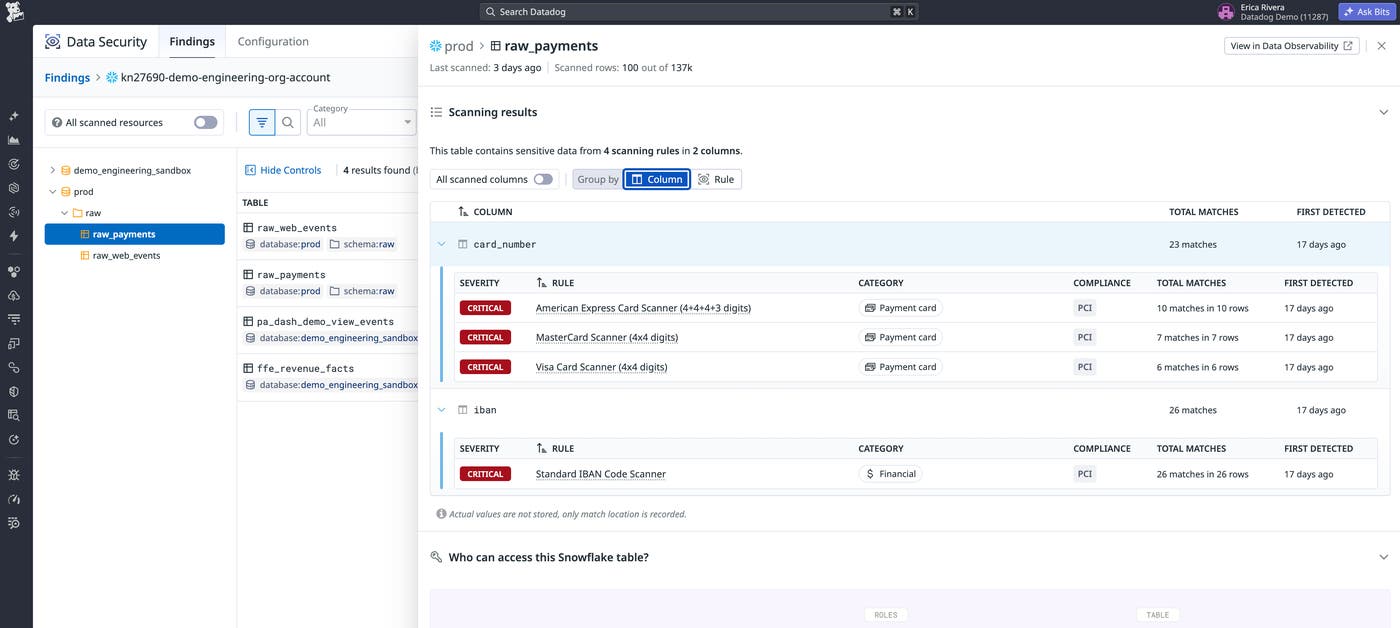
Since your data team already monitors that table in Datadog, you can present a specific column and rule rather than a full spreadsheet of findings.
Join the DSPM Preview
Datadog DSPM enables discovery and classification of sensitive data at rest in Snowflake, PostgreSQL, and Amazon S3 using built-in Sensitive Data Scanner rules. Findings are available in the Data Security explorer and on the pages of the stores where engineers already work. Beyond the Preview, we plan to link DSPM findings to lineage, query activity, and AI agent traces already collected by Datadog, which will help teams track sensitive data from storage to AI applications, remediate it, and inform AI Guard access decisions. We’ll define next steps based on feedback from Preview participants.
To map sensitive data across your data stores and help shape where DSPM goes next, join the DSPM Preview. Customers will not be billed for participating in the DSPM Preview. If you’re new to Datadog, sign up for a 14-day free trial.
