
Nicolas Jung
Product Manager

Corey Brincks
Product Marketing Manager
Logs often require manual parsing configuration before teams can use the information inside them for investigations, dashboards, and alerting. Engineers need to write and debug parsing rules, map standard attributes, and adjust their pipelines as applications change. When a log format drifts, parsing can silently stop matching, leaving gaps in dashboards or causing monitors that depend on extracted attributes to stop firing.
Datadog Auto-Processing (generally available) automatically structures logs without requiring you to build and maintain parsing pipelines. It identifies log formats that still need processing, generates and applies parsing rules for them, and normalizes core attributes. As log formats change, Auto-Processing adapts the parsing to help keep your logs structured for downstream analysis by humans and agents.
In this post, we’ll show how you can use Auto-Processing to:
Automate detection and parsing of unstructured logs
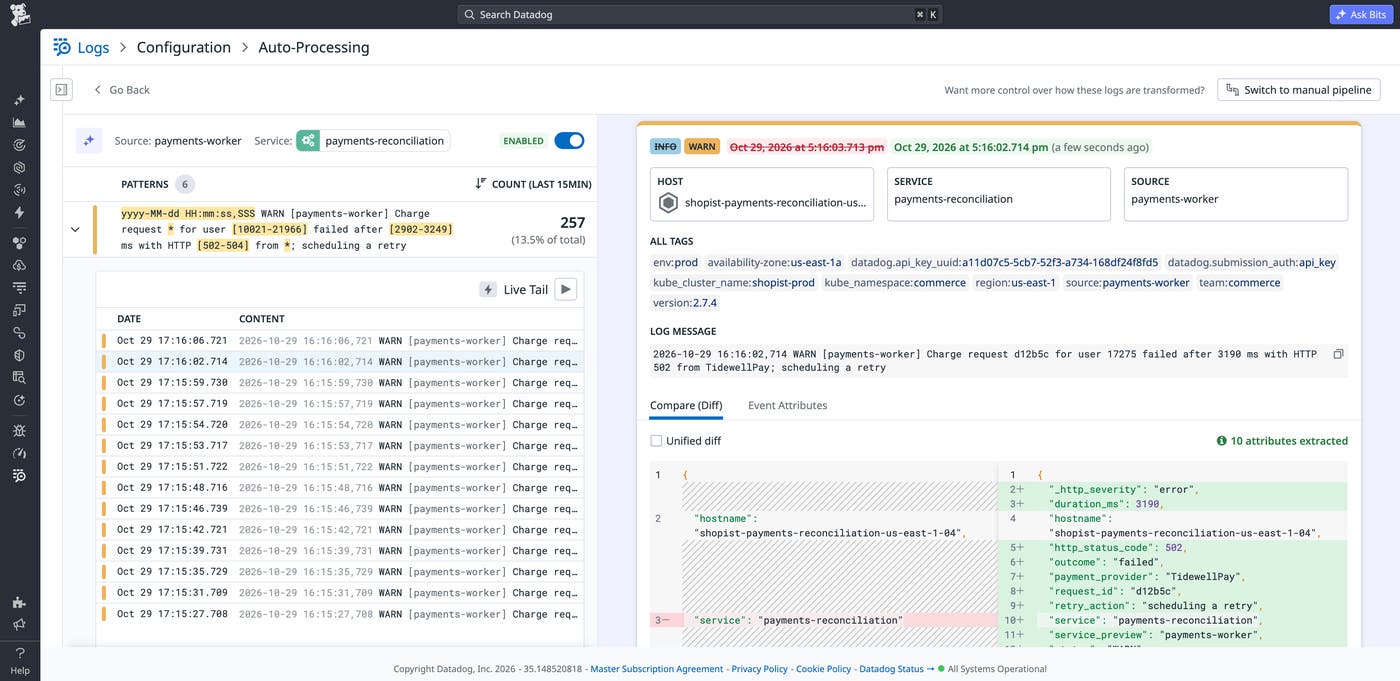
When incoming logs are from custom sources and don’t already have an applicable pipeline, Auto-Processing handles pipeline creation from start to finish. It identifies the logs that need processing, generates the parsing needed to structure them, and applies the pipeline automatically. You don’t need to initiate pipeline creation, write parsing rules, or approve the generated pipeline before it takes effect.
For example, let’s say you’re an engineer who is responsible for a new payments-reconciliation service that generates logs like this one:
2026-10-29 17:16:02,714 WARN [payments-worker] Charge request d12b5c for user 17275 failed after 3198 ms with HTTP 502 from TidewellPay; scheduling a retry
The log contains the details that you need to investigate the service, but the details aren’t structured attributes. As logs from the service begin flowing into Datadog, Auto-Processing identifies that they need processing and creates parsing rules automatically.
Auto-Processing applies a pipeline when confidence and risk scores meet a required threshold. The full process of detecting a processing gap, generating new pipeline rules, and applying them takes about 1 hour. When that process finishes in our example, the service’s logs are structured.
Filter and aggregate logs with extracted attributes
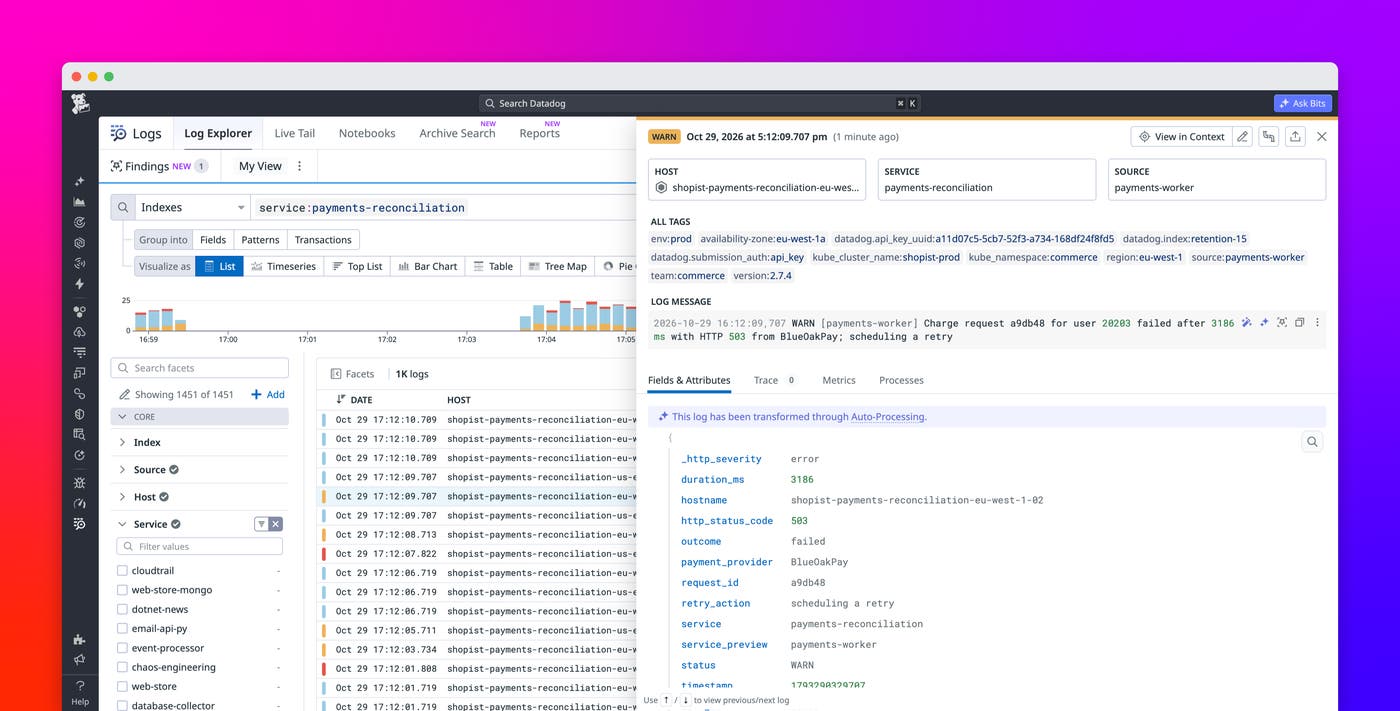
When Auto-Processing extracts the values in your logs into attributes, you can query them directly instead of building complex text searches or extracting values from each message at query time. In our payments example, you can filter by provider, find requests for a specific user, or isolate requests that returned HTTP 502. The extracted attributes make it easier to investigate whether failures are concentrated on the provider TidewellPay or affecting multiple providers.
Numeric attributes such as request latency and transaction duration also become available for aggregations and graphs. You can compare average latency across providers, track response times over time, and build monitors for requests that exceed a threshold. In our example, you can investigate whether an increase in failed payments coincides with higher latency.
Analyze logs consistently across services with normalized attributes
Extracting values makes the details in each log queryable. To help you analyze logs consistently across services, Auto-Processing also maps information to Datadog core attributes, including timestamp, status, service, trace ID, and span ID.
In our payments example, suppose you want to investigate whether payment failures coincide with warnings from a separate checkout service. That service also emits unstructured logs but uses a different format. Auto-Processing uses the severity and timestamp extracted from each service’s messages to set the logs’ status and event time in Datadog. You can then investigate warnings across both services by using the same status filter and time window, regardless of each service’s log format.
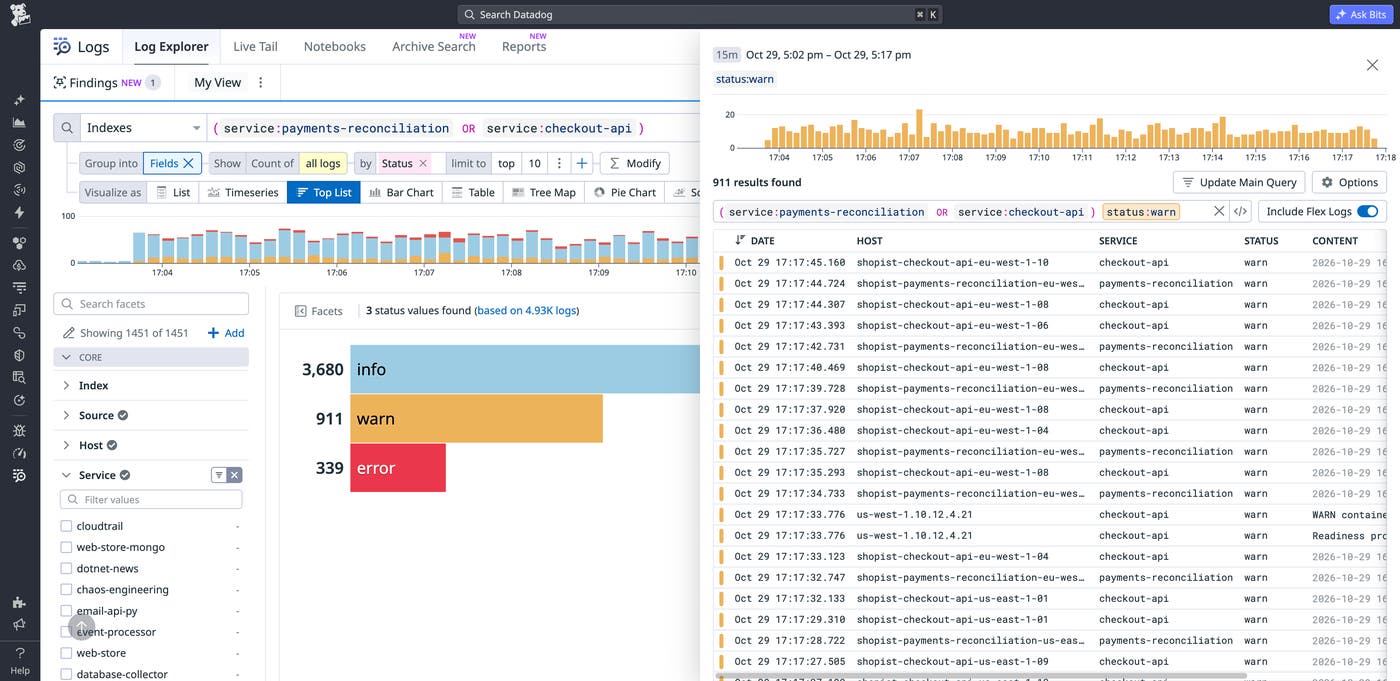
Normalization also gives you consistent attributes to build dashboards around, even when the underlying logs come from different sources or use different formats. A dashboard can use standard fields such as service and status across those logs without requiring source-specific handling at query time.
Because Auto-Processing structures logs during processing, the resulting attributes remain available across downstream workflows and destinations. You can use the same structured data in the Log Explorer, generate log-based metrics from that data, retain it in Flex Logs or archives, and forward processed logs to other destinations.
Keep dashboards and monitors working as log formats change
Automatic pipeline creation addresses the initial work of structuring a new log format, but applications and their logs can change after that first pipeline is created. Auto-Processing adapts the pipelines it manages as those formats change, helping preserve the attributes that dashboards and monitors depend on.
To continue our example, suppose that Auto-Processing has populated the status attribute for logs from the payments-reconciliation service. If a future deployment causes the service’s log format to drift, Auto-Processing will detect the change and adapt parsing rules to help dashboards and monitors that depend on the status attribute continue to function. As a result, engineers don’t have to discover each log format change and update the corresponding rules themselves.
Start accelerating investigations with Auto-Processing
Auto-Processing enables you to get answers from logs that come from custom sources without requiring you to build and continually update parsing pipelines. It helps you keep logs structured and ready for the searches, monitors, dashboards, metrics, and other workflows that depend on them. To get started, read the Auto-Processing documentation.
If you don’t already have a Datadog account, you can sign up for a 14-day free trial to start processing and analyzing your logs with Datadog.
