

Angelina Jin

Bo Huang

David Pointeau

Kyler Kang
Associate Product Manager

Sophie Ruetschi

Vic Weiss
Modern organizations often operate from multiple locations. From retail stores to global enterprises, many companies rely on distributed wired and wireless networks to keep business-critical applications online. HPE Aruba Networking Central provides a centralized, cloud-based platform for managing that infrastructure at scale.
With Datadog’s Aruba Central integration, teams can monitor device health, performance metrics, and network usage across Aruba-managed infrastructure. The integration provides centralized visibility into the health, performance, and usage of Aruba-managed access points and switches. By bringing Aruba Networking Central telemetry data into Datadog, teams can quickly correlate network issues with application and infrastructure signals across sites.
In this post, we’ll explore how the Aruba Central integration helps teams:
Monitor device health and availability
When engineers operate hundreds or thousands of access points and switches, even small configuration changes can have widespread impact. For example, a firmware rollout might introduce instability that becomes visible when devices begin to appear offline in your management console.
The Aruba Central integration surfaces device health and availability metrics directly in Datadog’s out-of-the-box (OOTB) dashboard. It shows devices online versus offline across your access points and switches, monitors device uptime, tracks client counts per access point, and analyzes CPU and memory utilization across your fleet. Firmware versions are also visible, making it easier to confirm whether issues correlate with a recent upgrade.
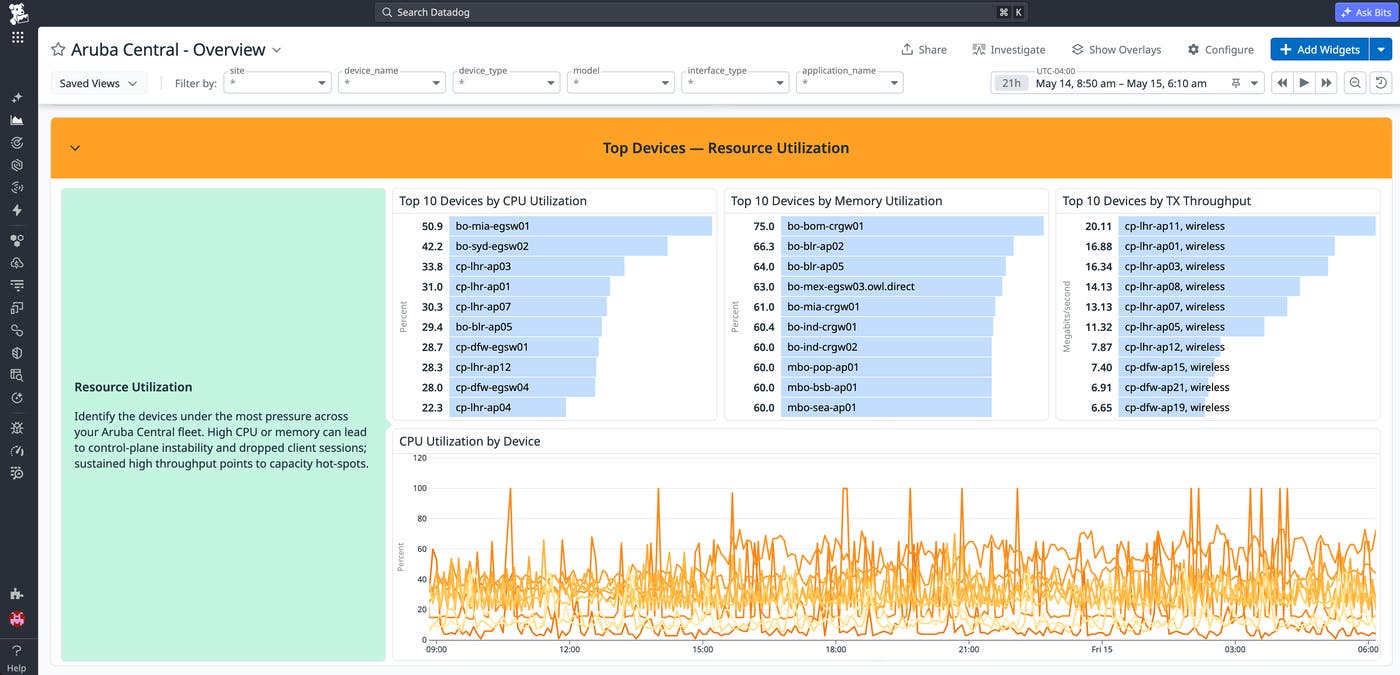
With these metrics in a unified dashboard, it’s easier to identify abnormal patterns. For example, if multiple access points across a region show rising CPU utilization and intermittent availability after a firmware update, teams can isolate the affected devices and initiate a rollback to reduce user impact.
If a specific access point begins to drop connections, teams can be alerted and quickly determine whether hardware errors, resource saturation, or excessive client load are contributing factors. This insight enables faster replacement or reconfiguration, minimizing user disruption.
Engineers can also correlate switch-level throughput and utilization with upstream application or infrastructure metrics to determine whether degraded application performance is caused by network congestion rather than compute or database constraints.
Track client experience and wireless performance
A healthy device doesn’t always mean a healthy network. An access point can remain online with low CPU utilization while still delivering a poor wireless experience if channel utilization is high and interference is driving retransmissions.
The Aruba Central integration helps teams monitor the wireless signals that reflect actual client experience. The radio and channel utilization section of the OOTB dashboard surfaces radio channel utilization (TX and RX percentage), co-channel interference, frame retry and drop rates, noise floor, and client counts by access point.
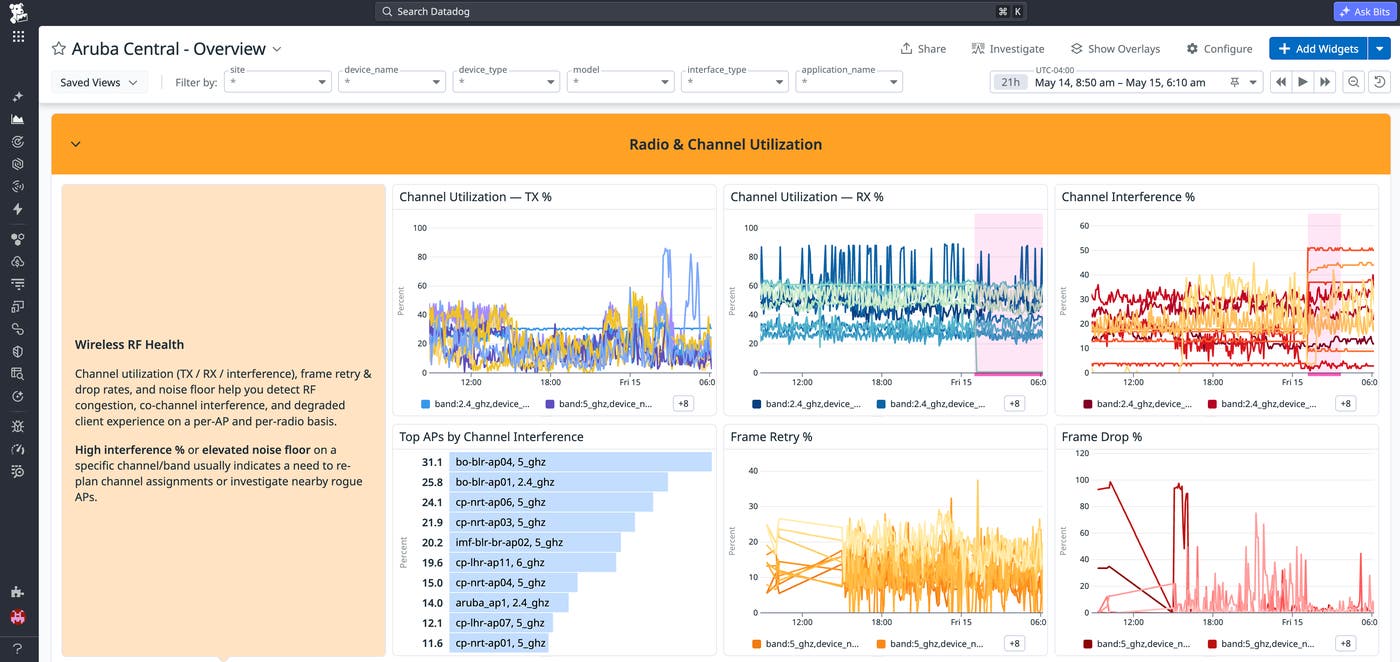
Tracking these metrics helps engineers to identify wireless degradation that device health metrics alone won’t surface. For example, if frame retry rates climb on a cluster of access points during peak hours, teams can investigate whether co-channel interference or client density is the cause, and take targeted action such as adjusting channel assignments or redistributing client load.
Building monitors based on these metrics can improve incident response. Because this data lives alongside device health, throughput, and application signals in Datadog, teams can quickly determine whether a connectivity complaint originates in the radio environment or deeper in the infrastructure stack.
Analyze network performance and application usage
High client density and unpredictable traffic spikes might strain even well-provisioned networks. Without historical visibility into throughput and application usage, it is difficult to anticipate capacity needs or diagnose peak-time slowdowns.
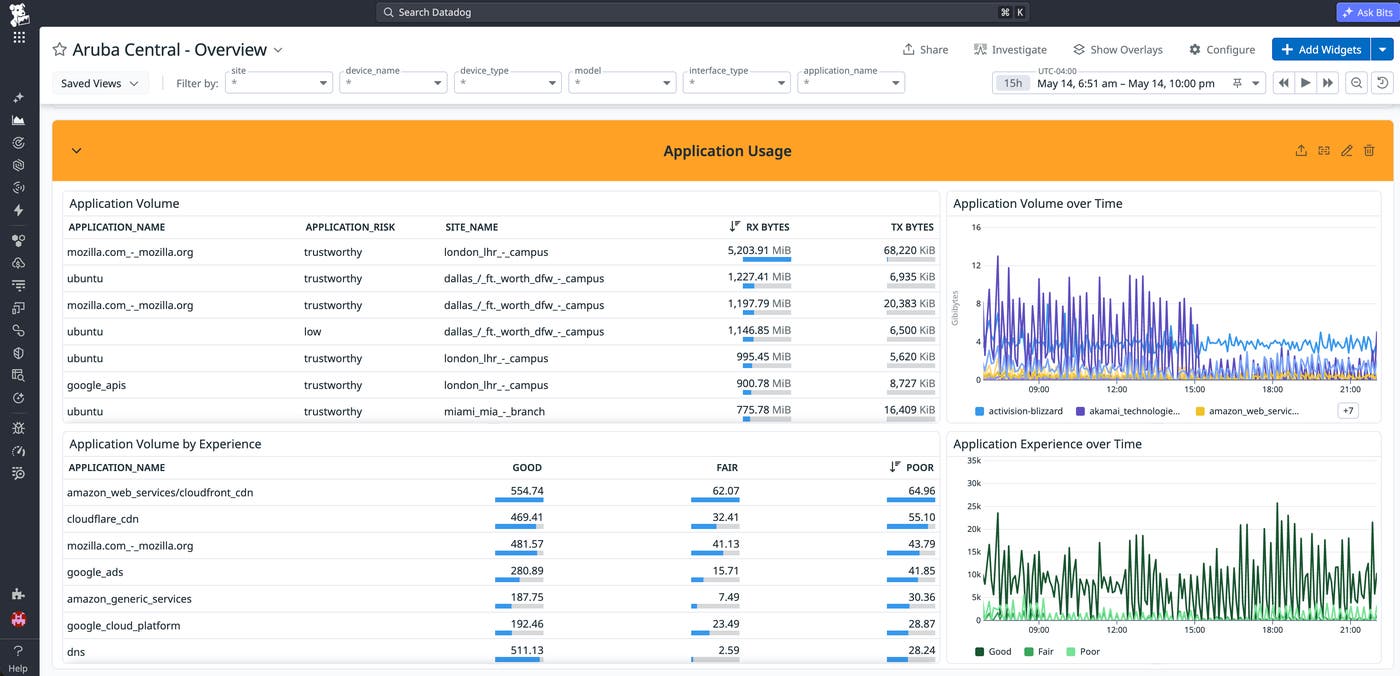
Datadog’s Aruba Central integration enables infrastructure and operations teams to monitor total inbound and outbound throughput, as well as traffic trends over time. It also provides visibility into application traffic categories and volume, allowing teams to map network demand to specific workloads.
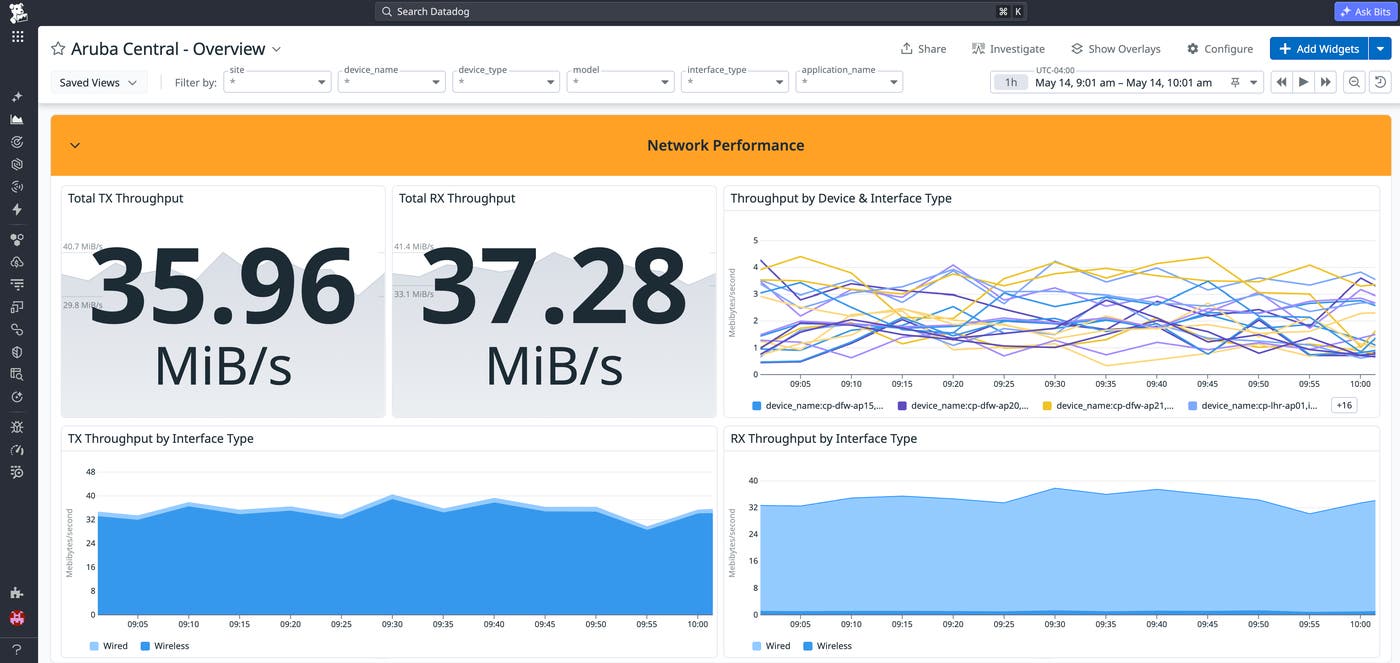
Consider a scenario where hundreds of users connect simultaneously at the start of a class or shift. By monitoring client counts per access point alongside throughput trends, teams can detect overload conditions early. Over time, these insights help inform capacity planning decisions, such as redistributing load, enabling additional access points, or upgrading hardware in high-traffic areas.
Because this integration extends Datadog Network Device Monitoring, teams can correlate network spikes with application latency, infrastructure metrics, and logs. This makes it easier to determine whether performance degradation originates in the network layer or elsewhere in the stack.
Get started with the Aruba Central integration
Datadog’s Aruba Central integration provides centralized visibility into the health, performance, and usage of Aruba-managed access points and switches across distributed environments. By centralizing device metrics, throughput data, and usage trends in Datadog, teams can detect issues faster, investigate root causes more effectively, and help maintain reliable connectivity across sites.
To get started, install the Aruba Central integration in Datadog.
If you’re new to Datadog, you can start a free 14-day trial.
