
Ellie Cohen
Product Manager

Cody Murray-Bruce
Product Marketing Manager
Organizations can use Oracle AI Database@AWS, Oracle AI Database@Azure, and Oracle AI Database@Google Cloud to run Oracle databases co-located with the cloud applications they support rather than managing the databases on premises. However, running applications in a cloud provider’s environment while hosting databases on Oracle Cloud Infrastructure (OCI) can lead to visibility gaps. When application performance degrades, identifying the source of the problem can be difficult. Teams also face challenges with assessing application performance after migration and attributing database costs across separate bills from cloud providers and Oracle.
Datadog supports Oracle AI Database@AWS, Oracle AI Database@Azure, and Oracle AI Database@Google Cloud through dedicated sub-integrations within the standard integrations for AWS, Microsoft Azure, and Google Cloud. Each sub-integration provides more than 50 out-of-the-box (OOTB) metrics and dashboards for monitoring Oracle database infrastructure. Teams can combine these integrations with Datadog Database Monitoring (DBM) to investigate query performance, Application Performance Monitoring (APM) to correlate database activity with application requests, and Cloud Cost Management (CCM) to analyze spending.
In this post, we’ll show how you can:
Troubleshoot Oracle AI Database performance with Datadog DBM
Validate performance as you migrate Oracle workloads to the cloud
Optimize and attribute Oracle AI Database costs across teams and clouds
Troubleshoot Oracle AI Database performance with Datadog DBM
When an application slows down, the cloud team checks the application, the database administrator team checks the database, and the root cause can sit in the gap between them. Datadog DBM helps close that gap with Database Investigations in Bits Chat. Engineers, including those without deep Oracle expertise, can go from a slowdown to a root cause in a single investigation.
Datadog DBM collects workload metrics, query samples, and execution plans from your Oracle databases. Bits Chat examines that data alongside logs from across your stack, then points to a root cause with concrete remediation steps. Each step links to the relevant queries, services, and database instances, with live graphs so that you can confirm the symptom or verify the fix. You can dig deeper with follow-up questions or add context, such as a recent deployment, to refine the investigation.
For example, say you’re paged because latency on a service endpoint spikes. You follow the trace from APM to DBM and start an investigation in Bits Chat. Bits identifies a query associated with this latency spike and examines its execution plan to investigate. The root cause is that the optimizer periodically chooses the full table scan instead of the index lookup. Bits recommends an immediate mitigation and long-term fix: Pin the good plan with a SQL Plan Baseline (an Oracle feature that stops the optimizer from switching plans) loaded from the cursor cache.
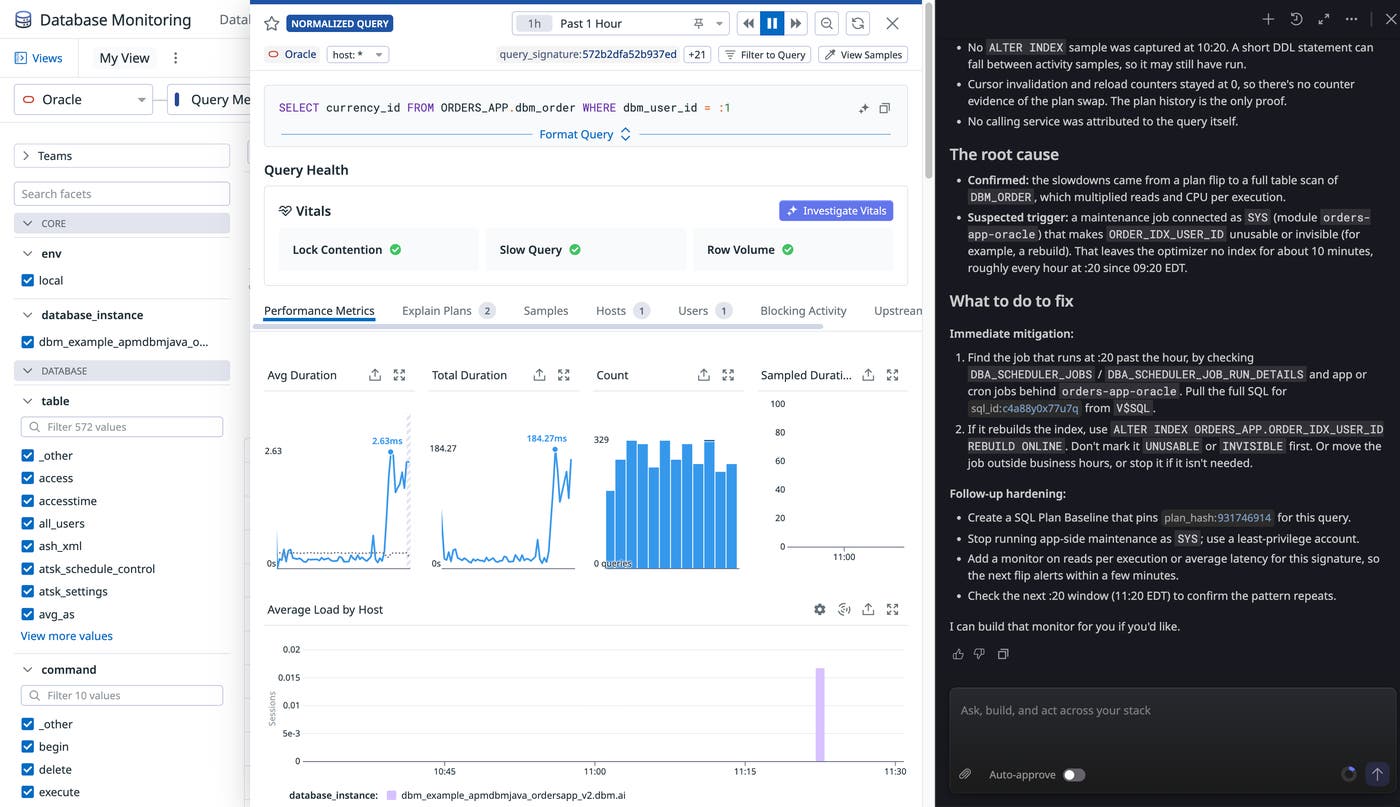
After you apply the fix, you can ask Bits to recheck the metrics and confirm that performance is back to baseline.
You can also explore performance data directly in DBM. The Databases view breaks active connections down by wait group, so you can see whether queries are waiting on CPU, I/O, or locks. The Top Queries view shows execution counts, average durations, and total execution times for normalized SQL statements, and you can open query samples and explain plans to see which operations slow a query down. Query samples include tagged metadata, enabling you to group resource-intensive queries by application and decide what to optimize first.
Validate performance as you migrate Oracle workloads to the cloud
Migrating on-premises Oracle workloads to Oracle AI Database@AWS, Oracle AI Database@Azure, or Oracle AI Database@Google Cloud requires validating database and application performance after cutover. Datadog DBM and APM show you how your database and application behave in the new environment, helping you catch regressions before your customers do.
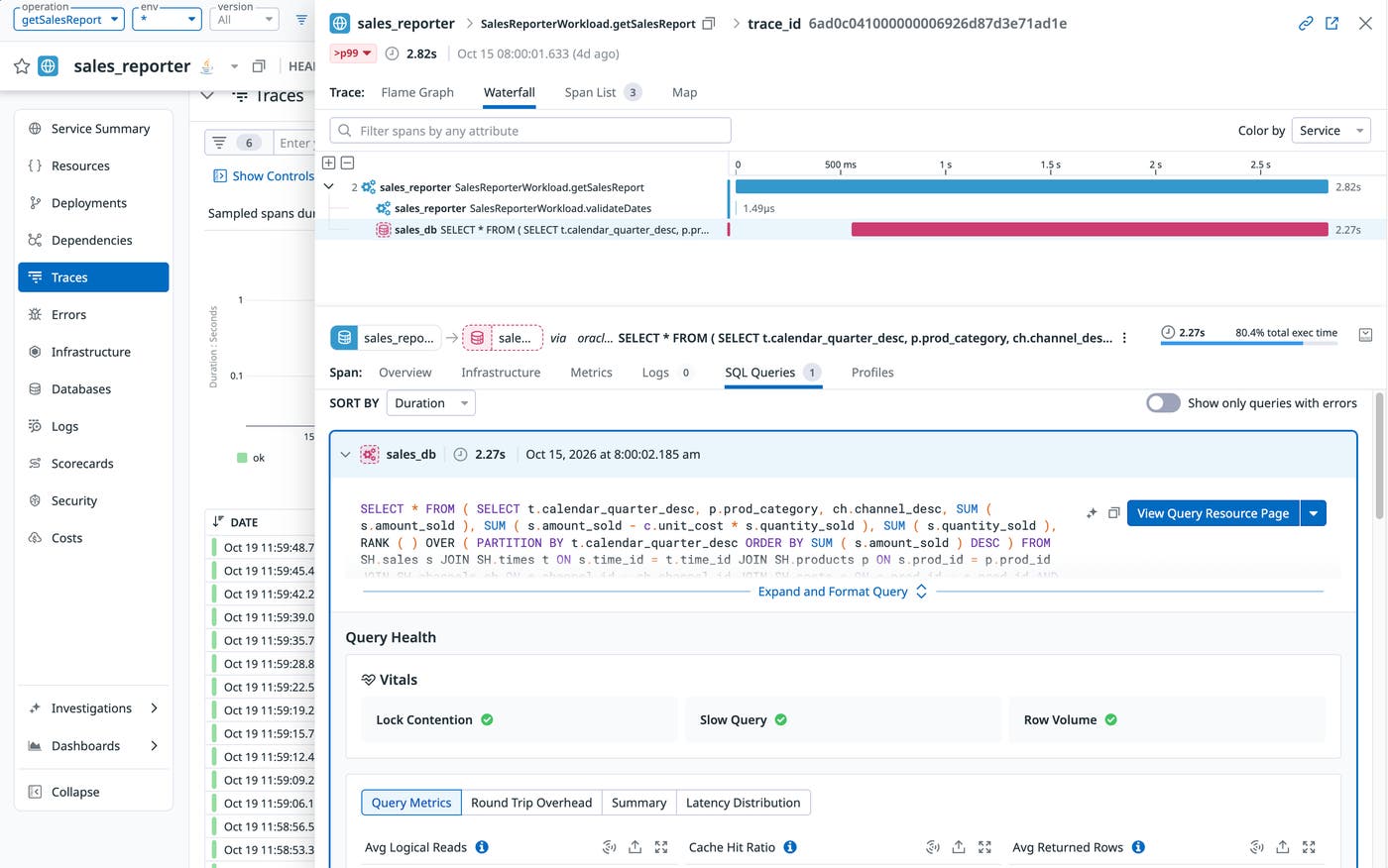
By connecting DBM and APM, you can follow a request from the application service into the database. Datadog adds APM trace identifiers to DBM query samples, so each sampled trace shows the query behind it. You can also break down database connections by upstream APM service to see which applications generate the most load on the new database.
When a query sample matches a sampled trace, you can open its explain plan and execution history inside the trace. The history includes sampled wait events, average latency, and recent plans for similar queries, helping you determine whether what you’re seeing is abnormal or just how this query behaves. That context helps you decide whether a slow request points to a database change, such as a new execution plan, or to something else in the application.
Optimize and attribute Oracle AI Database costs across teams and clouds
Oracle AI Database deployments across AWS, Azure, and Google Cloud create cost visibility challenges because the cloud providers and Oracle report spending separately. A cloud provider’s bill might show Oracle database charges as a single line item without identifying the underlying database usage or responsible teams. OCI billing provides more granular database usage information but lacks the application context needed to attribute spending to specific services.
Datadog Cloud Cost Management brings OCI and cloud provider costs into a shared dataset, normalizing spending across providers by using FinOps Open Cost and Usage Specification (FOCUS) tags. After you configure OCI cost collection, CCM ingests cost data daily, helping you identify spending changes without waiting until the end of a billing cycle. OCI cost data also includes a resource_id tag that helps you correlate database costs with observability data. By combining CCM with DBM and APM, you can compare database spending against query activity and identify the application services responsible for database load.
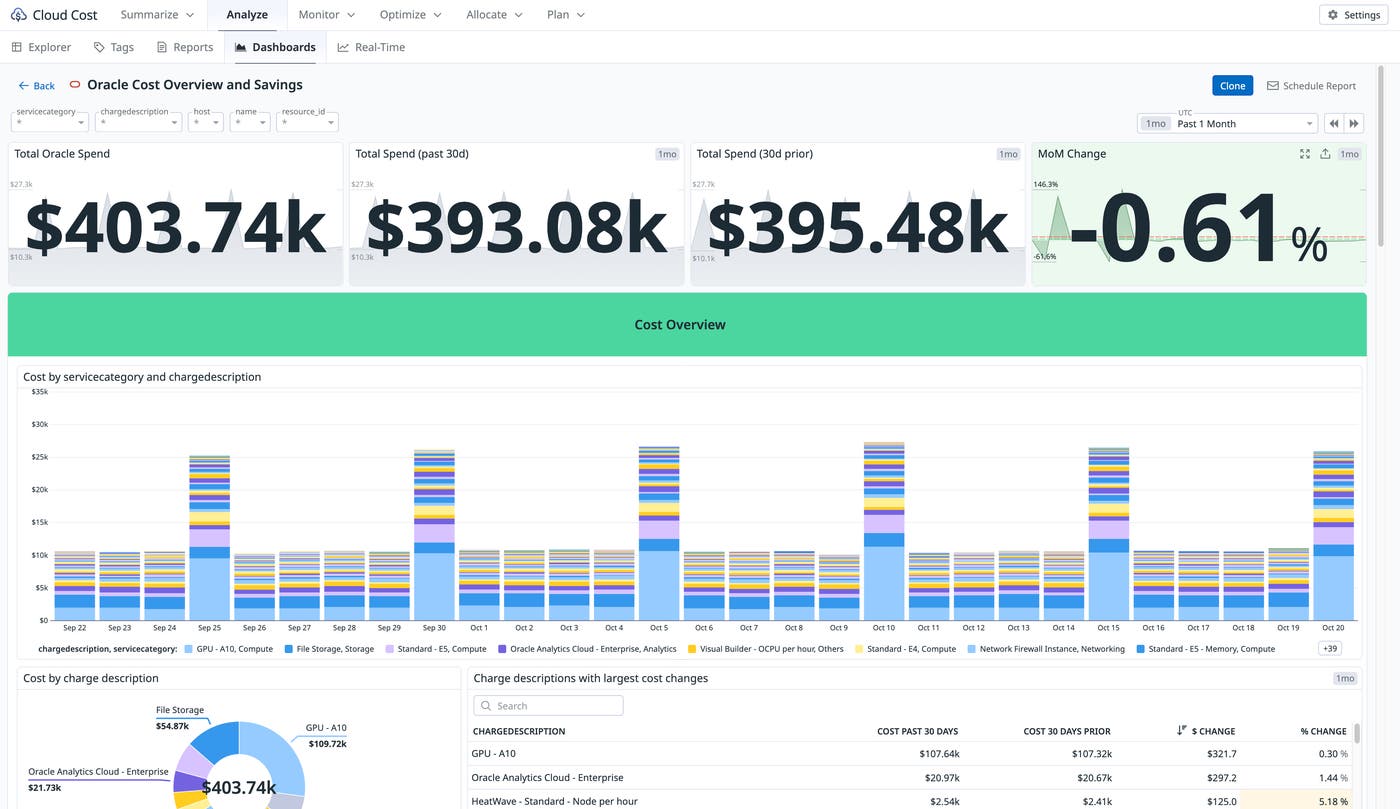
For example, a database with high costs but relatively little query activity might be a candidate for rightsizing. Conversely, a database with substantial query activity from a single application service can help you identify which team is driving spending. Datadog Notebooks provide a shared workspace where engineering and FinOps teams can review database performance and cost data together and collaborate on rightsizing recommendations.
Datadog also helps improve cost attribution through Tag Pipelines, which standardize inconsistent tags across providers, and the Tag Explorer, which identifies gaps in cost allocation. Cost monitors can alert you to unexpected OCI spending increases, and multi-provider budgets and forecasts help track Oracle costs alongside other cloud expenses.
Start monitoring Oracle AI Database workloads across clouds
Datadog helps teams monitor Oracle AI Database workloads across AWS, Azure, and Google Cloud by bringing database, application, infrastructure, and cost data into one platform. With DBM, APM, and CCM, teams can investigate performance issues, validate cloud migrations, and identify opportunities to optimize database spending. To get started, configure the AWS sub-integration, Azure sub-integration, or Google Cloud sub-integration. You can learn more by reading Oracle’s blog post.
If you don’t have a Datadog account, sign up for a 14-day free trial to start monitoring Oracle database workloads across clouds.
