
Gabriel Musat Mestre
Staff Engineer
As Datadog has moved toward open standards, we chose Apache DataFusion as a single composable query engine to replace previously specialized query systems. At Datadog scale, however, some queries must scan enormous amounts of data while still returning results with low latency. Although DataFusion gave us the extensibility and composability we wanted, it could execute a query on only a single machine. To meet our scalability requirements, we built Distributed DataFusion, an open source framework that extends DataFusion to execute a single query across multiple machines.
In this post, we’ll explain why we built Distributed DataFusion, how it works, and the design decisions behind scaling interactive queries across multiple machines.
Building a unified query engine
As Datadog expanded from metrics into traces, logs, profiles, real user monitoring, and security signals, a bottom-up engineering culture led teams to build specialized ingestion pipelines and query engines for different workloads. Those systems delivered the performance each use case required, but they also introduced fragmentation: different engines, different interfaces, and limited composability across datasets.
In recent years, we’ve worked to reconcile that specialization with a more unified approach. By refactoring our query engine interfaces and adopting open standards, we’ve been building a composable data system that preserves the performance of specialized systems while enabling shared capabilities and cross-dataset queries, and more flexible ways to access data.
To realize that vision, we’ve converged on Apache Arrow as our in-memory data format, Substrait as our execution plan format, and Apache DataFusion as our composable query engine. But DataFusion executes each query on a single machine, limiting its ability to support some of our largest interactive workloads.
Distributed DataFusion extends DataFusion’s execution model across multiple machines, allowing a single query to use additional compute resources while keeping latency roughly flat as the amount of queried data grows. The project is open source, written in Rust, and available on GitHub and crates.io under an Apache 2.0 license.
Why existing distributed engines weren’t enough
Before starting the project, we evaluated other distributed query engines, but none met all of our requirements:
Extensibility: We needed to write custom code to read from our own data sources, write our own optimization rules, and integrate with our networking stack. We weren’t looking for a distributed query engine. We were looking for a framework for building one.
Low-latency interactive execution: There’s a human on the other side of the screen waiting for a result. We weren’t looking for a system that runs background fault-tolerant jobs. We needed a zero-copy streaming solution.
Integration with our query stack: Arrow and Substrait are the contracts between the query engine and the services that call it, so any distributed framework needed to integrate well with both.
Efficiency at scale: The overhead of distribution should be as small as possible. Heavy queries should make efficient use of available resources, while small queries shouldn’t be penalized.
Those requirements ruled out different engines for different reasons. ClickHouse wasn’t extensible in the ways we needed. Apache Spark and Apache DataFusion Ballista rely on intermediate data materialization, making them a poor fit for our low-latency interactive workloads. Trino is extensible, but it doesn’t integrate well with Arrow and Substrait and is expensive to run at our scale. Taken together, those requirements led us to extend Apache DataFusion rather than adopt an existing distributed engine.
Benchmark results
We benchmark Distributed DataFusion by using a public benchmarking infrastructure that anyone with an AWS account can reproduce. The benchmarks use standard TPC-H and TPC-DS datasets.
Our test environment consists of a 12-node Amazon EC2 c5n.2xlarge cluster, with 8 vCPUs, 21 GiB of memory, and up to 25 Gbps of network bandwidth per node. The cluster reads Parquet data from Amazon S3. Every engine in the comparison runs on the same hardware and datasets, with TPC-H scale factors ranging from 1 GB to 100 GB.
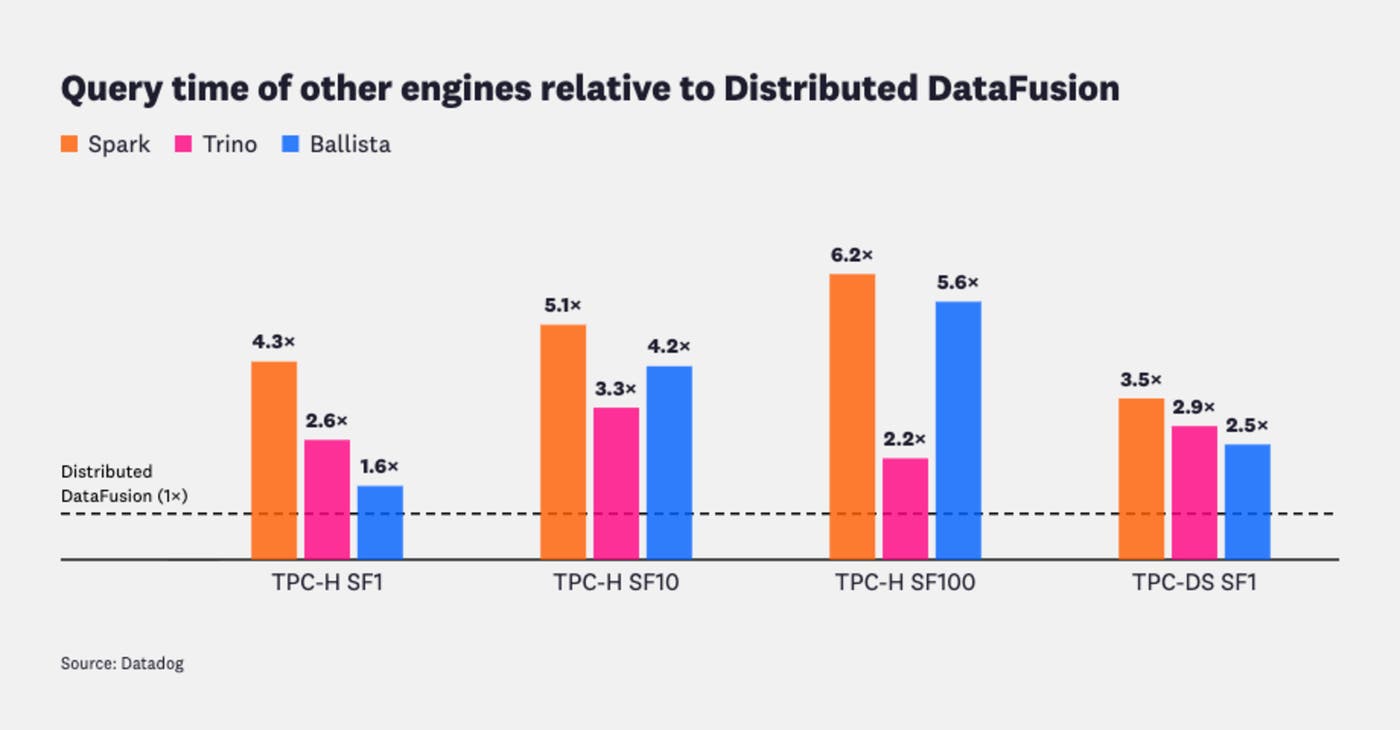
Lower values indicate faster query execution. Results are normalized to Distributed DataFusion (1.0×), so bars above 1.0× represent slower execution.
The synthetic benchmarks show how Distributed DataFusion compares with other engines. In production at Datadog, we’ve seen the impact in three broad categories:
Existing heavy queries: Some long-running queries that previously struggled on a single DataFusion node now complete up to 10× faster by executing across multiple machines at the same total cost.
Existing lightweight queries: When the expected cost of distribution outweighs its benefits, the planner leaves the query on a single machine. This avoids adding distribution overhead to queries that already fit comfortably on one node.
New workloads on a unified query stack: As we adapt more of our infrastructure to Arrow, Substrait, and DataFusion, we’re moving increasingly heavy workloads onto this stack. Previously, these workloads relied on bespoke query engines with custom-built distribution because they could not run on a single machine.
Distributed DataFusion enables us to serve these workloads on a shared DataFusion-based stack, and any system relying on it will get to see the benefits of current and future performance improvements. To understand how Distributed DataFusion achieves this, let’s look at how it extends DataFusion’s existing execution model.
Extending DataFusion beyond a single machine
DataFusion is an extensible framework for building custom databases and analytical systems. To see where Distributed DataFusion fits, let’s briefly recap how a query flows through a single-node DataFusion engine:
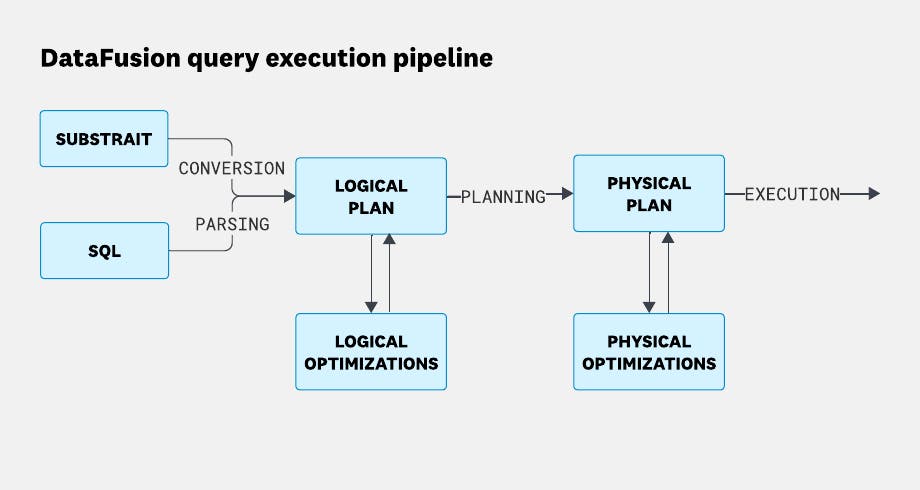
Distributed DataFusion operates exclusively on the physical plan, so it leaves the earlier planning layers unchanged. Whether a query starts as SQL or Substrait, it ultimately becomes a logical plan describing what the query does and then a physical plan describing how it executes. Distributed DataFusion extends that physical execution model from multiple CPUs on one machine to multiple CPUs across multiple machines. It does this by building on DataFusion’s existing partitioning model, which processes non-overlapping streams of data in parallel.
Coalescing results across multiple machines
To see how partitioning works in practice, let’s start with a simple ORDER BY query against a table of weather data. We’ll ask DataFusion to return the 10 highest temperatures ever recorded:
SELECT "MaxTemp" FROM weather ORDER BY "MaxTemp" DESC LIMIT 10You can run it yourself in the DataFusion Fiddle.
On a machine with two CPUs, the physical execution plan looks like this:
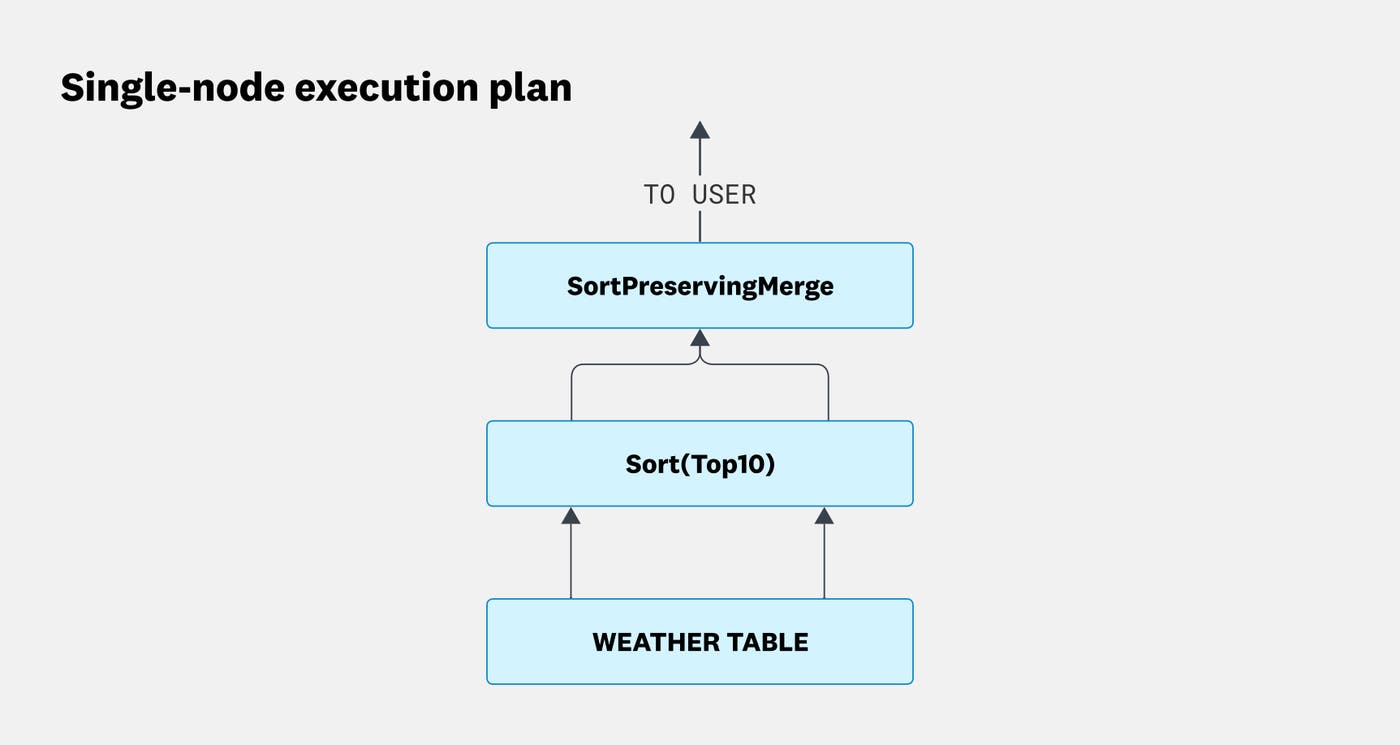
On a single machine with two CPUs, DataFusion partitions the scan into two data streams that make progress in parallel before merging the results. Distributed DataFusion extends that same model across workers.
To illustrate, we’ll configure the planner to use two workers with two CPUs each:
SET distributed.max_tasks_per_stage = 2; -- limit the max distributed workers to 2, small for visualization purposes.SET distributed.file_scan_config_bytes_per_partition = 1024; -- force the distributed planner to distribute this query.
SELECT "MaxTemp" FROM weather ORDER BY "MaxTemp" DESC LIMIT 10Run this example in the DataFusion Fiddle.
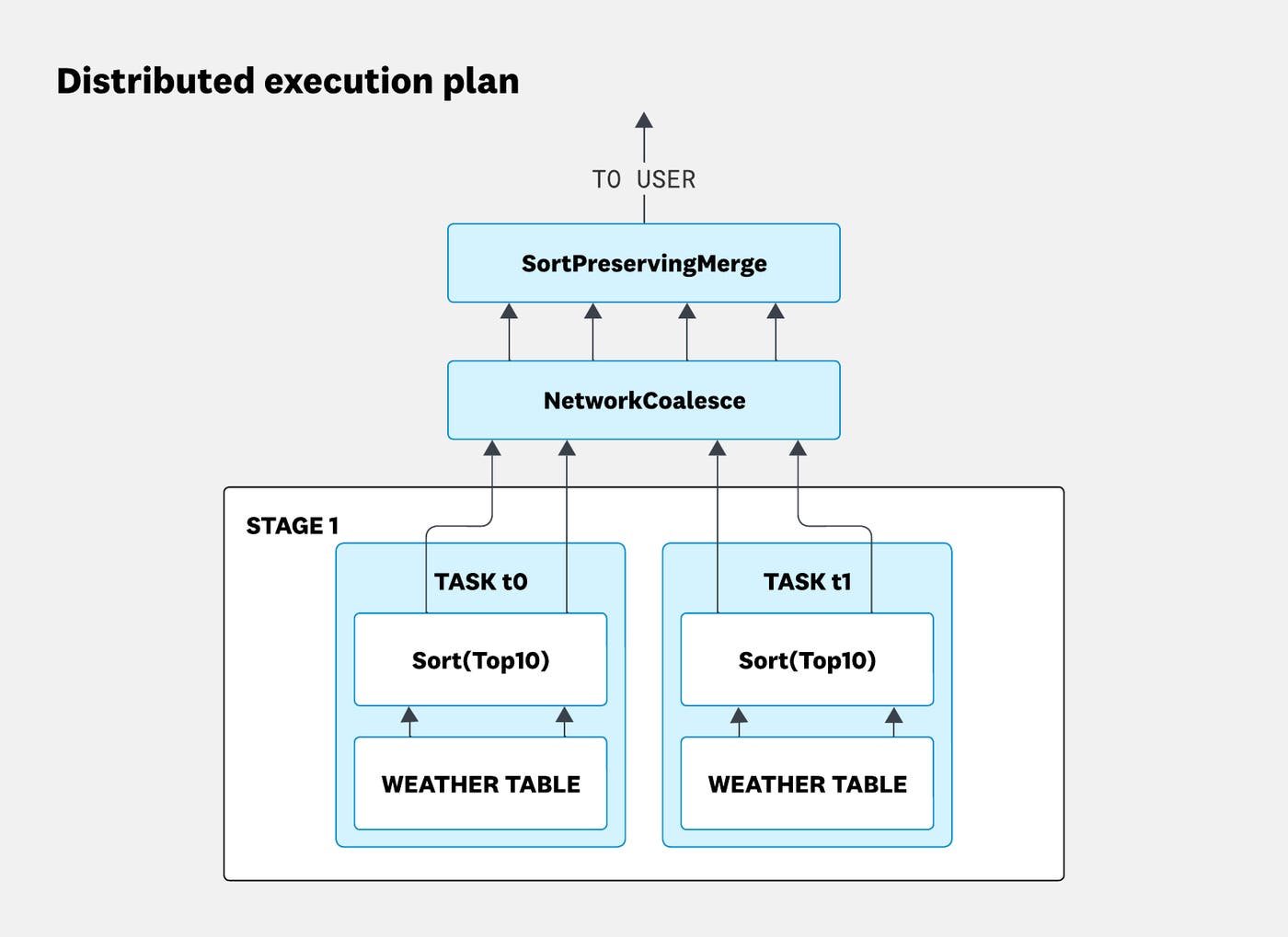
This plan introduces three new concepts:
Stage: A section of the plan separated by a network boundary. Other query engines often call this a fragment.
Task: A task is to a distributed plan what a partition is to a single-node plan. Each stage is divided into tasks, and each task executes on exactly one worker. For simplicity, you can think of one task as one worker.
DistributedLeafExec: A physical plan mode that represents the different variants of the leaf nodes executed in different distributed tasks.
Despite the more complex plan, the execution model is similar:
Single node: Two CPUs process two parallel data streams, which are merged into a single stream before returning the result.
Distributed: Two workers with two CPUs each process four parallel data streams. A
NetworkCoalescegathers the streams from the remote workers over the network before merging them into a single stream.
This works because each stream can process a different, non-overlapping subset of the data. Aggregations are trickier: To compute them correctly in parallel, the data must first be partitioned by the aggregation’s grouping keys.
Shuffling results across multiple machines
Consider an average grouped by RainToday:
SELECT "RainToday", AVG("MinTemp") FROM weather GROUP BY "RainToday";Run this example in the DataFusion Fiddle.
The following diagram shows how DataFusion evaluates the aggregation on a single machine:
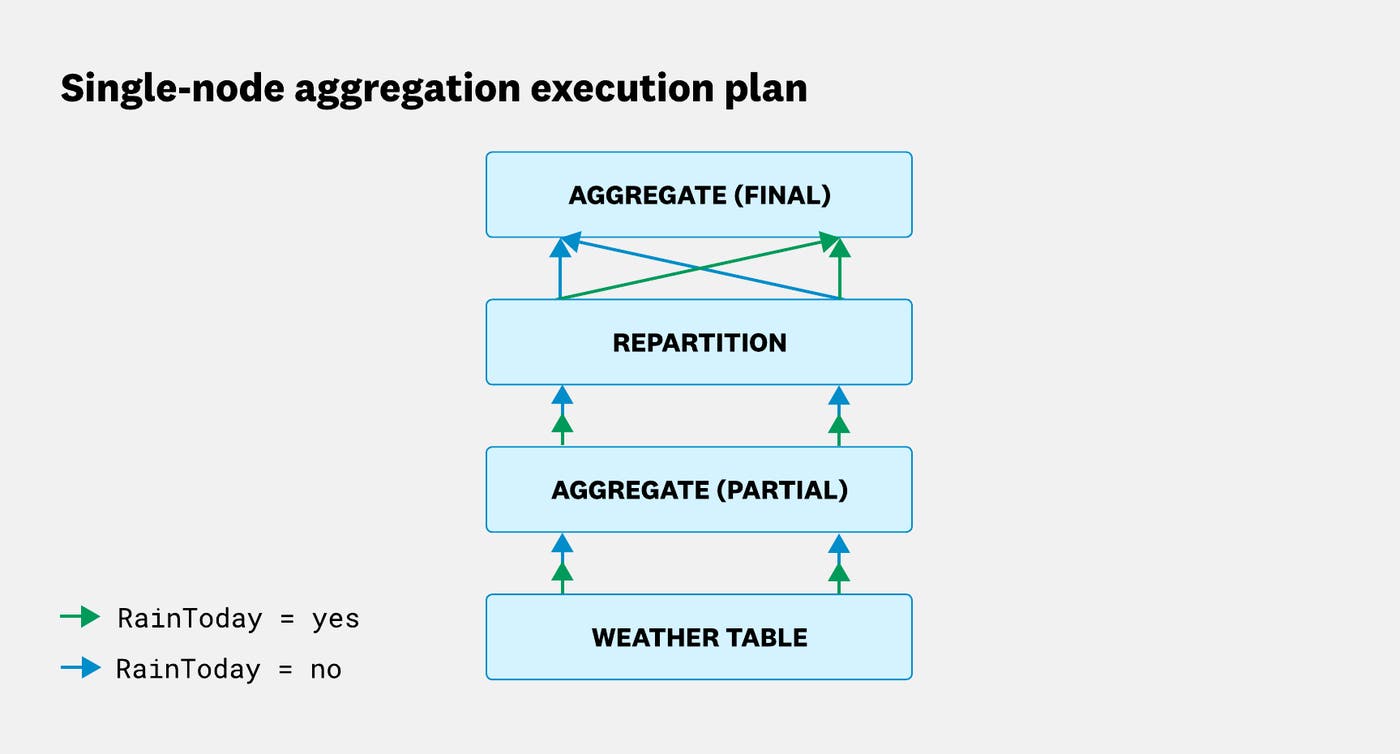
Initially, both partitions contain a mix of grouping keys. After repartitioning, each partition owns a non-overlapping set of keys.
The planner breaks the aggregation into three steps:
Partial aggregation: Each partition independently aggregates the rows it holds. Because rows for a given
RainTodayvalue are spread across both partitions, neither partition has the complete result. For an average, each partition emits a running sum and count for each group rather than a finished average.Repartition: DataFusion hashes each partial result by its grouping key and shuffles the data so that all partial results for the same key land in the same partition. After this step, one partition owns all the partial results for
RainToday = “Yes”, and the other owns all the partial results forRainToday = "No".Final aggregation: Each partition now holds all the partial results for the keys it owns, so it can compute the final averages by combining the sums and counts. The partitions can still perform this work independently and in parallel.
With only two RainToday values (Yes and No), this aggregation fits comfortably on a single machine. To see what changes when an aggregation must be distributed across workers, let’s instead group by Humidity9am, which contains the relative humidity percentage measured at 9 a.m. We’ll use two workers with two CPUs each:
SET distributed.max_tasks_per_stage = 2; -- limit the max distributed task to 2, for visualization purposesSET distributed.file_scan_config_bytes_per_partition = 1024; -- force the distributed planner to distribute this query.
SELECT "Humidity9am", AVG("MinTemp") FROM weather GROUP BY "Humidity9am";Run this example in the DataFusion Fiddle.
The distributed aggregation follows the same basic pattern as the single-node version, but with one important addition: The data must also be repartitioned across machines. Let’s walk through how that works.
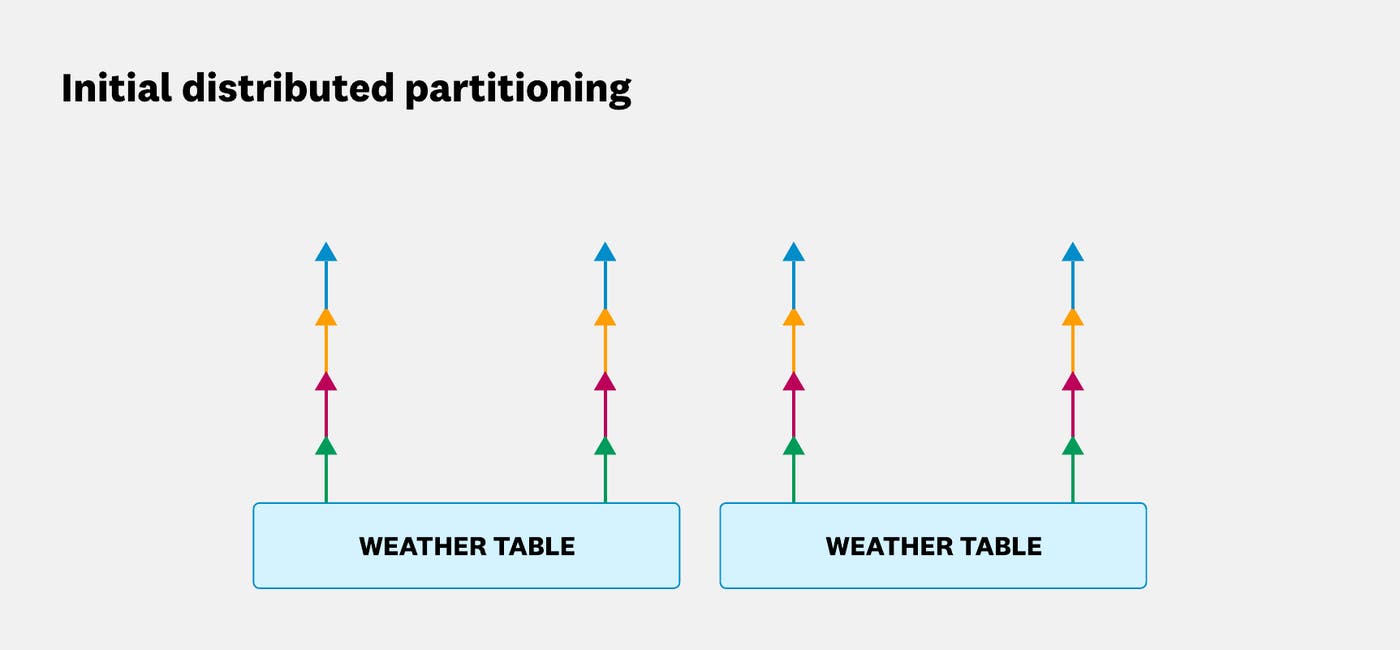
First, the planner decides how many distributed tasks will execute the leaf node. In this example, it creates two distributed tasks, each with two partitions. As in the single-node example, the grouping keys are initially all mixed across all four streams:
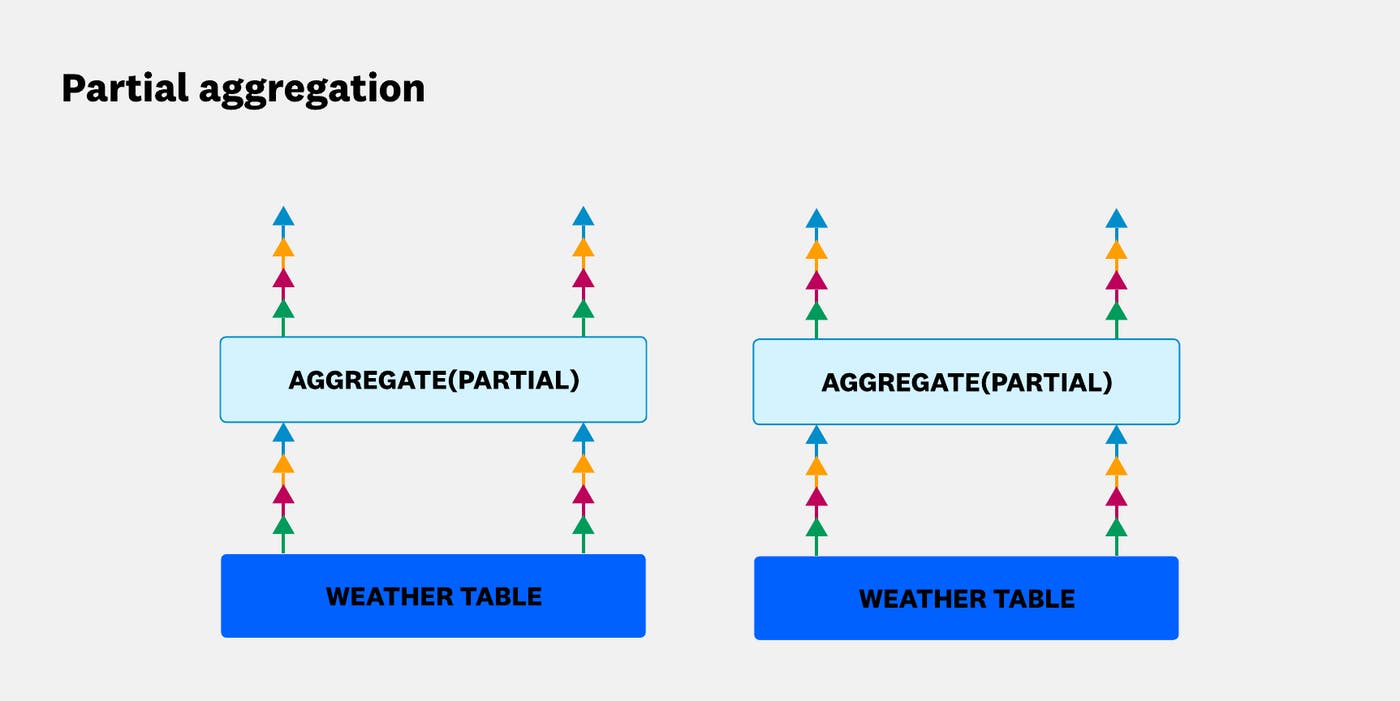
Next, each partition performs a partial aggregation independently. Across the two workers, four partitions perform this work in parallel:
The planner then repartitions the data locally so that each partition handles a distinct, non-overlapping set of grouping keys. The separation of colors in the following diagram shows how rows with the same grouping key are assigned to the same local partition:
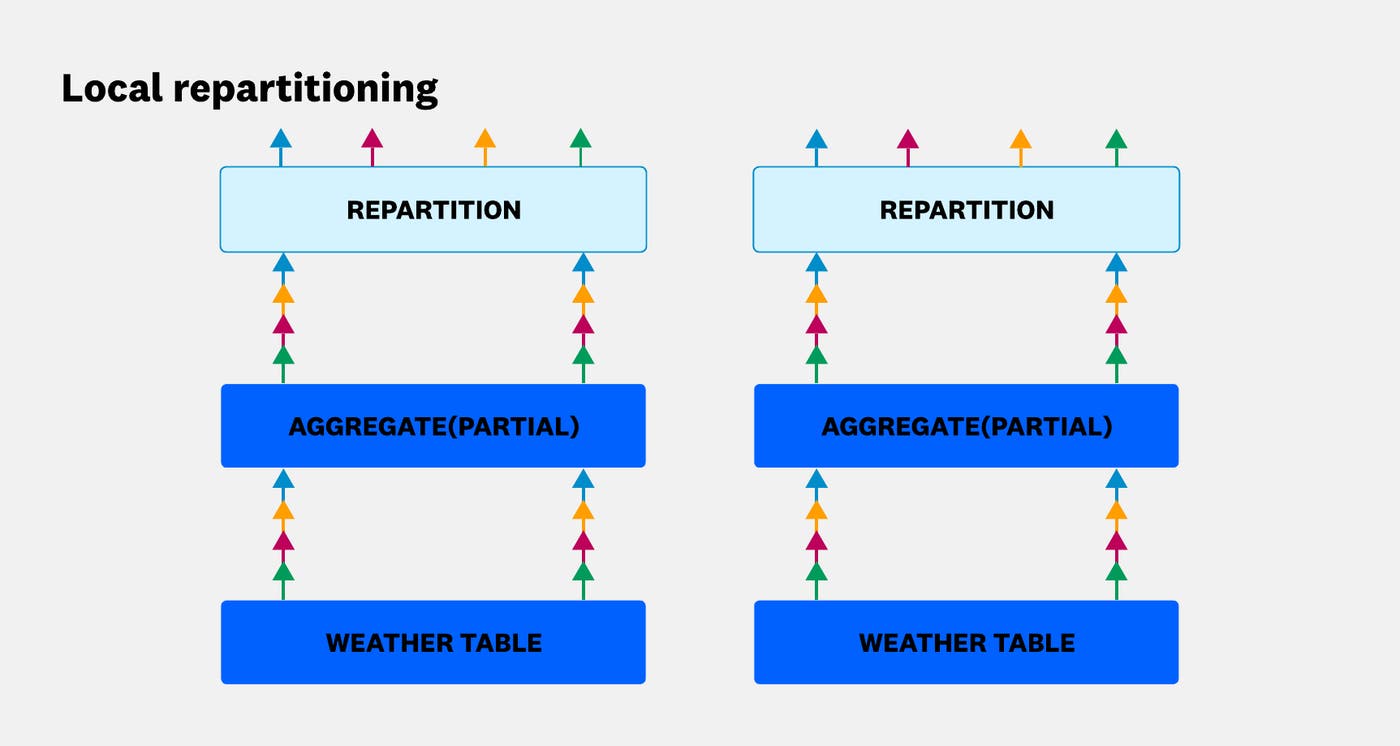
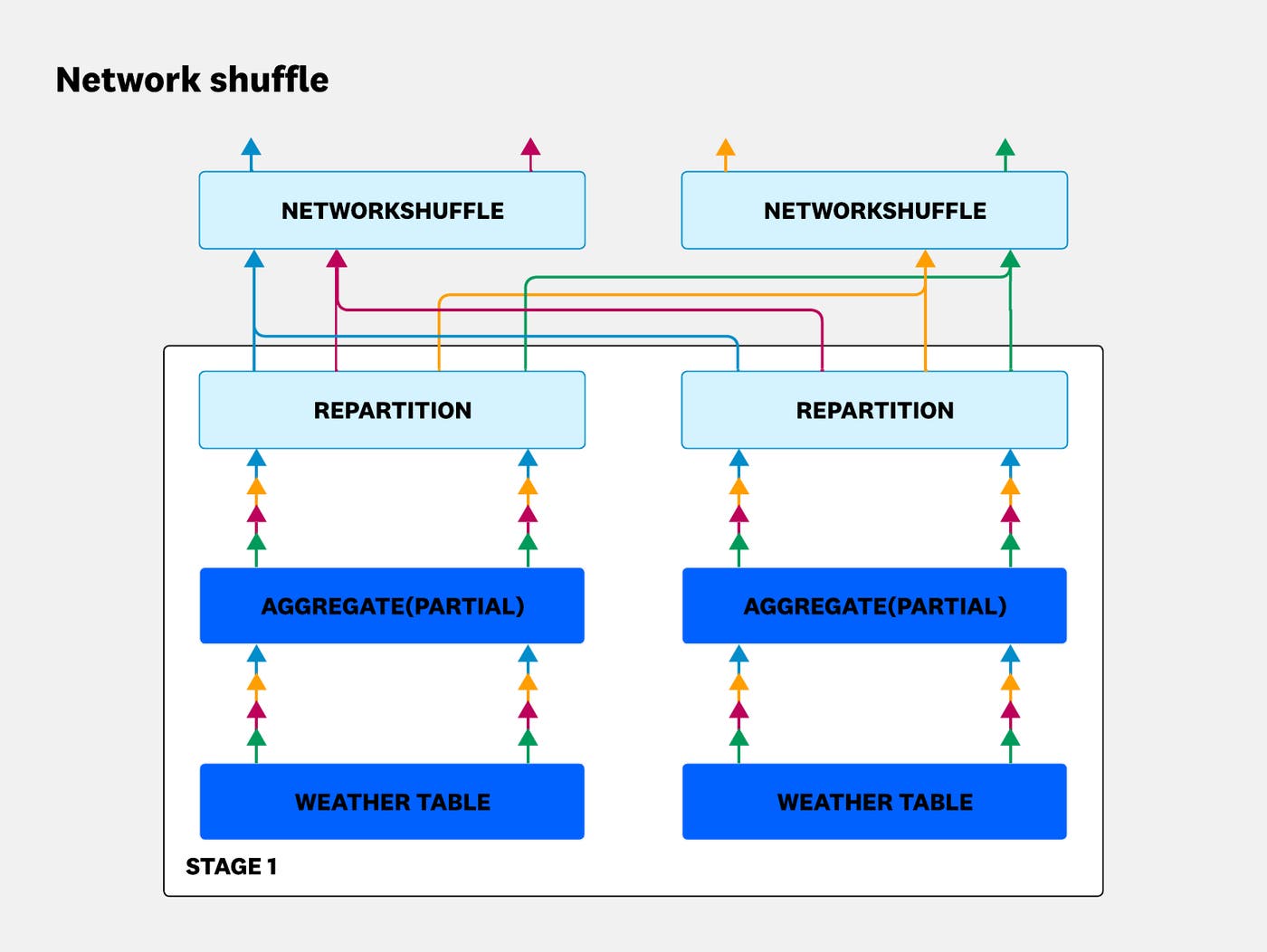
At this point, the data is correctly partitioned within each machine, but not yet across the full cluster. NetworkShuffle, a node introduced by Distributed DataFusion, exchanges the locally repartitioned data between machines so that it’s globally repartitioned:
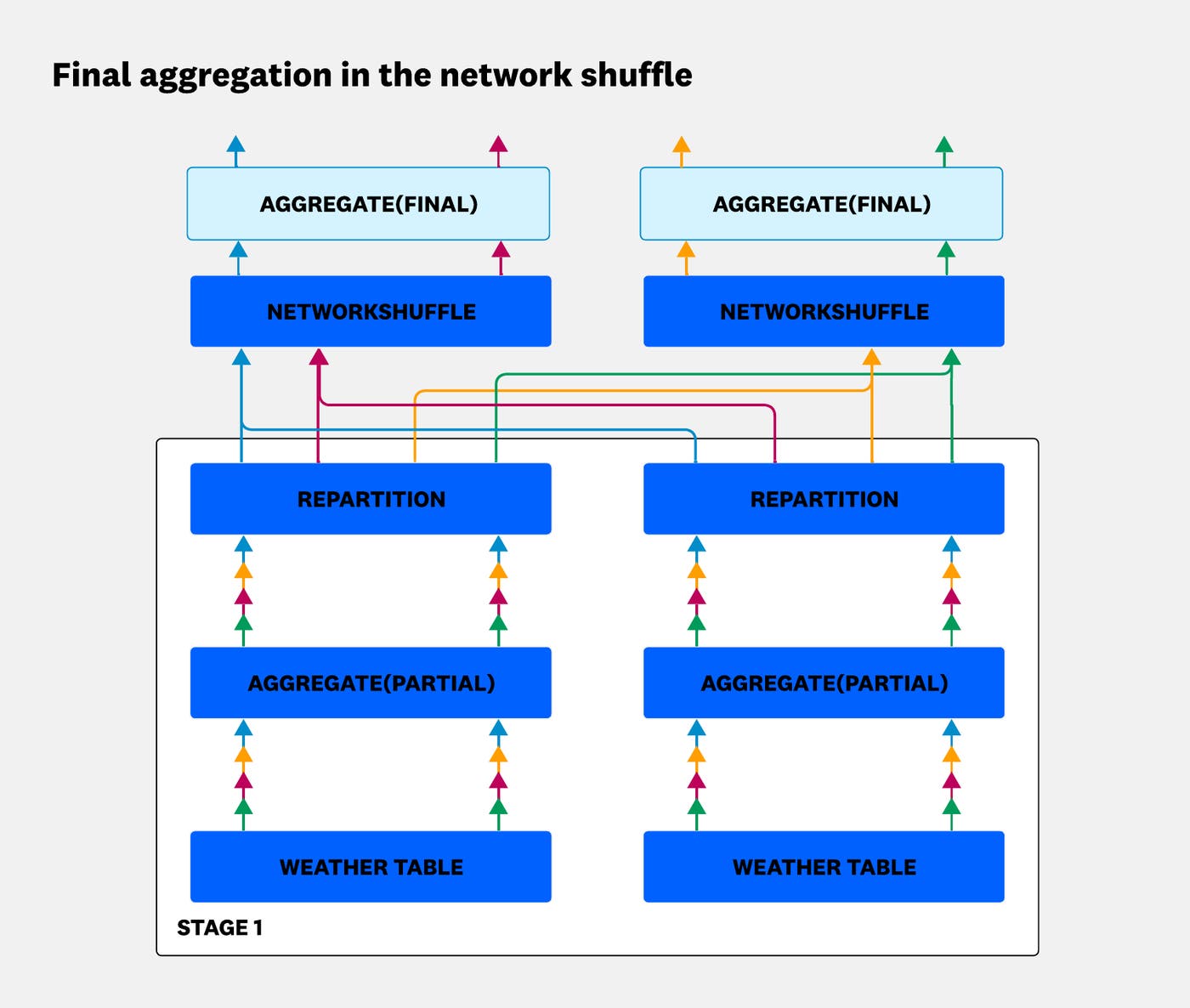
Once the data is globally repartitioned, the workers can safely perform the final aggregation. Each partition owns a non-overlapping set of grouping keys and can combine the partial results for those keys independently:
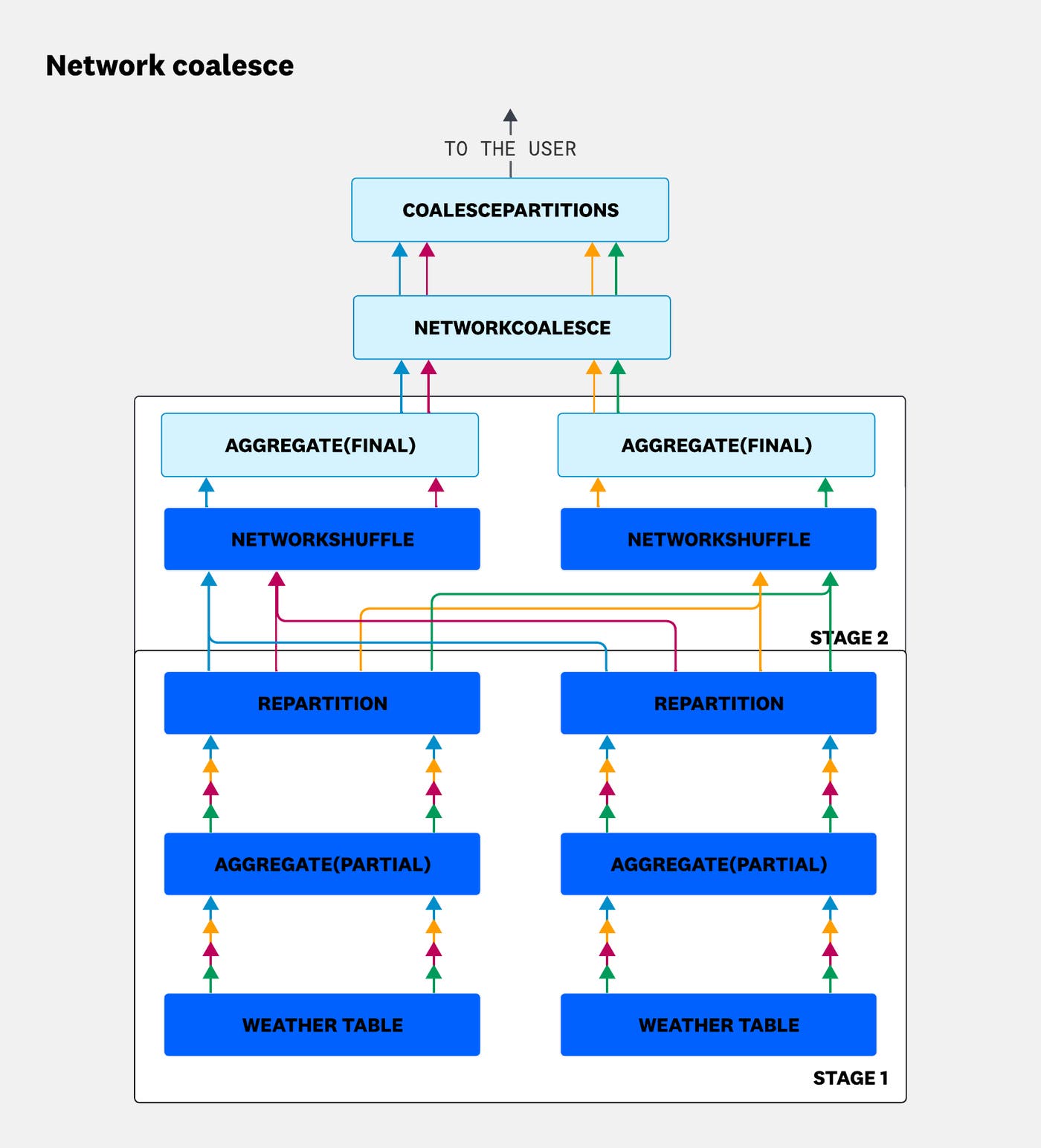
Computation is now complete, but the results are still scattered across multiple machines. NetworkCoalesceExec gathers those streams onto a single machine, and CoalescePartitionsExec merges them into the final result returned to the user.
This example shows how Distributed DataFusion distributes an aggregation, but the framework can also distribute other operations, including:
Partitioned joins
Broadcast joins
Distributed unions
Tree-reduce aggregations
Extensibility in practice
Everything we’ve covered so far—partitioning, network boundaries, coalescing, and shuffling—is applicable to most distributed query engines. What distinguishes Distributed DataFusion is that it provides these capabilities as an extensible framework rather than a complete engine.
Instead of prescribing how data should be read, distributed, or executed, Distributed DataFusion lets users bring their own data sources, execution nodes, networking, and planning logic. The project documentation includes examples for adapting a cluster to networking infrastructure, distributing custom execution nodes, propagating custom configuration across workers, building custom distributed plans, and routing data partitions to specific workers for cache-affinity scenarios.
Lessons learned while designing Distributed DataFusion
Two of the most important lessons we learned while building Distributed DataFusion were when not to distribute and how to preserve DataFusion’s extensibility.
Know when not to distribute
Distributing queries was never the goal. It was a trade off required to support Datadog’s scale. Every distributed query introduces overhead:
Network exchanges: Data must move between workers, consuming network bandwidth that could otherwise be used to serve user queries.
Data serialization: Network transfers require serializing and deserializing data, consuming CPU cycles.
Coordination overhead: Several machines must coordinate execution while exchanging status information and other metadata.
Paying those costs for queries that fit comfortably on a single machine only increases resource use and latency. Distributed DataFusion avoids that overhead in two ways:
Recognizing when distribution isn’t worthwhile: If a query is expected to scan only a small amount of data or perform relatively little computation, Distributed DataFusion executes it on a single worker instead of distributing it.
Keeping distribution lightweight: Data moves over the network by using Arrow Flight streams, the coordination layer remains lightweight, and the system is continuously benchmarked to keep the distribution efficient.
Build a framework, not a service
This follows the same philosophy that led us to build on Apache DataFusion. Distributed DataFusion is not an out-of-the-box service. Instead, it’s a library that organizations can use to build query engines tailored to their own data sources, with as few prescribed implementation details as possible.
We designed it with many internal users in mind. Different teams at Datadog build different production services, connect to different data sources, and support different query patterns. The same flexibility also benefits organizations outside Datadog that need to build distributed query engines for their own workloads.
Building Distributed DataFusion as a framework for distributed query engines lets us:
Share a common foundation across teams at Datadog
Enable community contributions that improve the project for everyone
Next steps for Distributed DataFusion
Distributed DataFusion is still evolving. We’re currently focused on two areas:
Adaptive query execution
Because Distributed DataFusion is a framework, users can bring their own data sources. Not every data source exposes the statistics the planner relies on to estimate how much data a query will scan—or even whether distributing the query is worthwhile.
We’re making execution adaptive. Instead of committing to a distribution strategy entirely up front, the engine will adjust as it observes the actual volume of data flowing through the plan, allowing it to make better decisions even when statistics are missing or unreliable.
GPU acceleration
Now that Distributed DataFusion can scale a single query across multiple machines, we’re also exploring a different kind of hardware: GPUs.
GPUs offer a much higher compute-to-price ratio than CPUs but have less memory. Distribution helps address that limitation. By spreading a query across multiple GPUs, we can pool their memory while taking advantage of their aggregated compute capacity, enabling workloads that wouldn’t fit on a single device.
Building distributed query engines together
Distributed DataFusion is already part of the production infrastructure at Datadog and other companies. We built it as a framework rather than a fixed service so that it can support many more use cases beyond our own.
Most companies that reach this scale end up building their own distributed query layer in-house, and we don’t think that effort needs to be duplicated. A shared foundation that each team can adapt to its own data sources and query patterns is better than everyone reinventing the same distribution machinery. The more teams build on it, the better that foundation becomes for everyone.
If you’re building an interactive query engine, we’d love for you to give Distributed DataFusion a try and to contribute back. Whether you’re plugging in a new data source, adding a distributed join strategy, running the benchmarks against your own datasets, or improving the documentation, every contribution helps make Distributed DataFusion a stronger foundation for building distributed query engines.
Want to work on projects like Distributed DataFusion? Explore engineering opportunities at Datadog and help build the systems behind observability at scale.
