Get Started with Datadog

The Monitor

Cut AI agent cost and improve accuracy with Code Execution in the Datadog MCP Server

Published

Read time

6m

Cut AI agent cost and improve accuracy with Code Execution in the Datadog MCP Server
Kit Freddura

Kit Freddura

Senior Software Engineer

Amy Zhou

Amy Zhou

Product Manager

Observability investigations rarely follow a straight line. A latency question might cause an AI agent to start with a metric, pivot into traces, compare a deployment window, and finish by reducing thousands of logs to a few patterns. Each individual query is easy, but propagating context throughout an entire investigation can be tricky and expensive.

With conventional MCP tools, each step becomes another exchange with the model: choose a tool, inspect its response, decide what to call next, and pull the new result into the conversation. That process works well for a focused lookup, but it can be inefficient in a multisignal investigation. The model ends up spending context on tool schemas, raw responses, and the intermediate steps between calls rather than focusing on outcomes.

Datadog Code Execution, generally available, gives AI agents a programmable way to investigate observability data through the Datadog MCP Server. From a sandboxed JavaScript environment, an agent can query several Datadog APIs, run independent work in parallel, branch on results, join data, and return only the evidence needed for the answer. By returning a more focused set of evidence to the model, Code Execution can improve answer accuracy while reducing the cost of running AI agents.

In this post, we’ll show how you can:

Keep multisignal investigation logic in code

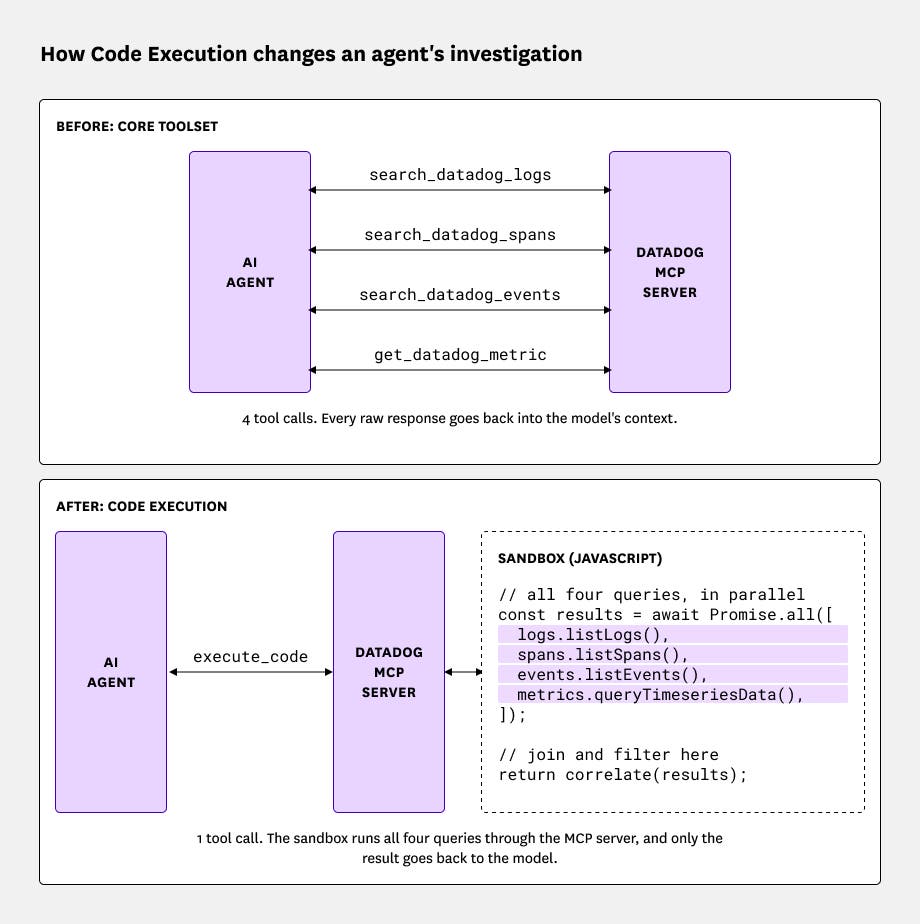
The Datadog MCP Server gives AI agents access to tools for querying logs, metrics, traces, monitors, dashboards, and other Datadog data. Traditional MCP tools provide the agent’s underlying model with clear, bounded actions and remain the shortest path for a focused question. For an investigation that crosses several data sources, however, an agent might need to call multiple tools and pass each result back through the model before deciding what to do next. Code Execution moves that intermediate work into code.

Code Execution combines a small MCP interface with a programmable execution environment. The agent interacts with Code Execution through two MCP tools, execute_code and search_datadog_sdk, to explore and query Datadog across its entire API surface. Within the execution environment, both control flow and the intermediate data remain in code instead of passing through the conversation one tool call at a time.

Inside the sandbox, the agent can run independent queries together, use one result to shape the next query, normalize responses from different APIs, and join them on a shared field. It can also filter or aggregate large responses before returning any results to the conversation. The available API operations are based on the Datadog TypeScript client SDK, so generated code uses the same clients and request shapes as other Datadog integrations. Each API operation stays individually typed and subject to its required permissions. The agent composes them by using ordinary control flow.

For example, an agent can generate and run the following script to query logs and spans for errors over the same 1-hour window. The code runs the two queries in parallel, groups the results by service, joins them, and returns only the services that appear in both result sets:

import { client, v2 } from "@datadog/datadog-api-client";
// Create clients for the two Datadog APIs we want to compare.
// Authentication stays outside the sandbox; the MCP service applies the caller's permissions.
const config = client.createConfiguration();
const logs = new v2.LogsApi(config);
const spans = new v2.SpansApi(config);
// Give both queries the same one-hour window so their counts are comparable.
const from = dd.time.hoursAgo(1);
const to = dd.time.now();
// Find the services producing the most errors in logs and traces. The queries
// run together, so neither result needs a separate round-trip through the model.
const [logErrors, spanErrors] = await Promise.all([
logs.aggregateLogs({ body: {
filter: { query: "status:error", from, to },
compute: [{ aggregation: "count" }],
groupBy: [{
facet: "service",
limit: 25,
sort: { aggregation: "count", order: "desc", type: "measure" },
}]
}}),
spans.aggregateSpans({ body: {
data: { type: "aggregate_request", attributes: {
filter: { query: "status:error", from, to },
compute: [{ aggregation: "count", metric: "*" }],
group_by: [{
facet: "service",
limit: 25,
sort: {
aggregation: "count",
metric: "*",
order: "desc",
type: "measure",
},
}]
}}
}}),
]);
// Index the log counts by service, then join them to the span results.
const logsByService = new Map(
(logErrors.data?.buckets ?? []).map(
bucket => [bucket.by?.service, bucket.computes?.c0]
)
);
// Return only the overlap instead of sending both raw responses to the model.
return (spanErrors.data ?? [])
.map(bucket => ({
service: bucket.attributes?.by?.service,
errorSpans: bucket.attributes?.compute?.c0,
errorLogs: logsByService.get(bucket.attributes?.by?.service) ?? 0,
}))
.filter(service => service.errorLogs > 0)
.slice(0, 5);

Each API in this example can return its top 25 services, but only the five services that appear in both result sets cross back into the model’s context. Without Code Execution, the model would have to receive both result sets and perform that join in the conversation.

Get more accurate answers while spending less

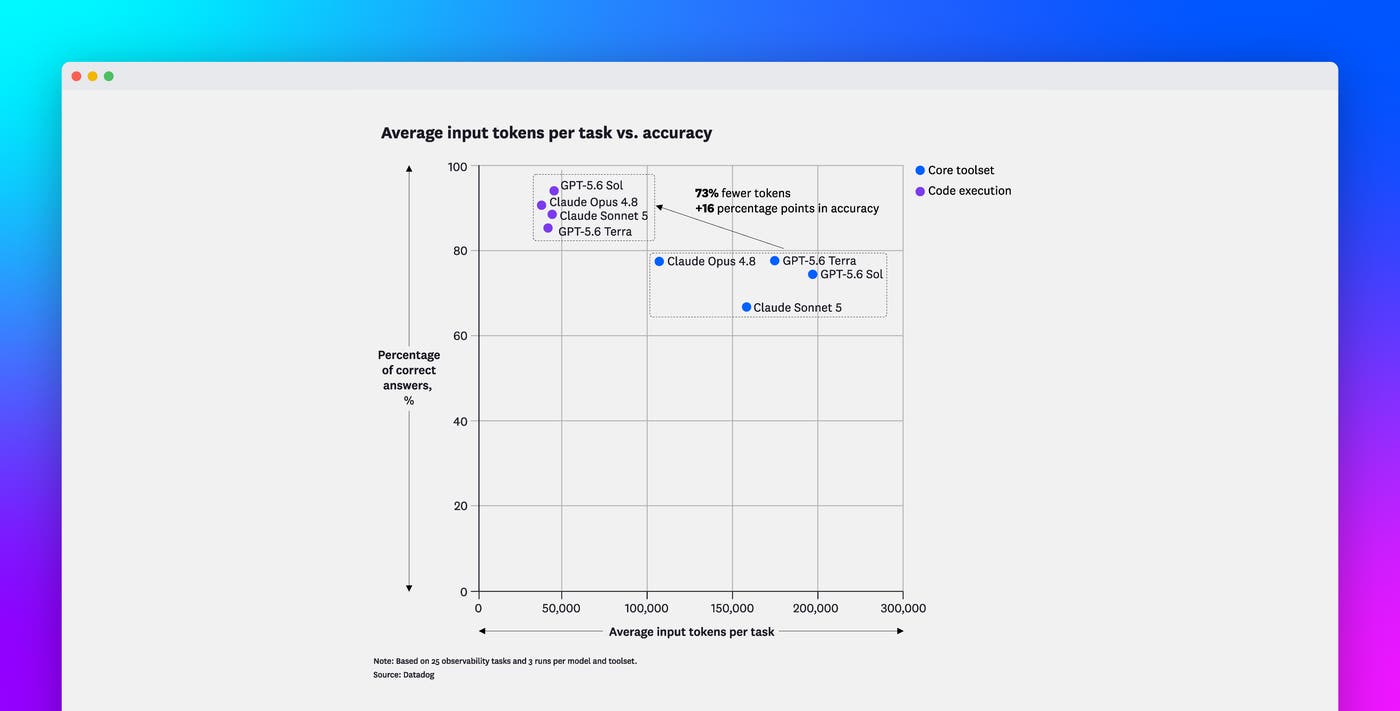
To measure how Code Execution affects investigation quality and cost, we compared it with Datadog’s Core toolset. The comparison covered 25 observability tasks across metrics, logs, traces, Datadog Error Tracking, and investigations that crossed more than one data source. We ran each task three times with GPT-5.6 Terra, GPT-5.6 Sol, Claude Sonnet 5, and Claude Opus 4.8, and then we scored the final answers for correctness.

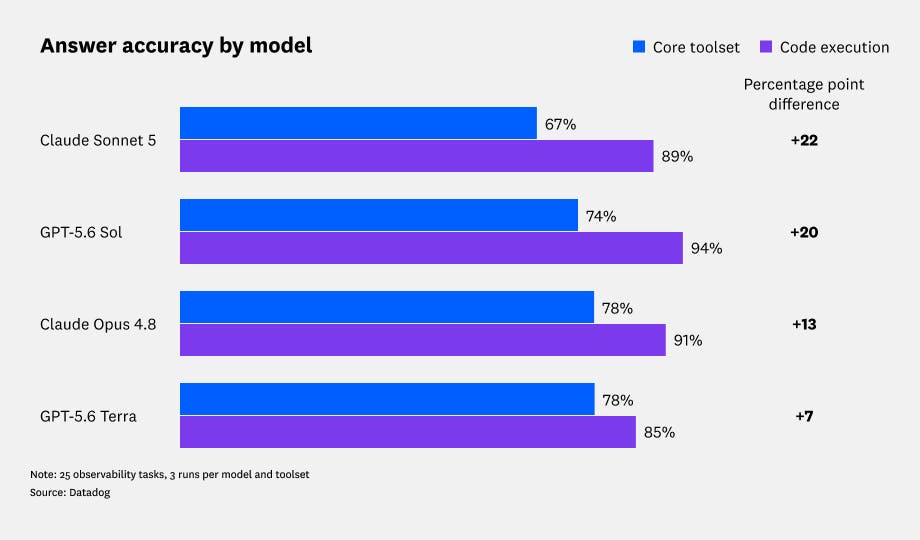
Code Execution improved answer correctness with every model we tested, with gains ranging from 7.7 percentage points (pp) to 21.8 pp:

ModelCore toolsetCode Execution toolsetChange
GPT-5.6 Terra77.6%85.3%+7.7 pp
GPT-5.6 Sol74.4%94.0%+19.6 pp
Claude Sonnet 566.7%88.5%+21.8 pp
Claude Opus 4.877.5%90.6%+13.1 pp

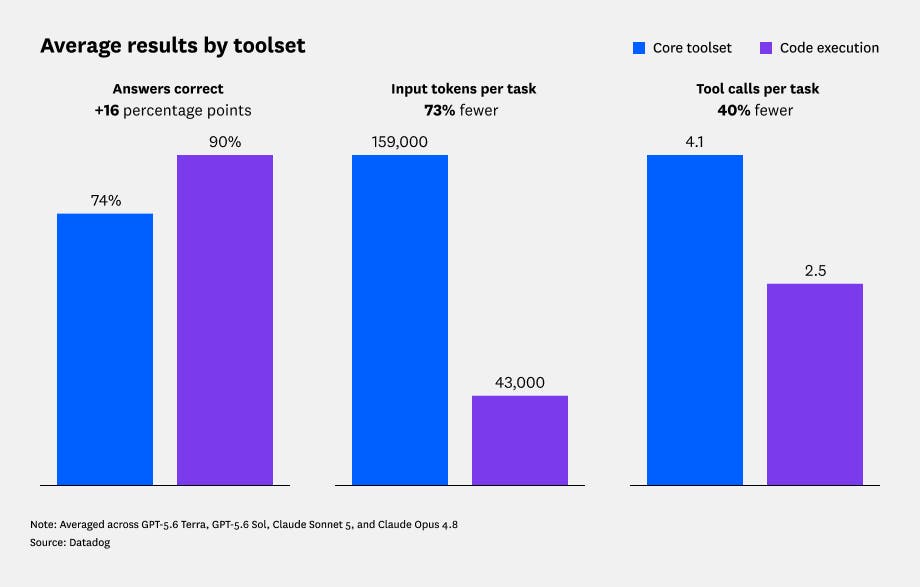
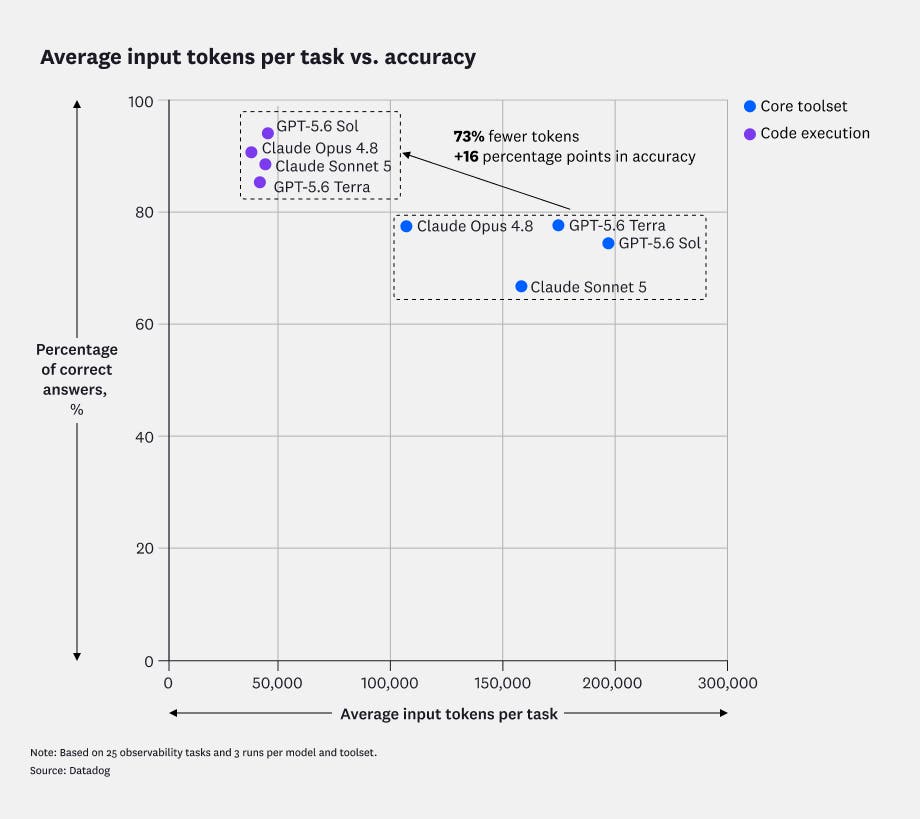
Because model costs depend on token usage, reducing the amount of context sent to a model can lower the cost of running an investigation. The averaged results across the four models showed that Code Execution used 73.2% fewer input tokens and 39.6% fewer tool calls:

CategoryCore toolsetCode Execution toolsetChange
Answer correctness74.1%89.6%+15.6 pp
Input tokens159.4k42.8k-73.2%
Tool calls4.082.47-39.6%

Note: Values in the Core toolset and Code Execution toolset columns are rounded. Values in the Change column are calculated from the unrounded values.

Run generated code without handing it your credentials

Letting a model generate code against production observability data requires a clear security boundary. Code Execution keeps execution and authentication on opposite sides of that boundary.

Generated JavaScript code runs in an isolated sandbox without access to the caller’s credentials. When the code calls a dd.* method, the trusted MCP service makes the request on the caller’s behalf, enforces their existing Datadog permissions and Code Execution policies, sanitizes the response, and returns it to the sandbox. The code can work with the resulting data, but it never handles the credentials that are used to retrieve it.

Set up Code Execution

To get started with Code Execution, connect the Datadog MCP Server to your AI client and enable the code-exec toolset.

When Code Execution is enabled, ask your agent a question that requires it to correlate multiple kinds of observability data. For example: “Find the services whose error rate changed after last night’s deployments, then show me the trace patterns that changed with them.” The agent can use Code Execution to gather the relevant data, correlate it, and return the evidence behind its answer.

Start investigating across Datadog with less model context

Code Execution helps AI agents use the Datadog MCP Server to carry out multistep observability investigations while keeping intermediate logic and data inside a sandbox. By reducing the amount of intermediate context and the number of tool calls that pass through the model, Code Execution can lower the cost of running AI agents while helping them produce more accurate answers. To learn more, see the Code Execution documentation, the toolset configuration guide, and the MCP Server documentation

If you’re new to Datadog, you can to try Code Execution for your investigations.

Start monitoring your metrics in minutes