

Addie Beach
Technical Content Writer

Rui Martins Lacerda
Senior Software Engineer
As teams rush to adopt AI, they often find themselves with conflicting workflows unique to each individual developer. To manage costs and promote good development practices, organizations need to establish Golden Paths around AI usage.
AI Golden Paths are standardized flows that help developers work with agents more reliably and effectively. But how do you sift through all the possible workflows to decide what these Golden Paths should be? And, once you’ve implemented your Golden Paths, how do you measure their success? In this post, we’ll explore how a Datadog AI guild built a process for creating AI Golden Paths grounded in data.
How to implement AI Golden Paths with agent controls
At Datadog’s Frontend Augmented by AI guild, we work to improve AI-assisted frontend development by tracking AI usage, tailoring internal tooling, and developing standardized Golden Paths. These paths inform both what AI tools we use and how we configure them. Because over 50 Datadog development teams use the paths we create, we need to ensure that any changes or additions result in measurable improvement.
We were curious whether we could enforce our Golden Paths by steering agents to produce consistent, high-quality output through controls. Golden Paths define the preferred workflows, but controls are the actual mechanisms that guide, restrict, or validate agent behaviors to keep developers on these paths. Controls can include skills, hooks, and tests. Many controls can impact token usage and spend, especially when implemented at such a large scale. As a result, we developed a series of questions that help us determine the right controls to use and evaluate their effectiveness:
What behavior do you want to change?
Golden Paths have positive goals, such as promoting cleaner or more efficient code, enhancing security, or reducing costs.
To steer agents toward these goals, you need to implement controls that discourage counterproductive behaviors. These negative behaviors can be common mistakes your agents make, including running improperly formatted CLI commands, attempting to access forbidden files, or not following codebase standards. You might also want to prevent behaviors that impact model performance, such as loading unnecessary skills or producing lengthy output.
Which controls should you use?
Each control has different cost and performance implications. For example, some coding agents automatically load root-level documentation like AGENTS.md files into context windows at startup, which can eat away at token budgets. On the other hand, changing your interface configuration to clarify expected behaviors has a much lighter impact.
At Datadog, we aim to use the control with the smallest scope that still gives us the output we want. To determine what this control is, we use a flowchart:
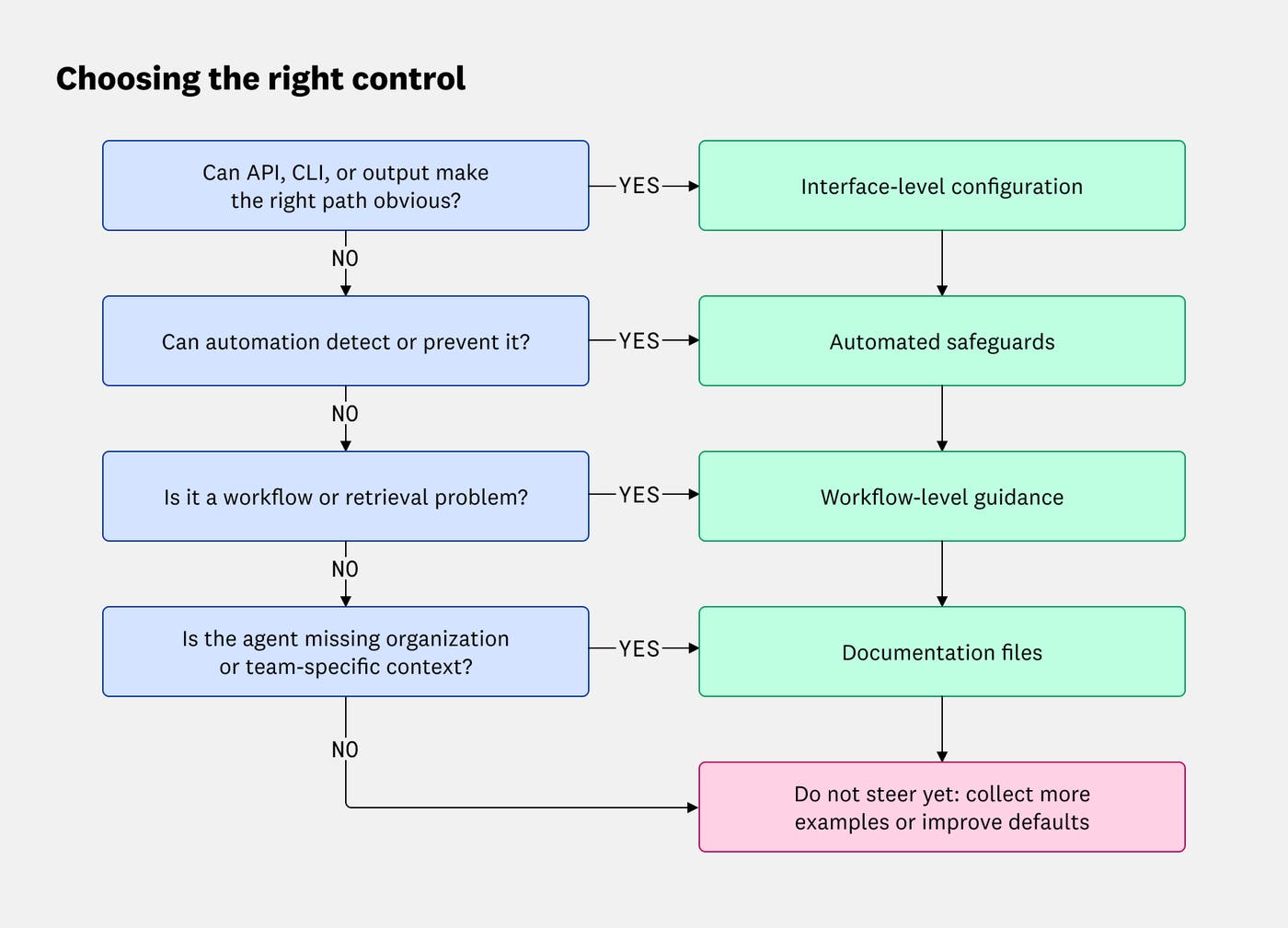
| Question | Control type | Examples | Use case |
|---|---|---|---|
| Can changes to your API, CLI, or agent output make the right path obvious? | Interface-level configuration | API, CLI, error, and output contracts | Making the preferred output easier to produce through defined behavioral rules |
| Can automation detect or prevent it? | Automated safeguards | Lint rules, type checks, tests, generators, templates OR------------- Hooks | Detecting issues in generated code or repository state OR------------------ Validating agent behavior at defined execution events |
| Is it a workflow or information retrieval problem? | Workflow-level guidance | Skills, commands | Specifying retrieval paths or carrying out complex, multi-step tasks |
| Is the agent missing organization- or team-specific context? | Documentation files | AGENTS.md | Establishing broad best practices based on organizational context |
How will you collect data and define success?
To see whether the controls you’ve configured are resulting in behavioral improvements, you’ll want to test them prior to widespread implementation. Just as controls have different trade-offs, however, methods for collecting and evaluating data require varying levels of time, effort, and resources.
Evaluations often produce the most comprehensive results, as they enable you to test specific hypotheses in controlled environments. However, they take effort to create, requiring annotated test cases and clear evaluation prompts. Our team therefore saves evaluations for controls that have a broader organizational impact or need to be judged on more complex criteria, such as output quality or token usage.
For low-impact, low-risk controls with easily measurable success conditions, you can try adding automated controls to your local development environment. Then, you can simply observe whether the negative behavior is fixed. You might choose this approach to verify that a lint rule correctly enforces naming conventions, for example. In this case, straightforward observation can provide you with all the data you need to make a clear decision, without the effort of creating a dedicated evaluation.
Who owns the control?
Teams often need to update controls as models shift, codebases change, and new best practices supplant existing ones.
Clear lines of ownership help ensure maintainability. For smaller controls, ownership is often limited to a single developer and recorded at the team level, with updates on an ad hoc basis.
On the other hand, more complex controls like skills, commands, or root-level documentation may be owned by entire teams or guilds. For the latter, owners should have access to monitoring data, visualizations, and alerts to help them proactively decide when controls need updates. Real-time monitoring is especially important for controls that have major cost implications or are critical to workflows.
Where should the control live?
The larger a control’s footprint, the greater the risk of unnecessary bloat. As a result, when deciding where you should implement your control, you’ll usually want to start with the smallest scope and work your way up. Doing so means determining which users, repositories, tasks, and resources the path applies to.
If the control is relevant to:
User-specific workflows and preferences: add it at the local level, outside of shared repositories.
Specific packages, apps, or subtrees: add it to domain-specific directories within the repository.
The entire repository: add it to root-level configuration.
How should you write controls?
To help with maintainability and encourage high-quality output, you’ll want to establish best practices for writing more complex controls, such as skills and agentic documentation. You may want to include recommendations like:
Use concrete examples
Use documentation files to specify when skills should be triggered or excluded
Lead with rules, commands, stable files, and decision paths
Don’t include unnecessary rationale or vague goals
Measuring the impact of root-level agentic documentation
Using the process outlined above, the Frontend Augmented by AI guild has tested dozens of controls across our shared frontend repository.
One particularly important control that we analyzed was our root-level agentic documentation. A quick review of our AGENTS.md file revealed it to be bloated with outdated information and unnecessary, team-specific instructions. We suspected that these files were driving up token usage, reducing available context, and increasing latency for users across our department. At the same time, however, we were worried that getting rid of these files would mean losing important instructions that would meaningfully degrade output quality. More importantly, would removing these files actually improve performance?
To test these concerns, we created a set of evaluations that measured agent performance within our current setup against a branch without root-level documentation files. By organizing the results into a dashboard, we were able to compare performance across multiple metrics, including:
Run cost
Run duration
Number of tools called
Number of iterations
Number of tokens used
We also displayed the average consistency of agent runs. We calculated the consistency score by finding the difference between the highest and lowest evaluation scores, then subtracting this number from one so that a higher consistency score would indicate greater stability.
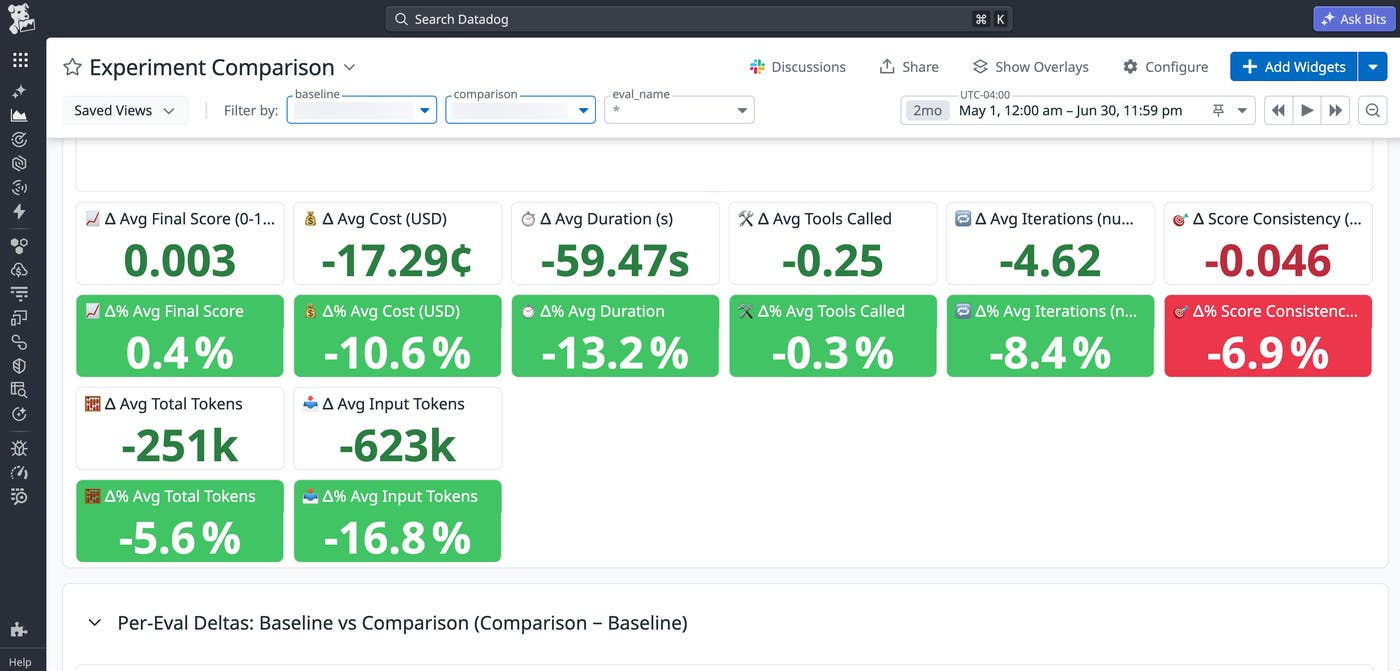
Overall, the results of our experiment favored removing root-level documentation. On average, the test branch saw 13% faster runs, 16% fewer input tokens, and 10% lower spend compared to the control.
We did note a small dip in output consistency, with a roughly 7% decrease on the test branch. However, we predict that we can close this gap by translating instructions from our root-level files into other, more finely scoped controls, including skills, hooks, lint rules, tests, and user- or domain-level documentation files.
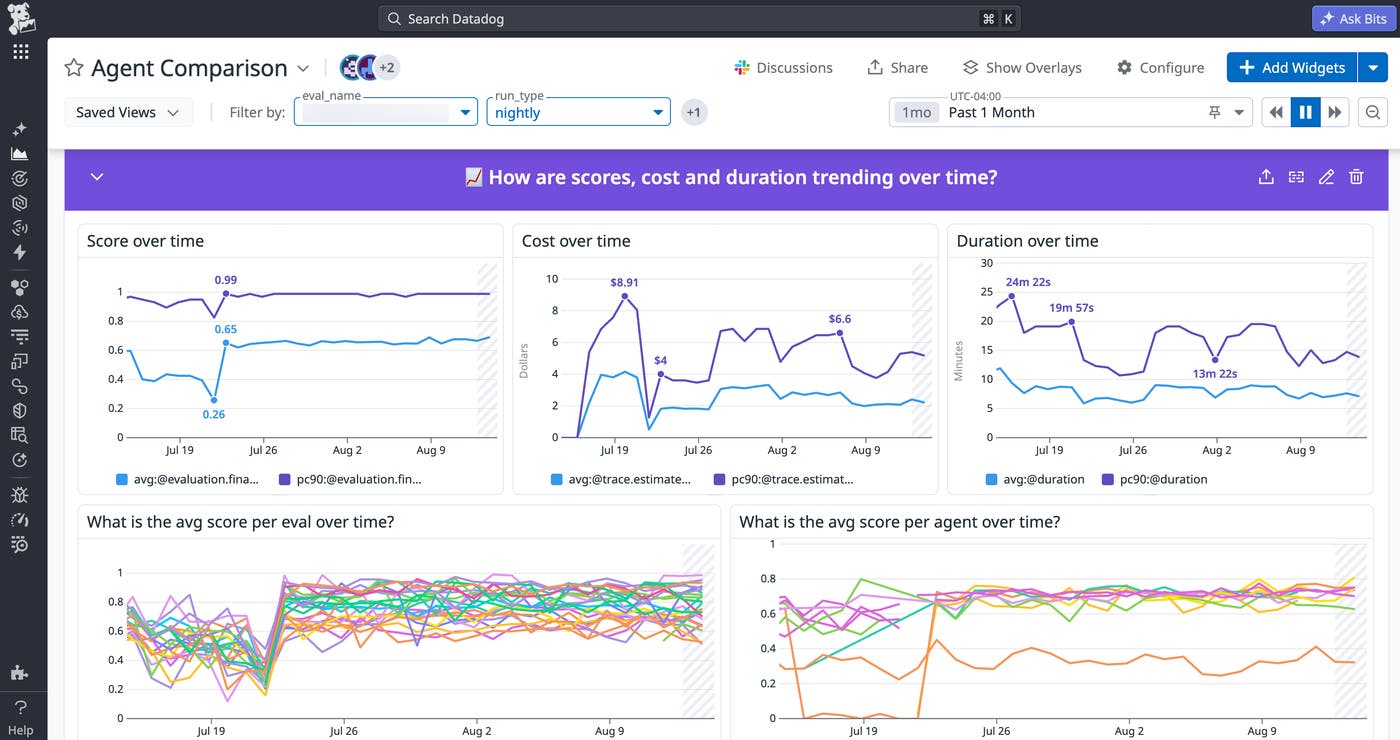
To ensure that consistency doesn’t degrade further as we fine-tune our controls, we’ve established evaluations for critical functionality. This helps us identify and prioritize the paths that may be suffering the most. For low-performing evaluations, we tweak the relevant controls in carefully designed experiments, implementing them only after multiple test runs show significant improvement over the original benchmarks. We can then monitor any impact on overall agent performance and output quality via a real-time dashboard that tracks trends in evaluation score, cost, and duration.
Build tried and true AI Golden Paths
AI Golden Paths provide you with clear goals for agentic behavior, which can help you standardize your team’s processes in the face of changing models and individualized workflows.
By creating a framework for testing and implementing new agentic controls, we at Datadog’s Frontend Augmented by AI guild are able to ground decisions about Golden Path configuration in concrete data. Asking a series of questions helps us pinpoint scope and desired outcomes, while experiments enable us to measure success. Meanwhile, dashboards let us track agent performance over time and tweak controls accordingly.
To start building and evaluating your own AI Golden Paths, you can read our blog posts to learn more about configuring agentic Golden Paths and running large language model (LLM) experiments using Datadog.
Or, if you’re new to Datadog, you can sign up for a 14-day free trial.
