
Stella Ma
Product Marketing Manager

Arti Arutiunov
Product Manager
Micro-frontend architectures, where independent teams build and deploy separate parts of a frontend application, introduce an observability challenge: Telemetry data is fragmented across services, making it difficult to determine which micro-frontend caused a performance degradation or error spike. Whether that’s a Largest Contentful Paint (LCP) regression or a surge in JavaScript errors, correlating frontend performance with service ownership becomes a manual effort, increasing mean time to resolve (MTTR).
Datadog Real User Monitoring (RUM) supports micro-frontend architectures and provides a build plugin that automatically attributes frontend telemetry data to the correct service and version at run time. By removing the need for manual instrumentation and runtime mapping, Datadog RUM enables teams to monitor, troubleshoot, and scale observability alongside their micro-frontend architecture.
In this post, we’ll cover how the RUM build plugin helps you:
Attribute micro-frontend telemetry automatically with the RUM build plugin
Instrumenting micro-frontends traditionally requires teams to maintain custom logic to correctly tag and attribute telemetry data. Teams must maintain large mapping logic, update it whenever micro-frontends change, and execute that logic for every event. This adds overhead that can affect application performance.
During the build process, the Datadog RUM build plugin injects service and version metadata directly into your frontend code, enabling RUM to reliably associate events with the correct micro-frontend service at runtime. This removes the need for manual stack trace parsing and reduces the amount of instrumentation code that teams must maintain. And because each micro-frontend is independently configured with the build plugin, observability scales automatically as your architecture evolves. When new micro-frontends or versions are deployed, telemetry data continues to reflect the correct service and version without requiring additional updates.
Attribute a broader range of frontend events
Traditional approaches to runtime attribution typically attribute only errors and XHR or fetch requests. With the build plugin, Datadog RUM can associate a broader range of frontend events—including custom actions, long tasks, and custom vitals—with the correct service. This provides more complete visibility into user experience issues across your application.
Datadog supports all common micro-frontend patterns. Teams that own entire routes can monitor and isolate performance through Datadog’s ownership of views feature. Teams that are contributing components to shared pages can isolate telemetry data for their individual services through the build plugin. This flexibility helps ensure that RUM provides consistent micro-frontend observability regardless of how your frontend is structured.
Monitor micro-frontends across the RUM Explorer
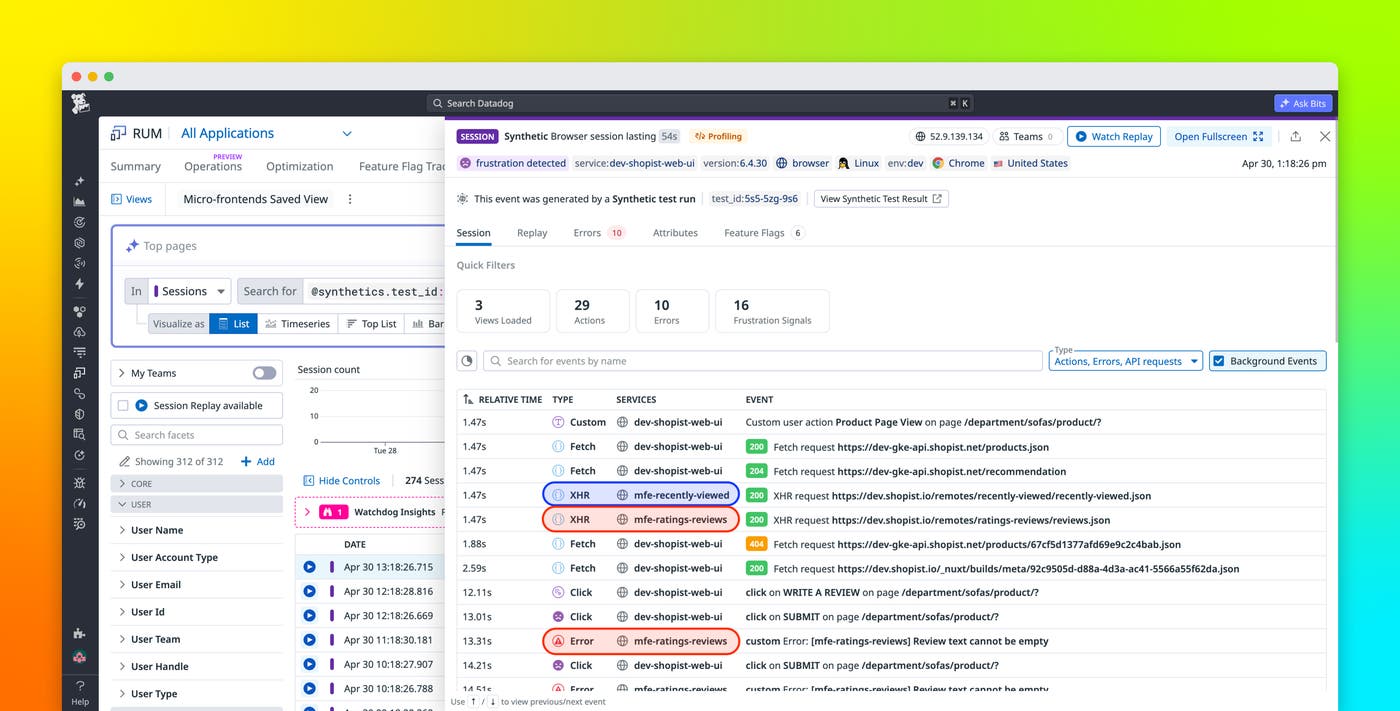
Once enabled, service and version attributes appear throughout the RUM Explorer, including in the error, resource, action, and long task side panels.
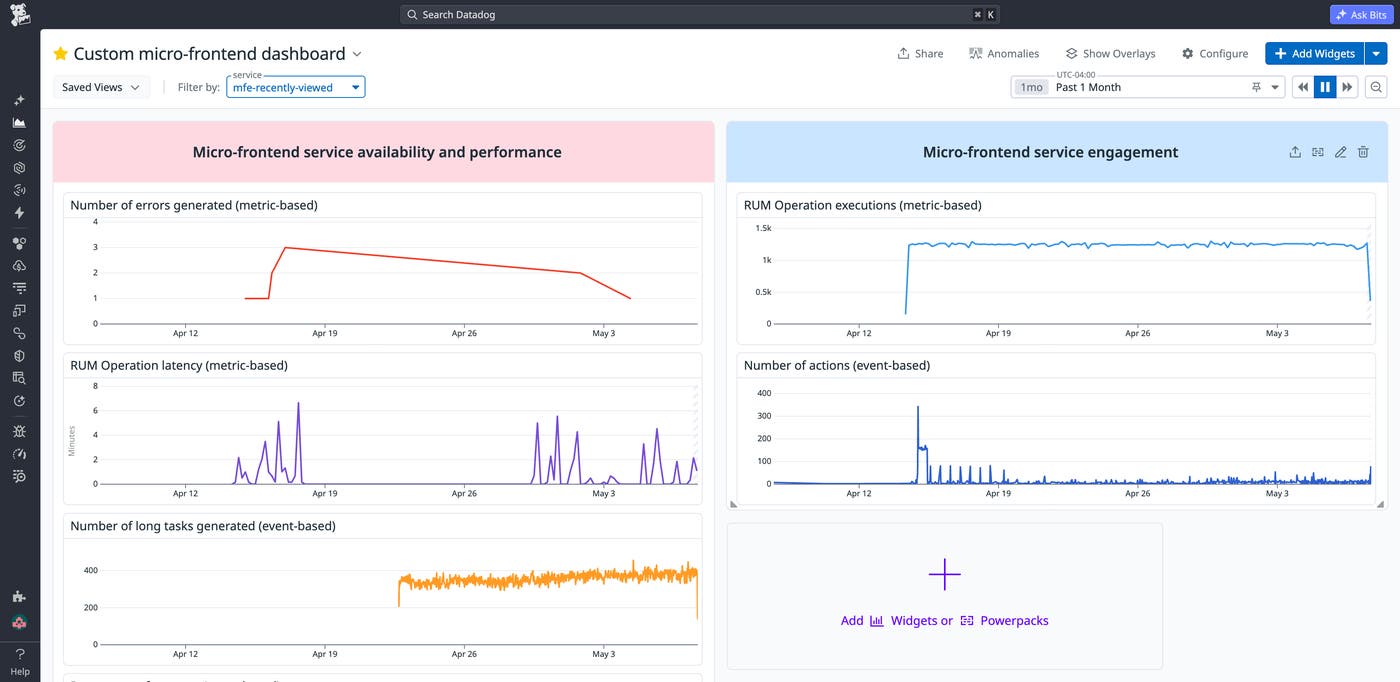
Micro-frontend performance is also captured through the service and version tags in RUM without Limits metrics, which are computed over full application traffic. These metrics can also be included in dashboards, monitors, and SLOs.
You can also build custom dashboards that monitor each micro-frontend independently.
Enable service ownership and visibility for faster troubleshooting
Clear service attribution enables teams to take ownership of their portion of the frontend. Instead of relying on cross-team coordination to investigate issues, engineers can filter telemetry data by service and focus on the micro-frontends they own.
Consider an example ecommerce application where separate teams manage checkout, cart, recommendations, and navigation components. After a deployment, conversion rates begin to drop and page performance degrades. Many RUM tools can surface increased page load times and degraded Core Web Vitals in this scenario, but without service-level attribution, it would be difficult to determine which micro-frontend is responsible.
With micro-frontend observability in Datadog RUM, teams can filter performance data by service and version. Instead of spending hours comparing deployments across multiple services or coordinating among teams to isolate the issue, engineers are able to pinpoint the responsible micro-frontend within minutes. They quickly identify that the cart micro-frontend—not the checkout flow—is generating new errors and long tasks following the recent deployment. With this information in hand, the cart team rolls back to the previous version, performance metrics return to baseline, and checkout conversion stabilizes.
This approach reduces the time required to isolate issues and helps teams respond faster. It also supports a distributed ownership model, where each team is responsible for the performance of its micro-frontend while maintaining visibility into the broader application experience. Teams gain the autonomy to move quickly on their own services without losing sight of how those services contribute to the overall user experience.
Get started with micro-frontend observability in RUM
Datadog RUM enables micro-frontend observability by automatically attributing telemetry data to the correct services. With this approach, teams can isolate performance issues, gain visibility into service ownership, and reduce MTTR across complex frontend architectures.
To learn more, see the documentation for configuring micro-frontend support in Datadog RUM. To start monitoring your micro-frontends with automatic service attribution, sign up for a 14-day free trial.
