

Danielle Park
Product Manager Intern
To detect and investigate threats, security teams need to collect telemetry data from identity providers, cloud platforms, web application firewalls, and endpoints. But these diverse sources describe the same tactics, techniques, and procedures (TTPs) differently according to their own vendor-specific language. For example, a failed Windows logon appears as an event ID, while an Okta account lockout appears as an identity event. A firewall, meanwhile, may represent a similar attack through a completely different log format. Because of this incompatibility, analysts often spend valuable time translating vendor-specific events into a common security context before they can investigate or respond. This step adds overhead and slows security investigations.
Observability Pipelines addresses this challenge with MITRE ATT&CK Enrichment Packs: preconfigured mappings that automatically tag security events with the relevant ATT&CK tactics and techniques. MITRE ATT&CK Enrichment Packs enrich your logs as they move through your pipeline, before they reach your SIEM, data lake, or archive. That means ATT&CK context is already there when the log lands, ready for detections, dashboards, investigations, and reporting.
In this post, we’ll explore how these packs help teams:
Automatically enrich logs with MITRE ATT&CK context
MITRE ATT&CK gives security teams a shared framework for describing how attackers operate, from initial access through exfiltration. For telemetry pipelines, that context can help teams enrich logs and events with relevant tactics and techniques before the data reaches downstream security tools, making it easier to prioritize the signals that matter for detection, threat hunting, and incident response.
Observability Pipelines now brings this context directly into your logs through MITRE ATT&CK Enrichment Packs. The initial release includes packs for:
Okta (identity and access): Tags authentication events that signal account abuse, including logins, MFA tampering, MFA fatigue, impersonation, API token creation, and account lockouts
Palo Alto (network and perimeter): Tags firewall activity including exploit attempts, command-and-control traffic, malware transfers, denial-of-service, VPN access, and admin brute force
FortiGate (network and perimeter): Tags the same firewall behaviors as Palo Alto and also maps data-loss events to exfiltration techniques
AWS WAF (web): Tags web-layer attacks including exploit attempts, brute force, bot activity, anonymous proxy traffic, and credential stuffing
CloudTrail (cloud): Tags cloud control-plane activity including console logins, IAM changes, defense evasion, and cloud infrastructure reconnaissance
Windows (endpoint): Tags endpoint-only behaviors like PowerShell execution, scheduled task creation, service installation, and event log clearing
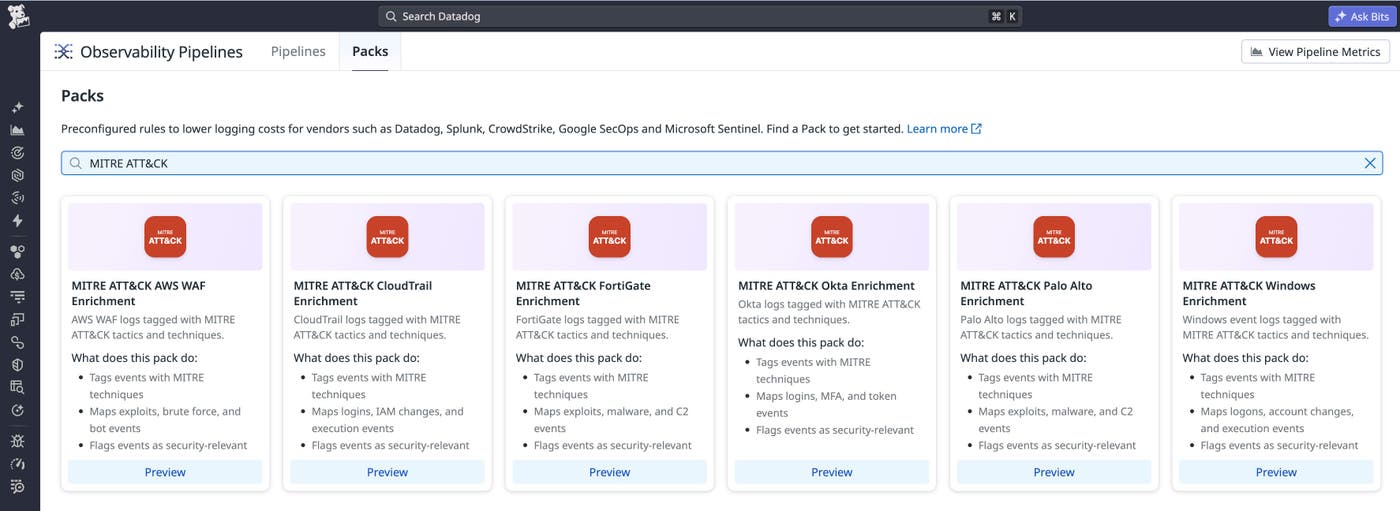
Teams can browse and add packs directly from Observability Pipelines. Each pack comes preconfigured with mapping logic, so there’s nothing to build from scratch.
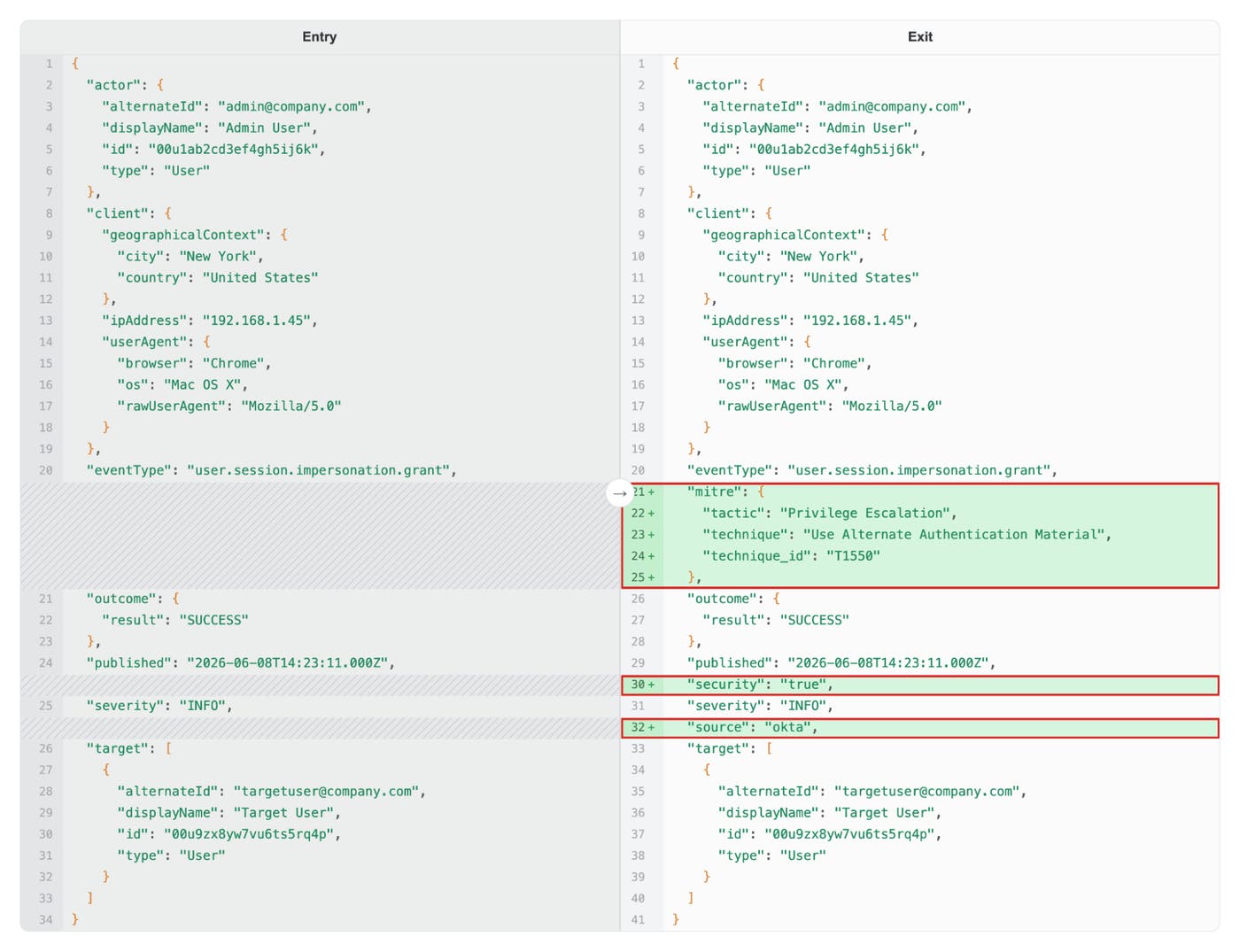
For example, suppose you’re a security engineer using Okta logs in Splunk to detect identity attacks. On its own, an event such as user.session.impersonation.grant means something only to analysts who already know Okta’s event taxonomy. After you add the Okta Pack, that same event arrives tagged as the MITRE ATT&CK tactic “Privilege Escalation” and the technique “Use Alternate Authentication Material (T1550).” Detection rules can then target MITRE ATT&CK fields rather than vendor-specific event names.
Once the pack is added, you can validate the enrichment logic against production log samples by using Live Capture. Live Capture shows exactly how an event is transformed as it moves through the pipeline. For example, the raw Okta event below enters on the left and exits on the right with its MITRE tags added, along with a security:true flag and a source field.
Investigate security incidents across every source
Security teams often spend as much time normalizing data as investigating threats. When the same attacker behavior appears in different formats across systems, teams can end up maintaining separate detection logic for each source.
MITRE ATT&CK Enrichment Packs apply one enrichment model across all supported sources. Identity events, network activity, cloud control-plane changes, and endpoint behaviors all arrive with the same fields, so teams write detections once and build dashboards on the same fields across every source. Inside each pack, processors match specific events and apply the corresponding MITRE ATT&CK mappings automatically, so analysts receive events already labeled with attacker intent. Each enriched event also carries a flag marking it as security-relevant.
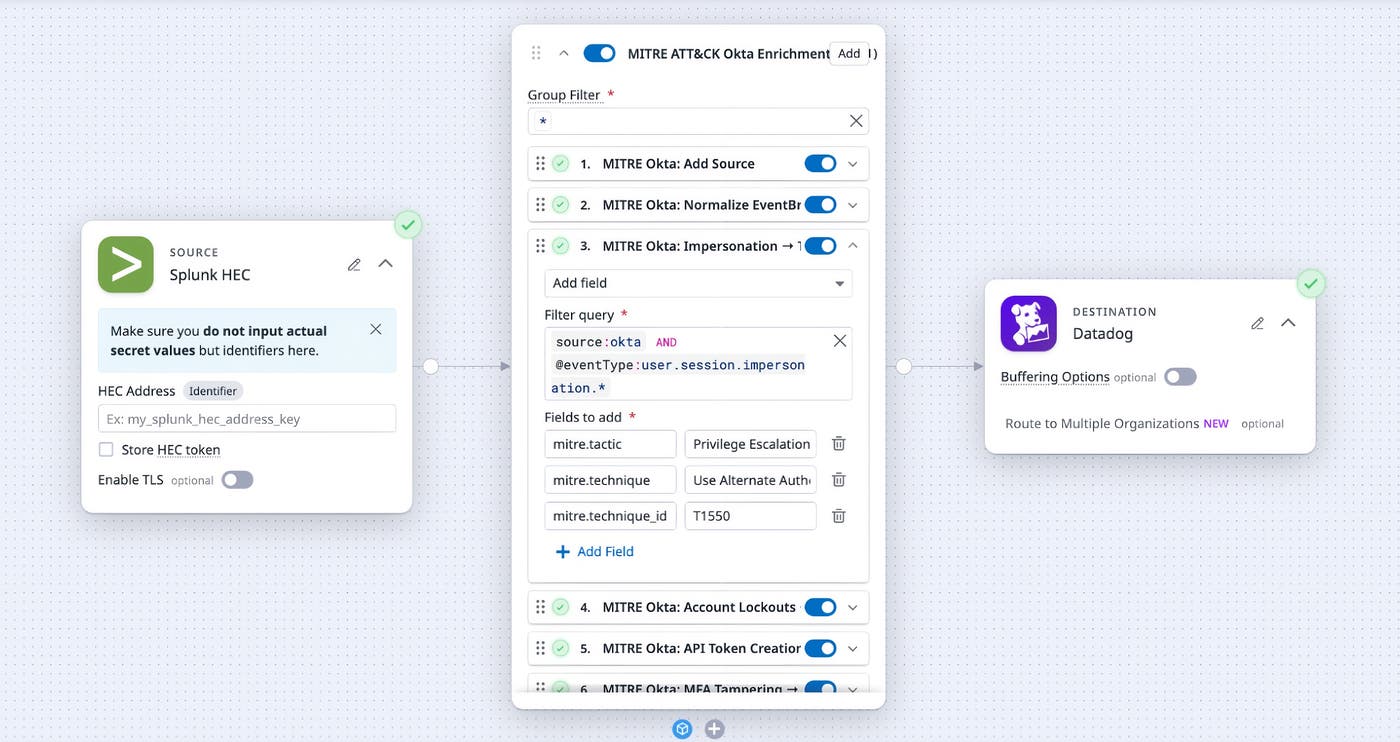
That standardization is what makes investigations fast. Say you’re investigating a possible account takeover. Without MITRE tags, you’d query each source in its own syntax and manually stitch together the timeline. With the tags applied in the pipeline, you can filter on @mitre.tactic:Privilege Escalation and see those events side by side, already labeled, from the moment they arrive. From there, you can narrow down to a specific technique or widen to @security:true to surface every security-relevant event at once.
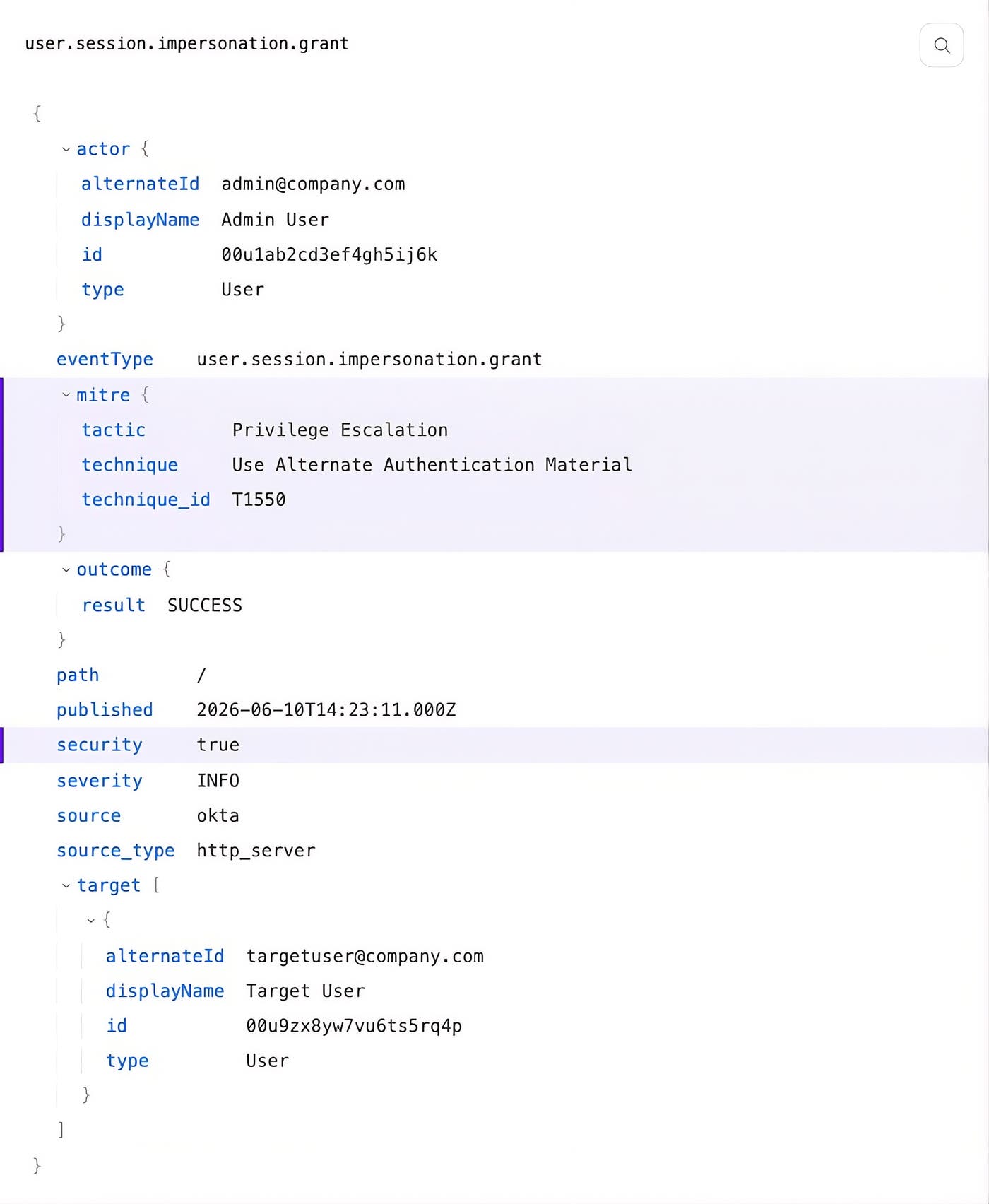
Because the tagging happens in the pipeline, before logs leave your environment, every destination gets the same context automatically. You can route the tagged events to the SIEM or data lake of your choice, including Splunk, Microsoft Sentinel, Datadog Cloud SIEM, or a data lake like Databricks or ClickHouse. The MITRE fields are already there when the log lands, and detection rules fire right away, without anything needing to be looked up.
Start enriching your security logs today
By tagging logs with MITRE ATT&CK context, you normalize security logs automatically, investigate activity across sources with a shared taxonomy, and speed up detections.
MITRE ATT&CK Enrichment Packs are included with Observability Pipelines at no additional cost and are available in all regions and environments outside GovCloud. To get started, open the Packs gallery in Observability Pipelines and add the pack that matches your log source. To learn more, check out the Observability Pipelines documentation, or read our blog on how Observability Pipelines can enrich logs with additional context on-stream. And if you’re not yet a Datadog customer, sign up for a 14-day free trial.
