

Jacob Simonov

Danny Driscoll

Jesse Feinman

Sophie Wigmore
At Datadog, our broad Kubernetes footprint amplifies the significance of a familiar autoscaling tradeoff: Overprovisioning wastes cloud spend, while underprovisioning threatens reliability. We built Datadog Kubernetes Autoscaling (DKA) to help teams rightsize their workloads by generating intelligent resource recommendations and automating multidimensional workload scaling. Across Datadog, adopting DKA has eliminated more than $3 million in annualized idle compute costs while reducing reliability risks. The first rollout by one of our core platform teams became the template for scaling that approach across teams.
This post looks at how Rapid, a Datadog platform team that supports more than 1,800 services and over 20,000 deployments, adopted DKA. Because Rapid supports such a large share of Datadog’s Kubernetes footprint, their DKA migration offered a meaningful opportunity to reduce idle compute, simplify scaling configuration, and improve reliability. It also meant DKA would have to hold up under real production demand. We’ll cover how Rapid adopted DKA to automate horizontal and vertical scaling, what DKA revealed about overprovisioning and reliability across the fleet, and the cross-team effects on cost ownership that followed.
Why Rapid needed a coordinated autoscaling approach
To manage autoscaling, the Rapid team used WPA for horizontal scaling and tuned pod sizes manually for CPU and memory. They could have used the VPA to automate vertical scaling, but WPA and VPA conflict when triggered by the same metric. That incompatibility prevented Rapid from deploying VPA alongside WPA, leaving vertical sizing to manual configuration.
This setup led to two significant problems, the first of which was the lack of automated vertical scaling. Without VPA, there was no systematic tooling to guide per-pod sizing decisions. The second problem for Rapid was that managing their WPA configurations was difficult to maintain at scale. Across more than 1,800 services and a growing number of data centers, the team had to maintain custom metric queries, watermark values, and replica settings that varied by environment. This ongoing maintenance burden grew steadily as they brought more data centers online, with each one adding to the number of configurations Rapid needed to maintain.
Coordinating autoscaling with a single resource
DKA’s multidimensional scaling mode, which manages both horizontal replica scaling and vertical resource rightsizing, addressed both of these problems. First, DKA improved Rapid’s vertical scaling by automatically adjusting resource requests based on observed usage, which helped align resource allocation more closely with actual workload needs. Second, DKA simplified Rapid’s autoscaling configurations with a single resource that specifies a utilization target and replica bounds.
Rapid quickly applied DKA across their services, confident in its effectiveness and its built-in safety mechanisms. These measures include conservative policies that avoid reacting too aggressively to transient spikes or brief lulls. DKA can also detect memory-starved pods and provision additional headroom before out-of-memory (OOM) errors disrupt service performance. These guardrails gave the Rapid team confidence to deploy and expand quickly, configuring autoscaling for 3,000 deployments in a single day.
Simplified configuration was only part of what DKA delivered. The more consequential result was giving Rapid the tools to tackle two problems they hadn’t been able to address at scale: widespread overprovisioning and risky underprovisioning.
How DKA cut costs by more than 50% in the first data center rollout
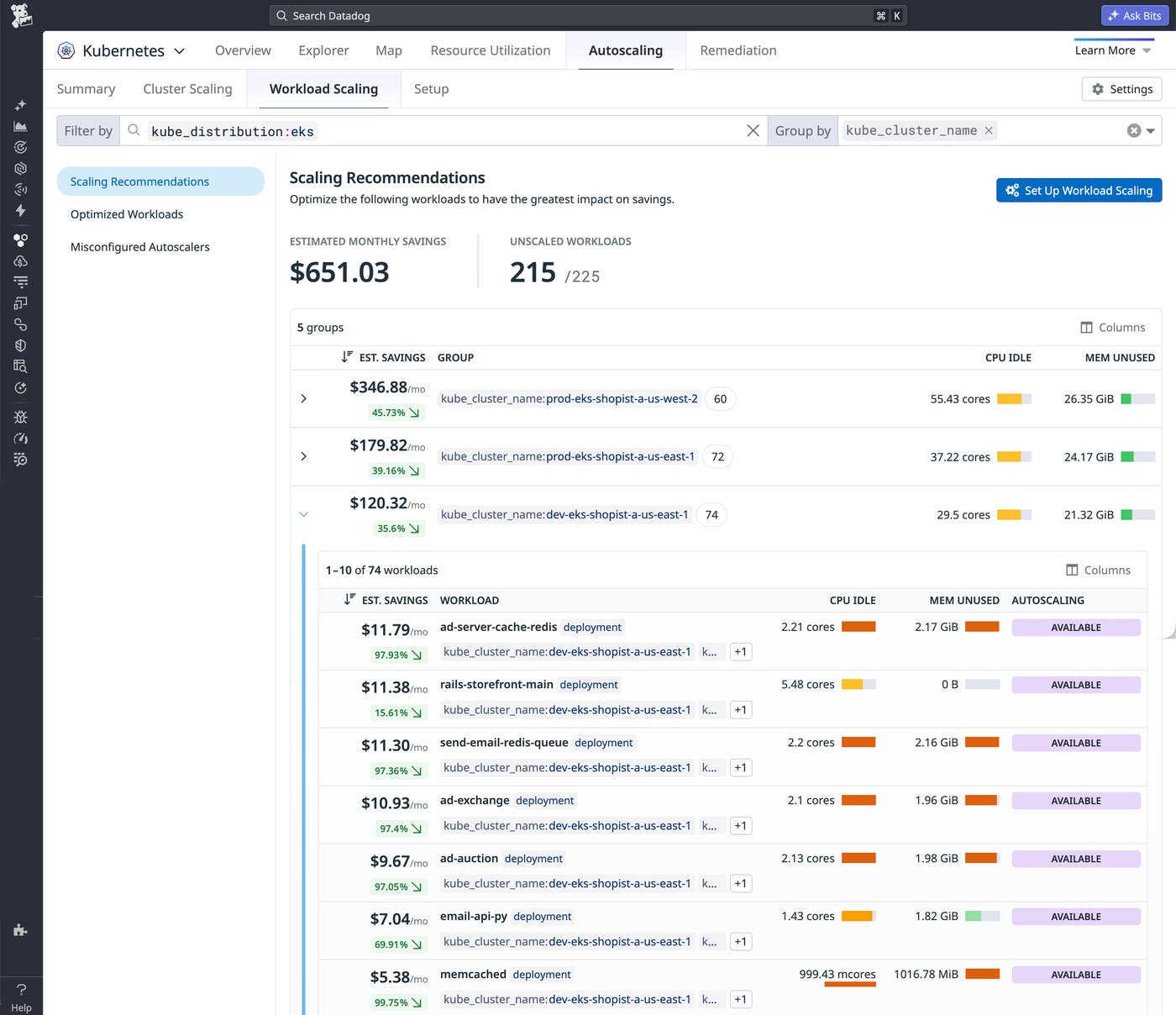
Rapid had already identified that many services were reserving substantially more CPU and memory than they consumed, and had estimated the potential savings before the rollout. What they lacked was a way to act on that analysis at scale. DKA’s Scaling Recommendations view surfaced the idle resources and estimated savings, letting Rapid prioritize the highest-value deployments. The team inspected and tuned DKA’s recommendations, then applied them to reduce overprovisioning across the affected deployments. The cost benefits were clear: In an initial rollout in one of Datadog’s smaller data centers, DKA reduced costs by more than 50%.
The Scaling Recommendations view (shown below) illustrated a pattern of overprovisioning. Resource utilization across the fleet was well below the team’s targets of 30% average CPU and 90% peak memory. Workloads were generating waste and contributing to unnecessary cloud costs.
How DKA identified and corrected underprovisioned services
Pre-migration, Rapid knew that some pods were running out of capacity entirely, pinned at 100% CPU utilization because their resource requests were too low for actual workload demands. Addressing this required manual per-pod configuration that wasn’t feasible at scale, and the reliability risk remained unresolved.
When Rapid deployed multidimensional scaling, DKA surfaced which services were affected and automatically raised their resource requests to match actual workload demand. The nodes had available compute capacity, but the pods simply hadn’t been allocated enough of it. Costs for those services increased rather than fell, but the spending was now effective: Services that had been consuming CPU budget without delivering full value could now reliably complete their work.
How Rapid’s rollout created a repeatable adoption playbook
What made DKA’s adoption spread was how little it asked of teams. While WPA required Rapid to maintain custom metric queries and multiple Kubernetes resources for every service they managed, DKA replaced all of that with a single declarative resource, making it straightforward for teams across Datadog to adopt DKA directly. DKA’s proven safeguards and Rapid’s early success have enabled Datadog to bring multidimensional scaling to about 30,000 deployments.
DKA’s adoption throughout the company further illustrates Datadog’s culture of cost ownership. Engineering teams own the cost of running their services and approach cost optimization as a first-order concern, alongside performance and reliability. DKA supports that by giving teams the visibility they need to optimize their services. As teams reduce costs, they share those results across the company, sustaining a cycle of continuous improvement.
Get started with Datadog Kubernetes Autoscaling
DKA gave the Rapid team a path from fragmented, manual autoscaling to a single resource managing 3,000 deployments in a single day. That adoption established a playbook that gives other teams a path to similar success. So far, teams across Datadog have eliminated more than $3 million in annualized idle compute costs, reduced the toil of maintaining scaling configurations, and used that time to innovate and improve their platforms. This migration also improved the reliability and cost-effectiveness of services that had been underprovisioned, reflecting an engineering culture at Datadog where controlling costs is as much a team responsibility as maintaining reliability.
Learn more about multidimensional autoscaling with DKA. To start rightsizing your Kubernetes workloads, start a free 14-day Datadog trial.
