
Curtis Maher

Sam Rodman

Daljeet Sandu
Engineering teams spend much of their incident response time investigating the problem and coordinating the response. Both tasks become harder when telemetry data lives in one place, deployment history is stored in another, and conversations unfold across chat channels and incident bridges. Responders often spend the first part of an incident rebuilding context before they can begin testing hypotheses and working toward resolution.
Datadog Incident Response includes three new AI-powered capabilities that help teams investigate incidents and coordinate responses more effectively without leaving their existing workflows. In this post, we’ll explore how you can:
Diagnose root causes with Bits Investigation as an active AI responder
Catch up on active incidents with AI-generated chat summaries
Diagnose root causes with Bits Investigation as an active AI responder
AI can help responders investigate incidents, but the quality of an investigation depends on the context available to the AI. When telemetry data, deployment history, ownership information, and incident activity are spread across different systems, AI tools often have to fill gaps with assumptions. Those assumptions can send responders down the wrong path and prolong an incident.
Bits Investigation joins active incidents as a responder alongside the human response team and analyzes the same incident context that the team uses. For example, Bits can reason over a latency graph shared in a Slack thread, a summary generated from an incident bridge call, and a runbook that is posted in a linked Confluence repository. Access to that context enables Bits to develop hypotheses based on the available evidence rather than making assumptions.
Responders can start an investigation by Bits from the Datadog web app or by using the @Datadog investigate command in an incident channel. They can also provide additional context as part of the request. For example, a responder can direct the investigation toward a specific service, deployment window, or suspected dependency issue. Bits uses that information as a starting point while continuing to analyze related telemetry data and incident context.
As the investigation progresses, Bits publishes updates in a chat thread while it works. Bits then shares a final summary that includes root cause findings and recommended next steps. Team members can follow the investigation without switching to a separate AI interface or monitoring another application.
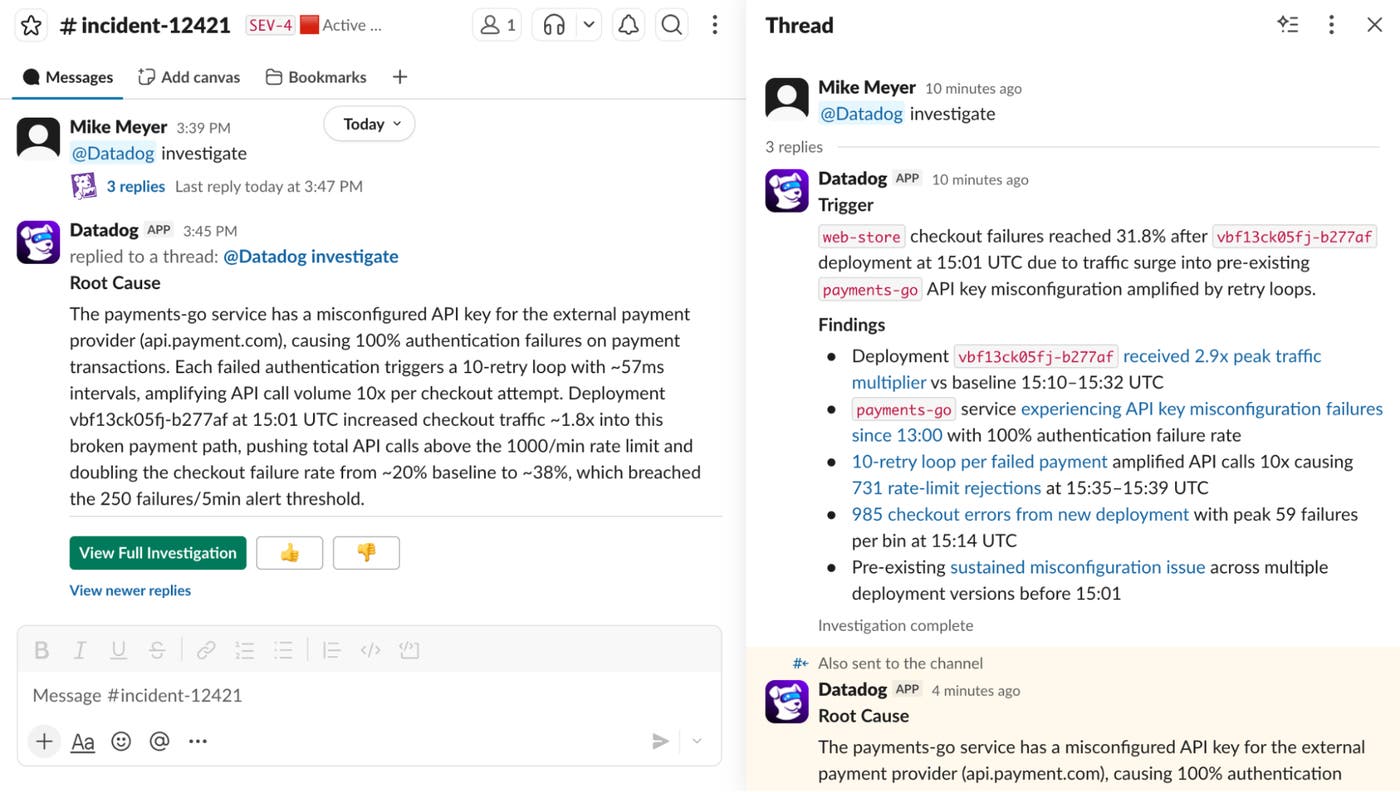
Bits also becomes part of the incident record. The agent appears in the incident’s responder list, and the full investigation remains available within the incident overview page. During postmortems and audits, teams can review the investigation alongside the rest of the incident timeline.
Catch up on active incidents with AI-generated chat summaries
Many responders join incidents after remediation efforts are already in progress. Catching up often requires reading hundreds of messages, reviewing timeline events, and piecing together context from several conversations. That process can delay a responder’s ability to contribute.
AI-generated incident summaries help responders get current context quickly. By using Datadog Incident Management integrations with Slack and Microsoft Teams, responders can request a summary of an incident’s current state and recent activity. The summary is delivered as an ephemeral response that is visible only to the requester. As a result, the requester gets current context without creating additional channel noise or interrupting teammates who are actively working on remediation.
Because the summary draws from the same incident context that powers other Incident Management workflows, the output reflects activity already captured in the incident channel and timeline. Responders receive a synthesized view of the investigation, ongoing remediation work, and key developments without needing to reconstruct the timeline manually.
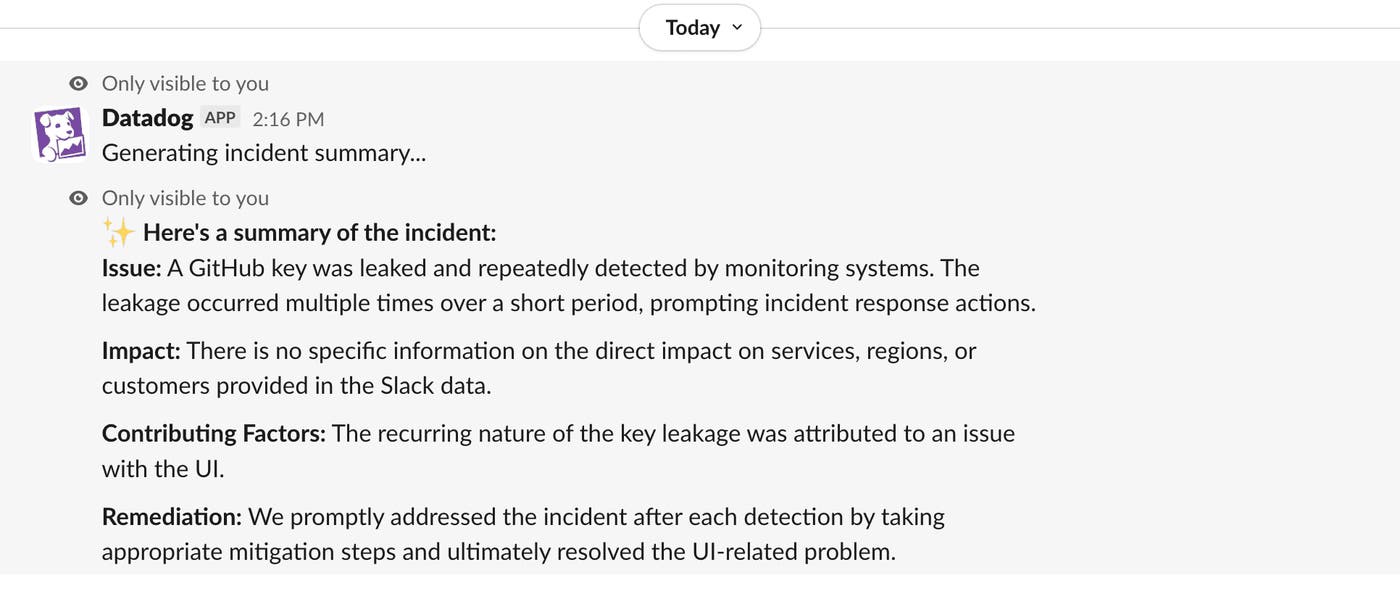
Teams can use AI-generated summaries throughout the incident life cycle. New responders can get up to speed quickly, incident commanders can review the latest state before communicating with stakeholders, and engineers who are returning to an incident can refresh their understanding.
Capture bridge discussions in a unified incident timeline
Critical decisions happen during incident bridge calls. Engineers discuss hypotheses, evaluate remediation options, and agree on next steps in real time. Without an automated way to capture those conversations, teams risk failing to document important context or must assign someone to record decisions and updates. Manual note-taking is an inefficient use of engineering time, requiring a skilled responder to divert their attention from resolving the incident.
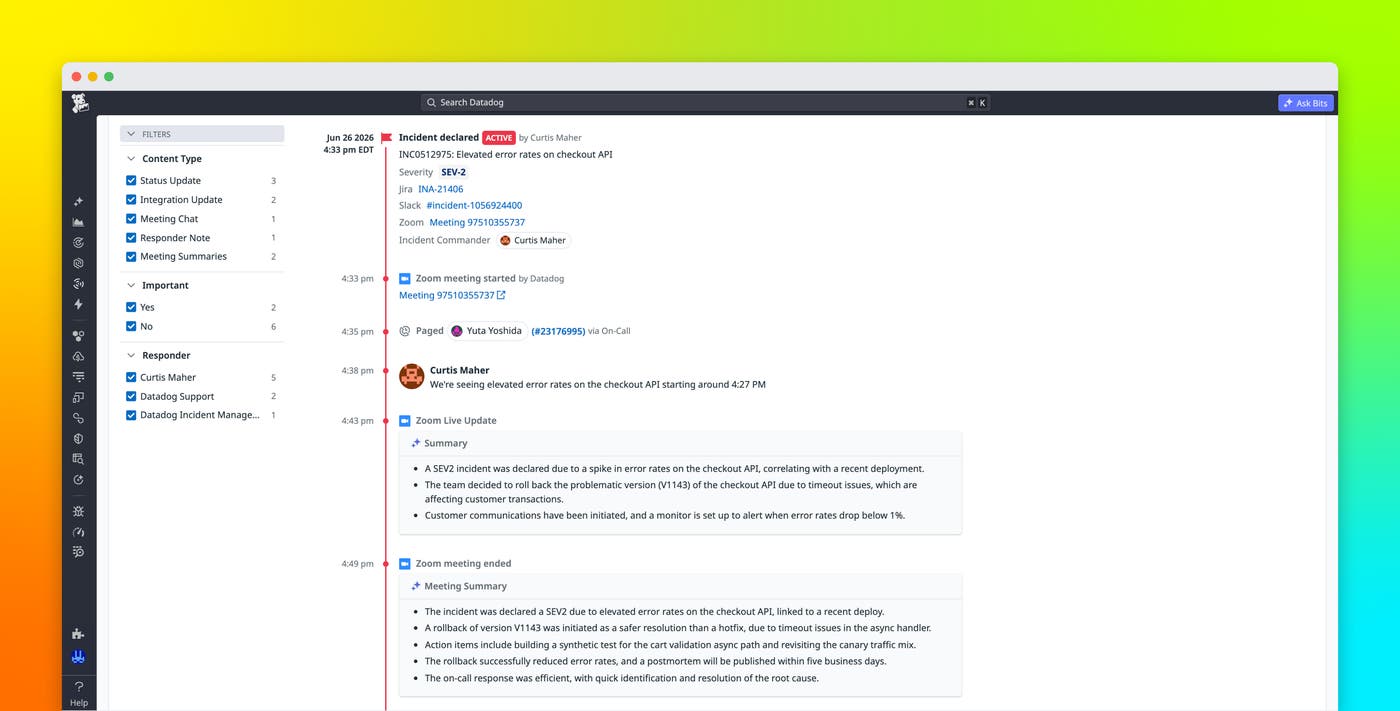
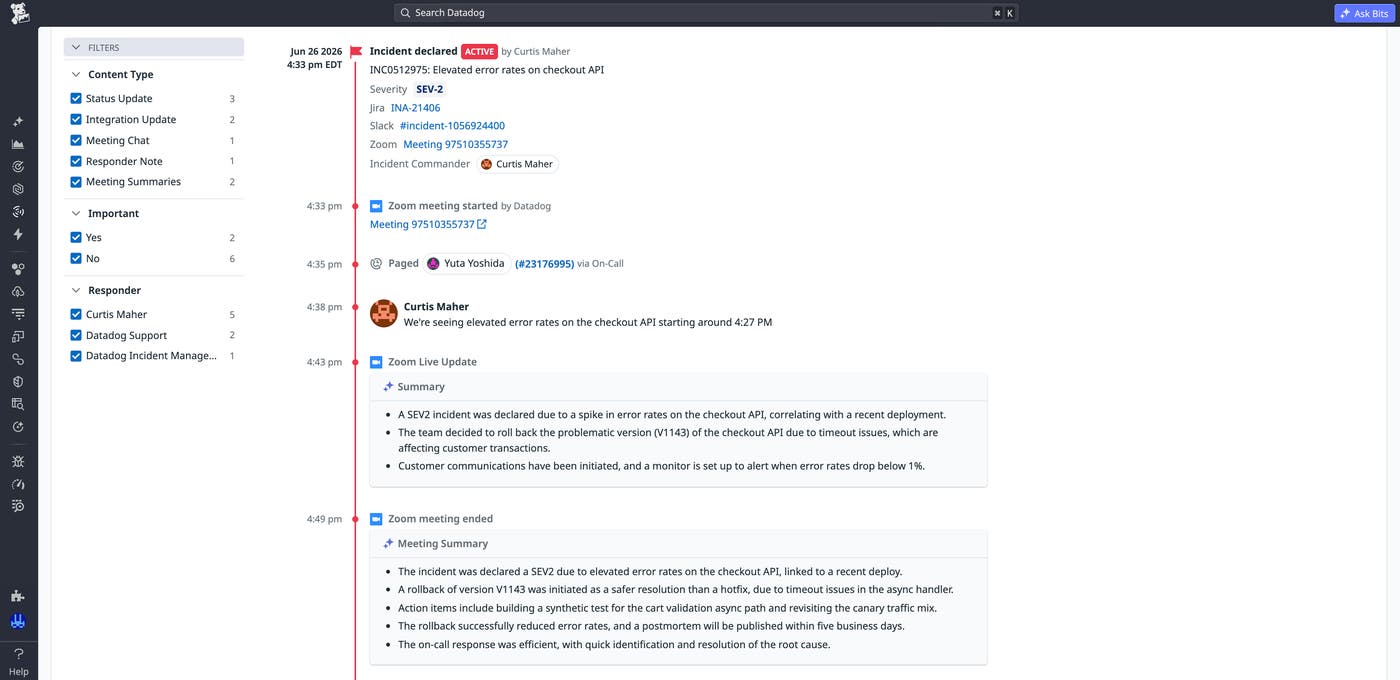
Incident Management integrates with video conferencing tools such as Zoom, Microsoft Teams, and Google Meet, automatically capturing incident bridge discussions and generating AI-powered summaries throughout meetings. After a meeting begins, a Datadog Transcriber joins the call and starts capturing discussion context.
During active bridge calls, Datadog publishes AI-generated summaries approximately every 10 minutes to the incident timeline and the corresponding Slack and Teams channels. Responders who join late or leave temporarily can review recent discussion points without interrupting the meeting.
When the bridge call ends, Datadog automatically generates and publishes a post-meeting summary. The AI understands that the video call is happening in the context of an incident and tailors the summary accordingly, as opposed to using generic summarization. Key decisions, remediation plans, and discussion outcomes become part of the same incident record that already contains responder actions, status changes, automation activity, and telemetry data.
You can also control which incidents receive summaries. Configuration options enable teams to scope summarization by severity, visibility, and tags. Private incidents are excluded from summarization by default.
Get started with AI in Datadog Incident Response
Datadog Incident Response combines AI-powered investigation, incident summarization, and meeting note-taking capabilities to help teams respond to incidents more effectively. Bits Investigation analyzes incident context alongside human responders, AI-generated summaries help engineers catch up on active incidents, and Incident Management collects decisions from incident bridge discussions and adds them to the incident record. Together, these capabilities unify telemetry data, investigation findings, chat activity, and meeting discussions in a shared context to help teams spend less time gathering information, coordinating handoffs, and documenting activity.
To learn more about AI capabilities in Incident Response, check out the Incident AI documentation and Bits Investigation documentation.
If you don’t already have a Datadog account, you can sign up for a 14-day free trial to start using Incident Response.
