
Nancy Zhu
Product Manager

Evan Marcantonio
Senior Product Manager

Nicole Parisi
Product Marketing Manager

Chris Miller
Staff Engineer
When an issue in production triggers an alert, the people responding to it are often working in Slack while the evidence they need is elsewhere. Responders need to move between conversations, telemetry data, source code, and incident tooling as they form hypotheses, coordinate actions, and keep stakeholders informed. That context switching can slow down a time-sensitive investigation and make updates harder to follow.
Bits Chat brings Datadog’s natural-language interface into Slack, giving responders access to Bits AI from the channel where they’re already collaborating. During an incident, teams can ask Bits to investigate the alert, pull in relevant telemetry data, generate a pull request for the fix, and keep track of follow-ups without leaving Slack.
In this post, we’ll follow an incident from alert to resolution and show how you can manage your incidents directly in Slack to:
Start an investigation
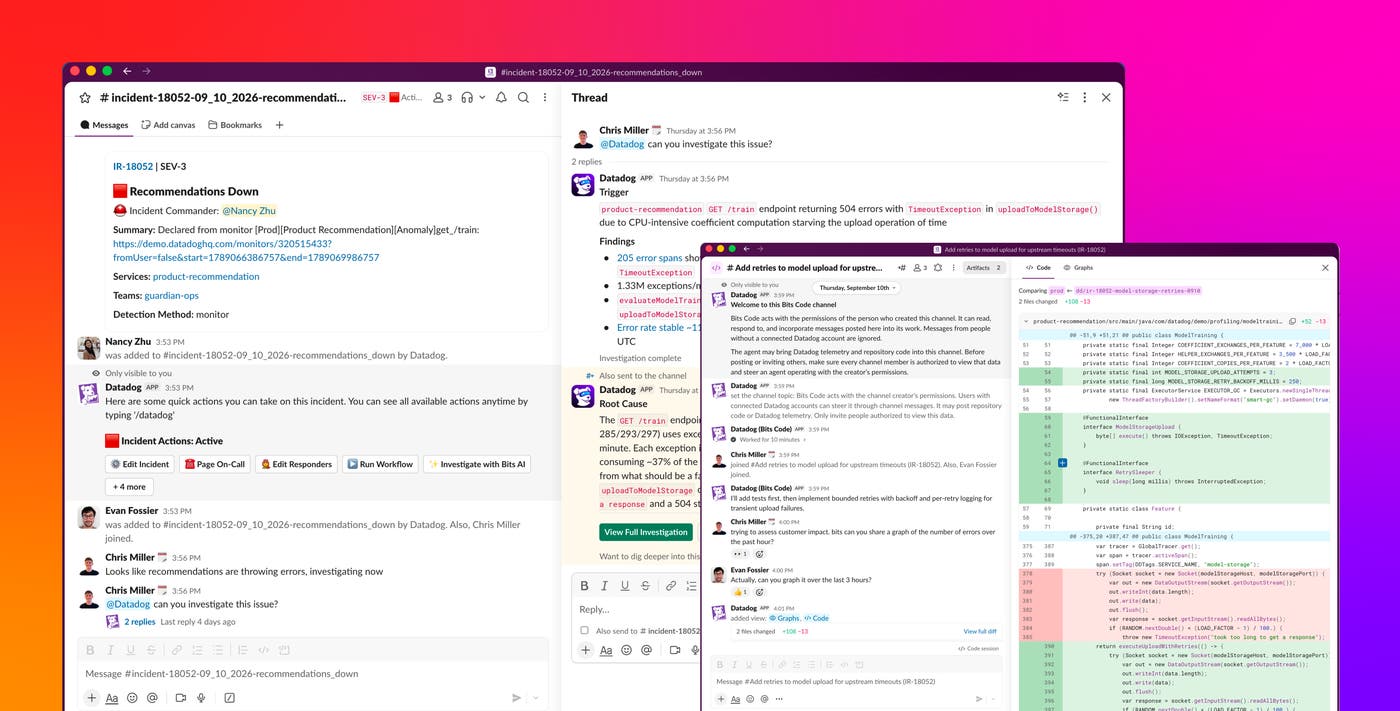
Let’s say you’re an on-call engineer for an ecommerce website and you receive a monitor notification that the website’s recommendation service is experiencing errors and failing because of timeouts. When you declare an incident, Datadog creates a dedicated Slack channel so that you and your team can collaborate on fixing the issue. Instead of leaving the conversation to begin gathering evidence, you can type @Datadog investigate in the channel to ask Bits to start an investigation.
Bits Investigation analyzes the issue by forming hypotheses from relevant telemetry data, runbooks, and past incidents. You can also include additional context or a hypothesis in the initial @Datadog investigate message to help Bits focus its investigation from the start. As the investigation runs, Bits posts updates in Slack so that responders can follow its work alongside their own discussion.
Troubleshoot with Bits and your responders
When Bits Investigation finishes, it returns its root cause findings and recommended next steps to the Slack conversation. In our example of the ecommerce website, Bits identifies a recent code change as the likely cause of the issue and shares the supporting telemetry data.
Team members can then mention @Datadog to ask questions about the findings, go deeper into analyzing the telemetry data, compare the findings with what the team has observed, and decide how to resolve the issue. For example, they can ask which endpoints and customer regions are affected and whether the errors are affecting any downstream services. All of these activities can happen in the same Slack channel, and the investigation stays connected to the related discussion.
Act on the investigation
After responders identify the likely cause, the next challenge is turning that finding into action. Bits Remediation suggests next steps based on the investigation and enables teams to take actions directly from the incident conversation in Slack. Those actions can include adding more responders, running incident workflows, or posting Status Pages updates as the incident progresses.
In our example incident, the responders ask Bits to start a fix. Bits Remediation passes the relevant context to Bits Code, which creates a dedicated code channel in Slack and uses the investigation findings to generate the fix. Bits Code then creates a pull request for the responders to review.
Other incidents might call for different actions. Bits Remediation can also trigger triage actions from chat, including sending messages to teammates, paging engineers via Datadog On-Call, and creating incident or follow-up records.
Resolve the incident and capture what happened
Addressing the problem does not end the incident workflow. Responders still need to communicate the outcome, resolve the incident, preserve the investigation context, and create follow-up work. These final stages of incident response can also happen in Slack through @Datadog.
Once the issue in our example has been addressed, Bits confirms that error rates have returned to their normal level. The responders then ask Bits to resolve the incident and create a postmortem notebook from the investigation. Because Bits already has the context from the response, the notebook documents the incident summary, relevant findings, resolution, and next steps.
The notebook gives responders a starting point for postmortem and follow-up work, removing the need to reconstruct the incident from separate conversations and tools. Creating postmortems helps teams and Bits respond to future incidents more quickly.
Start managing incidents in Slack with Bits Chat
Bits Chat in Slack brings investigation, collaboration, and action into the conversation where incident responders are already working. From the initial alert through remediation and follow-up, teams can handle incidents in Slack without having to move between tools to coordinate the response. To get started, follow the Bits Chat setup instructions for Slack. You can also learn more about using Bits Investigation to investigate issues and using Bits Code to generate code fixes.
If you don’t have a Datadog account, you can sign up for a 14-day free trial to start using Bits Chat in Slack.
