
Jessica Yang
Associate Product Manager

Candace Shamieh
Technical Content Writer
The OpenTelemetry (OTel) gateway deployment pattern helps platform teams scale telemetry data collection by aggregating telemetry data and centralizing processing tasks before routing it to observability backends. While gateway deployments provide teams with flexiblity, it can also complicate troubleshooting as telemetry data flows through multiple intermediary systems. When data volume drops, spikes, or encounters bottlenecks, engineers must consult multiple tools to understand the full pipeline and pinpoint root causes. The lack of complete visibility into OTel gateway architectures leads to increased operational overhead, slower incident triage, and ultimately leads to a longer mean time to resolution (MTTR).
Datadog Fleet Automation now addresses this fragmented troubleshooting with an end-to-end view of your OTel gateway architecture at the cluster level for the Datadog Distribution of OpenTelemetry Collector (DDOT) and upstream-compatible OTel Collectors. By unifying visibility of your gateway architecture, traffic patterns, Collector configurations, and active monitor signals, Fleet Automation enables you to minimize context switching between tools, isolate problematic Collectors or components, and remediate issues faster.
In this post, we’ll show how Fleet Automation helps you:
Visualize your OTel gateway architecture
OTel gateway deployments often involve complex telemetry data routing: Kubernetes DaemonSet Collectors forward node-level data to load balancers or gateway services, which then route to one or more layers of gateway Collectors before the data reaches an observability backend. Teams must switch between multiple Collector YAMLs, deployment manifests, and architecture diagrams to piece together the full telemetry data pipeline, making it difficult for them to validate whether the data is following the expected paths.
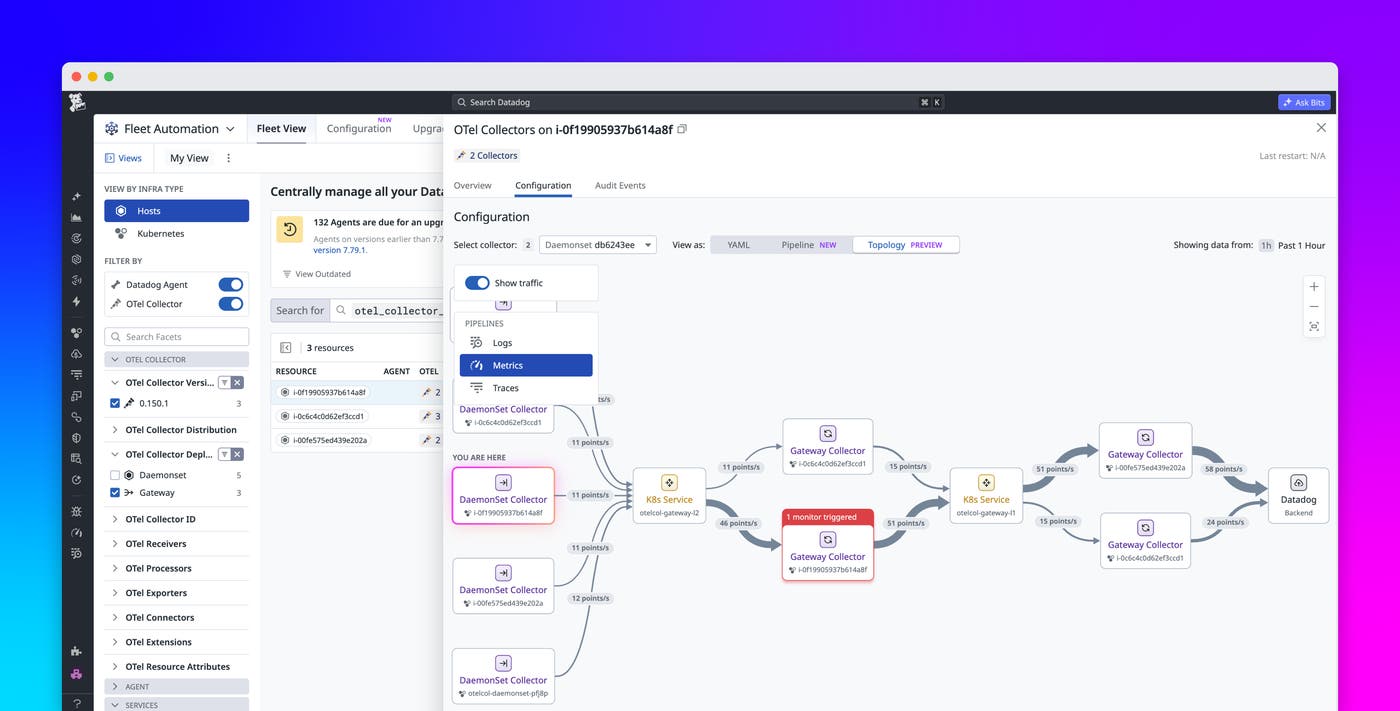
Topology View in Fleet Automation gives platform teams a cluster-level view of their end-to-end OTel gateway architecture. The visualization represents each layer of the gateway deployment as connected nodes, making it easier to validate telemetry data routing from sources to destinations across the full deployment.
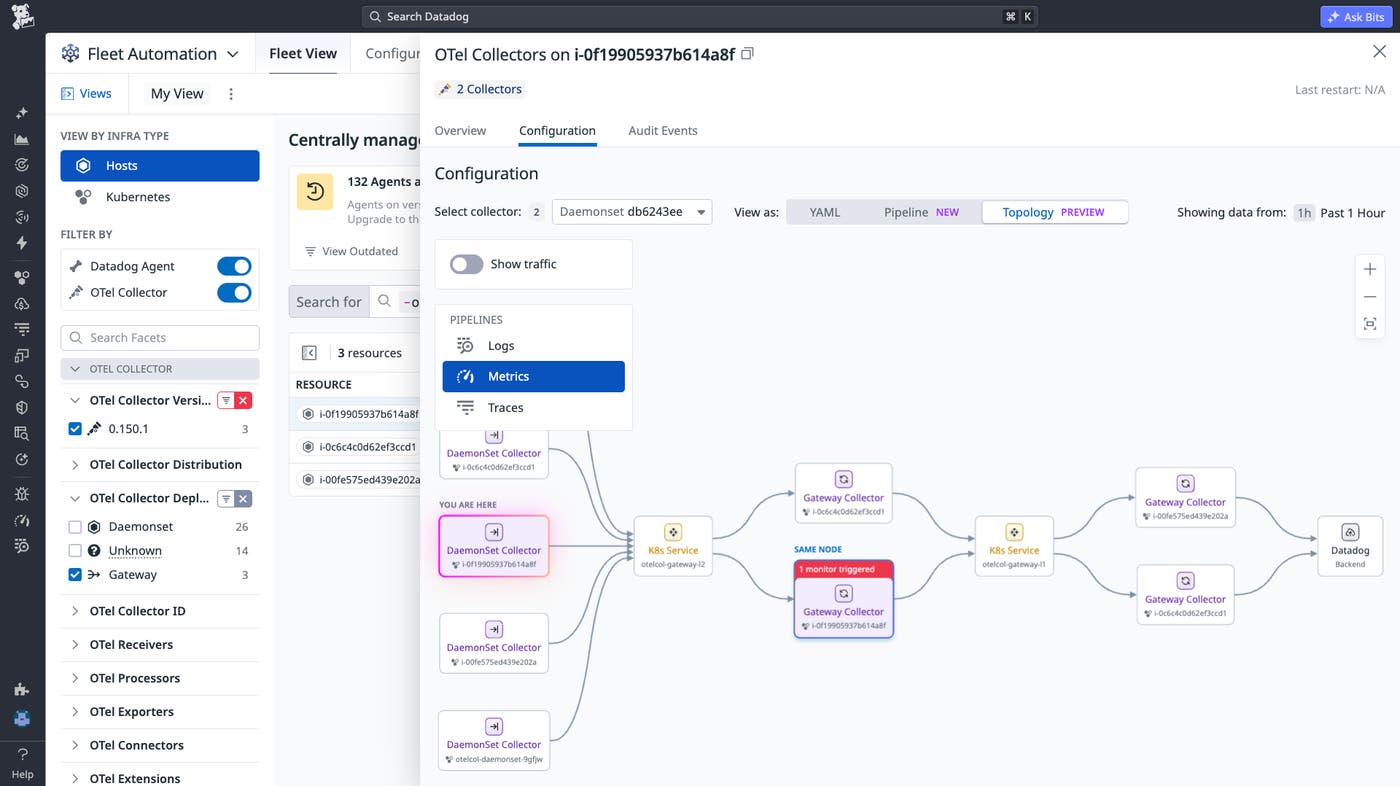
With this broader view, teams can easily validate routing after adding a new backend, modify routing rules, or introduce additional gateway layers for scale without context switching.
Detect traffic anomalies across OTel gateway deployments
Even with a clear view of your gateway architecture, it can still be difficult to understand where telemetry data behavior diverges from expectations. Missing signals or unexpected traffic volume may originate from a single telemetry data pipeline, backend route, or component within a Collector. Without traffic context, teams may know that data is missing or delayed, but not where the problem occurs.
Topology View helps you narrow down to the pipeline of a specific telemetry data type and provides traffic insights to pinpoint abnormal traffic flow patterns across your gateway deployments. For example, if a backend destination is slow to accept trace data, backpressure can build up in the gateway layer and cause traces to queue or drop before they are exported. In Topology View, you may see traffic entering the gateway Collectors as expected, but reduced or delayed trace traffic leaving toward the backend.
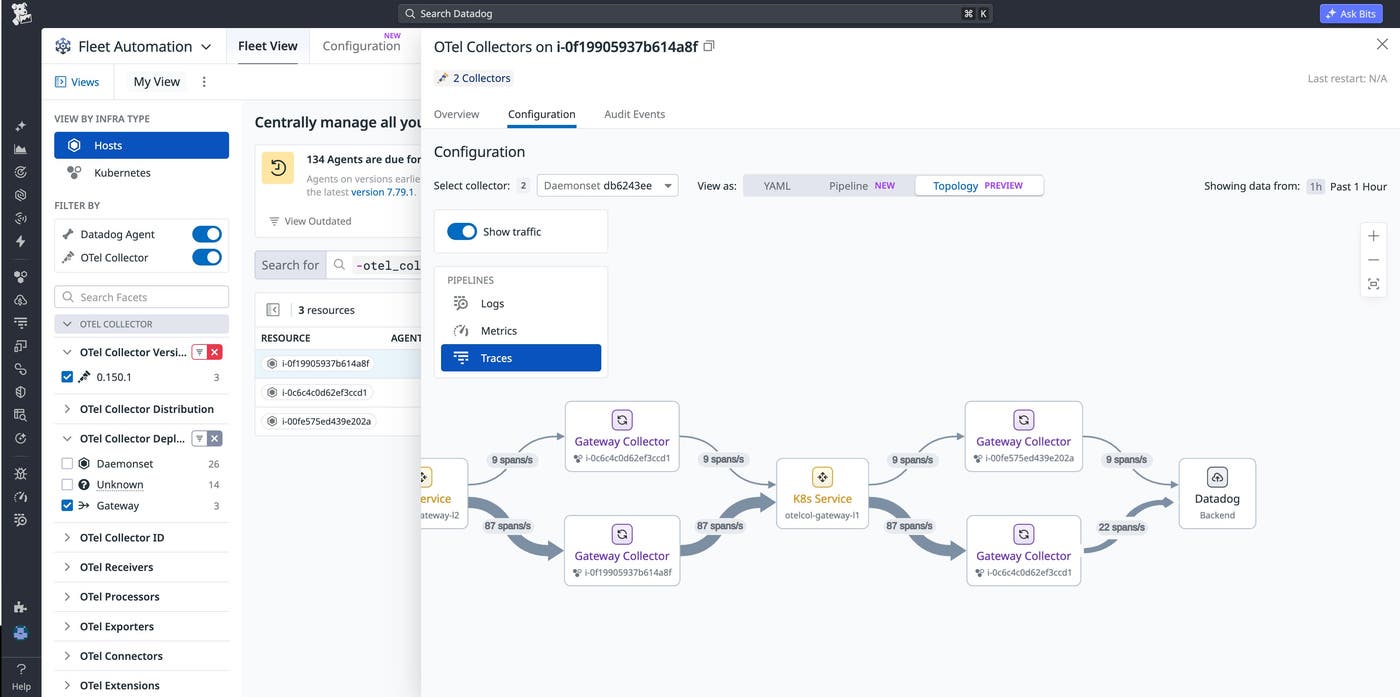
By filtering to traces and comparing traffic across the affected route, teams can quickly isolate the issue to the gateway-to-backend path and begin troubleshooting the relevant exporter, queue, or backend destination instead of reviewing the entire deployment.
Investigate OTel Collector issues with active monitors and configuration context
After teams identify a problematic route or Collector, they still rely on manual operations to cross-reference dashboards, monitors, and configuration YAMLs to pinpoint the exact root causes and begin remediation workflows. This can lead to longer MTTR and negative business outcomes.
Fleet Automation overlays Topology View with monitor alerts context, so you can understand at a glance which OTel Collectors have active issues that require attention. To investigate further, you can quickly drill down to a single OTel Collector by using Pipeline View, which shows how data flows through configured OTel receivers, processors, connectors, and exporters.
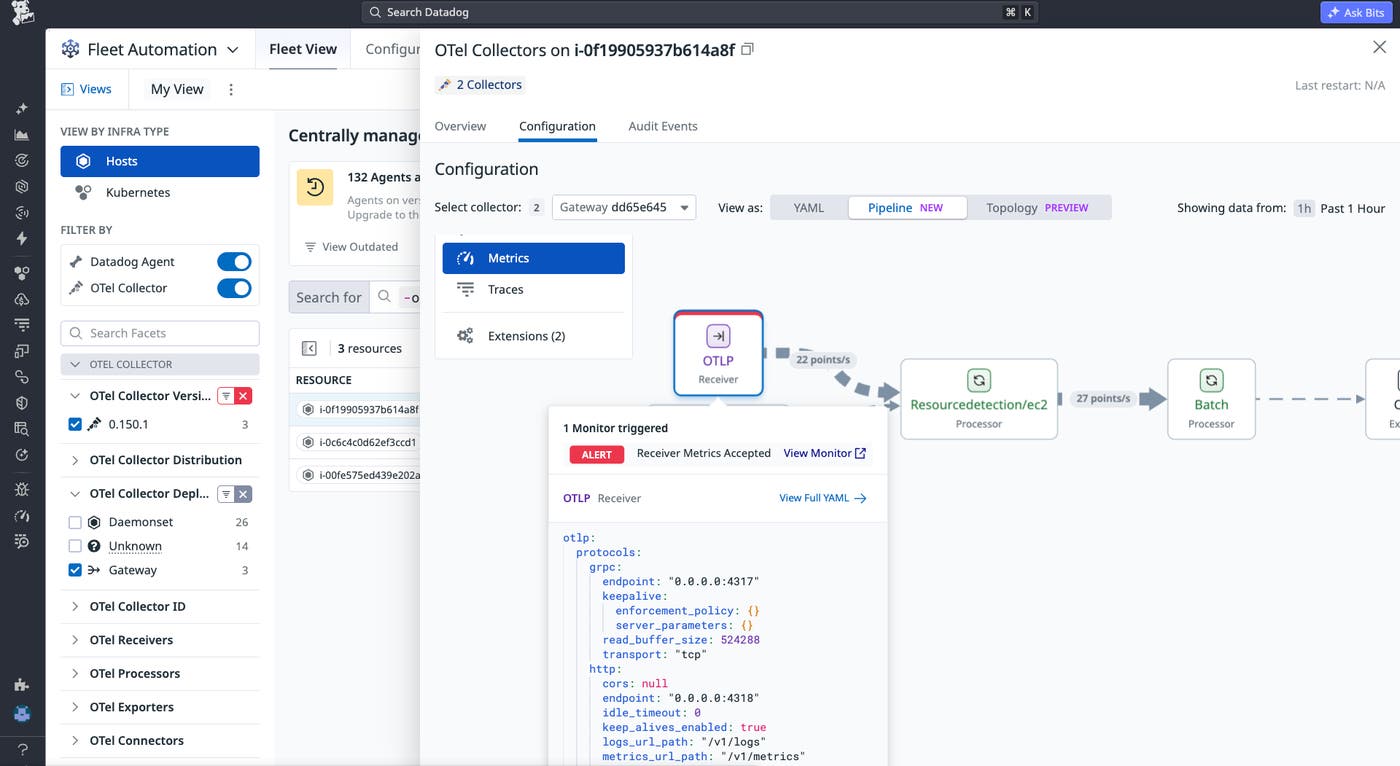
You can then use component-level monitor alerts and configuration YAML snippets to start troubleshooting workflows in one place, reducing the time spent correlating signals across tools and accelerating remediation.
Start troubleshooting OTel gateways in Datadog
Fleet Automation brings OTel gateway topology, traffic insights, monitor alerts, and configuration context into a single troubleshooting workflow, helping you better understand your OTel gateway architectures, isolate problematic Collectors or routes, and resolve issues faster. With this unified troubleshooting experience, platform teams can now access the scalability and flexibility benefits of OTel gateway deployments with greater confidence, while reducing the operational complexity of running them in production.
To get started, visit the Fleet Automation and DDOT gateway setup documentation. If you’re new to Datadog, you can sign up for a free 14-day trial to get started.
