

Micah Kim

Nolan Hayes
Many DevOps and security teams rely on ServiceNow CMDB (Configuration Management Database) as the system of record for metadata about infrastructure assets, application and service ownership, and dependencies. ServiceNow CMDB captures which team owns each service, what business unit the service supports, the environment where it runs, and how assets relate to each other. But logs and security events typically arrive in downstream tools without that context, forcing teams to correlate telemetry data with CMDB data by hand during incidents and investigations. That work slows down triage and often must be repeated separately in every tool that consumes those logs.
Now, Datadog Observability Pipelines helps you solve this problem by enriching logs with CMDB data as they flow on-stream to your preferred destinations. By using the Datadog Reference Tables integration with ServiceNow CMDB, you can use dynamically updating lookups with your data pipelines so that enrichment pulls the latest dataset from your system. You’re able to enrich log events with ownership, application, and dependency data before they leave your infrastructure, and you give each downstream destination that same context. Your teams gain the flexibility to process logs within your own infrastructure while relying on centralized enrichment from cloud-hosted datasets.
In this post, we’ll explore how Observability Pipelines can help you:
- Enrich logs with CMDB information on-stream
- Route and prioritize events by using CMDB ownership and dependency data
- Investigate incidents and security threats with CMDB-backed context
Enrich logs with CMDB information on-stream
Many log events carry only basic identifiers such as domains, hostnames, IP addresses, and service names. This limitation leaves teams with a gap, where raw events don’t contain contextual information and lookup logic must be managed manually for each tool.
With Observability Pipelines, you can use the Enrichment Table processor to enrich logs on-stream with ServiceNow CMDB data that is stored in Reference Tables. Key fields such as ownership, business unit, service tier, and dependencies stay in sync, and updates are automatically reflected in your logs without requiring any changes to your pipelines. Since enrichment occurs within your own infrastructure and upstream of any vendor tools, you can apply this logic universally to any destination. You can then route the enriched records to your preferred SIEM or data lake, including Microsoft Sentinel, Splunk, CrowdStrike, and Datadog CloudPrem, without duplicating lookup logic for each tool.
For example, let’s say that you work as a platform engineer for a large healthcare organization supporting a hybrid infrastructure of cloud and on-premises workloads. Your environment contains thousands of shared network and storage devices that have critical dependencies for your applications. However, logs from your systems often arrive with minimal context, many only containing an IP address or hostname.
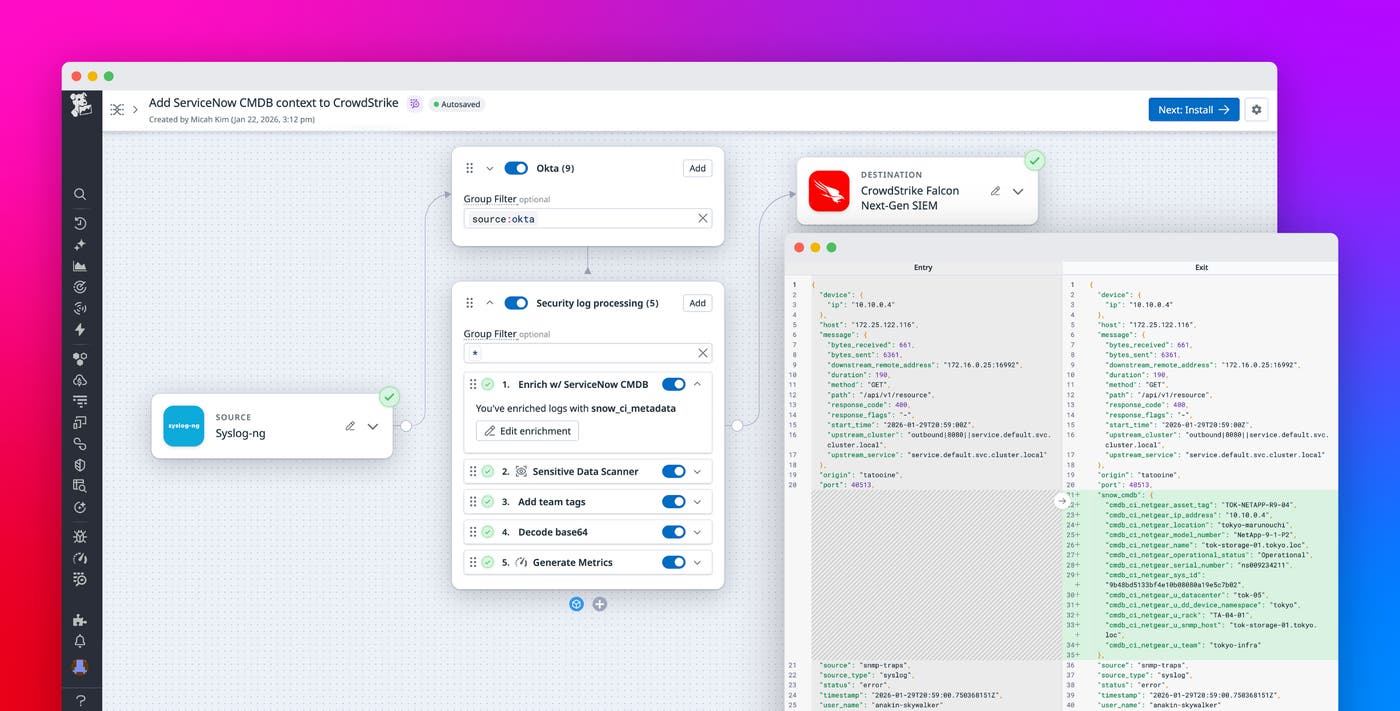
Using Observability Pipelines, you can now add ServiceNow CMDB information directly stored in Reference Tables. The following screenshot shows the Enrichment Table processor configured to enrich logs from the snow_ci_metadata table that dynamically updates from CMDB.
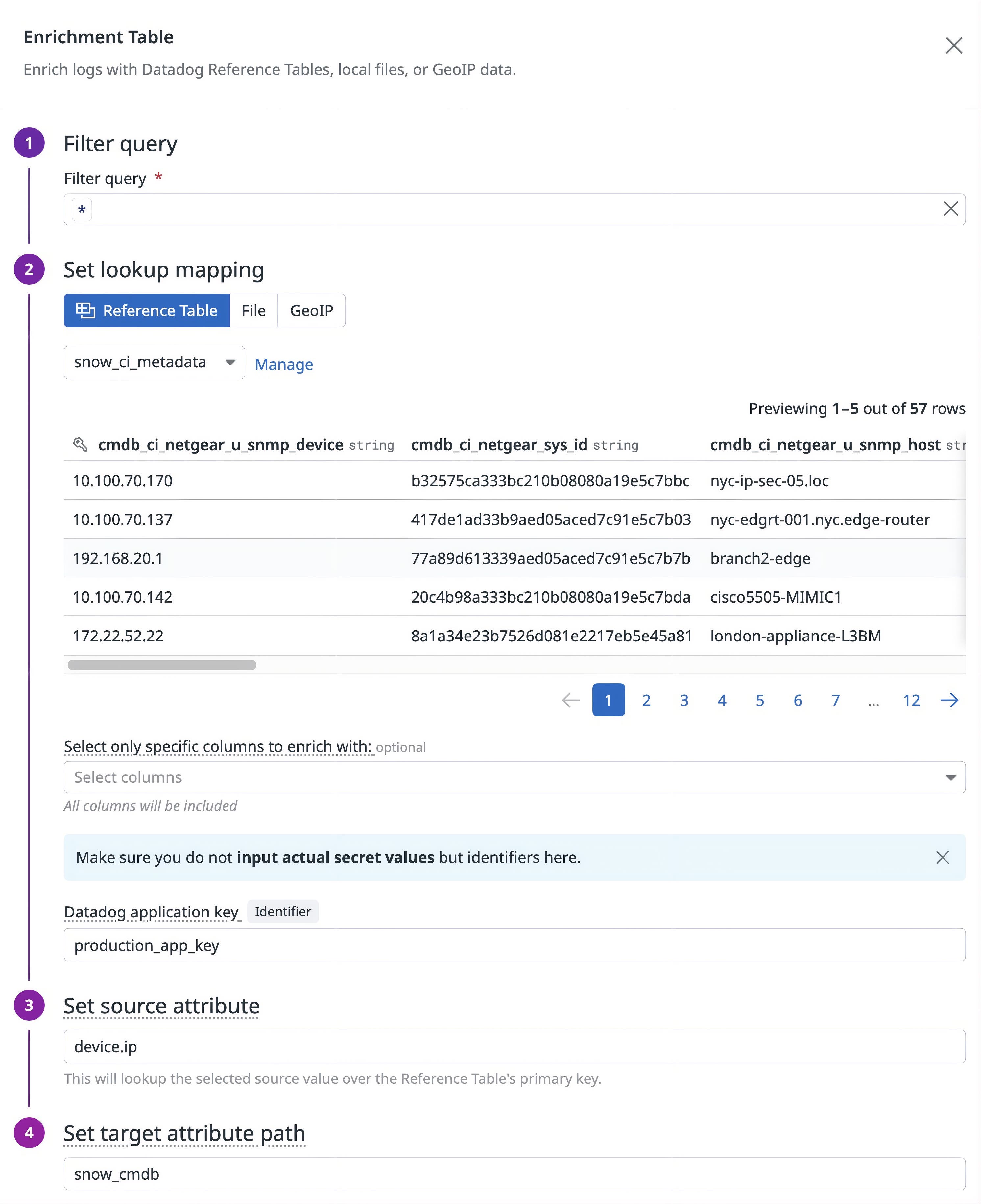
Once the processor is configured, logs containing values that match keys found in cmdb_ci_netgear_u_snmp_device will be appended with information from the table.
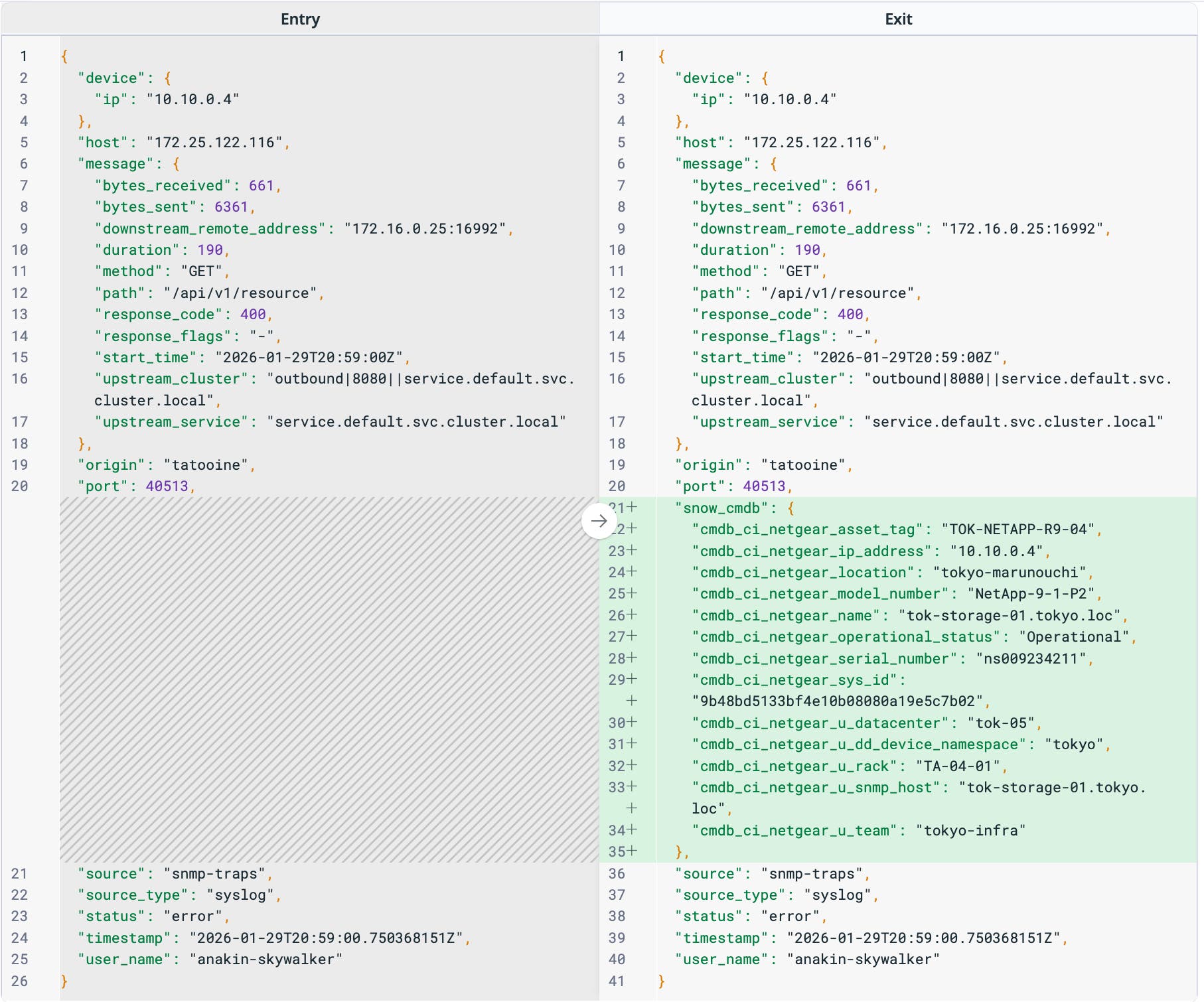
The raw log on the left arrived with an IP address 10.10.0.4 nested under the device.ip object. Observability Pipelines dynamically looks up that IP in the snow_ci_metadata table and automatically appends context to the logs before sending them to your preferred destination. Now, the enriched log on the right includes the device’s asset tag, physical location, model number, serial number, and owning team under the snow_cmdb object. With this additional context, your core SRE and security teams can alert the correct owners and correlate infrastructure issues with application impact, without needing to manually search this information in ServiceNow.
Route and prioritize events by using CMDB ownership and dependency data
Ownership and dependency data enables your teams to define routing and storage rules for each service and application. Once CMDB info is appended to logs, DevOps and security teams often rely on that context for routing and prioritization. Since Observability Pipelines gives your teams the flexibility to configure routing rules before egress occurs, you can make decisions based on any attribute in the event, including the ownership, service tier, dependency, or business unit fields that came from your CMDB.
A common pattern is to tier log data by business impact. After enrichment, you can define routing rules that send logs from critical, customer-facing services to a SIEM such as Microsoft Sentinel or Google SecOps to inform detection rules or directly to a security data lake such as CloudPrem. Because the routing uses CMDB-derived attributes instead of static, manually created tags, the rules stay updated with your organization’s ServiceNow configurations.
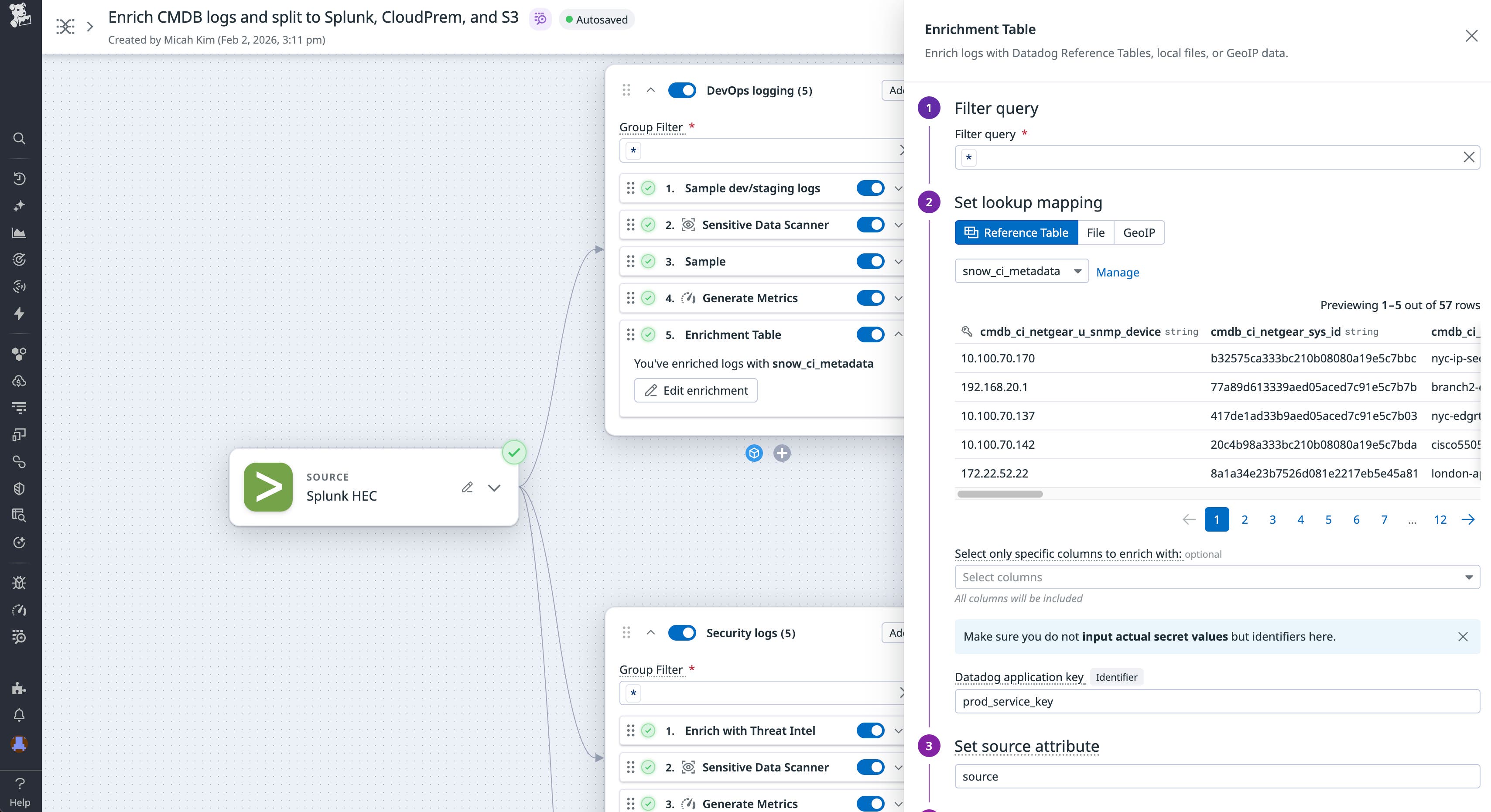
For example, let’s say that you’re the Head of SRE at a large fintech organization tasked with enforcing compliance requirements. You must ensure that teams that use Splunk and CloudPrem receive the logs they need while maintaining a copy in Amazon S3. You rely on ServiceNow CMDB as your source of truth for ownership and need the data to be processed, prioritized, and routed according to each business unit’s needs.
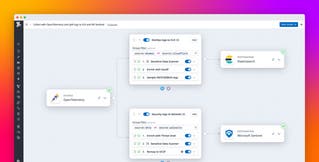
Using Observability Pipelines, you can enrich all of your logs with CMDB context before applying processing and routing rules. With this context, you can redact personally identifiable information (PII) before splitting security logs to Splunk and DevOps logs to CloudPrem. You can also divert data from internal, lower-level environments to Amazon S3 for long-term storage and rehydrate to each destination as needed.
Investigate incidents and security threats with CMDB-backed context
During incidents and operational outages, security teams need to know which services are affected, who owns them, and what dependencies are involved. Without CMDB data in the logs, these teams often must pivot between their SIEM or data lake and ServiceNow to piece together the story. With CMDB enrichment in Observability Pipelines, events that reach your security tools already carry the information you need without requiring any extra manual effort.
For example, let’s say that you’re a security engineer for an enterprise financial organization who is investigating a suspicious authentication pattern in CrowdStrike. When you add security context to your logs with Observability Pipelines, your events arrive at your SIEM with enriched information. You can filter or group by cmdb_ci_owning_team, cmdb_ci_permissions, or cmdb_ci_location to identify important stakeholders and determine priority.
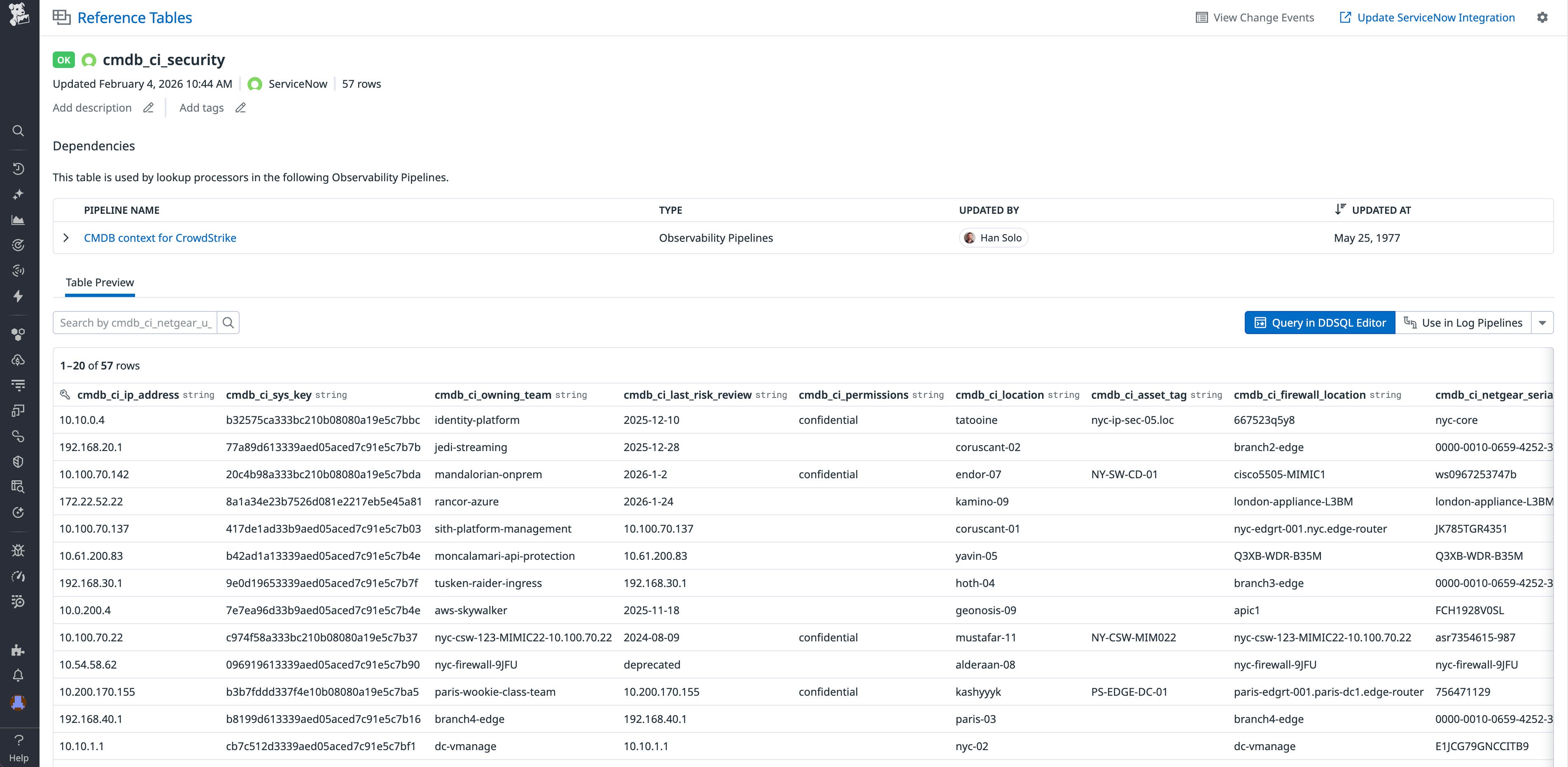
Because Reference Tables synchronize with ServiceNow automatically, enriched logs have the latest CMDB info even as teams reorganize or reclassify services. When ownership changes, you don’t need to update pipeline configuration. The next sync brings in the new owner, and subsequent events reflect that change.
Additionally, security teams often use historical audit events or correlated events when they investigate new threats. Using rehydration for Observability Pipelines, you can pull archived logs from Amazon S3, Azure Blob Storage, and Google Cloud Storage; add fresh context from ServiceNow-backed Reference Tables; and send the newly enriched events to your preferred SIEM or data lake. Historical records then arrive with up-to-date CMDB info, enabling you to correlate old events with current ownership and dependency information without manual joins.
Start enriching your logs with ServiceNow CMDB data today
Using Observability Pipelines with Reference Tables and the ServiceNow CMDB integration gives you a scalable way to attach ownership and dependency context to logs before they reach their destination. By enriching events as logs flow through your pipelines and reusing that logic across tools, you can reduce duplicated configuration, route data based on business impact, and accelerate security investigations with CMDB-backed context already present. To get started, check out the Observability Pipelines Enrichment Table processor documentation and the Reference Tables documentation.
If you’re new to Datadog, you can sign up for a 14-day free trial.