

Capucine Marteau
Product Manager

Natasha Silva
Technical Content Writer
Alert fatigue and blind spots develop together. Monitoring stacks that generate noise while missing critical issues may have incomplete coverage or poorly configured alerts. As they grow reactively and without structured coverage assessment, both issues worsen. Teams will often add monitors when something breaks and tune thresholds when alerts become unbearable, but rarely audit their overall setup to see if it works.
To develop a healthy monitoring stack, teams need to get two things right: coverage and quality.
Assess monitoring coverage across your stack
Effective coverage is not the same as monitor quantity. What matters is whether you’re detecting failure modes across each layer of your system. Those layers fall into a rough priority order. Gaps in lower layers are often silent and tend to surface once Layer 1 or 2 starts degrading. Visibility at all layers matters even if alerting thresholds differ.
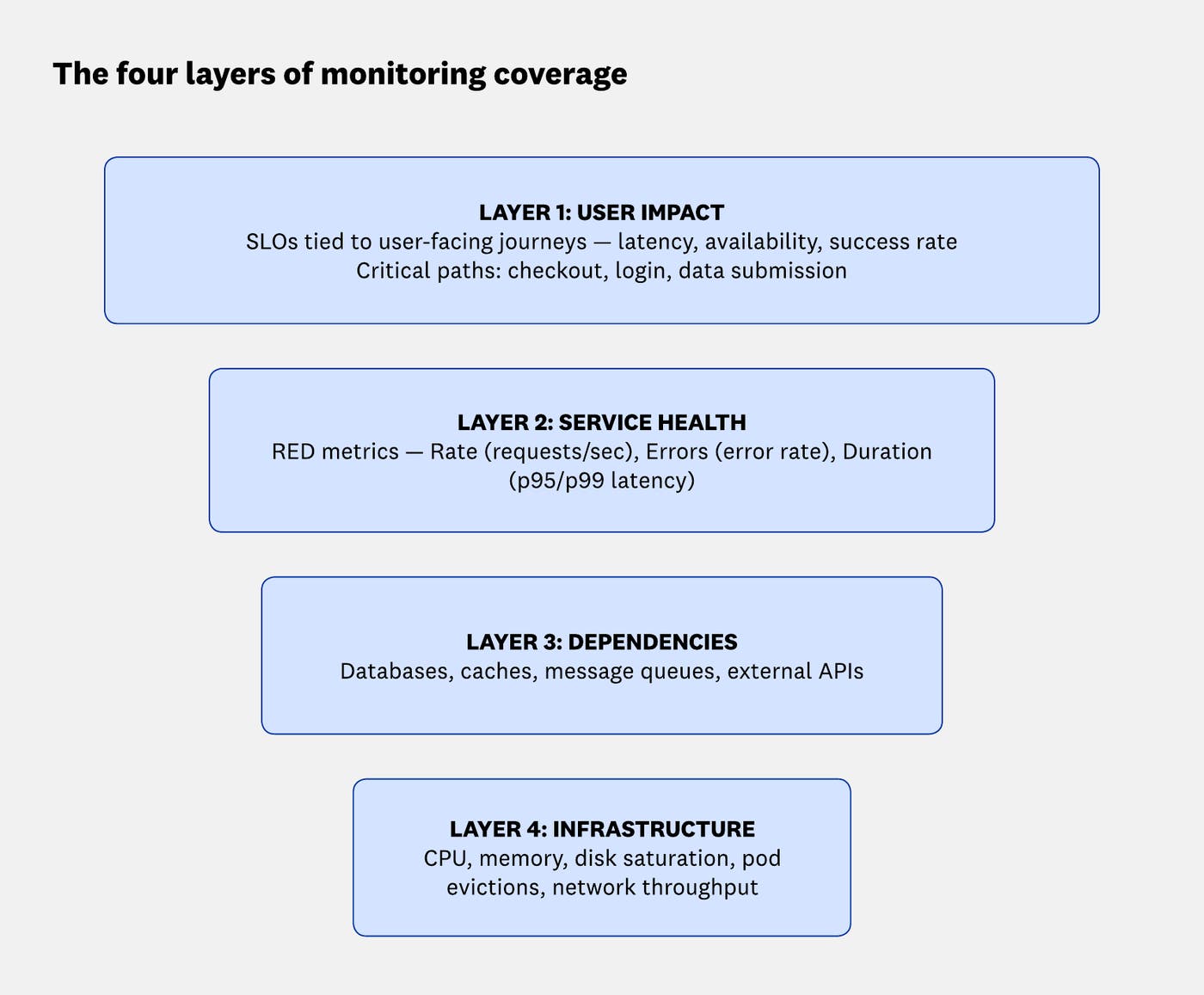
Layer 1 is the highest-priority layer. If it has no alerts, users will report outages before monitors do.
Layer 2 is where most teams have some coverage, but often with poorly configured thresholds.
Layer 3 tends to be under-monitored, even though dependency failures are a leading cause of service degradation.
Layer 4 covers signals that should primarily drive tickets instead of alerts, unless they directly correlate with user impact. For example, memory usage trending steadily upward over hours may indicate a leak heading toward an out-of-memory crash. That’s worth an alert, but a brief CPU spike during a deployment that resolves within minutes is not. AI-assisted tools like Bits AI SRE can help make these judgment calls automatically, flagging infrastructure signals that correlate with user impact without manual threshold tuning.
If you can’t commit to a full audit right away, these three steps will give you the highest return on your first few hours of work:
Check Layer 1 first: Verify that every tier-1 service has at least one user-impact alert. If not, that’s your first gap to fill.
Find your noisiest monitors: Sort monitors by trigger frequency over the last 30 days. The top 10–20 are almost always the ones draining on-call energy the most.
Fix orphaned alerts: Ensure every monitor has an owner and working alert routing. Without both, alerts either go unnoticed or provide no value. Fix routing before anything else.
What makes a high-quality alert
An alert that fires too often stops being treated as urgent. An alert with no owner gets ignored. When alerts lose credibility, teams stop responding effectively. High-quality alerts share a few key properties:
| Property | What a good alert looks like | What to avoid |
|---|---|---|
| Clear symptom | Describes what’s wrong from a user or system perspective | “X metric crossed a threshold”, no context |
| Clear ownership | Named team or on-call rotation | No owner assigned |
| Appropriate urgency | Alert, ticket, or log matched to actual severity | Every issue raises an alert, or none does |
| Actionable | Contains a runbook link, dashboard, or first diagnostic step | Engineers wasting time during an incident |
| Stable | Low flap rate, evaluation window fits signal variance | Alerts that resolve and re-fire within minutes |
Audit and clean up your monitors
A monitoring audit is a structured process that starts with understanding what the team has, maps it to what is needed, and produces a prioritized action list. Working through the following steps in order helps ensure that cleanup doesn’t accidentally remove important coverage.
Step 1: Build your inventory
Before making any changes, establish a clear baseline of your current monitoring footprint. For each monitor, collect:
Name and type (metric threshold, anomaly, composite, synthetic, etc.)
Owner or team
Service or component monitored
Notification routing
Severity classification
Last triggered date and trigger frequency over the past 30 and 90 days
Time to acknowledge
Linked runbooks or dashboards
Sorting this inventory surfaces a few distinct problem categories. Noisiest monitors are the top 10–20 by trigger frequency. Orphaned monitors have no owner, no routing, and no identifiable purpose. Zombie monitors either never trigger (often because the component they watched was decommissioned) or trigger constantly because their thresholds were never tuned to actual operating ranges.
For most teams, writing this list out and sorting by trigger count is enough to prioritize necessary next actions. With Datadog, this can be done directly from the Manage Monitors page, filtering by team, service, or environment, then sorting by alert frequency. For teams that want to automate this step, the Monitor Search API enables programmatic inventory export to build their own reporting pipeline.
Step 2: Map your architecture and critical paths
Before deleting anything, establish what must be monitored. During the inventory, you may find monitors that don’t fire often but catch catastrophic events when they do. Those are worth keeping.
Engineers often work with systems they didn’t build. In that case, documentation is frequently incomplete or outdated. Traffic patterns and incident history are better starting points since they are likely to give a more accurate picture of the critical paths than any doc.
From there, list the flows that directly represent the product’s core value: checkout, login, data export, job submission, API calls from paying customers. For each journey, trace the request path. For example:
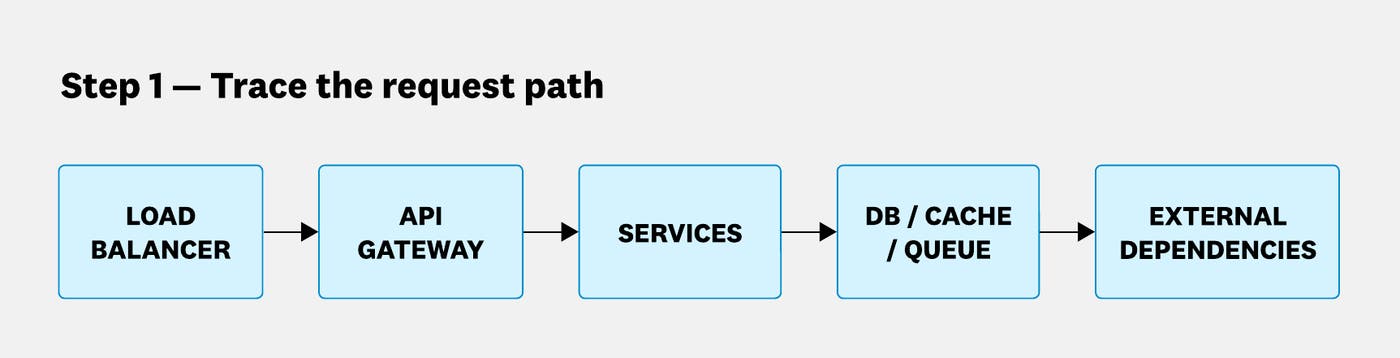
The next step is to mark high-risk components: stateful systems, scaling boundaries (worker pools, connection pools), and external dependencies where you don’t control reliability (payment processors, third-party APIs).
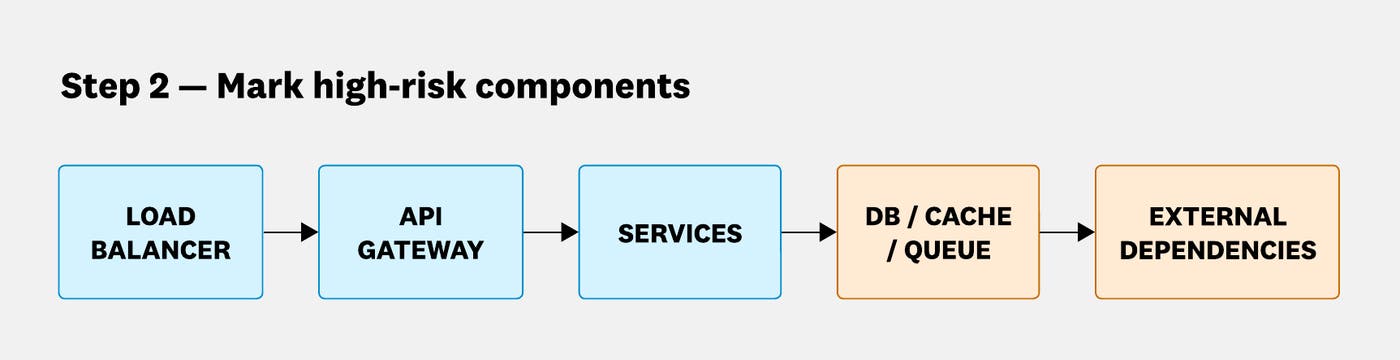
The anchoring question at each step is, “If this component fails, does a user journey break?” For example, if a payment processor is slow or returns errors, customers can’t complete purchases. The processor therefore needs monitoring from your side, not just from their own status page.
Datadog provides several tools that can speed up this mapping and reduce manual discovery work. Software Catalog gives a searchable inventory of all your services with ownership and dependency metadata. Service Map visualizes live service-to-service traffic, and the APM dependency map shows how services depend on each other at runtime.
Step 3: Audit coverage by failure mode
For each critical user flow identified in the previous step, verify that you’re detecting every meaningful way it can fail. Consider the following categories:
| Failure category | What to monitor |
|---|---|
| Availability and correctness | Endpoint availability, HTTP 5xx rate, job failure rate, and business key performance indicator (KPI) monitors like payment success rate |
| Latency and saturation | p95/p99 latency per endpoint, timeout rates, queue depth, and thread pool exhaustion |
| Dependency health | Database connection pool utilization, cache hit rate, and external API latency and error rate |
| Delivery and change risk | Deployment markers correlated with error or latency changes, and feature flag rollout health metrics |
| Silent correctness failures | Business KPIs like orders processed and events delivered, expected throughput, and data consistency checks |
The hardest failures to catch are silent ones. Jobs can succeed and return HTTP 200s while producing wrong or incomplete output. Consider an order processing pipeline where no error rate spikes, but a subset of orders are silently failing to write to the database due to a schema mismatch. The only way to discover that gap during an audit is by asking, “Do we have any monitor that would catch wrong or incomplete output?”
Step 4: Find coverage gaps and misconfigured monitors
Both missing and misconfigured monitors can produce alert fatigue and blind spots. This distinction matters for remediation. Missing monitors require adding new coverage, while misconfigured monitors require tuning what already exists.
Datadog’s Monitor Quality page is a good starting point for this step. It surfaces monitors with known quality issues, including noisy monitors, monitors muted for extended periods, alerts with missing owners or routing, and flapping monitors. The page also includes direct remediation actions from the same view.
Missing monitors to look for
No alerting monitor tied to user impact for a tier-1 service (no SLO, no latency alert, no error rate alert)
No visibility into a critical dependency used by a tier-1 service (the database has no monitors)
No early warning signal for saturation (you only discover a system is full when it starts failing)
Third-party dependency health that’s only visible through your own service’s errors (downstream failures are detected after they’re already impacting you)
Misconfigured monitors to look for
Always-firing: triggers more than a set number of times per day because the threshold is calibrated to the normal operating range.
Flapping: rapidly alternates between firing and resolving because the evaluation window is too short for the signal’s natural variance.
Deploy-correlated: fires reliably during every deployment due to brief metric spikes.
Unbounded grouping: alerting per-host or per-pod on a metric that applies to hundreds of instances creates alert storms.
Wrong aggregation: alerting on average latency misses tail latency issues (p99 can be actively degrading while the average looks healthy). Similarly, alerting on error count instead of error rate creates thresholds that stop firing under load as traffic grows. Use p95 or p99 for latency monitors, and alert on error rate rather than count.
Step 5: Prioritize remediation
A full audit will surface more issues than can be fixed in one sprint. Not all gaps carry equal risk, so prioritization determines where remediation efforts should go first.
A good practice is to start with Layer 1. Every tier-1 service should have at least one user-impact alert focused on error rate, latency, or service level objective (SLO). Add alerts to flows where users might report outages before monitors do.
The next step is to fix orphaned alerts. Ensure every alert has an owner and a correct notification channel before changing or deleting anything. An alert currently routing to a dead Slack channel or empty distribution list is effectively silent. Fixing routing is a quick win that can happen during the inventory step.
Finally, address the noise. Once critical coverage is confirmed, work through misconfigured monitors from most to least disruptive. Start with the highest-frequency triggers and remove noisy monitors that are wearing down on-call engineers.
Step 6: Reduce alert noise without dropping critical coverage
An on-call engineer who doesn’t trust their alerts will hesitate to act or stop acting altogether. Reducing noise directly improves incident response time, and there are a few reliable tactics for doing so.
Deduplicate and consolidate: Merge multiple alerts that monitor the same symptom from different dimensions. Replace per-pod paging with service-level aggregation unless the failure is genuinely instance-specific, such as a disk filling on a specific stateful node.
Add stability mechanisms: Increase evaluation windows for spiky metrics. Add evaluation delays during deployments to suppress transient restart spikes. Use multi-window alerting for SLO-based signals: a fast window for detection and a slower window for sustained degradation.
Alert on symptoms, ticket on causes: Relate alerts to user impact (latency degradation, error rate). Ticket on likely causes (high CPU, pod restarts) unless they directly correlate with user impact.
One exception applies to saturation signals. For disk filling or a connection pool approaching its limit, the trigger should be rate of change, not absolute value. A connection pool at 80% that has been stable for days is a ticket. The same pool reaching 80% in the last 20 minutes and trending toward its limit is an alert. Use a forecast or rate-of-change alert rather than a static threshold to avoid finding out too late.
Step 7: Build a maintainable monitoring baseline
Rather than inheriting a legacy pile of monitors, define what “baseline coverage” means for your organization and assess the gap. Codify this baseline as a template or checklist and apply it to every new service during onboarding, so that nothing goes to production without it.
A good per-service baseline covers:
Service health (RED): request rate, error rate, and p95/p99 latency.
Saturation: CPU and memory utilization, thread pool and worker utilization, and connection pool saturation.
Dependency signals: database connection pool, cache hit rate, and primary downstream service error rate.
User journey and SLO: success rate for critical user-facing operations and a latency threshold tied to user experience expectations.
For platform and infrastructure, the baseline should also include host/node saturation, Kubernetes scheduling failures and pod eviction rate, and telemetry pipeline health.
A sudden drop in metric volume from a service is often the first sign of an agent issue. Monitoring your observability pipeline is as important as monitoring your application. Monitor metric ingestion rate per service, agent heartbeat, and pipeline lag. Without these signals, a dead agent can create the appearance of a healthy service.
For expanding coverage beyond the baseline, the Datadog Monitor Template library provides pre-built monitors for common technologies such as PostgreSQL, AWS Lambda, and Kafka. It lets you apply best-practice coverage for a new dependency without starting from scratch. In-flow suggestions during monitor creation also help catch common configuration mistakes before they become operational problems.
Step 8: Add governance to keep it clean
Preventing the same problems from recurring requires lightweight, automated controls built into how monitors are created and maintained. A practical governance model rests on four pillars:
Ownership and naming conventions: Require metadata (team, service, environment, severity) on every monitor and enforce a naming convention that makes alerts readable without clicking into them (e.g., [team] service | signal | condition). Without consistent naming, the inventory step of the next audit becomes significantly harder.
Tagging standards: Tag every monitor with service, team, env, tier, and runbook URL. Consistent tagging enables automated quality checks and bulk remediation. With Datadog’s tag policies, teams can enforce required tagging across all monitors.
Monitors as code: Manage critical monitors through infrastructure as code (Terraform, Pulumi, etc.) to require reviews, maintain change history, and enable rollback. Code review creates a natural quality gate. For example, a pull request that creates a monitor without a runbook should fail review. Datadog’s restriction policies define who can create or edit these monitors, supporting change control without slowing teams down.
Regular reviews: Schedule recurring reviews and communicate findings to stakeholders in terms of business risk, not technical debt. Saying “We have no coverage on checkout, our highest-revenue flow” lands differently than “we have gaps in Layer 1 monitoring.” Proposing a concrete remediation plan with clear ownership and timelines makes it easier to get time approved for this work.
Monitor correctly for better reliability
Regular monitoring audits help teams detect failures faster and reduce on-call burnout, and build trust in alerts that improves incident response.
Datadog provides baseline monitors for critical signals from day one, giving you a coverage starting point without manual setup. You can use our Monitors documentation to start auditing and improving your monitoring posture.
If you don’t have a Datadog account, sign up for a 14-day free trial.
