
Amy Zhou
Product Manager

Bowen Chen
Senior Technical Content Writer
Engineers are increasingly launching investigations from AI tools such as Claude, Cursor, and ChatGPT that can access engineering knowledge and observability data using connectors and MCP servers. However, in these workflows, AI tools typically communicate and summarize data using text. For example, an AI chat interface might tell you that latency spiked following a specific deployment or that a monitor entered an alert state, but you still need to open Datadog to inspect graphs and validate trends before deciding on your next course of action.
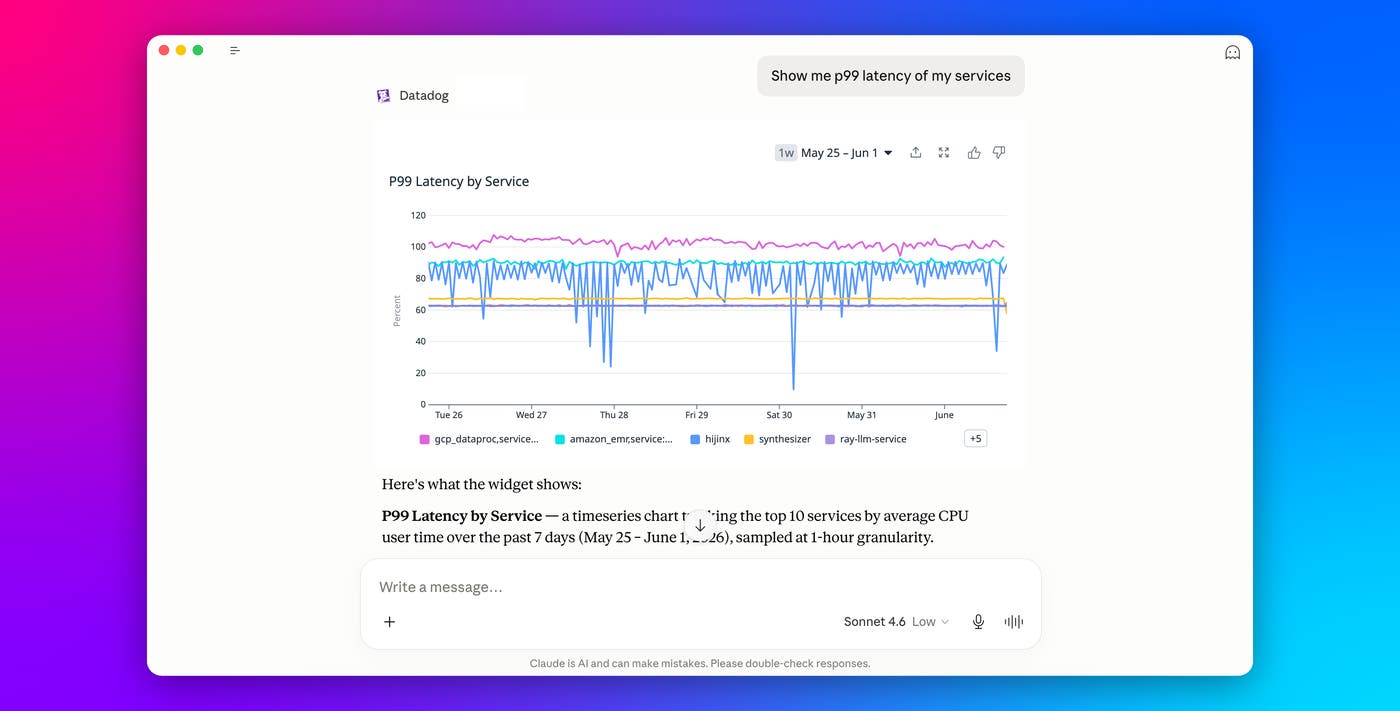
MCP Apps are an extension of the Datadog MCP Server that enable our server to return interactive UI elements directly within the AI conversation. This means that instead of reading summaries about your telemetry data, you can inspect live Datadog graphs, monitors, Product Analytics widgets, and more inline with the model’s text response. Whether you are investigating an incident in Cursor, reviewing user behavior in Claude, or troubleshooting latency in ChatGPT, you can interact with the same visual context you would normally open in Datadog without needing to switch contexts or open a separate window.
In this post, we’ll look at how Datadog MCP Apps help you:
Triage incidents from your IDE or chat interface
As an on-call developer, you want to be able to quickly understand the alerts affecting your service when you get paged. Previously, AI tools like Claude and ChatGPT with access to the Datadog MCP Server could use the search_datadog_monitor_groups tool to find monitor groups related to a specific service in an alerting state and relay that information to you. MCP Apps enhance this workflow by displaying alerting monitors as interactive monitor cards directly within your AI chat interface. By selecting a monitor card in the chat, you can view its associated metrics as timeseries graphs and access familiar tooltips.
This enables you to continue investigating and asking follow-up questions without needing to switch contexts until you’ve gathered enough information to launch a more targeted investigation in the Datadog platform.
For example, after inspecting alerting monitors in Claude for a specific checkout service, you can ask Claude if the blast radius affects other services as well. If Claude discovers that the impact is isolated to a downstream dependency, it can help you identify whether the elevated error rates align with a recent deployment and visualize metrics and errors for that deployment alongside earlier versions. If you need to investigate further, you can ask Claude for a direct link to the service page within Datadog APM, where you can examine version traces to determine whether the issue requires a roll back.
Explore Product Analytics funnels directly in your AI conversation
AI workflows are also becoming more common for product and engineering teams looking to understand product adoption and user journeys. However, text-only answers often lack the visual context that make behavioral data meaningful.
Datadog MCP Apps enable Product Analytics visualizations to appear directly inside AI conversations so you can explore user behavior without leaving your existing workflow. You can ask, “How is our checkout conversion performing this month?” or “What does the funnel from /cart to /checkout look like?” Instead of generating a textual summary alone, the AI assistant renders an interactive user journey directly in the conversation, as shown in the graph below.
This enables you to engage with interactive UI elements within the context of the conversation and directly prompt the AI with follow-up questions. For example, after identifying an engagement drop-off point, you can ask the agent, “Why are we losing so many users here? Is there a difference between device types?” The AI assistant can then update the visualization inline with segmented data that helps you identify patterns in user behavior.
You can then investigate further by viewing specific Session Replays. After identifying a problematic funnel stage, you might ask the agent to review sessions where users appeared frustrated or abandoned checkout flows. MCP Apps can surface Session Replay results and related telemetry data directly in the AI interface, helping you correlate quantitative trends with real user behavior.
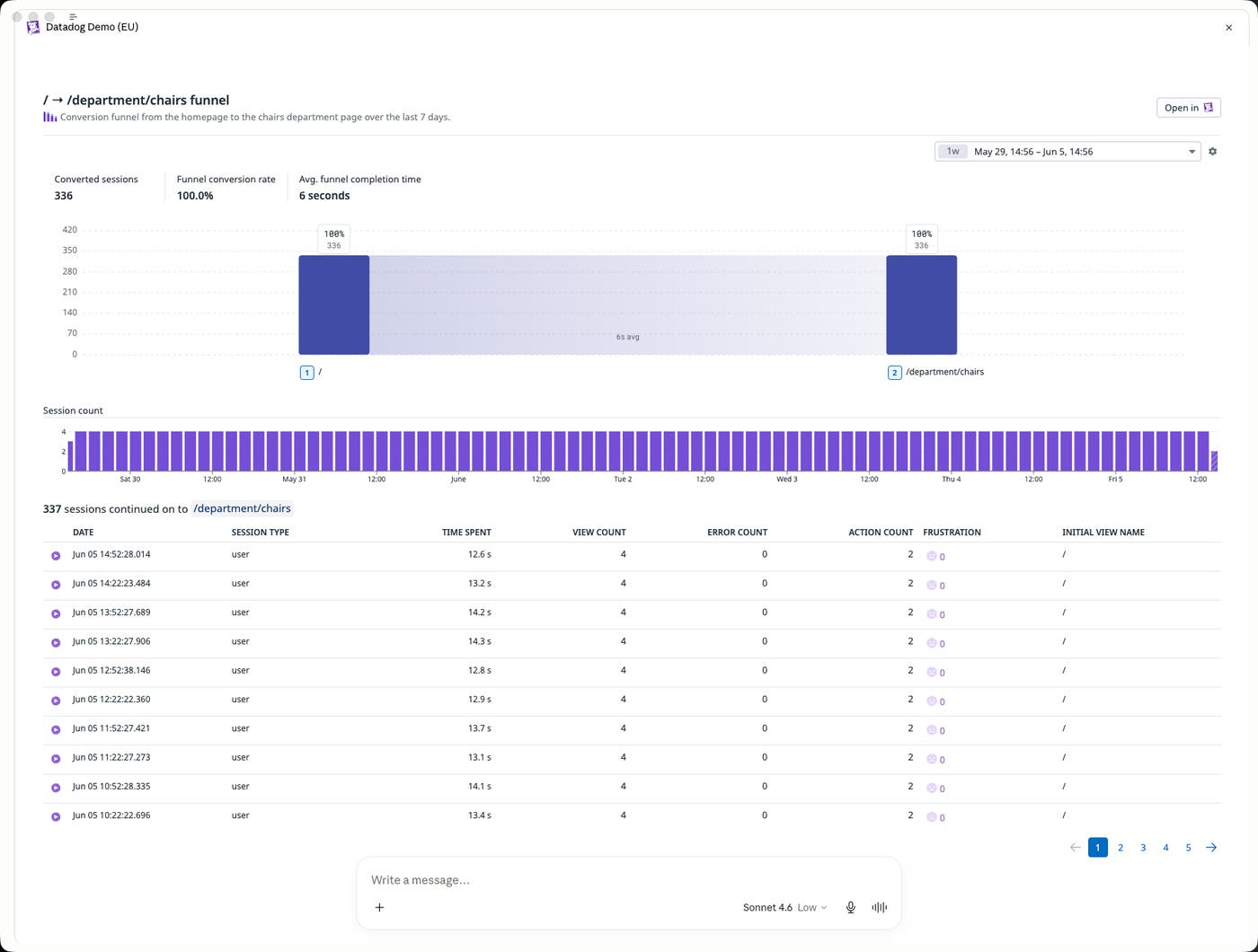
These workflows make it easier for you to move from high-level business questions to in-depth analysis within a single conversation. Instead of exporting screenshots or manually assembling reports across multiple tools, you can continue iterating directly in the AI interface while staying connected to live Datadog data. After completing an analysis, you can then ask the assistant to summarize your findings in a Datadog Notebook or share results with a Slack channel, helping teams preserve investigation context and communicate findings more efficiently.
Troubleshoot latency spikes from AI tools
Datadog MCP Apps bring APM visualizations directly into AI workflows so you can investigate latency regressions from the same interface where they are already collaborating or coding.
For example, after a deployment, you might ask, “Why did checkout latency spike after my recent deployment?” The assistant can render a Datadog timeseries visualization inline that highlights the latency increase across services and infrastructure components.
You can then ask follow-up questions to narrow the scope of the issue. For example, you might ask whether the latency increase is isolated to the checkout service or affecting downstream dependencies as well. Your AI tool can update the visualization to focus on the relevant services, helping you identify which system component is most likely contributing to the regression.
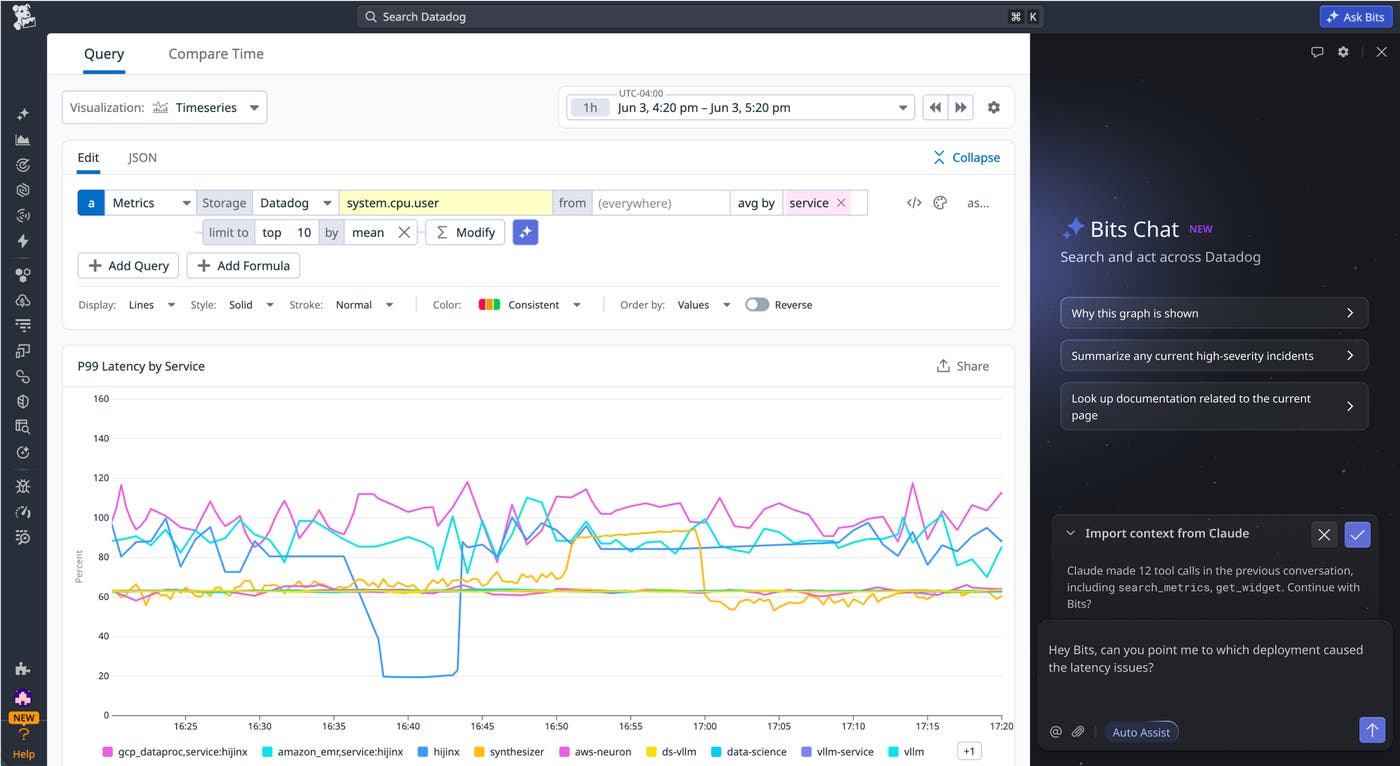
To continue your investigation within our platform, Datadog’s agent handoff feature for Claude enables you to import all of your chat context directly to Bits Chat. Bits Chat enables you to seamlessly continue your investigation and harness Bits AI features to surface signals and resolve the root cause of complex issues.
Bring Datadog context directly into your AI workflows
The examples in this post highlight just a few of the ways Datadog MCP Apps bring interactive Datadog experiences into the AI tools where engineers and product teams increasingly spend their time. Whether you’re triaging incidents, investigating latency regressions, analyzing user behavior, or exploring other workflows, MCP Apps make it possible to interact with Datadog data directly from commonly used AI interfaces.
To learn more about Datadog MCP Server tools, check out our documentation. You can also learn more about all of Datadog’s new AI Agent integrations in this DASH blog post. Otherwise, if you’re new to Datadog, sign up for a free 14-day trial to start exploring MCP-powered workflows with your Datadog data.
