
Amrita Lakhanpal

Barak Shoushan

Kruthi Vuppala

André Rodrigues

Howard Wang

Eunmo Kang
Engineers rely on many systems to prioritize what they need to work on each day. A single morning routine might involve checking pull requests (PRs), reviewing tickets, scanning CI/CD failures, looking at on-call handoffs, and confirming whether owned services are healthy. Each system provides useful context, but with that context scattered across tools, the work of turning signals into a clear plan often falls on the individual engineer.
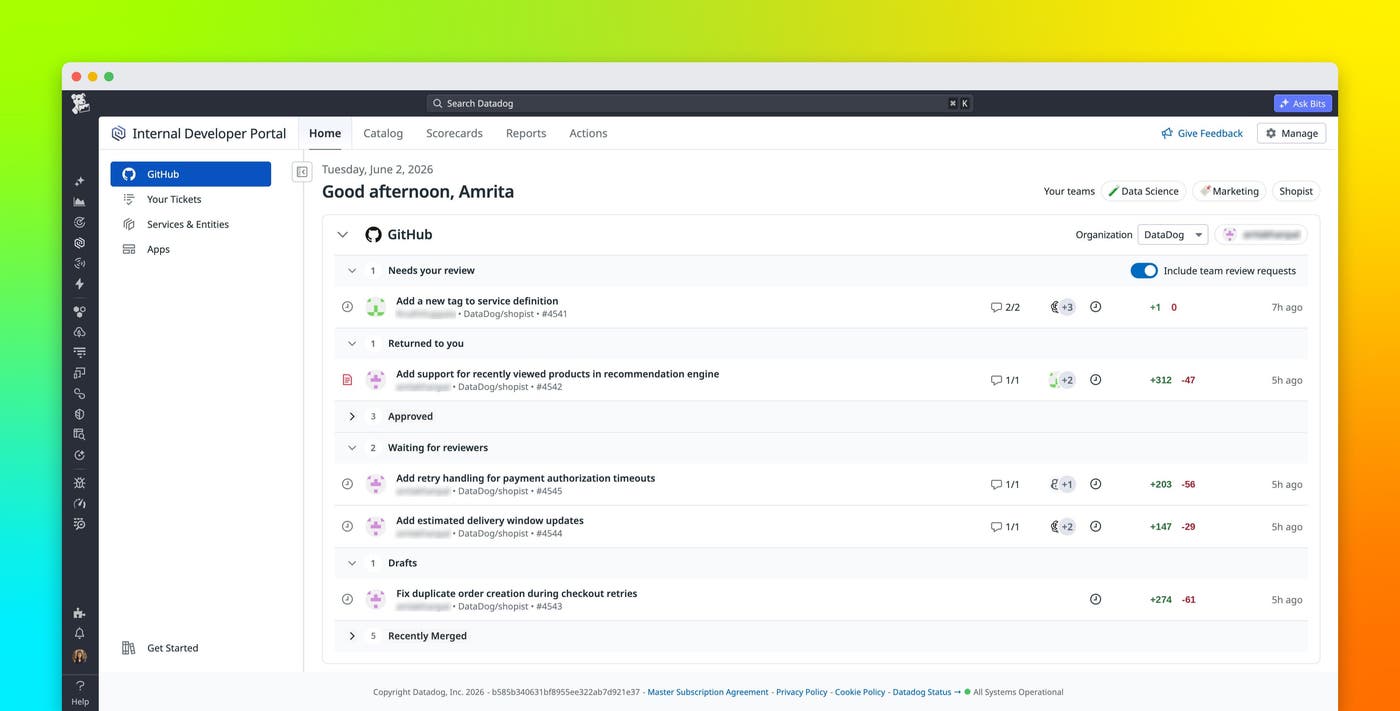
The IDP Homepage, part of the Datadog Internal Developer Portal (IDP), gives developers and the teams that support them a central starting point for prioritizing daily work in Datadog. It brings together the code changes, ownership context, and operational signals that matter to each Datadog user so they can understand what needs attention and move directly into action.
In this post, we’ll show how the IDP Homepage enables you to:
Start every day from the IDP Homepage
The IDP Homepage is the central starting point for developers using Datadog. Instead of beginning the day by opening several tabs and manually checking each tool, developers can use the homepage to see assigned tasks, owned services, and operational status in one place. This helps them start directly from “What should I do next?” rather than “What should I check?”.
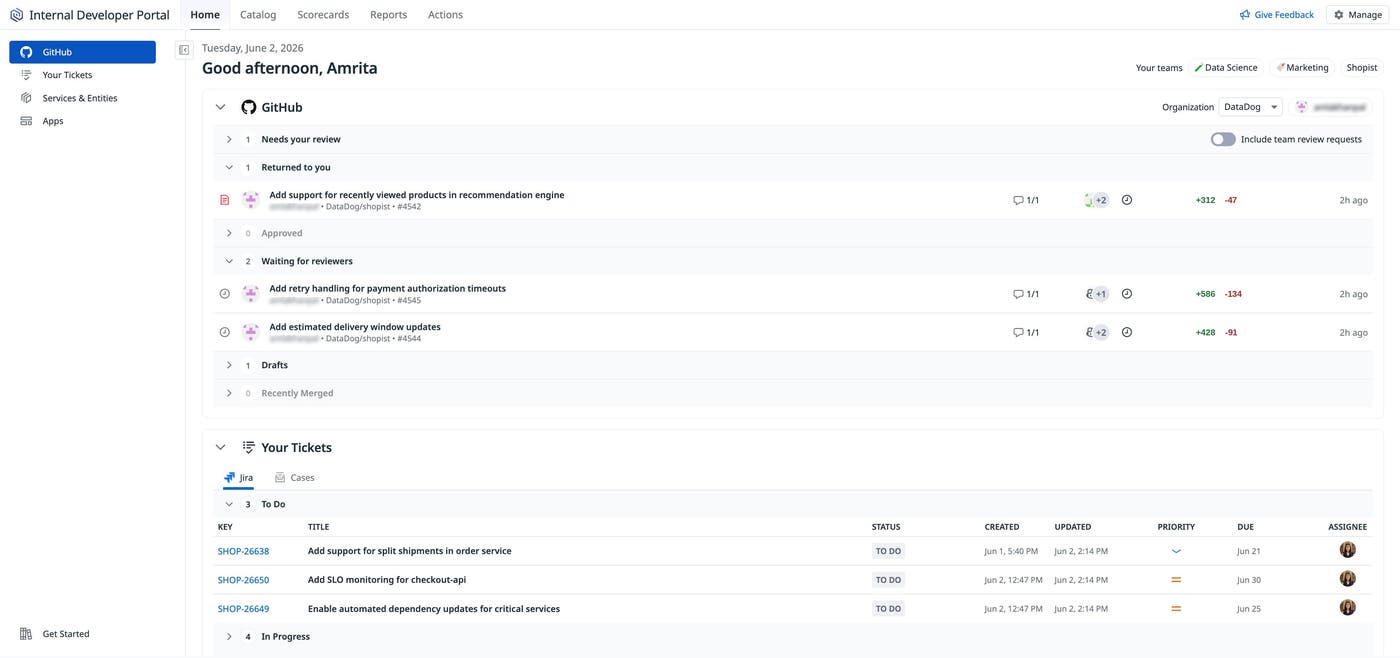
The homepage surfaces daily work from systems such as GitHub and Jira, enriched with operational context from entities in Datadog’s IDP Catalog, including health, deployments, monitor status, Scorecards, and on-call information. For example, a developer can review PRs that need attention, the tickets assigned to them, recent service activity, and alerts tied to the services that their team owns. This context is especially useful for teams that use Datadog as both an observability platform and internal developer portal because it connects engineering work with the production systems that are affected by that work.
The IDP Homepage reduces context switching while preserving the context that engineering teams need to make informed decisions. A PR can be evaluated alongside the health of the service it changes. A Jira ticket can be understood within the context of related incidents, alerts, and deployments. A healthy service can be left undisturbed while services with active issues can receive more attention.
Bring together development workflows and operational context
In many engineering organizations, code review workflows and operational workflows are siloed in separate tools. This separation can make it difficult to understand whether a code change is routine, blocked, or related to an active service issue. The IDP Homepage removes this obstacle by giving developers visibility into the connections between their code changes and the systems they own in production.
The homepage brings development workflows and operational context into a single view, including PRs, Jira tickets, service health, monitor alerts, errors, deployments, and on-call ownership. This helps developers understand not only which work is assigned to them but which work has the highest operational impact.
For example, a developer who owns a checkout service might start the day with several open PRs and Jira tickets. Viewing these items in their native tools such as GitHub or Jira makes it difficult to discern their priority. But viewing them in the IDP homepage alongside operational context can reveal that a particular service, such as the checkout service, has active monitor alerts or recent failed deployments. This enables the developer to focus first on the PRs and tickets most closely tied to customer-facing risk.
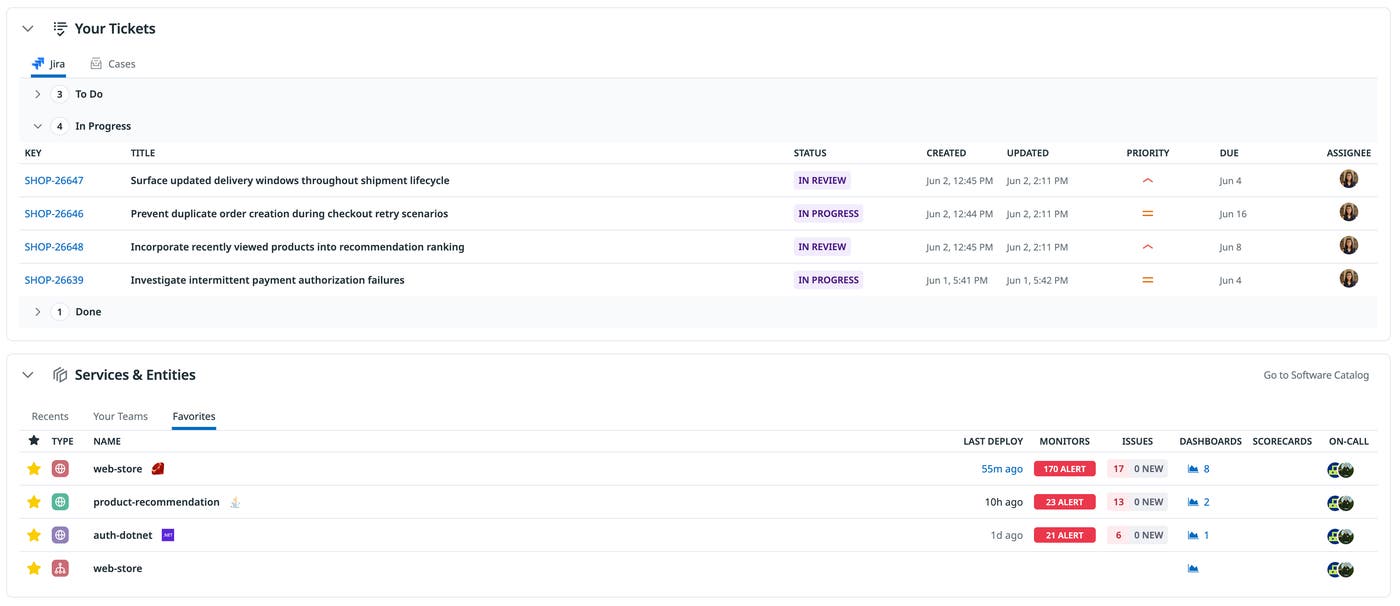
The homepage also includes the entities associated with an engineer’s team. Each entity can include information such as Scorecards, recent deployments, related monitors, open incidents, linked dashboards, and on-call status. You can also ask Bits Chat about what you see on the page. A question like “What should I do today?” prompts Bits Chat to prioritize your work so you can focus on the highest-impact tasks first. By bringing entity-level operational context together with daily development tasks and helping you prioritize across both, the homepage bridges the gap between developer portals and observability workflows.
Extend the homepage with custom apps
Each engineering team has its own tooling ecosystem. Many teams use a combination of commercial systems, internal tools, and custom workflows to manage deployments, approvals, incidents, migrations, and operational reviews. Native integrations can cover many common workflows, but they cannot account for every internal system that a team depends on.
You can extend the homepage by using Datadog App Builder or Datadog Apps. App Builder enables teams to create low-code apps and embed them directly within the homepage. Apps enables developers to build custom applications by using React and TypeScript (or JavaScript), either through their existing development workflows or with the help of their preferred AI coding agent.
Apps built using Datadog App Builder or Datadog Apps can help troubleshoot issues, optimize operations, and deliver self-service experiences. They run within Datadog and use the same permissions model, allowing teams to securely combine custom workflows with their organization’s existing telemetry data.
This enables platform teams to adapt the homepage to their organization without requiring a native integration for every system. For example, if your team uses LaunchDarkly for feature flag management, you can build and embed a LaunchDarkly Manager application in your homepage that enables you to view feature flags, monitor their status, and quickly navigate to flag details directly from within Datadog.
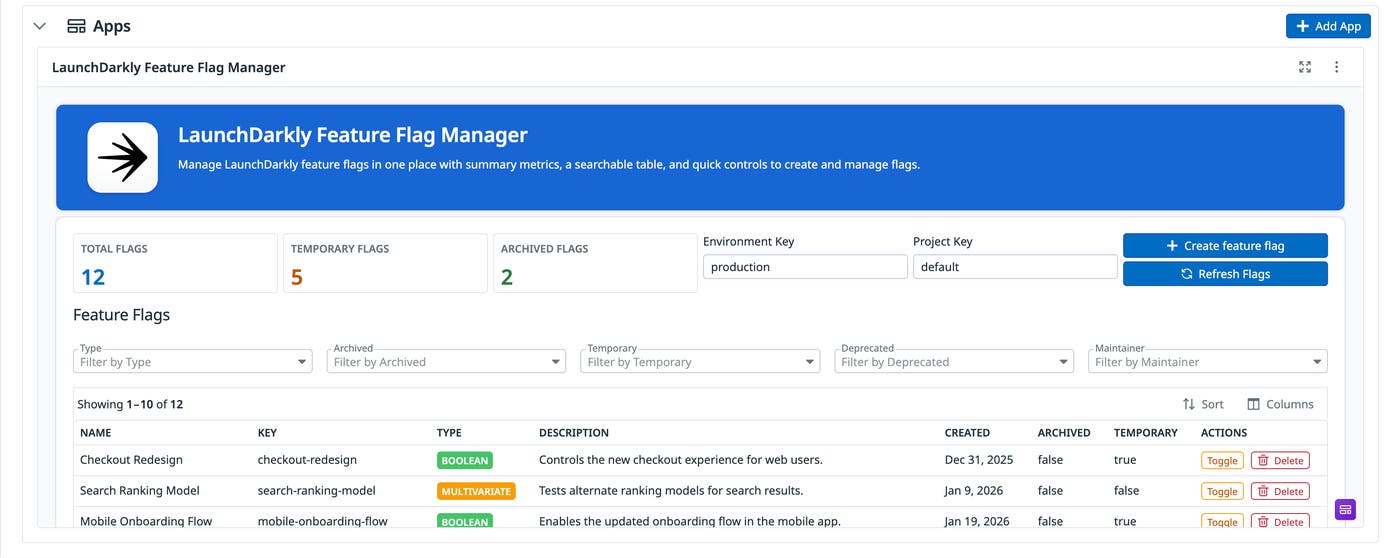
This ability to extend the IDP Homepage enables engineers to begin with out-of-the-box context from Datadog and its supported integrations, and enrich that with custom applications and internal tools tailored to their team’s processes. The result is a homepage that reflects how your organization actually works, bringing critical context and action into a single place.
Make the IDP Homepage your daily starting point
The IDP Homepage helps engineering teams start their day with a clear view of their work, the entities they own, and the operational signals that need attention. By bringing together development workflows, ownership context, and operational health indicators, the homepage helps teams reduce tool switching and connect daily engineering work to production impact. To get started, read the IDP Homepage documentation and the Internal Developer Portal documentation.
If you don’t already have a Datadog account, you can sign up for a 14-day free trial.
