

Allie Rittman
Running Kubernetes at scale almost always means paying for more compute than you need. To protect reliability, platform and application teams typically overprovision nodes early in development and keep scaling up as they add features and workloads. They are often reluctant to move to smaller or different instance types without a clear picture of how those changes will affect performance or availability. The result is a fleet of underutilized nodes that silently inflate your cloud bill.
Datadog Kubernetes Autoscaling’s Cluster Autoscaler, now in limited preview, helps you right-size your Kubernetes infrastructure by simulating your existing clusters and generating safe, cost-efficient node recommendations. It then automates node autoscaling and workload migration with a managed Karpenter integration or with your GitOps solution. Cluster Autoscaler builds on Datadog’s Kubernetes observability and workload autoscaling capabilities to connect instance-type decisions directly to real workload behavior and SLOs.
In this post, we’ll show how you can use Datadog Cluster Autoscaler to:
- Identify cluster idle spend and impacted workloads
- Automatically update node configurations and migrate workloads
Identify cluster idle spend and impacted workloads
Reducing Kubernetes infrastructure cost starts with understanding where you are wasting capacity and what may break if you change it. Datadog Cluster Autoscaler analyzes your live clusters and simulates how they would behave on different instance shapes so you can identify idle spend, see which workloads are affected, and estimate how much you could save before you touch any YAML.
Datadog uses a snapshot of your cluster to build this simulation, taking into account the same constraints that the Kubernetes scheduler and your autoscaling tools must respect. This includes:
- Node and pod affinities and anti-affinities
- Taints and tolerations
- Pod disruption budgets
- Existing autoscaling behavior from tools like Datadog
By modeling these constraints, Datadog can propose realistic node layouts that preserve your workload guarantees while reducing waste. Recommendations are regenerated roughly every 24 hours, reflecting the fact that node scaling decisions are more coarse-grained than per-pod autoscaling and should be based on stable usage patterns rather than transient spikes.
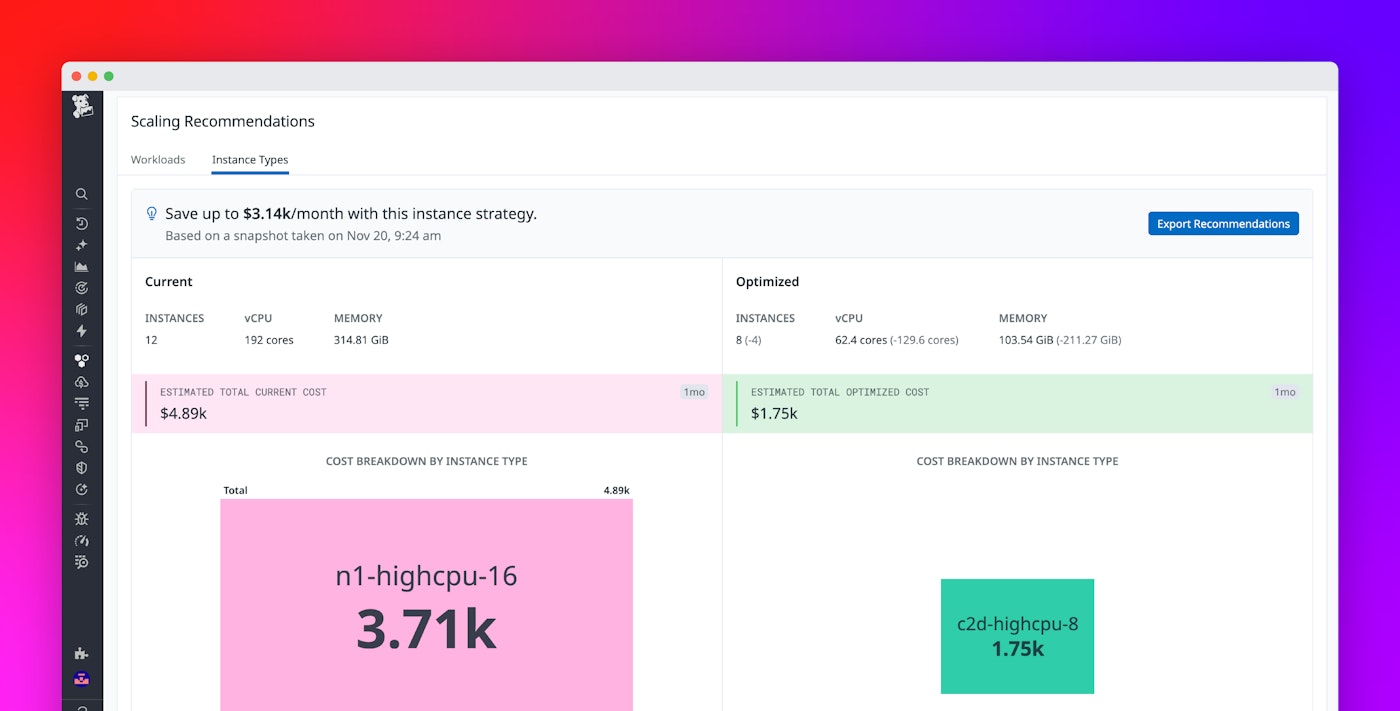
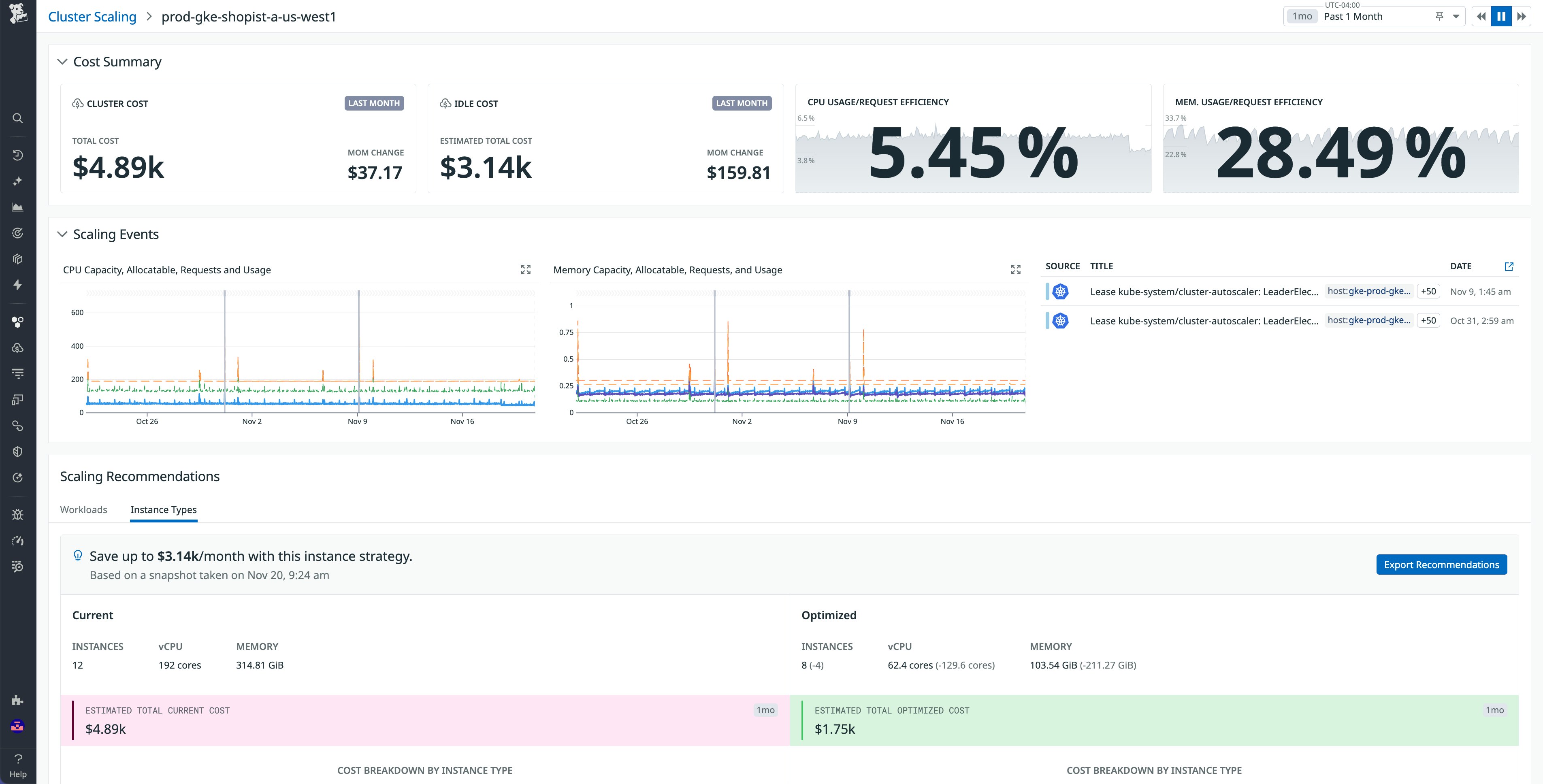
The Scaling recommendations view surfaces these simulations in the Datadog UI. You can compare your current node mix against an optimized configuration, including:
- Estimated total monthly cost for your current instance types
- Projected cost after applying the recommended configuration
- A breakdown of spend by instance type before and after optimization
- A list of workloads that are currently constrained or contributing most to idle overhead
Right-size your GPU-powered clusters
Because many modern workloads include GPU-backed AI and ML services, Datadog also generates recommendations for GPU instance families. This helps you shift from fixed, overprovisioned GPU nodes to configurations that better match the actual behavior of your training and inference workloads, while still respecting your scheduling constraints and disruption budgets.
Taken together, these insights give you an actionable view of cluster-level waste. Instead of guessing which instance types to resize or decommission, you can see quantified savings and the updated workload bin packing when you apply a given recommendation.
Automatically update node configurations and migrate workloads
Even when teams know where their cluster waste is, turning that analysis into safe, repeatable changes can be difficult. Many organizations already use autoscaling options such as Datadog Kubernetes Autoscaling or the Kubernetes Horizontal Pod Autoscaler (HPA) to adjust pod replicas based on demand, but node capacity often lags behind. Pods can become stuck in a pending state when there are no suitable nodes available, degrading application performance, while earlier bursts of demand leave large instances idle long after traffic has subsided.
Datadog Cluster Autoscaler closes this loop by automatically translating its simulations into Karpenter NodePool definitions tailored to your environment. For each cluster, Datadog can:
- Generate Karpenter NodePools that encode the recommended instance types, capacity ranges, and relevant scheduling constraints
- Align NodePool settings with your existing affinities, taints, and disruption policies
- Keep NodePools in sync with refreshed simulations as your workloads and usage patterns evolve
You can consume these NodePool definitions in two main ways, depending on how you manage your Kubernetes configuration today:
- Live node scaling via Datadog: You can enable live node scaling so that Karpenter automatically provisions and deprovisions nodes based on Datadog’s recommended NodePools. In this mode, Cluster Autoscaling adjusts the underlying capacity as your autoscaled workloads grow and shrink, helping you avoid both pending pods and long-lived idle nodes. When using this method, Datadog also automatically migrates your workloads to these new NodePools, saving time and cost.
- GitOps flow: From the Datadog UI, you can copy the generated NodePool specs and paste them into your Git repository. This allows you to review, test, and roll them out using your existing CI/CD pipelines and GitOps controllers such as Argo CD or Flux. Because the specs originate from Datadog’s simulations, you still benefit from a data-driven starting point instead of hand-tuned YAML.
In either workflow, the goal is the same: keep node capacity aligned with real workload demands.
Start optimizing your cloud compute spend today
Datadog Kubernetes Cluster Autoscaler makes it easy to understand and take action on your Kubernetes cluster idle resource usage, reducing costs without sacrificing your application performance. To start optimizing your cluster costs, get started with Kubernetes Cluster Autoscaler by signing up for limited preview. If you’re not already a Datadog customer, get started with a 14-day free trial.