
Dom Nguyen
Senior Product Marketing Manager
Managing cloud, AI, and SaaS costs means answering a steady stream of questions from finance, leadership, and engineering teams. What changed? Which team owns the spend? Was an increase expected? Are we still on track against the budget? When each answer requires moving between dashboards, filtering cost data by team or service, or manually correlating billing data with observability data, it can slow down investigations while costs continue to rise.
The Cloud Cost skill in Bits Chat brings Cloud Cost Management analysis into a conversational workflow. You can ask cost questions in plain language, investigate cost anomalies, and get answers grounded in both cost and observability data within minutes. In this post, we’ll show how you can:
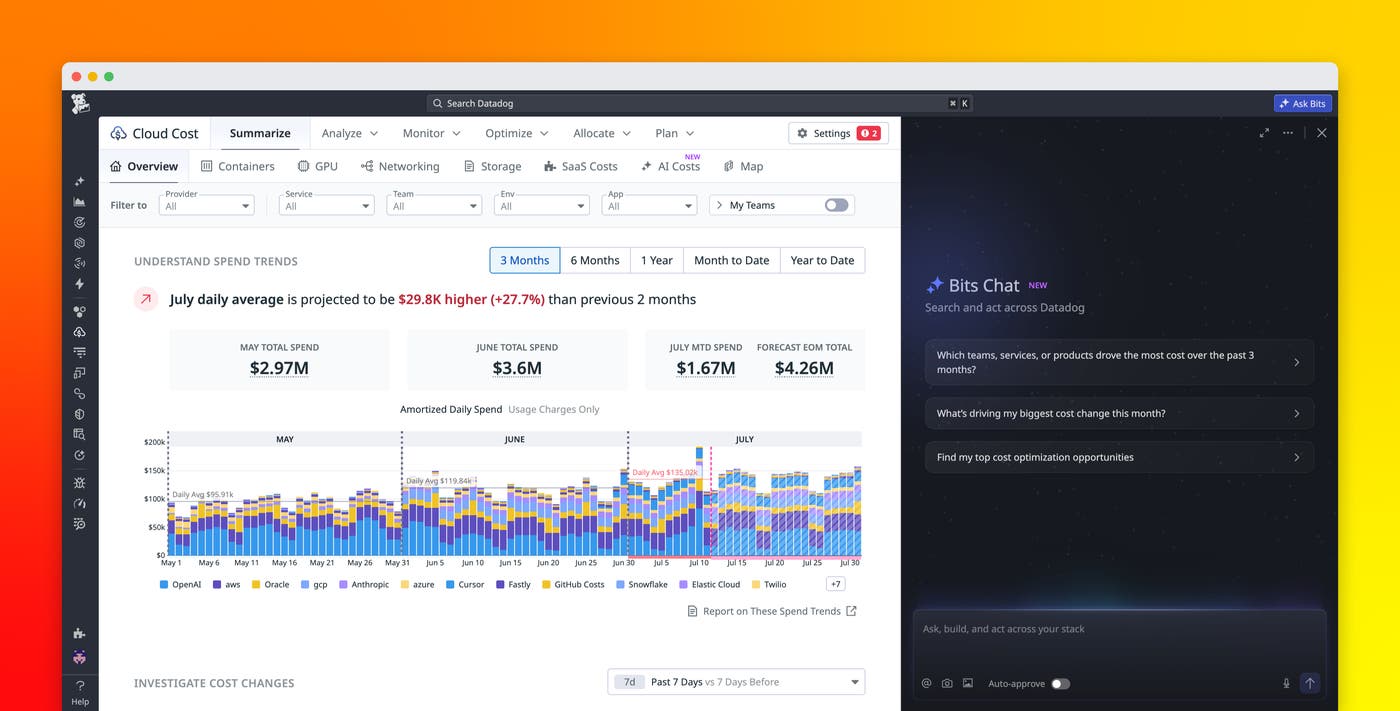
Ask Bits Chat anything about your costs
The Cloud Cost skill gives FinOps practitioners and engineers one place to ask cost questions without needing to know which dashboard to open or how to construct a query. You can get started with Bits Chat in the Datadog navigation bar, or you can start an investigation directly from a cost anomaly. From there, Bits Chat analyzes the relevant cost data and responds with a concise summary, then asks what you want to explore next.
Because the Cloud Cost skill works across many cost categories, including cloud, SaaS, AI, custom, and Datadog, teams can use the same workflow for any cost question. FinOps teams can use it to track budgets, identify cost owners, and investigate anomalies. Engineers can use it to understand the cost impact of their own services and workloads, and identify optimization opportunities. For example, you can ask Bits to investigate why Anthropic costs increased last week for team:web-store, identify which teams are driving the highest OpenAI spend this month, or show total AI cost by provider for the last 30 days.
Bits Chat can investigate cost monitor alerts, cost anomalies, and cost changes; identify teams, services, accounts, regions, or resources that are driving spend; and compare actual or forecasted spend against budgets. It can also correlate cost changes with observability metrics such as CPU, memory, request volume, and storage size. This gives teams the technical context they need to understand whether a cost change came from a usage increase, a configuration change, or another source.
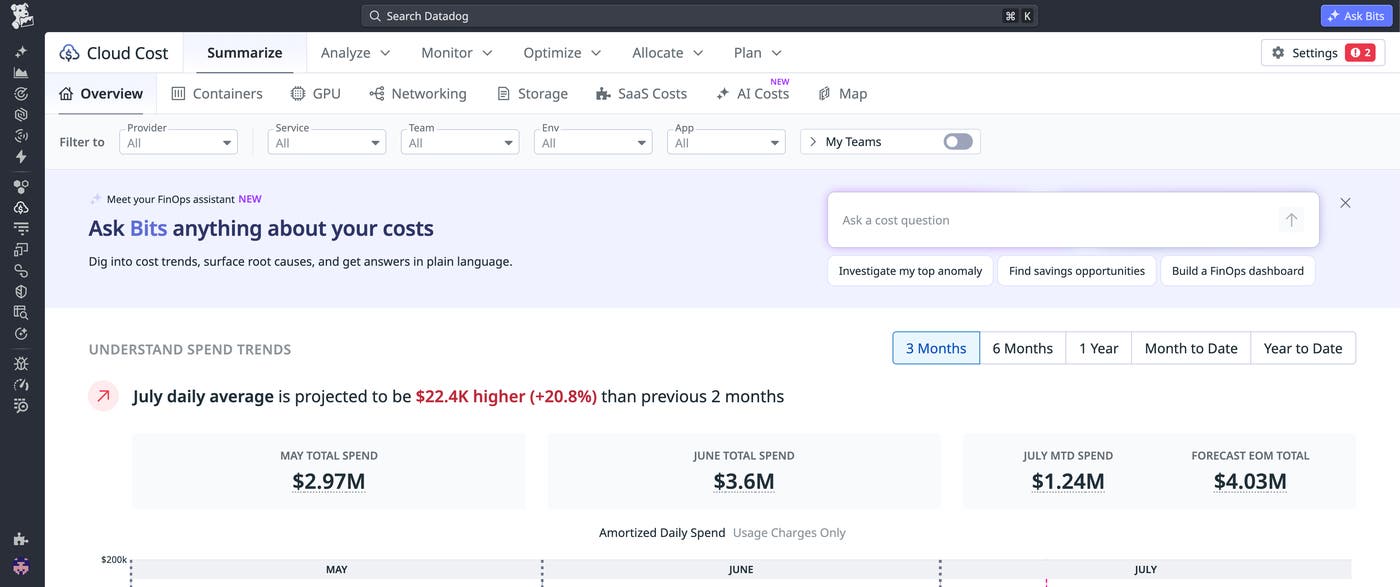
Spot Anthropic cost spikes before they grow
AI usage can become expensive quickly, especially when costs are spread across providers, models, teams, users, and services. AI Costs in Cloud Cost Management gives FinOps and engineering teams a unified location for analyzing AI spend across providers such as OpenAI, Anthropic, Amazon Bedrock, Google Gemini, Vertex AI, GitHub Copilot, and Cursor. Datadog normalizes this spend so teams can understand which providers, models, users, and API keys are contributing to cost changes.
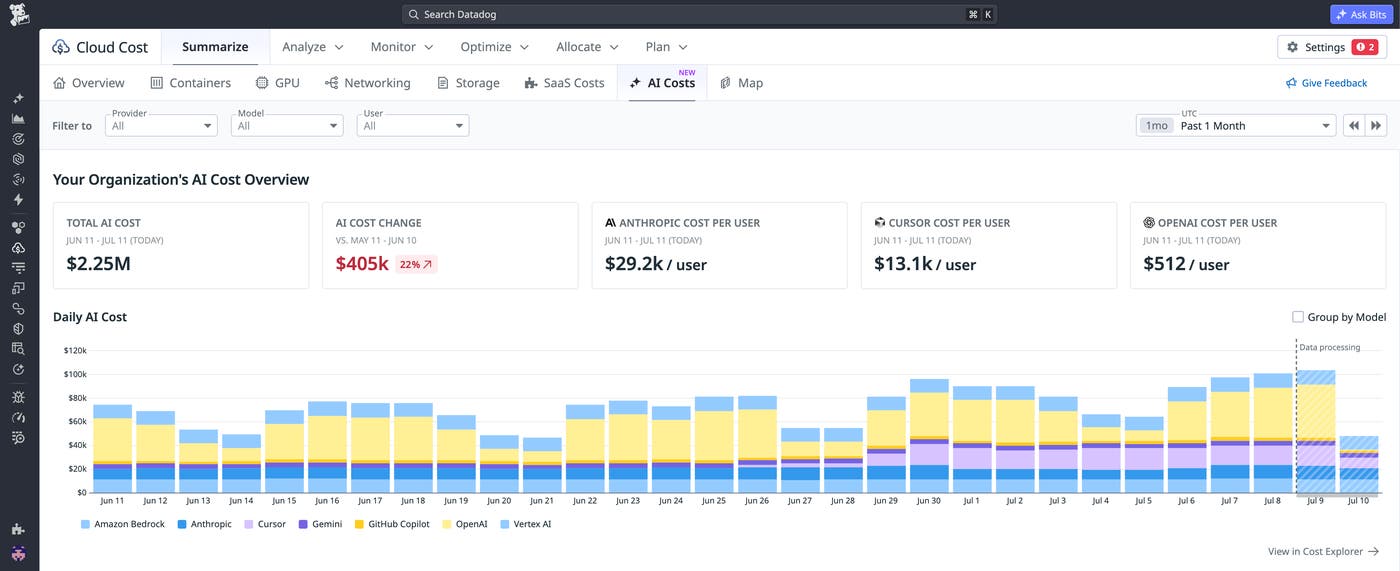
This level of granularity helps teams detect AI cost anomalies before they cause larger budget issues. For example, Datadog can surface an unexpected Anthropic cost spike that might otherwise go unnoticed until the next billing review. But identifying a spike is only half the problem—understanding what caused it is another. Without a connected cost investigation workflow, a team would need to pull billing exports, cross-reference logs, and search for the service or team that caused the change.
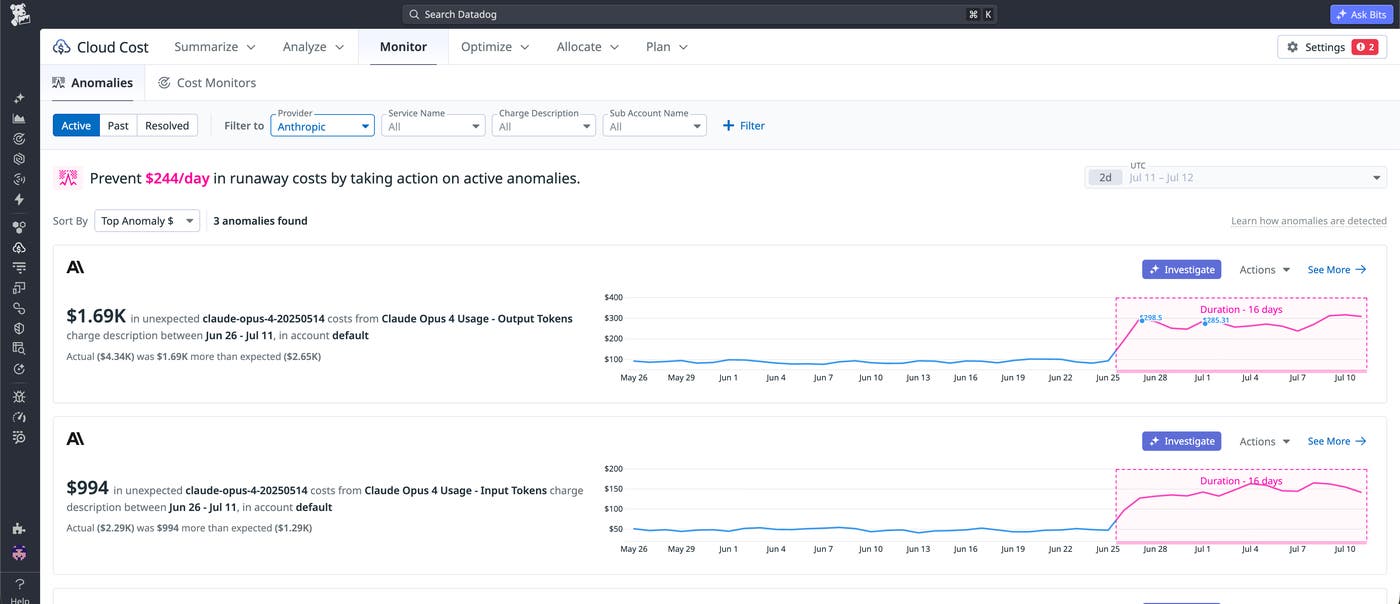
With the Cloud Cost skill, the team can start the investigation in one click. When the team clicks “Investigate” directly from the anomaly, Bits automatically pulls in the relevant context and kicks off a root cause analysis. This lets the team move from detection to investigation without navigating to a new page or having to do any manual work.
Find the root cause of a cost change
Once an investigation starts, Bits Chat performs root cause analysis by using both cost data and observability data from across Datadog. For a cost anomaly investigation, the initial analysis typically includes a daily cost chart for the baseline and investigation periods so you can see exactly when a change started. It also summarizes the total dollar change, percentage change, and projected annual impact when applicable.
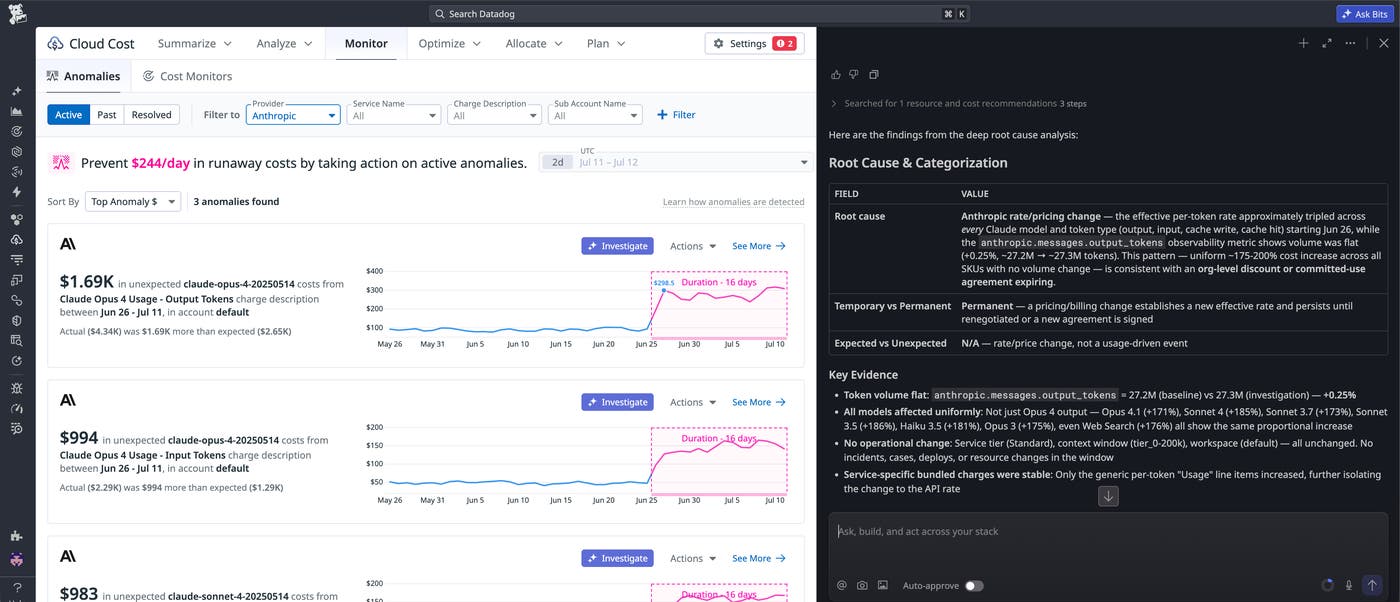
Bits Chat also provides rate-versus-usage context, which helps teams determine whether spend increased because of a pricing change or because a team consumed more of a resource. For AI spend, this distinction is especially important. An Anthropic spike might come from more requests, larger prompts, higher output token usage, a model change, or a combination of these factors. By correlating cost with observability metrics, Bits can help connect the billing change to the system behavior behind it.
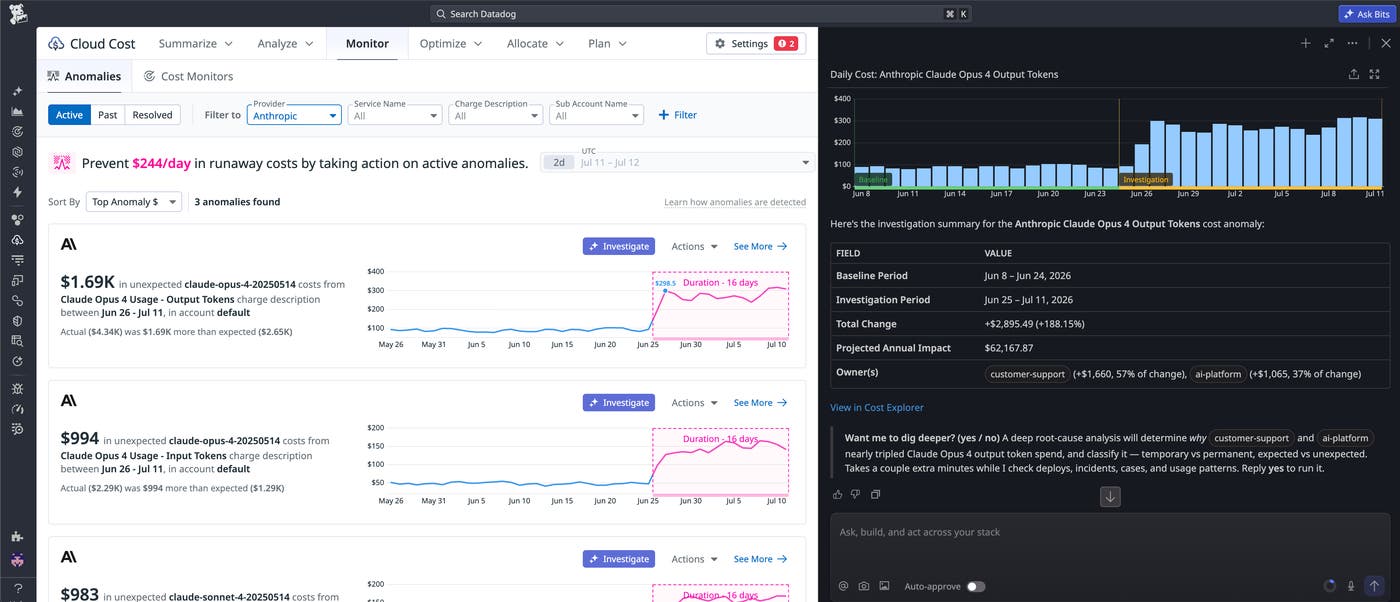
In the preceding example screenshot, Bits identifies that the Anthropic cost spike is driven by two teams: Customer Support (57%) and AI Platform (37%). Together, these teams account for the full $2,895.49 increase—a 188.15% jump—with a projected annual impact of $62,167.87. Instead of knowing only that Anthropic costs went up, the engineer can see exactly which teams are driving it and by how much, which makes it immediately clear who to loop in.
From there, the team can keep drilling into the investigation. Bits can find the top services, accounts, regions, resources, or tags driving the change. It can also compare actual and forecasted spend against related budgets, identify optimization opportunities, and create a Datadog Notebook that captures the investigation for the owning team. This helps preserve the full context, so the team does not need to reconstruct the analysis later from Slack threads or separate reports.
Get started with the Cloud Cost skill in Bits Chat
The Cloud Cost skill in Bits Chat helps FinOps and engineering teams investigate cost changes, budget risks, and AI spend in the same place where they already monitor their systems. By grounding answers in both cost and observability data, Bits Chat can help teams move from a broad cost question to an actionable explanation in minutes.
To get started, read the Cloud Cost skill documentation and make sure you’ve configured Cloud Cost Management for the cost sources you want to analyze. Users also need Bits Chat access and Cloud Cost Management permissions for the data they ask about. If you want Bits to create or update investigation records, you can also grant the relevant Notebooks permissions. Learn more in the Bits Chat documentation and AI Costs in Cloud Cost Management documentation.
If you don’t already have a Datadog account, you can sign up for a 14-day free trial to start investigating your cloud costs with Datadog.
