


Mallory Mooney

Maxime Visonneau

Anton Ippolitov

Eric Mountain
Cilium network policies (CNPs) extend Kubernetes’ L3/L4 controls to the application layer (L7). CNPs provide teams with advanced networking capabilities, but they can also introduce new ways for connectivity to fail, especially in environments running thousands of workloads. Many of these issues stem from differences in how Kubernetes and Cilium interpret the same concepts, such as label scoping, IP-based rules, service identities, and how default-deny behavior is applied. For example, Cilium supports explicit deny rules and evaluates them before allow rules, which can cause traffic to be blocked even when another CNP allows it. Deny rules are useful for enforcing global restrictions, such as blocking access to cloud metadata services, but they also require teams to think more carefully about how cluster-level and namespace-level policies interact.
This post walks through four common Cilium network policy scenarios that block traffic, how they appear in workloads, why they happen, and how to fix them:
- Cross-cluster requests fail due to identity mismatches
- Combining toServices and toPorts causes unexpected egress denies
- CIDR-based rules allow unintended external access or block internal pods
- Traffic fails across namespaces without explicit policy rules
Cross-cluster requests fail due to identity mismatches
Requests between clusters will fail when CNPs don’t account for how Cilium scopes cluster endpoints. This issue can manifest as sudden increases in the number of dropped HTTP requests or packets between clusters, even though mesh connectivity is healthy. A common misunderstanding when configuring entity-based L3 policies is that the cluster entity includes only endpoints in a local cluster and that it does not include other clusters in a Cluster Mesh.
Cilium assigns security identities to pods based on their labels. This enables Cilium to control traffic without needing to account for individual IP addresses, which change every time a pod spins up or down. Entities operate similarly in that you can categorize endpoints without their IP addresses. Before v1.19, a policy that selected pods by label would match workloads from any cluster, including those in meshes. However, Cilium v1.19 introduced a policy-default-local-cluster setting that automatically restricts label-based selectors to the local cluster unless explicitly overridden. As a result, the cluster entity consists solely of Cilium-managed and unmanaged pods, and the host, remote-node, and init special identities. This setup allows node- or system-level connectivity, such as health checks between nodes, but does not allow for pod-to-pod traffic between clusters.
As an example, let’s say you have two meshed clusters named cluster-a and cluster-b. You want to allow incoming traffic to cluster-a from all pods in cluster-b labeled app:web, so you create the following CNP:
apiVersion: "cilium.io/v2"kind: CiliumNetworkPolicymetadata: name: "allow-web-internal" namespace: cluster-aspec: endpointSelector: matchLabels: app: web ingress: - fromEntities: - clusterIn this snippet, the policy uses the cluster entity in an attempt to allow traffic from all clusters within the mesh. With this policy, however, Cilium will block traffic from any pod outside cluster-a, even if they have the same app:web label.
If you are migrating pods to Cilium v1.19, the cilium clustermesh inspect-policy-default-local-cluster --all-namespaces command can help you determine which policies will be affected by the policy-default-local-cluster setting. You can also watch for changes in Cilium metrics, such as drop_count.total and http_requests_total. Sudden spikes in dropped packets often indicate a misconfiguration, especially if the pattern coincides with a recent policy deployment. The example scenario below shows how drop count totals can steadily increase across clusters when an updated policy blocks traffic it shouldn’t.
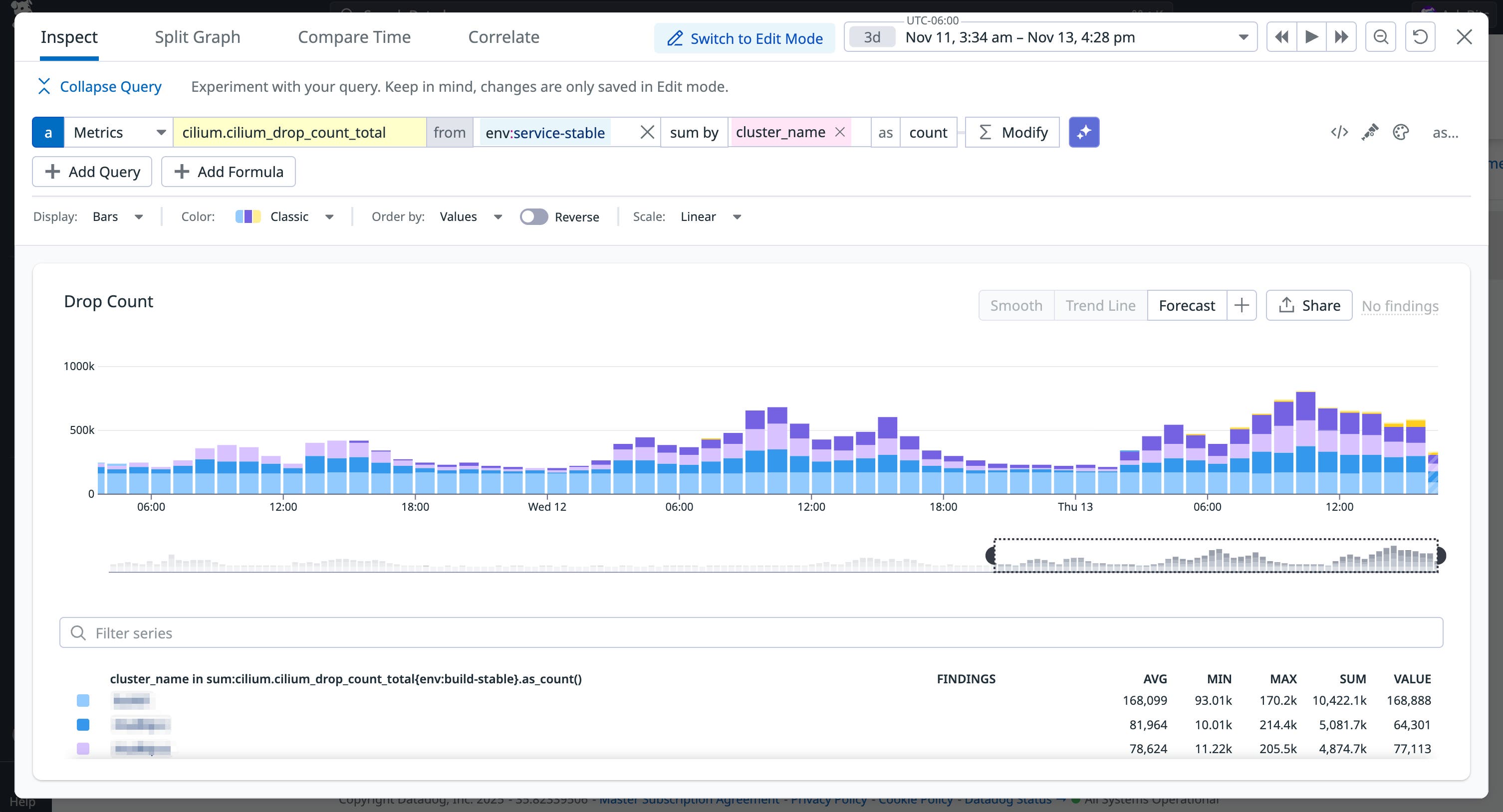
To restore intended cross-cluster behavior, you have to specify clusters by using an endpoints-based policy and the io.cilium.k8s.policy.cluster selector instead of the entity-based policy.
The following snippet shows the updated configuration:
[...] ingress: - fromEndpoints: - matchLabels: app: web io.cilium.k8s.policy.cluster: cluster-bWith this new policy for cluster-a, Cilium will allow traffic from pods labeled with app:web that are running in cluster-b. This kind of policy is useful for configuring traffic for specific clusters, but you can also allow traffic from any cluster in the mesh using the following snippet:
[...] ingress: - fromEndpoints: - matchExpressions: key: "k8s:io.cilium.k8s.policy.cluster" operator: ExistsCombining toServices and toPorts causes unexpected egress denies
While cross-cluster issues are often a result of how Cilium scopes identities, other failures are caused by how CNPs combine selectors. CNPs include several configuration options for managing both inbound and outbound traffic to various destinations, but there are restrictions on how they can be used within the same policy. For example, you can create service-based L3 policies by using the toServices selector, which will allow traffic to specific Kubernetes services by name or label. You can also manage traffic to specific port numbers by using the toPorts field in your network policies.
However, a point of confusion with these configuration options is that you cannot create an egress rule that simultaneously specifies a service and restricts ports. You must choose between defining traffic by service identity or by port. Otherwise, you introduce security risk by restricting (or allowing) traffic in ways you didn’t expect.
Let’s say you have a pod that should only connect to a database service via a specific port. You create the following CNP to specify which service and port:
apiVersion: cilium.io/v2kind: CiliumNetworkPolicymetadata: name: allow-myclient-egressspec: endpointSelector: matchLabels: app: myclient egress: - toServices: - k8sService: namespace: prod serviceName: db-service toPorts: - ports: - port: "3306" protocol: TCPWhen toServices and toPorts are combined, Cilium will ignore the toServices clause. The policy will then allow traffic to any destination on the specified port, which effectively extends access instead of restricting it. This can be particularly confusing if the CNP contains additional configurations because Cilium will fail to import the entire policy without a clear indication of what happened, even though Kubernetes will validate it.
The only way to troubleshoot this issue is to investigate Cilium agent logs. The example log below includes the particular error that Cilium will generate in these cases, which is “Invalid CiliumNetworkPolicy spec: Combining ToServices and ToPorts is not supported yet.”
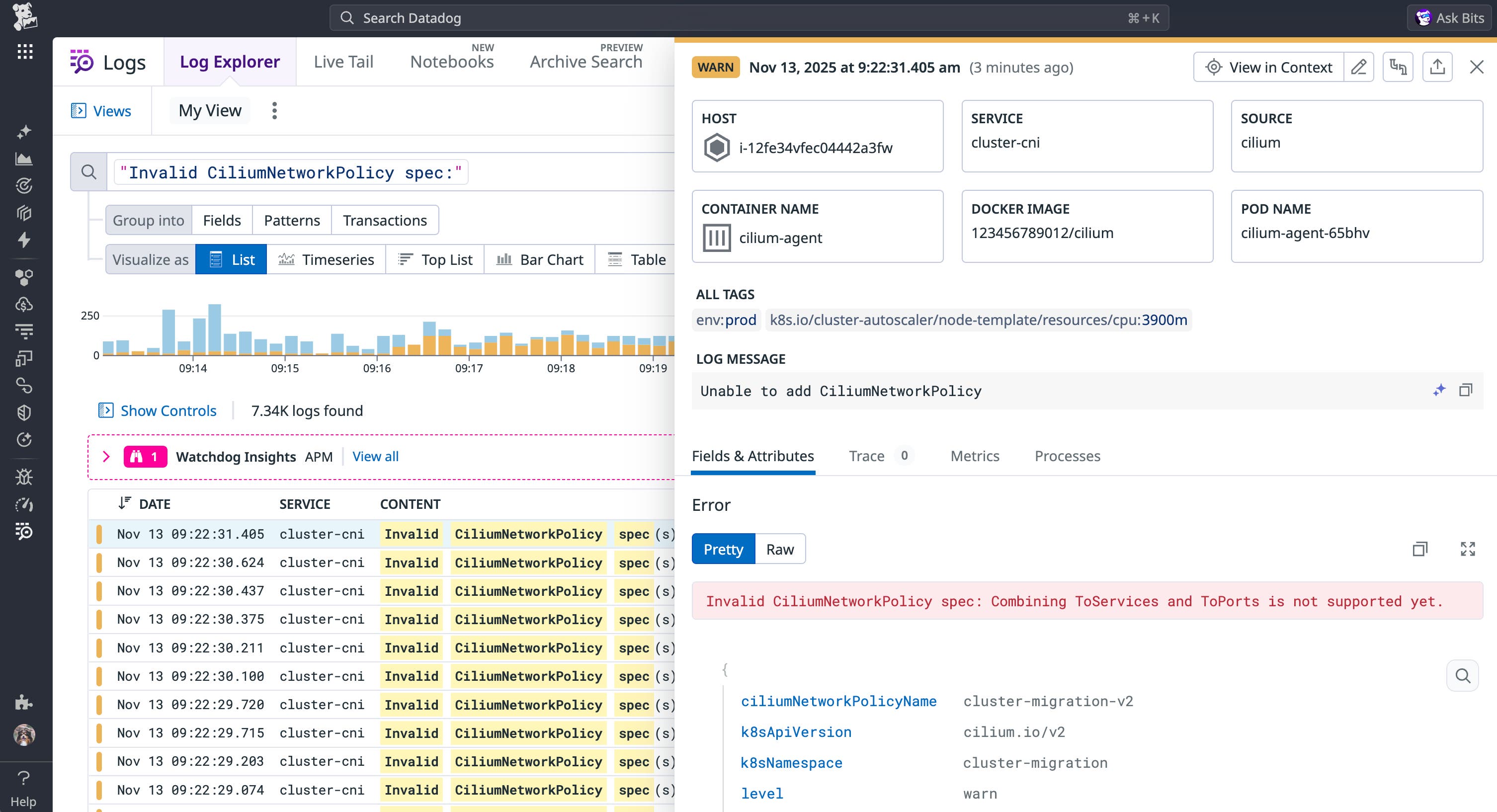
To resolve this issue, you can use Cilium’s toEndpoints with toPorts to specify a destination based on Kubernetes labels, as seen in the following updated CNP:
[...] egress: - toEndpoints: - matchLabels: app: db toPorts: - ports: - port: "3306" protocol: TCPIn general, the toServices option should be used sparingly in cases where services do not have a label selector. Cilium also offers an alternative for special services, such as the Kubernetes API Server.
CIDR-based rules allow unintended external access or block internal pods
Another common pitfall stems from differences in how Cilium and Kubernetes evaluate IP-based CIDR ranges. For L3 policies, you can create CIDR-based rules to manage traffic, but only for endpoints that Cilium doesn’t manage. This behavior can be confusing if you’re familiar with how Kubernetes CIDR rules can match any IP, including internal pod IPs. However, if you configure a CIDR-based policy by using a range that only includes IPs, Cilium will not apply it to traffic between regular pods or nodes in your cluster.
As an example, let’s say a cluster’s pods are all on a 10.0.0.0/8 network. You want to allow traffic to my-service only from within the cluster and from the 203.0.113.0/24 IP range. To do this, you could create the following CNP:
apiVersion: "cilium.io/v2"kind: CiliumNetworkPolicymetadata: name: "allow-internal-corp"spec: endpointSelector: matchLabels: app: my-service ingress: - fromCIDR: - 10.0.0.0/8 - 203.0.113.0/24The expectation here would be that Cilium will allow traffic from both ranges, but in practice only the external network is allowed. Because Cilium manages cluster endpoints via security identities, CNPs match pods by their labels instead of IP addresses. As a result, the example CNP would cause Cilium to expect a label-based selector for internal pod traffic. This behavior is by design and follows Kubernetes guidance on using ipBlocks.
As with monitoring for dropped requests across clusters, you can also track when Cilium drops traffic between a particular destination and configured networks. The example below shows sporadic increases in the total number of dropped requests for a group of internal network IP addresses attempting to connect to the my-service destination.
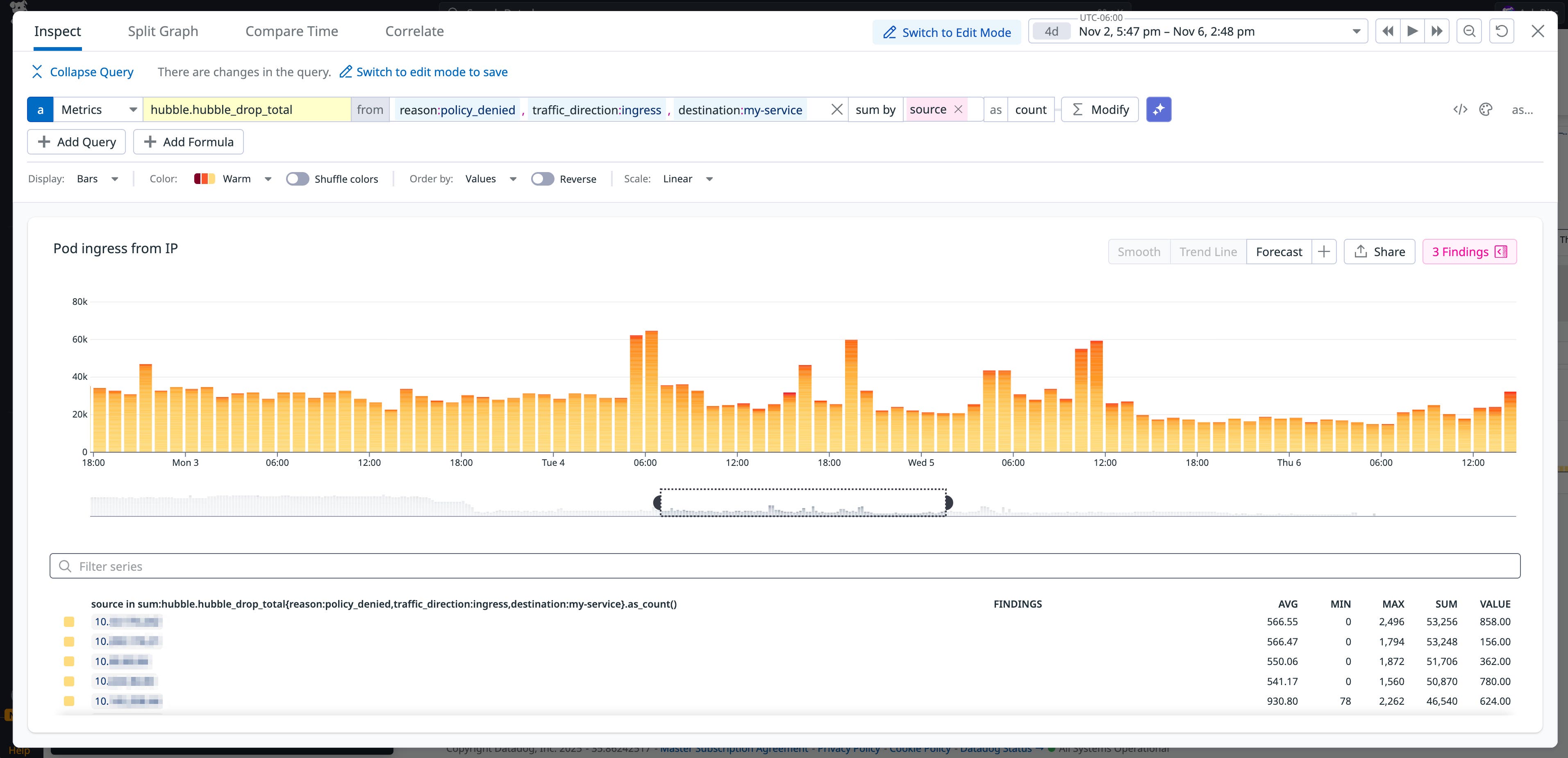
A pattern like this could be the result of temporary traffic congestion. But any anomalies, such as a significant increase in dropped requests from source IPs, could indicate a policy misconfiguration.
To resolve this issue, you can use entity-based policies for internal traffic and CIDR-based policies for specific external networks or IPs. The following policy implements both:
[...] ingress: - fromEntities: - cluster - fromEndpoints: - matchExpressions: - key: "k8s:io.cilium.k8s.policy.cluster" operator: In values: ["cluster-b"] - fromCIDR: - 203.0.113.0/24With this example, Cilium will allow traffic to app:my-service pods from three areas: pods within the local cluster (fromEntities), from meshed clusters (fromEndpoints), and from the external 203.0.113.0/24 IP range (fromCIDR).
Traffic fails across namespaces without explicit policy rules
Namespace isolation is a fundamental component in both Kubernetes and Cilium, but how that isolation affects CNP configuration isn’t always obvious. Cilium enforces isolation by automatically scoping labels to the policy’s namespace. This scoping can create confusion in managing traffic across namespaces when you attempt to create rules that match on labels for the policy’s endpointSelector.
As an example, let’s say you create the following CNP that attempts to give monitoring-agent pods, which reside in the monitoring namespace, access to pods in the web-app namespace:
apiVersion: cilium.io/v2kind: CiliumNetworkPolicymetadata: name: allow-monitor namespace: web-appspec: endpointSelector: matchLabels: app: my-web-service ingress: - fromEndpoints: - matchLabels: app: monitoring-agentKubernetes restricts the endpointSelector in CNPs to match on pods only within the namespace where the policy is defined, such as the web-app namespace in our example. Because the policy doesn’t specify the monitoring namespace for the monitoring-agent pods, Cilium will only attempt to match pods in the web-app namespace and block access for pods in other namespaces.
Monitoring traffic between namespaces can surface issues that are the result of these types of policy misconfigurations. As with our other monitoring examples, this can look like anomalous patterns in dropped traffic. The following example shows a sudden increase in blocked requests for a specific namespace, which could indicate an unintentional policy change.
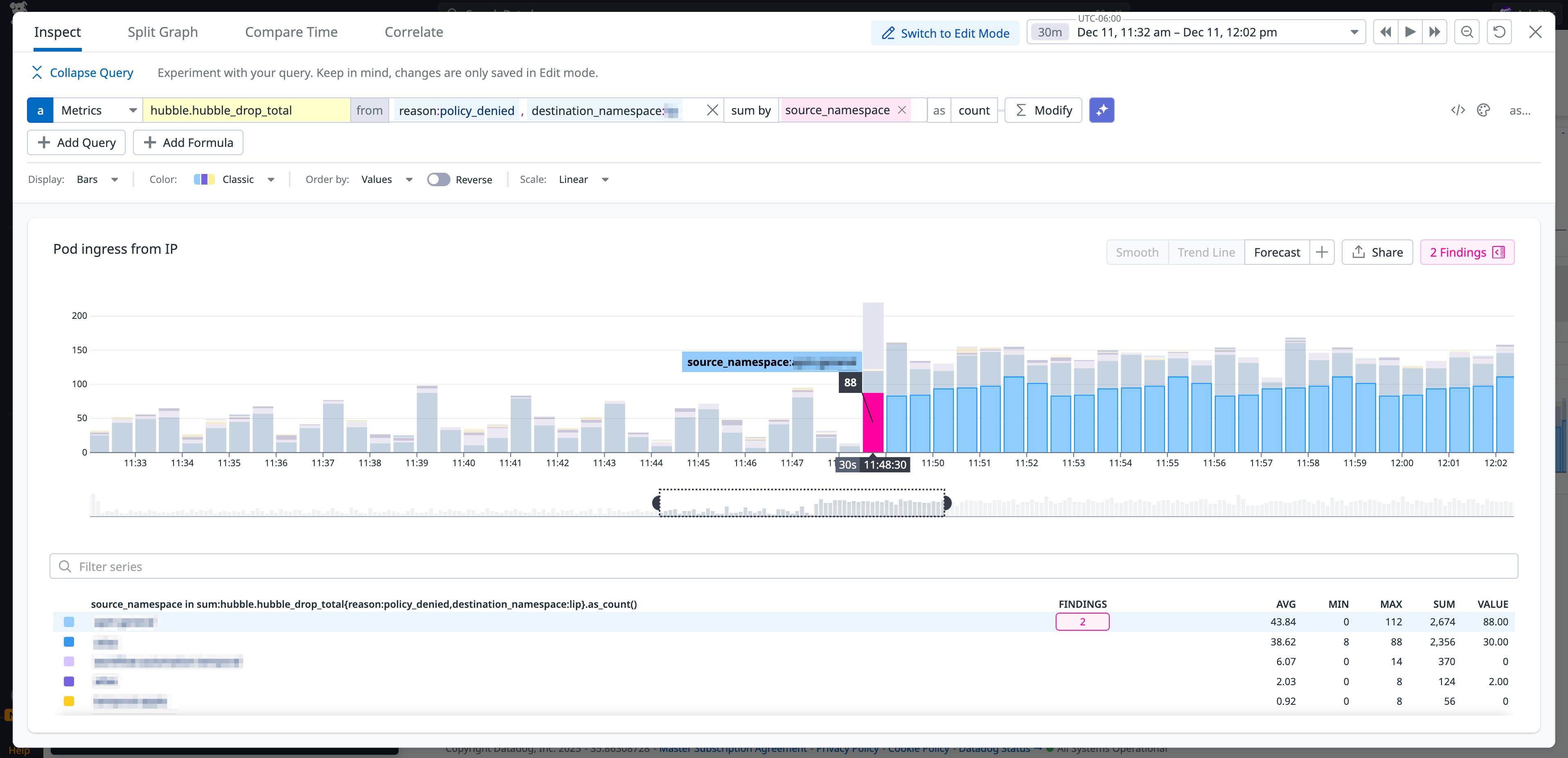
To resolve this problem for the CNP, you must specify the remote namespace in either the toEndpoints or fromEndpoints clauses by using the k8s:io.kubernetes.pod.namespace label, as seen in the following CNP snippet:
[...]ingress: - fromEndpoints: - matchLabels: k8s:io.kubernetes.pod.namespace: monitoring app: monitoring-agentTo apply the ingress rules in the “allow-monitor” example configuration to all namespaces, you can create a cluster-wide policy instead by using kind: CiliumClusterwideNetworkPolicy.
Configure your Cilium network policies with confidence
In this post, we looked at some common configuration issues with Cilium network policies and how they manifest in your environment. Being aware of the differences between how Cilium and Kubernetes manage workloads enables you to configure policies accurately.
For a deep dive into Cilium and using tools such as Hubble, check out our three-part guide on Cilium’s architecture and monitoring key performance metrics. And if you don’t already have a Datadog account, you can sign up for a free 14-day trial.