
Hiba Ijjaali
Product Manager

Natasha Silva
Technical Content Writer
Synthetic tests help teams catch customer-facing issues before users report them. But even then, responding to failures can still be time-consuming. When a Synthetic Browser or API test monitor fires, an engineer must first determine whether the failure is a real regression or a test configuration issue. Making that determination requires manual review, and once an issue is confirmed, the team still needs to correlate logs, APM traces, infrastructure metrics, and deployment signals across multiple sources to figure out where the problem started.
AI-assisted triage is now available in Synthetic Monitoring through Datadog’s AI failure summaries and Bits Investigation. From there, you can determine whether a failure is worth investigating, review the evidence surrounding it, and launch or automate investigations that correlate telemetry data across Datadog. Instead of spending time gathering context, you can focus on finding the likely cause and beginning remediation.
In this post, you’ll learn how to:
Determine whether a failure is worth investigating
Not every synthetic test failure represents a production issue. Browser and API tests can fail because of expired credentials, outdated assertions, environment drift, or changes in the application workflow. In many teams, you may still be manually inspecting recent runs and test details before determining whether the alert deserves escalation.
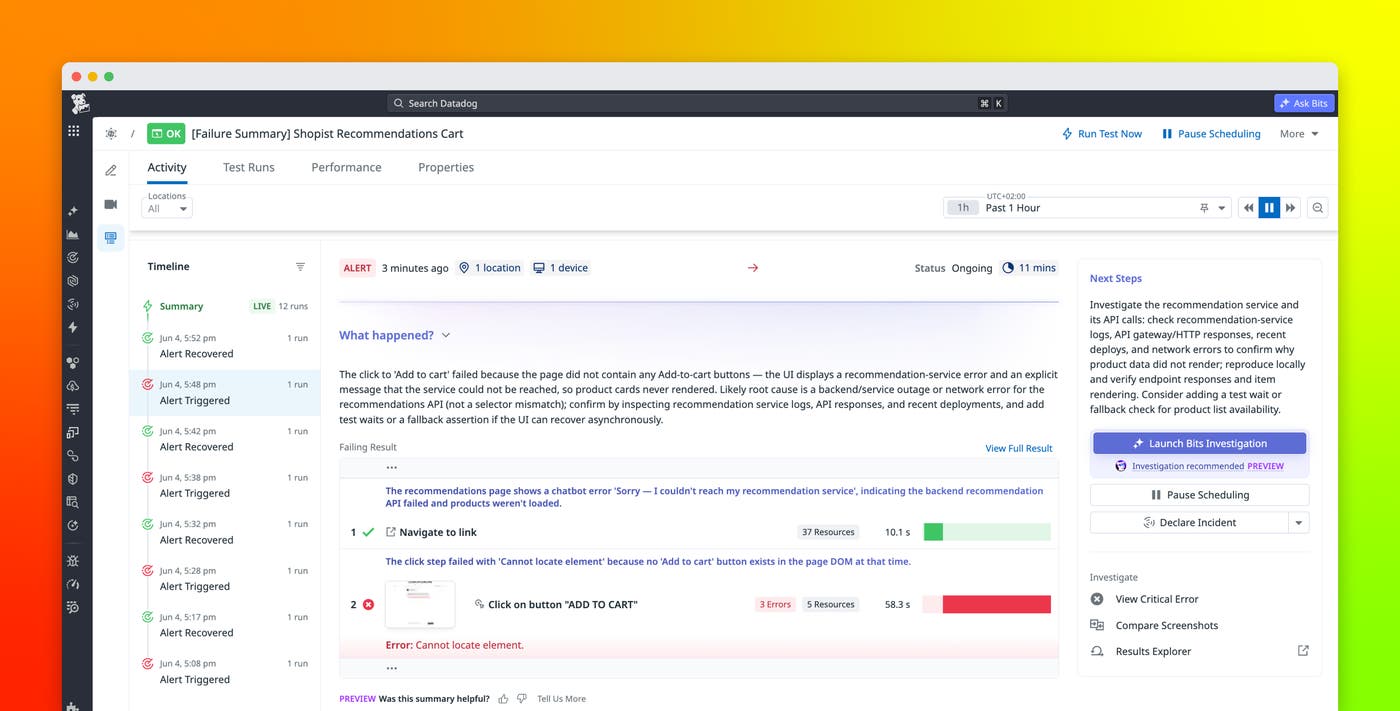
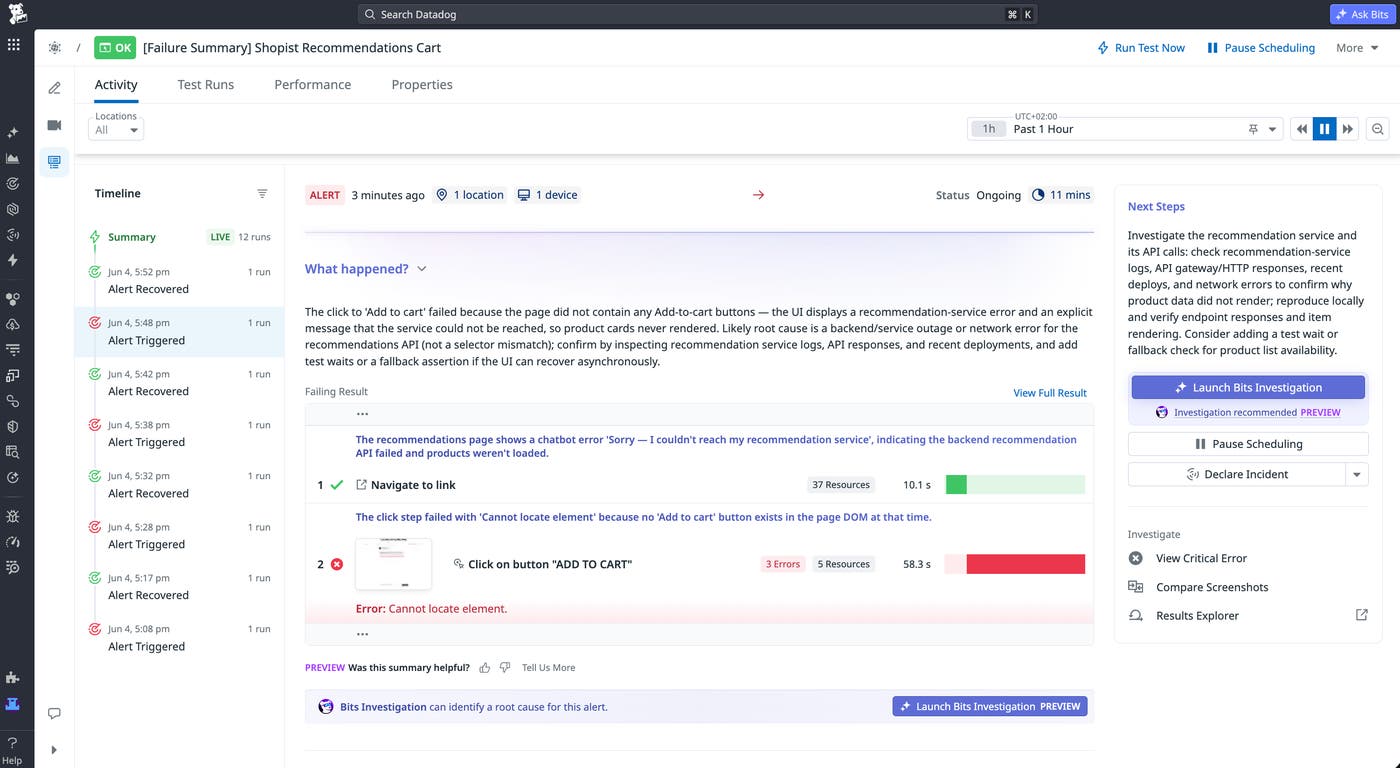
The Synthetic Tests details page now includes an AI failure summary that classifies failures as either likely regressions or likely test misconfigurations. For Browser tests, the summary analyzes step failures, screenshots, and error details to explain what happened. For API tests, the summary uses request/response headers and bodies, and assertion outcomes to summarize the failure and its likely cause. The summary also recommends next steps, such as whether you should update the test configuration or go deeper with Bits Investigation.
For example, a Browser test monitoring a login flow might begin failing with repeated 401 responses. The AI failure summary can identify this as a likely misconfiguration caused by outdated credentials stored in the test configuration, rather than a production regression. You can update the credentials and resolve the issue without escalating the alert or opening a broader investigation.
Get to a root-cause hypothesis faster
After you confirm that a failure represents a real issue, the next challenge is identifying what changed and where the problem came from. Synthetic test failures often surface symptoms rather than causes, so tracing the problem back to its source still requires manual work. That process is more difficult for anyone new to the service or unfamiliar with its dependencies.
Bits Investigation extends the Synthetic Monitoring workflow by automatically correlating telemetry data across Datadog to generate root-cause hypotheses. You can launch an investigation from the Synthetic Tests details page or the Monitor page, allowing you to move from alert to investigation without context switching.
Each investigation begins with the same failure classification used in the AI failure summary, then goes further by analyzing APM traces, logs, infrastructure metrics, synthetic test results, and test history. Hypotheses are tailored to the kinds of failures Synthetic Monitoring surfaces: backend regressions, recent code deployments, database query failures, and third-party dependency issues. The result is a hypothesis tree with linked supporting evidence, so you can verify the most likely cause rather than track it down manually.
For example, a Browser test monitoring a checkout workflow starts to fail during payment submission. Rather than returning a vague “frontend error,” Bits Investigation can cross-reference recent deployment activity, trace latency increases, and database query failures to identify a likely regression in the checkout service’s database layer. You can review the linked evidence and begin validating the hypothesis instead of starting the investigation from scratch. Anyone on your team can then act on the alert from the moment it fires, regardless of how deeply they know the system.
Configure automatic or on-demand investigations by monitor criticality
Different monitors require different response workflows. Some alerts represent failures users will notice, while others are lower priority. Managing those workflows manually can create inconsistent incident responses across your teams and services.
Bits Investigation can be triggered manually or automatically, so you can match each investigation to monitor criticality. Engineers can launch investigations from the Synthetic Tests details page, the Monitor page, or directly through the Bits Investigation interface. You can also configure automatic investigations that start as soon as specific monitors fire.
This lets you define workflows that match your operational priorities. Critical monitors for systems like checkout, login, or payment processing can begin investigations automatically the moment an alert fires. When you’re on call, context and hypotheses are already waiting. Lower-priority monitors remain available for manual review when needed.
Investigate synthetic test failures with Bits Investigation
Bits Investigation brings AI-assisted triage to Synthetic Monitoring, reducing the time you spend confirming alerts and tracing failures to their source. With AI failure summaries and Bits Investigation, you can move from alert to remediation faster without manually correlating telemetry.
To learn more, see how to configure Bits Investigation and our Synthetic Monitoring documentation.
If you’re not yet a Datadog customer, sign up for a free 14-day trial.
