
Eric Metaj
Product Marketing Manager

Teddy Gesbert
Product Manager
Engineering teams have rapidly adopted AI coding tools, but organizations still struggle to understand their impact. Existing dashboards focus on activity, such as daily active users, acceptance rates, or lines of generated code, but these metrics don’t answer a more important question: Are teams actually shipping more, faster, and with fewer issues?
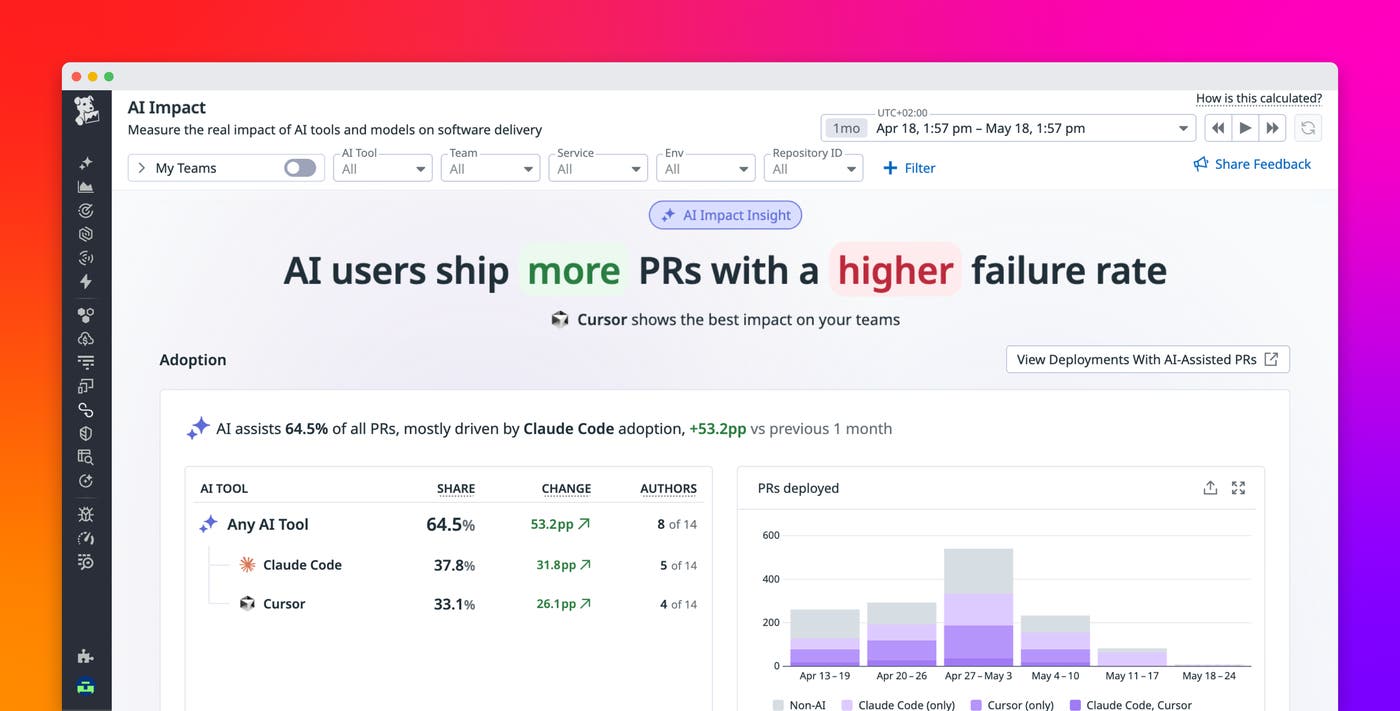
Datadog AI Impact connects AI usage data with your software delivery and DORA metrics so that you can evaluate how AI affects both velocity and stability. By correlating AI-assisted code with outcomes such as lead time and change failure rate, you can move beyond adoption metrics and understand how AI tools influence real engineering performance.
In this post, we’ll show you how to:
- Measure how much faster your teams are shipping with AI
- Evaluate the stability of AI-assisted code in production
- Compare AI coding tools by using delivery outcomes
- Test new models before rolling them out broadly
Measure how much faster your teams are shipping with AI
To evaluate AI’s impact on delivery, you first need to connect usage data with the code changes that reach production. Datadog AI Impact brings together telemetry data from AI coding tools with your DORA metrics, so each commit can be associated with the tool and model that contributed to it.
As commits move through pull requests and into deployments, AI attributes persist alongside them. AI Impact allows you to analyze delivery performance across AI-assisted and unassisted work without requiring manual tagging or custom instrumentation. This foundation makes it possible to analyze how AI influences both speed and reliability, using the same metrics you already rely on to measure engineering performance.
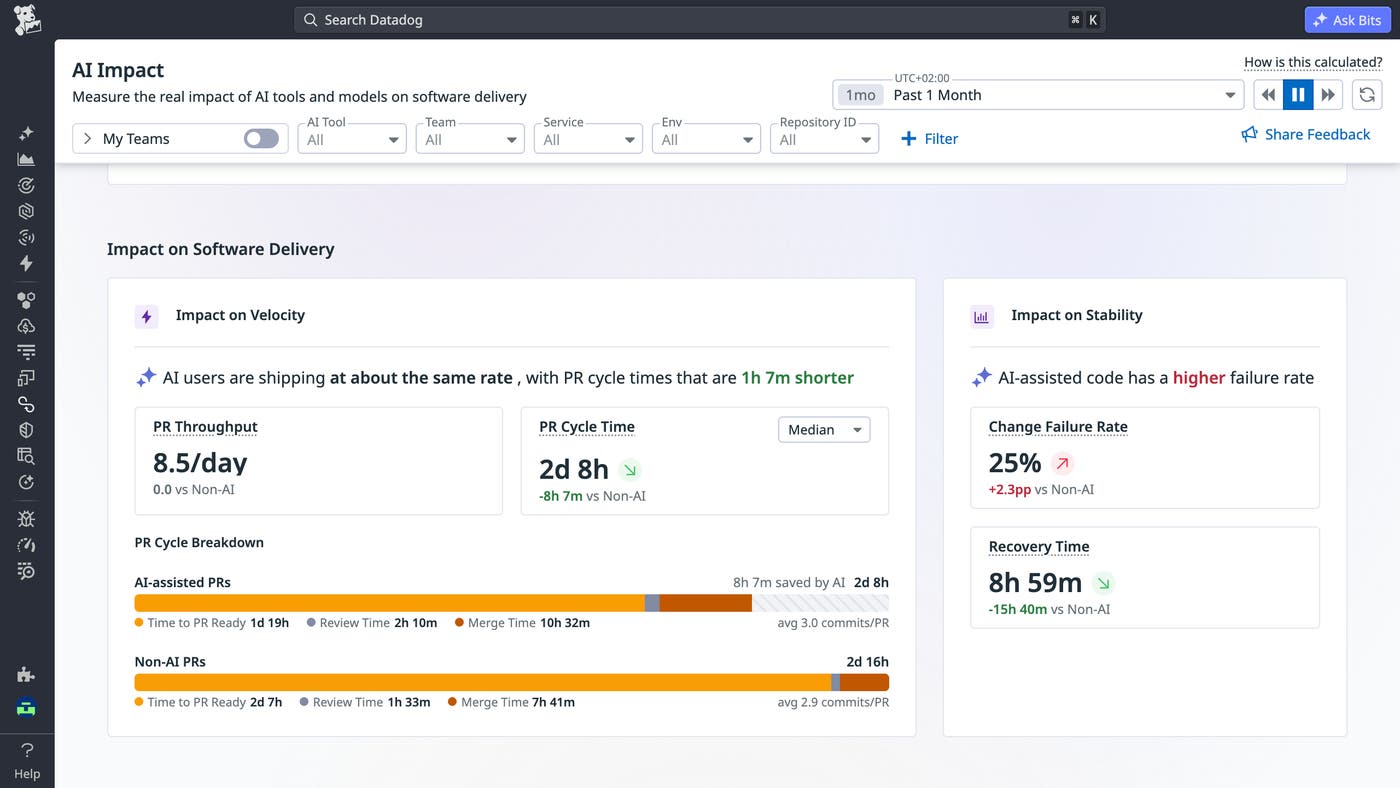
With AI-tagged commits, you can break down delivery performance metrics by whether changes were AI-assisted. AI Impact enables direct comparisons between AI-assisted and unassisted work across your organization.
You can start by analyzing PR cycle time to see how quickly pull requests get merged. Pairing this with review time helps you understand whether AI reduces development effort, shifts effort into review, or changes how teams collaborate.
AI Impact also lets you evaluate throughput gains such as pull requests deployed per developer each day. This clarifies whether faster development translates into more shipped work or whether gains are offset by factors like larger changes or longer reviews (or amplified by developers working on more tasks in parallel). Because these comparisons are based on your own teams, codebases, and workflows, they reflect real-world performance rather than synthetic benchmarks.
Evaluate the stability of AI-assisted code in production
Speed alone does not tell the full story. If AI-assisted code reaches production faster but introduces more failures, teams may shift effort from development to incident response.
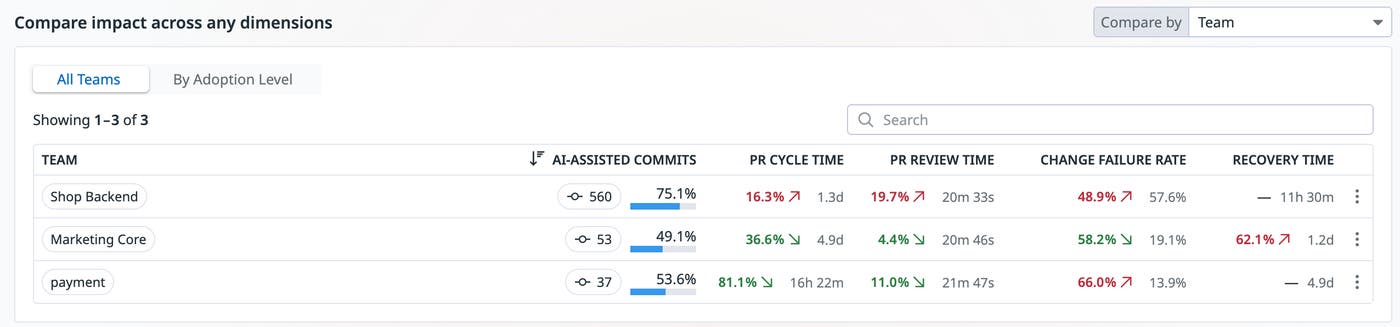
AI Impact helps you evaluate this trade-off by measuring change failure rate (CFR) across AI-assisted and unassisted code, attributing failures proportionally based on the composition of each deployment. For example, consider a deployment containing 80% AI-assisted commits and 20% unassisted commits. If that deployment causes a production failure, AI Impact attributes 80% of the failure impact to AI-assisted code. Over time, these attributions accumulate across deployments, so you can compare failure rates at scale rather than reasoning from individual incidents.
If AI-assisted changes show a higher failure rate, you can investigate further by drilling into specific teams, services, or repositories where the gap is most pronounced. This analysis helps you understand whether AI is improving delivery overall or introducing risks that require additional guardrails.
Compare AI coding tools by using delivery outcomes
Once you understand how AI impacts your delivery metrics, you can extend that analysis to compare different tools and models, such as the Claude Code API, Cursor, and GitHub Copilot. Because AI Impact tags each commit with the associated tool, you can analyze performance across tools by using the same impact metrics. This enables side-by-side comparisons of how different assistants affect throughput, cycle times, and production stability.
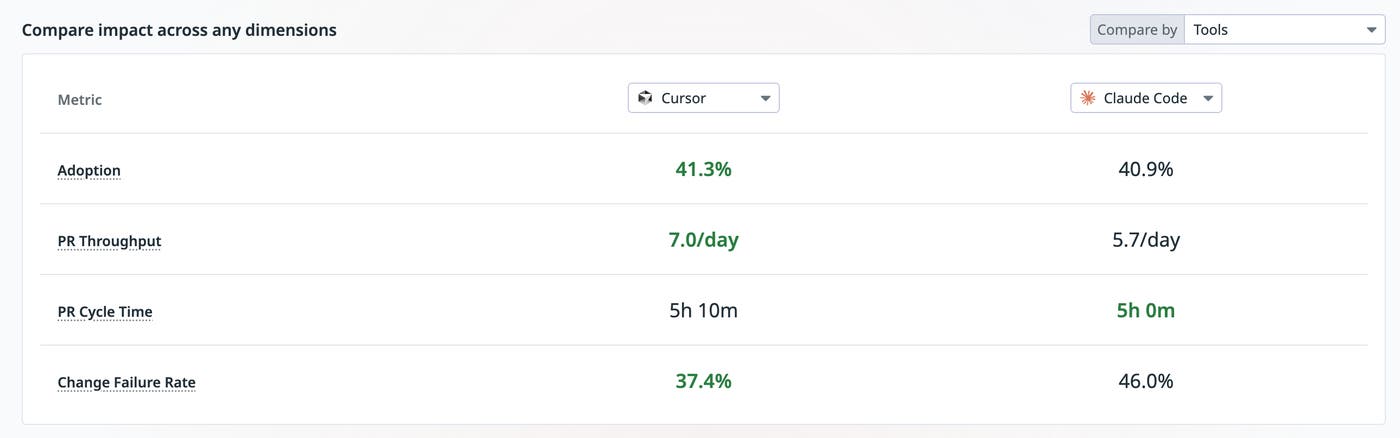
You can also break down results by team, repository, or language to identify where each tool performs best. For example, one assistant may reduce cycle time for backend services, while another may be more effective for frontend development. These comparisons turn tool selection into a data-driven decision grounded in engineering outcomes rather than subjective preference.
Test new models before rolling them out to all teams
AI models evolve quickly, and new releases often promise improved performance at higher cost. Evaluating these trade-offs in your own environment is critical before adopting them widely.
With AI Impact, you can roll out a new model to a subset of teams and monitor its effect on delivery metrics over time. By observing changes across velocity and stability, you can determine whether the model provides meaningful improvements.
For example, a model that reduces coding time but increases review time or failure rates may not deliver overall gains. Similarly, a model that improves performance marginally but increases cost significantly may not justify broader adoption.
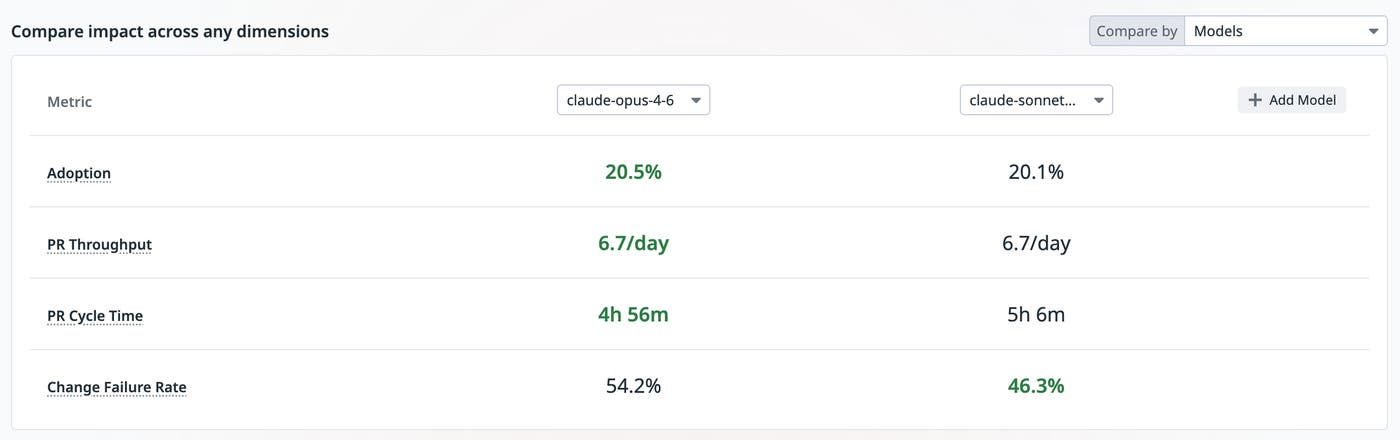
By testing changes in a controlled way, you can make informed decisions based on observed outcomes rather than external benchmarks.
Measure and optimize the impact of AI in your organization
AI coding tools are becoming a core part of the software development process, but understanding their impact requires more than tracking usage. By connecting AI telemetry data with delivery metrics, Datadog AI Impact provides a clear view of how these tools affect both speed and reliability.
With this visibility, you can evaluate tools, guide adoption, and make decisions based on real delivery outcomes rather than assumptions. To get started, set up DORA metrics in Datadog and connect your AI coding tool integrations. For more information, see the AI Impact documentation.
If you’re new to Datadog, sign up for a 14-day free trial.
