

Remi Hakim
Two years ago, we introduced our Datadog .NET StatsD port, DogStatsD, which allows you to track the performances of your C\# applications by sending custom metrics to Datadog, where they can be graphed and analyzed in real time.To learn more about StatsD, you can read this blog.
MIcrosoft .NET Custom Events Ingestion
Events can now be sent straight from Microsoft .NET to DogStatsD. This allows you to correlate custom events occurring in your environment with your application metrics. For example, you can see if certain events occur at the same time as spikes occur in certain Microsoft .NET application metrics. To send an event from your C\# applications just add the following line to your code:
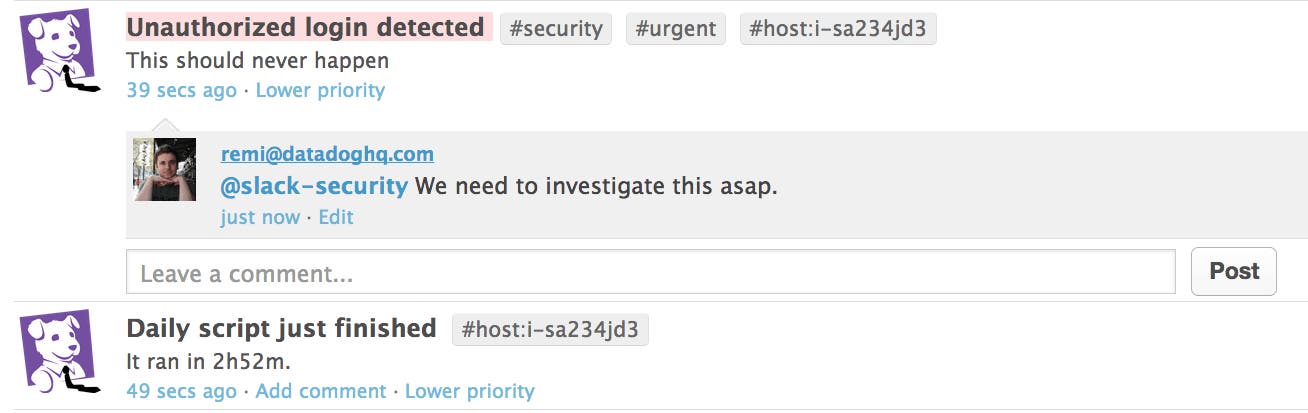
// Post a simple messageDogStatsd.Event("Daily script just finished", "It ran in 2h52m.");
// Send an error eventDogStatsd.Event("Unauthorized login detected", "This should never happen", alertType: "error", tags: new[] { "urgent", "security" });This snippet will yield events similar to the ones below:
Getting Started
In order to start using the DogStatsD C\# client in your application you’ll need the following:
A Datadog account so that you can graph and analyze your custom metrics. If you don’t have a Datadog account, you can sign up for a 14-day free trial.
The NuGet package manager to easily fetch and install the client
A running Windows Datadog Agent that will receive the metrics sent by the client
Once you have these prerequisites, open the project you want to monitor in Visual Studio. Then, click on the Tools menu, hover over Library Package Manager, and select Package Manager Console.
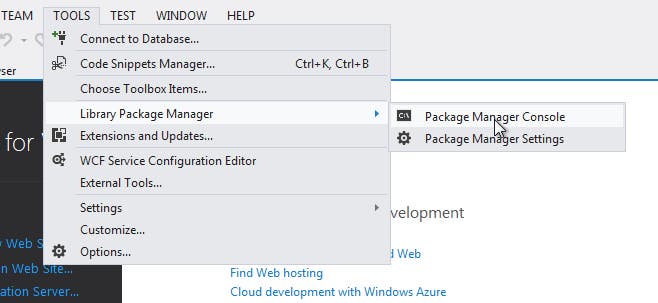
The Package Manager Console will now be displayed. Execute the following command in the console:
Install-Package DogStatsD-CSharp-Client
You are now ready to send events from your C\# Application!
More detailed documentation for the .NET library can be found on the GitHub repository.
