

Addie Beach

Bridgitte Kwong
Connecting day-to-day development work to real user outcomes can be challenging. As a result, engineers and product teams often struggle to effectively prioritize projects together. While the goal of improving user experience (UX) is the same, each team relies heavily on different—and often siloed—forms of monitoring to understand their app, creating a disconnect in metrics and visualizations that can be hard to communicate.
To gain a full picture of their app’s UX, both teams need a deep understanding of how users are responding to version changes, errors, or performance issues. Achieving this means translating each team’s key goals, concerns, and findings into a common language.
In this post, we’ll explore strategies for combining real user monitoring (RUM) and product analytics to:
How frontend teams define success
Engineering and product teams often envision the optimal state of their app differently, which is reflected in the tools and metrics they use.
For frontend engineering teams, success is defined in terms of system performance. Their main goal is to identify and remediate issues before they cause significant user impact. They consider performance issues to be the main cause of a negative experience and look to metrics like Core Web Vitals, error rates, and frustration signals to assess UX. As a result, they are most interested in tools that use these metrics to help them detect technical problems, pinpoint where they occur, and evaluate user impact, including:
Synthetic tests and experiments aimed at detecting bugs before release
Visualizations like waterfalls and flame graphs that depict resource and request performance
Session replays that illustrate sessions from a user’s point of view
On the other hand, product teams are primarily concerned with user engagement and discoverability. Their main goal is to determine which aspects of their app are driving or reducing user activity. They spend much of their time deciding which projects to prioritize, particularly when predicting how design changes or performance optimizations might impact engagement.
To quantify success in concrete data, product teams look at overall conversion and retention rates for a big-picture view. They may also look at more granular indicators of user engagement, such as how long users stay on a page, how much they spend per session, and how often they interact with key elements like checkout buttons. The tools these teams use tend to depict trends in user activity, including:
Funnels that depict dropoff at each step of the user journey
Pathway diagrams that show the most popular journeys within an app
Experiments that measure the viability of projects in terms of business goals such as revenue
Ultimately, the disconnect between product and engineering teams tends to stem from a lack of a shared context. Siloed metrics and disparate tools prevent them from connecting their perspectives for more informed goal setting and troubleshooting. For example, frontend engineering teams may view a feature that results in faster loading times as a clear success. However, product teams may see the same project as a failure if it doesn’t improve conversion rates. By combining data, teams can more easily collaborate on and prioritize projects that lead to success from both perspectives—that is, ones that improve performance in areas with the greatest impact on user engagement.
Combining RUM and product analytics for complete visibility
For engineering and product teams to make decisions together, they need a unified understanding of what users are doing and seeing within their app. Bringing together RUM and product analytics tools enables these teams to connect performance troubleshooting and optimization to end-user outcomes. By drawing from the same source of truth, they can more easily collaborate on decision making and effectively prioritize projects based on their impact on user experience.
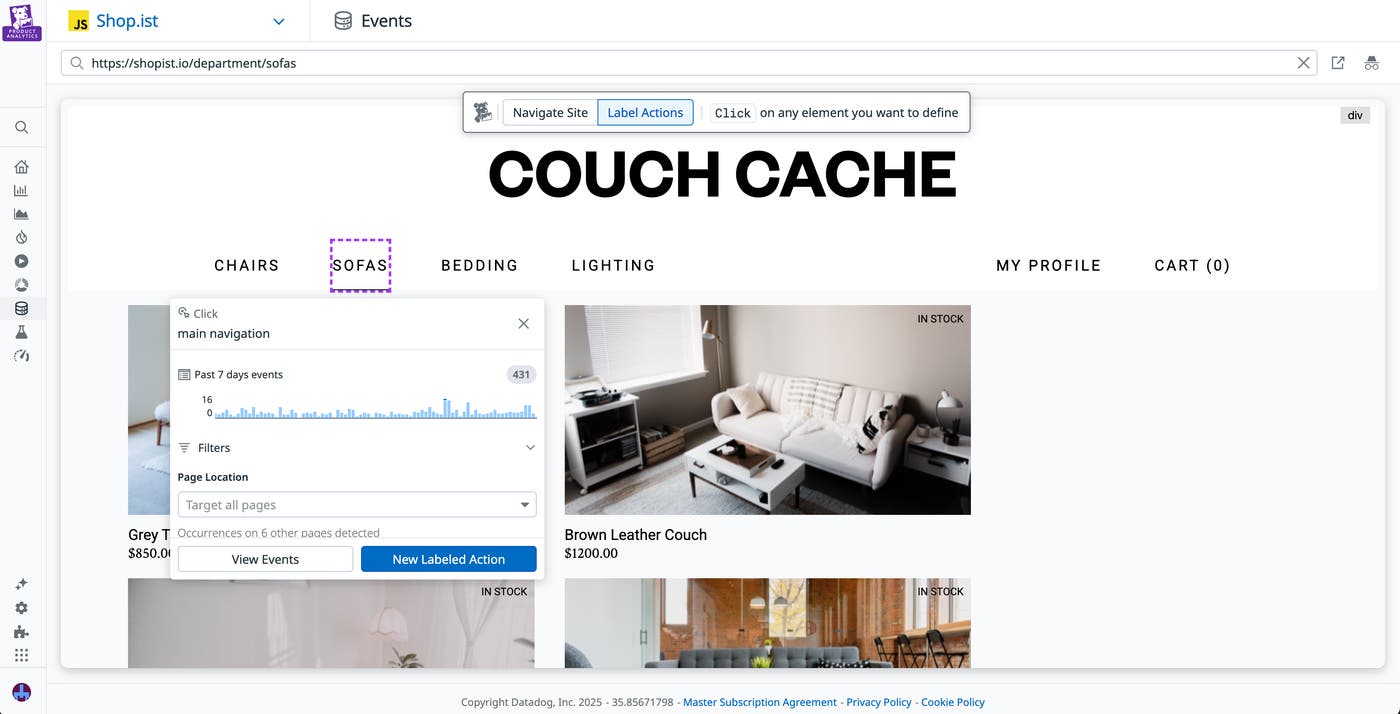
To do this, they need to first establish a shared vocabulary for key user actions. Without consistent definitions, teams often end up interpreting the same behavior differently, slowing down investigations and making it hard to align on priorities. To help your organization develop a single, universal dataset, Datadog automatically captures user actions, labels them, and populates them across both Datadog Product Analytics and Datadog RUM. This means that every team uses the same common reference points and can more effectively communicate with each other. Product Analytics also comes with a no-code Action Management interface—currently in Preview—that enables teams to create reusable action names, allowing product managers to directly customize this dataset and reducing engineering overhead.
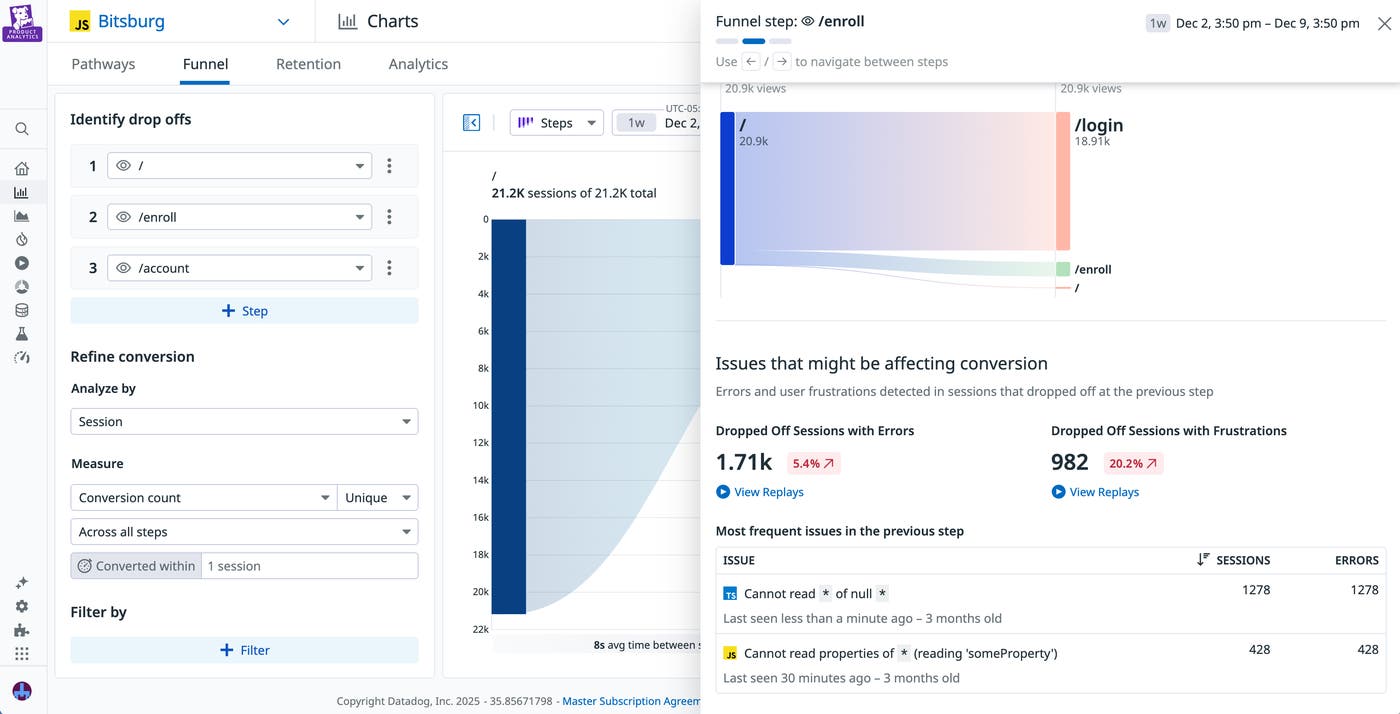
From here, sharing analytics through monitoring tools helps both teams evaluate the effectiveness of their projects from multiple perspectives. Let’s say that you belong to a product team that has recently released a redesign of your website. Soon after rollout, you receive an alert about a sharp increase in frustration signals. You pivot to a funnel within Datadog Product Analytics, enter the steps for your most common user flow, and quickly spot that your enrollment page now has a higher than expected drop-off rate. By clicking into the funnel step for this page, you can view a list of dropped-off sessions that contain frustration clicks.
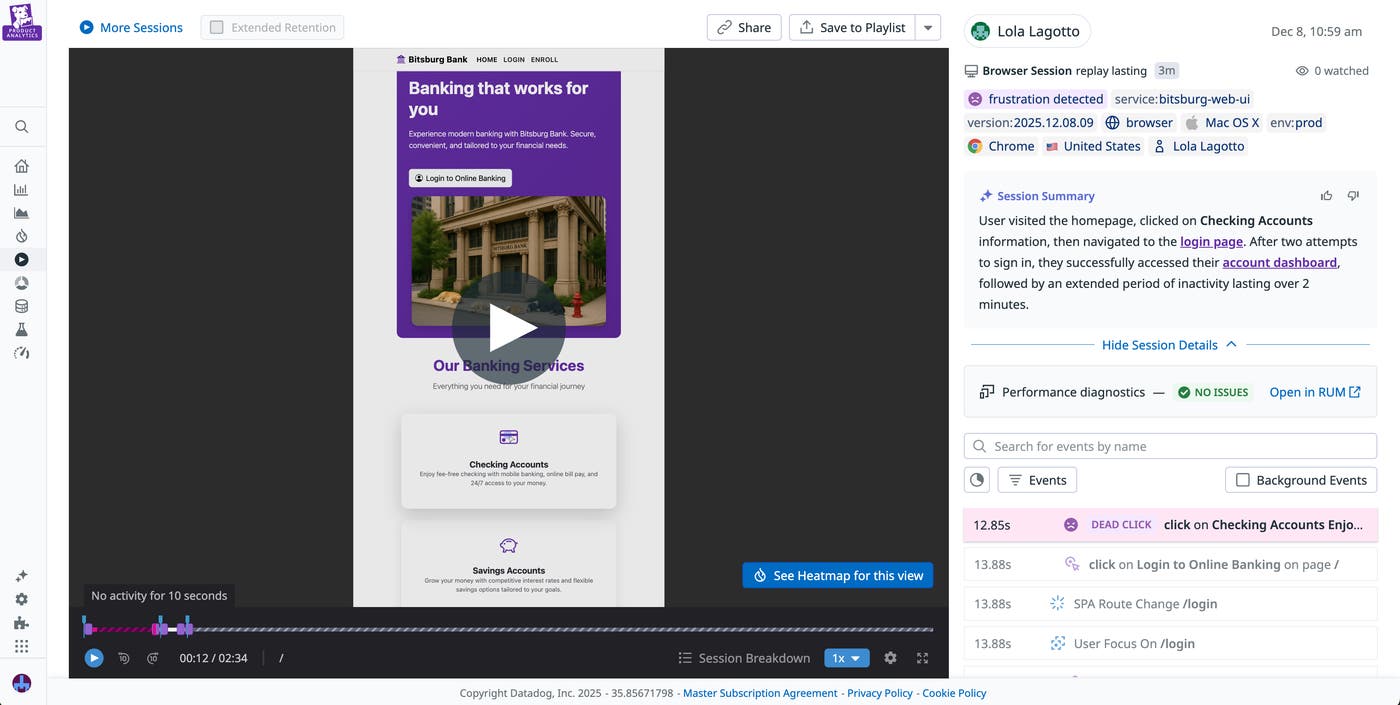
You view a session replay for this page and identify an unresponsive enroll button that caused users to abandon their sessions. You send this replay to your engineering teams, who can pivot directly from the replay to performance diagnostic data within Datadog RUM.
Alternatively, engineering teams can easily view the impact of their changes through unified data. If you’re an engineer who’s recently completed performance optimizations for your app, you can view user engagement trends within Product Analytics to determine the impact of these changes. For example, you may want to determine whether there’s been an increase in checkout completion events following your optimizations. If you do see a marked improvement, you can send these results to your product teams to communicate that this is a critical project worth investing in further.
Start connecting user experience to product outcomes
When teams share visibility into software performance and user engagement, engineers see the real impact of their work and product teams gain empathy for technical challenges. By bridging their data, frontend teams can easily assess how every release shapes the user journey.
You can learn more about using Datadog RUM and Product Analytics together in our recent case study with Ibnsina Pharma. You can also read our documentation to start monitoring performance with RUM and user engagement with Product Analytics. Or, if you’re new to Datadog, you can sign up for a 14-day free trial.
