
Mallory Mooney
Staff Technical Content Writer
Cloud threat detection requires context in order to be successful. Without it, you’re left with signals that lack the “why” and “how” needed to determine whether activity represents a real threat or a benign misconfiguration.
This ambiguity is common in cloud environments. Attackers often operate by abusing legitimate identities, permissions, and services, which makes malicious activity difficult to distinguish from normal behavior. Effective cloud threat detection depends on identifying risky activity across both control plane and data plane operations, then correlating those signals with cloud assets to understand intent.
In this post, we’ll look at:
How risky activity maps to specific identities and resources
How you can connect these signals to prioritize real threats in your cloud environments
Key signals for cloud threat detection across control and data planes
Risky behavior commonly shows up in two areas of your cloud environment: control plane and data plane operations. The control plane typically involves authentication events, administrative actions, and orchestration, such as scheduling workloads for a Google Kubernetes Engine (GKE) cluster or launching a new Amazon Elastic Compute Cloud (Amazon EC2) instance. The data plane refers to interactions between resources and data, such as writing to an Amazon Simple Storage Service (Amazon S3) bucket.
Because attackers often rely on legitimate cloud operations, risky behavior can closely resemble day-to-day activity. Distinguishing between the two requires understanding which identities and resources are involved, and how authorized actions can be abused as part of an attack path.
The following examples illustrate how common detection signals map to real attack scenarios:
Unusual authentication and access patterns: Impossible travel, repeated failed logins, or authentication from unfamiliar locations can indicate compromised credentials. When these events are followed by successful access or privilege changes, they often represent the early stages of account takeovers.
Privilege escalation and identity abuse: Creating new service account keys or modifying IAM roles are common signs of attackers attempting to escalate privileges or establish persistence using legitimate identities.
Suspicious configuration changes: Disabling logging or weakening network controls can signal attempts to impair defenses. These activities often come before data exfiltration or lateral movement within a cloud environment.
Unexpected data access: Accessing storage resources in unusual ways can signal reconnaissance or data exfiltration, especially when this activity is paired with newly created or rarely used identities.
Signals like these generally fall into one of two categories: Anomalous user and admin activity and identity risks and resource misconfigurations. Grouping signals this way helps you investigate cloud threats by showing who was responsible for certain behavior, how they were able to accomplish those actions, and their ultimate goals.
Anomalous user and admin activity
Monitoring user and admin activity for the initial signs of risky actions can serve as a foundation for identifying risks in other parts of your environment. Most of this activity occurs in the control plane because it involves authorization and authentication events. Examples can include login attempts from unusual locations (e.g., impossible travel) and multiple, failed authentication attempts from specific accounts. Though these are common events in cloud environments, they are still considered risky behavior because they can indicate the beginning of targeted attacks against resources, such as Amazon Simple Email Service (SES). Your cloud provider’s audit logs, such as AWS CloudTrail logs and Google Cloud logs for admin activity, will capture this kind of activity, giving you a starting point for investigations.
Monitoring this activity for any unusual behavior can also give you better visibility into the specific actions that an attacker is taking within your environment, such as moving laterally, escalating privileges, or maintaining a foothold in an environment. These tactics can occur in both the control and data planes depending on whether they trigger authorization and administrative events or attempt to access resource data. They are also typically a part of an attacker’s larger objectives and can be difficult to detect because they use existing accounts within your environment to cover their activity.
Some specific examples of what these tactics look like include moving laterally between on-premise and cloud environments and escalating privileges to jump between cloud accounts. In scenarios like these, you can look at both audit logs and your cloud provider’s built-in security detection services for signs of an attacker moving through your environment. For example, AWS CloudTrail can provide logs about data events for interactions with specific resources, which GuardDuty uses to detect unusual IAM activity. Google Cloud audit logs and Google Cloud Security Command Center findings capture information about data access and security-related anomalies in your Google Cloud environment.
Identity risks and resource misconfigurations
Tracking activity shows what happened within your environment, but it’s also important to understand how it happened and who initiated it. Visibility into the specific identity and resources involved gives you insight into entry points to risky behavior. This information is primarily captured in the control plane, which manages configurations, authorization, and authentication controls for cloud accounts and resources. In many cases, the risky behaviors that led to attacks can be traced back to mismanaged accounts, credentials, and resource configurations.
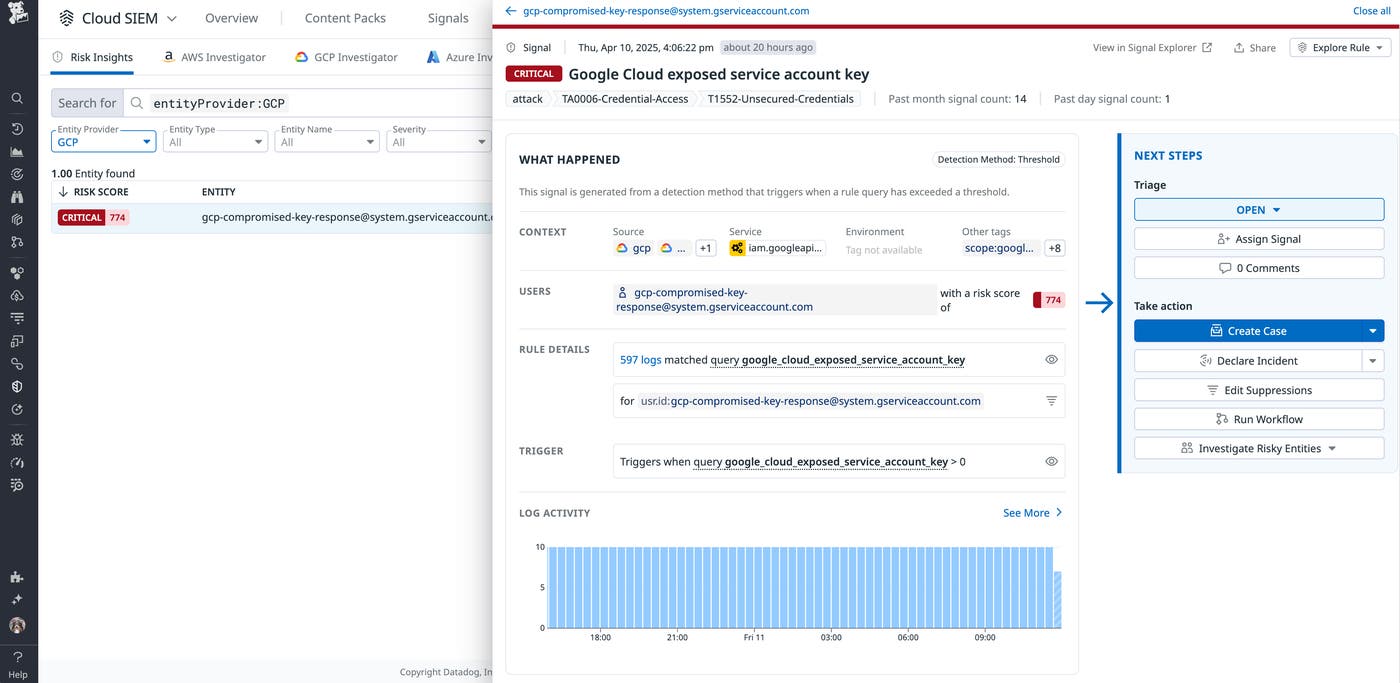
Stale credentials and IAM roles with excessive permissions, for example, are common entry points for attacks. Publicly accessible storage buckets have also been the source of breaches, enabling attackers to easily exfiltrate sensitive data.
As with admin and user activity, your cloud provider’s audit logs and security findings will contain information related to accounts and changes to resources. For AWS CloudTrail, you can look at management events. AWS Config and Security Hub events can show changes to your resources and some security misconfigurations, respectively. Google Cloud audit and system event logs will track changes to Google accounts and resources, while Google Security Command Center will detect resource misconfigurations.
Correlate cloud threat detection signals with identities and resources
We’ve looked at examples of activity and misconfigurations that show the “who,” “what,” “why,” and “how” behind risky behavior. Considering the numerous sources for finding this data, how do you put the various pieces together to form a complete picture of risk within your cloud environment? We’ll look at an example of how cloud SIEMs and entity analytics accomplish this to bring you end-to-end visibility into risky behavior.
Cloud SIEMs aggregate security logs, analyze patterns, and generate alerts based on predefined and custom rules, which help distinguish between everyday activity and real security threats. Consider a scenario where your cloud SIEM detects a service attempting to query a Google Cloud SQL database. The attempt is denied, and this activity is logged in Google Cloud audit logs as unauthorized service activity. We do not have additional context for this activity, such as why it happened, so we can’t confirm if it is risky behavior on this data alone. Unauthorized activity does not always mean the account is compromised. It could simply be the result of misconfigured permissions preventing access to a resource the service should have access to. However, a trail of unauthorized or unexpected events from a single service account is worth investigating.
One limitation of monitoring security logs is the difficulty of tying what happened to how they happened and who initiated them. Entity analytics correlates logs with users, service accounts, and roles and helps prioritize threats based on custom risk scores, which are typically provided by the security vendor. In most cases, these scores are calculated based on the number of alerts, detections, or signals associated with the entity and characteristics of those signals, such as their level of impact.
Let’s look at our previous cloud SIEM example again, which flagged unauthorized activity from a single service. Entity analytics can provide more details about its activity. We discover that this particular service triggered multiple detections for creating new service account keys and a new privileged service account. Together, these factors indicate a higher risk to your cloud environment and could be the sign of malicious behavior like maintaining persistence, so the activity should be prioritized for investigation.
Strengthen cloud threat detection with Datadog Cloud SIEM Risk Insights
How does Datadog piece together cloud SIEM data—like unusual events captured in audit logs—with the additional context from entity analytics? With Content Packs, Datadog Cloud SIEM can automatically detect risky behavior across both control and data planes by scanning cloud provider data sources. These include some of the major sources for identifying potentially malicious activity in the cloud, such as AWS CloudTrail, Google Cloud logs, and Google Security Command Center findings. You can efficiently collect these and other types of security logs with Flex Logs, which decouples the costs of log storage from the costs of querying.
Let’s walk through an example of how Datadog Cloud SIEM brings together the necessary pieces of information for determining if activity is malicious or simply anomalous. In the following screenshot, Datadog Cloud SIEM identified signs of impossible travel for user Billy.Taylor:
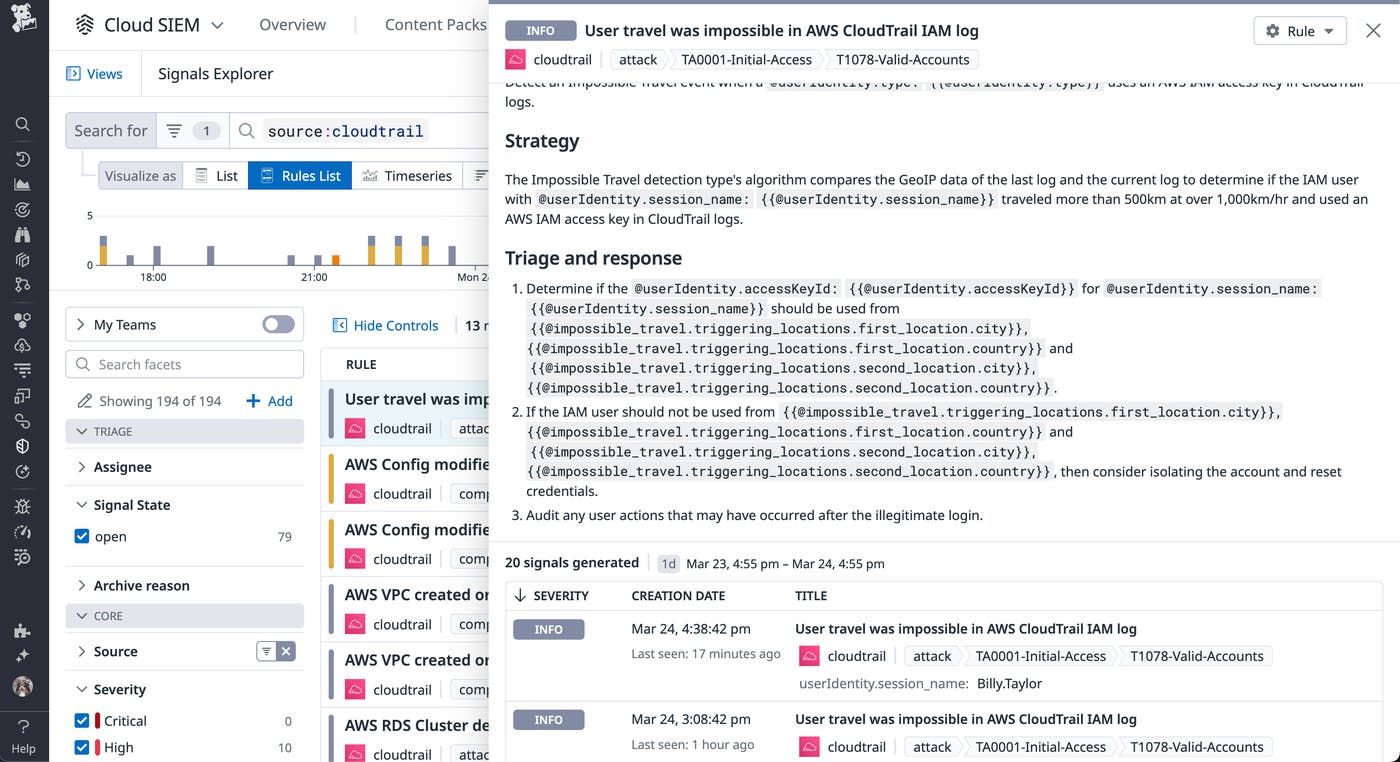
Is this simply the result of logging in from a new location, or is it the sign of a potentially compromised account? To answer these questions, we can investigate related signals and risks to determine the root cause.
In addition to monitoring events, Datadog Cloud SIEM Risk Insights maps them to identities and resources for both AWS and Google Cloud environments, which will give you a better understanding of what the risky behavior is and how it should be prioritized. Through Risk Insights, we discover that Datadog assigned a high risk score for Billy.Taylor because of the number of associated security signals with a high severity level. For example, the user removed public access blocks for multiple Amazon S3 buckets, which Datadog flagged as a high risk.
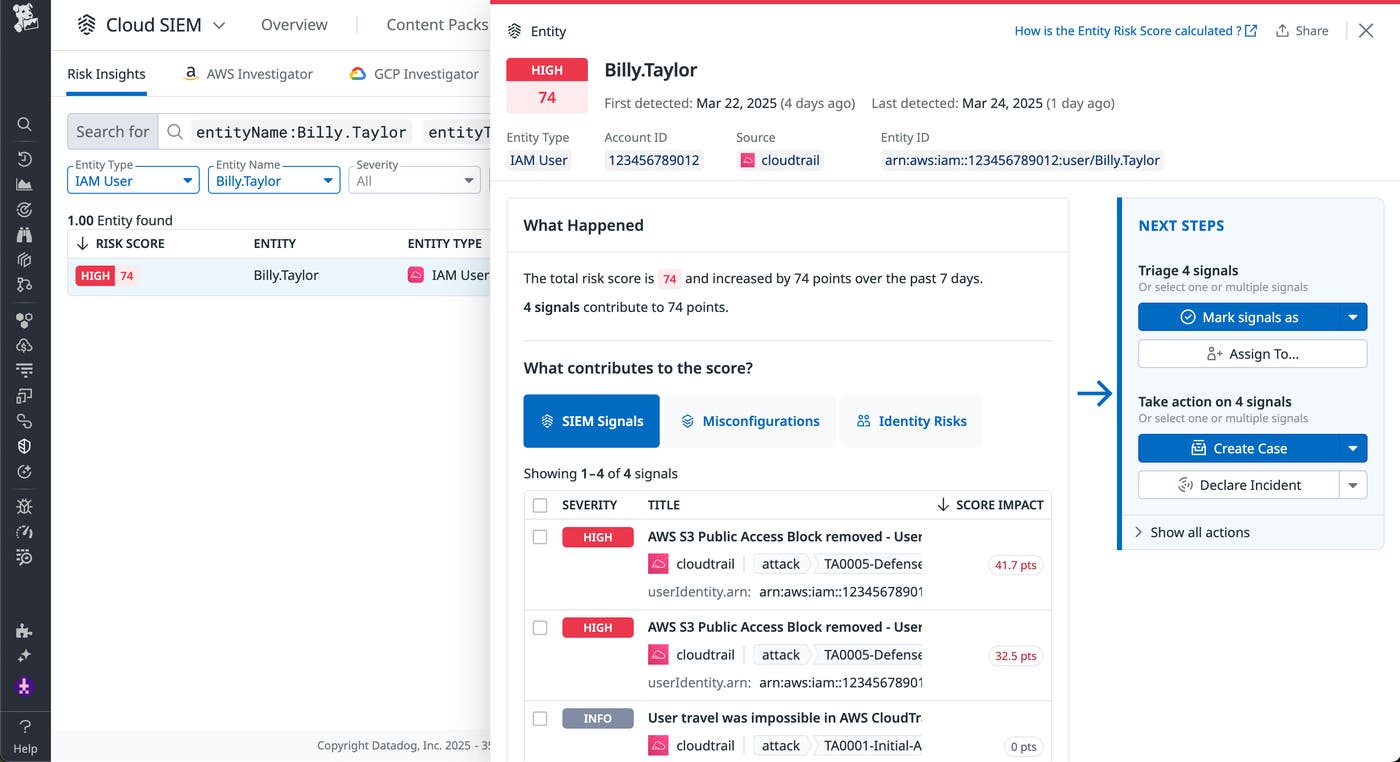
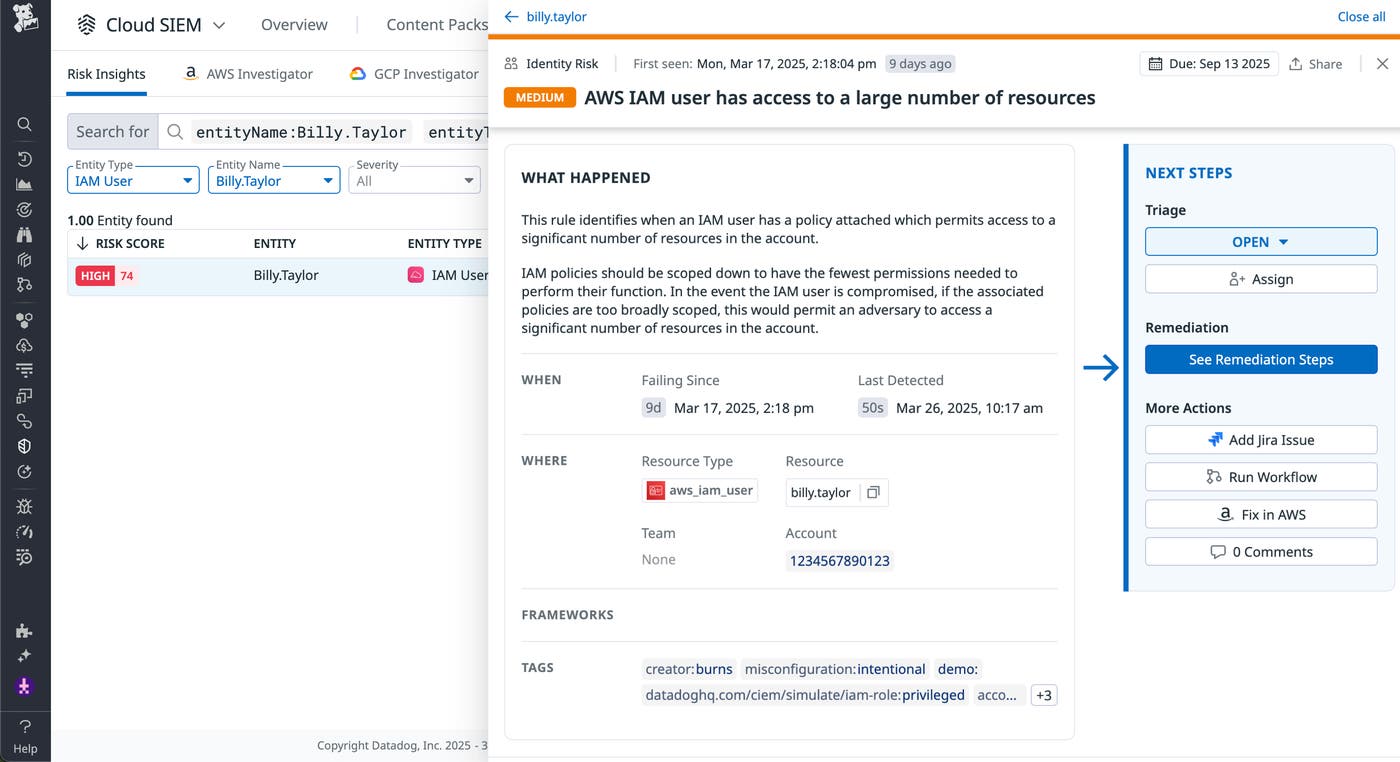
This user also has multiple identity risks, such as access to a large number of AWS resources. In this scenario, investigating the trail of risky behavior can help you determine how to respond. To start, you can confirm if the impossible travel was legitimate or the result of logging in from a different device. You can also determine if the user removed public access blocks as a way to debug legitimate issues with a service. As a final step, you may want to consider limiting the number of resources the user has access to, as seen in the following screenshot. If this particular user was compromised, the attacker would have access to all of the same resources.
Add context to cloud threat detection
In this post, we looked at common examples of risky behavior and how they can create vulnerabilities in your cloud environment. We also walked through Datadog Cloud SIEM’s capabilities for detecting risky behavior and providing more context via Risk Insights. Check out our documentation for more information about Datadog Cloud SIEM Risk Insights. If you don’t already have a Datadog account, you can sign up for a free 14-day trial.
