

Allie Rittman
Kubernetes environments generate a constant stream of signals across clusters, nodes, pods, and workloads. For teams that have standardized on OpenTelemetry (OTel), maintaining ownership of that data is critical. But in practice, many observability platforms require translation into vendor-specific data formats, leading to fragmented product experiences, blank dashboards, and uncertainty about data integrity.
Today, we’re announcing a Preview of native OTel support in the Datadog Kubernetes Explorer. Building on our existing support for OTel metrics, this expansion brings first-class, in-app Kubernetes exploration and troubleshooting powered directly by your OTel data. You can now visualize clusters, investigate resource health, and correlate metrics, logs, and traces without sacrificing vendor flexibility or data ownership.
In this post, we’ll show you how to:
- Resolve variations in OTel Kubernetes metric types and semantics
- Correlate OTel metrics and alerting signals in the Kubernetes Explorer
- Understand cluster root causes and related resources by using OTel data
Resolve variations in OTel Kubernetes metric types and semantics
OTel offers flexibility in how you collect Kubernetes telemetry data. You can choose from multiple receivers (such as dockerstatsreceiver, podmanreceiver, or kubeletstatsreceiver), each of which may emit similar metrics with different units or types. When that data flows into an observability platform, additional translation is often required to map it to vendor-specific metric names and definitions. The result can be confusing. For example, CPU usage may appear as:
container.cpu.usage.totalwith a unit ofnanosecondsand typecountcontainer.cpu.usage.totalwith a unit ofsecondsand typecountcontainer.cpu.usagewith a unit ofCPUand typegauge- A platform-defined metric with a different unit such as
nanocores
Although these metrics sound similar, they are not equivalent. Misaligned units and types can distort dashboards and alerts, making it difficult to interpret cluster health accurately.
The Datadog Kubernetes Explorer addresses this by performing semantic matching on incoming OTel metrics. We automatically translate native OTel metrics into Datadog-standard representations while preserving their original context. This enables you to query by using either the native OTel metric name or the Datadog-standard name, with consistent units and types across views.
In addition, we provide guidance on receiver configuration to help you reduce ambiguity at the source. Because there are many valid OTel configurations and permutations, these recommendations can help ensure that your Kubernetes dashboards reflect accurate, comparable data regardless of how it was collected.
Correlate OTel metrics and alerting signals in the Kubernetes Explorer
Even with consistent metrics, troubleshooting Kubernetes issues can be time-consuming if signals are scattered across dashboards and other tools. Engineers often jump between views to understand whether a spike in pod restarts is isolated or part of a broader cluster issue.
The Kubernetes Explorer provides a unified way to navigate your clusters using OTel data. It offers table-based views of key resources including clusters, nodes, namespaces, pods, and workloads. This enables you to quickly sort and filter by critical indicators such as erroring pods, restart counts, and resource utilization.
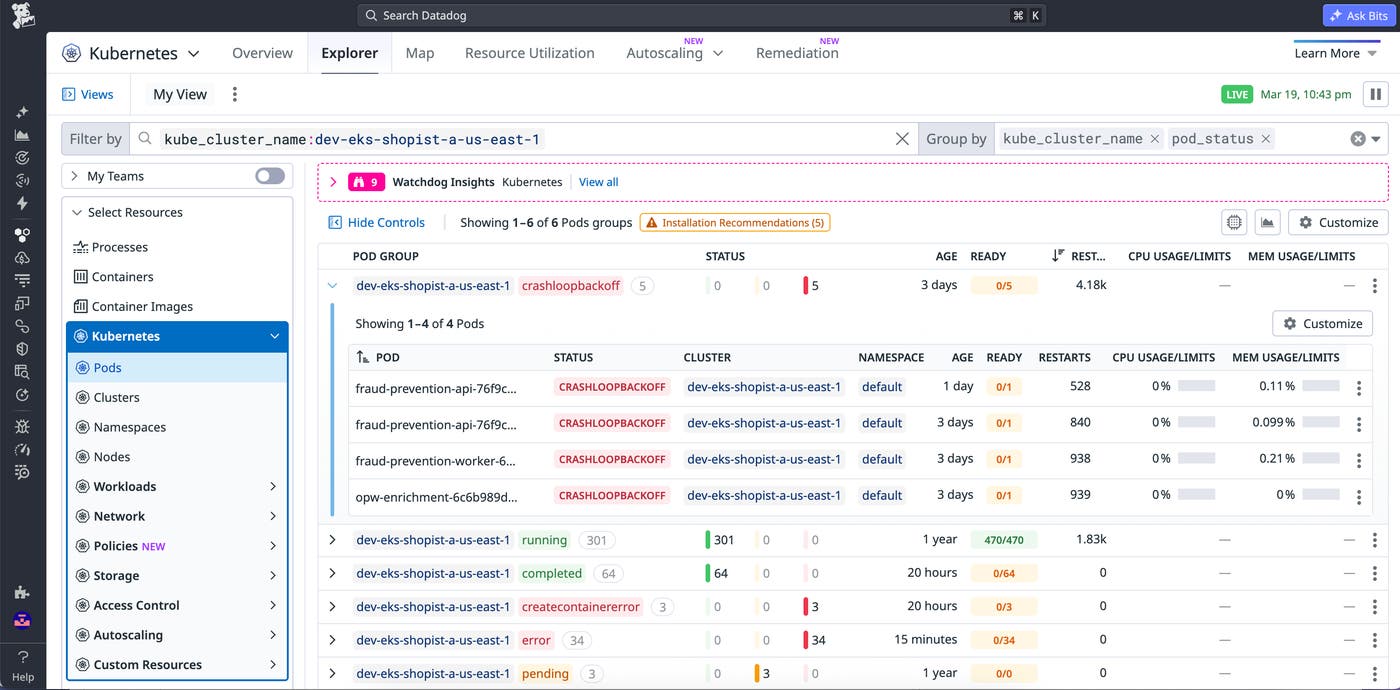
From a high-level cluster view, you can assess which clusters, workloads, or groups of resources are experiencing frequent issues. By reviewing key metrics and pod statuses in the Kubernetes Explorer table, you can quickly identify high-priority issues and start troubleshooting.
For teams operating hybrid environments, Datadog identifies whether telemetry data originates from a native OTel pipeline or a Datadog Agent. If you’re running a mix of both, the Explorer joins this data so you can troubleshoot across clusters without worrying about how the data was collected.
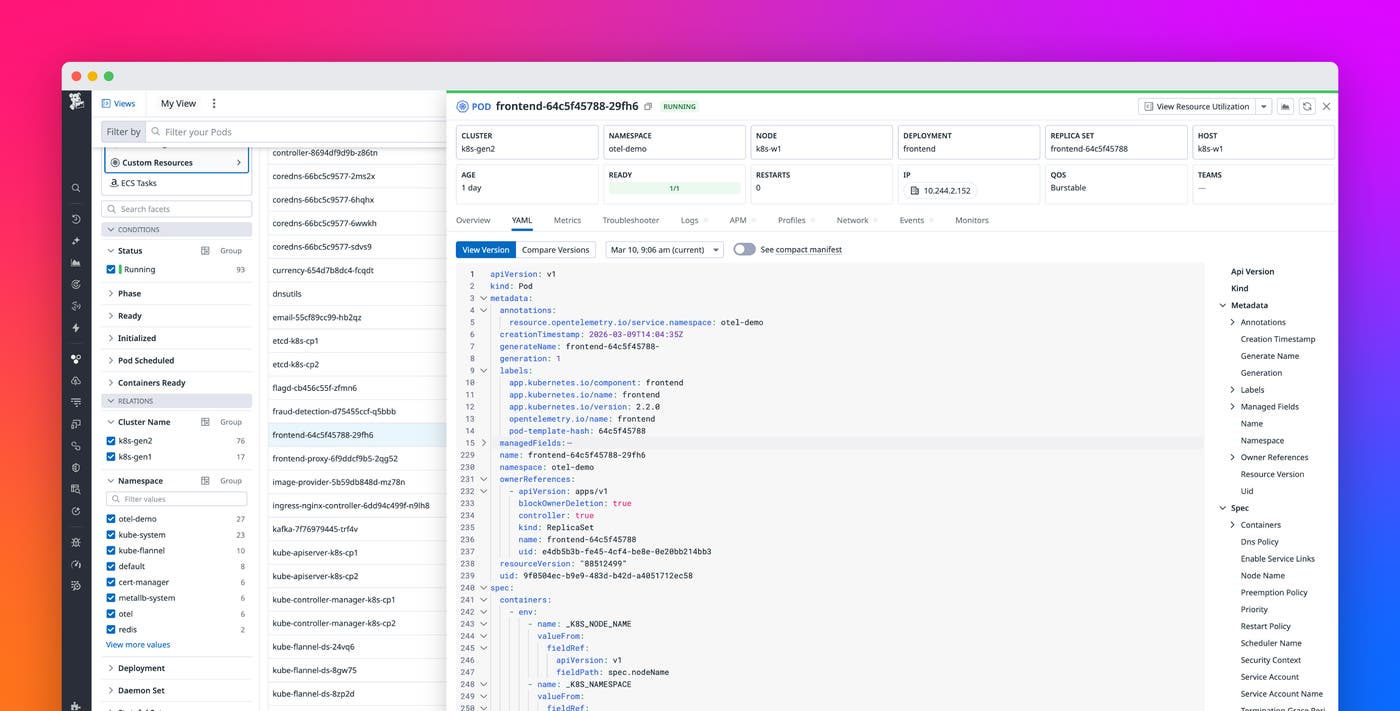
From this top-level view, you can drill into a specific resource and open a side panel that aggregates the resource’s relevant metrics, logs, and traces. If a pod is failing, you can immediately check related workloads, confirm whether other pods on the same node are impacted, and determine whether resource constraints or configuration changes contributed to the issue.
Understand cluster root causes and related resources through OTel
Root cause analysis in Kubernetes often requires stitching together infrastructure state, workload configuration, and application telemetry data. Without a resource-aware model, it can be difficult to determine which deployment, pod, or node is responsible for degraded performance.
To power the Kubernetes Explorer, Datadog ingests your Kubernetes resource manifests and associates them with incoming OTel telemetry data. This pipeline recognizes the origin of each resource and maps metrics, logs, and traces to the correct Kubernetes entities.
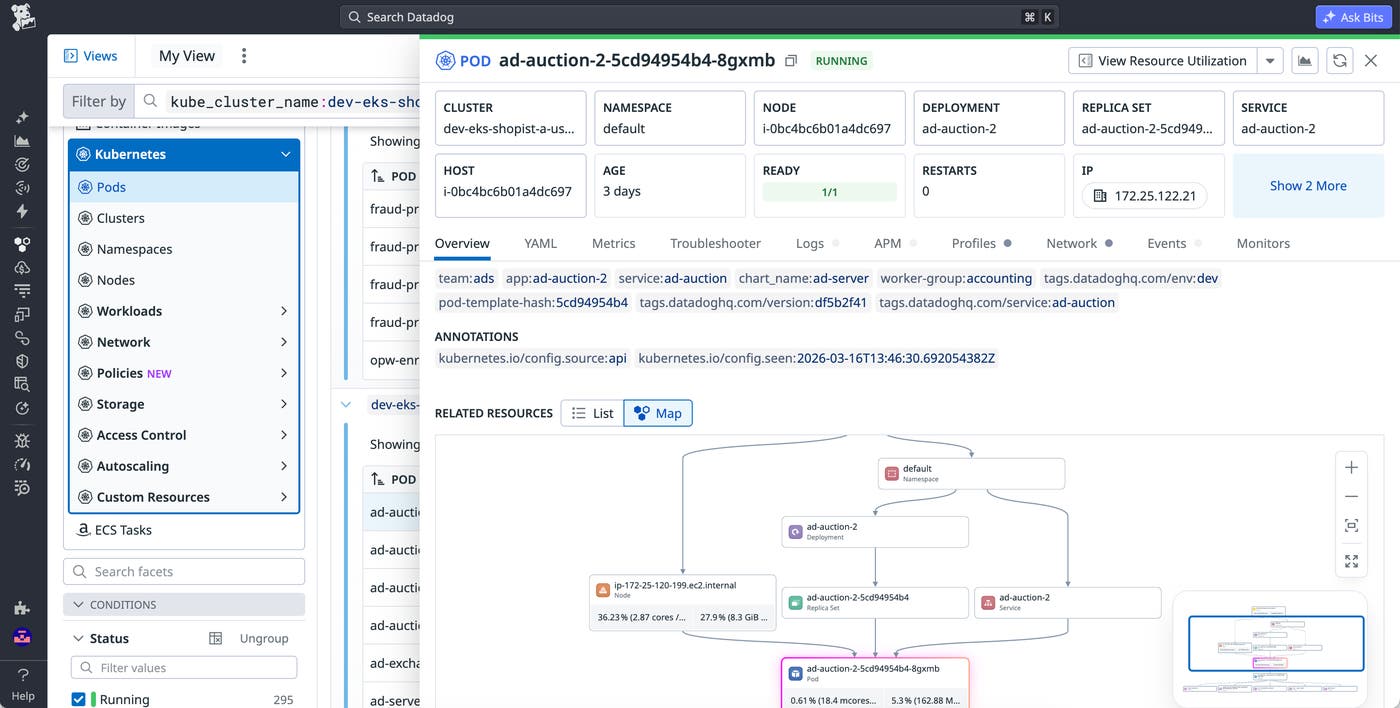
The Explorer supports core Kubernetes resource types, including clusters, nodes, namespaces, pods, and common workload controllers such as Deployments, DaemonSets, Jobs, and StatefulSets. For each resource, you can view configuration details, related resources, and key telemetry data in one place.
This makes it easier to answer questions like the following:
- Is this issue isolated to a single pod or affecting an entire deployment?
- Did a recent configuration change coincide with rising error rates?
- Are resource limits or node conditions contributing to application instability?
The Explorer also surfaces related resources in context. For example, when investigating an erroring pod, you can navigate to its underlying node to check CPU or memory pressure, or pivot to the deployment that manages it to assess whether the issue is systemic. This relationship-aware view reduces the need for manual command-line queries and helps you prioritize what to fix first.
Because this experience is powered directly by your OTel data, native OTel users can troubleshoot Kubernetes workloads with the same depth of functionality available to Agent-based environments. You retain flexibility in how you collect and route telemetry data while gaining a consistent, high-trust product experience.
Get early access to the native OTel Kubernetes Explorer
With native OTel support in the Kubernetes Explorer, you can explore clusters, correlate signals, and investigate root causes using the telemetry pipeline you already trust. Datadog normalizes OTel metrics, maps them to Kubernetes resources, and surfaces related telemetry data in context so you can move from a high-level health signal to a specific container root cause in just a few clicks.
This feature is currently in Preview. To request access, visit our native OTel Kubernetes Explorer Preview page. To learn more about Datadog’s OTel support, read our blog post on OpenTelemetry-native metrics. If you’re new to Datadog, sign up for a 14-day free trial.