
Tim Mannai

Kim Mason

Nolan Hayes
Senior Technical Content Editor
Software composition analysis (SCA) tools have become essential in modern security programs. They continuously scan software supply chains and match component fingerprints against Common Vulnerabilities and Exposures (CVE) databases to surface vulnerabilities in dependencies. SCA tools are effective at scale, but they introduce a persistent challenge: Not every flagged vulnerability actually presents a risk.
If you run Datadog software such as the Agent, container images, or packages, there’s a good chance your scanner has flagged one of our artifacts for a CVE. From there, your security team is left in a difficult position: spend time investigating a vulnerability in software you don’t own and can’t fully inspect, or accept the risk and move on. Either way, the burden falls on you to make a call without the full picture.
The Datadog Public Artifact Vulnerabilities page offers visibility by sharing exploitability assessments for Datadog-managed software to help you make informed decisions about findings that affect our artifacts and libraries. We use the OpenVEX specification to provide human-readable and machine-readable data about vulnerabilities in Datadog artifacts. By incorporating this context into your workflows, you can reduce noise in your scans and prioritize issues that require action.
In this post, we’ll explain what OpenVEX is and how we generate and validate our VEX statements. We’ll also show how you can use the Public Artifact Vulnerabilities page and access raw OpenVEX files to stay updated about the vulnerabilities that matter to you.
What are VEX and OpenVEX?
Vulnerability Exploitability eXchange (VEX) provides information about whether a product is affected by a specific vulnerability. If the product is affected, VEX also indicates whether remediation is recommended and what actions you should take. This information is packaged into machine-readable VEX documents that security tools can consume.
Many implementations of VEX exist, including OpenVEX, CSAF VEX, CycloneDX VEX, and SPDX VEX. Each implementation offers different formats and tooling ecosystems to produce and consume VEX documents.
OpenVEX is a lightweight and embeddable format that meets the requirements defined by the VEX Working Group, which is coordinated by the Cybersecurity and Infrastructure Security Agency (CISA). For each vulnerability statement, OpenVEX lets a vendor specify:
Status: a vulnerability assertion that defines the current exploitation risk (
not_affected,affected,fixed, orunder_investigation)Justification: the reason a product is not affected (for example, when vulnerable code is not present, not reachable, or mitigated)
Impact statement: a human-readable explanation of the exploitability assessment
Action statement: guidance about what users should do
OpenVEX integrates with widely used open source dependency scanners, enabling you to pass VEX files directly into your scans. You can run commands like the following to provide a VEX file to tools such as Trivy or Grype:
trivy image --vex <vex-file.json> myimage:taggrype --vex <vex-file.json> myimage:tagHow Datadog generates and validates VEX statements
At Datadog, we combine automation with human expertise to produce accurate VEX statements. Internally, vulnerability scanners continuously analyze our artifacts and identify relevant CVEs. Our vulnerability management systems ingest these findings and label them with a preliminary status.
From there, our vulnerability management team works with the relevant security engineers and service owners to review each case and determine whether the vulnerability is exploitable. We consider how the affected component is used, whether vulnerable code paths are reachable, and whether mitigating controls exist. After we validate the VEX statements, we encode them as OpenVEX documents and publish them on a weekly basis.
View the Public Artifact Vulnerabilities page
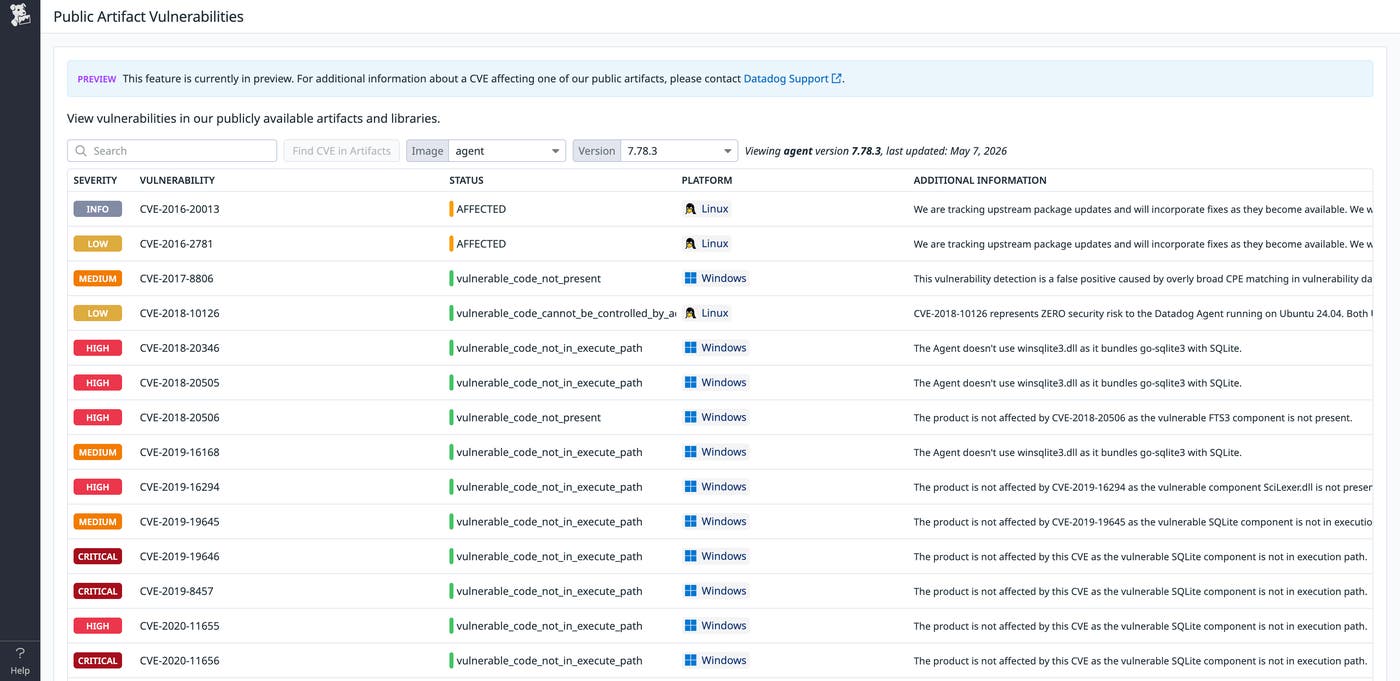
We publish a human-readable status page that focuses on the information that matters most to you:
Which vulnerabilities affect a given artifact (by image or version)
Which artifacts are affected by a given CVE
Status and impact details for each vulnerability, including context that explains the exploitability assessment
The Public Artifact Vulnerabilities page covers our most widely used container images, with progressive rollout to additional images ongoing. You can access the page directly or through our help portal.
Integrate raw OpenVEX statements into your pipelines
For teams that want to integrate our VEX data directly into their security pipelines, we publish machine-readable OpenVEX files on our OpenVEX Files page. Each file includes vulnerability data for all platform variants of a given version and is structured as JSON so that it can be consumed directly by tools and CI/CD pipelines.
For example, the following commands show how to retrieve the OpenVEX file for a specific version of the Datadog Agent and pass it to Trivy to filter scan results based on our published exploitability assessments:
AGENT_VERSION="7.78.0"curl -fsSL "https://openvex.datadoghq.com/vex/agent/${AGENT_VERSION}/agent@${AGENT_VERSION}.json" -o "agent@${AGENT_VERSION}.json"trivy image --vex "agent@${AGENT_VERSION}.json" "datadog/agent:${AGENT_VERSION}"Get started with Datadog Public Artifact Vulnerabilities
The Datadog Public Artifact Vulnerabilities page and machine-readable JSON files give you context about exploitability for Datadog-managed software. With validated assessments shared as OpenVEX documents, you can quickly determine whether a vulnerability affects your environment and what action, if any, to take. To learn more, check out our Public Artifact Vulnerabilities documentation.
As we expand coverage, refine our internal validation process, and work toward broader package-level VEX support, we’d love your feedback. If there’s a specific artifact that you’d like for us to include, tell our Support team.
If you’re new to Datadog, you can sign up for a 14-day free trial to get started.
