

Alex Weisberger
It’s an all too common scenario: You get paged for some queries timing out, but when you investigate, the database performance looks unchanged. Something must have changed, though. If the database doesn’t look overloaded, where are these timeouts coming from?
The answer often lies outside the database itself. Round trip query latency includes every hop between your application and the database, including connection pools, load balancers, and proxies. A bottleneck anywhere along that path looks the same from the outside.
In this post, we’ll show how Datadog’s correlated Database Monitoring (DBM) and (Application Performance Monitoring) APM data lets you decompose round trip latency so that you can pinpoint exactly where to look.
Round trip latency involves more than the database
Database query latency is more nuanced than a single number. A database process executes a query, but those results must be transferred over a network and decoded by an application. In between, load balancers, connection pools, and other proxies are often used, all introducing their own latency overhead. What a user or client ultimately experiences is the round trip latency of the query including all of the waypoints along the way.
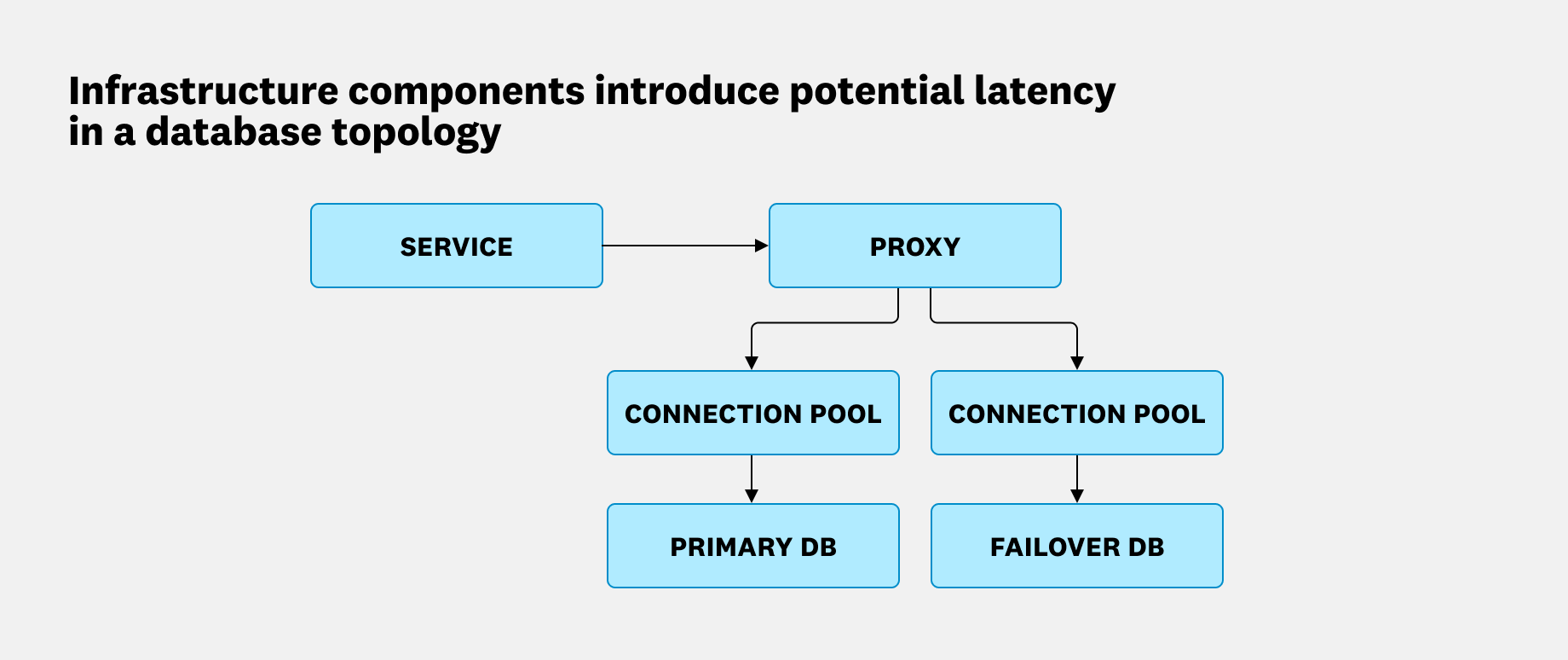
The problem is that many database monitoring tools only see inside the database. When latency spikes due to a saturated connection pool or a slow proxy, your database metrics can look completely normal. That’s because from where the database sits, everything is normal. Understanding where the round trip latency is actually coming from is essential, because the remediation steps are completely different depending on the answer. To find the true source, we have to decompose round trip query latency into its constituent parts.
Separating round trip time from database time
Database architectures across the industry are diverse and stack-dependent, but at the beginning of every investigation, you can typically draw a clear line between round trip time and database time. Think of it as a parent/child relationship. The parent span covers the full query, from the moment your application issues it to the moment it receives a response. Nested inside are two children, including the time the database spent executing the query, and everything else. That “everything else” is where connection pools, proxies, and network overhead live.
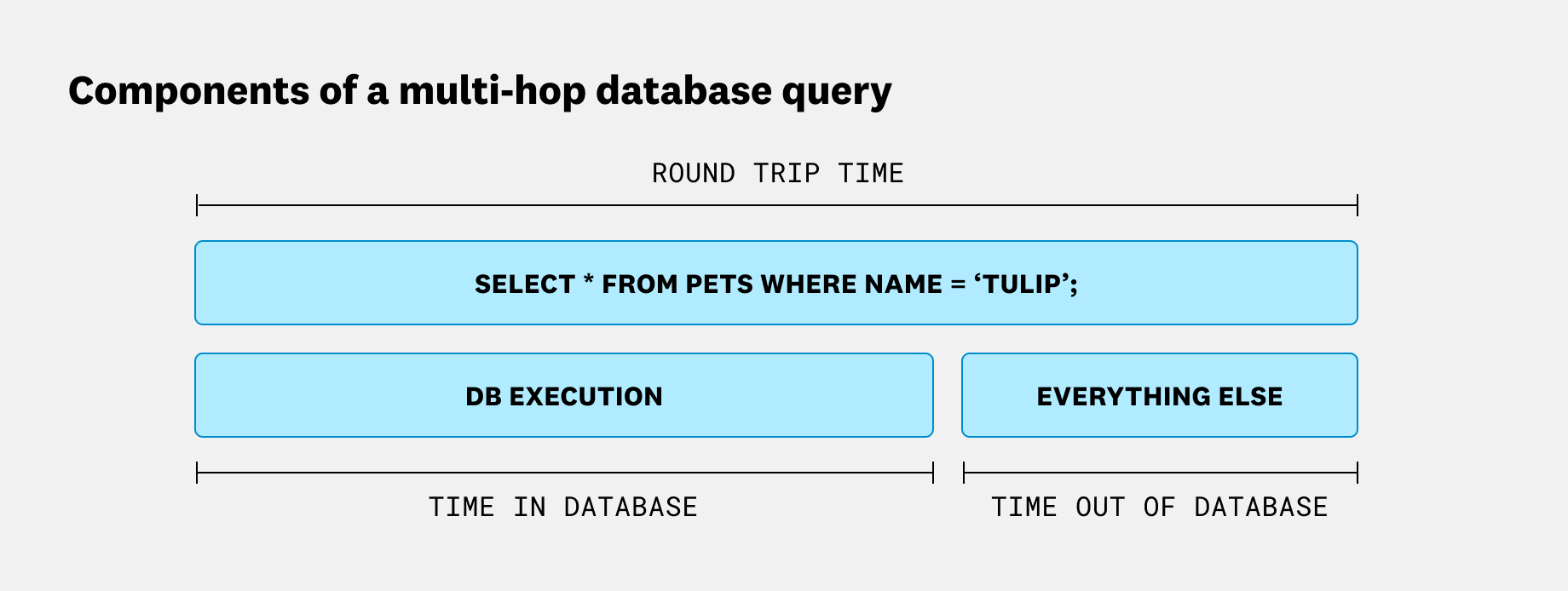
The first question to answer is whether the latency is coming from inside the database or somewhere outside it. That tells you whether to focus on the database itself or look further up the stack. If DB execution time dominates, query optimization or database scaling may help. If “everything else” dominates, you’re looking at a problem no amount of query tuning will fix.
We built a view for answering this exact question, which we’ve called “Round trip overhead analysis”:
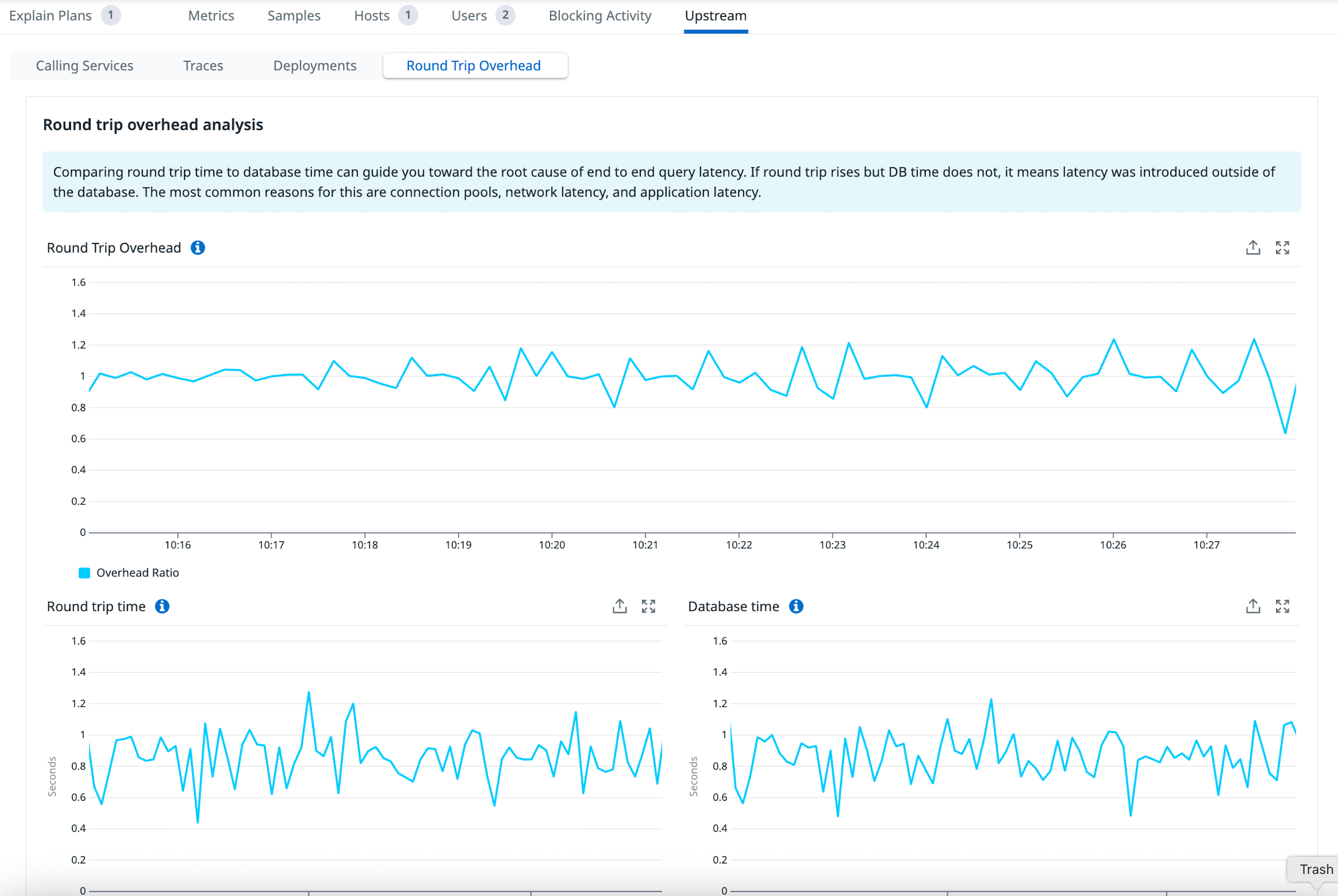
This view first presents a single number, “Round Trip Overhead,” for a quick overview of the relationship between database time and all other processing. It’s calculated as round trip time / database time, so a larger number means more time is being spent outside of the database. In practice, this number can vary quite a bit depending on your topology. In the above example it sits at ~1, meaning negligible overhead from additional hops. It can often be quite large (~10 or even 100x) when a highly optimized query is much faster than its transport costs.
There’s not necessarily an ideal overhead number, so we also display the constituent parts below round trip overhead. Here, everything looks stable: Neither round trip time nor database time shows any substantial change. Next, let’s look at an example where that isn’t the case.
Walkthrough: Troubleshooting an underprovisioned connection pool
Connection pools like PgBouncer are among the most common sources of latency surprises in the Postgres ecosystem. Let’s walk through a typical scenario.
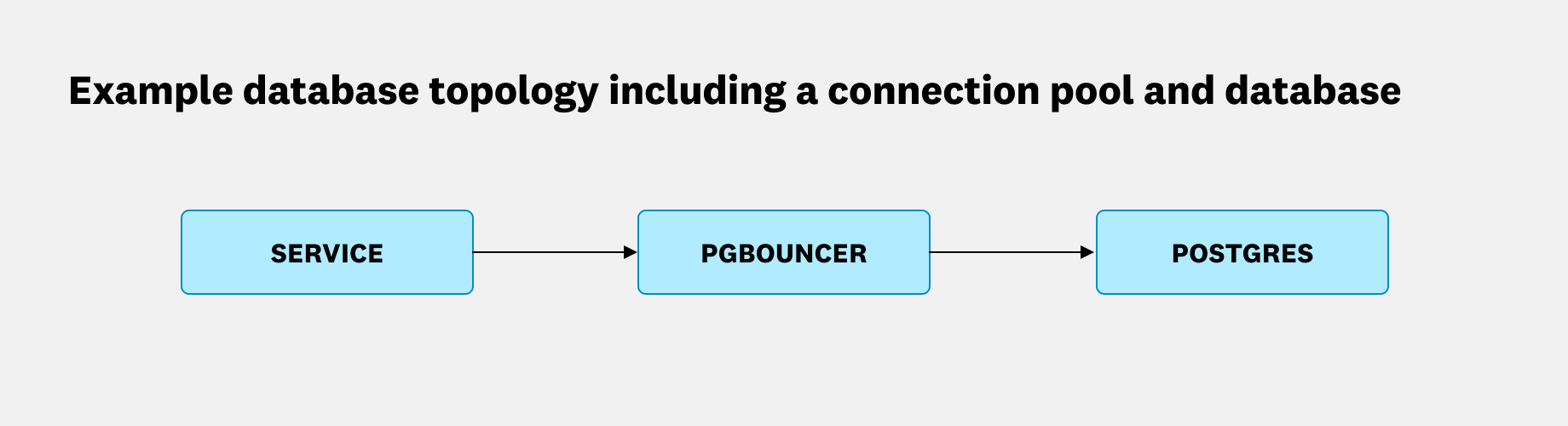
Suppose we have a Postgres database with an externally hosted PgBouncer instance sitting in front of it. We start seeing timeouts, so as a first step, we pull up the round trip overhead analysis:
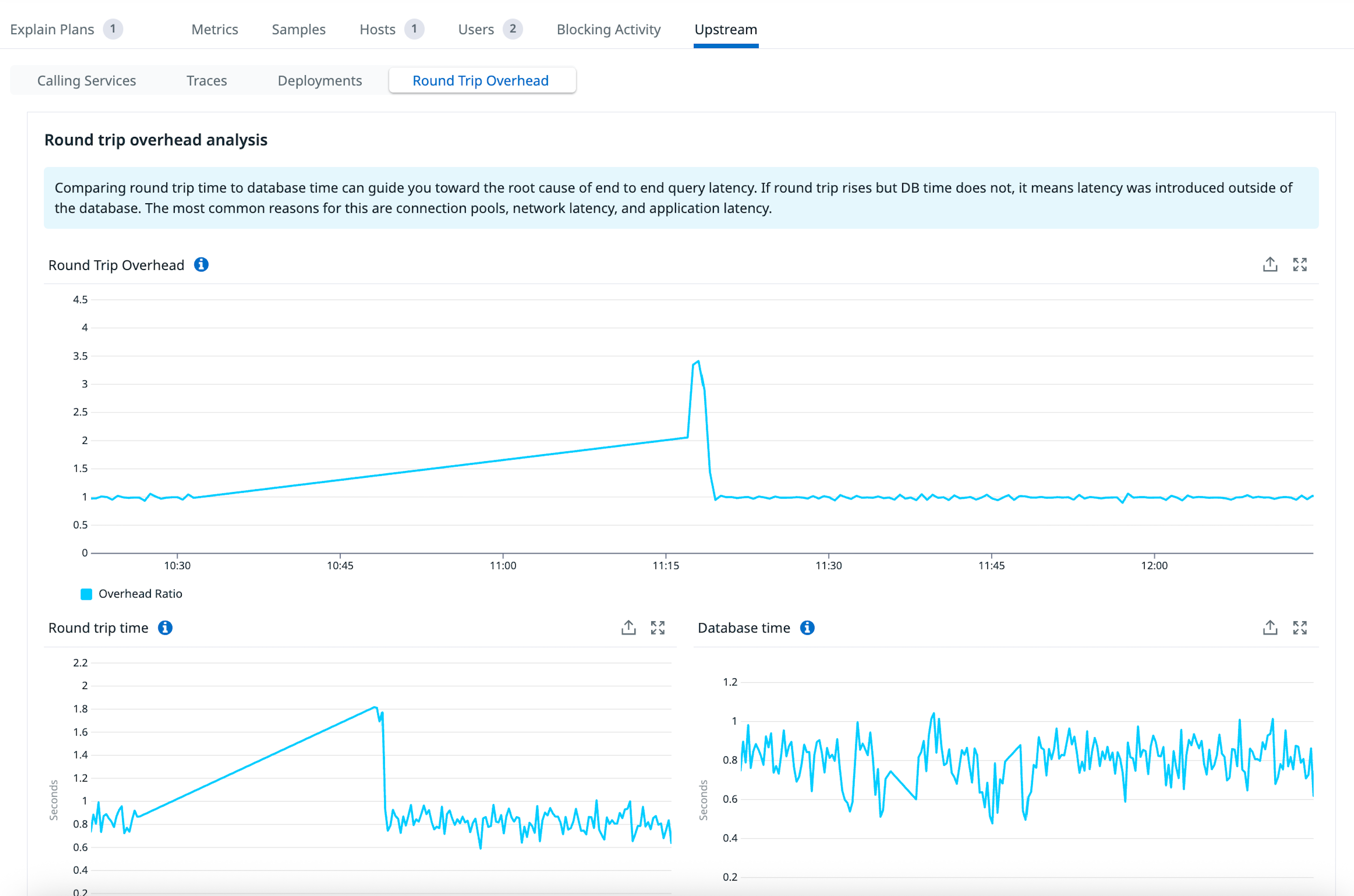
Now it’s more interesting. The overhead clearly increased along with the round trip time. But notice how database time remained unchanged. This is a clear indication that the latency was introduced outside of the database. In this case, the PgBouncer host’s CPU became saturated, causing its single-threaded event loop to slow down. We added another PgBouncer instance, along with a load balancer, to handle the recent growth in query load.
Rather than going down a dead end trying various query optimizations, we were able to shortcut the investigation and focus on the true source of latency.
How Datadog connects APM and Database Monitoring
Datadog has the unique ability to correlate APM traces with Database Monitoring data, which is what makes the round trip overhead analysis possible.
The two products each see a different slice of the query’s journey. APM measures round trip query time because the APM tracer is embedded directly in your application code. It starts timing when your application issues the query and stops when it receives a response. Every hop in between, including PgBouncer, falls inside that window. So when the PgBouncer host became saturated and slowed down, that additional wait time was captured in the round trip duration.
Database Monitoring connects directly to the database and extracts database-centric metrics. For Postgres, it reads pg_stat_statements.total_exec_time, which increments only after the database finishes executing a query and producing its result set. Time spent transmitting data to the client is excluded entirely.
This distinction matters more than it might seem. Both products deal in units of time, but the frame of reference is completely different. Conflating the two is easy to do, and it’s exactly the kind of mistake that sends engineers chasing the wrong problem. Keeping them separate, and comparing them, is what makes the analysis useful.
Diagnose query latency across your full stack with APM and Database Monitoring
In this post, we introduced a framework for investigating query latency in modern database topologies. Rather than treating latency as a single number, we showed how to decompose it into database time and round trip time to identify where in the stack a problem originates.
This kind of analysis is only possible with tools like Datadog that correlate APM and Database Monitoring data in one place. Correlating the two signals lets you rule out the database as a source of latency or confirm it before committing to a remediation path.
To get started with Datadog, sign up for our 14-day free trial.