

Mahip Deora

Noueman Khalikine
Nutanix is a hyperconverged infrastructure (HCI) platform that combines compute, storage, and virtualization into a single software-defined stack. By collapsing traditional infrastructure tiers into one platform, Nutanix simplifies provisioning and operations for virtualized workloads. Clusters are managed through Prism Central, which provides visibility into health, performance, capacity, and operational activity across hosts and VMs.
This layered model shapes how teams need to monitor and troubleshoot their environments because performance issues don’t always show up in a single place. A slowdown in application response time might stem from cluster resource pressure, shifting storage I/O behavior, uneven host utilization, inefficient VM allocations, a configuration, or maintenance activity.
Datadog’s Nutanix integration, now generally available, supports these troubleshooting and capacity-planning tasks. It collects telemetry data across clusters, hosts, and VMs, and brings Prism Central alerts, events, tasks, and audits into Datadog as events. With this visibility, you can monitor Nutanix infrastructure alongside the applications running on it and determine whether an issue originated in the application layer or the underlying platform.
In this post, we’ll explore a real-world example to show how you can use the integration to:
Monitor cluster health and capacity
When you’re on call or simply validating whether your cluster is ready for the next workload, cluster-level visibility helps you answer the first, most practical questions:
Is Prism Central reachable, and is the cluster healthy?
Do we have enough CPU, memory, and storage headroom right now?
Are we trending toward a constraint before it becomes an incident?
As an example, let’s say that you’re an SRE who gets paged because a critical service’s p95 latency has spiked during peak traffic. On the Datadog Application Performance Monitoring (APM) service page, you confirm that the regression started in the last 15–20 minutes and is scoped to a specific environment. Instead of switching tools, you keep that context and pivot into your infrastructure view. Using the same tags you already rely on (including Nutanix categories, brought into Datadog as tags), you go straight to the Nutanix cluster that is backing the affected service.
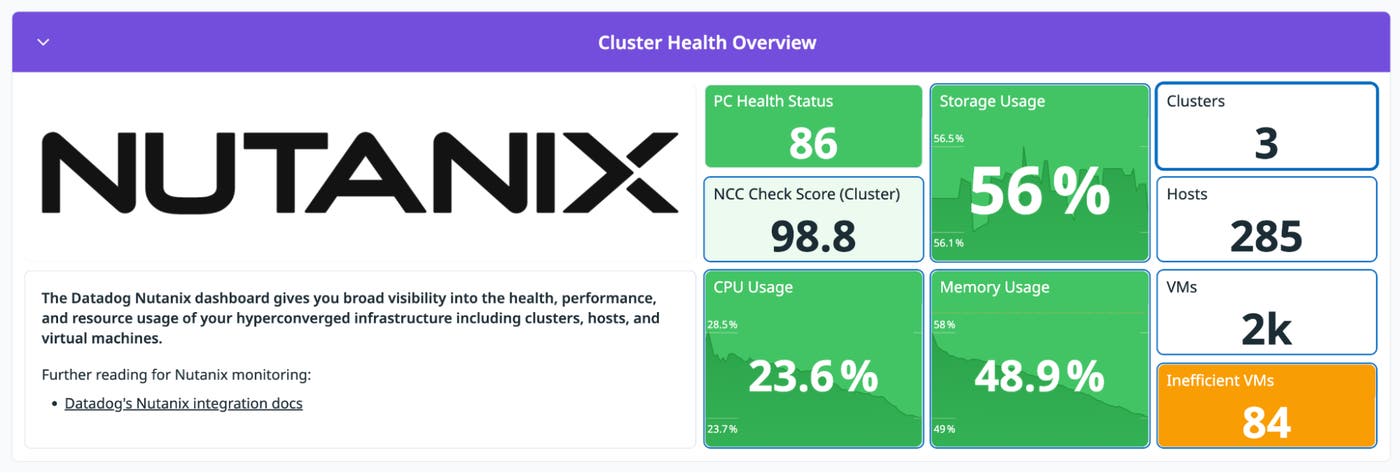
The out-of-the-box (OOTB) Nutanix Overview dashboard gives you a baseline view of your environment, with high-level signals such as cluster health status, resource usage, and inventory counts. If CPU and memory are steady, the cluster isn’t under immediate compute pressure. As a result, it’s unlikely that the latency spike is caused by general resource exhaustion.
Use capacity trends to keep clusters rightsized
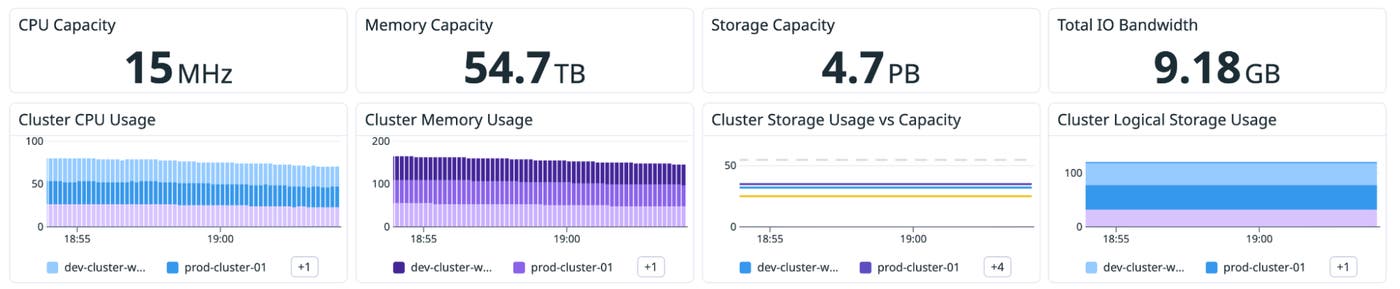
Next, you can determine capacity trends by making simple comparisons and observations:
Storage capacity vs. storage usage: Are you approaching a threshold, and how quickly is usage growing?
CPU and memory usage over time: Do you have sustained periods of pressure that coincide with peak workloads?
Inefficient VM indicators: Are allocations drifting upward over time even when utilization stays flat?
If capacity trends show no sustained growth or headroom collapse leading up to the increase in latency, then the cluster was stable before the latency spike. At this point, you’ve ruled out that the cluster has reached capacity. The next step is to investigate storage performance more closely.
Investigate storage and I/O performance
In hyperconverged environments, storage performance is often where user-facing impact shows up first. Latency can rise gradually as usage grows, or it can spike suddenly when the workload mix changes.
A helpful way to investigate storage issues is to start broad and then narrow your focus:
Cluster-level: Confirm whether latency, IOPS, or bandwidth changed—and whether the shift aligns with a particular window.
Host-level: Determine whether the behavior is isolated to one node or spread across the fleet.
VM-level: Identify which workloads are most associated with the shift.
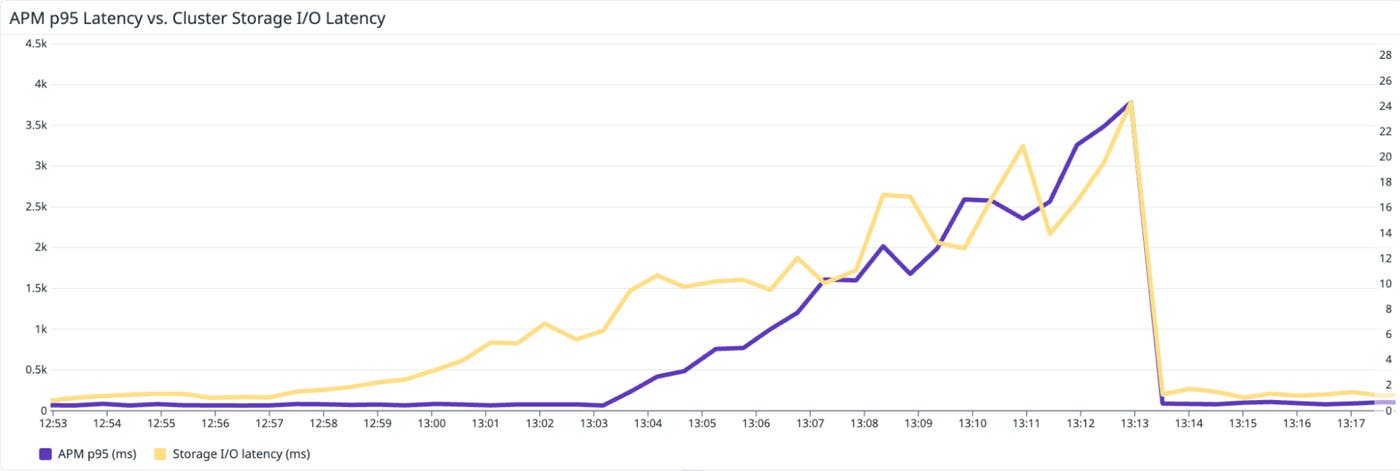
The OOTB dashboard presents cluster and host I/O views, including latency and bandwidth trends, to help you tell whether you’re looking at a localized hotspot or a cluster-wide pattern. If you see that I/O latency increases at the time that APM latency spikes, the problem is related to the infrastructure, not the application code. The next step is determining whether this is a cluster-wide saturation event or a localized hotspot. The cluster-level I/O views help you quickly answer that question.

Analyze hosts and VMs to find hotspots and inefficient workloads
Once you’ve confirmed that a performance change occurred at the cluster level, the next step is to determine which hosts or VMs are responsible for the shift.
Identify hot hosts
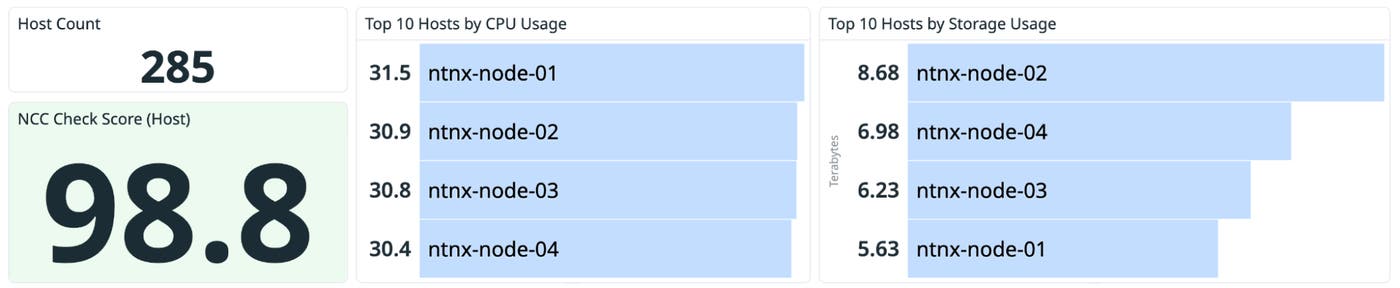
If one host is consistently more loaded than its peers (in other words, it’s showing higher CPU, memory, or storage I/O usage), you can see the imbalance in top lists and timeseries. This visibility is especially useful when the cluster looks healthy overall but one node is nearing capacity limits.
Common follow-up questions to answer include:
Is the host running hotter because of workload placement?
Is storage usage uneven across the cluster?
Does host I/O latency diverge from cluster I/O latency, indicating that the issue is isolated to a specific host?
Validate VM contention and rightsize allocations
VM monitoring typically involves two recurring scenarios:
Performance troubleshooting: “Why is this workload slow?”
Capacity efficiency: “Are we sized correctly for what we’re actually using?”
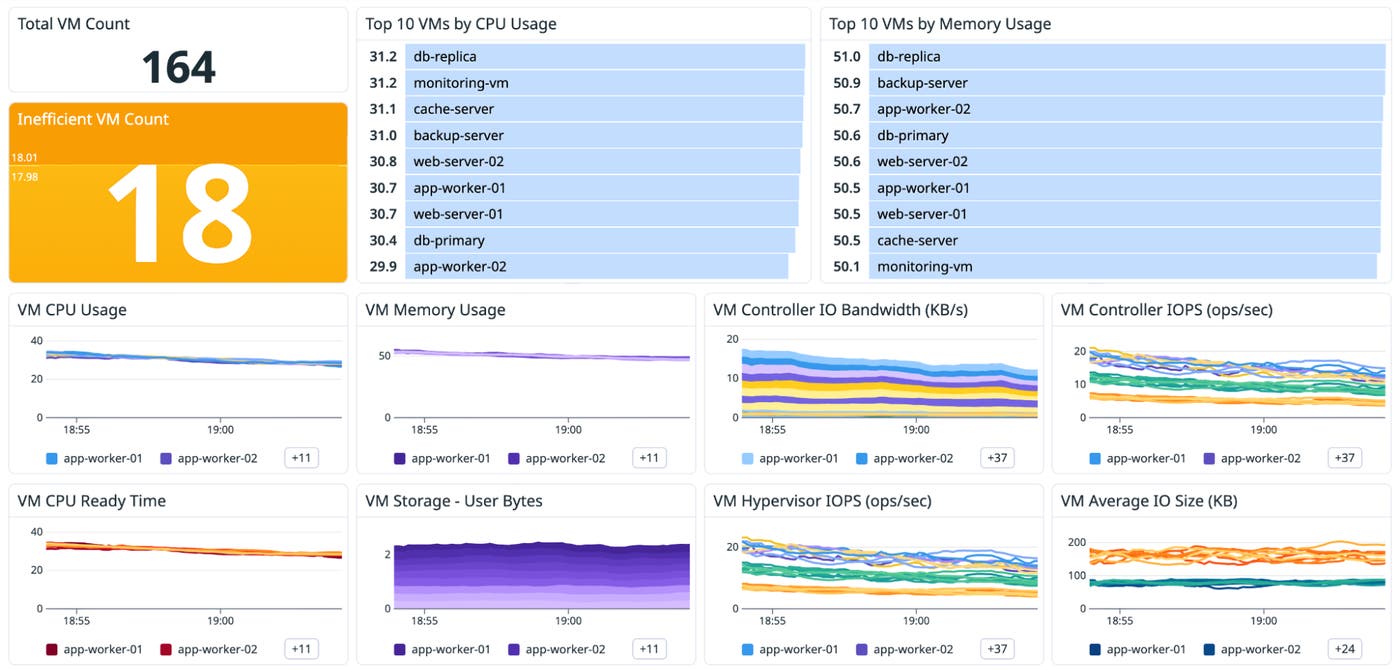
The Nutanix dashboard includes VM-focused views designed for both options: top VMs by resource usage, plus trends you can use to spot contention signals (such as CPU scheduling pressure) and inefficiencies.
If a VM shows sustained demand but also signs of contention, you might need to redistribute workloads or add headroom. On the other hand, if allocations are consistently far above what’s used, you might be able to reclaim capacity without scaling the cluster.
Use the Host List for high-level fleet triage
For larger environments, the Datadog Host List offers a fast way to pinpoint hotspots and outliers. You can quickly identify which nodes are contributing most to resource pressure before you examine individual hosts in detail.
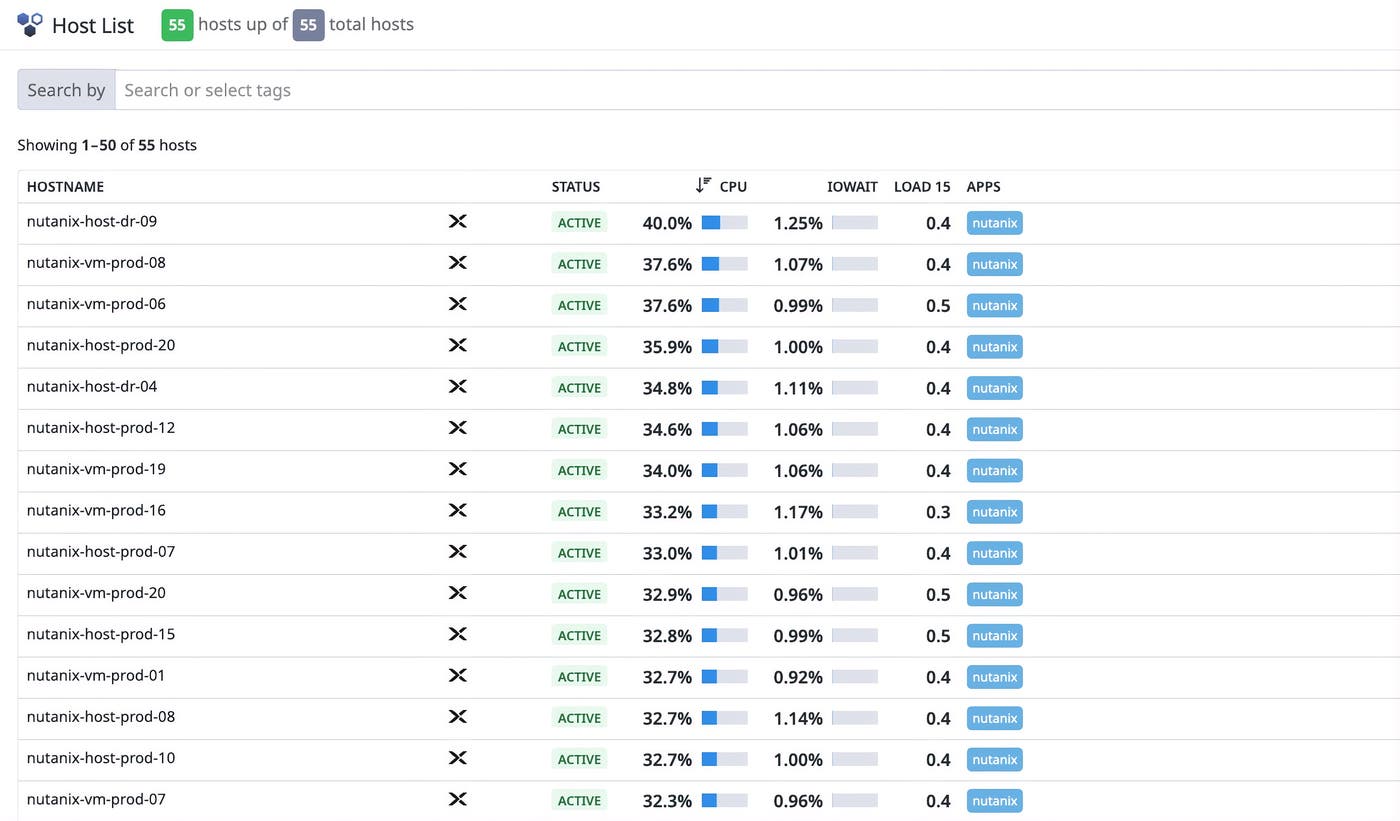
As you continue to investigate the p95 latency increase from our example, you drill into the Host List and spot an outlier node where IOPS and latency are disproportionately high. You then pivot into the VM view to see which workloads are contributing most to that increase. The remaining problem to solve is figuring out what triggered the change.
Correlate performance shifts with Prism Central activity
When you identify the hot VM, you see where the pressure is coming from. The next step is understanding why the change occurred.
By default, Datadog’s integration with Nutanix collects Prism Central alerts, events, tasks, and audits, and then emits them into Datadog as events. This consolidation of operational activity within Datadog makes it easier to line up a performance shift with:
Maintenance work that coincides with a change in resource usage
Spikes in Prism Central alerts during the same time window
Infrastructure tasks such as upgrades, migrations, and configuration changes
Audit activity that provides context during investigations
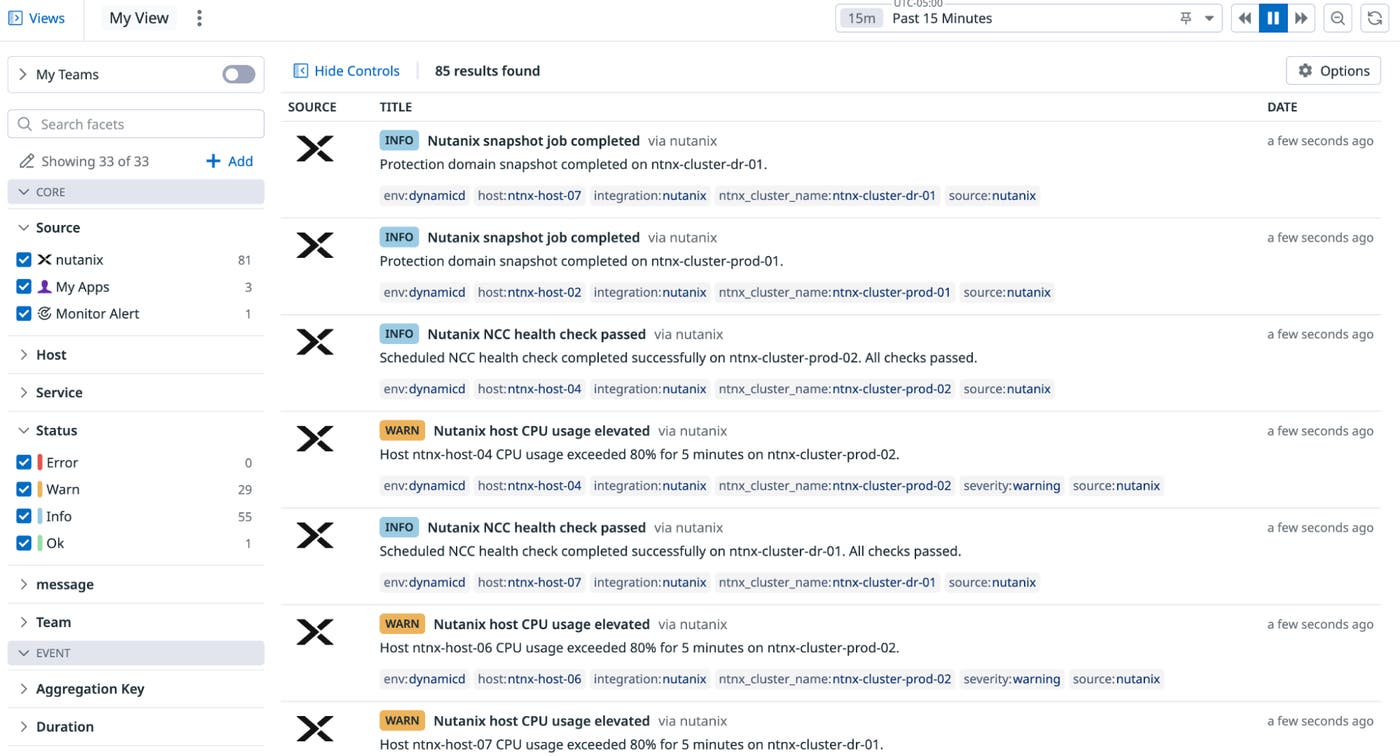
To validate what changed during the increase in p95 latency, you switch to Datadog Event Management and filter Prism Central activity for that cluster. You notice a burst of tasks, alerts, and audits that aligns with the start of the incident window. That timing confirms that the latency spike wasn’t random and that it coincided with operational activity in the cluster.
With the scope narrowed, you spot a few top VMs whose write-heavy workload started minutes before the APM alert. You live-migrate those VMs off the hottest host and rebalance the cluster. Within a few minutes, the Nutanix write latency flattens on the dashboard, and the APM p95 latency alert clears as request times return to normal. The root cause is identified and resolved without you having to switch tools or rely on cross-team screenshot exchanges.
Start monitoring Nutanix environments with Datadog
Datadog’s Nutanix integration helps you monitor cluster health, storage performance, and capacity so that you can keep your environment running smoothly and sized appropriately as workloads change. By combining telemetry data from clusters, hosts, and VMs with Prism Central operational activity data, you can move from symptoms to causes more quickly.
To start monitoring Nutanix with Datadog, set up the Nutanix integration by deploying the Datadog Agent on a VM that can reach Prism Central. Datadog includes more than 1,000 integrations, enabling you to extend Nutanix monitoring into end-to-end visibility. You can correlate health and capacity signals for your infrastructure with the applications and services that run on top of it, all in one place.
If you’re new to Datadog, sign up for a 14-day free trial to get started.
