

Christophe Tafani-Dereeper
We have just released the 2025 State of Cloud Security study, where we analyzed the security posture of thousands of organizations using AWS, Azure, and Google Cloud. In particular, we found that:
- Many organizations centrally manage multi-account environments using AWS Organizations
- As organizations adopt data perimeters, most lack centralized control
- Long-lived cloud credentials remain pervasive and risky
- One in two EC2 instances enforces IMDSv2, but older instances lag behind
- Adoption of public access blocks in cloud storage services is plateauing
- Organizations continue to run risky workloads
In this post, we provide key recommendations based on these findings, and we explain how you can use Datadog Cloud Security to improve your security posture.
Use an AWS multi-account architecture with organizational guardrails
AWS cloud environments typically span across multiple teams, applications, and business domains. AWS accounts act as an isolation boundary for identity and access management (IAM), cost tracking, and quota allocation. That’s why it’s recommended to use several AWS accounts to minimize the “blast radius” of a security breach and ensure teams can work independently in an efficient manner.
The best way to bring multiple AWS accounts under a common roof is to use AWS Organizations, a free AWS service that allows organizations to implement critical capabilities such as single sign-on (SSO), cost tracking, backup policies, and more. The typical setup has a mix of “core” AWS accounts handling vital capabilities such as networking, logging, or security, as well as “workload” AWS accounts—typically one account per application and environment stage.
Using AWS Organizations brings a number of additional security features, two of which are Service Control Policies (SCPs) and Resource Control Policies (RCPs). These allow you to set guardrails for all or a part of your AWS accounts to make sure that dangerous or unwanted actions are proactively blocked. Implementing robust SCPs and RCPs typically enables organizations to delegate permissions to developers while ensuring a consistent security baseline across the organization.
Here are some examples of recommended organization-level policies:
- Block root user access (SCP)
- Deny the use of unapproved regions (SCP)
- Deny the ability of an AWS account to leave the AWS Organization (SCP)
- Ensure that all S3 buckets can only be accessed through an encrypted TLS connection (RCP)
- Limit access to trusted OIDC Identity providers when using GitHub Actions with identity federation (RCP)
For more information and implementation guidance, refer to the technical AWS white paper on organizing your AWS environment using multiple accounts. We also recommend the re:Invent talk on best practices for organizing and operating on AWS, co-authored by Datadog’s current VP of Security Engineering, Bianca Lankford.
How Datadog Cloud Security can help secure your entire cloud infrastructure
Datadog allows you to observe and secure your cloud infrastructure no matter how many AWS accounts you have, giving you a centralized view of your resources.
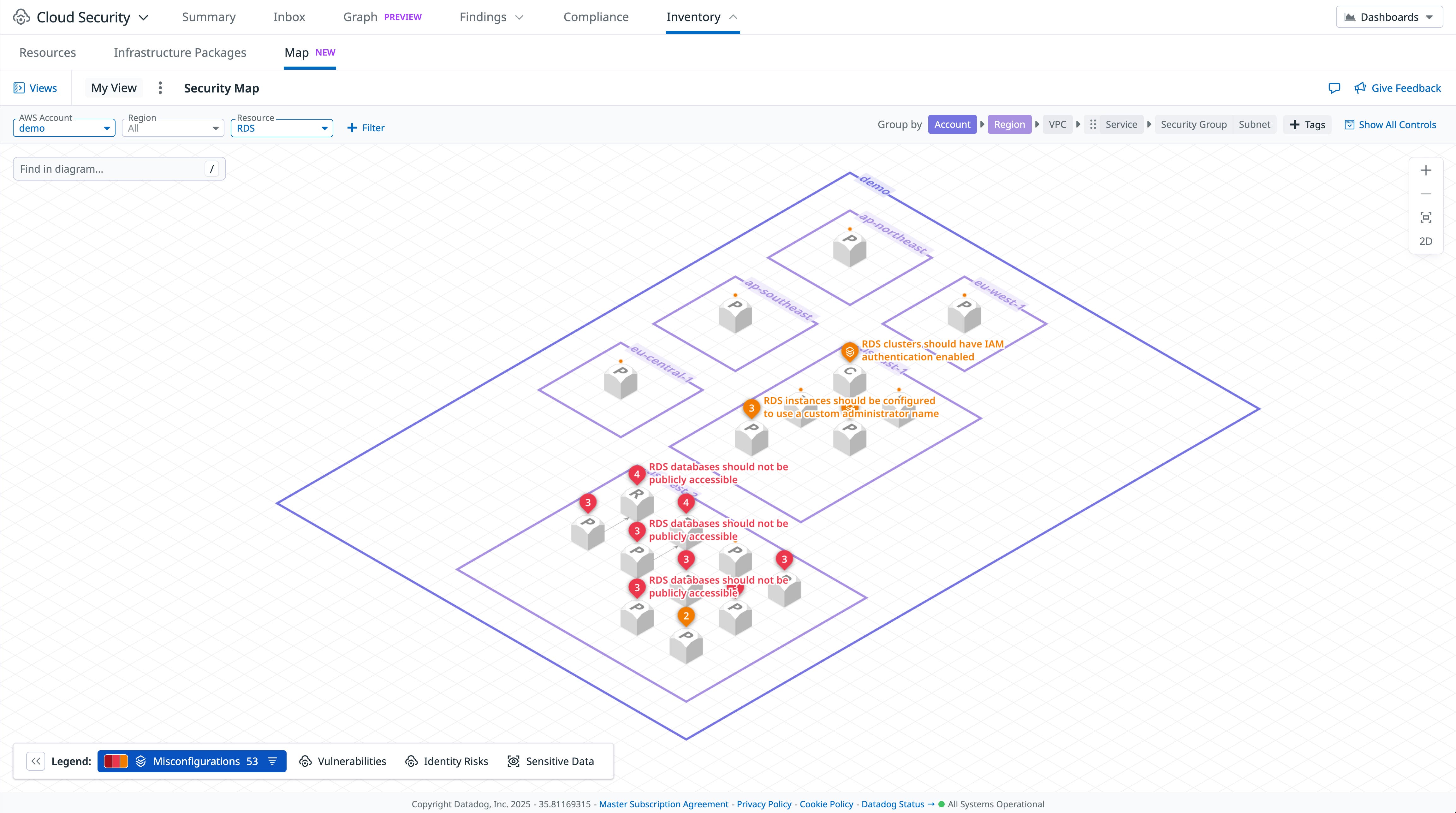
You can integrate Datadog at the AWS Organizations-level using CloudFormation StackSets, Terraform, or AWS Control Tower.
In AWS, implement data perimeters to minimize the impact of credentials theft
In cloud environments, most security breaches involve a compromised set of cloud credentials. These are typically leaked unintentionally by a developer or retrieved by an attacker exploiting a public-facing web application. Data perimeters allow organizations to mitigate that risk by enforcing that trusted identities can access your resources only if they are coming from expected networks, VPCs, or subnets.
On AWS, data perimeters can be implemented by using a mix of VPC endpoint policies, SCPs, and RCPs with global IAM condition keys such as aws:PrincipalOrgID, which provide granular context on the source identity or target resource location during the authorization process.
Here are a few common patterns to implement with data perimeters:
- Ensure that an S3 bucket can only be accessed by authorized principals in a specific subnet through a VPC endpoint
- Ensure that EC2 instances in a specific subnet are only able to write data to S3 buckets in the current account—independently of their permissions—to reduce the risk of data exfiltration
- Ensure that a specific IAM role, such as one assigned to an EC2 instance, can only be used from a specific VPC, mitigating the risk of credentials exfiltration
For more information and implementation guidance, refer to the AWS white paper on building a data perimeter on AWS. We also recommend the fwd:cloudsec talks “Data Perimeter Implementation Strategies: Lessons Learned Rolling Out SCPs/RCPs” and “The Ins and Outs of Building an AWS Data Perimeter.”
How Datadog Cloud Security can help strengthen data perimeters
When using Datadog Cloud Security and implementing data perimeters, you can use out-of-the-box rules to identify VPC endpoints that don’t have a hardened VPC endpoint policy.
You can also easily write custom rules to identify subnets that do not have VPC endpoints for critical services, such as S3:
package datadog
import data.datadog.output as dd_output
import future.keywords.containsimport future.keywords.ifimport future.keywords.in
eval(resource) = "pass" if { has_s3_vpc_endpoint(resource)} else = "fail"
has_s3_vpc_endpoint(subnet) if { some endpoint in input.resources.aws_vpc_endpoint endpoint.vpc_id == subnet.vpc_id endpoint.subnet_ids[_] == subnet.id endswith(endpoint.service_name, ".s3")}
results contains result if { some resource in input.resources[input.main_resource_type] result := dd_output.format(resource, eval(resource))}This allows you to create dashboards and iteratively track your cloud security journey.
Minimize and restrict the use of long-lived cloud credentials
Credentials are considered long-lived if they are static (i.e., never change) and never expire. These types of credentials are responsible for a number of documented cloud data breaches, and organizations should avoid using them.
| Cloud provider | Insecure long-lived credentials type | Recommended alternatives |
|---|---|---|
| AWS | IAM user access keys | For humans: AWS IAM Identity Center (SSO). For workloads: IAM roles for EC2 instances, Lambda execution roles, IAM roles for EKS service accounts, IAM roles for ECS tasks, etc. |
| Azure | Entra ID app registration keys | Managed Identities for most services; Entra Workload ID to allow Azure Kubernetes Service (AKS) pods to use Azure APIs |
| Google Cloud | Service account keys | Attach service accounts to workloads; Workload Identity Federation to allow Google Kubernetes Engine (GKE) pods to use Google Cloud APIs |
Securing an environment is often a mix of catching up with a backlog of insecure practices while ensuring no new vulnerabilities are introduced. Several options exist to proactively block the creation of insecure, long-lived credentials. On AWS, you can use an SCP to block the creation of IAM users. On Google Cloud, turning on the iam.managed.disableServiceAccountKeyCreation organization policy ensures that developers can attach service accounts to their workloads while denying the creation of long-lived service account keys.
How Datadog Cloud Security can help prevent long-lived credentials
Datadog Cloud Security gives you several tools to identify long-lived cloud credentials and help you prioritize remediation.
First, you can use the Inventory in Cloud Security to identify IAM users and Google Cloud service accounts or service account keys across all your cloud environments. The Inventory flags when a cloud identity is problematic (e.g., overprivileged), allowing you to prioritize remediation steps such as removing an AWS IAM user access key.
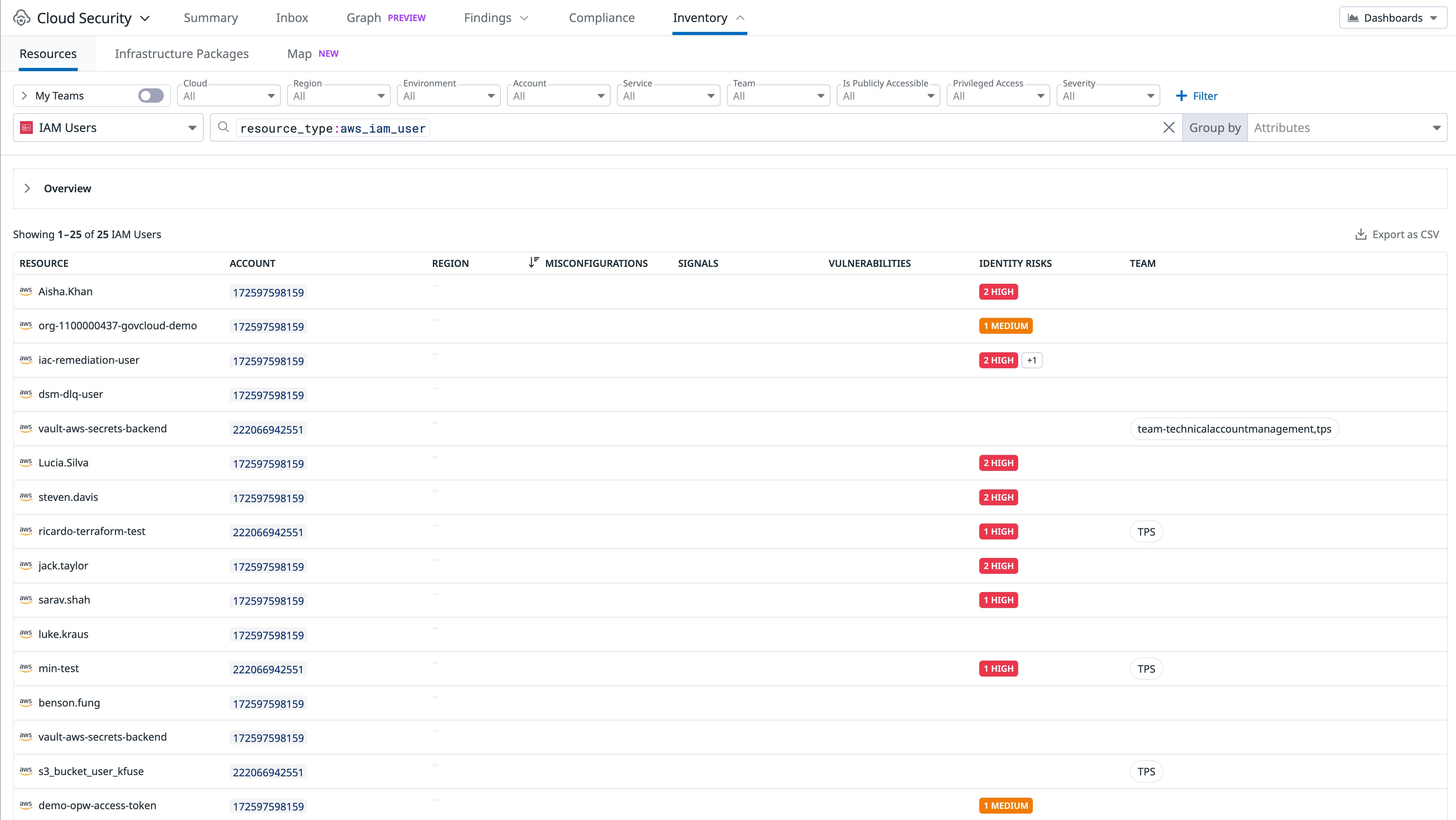
The following cloud configuration rules can also help you identify stale long-lived credentials and remove them:
- Google Cloud: “Service accounts should only use GCP-managed keys” allows you to quickly identify Google Cloud service accounts with active user-managed access keys.
- AWS: “Access keys granting ‘root’ should be removed” allows you to track and remove AWS root user access keys.
- AWS: “IAM access keys that are inactive and older than 1 year should be removed”
- AWS: “Access keys should be rotated every 90 days or less”
Adopt the use of IMDSv2 on Amazon EC2 instances
Similar to our recommendation in last year’s key learnings, it’s critical that EC2 instances enforce Instance Metadata Service Version 2 (IMDSv2) to protect against SSRF vulnerabilities, which are frequently exploited by attackers. The EC2 IMDSv2 helps protect applications from server-side request forgery (SSRF) vulnerabilities, but by default, newly created EC2 instances often allow using both the vulnerable IMDSv1 and the more secure IMDSv2 protocols. AWS has a guide to help organizations transition to IMDSv2 and a blog post about the topic. Several additional mechanisms are also available:
- A mechanism to enforce IMDSv2 by default on specific Amazon Machine Images (AMIs), released in 2022
- A set of more secure defaults for EC2 instances started from the console, released in 2023
- A mechanism to enforce IMDSv2 by default at a regional level, released in 2024 (Datadog supports this mechanism in the Terraform AWS provider)
How Datadog Cloud Security can help identify at-risk instances
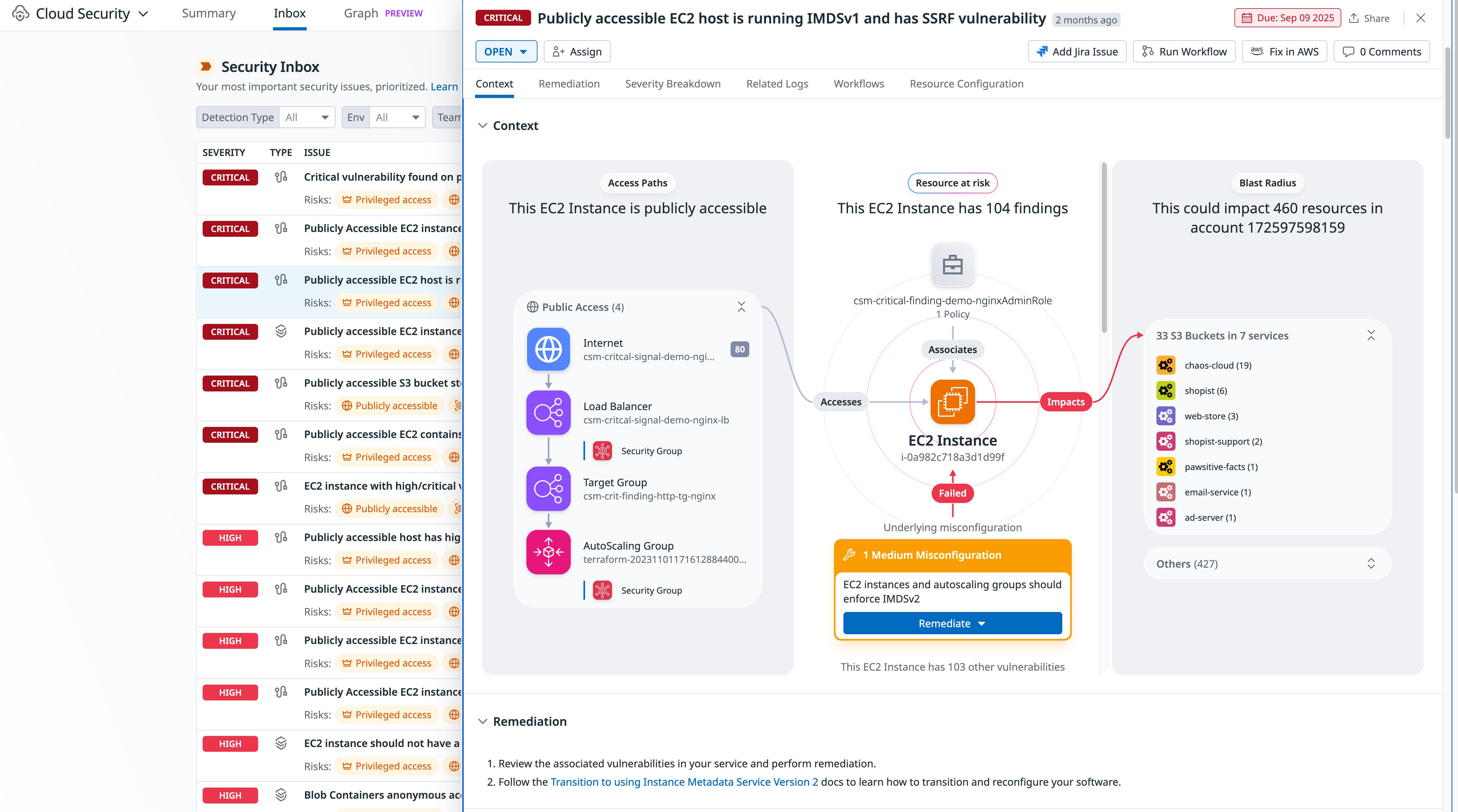
You can use Datadog Cloud Security to identify EC2 instances that don’t enforce IMDSv2 through the Misconfigurations rule “EC2 instances should use IMDSv2” and the CSM Issue “Publicly accessible EC2 instance uses IMDSv1”.
In addition, the attack path “Publicly accessible EC2 host is running IMDSv1 and has an SSRF vulnerability” allows you to easily identify instances that are immediately at risk.
Implement guardrails against public access on cloud storage services
Cloud services help make data more accessible. Unfortunately, without appropriate guardrails in place, it’s easy to misconfigure cloud storage buckets to be publicly accessible by anyone on the internet. Although breaches involving public cloud storage have happened for over 15 years, such incidents continue to happen in 2025, be it leaking medical records, database backups, or financial records.
The best way to protect against such vulnerabilities is to ensure that human mistakes (such as misconfiguring an S3 bucket’s policy) don’t automatically turn into a data breach, and that they are instead restricted by guardrails—just like how a road safety barrier would prevent a car missing a turn from jumping into a canyon.
In AWS, S3 Block Public Access allows you to prevent past and future S3 buckets from being made public, either at the bucket or account level. It’s recommended that you turn this feature on at the account level and ensure this configuration is part of your standard account provisioning process. Since April 2023, AWS blocks public access by default for newly created buckets. However, this doesn’t cover buckets that have been created before this date. For extra protection, the best practice is to also create an organization-wide SCP that restricts changing S3 Block Public Access settings, along with an organization-wide RCP that automatically blocks unauthenticated access to all of your S3 buckets, including if their configuration makes them public.
{ "Version": "2012-10-17", "Statement": [ { "Sid": "DenyS3AccessFromOutsideOrg", "Effect": "Deny", "Principal": "*", "Action": [ "s3:GetObject", "s3:ListBucket", "s3:GetBucket*" ], "Condition": { "StringNotEquals": { "aws:PrincipalOrgID": "o-xxxxxxxxxx" }, "Bool": { "aws:PrincipalIsAWSService": "false" } } } ]}A similar mechanism exists in Azure, through the “Allow blob public access” parameter of storage accounts. Similarly to AWS, all Azure storage accounts created after November 2023 block public access by default.
In Google Cloud, you can block public access to Google Cloud Storage (GCS) buckets at the bucket, project, folder, or organization level using the constraints/storage.publicAccessPrevention organization policy constraint.
When you need to expose a storage bucket publicly for legitimate reasons—for instance, hosting static web assets—it’s typically more cost-effective and performant to use a content delivery network (CDN) such as Amazon CloudFront or Azure CDN rather than directly exposing the bucket publicly.
How Datadog Cloud Security can help identify vulnerable cloud storage buckets
You can use Datadog Cloud Security to identify vulnerable cloud storage buckets through the following rules:
- “S3 bucket contents should only be accessible by authorized principals”
- “S3 buckets should have ‘Block Public Access’ enabled”
- “S3 Block Public Access feature should be enabled at the account level”
- “S3 bucket ACLs should block public write actions”
- “Blob Containers anonymous access should be restricted”
- “Cloud Storage Bucket should not be anonymously or publicly accessible”
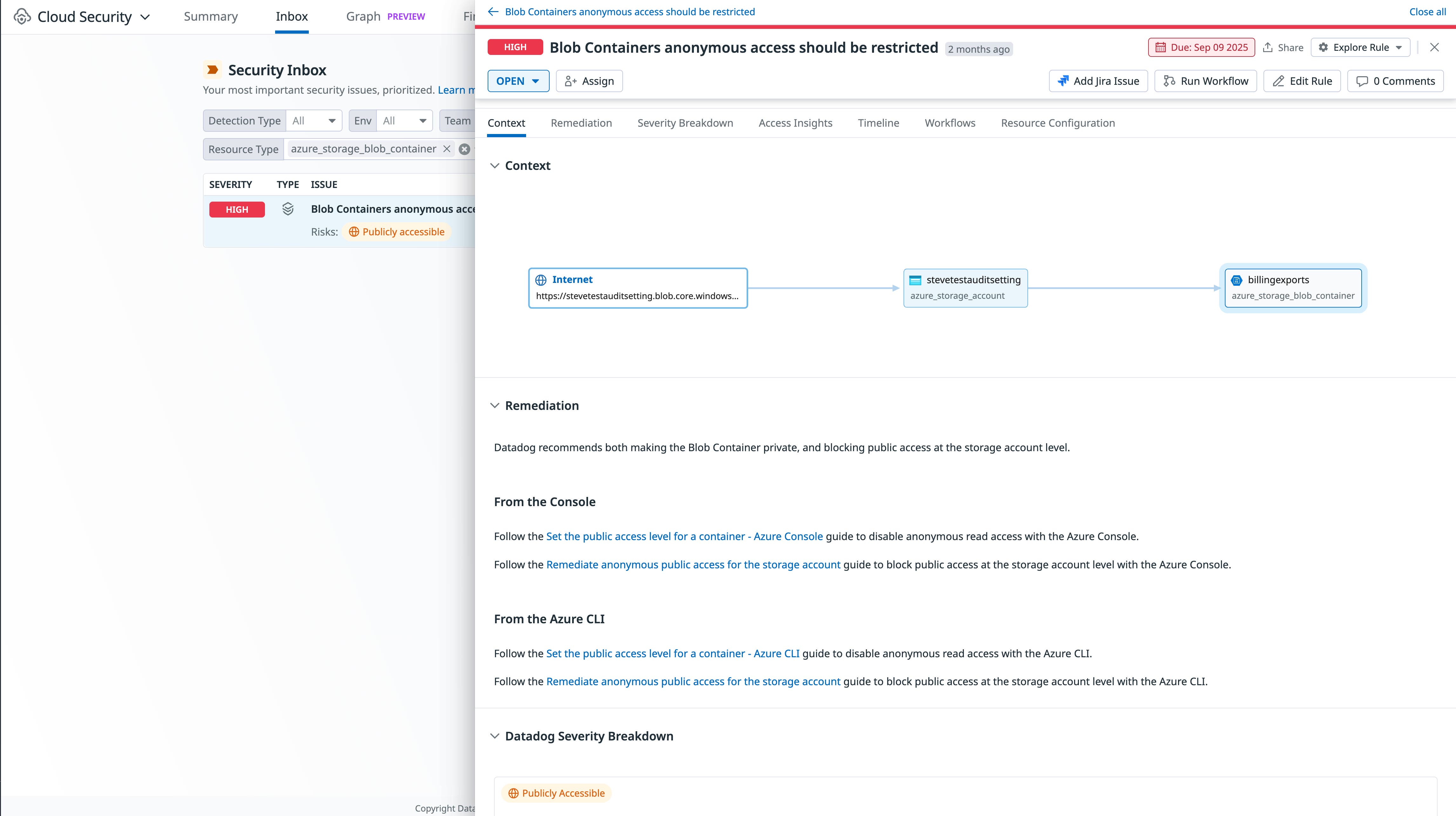
Datadog also determines when a storage bucket is publicly accessible and allows you to filter associated misconfigurations so you can focus on the ones that matter most.
Limit permissions assigned to cloud workloads
Cloud workloads, such as Amazon EC2 instances or Google Cloud Run functions, are frequently attached to permissions so they can interact smoothly with the rest of the cloud environment, such as uploading files to a storage bucket or accessing a cloud-managed database. These workloads are commonly exposed to the internet, making them an attractive target for attackers. When an attacker compromises a cloud workload, they typically exfiltrate credentials for the associated cloud role, for instance by calling the instance metadata service or by reading environment variables.
It’s therefore important to ensure that cloud workloads are appropriately privileged. Otherwise, attackers can pivot from compromising a single workload to the full cloud environment.
During development, tools like iamlive can identify what cloud permissions a workload needs. At runtime, cloud provider tools such as AWS IAM Access Analyzer or Google Cloud Policy Intelligence can compare granted permissions with effective usage to suggest tighter scoping of specific policies. (Note: As of January 2024, Google now limits Policy Intelligence accessibility to organizations that use Security Command Center at the organization level.)
It’s important to note that seemingly harmless permissions can enable privilege escalation. For instance, the AWS-managed policy AWSMarketplaceFullAccess may seem benign, but it allows an attacker to gain full administrator access to the account by launching an EC2 instance and assigning it a privileged role.
How Datadog Cloud Security can help pinpoint risky workloads
You can use the following Cloud Security Misconfiguration rules to identify risky workloads:
- AWS: “EC2 instance should not have a highly-privileged IAM role attached to it”
- AWS: “Publicly accessible EC2 instances should not have highly-privileged IAM roles”
- AWS: “Lambda functions should not be configured with a privileged execution role”
- Google Cloud: “Instances should be configured to use a non-default service account with restricted API access”
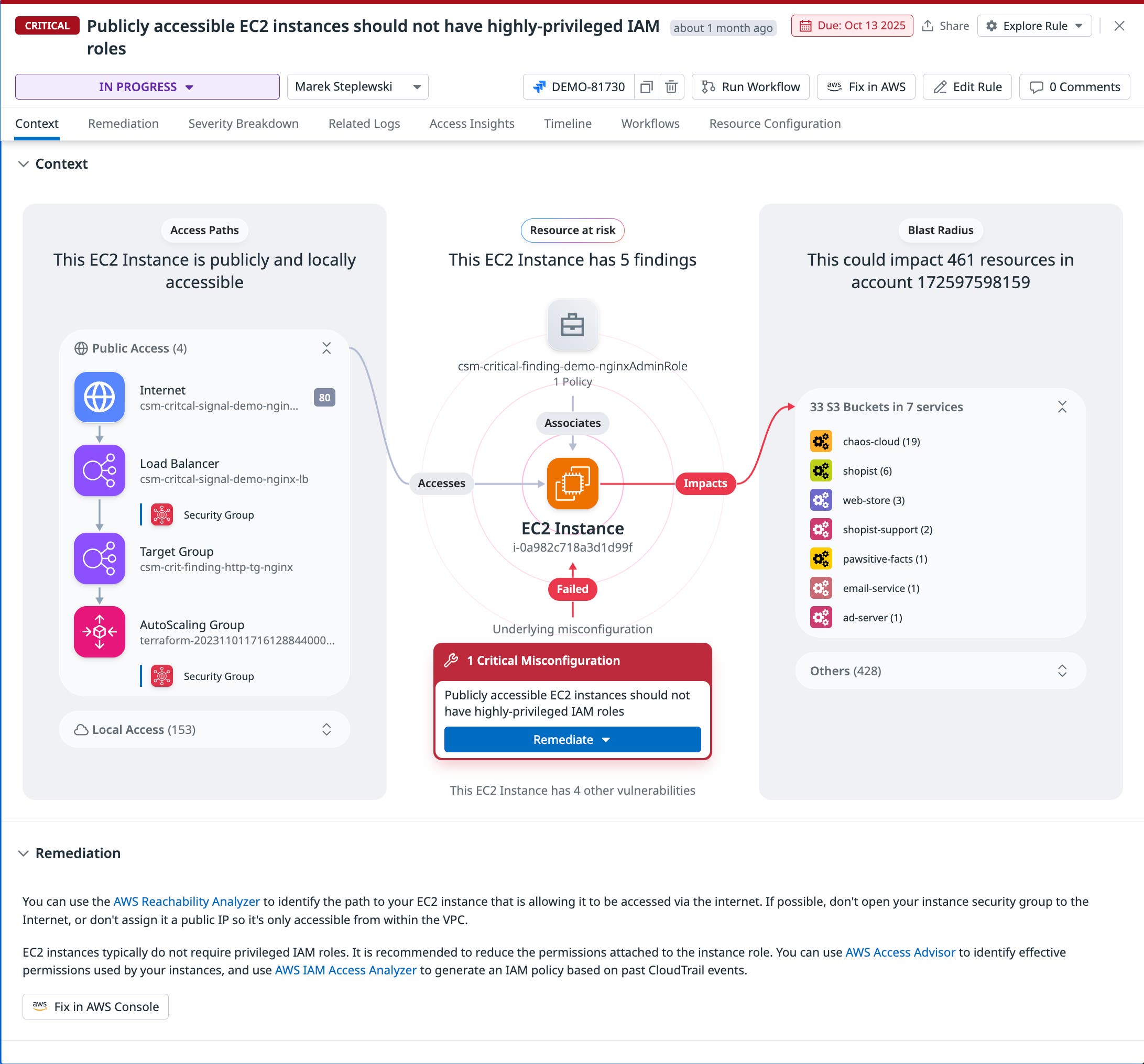
In addition to showing you a detailed context graph, Datadog Cloud Security also indicates the “blast radius” of the impacted workload—i.e., further resources that can be accessed if the instance is compromised.
Protect your infrastructure against common cloud risks
Our 2025 State of Cloud Security study shows that organizations continue to reduce long-lived cloud credentials, adopt secure-by-default mechanisms, and enact more precise control over IAM permissions in AWS, Azure, and Google Cloud. Still, many environments expose key resources to known exploits and potential attacks. Emerging strategies—such as implementing data perimeters and managing multi-account environments centrally—are gaining traction and offer powerful protections, but they often require deliberate configuration to avoid introducing new risks. In this post, we highlighted how teams can address these challenges and use Datadog Cloud Security to help safeguard their cloud environments.
Check out our documentation to get started with Datadog Cloud Security. If you’re new to Datadog, sign up for a 14-day free trial.