
Usman Khan
When debugging production issues, investigating security incidents, or analyzing network traffic, engineers and analysts need not only to find the right logs but to make sense of all the dense, unstructured data generated by different systems. Logs rarely ship neatly laid out in a way that facilitates filtering, faceting, or graphing for every possible scenario. As a result, teams often find themselves writing regular expressions or custom parsers on the fly, which can be error-prone and time-consuming.
To help simplify the process of getting from raw text to relevant insight directly at query time, Datadog Log Management now offers a brand new one-click log parsing experience in the Log Explorer, powered by AI.
Given a raw log line, Datadog can analyze the content to suggest Grok parsing rules that extract important pieces of information (like IP addresses, user IDs, and actions) into structured fields, enabling deep analysis without having to modify global ingestion pipelines or rely on a regex testing tool.
In this post, we’ll show you how AI-powered log parsing in the Log Explorer helps you:
Enrich unparsed logs with auto-extraction of easily queryable fields
Standardize logs from disparate sources without context switching
Auto-extract fields from unparsed log data on the fly
In distributed microservices environments, a single user request can generate dozens of complex log events across multiple services and systems. Traditionally, analyzing an unparsed log message has consisted of some combination of the following steps:
Reviewing and interpreting the content of the log to identify which components are relevant to the current task
Handcrafting patterns to capture this relevant info (e.g., date and time, severity, system info, user details, etc.)
Testing and verifying correctness, often by copying the parsing rule and other manually collected log samples into a testing tool
Contacting an admin to get the logic implemented within shared data processing pipelines
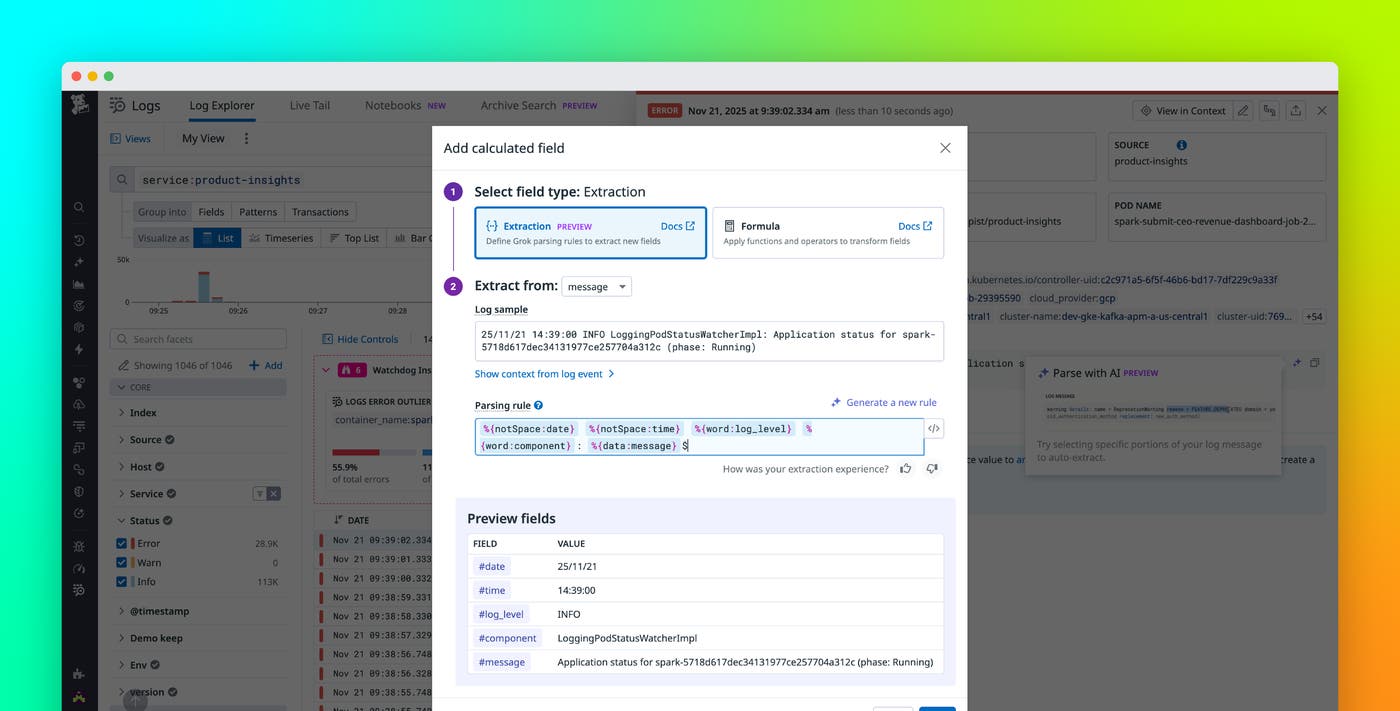
Datadog reduces this process to a single click by offloading this work to AI, which will analyze a selected log line and extract key details as calculated fields in a matter of seconds.
From here, you can opt to modify the generated rule before saving the parsing rules (which is useful if you want to rename the fields being extracted, for example), or ask Datadog to generate a new one altogether. Otherwise, you can continue on with your analysis by incorporating the calculated fields you’ve extracted by filtering, faceting, graphing, or simply displaying the new dimensions in your view.
Simplify investigation sprawl and reduce context switching
During an end-to-end investigation, you may be reviewing logs from a variety of sources, including network appliances and firewalls, VPNs and proxies, legacy services and third-party tools, AI agents, and more. Since these sources don’t share a common schema, tracking context across all of your telemetry can become challenging.
Because the Log Explorer now provides automated, AI-based parsing rule generation, you can rely on Datadog to determine what’s most important (e.g., status codes, transfer sizes, error messages, etc.), and where in the message it lives, for each individual log type. For example, a network engineer can pull up raw firewall logs, instantly receive a rule designed to parse the source and destination IP addresses, and then use those newly created facets to perform a geospatial analysis of blocked connections, all without ever leaving the Log Explorer or requiring any preconfiguration. This repositions log standardization as an exploratory, query-time activity tied to the task at hand, rather than a rigid, pre-ingestion requirement.
Take advantage of AI to parse logs faster
AI-powered log parsing removes the friction of manual rule creation and helps teams convert raw logs into structured insights in seconds. By providing automated rule suggestions, query-time transformations, and on-the-fly field extraction, Datadog enables engineers and analysts to fluidly explore complex log data, investigate incidents, debug issues, and get to insights faster.
To get started, access the Datadog Log Explorer today and visit our Calculated Fields documentation to learn more. If you’re new to Datadog, sign up for a 14-day free trial.
