

Tom Sobolik

Charles Jacquet
If you’re building LLM-powered applications and agents, you’ve probably asked yourself: “How do I know if my changes actually made things better?” You can tweak prompts, adjust temperature settings, or try different models, but it’s not always easy to validate whether version B’s response is better than version A’s. Most teams fly blind in preproduction and rely on user feedback to see how well their application works in the real world. This limited visibility often leads to user frustration that could have been caught before a feature was deployed.
Offline evaluation presents a way to unit test your AI agent in development, validating new changes against known test cases before shipping them to production. In this guide, we’ll discuss best practices for offline evaluations to help you deliver improvements for your AI agents faster and with more confidence.
To follow along, download our example application “Contract Redliner”.
Why offline evaluation matters
Unlike traditional, deterministic software, AI agent outputs are probabilistic and context-dependent. This means they can fail in creative ways you’d never anticipate. Without offline regression testing that evaluates your agent’s outputs during development, you can find yourself stuck in a painful and error-prone cycle:
- Make a change to your prompt, model, or application
- Manually test a few example inputs
- Deploy
- Wait for signs of user frustration
- Repeat steps 1-4
With a limited ability to validate changes before they reach customers, your agent is exposed to a higher potential for churn and lost revenue. Offline evaluation, where you maintain test data and run experiments within your local environment before pushing changes, is a portable and effective way to benchmark and iterate AI agents more efficiently and reliably.
Operating a reliable evaluation framework as part of your development process helps you run more accurate tests with measurable results by using curated, annotated datasets. This way, you can compare versions of your agent more reliably, iterate faster, and catch regressions in CI/CD or version control before they ship. Offline evaluation is useful in many different scenarios during AI agent development, including:
- Testing prompt iterations to prevent regressions
- Comparing model versions or models from different providers
- Optimizing agentic systems and tool usage
- Validating the efficacy of model fine-tuning
A framework for offline evaluation: Data, tasks, and evaluators
Whether you’re testing a single LLM call that classifies support tickets or a tool-heavy, multi-agent workflow that handles processes end-to-end, your offline evaluation system hinges on:
- Data—annotated test cases, including sample inputs and outputs
- Tasks—application logic that composes prompts and context to produce outputs
- Evaluators—functions scoring output on specific qualities
Datadog LLM Experiments provides tooling and logic for creating and managing each of these components. Next, we’ll go over best practices for each of them, using our example agent to show how you can create your own offline evaluations.
Data
Offline evaluation data can be thought of as test fixtures for observing how your agent responds to specific conditions or domains. Your dataset should cover your agent’s core use cases and potentially adversarial or off-topic cases if you want to test guardrails.
Let’s say your agent is designed to review and redline contracts (the process of editing and negotiating legal documents by marking proposed changes—additions, deletions, and comments—directly on the document), assisting your organization’s finance and legal teams. Your agent’s input is a legal document and its output is a series of excerpts, each one associated with a set of proposed changes.
A representative dataset for this agent should, at minimum, include examples of each of the most common document types (such as NDAs, services agreements, and MSAs). It makes sense to start with a smaller set of 20-50 carefully selected examples that cover your core use cases to validate your application early in development. As you start getting usage on your agent and iterating it, you can add more test cases to form a comprehensive set. Tracing your agent will enable you to obtain real user scenarios for your test data, particularly edge cases that may have led to production failures.
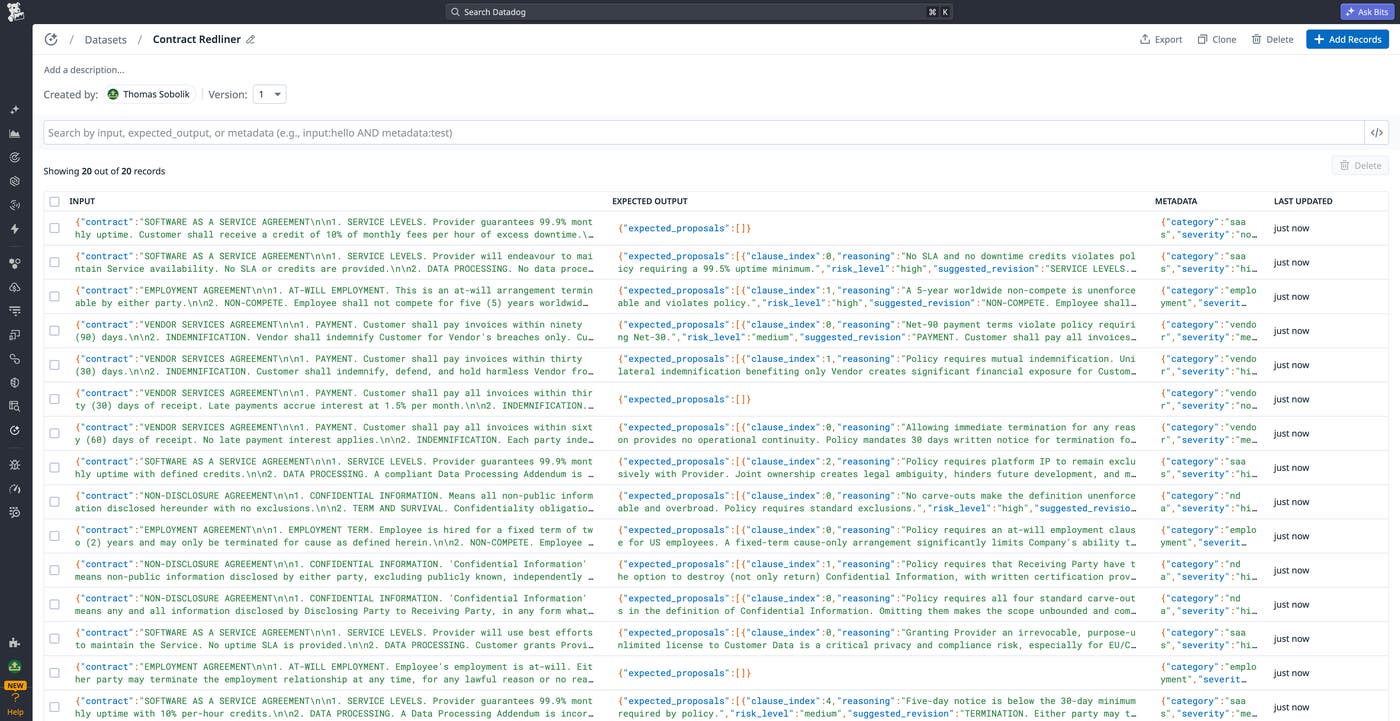
To make sure that your agent behaves as expected, you need to provide a ground truth that will be used as the assertion basis. This approach gives you precise targets whether you’re using deterministic evaluators or using LLM-as-a-judge to assess the performance of your agent. For our contract redliner agent, we need to add a set of annotations (extracted lines and suggested corrections) for each document that mark each of the flaws that the app is designed to catch. This will be used to define the overall correctness of the agent’s output.
When developing test cases, it’s best to focus on the end-to-end journey: the paths taken by the agent and the tools used can vary for the same task, but it should still arrive at the same expected outcome from a given input. There are numerous kinds of edge cases and failure modes to consider when building your evaluation dataset. These should test both when a behavior should occur and when it shouldn’t. Some examples include:
- Multi-turn conversations that test whether the agent is able to retain needed context across multiple prompts
- Ambiguous or off-topic prompts that test whether the agent follows appropriate guardrails and asks for clarification
- Adversarial prompts that test the agent’s vulnerability to jailbreaks, hallucinations, and other policy violations
In addition to ground truth labels, you can enrich your dataset records with metadata, enabling you to more easily manage records and slice experiment results by key facets like category, complexity, prompt length, and so on. This can help you scale your dataset while maintaining an understanding of how your agent’s performance changes in different conditions and use cases. Filtering your experiment results with tagged metadata can help you answer questions like:
- Which kinds of prompts have the lowest accuracy scores?
- Does performance degrade when prompts pass a certain token length?
- Are multilingual queries handled as well as English ones?
- Do workflows requiring a certain tool have higher failure rates?
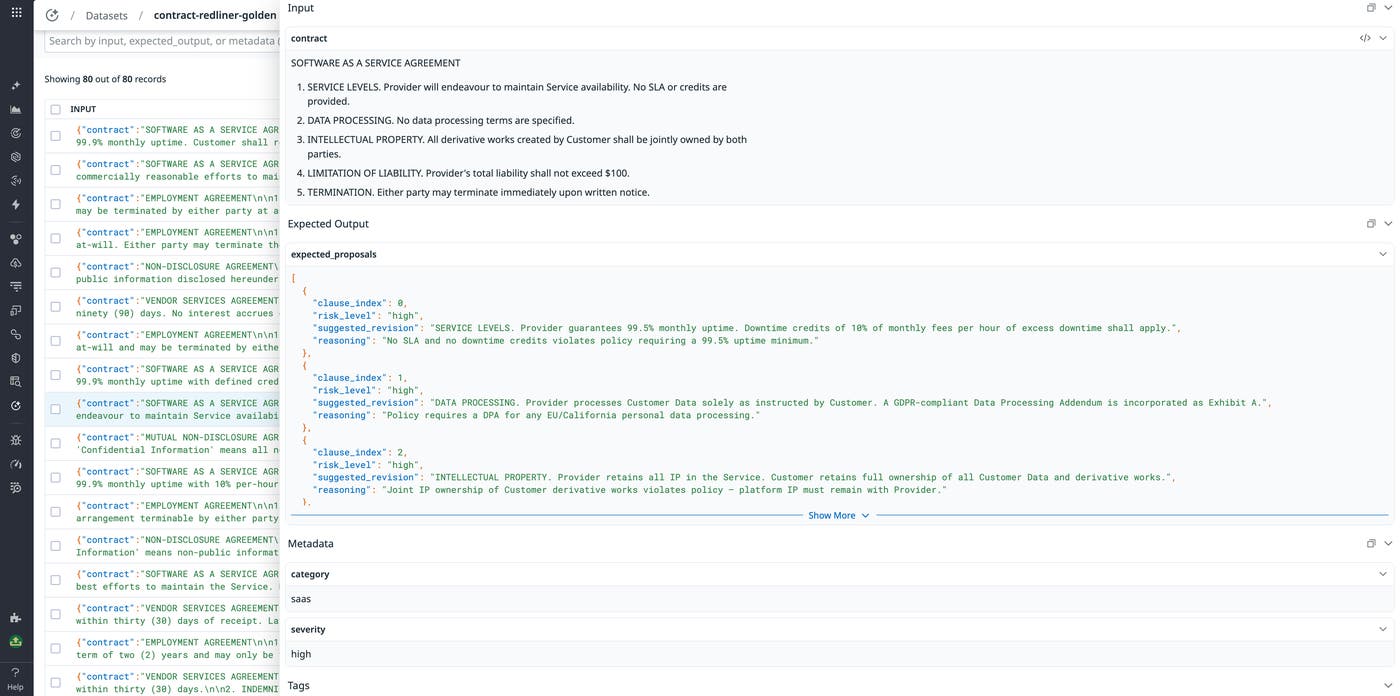
For instance, our contract redliner agent’s test data can include a category tag that indicates whether the input contract is a SaaS agreement, vendor deal, employment contract, and so on. This enables us to filter experiment runs by contract type to understand how the agent handles each of these unique use cases. The following screenshot shows a record tagged with the SaaS category.
Scaling a dataset requires maintaining strict data quality standards. By ensuring that data remains fresh, accurate, and correctly processed, you can prevent flaky tests from compromising your application. Building test data programmatically enables you to implement data quality checks and use them to flag stale, malformatted, or incomplete data in your version control. You can use Datadog LLM Experiments to automatically create enriched test data directly from your production traces in LLM Observability. For more information, see our LLM observability documentation.
Tasks
Task code varies significantly based on the architecture of your agent and use cases. You might be evaluating:
- A single LLM call with a long, highly structured prompt
- A multi-agent workflow with conditional tool use and nested prompts that form a probabilistic, decision tree-based execution
- An entire full-stack system that combines an agent with a set of microservices
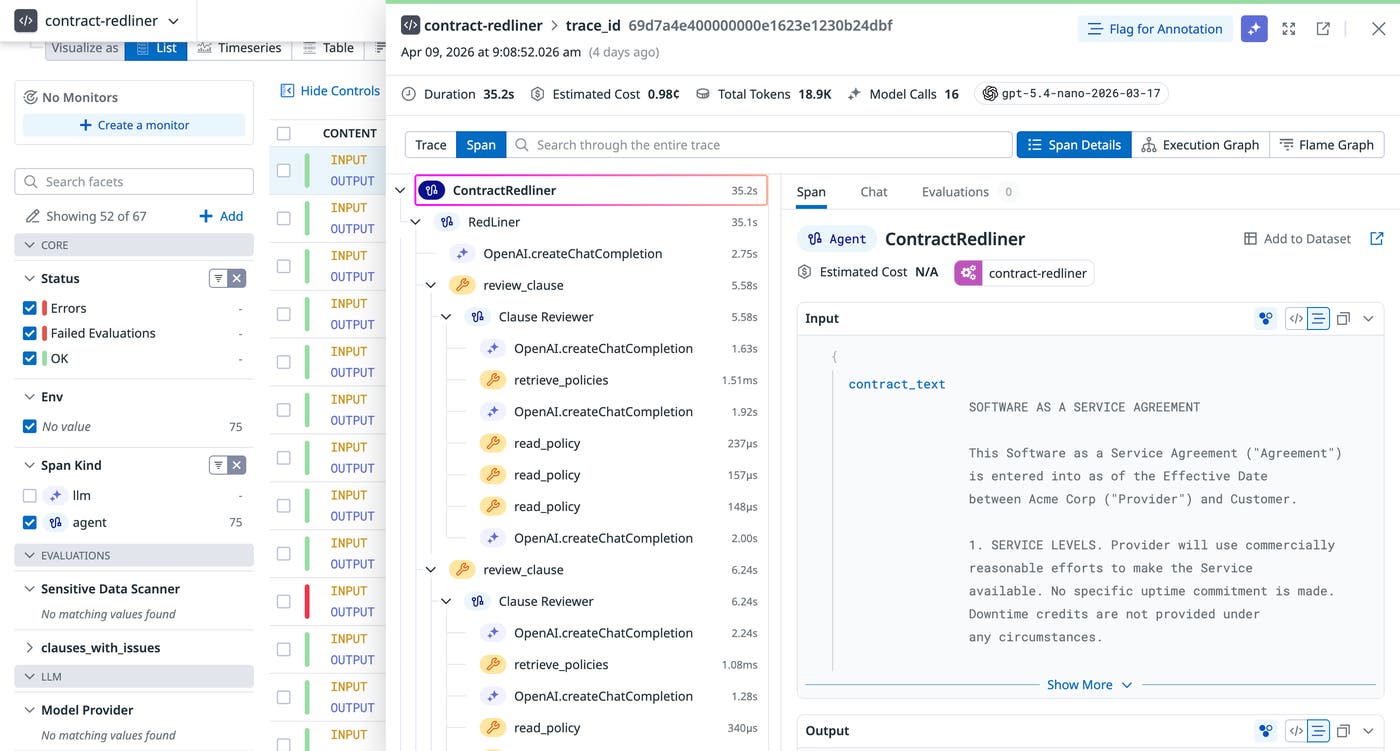
Most modern agents are organized around a central LLM loop and multiple tools that are chosen autonomously to achieve the desired response. More complex ones can consist of multiple sub-agent loops, each with their own tools. It’s critical to trace your agent runs during testing so you can observe the full chain of execution that led to each result. This way, you can appropriately structure your experiments around each critical step.
Our contract redliner is a three-agent system. A top-level orchestrator receives the full contract text, autonomously decides how to break it into clauses, and has access to two tools: one that delegates to a per-clause reviewer sub-agent, and one that delegates to a validator sub-agent. Let’s take a closer look at these steps and discuss how they can be translated into experiment task code.
Phase 1: Clause review
RedLiner (the orchestrator agent) receives the full contract text and determines clause boundaries on its own, based on its system prompt instructions. For each clause it identifies, it calls the review_clause tool, which runs the ClauseReviewer sub-agent. ClauseReviewer is instructed to follow a two-step lookup before deciding whether a revision is needed.
The main agent receives the clauses and autonomously decides which tools to call, in what order, and when to return the final answer.
This process uses these two tools registered on the agent:
| Tool | Function |
|---|---|
retrieve_policies(clause) | Keyword-matches the clause text against known topics (nda, saas, employment, vendor) and returns the list of available policy names for any matching topics. |
read_policy(topic, policy) | Returns the full text of a specific policy from the internal policy database. |
After retrieving relevant policies, ClauseReviewer returns a ProposedRevision— including reasoning, revised_clause, and risk_level—or None if the clause needs no change.
Phase 2: Validation
Once all clauses have been reviewed, RedLiner calls the validate_revisions tool, providing the full list of proposals. This runs the Validator sub-agent, which takes the role of a senior contract lawyer performing a final pass. It checks proposals for internal consistency (clauses must not contradict each other), conciseness, and accurate risk calibration, then returns an accept, reject, or modify decision for each.
Phase 3: Output
RedLiner composes a final list of ProposedRevisionWithOriginal objects—one per flagged clause—each containing the original_clause, revised_clause, risk_level, and reasoning.
We can write a task that tests the agent, tracing the results the same way we do in production by using the Datadog LLM Observability SDK. For our contract redliner, this requires calling the run_redliner() function inside the task definition. The following code snippet shows this function.
@llmobs_agent(name="ContractRedliner")async def run_redliner(contract_text: str) -> list[ProposedRevisionWithOriginal]: result = await RedLiner.run(contract_text) return result.outputThe @llmobs_agent decorator wraps the entire execution in a single traced LLM Observability span named "ContractRedliner", so every sub-agent call is nested under it automatically.
Then, after importing this function into our experiment code, we can define our task to run the function on the supplied input contract and return the results. Because run_redliner() is async, the task must be async as well:
async def task(input_data: dict, config: dict | None = None) -> list[dict]: revisions = await run_redliner(input_data["contract"]) return [revision.model_dump() for revision in revisions]The more complex your tasks are, the more likely it is that random variation will occur in experiment results. Because RedLiner autonomously decides how to split clauses and which policies to retrieve, running experiments multiple times per record and averaging the results will help prevent test flakiness and make comparisons across app versions, models, and prompts more reliable.
Evaluators
Evaluators define the success criteria of your tasks. Code-based, deterministic evaluators are useful to assess the performance of your agent based on strict criteria, such as whether or not the agent flagged a risky clause. LLM-in-the-loop evaluation can measure more nuanced qualities, but can be less reliable and more difficult to verify. For instance, you can use an LLM judge to measure the “correctness” of a response compared to an established ground truth, but this requires defining what “correctness” means and verifying that the evaluator’s judgement is consistent with that definition. Our LLM evaluation framework guide covers some of the basics of non-deterministic LLM evaluation. Let’s now discuss some best practices for evaluators in an offline, development context.
As you build your offline evaluation system, you can avoid metric bloat by not introducing too many independent facets into your analysis. For the first iteration, start with a concise set of deterministic checks and two to three key evaluation metrics. Deterministic evaluators are ideal for fundamental checks, such as validating input or output token length constraints and testing for the presence of specific items in the output. A system that’s 5% more accurate but three 3 slower or 10 times more expensive might be worse overall, so it’s also important to measure latency and cost in your preproduction testing.
LLM-as-a-judge evaluators help you measure subjective qualities that deterministic code can’t capture. It’s highly important to define an LLM judge’s evaluation criteria with as much specificity to your problem space as possible. Good evaluation prompts should tell the judge exactly what to look for, provide examples of good and bad responses, and constrain the output format (numeric scores, not explanations). Before you trust your evaluators with measuring your agent’s performance in preproduction, you can perform test evaluations with a sample of outputs using known evaluation figures.
Let’s consider our contract redliner agent again. We’ll define the following evaluators to answer the critical questions that encode the business impact of failures.
clause_recall: Did we catch every real issue?
|actual ∩ expected| / |expected|Of the clauses the golden dataset says should be flagged, what fraction did the agent actually catch? This is the primary metric in contract review because false negatives are expensive—a missed liability cap or GDPR clause can cost more than the entire contract is worth. We’ll optimize for this first, even at the cost of precision.
clause_precision: Did we avoid false alarms?
|actual ∩ expected| / |actual|Of the clauses the agent flagged, what fraction were actually issues? If this metric is low, the agent is spamming legal teams with false alarms. This could cause staff to begin ignoring the tool, leading to reduced deal velocity and a heightened risk of missed mistakes in contracts. This precision metric pulls in the opposite direction of our previous recall metric, so we’ll have to measure both to monitor the tradeoff.
severity_match: Is our risk calibration correct?
This metric compares the maximum determined risk level across the actual tested proposal and the expected result, passing only if the highest severity label matches the ground truth. It tells us whether the agent understands the relative danger of what it found. An agent that always flags everything as “high severity” will score well on recall but fail here. It’s a proxy for whether the risk taxonomy is calibrated correctly, so that your legal personnel can appropriately prioritize the real review queue.
revision_quality: Are the rewrites actually useful?
Even when the agent flags the right clauses, do the suggested rewrites solve the problems? This evaluator actually reads the redlined document to score the quality of its suggested revisions. It sends the agent’s suggested_revision strings alongside the expected revisions to an LLM and asks for a score between 1 and 5. A score of 1 means the revision is legally wrong or useless; 5 means a lawyer could copy-paste it. Pass threshold is ≥ 3. This metric is inherently noisier than the deterministic evaluators, but you can correlate them to form a clearer picture. For instance, if clause_recall passes but revision_quality remains low, your detection is fine but your generation is broken.
Running experiments with our evaluators
Now that we’ve defined these key evaluators, we can implement them in our experiment code to run on task outputs and produce scores for us to track. For more information on how these evaluators are written, see the experiment code.
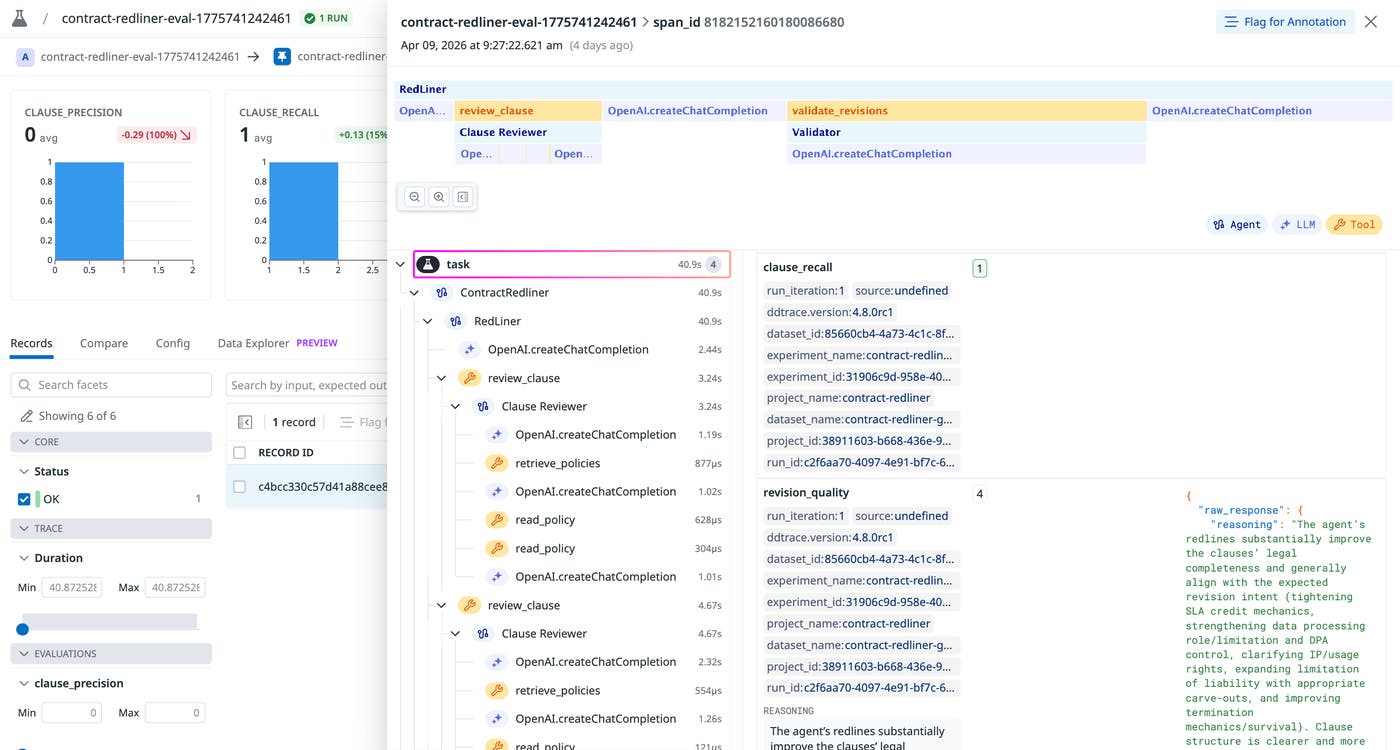
While these evaluators alone can produce useful metric scores for benchmarking our agent’s response quality, it’s highly beneficial to trace experiment runs in order to break down agent executions and understand the underlying behaviors that produced these results. For instance, if our contract redliner agent produced a low clause_recall, we’ll want to know if the issue stems from poor reasoning on the policies the agent retrieved, or whether key policies were left out during the policy retrieval step.
Tying everything together, our experiment’s main function takes in our task, dataset, evaluators, and parameters to run the experiment, tracing the results for further investigation inside Datadog LLM Experiments. The following screenshot shows a trace for our clause_recall evaluator. The trace shows each tool invocation and LLM call that occurred over the run, along with the evaluator results.
Iterate your agents with more precision
Offline evaluation is critical for making your agent development workflows efficient, scalable, and less incident-prone. By measuring application performance in preproduction with offline evaluations, you can prevent regressions from reaching users.
Datadog LLM Experiments lets you create, run, and manage offline evaluation tests and datasets, all within Datadog. You can use production traces from LLM Observability to create datasets and monitor your new app versions’ performance in production from within a single, unified platform. For more information setting up your first offline evaluation, see our LLM Observability documentation.
Or, if you’re brand new to Datadog, sign up for a free trial.