
Reva Ranka

Barak Shoushan
Engineering organizations rely heavily on developer feedback to improve internal platforms, tooling, and processes. However, that feedback is often scattered across disconnected systems such as external forms, spreadsheets, chat threads, and documentation tools. Because these systems are separate from operational data, teams struggle to correlate developer sentiment with measurable performance or reliability outcomes. This disconnect makes it difficult to prioritize improvements or identify systemic issues early.
To help solve these challenges, you can use Datadog Forms and Datadog Sheets in the same environment where your teams already operate. Forms enables you to create structured surveys and view feedback directly within Datadog, and Sheets helps you analyze responses alongside telemetry data and contextual metadata by using a familiar spreadsheet interface. By combining these capabilities, you can move from fragmented feedback to clear insight that you can act on.
In this post, we’ll explain how you can use Forms and Sheets together to:
- Collect structured feedback directly within Datadog
- Review and act on feedback as you receive it
- Analyze responses over time and enrich them with useful metadata
- Aggregate data and identify trends
Collect structured feedback directly within Datadog
Feedback collection is most effective when it fits naturally into your team’s existing workflows. With Datadog Forms, you can gather input without relying on external tools that separate your data and processes. You can solicit feedback as part of a postmortem, after specific events (like incident resolution or deployment), or on a scheduled basis.
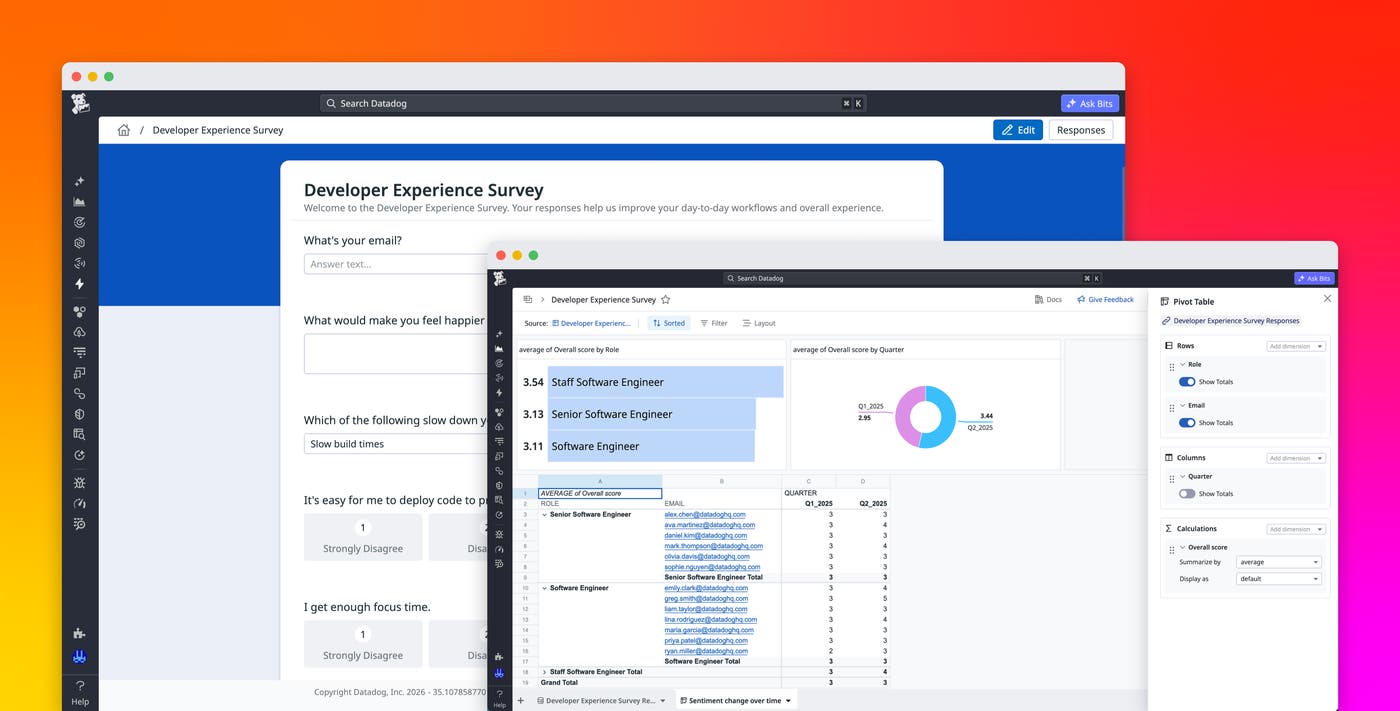
For example, let’s say that you’re creating a quarterly developer experience survey to understand how engineers rate internal tooling, deployment workflows, and overall satisfaction. Using Forms, you can build surveys with a range of field types, including dynamic dropdowns, rating scales, prioritization lists, calendar pickers, and image uploads. You can also apply validation rules that enforce email address formats or restrict invalid characters to help ensure that responses are structured and consistent.
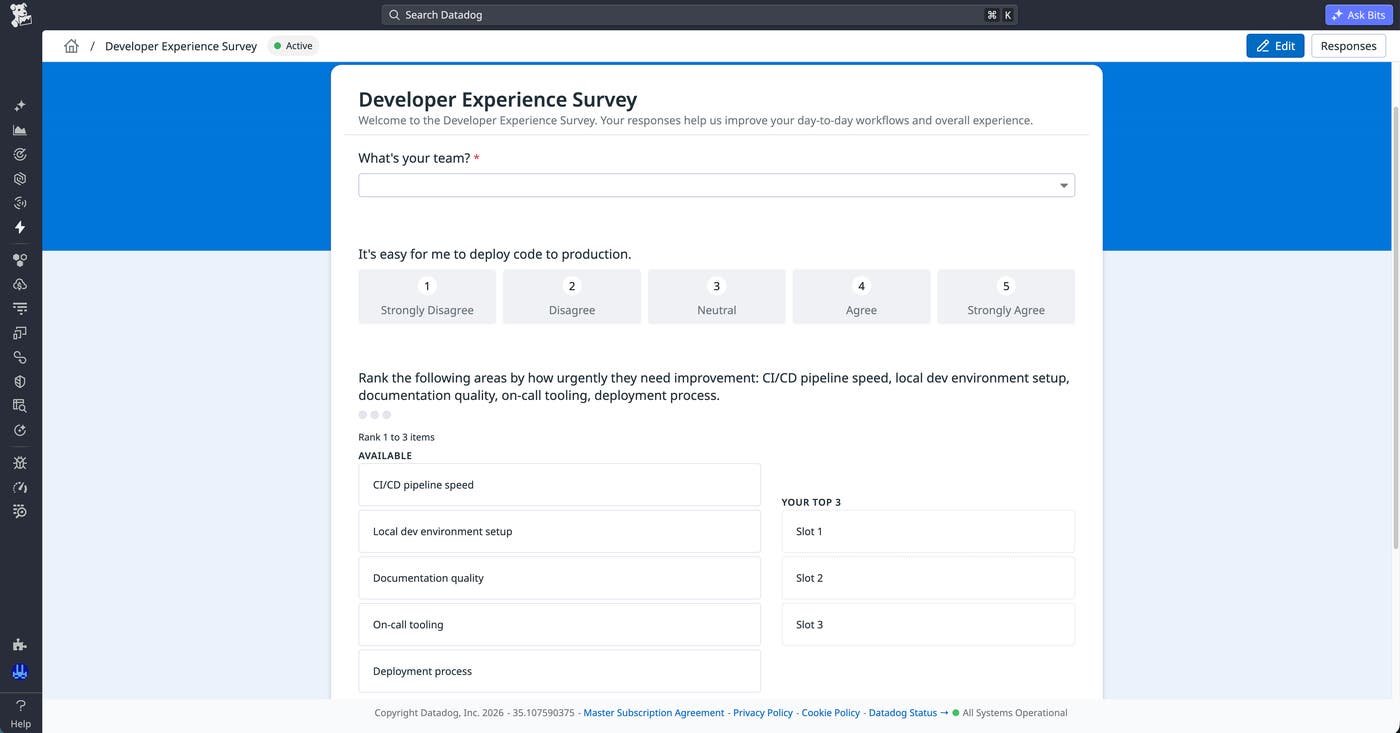
When your form is ready, you can distribute it internally by sharing a link in the Datadog Internal Developer Portal or in your internal documentation or chat tools. You can also add forms directly to dashboards, so engineers can submit feedback without leaving the tools they’re already using. Another option is to use Datadog Workflow Automation to distribute forms and issue automated reminders to respond. Additionally, you can share forms externally with users who don’t have a Datadog account, whether they’re inside or outside your organization.
Forms supports anonymous responses so that engineers can share candid input about tooling or processes without attribution concerns. You can also configure a form to close automatically on a set date, keeping your dataset clean for time-bounded surveys like quarterly reviews.
Review and act on feedback as you receive it
When feedback starts coming in, you can use Forms to review responses and manage access directly within the platform. You maintain full role-based access control (RBAC) over who can access the responses. Because the form lives within Datadog, responses are captured as data that you can filter and query instead of as isolated documents or attachments. This approach makes it easier for you to revisit and analyze the feedback later. You can also use form submissions to trigger automated workflows, such as creating cases or notifying teams, so that you can act on feedback as soon as it’s submitted.
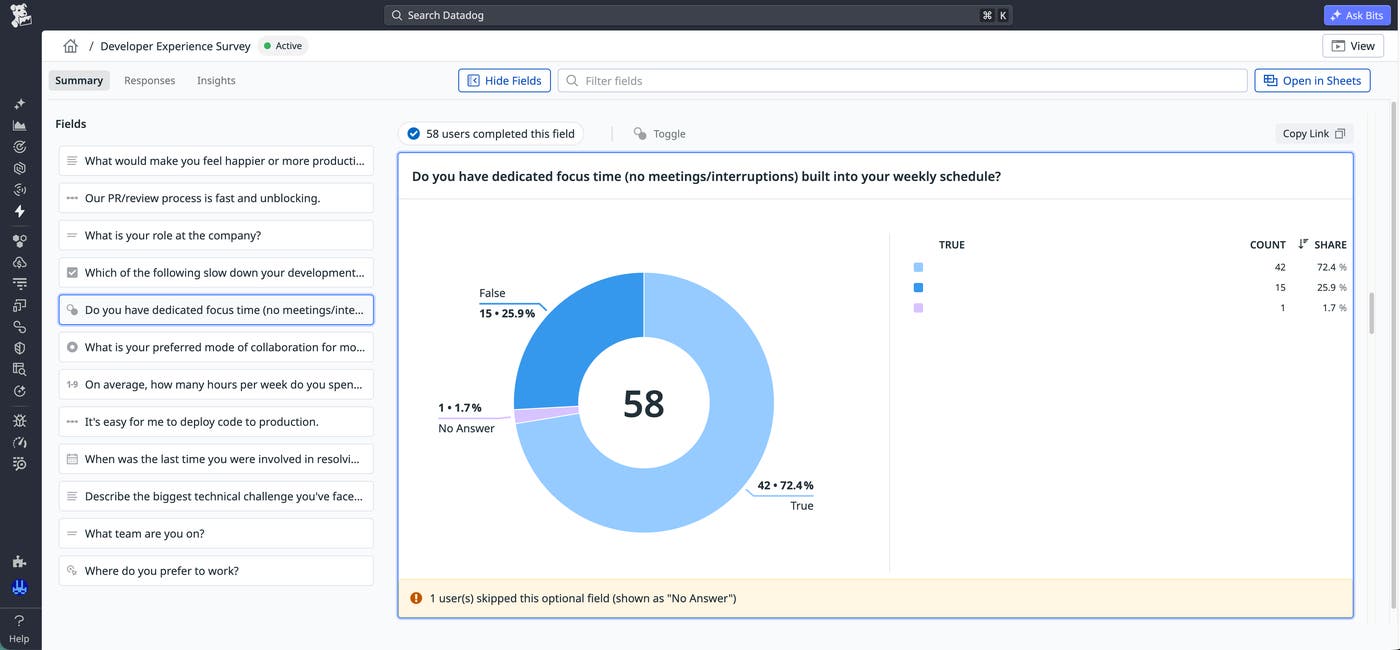
Responses come with AI-generated summaries and built-in visualizations, such as counts for categorical fields and averages for rating scales, to help you quickly understand developer sentiment. These insights help you spot patterns and outliers without having to do manual analysis.
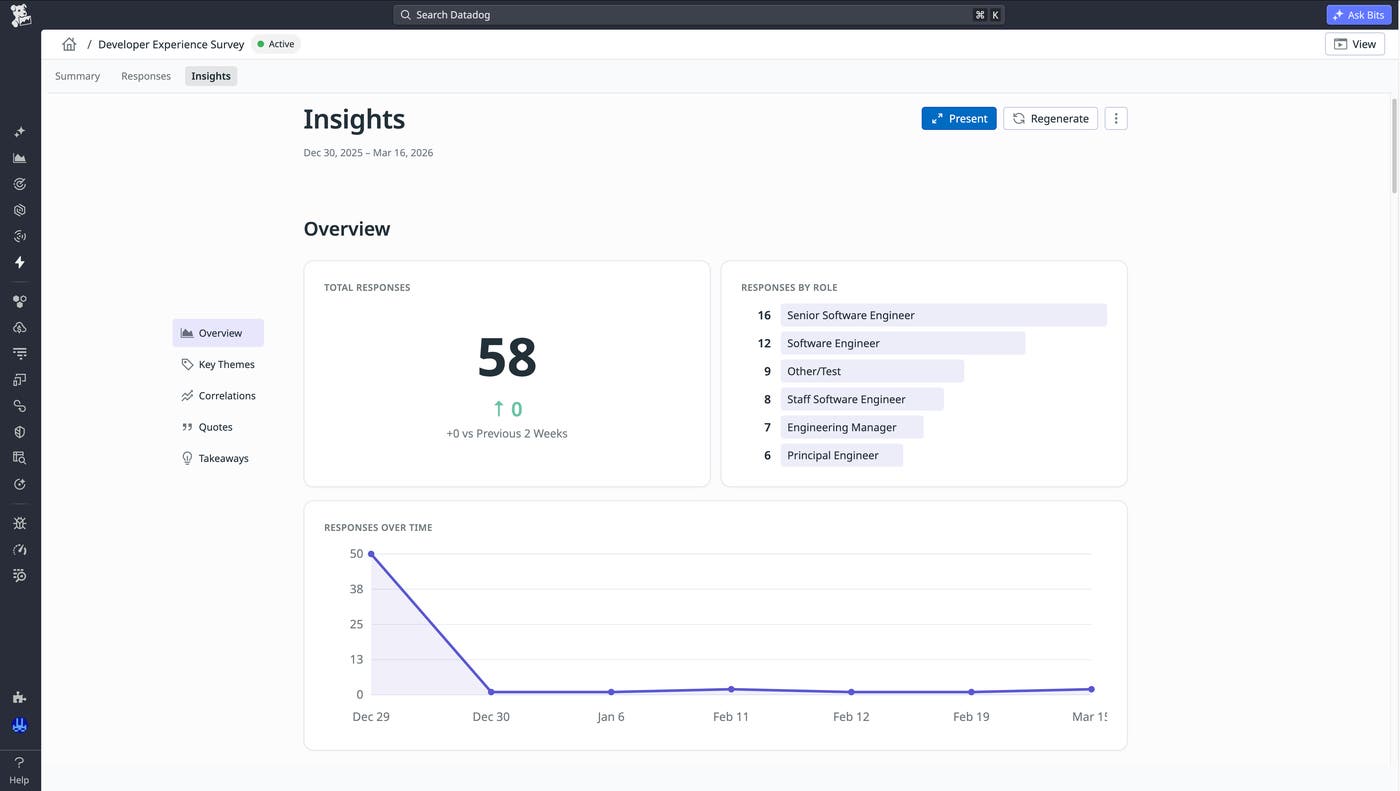
For deeper evaluation, the Insights tab automatically synthesizes responses into an AI-generated overview that includes sentiment by role, key themes, notable quotes, correlations, and prioritized takeaways. You can present these findings directly as slides or download them locally to share results without rebuilding anything in a separate tool.
Analyze responses over time and enrich them with metadata
The value of the feedback that you collect increases when you can analyze it in context. Datadog Sheets enables you to work with form responses as structured data that can be queried, transformed, and enriched alongside other Datadog data sources.
You can open form responses directly in Sheets, where they become part of a dynamic dataset. From there, you can create calculated columns to derive new metrics, such as an overall satisfaction score based on multiple survey questions. This approach helps you standardize how you measure developer experience across teams and time periods.
With Sheets, you can also enrich your data with additional metadata by using lookups. For example, you can associate responses with team ownership, service boundaries, or developer roles. This added context makes it possible to segment feedback in meaningful ways, such as comparing satisfaction across teams or identifying whether specific services correlate with lower developer experience scores.
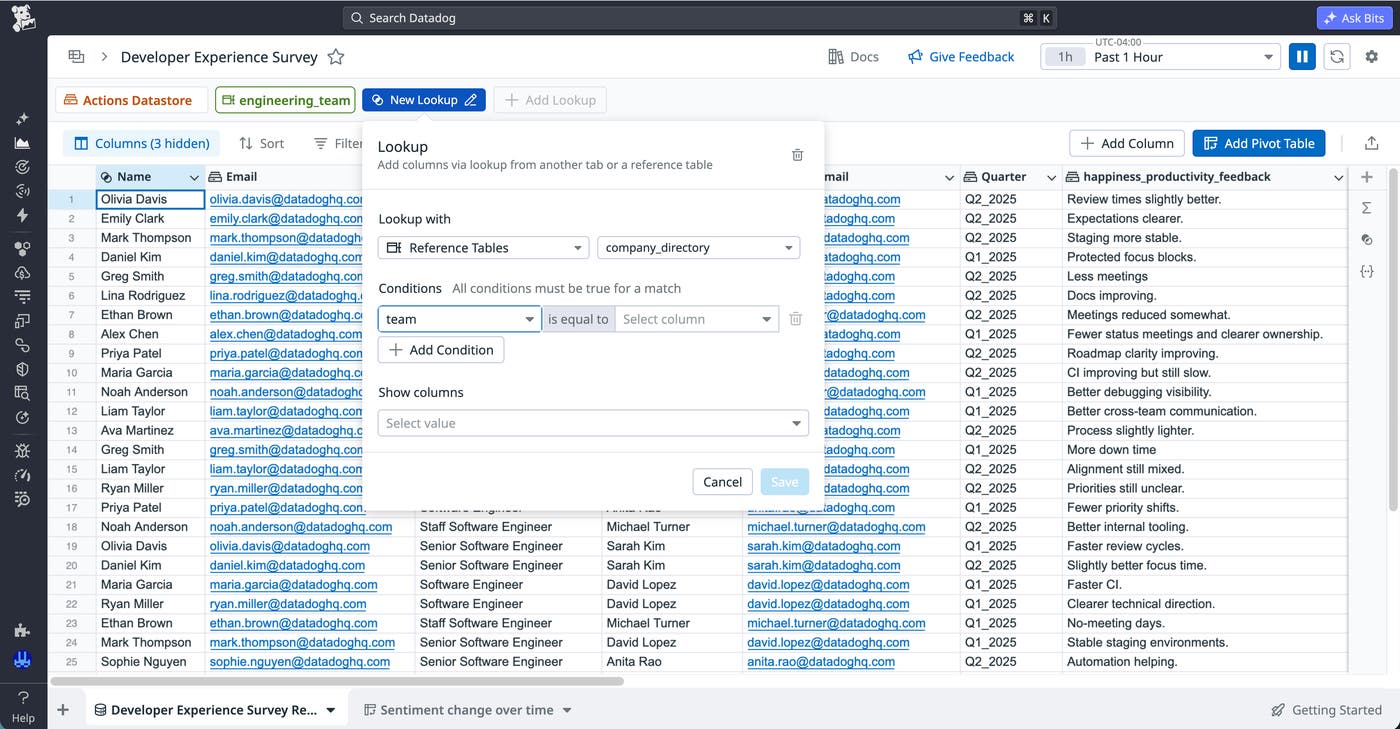
Because the data remains live within Datadog, your analysis stays up to date without manual exports or periodic refreshes. You can continuously monitor feedback trends as new responses are submitted, rather than relying on static snapshots.
Aggregate data and identify trends
As your dataset grows, it becomes important to summarize and visualize feedback in a way that reveals patterns. Datadog Sheets provides tools such as pivot tables and charts to help you aggregate responses and identify trends across dimensions like team, time period, and tooling area.
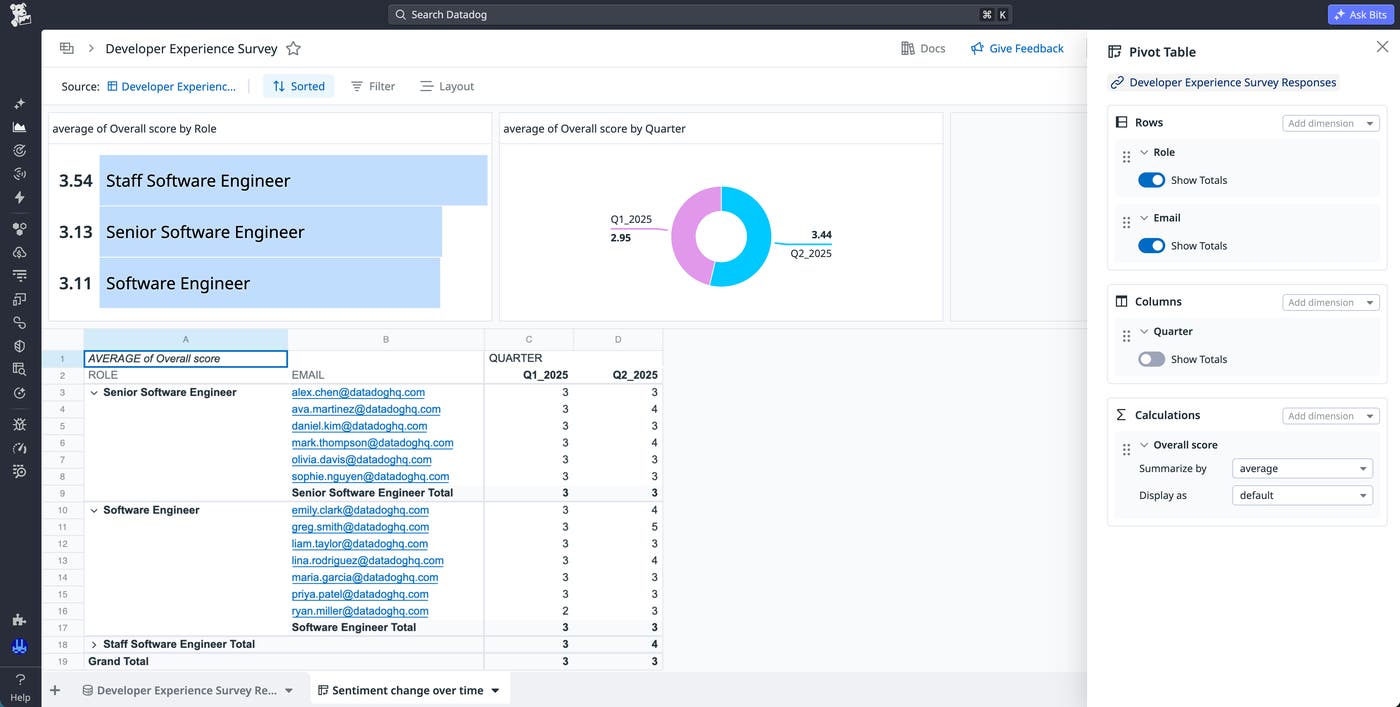
Using pivot tables, you can group responses by attributes such as role and calculate metrics like average satisfaction scores or response counts. With this information, you can compare how different parts of your organization experience internal tools and processes. You can also analyze how these metrics change over time by introducing date-based groupings or rolling windows.
To make these insights more accessible, you can add visualizations such as top lists or pie charts directly within Sheets. These visuals help you quickly communicate trends, such as improvements after a tooling change or regressions that result from a new deployment process. By combining tabular analysis with visual summaries, you can more effectively interpret feedback and share findings across your organization.
Start converting feedback into actionable insight with Datadog
Datadog Forms and Datadog Sheets provide a structured way to collect developer feedback and analyze it over time. By embedding feedback workflows directly within Datadog and enabling spreadsheet-style analysis in the same platform, you can transform scattered input into actionable operational insight. To learn more, check out the Forms documentation and the Sheets documentation.
If you’re new to Datadog, you can sign up for a 14-day free trial to get started with Forms and Sheets.