

Sangeeta Shivaji Rao

Mike Peralta
ClickHouse is widely used for large-scale analytics, but once it is running in production, it can be difficult to understand how query activity translates into resource usage. Engineers investigating performance issues often struggle to determine which queries consume the most memory, run most frequently, or cause spikes in load. In practice, engineers are left querying system.query_log, tailing server logs, and piecing together information after an incident. While this can show what queries are running at a given moment, it does not provide a consistent way to compare queries across a cluster. It also does not reveal the overall impact of a query or show what it actually costs once it is finished.
Datadog Database Monitoring for ClickHouse, available in Preview, provides a unified view of query performance across both ClickHouse Cloud and self-hosted deployments. It collects aggregated query metrics, captures completed query samples, and surfaces real-time query activity so that teams can identify inefficient queries, investigate incidents, and optimize workloads.
In this post, we’ll cover how Database Monitoring for ClickHouse helps you:
Find your most expensive queries
Understanding query performance at scale requires more than reviewing individual slow queries. Engineers need to compare patterns across the cluster, including how often queries run, how long they take, and how much data they process. Without this context, teams might focus on outliers and miss the queries that drive most resource usage, such as queries that run thousands of times per hour.
Database Monitoring collects aggregated metrics for each normalized query pattern in your ClickHouse environment. This helps engineers evaluate queries by overall impact, not just latency. For example, a moderately slow query that runs frequently can have a greater effect than a single long-running query.
These metrics include execution count within a collection window, total and average duration, memory usage, and I/O activity such as rows and bytes read or written. They also include result set size, which helps teams understand how much data queries return to clients. With this data, teams can identify which query patterns drive the highest cost and prioritize optimization work.
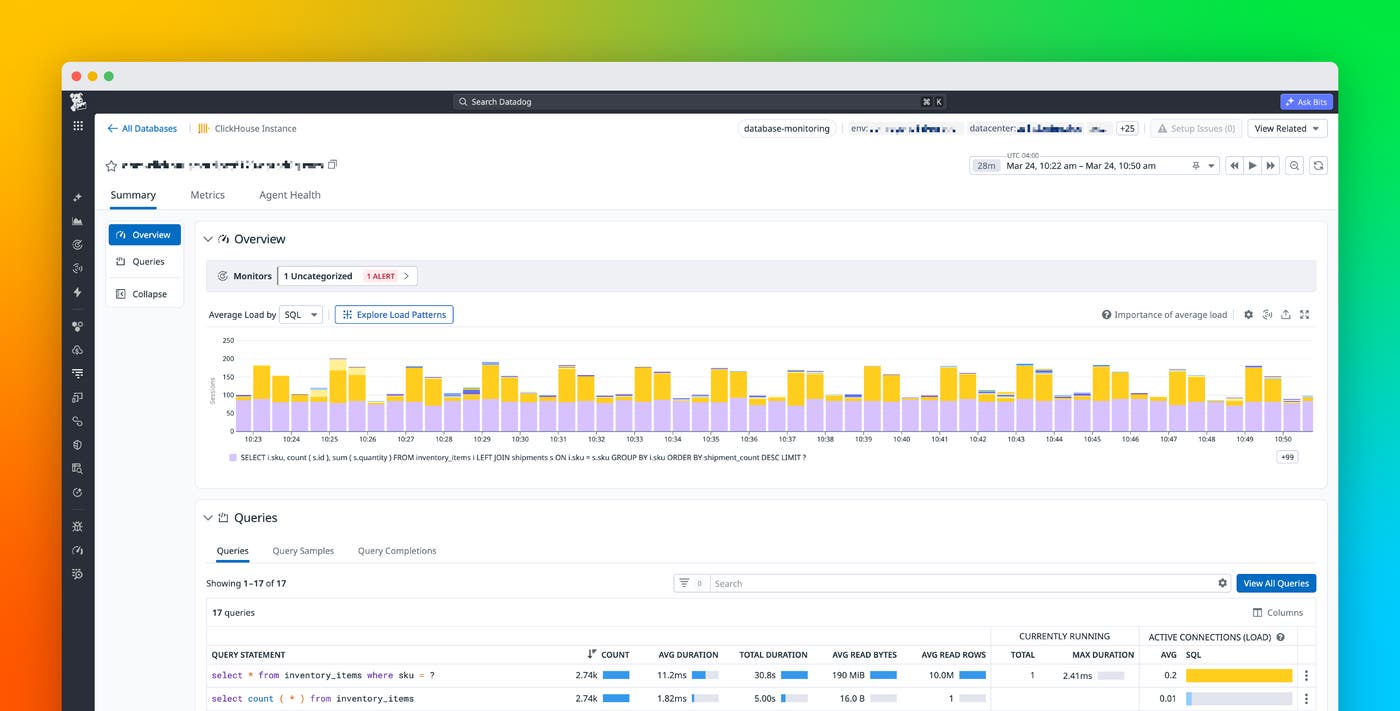
Database Monitoring for ClickHouse brings all this together in one place, as shown in the preceding screen capture. The ClickHouse instance page gives you two complementary views for identifying expensive queries. The stacked bar chart breaks down sessions over time by query pattern. You can scan for spikes in load and hover over individual bars to see which query patterns were active at that moment, making it easy to correlate load spikes with specific queries.
Below the chart, the Queries table ranks query patterns by their current impact. Together, these views let you move beyond “which query is slowest” to “which query costs the most overall,” whether that’s a high-frequency moderate query or a low-frequency heavy one. The Query Metrics view lets you rank queries by the metric that actually matters: the total impact on the system. This way, you can optimize the right queries first, not just the most frequent or the slowest ones.
Reconstruct what happened during an incident
When performance issues occur, aggregated metrics are not enough. Engineers also need to understand the resource profile of each query execution—specifically, how individual queries performed at a specific point in time. To construct this profile, teams might resort to querying system.query_log across each node in the cluster, filtering through large volumes of entries, and correlating timestamps. On busy clusters, retention settings may even remove the data needed to perform a full investigation.
Database Monitoring captures completed query samples for each execution and stores them independently of ClickHouse logs. Teams can view these samples across multiple instances and clusters in a single place, which makes it easier to investigate issues that span distributed environments.
Each query sample includes detailed execution context, including query text (with sensitive values hidden), execution duration, memory usage, and data read and written. It also includes result set size and metadata such as user, database, tables accessed, and query type. All this context gives teams a clear picture of how queries interact with the entire system.
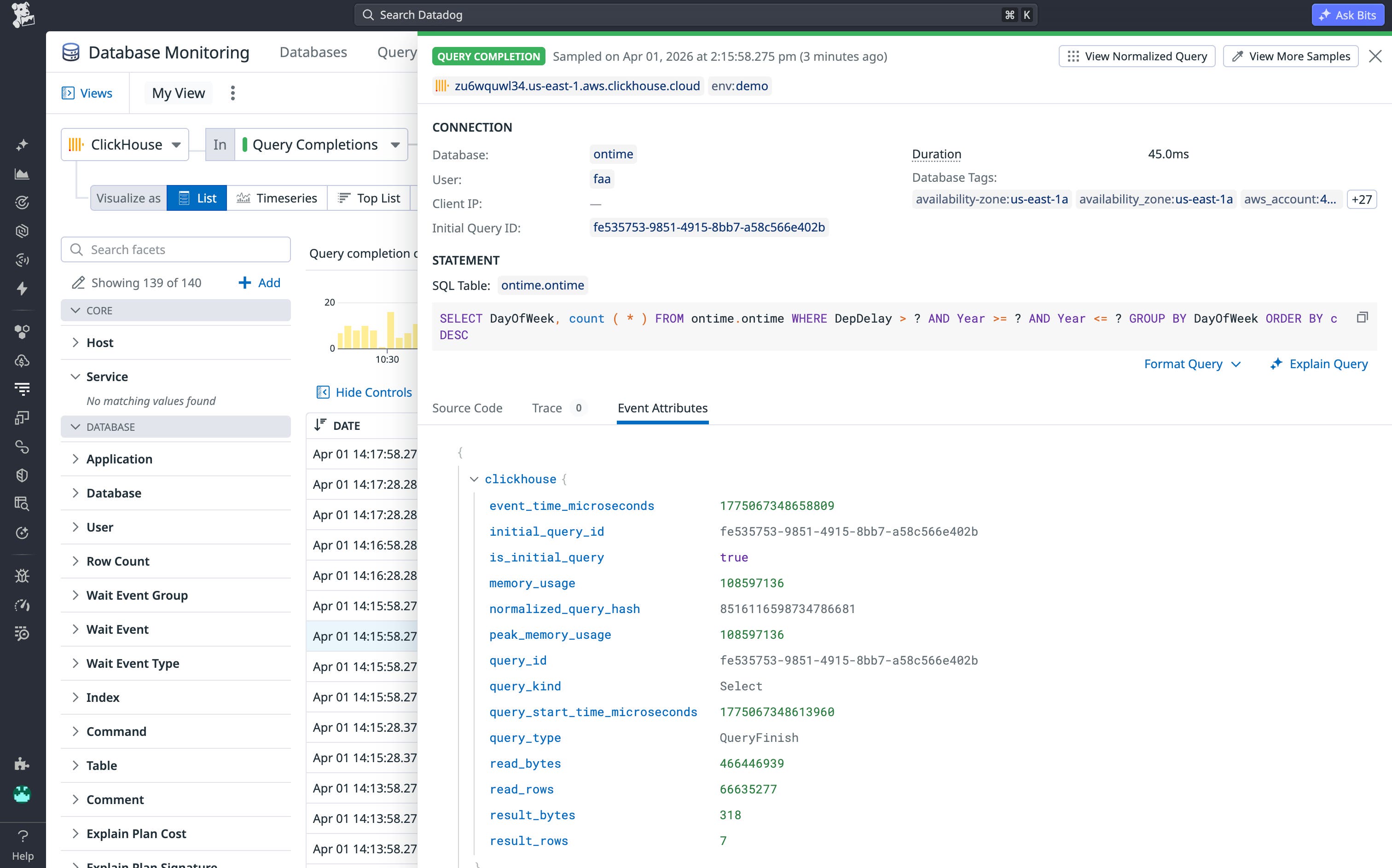
With this data, engineers can also reconstruct incidents after they occur. They can identify which queries caused spikes in memory usage, determine whether workload changes contributed to degraded performance, and trace issues to specific users or services. Because Datadog retains this data, teams are not limited by ClickHouse log retention settings.
Get started with ClickHouse Database Monitoring
Database Monitoring for ClickHouse gives engineers a full, unified view of query performance, helping teams reduce costs, improve performance, and respond more effectively to incidents. Teams can view aggregated query metrics, completed query samples, and active queries in real time across all ClickHouse deployments in one place, alongside the rest of their Datadog observability data.
Database Monitoring for ClickHouse is available in Preview for both ClickHouse Cloud and self-hosted deployments. For setup details, see the ClickHouse Database Monitoring documentation or request access on the Preview page.
If you’re new to Datadog, sign up for a 14-day free trial.