

Bowen Chen

David Pointeau

Ignacio Eguinoa
AI-powered coding tools are becoming essential to developer workflows. GitHub Copilot has evolved from an inline code-completion assistant into a full AI coding agent capable of autonomous code generation, pull request (PR) authoring, and multi-mode chat. As these capabilities expand, so does the challenge of understanding how your teams use them, whether the investment is paying off, and where to focus improvement efforts.
Datadog's GitHub Copilot integration connects to GitHub's latest Copilot usage metrics API to bring Copilot metrics into the same platform where you already monitor your infrastructure, applications, and CI/CD pipelines. GitHub provides basic usage stats in its admin console, but Datadog enables you to go further to filter by individual developer, correlate Copilot adoption with deployment frequency or code quality metrics, set alerts on license waste, and build custom dashboards tailored to your organization. The integration provides detailed user metrics across every Copilot surface (code completions, chat, agent mode, and PRs).
In this post, we'll explore how to:
Track GitHub Copilot adoption with user-level granularity
Datadog's preconfigured dashboard gives you a real-time view of seat utilization: total seats, active seats, inactive seats, and pending invitations or cancellations. Low utilization signals licenses that could be reassigned to developers who would benefit from them.
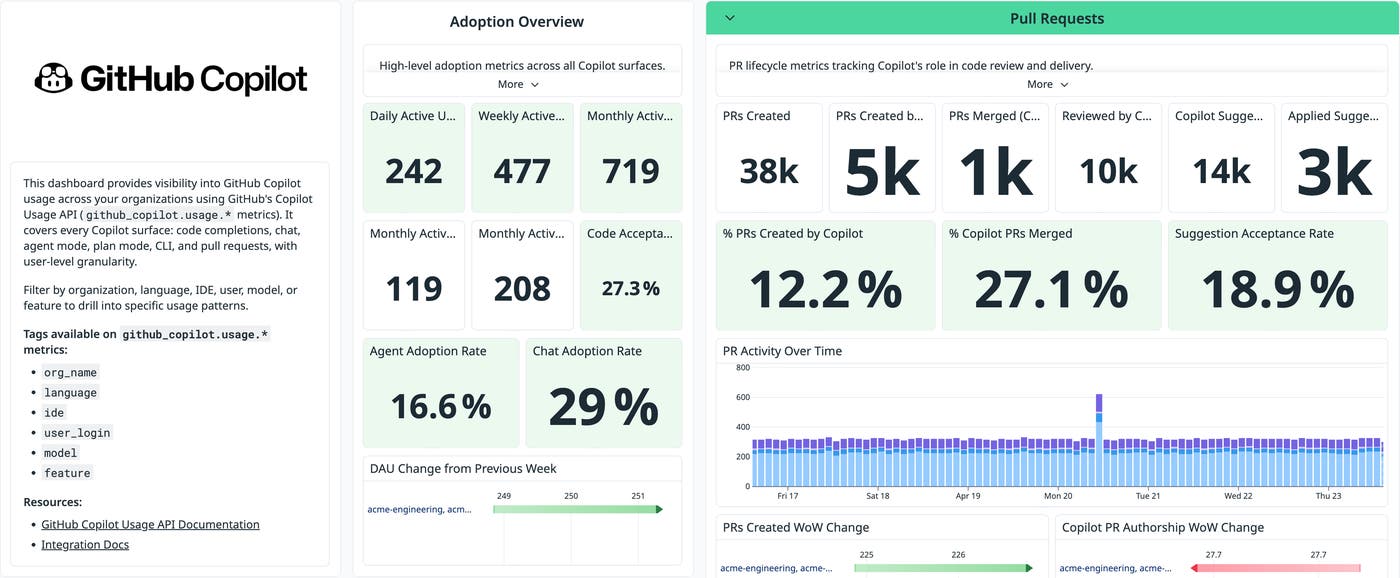
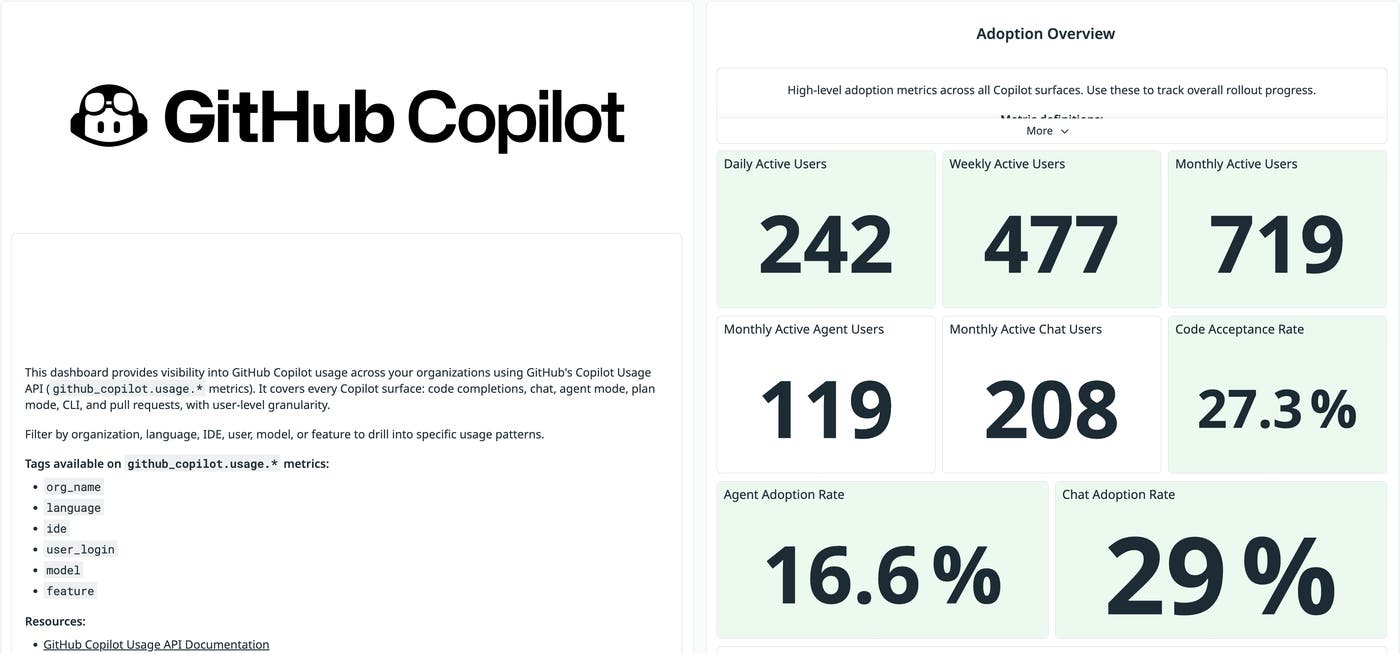
The dashboard also surfaces adoption metrics that go deeper than seat counts. You can track daily, weekly, and monthly active users across all Copilot features. Two new rates help you measure how far adoption has spread:
Agent Adoption Rate: the share of monthly active users who have used Copilot's agent capabilities
Chat Adoption Rate: the share of monthly active users who have interacted with Copilot Chat
Because the API reports at the user level, you can filter the entire dashboard by individual developer, organization, IDE, programming language, AI model, or Copilot feature. GitHub's admin console shows organization-wide totals, but in Datadog you can filter and analyze the data however you need: "Which developers on the platform team are actively using agent mode?" or "What percentage of our VS Code users have tried Copilot Chat?" You can also set monitors to alert you when seat utilization drops below a threshold or when adoption stalls for a particular team.
Measure user activity vs. GitHub Copilot agent activity
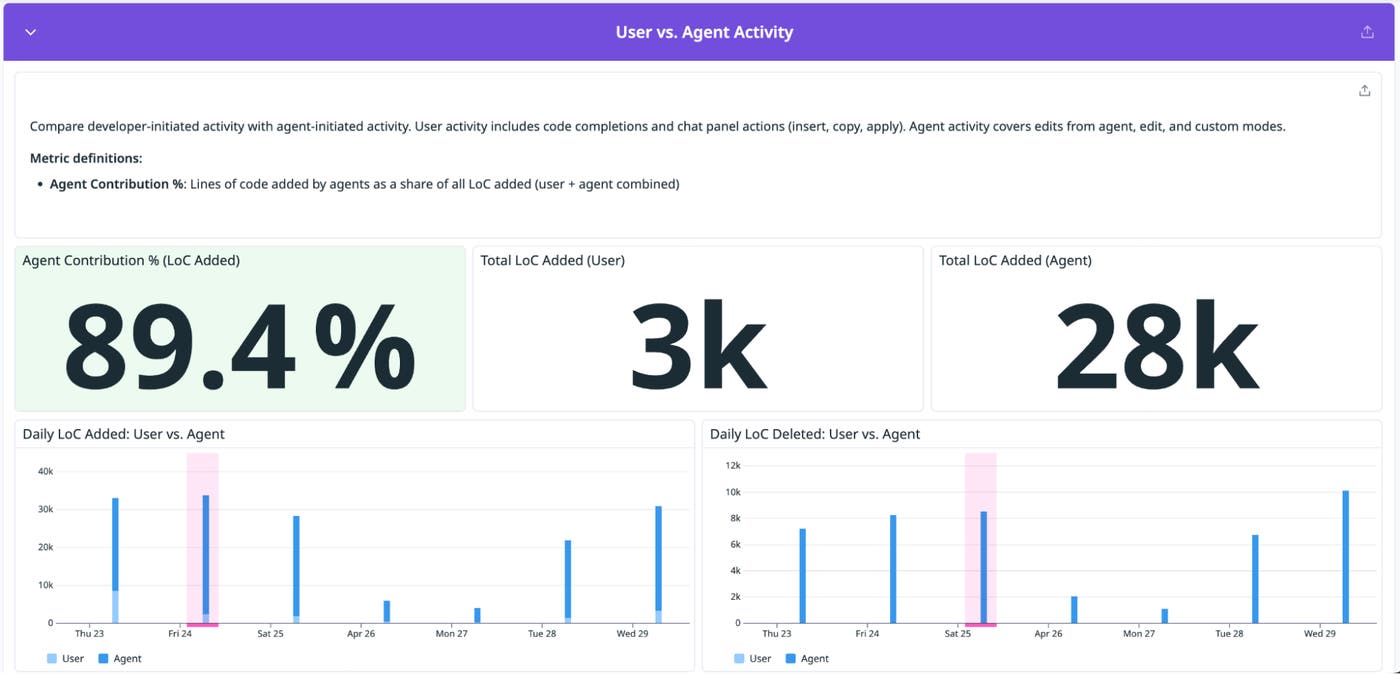
As GitHub Copilot's agent mode takes on a larger share of code production, you need visibility into what the agent is doing relative to your developers. The dashboard's User vs. Agent Activity section lets you compare these two sources of code changes side by side.
The key metric is Agent Contribution %, the share of all lines of code (LoC) added that came from Copilot's agent rather than from a developer. If the Agent Contribution % metric is climbing, it means that the agent is taking on a larger share of code production. You can also see the raw totals (Total LoC Added by User vs. Total LoC Added by Agent) and track the trend over time with daily timeseries charts for lines added and lines deleted.
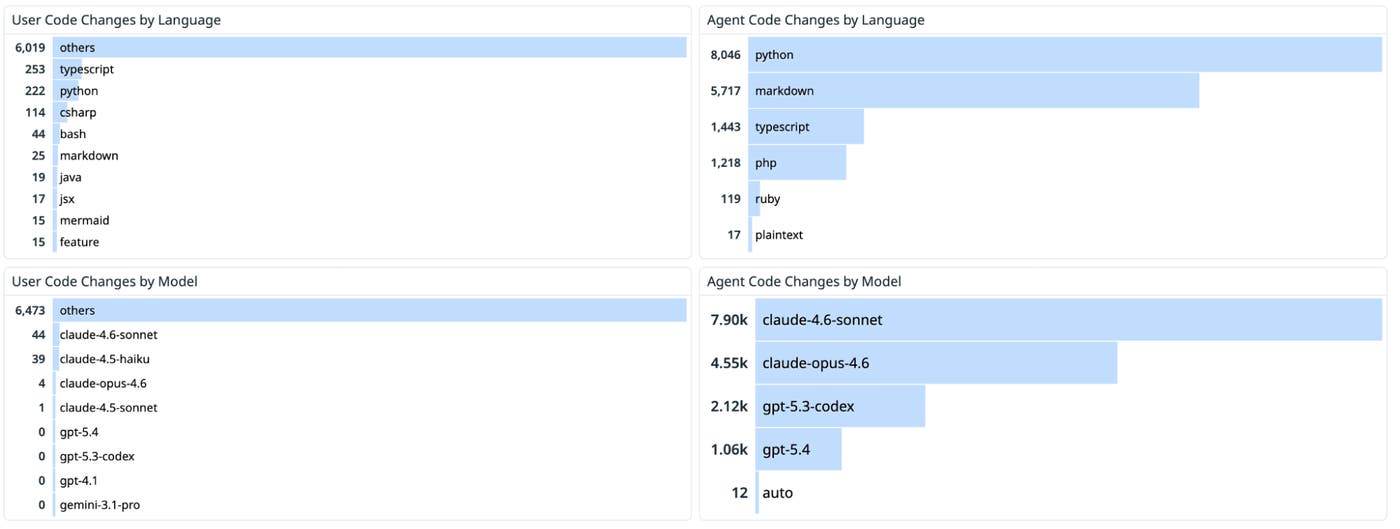
The language and model breakdowns within this section reveal where the agent is most effective. For example, you might discover that the agent contributes 40% of all Python code but only 5% of Go code. This kind of insight helps you target agent-mode enablement toward languages and projects where it delivers real value. Similarly, comparing code changes by model (for example, GPT-4o vs. Claude Sonnet 4) lets you understand which underlying model is driving the most agent activity.
Gain visibility into code completions, chat activity, and pull requests
GitHub Copilot usage extends across several distinct workflows, including code completions, chat interactions, and PR activity. To understand how it impacts developer productivity, you need visibility into each of these areas and how developers engage with them over time.
Code completions
The dashboard tracks inline code suggestions across all IDEs. You can see how many suggestions Copilot generates, how many suggestions that developers accept, and the acceptance rate over time. The average lines of code per acceptance tells you whether developers are adopting single-line fixes or multi-line blocks.
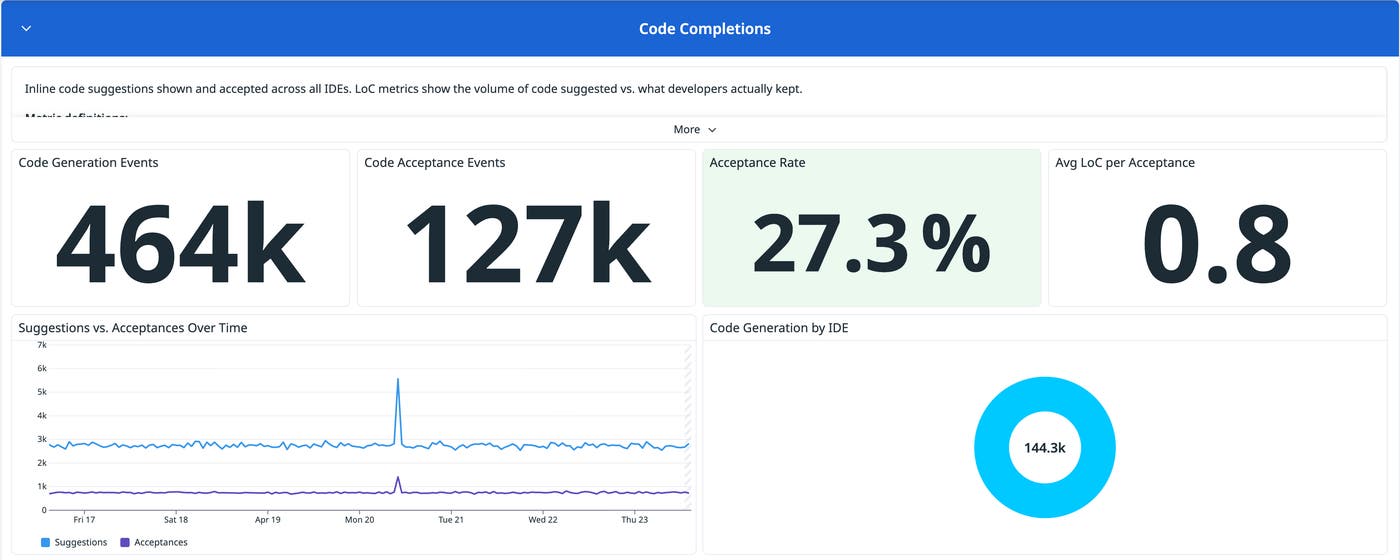
The language breakdown section helps you identify where Copilot is most effective at generating relevant code. If you notice high acceptance rates in Python but low rates in Go, that signals an opportunity to evaluate whether Copilot's Go suggestions need different prompting patterns or whether Go developers prefer a different workflow.
Chat activity
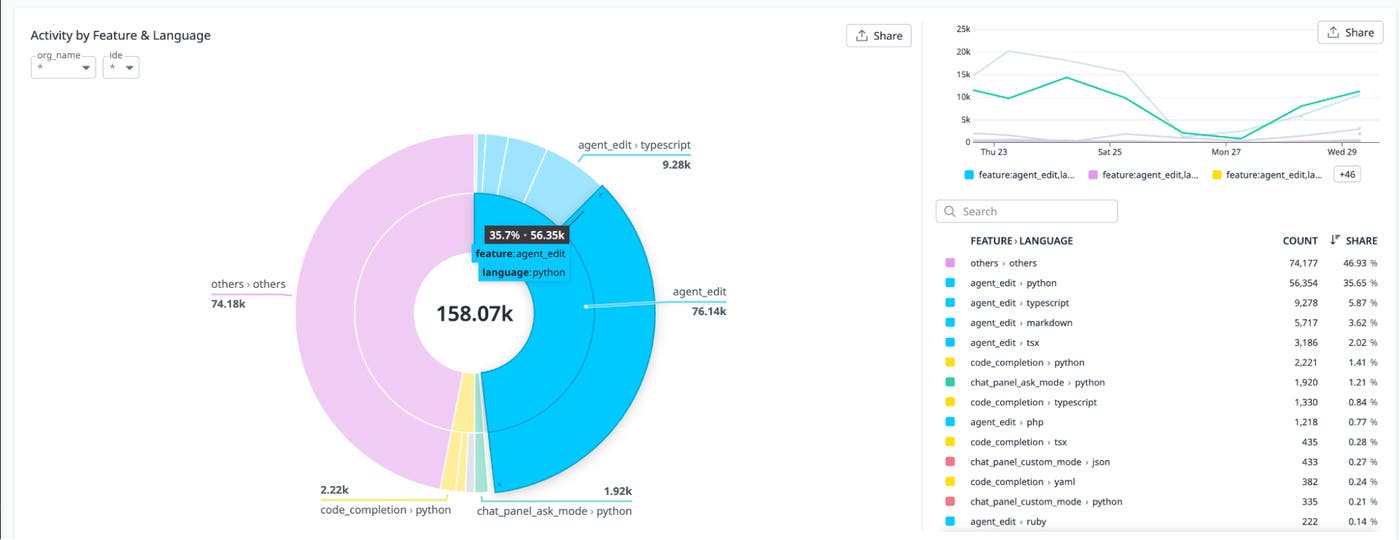
Copilot Chat now spans multiple interaction modes: ask, edit, plan, agent, and inline. The dashboard breaks down interactions across all of these modes so that you can see which capabilities your developers rely on most and how usage patterns shift over time.
You can track total chat interactions, average interactions per user, and a per-user leaderboard of the most active Copilot Chat users. The Activity by Feature & Language sunburst chart shows at a glance which chat modes dominate and in which languages. The Code Generation by Feature Over Time timeseries enables you to spot trends, such as growing adoption of agent mode over traditional ask mode.
Pull requests
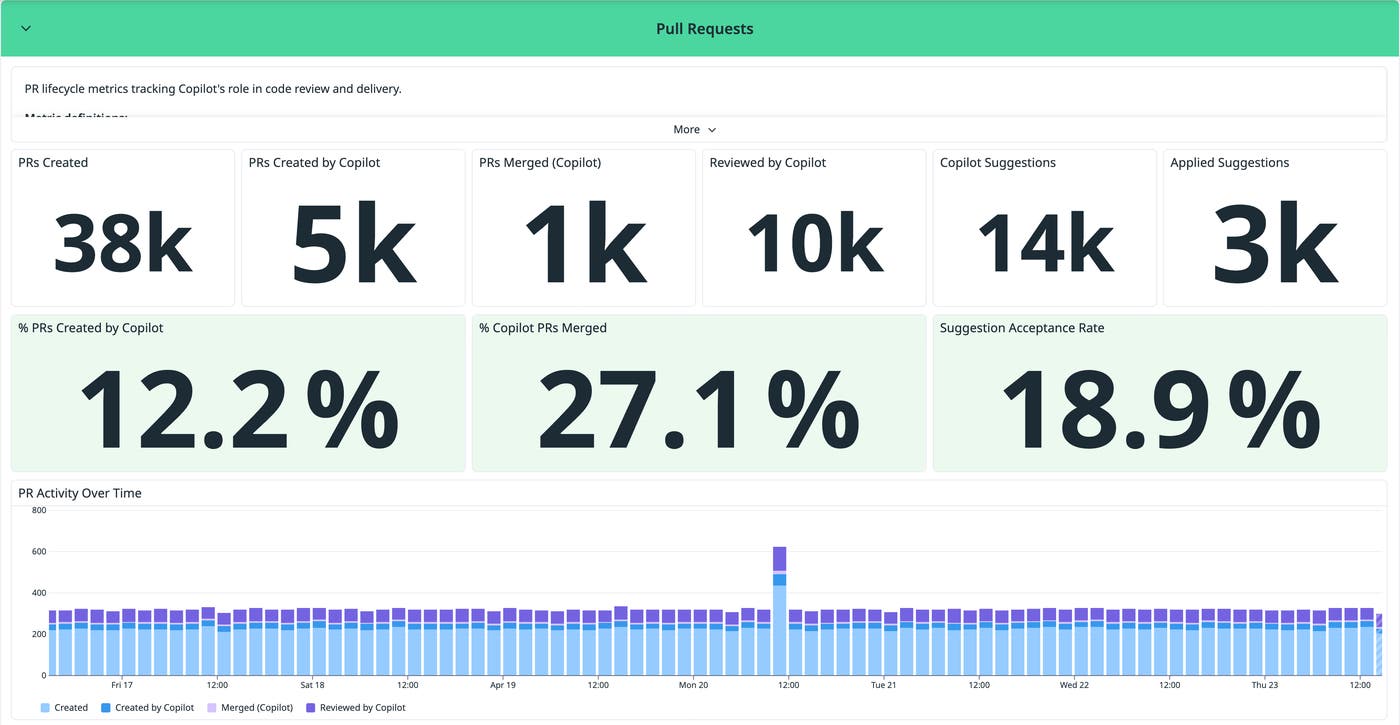
Copilot now participates in the PR life cycle, from authoring PRs to reviewing code and suggesting changes. The dashboard tracks this life cycle from end to end: how many PRs are created by Copilot vs. by developers, what share of Copilot-authored PRs are merged, and how often developers apply Copilot's review suggestions. If you're already using Datadog's DORA Metrics or CI Visibility, you can correlate Copilot's PR activity with your broader delivery performance.
PR metrics help you assess whether Copilot is producing mergeable code or creating noise. A high % Copilot PRs Merged rate means that the agent is generating production-quality contributions. A low Suggestion Acceptance Rate on reviews might indicate that Copilot's feedback isn't aligned with your team's coding standards yet.
Get started monitoring GitHub Copilot usage with Datadog
Datadog's GitHub Copilot integration brings Copilot usage data into the observability platform that your teams already use, so you can track adoption, optimize spend, and understand how AI-assisted development fits into your broader engineering workflows. The integration connects via OAuth and starts collecting metrics immediately. You can learn more in our GitHub Copilot integration documentation. If you're interested in reading more about AI features that Datadog supports, check out our AI-focused blog posts.
If you don't already have a Datadog account, you can sign up for a free 14-day trial to get started monitoring GitHub Copilot usage.
