

Abril Loya McCloud
Postfix is an open source, SMTP-based mail transfer agent (MTA) first released in 1997 that continues to be a popular choice for organizations that need an affordable way to route and deliver email. By using Postfix, organizations also have an initial layer of protection against common email issues like spambots and malware.
Datadog integrates with Postfix to ensure you have all the necessary information to monitor your email service’s performance.
Monitor Postfix queues
The most important Postfix performance metric you can track within Datadog is your postfix.queue.size for your incoming, active, and deferred queues. This metric shows the number of emails that are currently waiting in that specific queue.
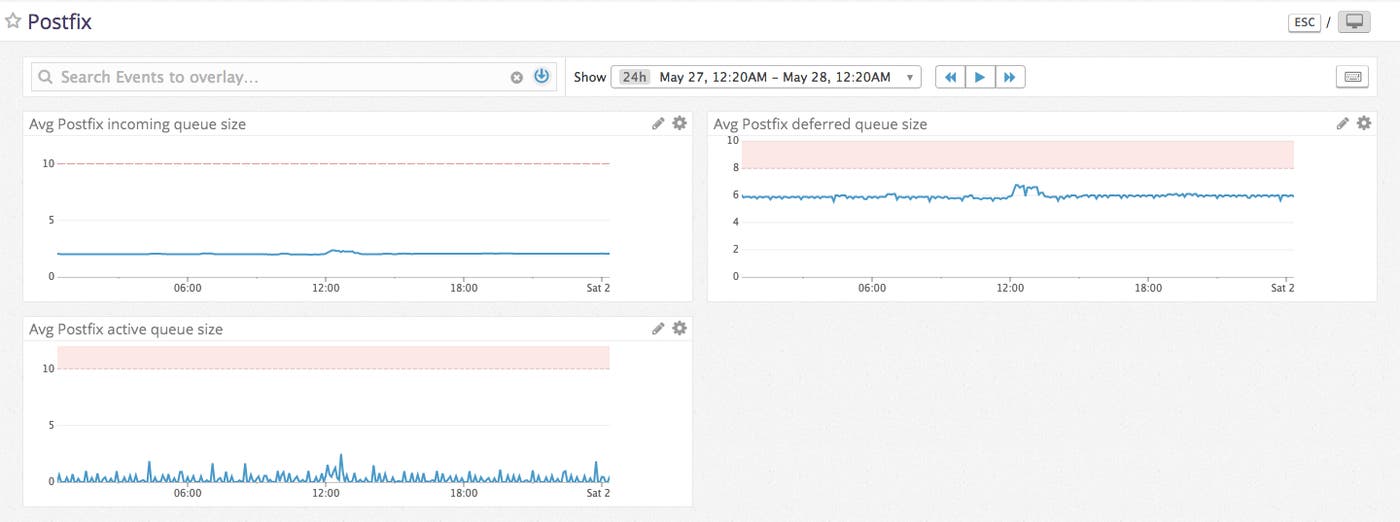
In the case of the incoming queue, postfix.queue.size shows the number of new emails processed by the cleanup8 service before they are moved into the active queue. Ideally, the incoming queue should move emails quickly enough into the active queue to maintain a near-zero queue value.
The deferred queue is comprised of soft-bounced sent emails. Soft-bounced emails, which are temporarily unable to be delivered, are sent to the active queue to be retried according to your retry parameters. Unexpected increases in the number of soft-bounces in your deferred queue can be caused by over quota recipient mailboxes, downed recipient email servers, or even too-large email content.
The active queue metric postfix.queue.size shows the number of emails that are ready to be sent, but are not currently in the process of being sent. The active queue is fed into by both the incoming queue and the deferred queue, so an unusually large active queue can be caused by a heavy load from either queue.
Once you’ve begun monitoring Postfix, you will have an established baseline value for your queue sizes. You can set a Datadog monitor at this baseline and be alerted if your queue sizes differ greatly from the norm so you can investigate the issue before performance is impacted.
All your metrics, in one place
With this integration, you get all the power of Datadog applied to your Postfix deployment. In addition to collecting, visualizing, and aggregating email metrics, Datadog can also correlate metrics with other systems or software in your stack, alert on abnormal application behavior, automatically detect outliers, and more.
Try it
If you’re already a Datadog customer, all you need to do is deploy the Datadog Agent and follow these instructions to grant access to find and optionally configure your mail spool directories. Otherwise, sign up for a Datadog free trial and start monitoring Postfix, as well as the rest of your infrastructure, in minutes. Once you’ve configured the Agent and your email system, restart the Agent and execute the info command to ensure it’s working (the exact command varies by platform, check here for the full list). If you use other SMTP-based mailing services, like AWS SES, we have you covered as well.
