
Maël Lilensten
Senior Product Manager

Arti Arutiunov
Product Manager

Younes Berradia
Product Manager

Lauren Zuniga
Senior Product Marketing Manager
Digital teams need to know whether users can sign in, check out, stream content, or complete other critical journeys. But the data that describes those experiences is often split across product analytics, real user monitoring (RUM), synthetics, and other systems. Product teams may see conversion drops while engineering teams investigate availability, latency, or frontend errors in a separate workflow. Suddenly, it’s difficult to quickly answer basic questions: Are users completing the journey? Is a technical issue blocking them, and which part of the stack is contributing to the problem?
Datadog Journey Monitoring enables teams to monitor critical digital experiences from a single hub. It brings user behavior, technical performance, availability service level objectives (SLOs) from Datadog RUM, and test results from Datadog Synthetic Monitoring together so product, engineering, and reliability teams can evaluate journeys through the same lens. In this post, we’ll show how Journey Monitoring lets you:
Evaluate behavior and performance side by side
A checkout journey might depend on a product detail page, cart service, payment provider, authentication flow, and confirmation page. Product teams may rely on conversion metrics that show what changed but not whether a technical problem caused the change. Engineering teams may track availability, latency, and errors at the service or page level, but those metrics do not always show how an issue affects a business-critical experience. The result is duplicate dashboards, inconsistent KPIs, and time spent reconciling views before anyone can act.
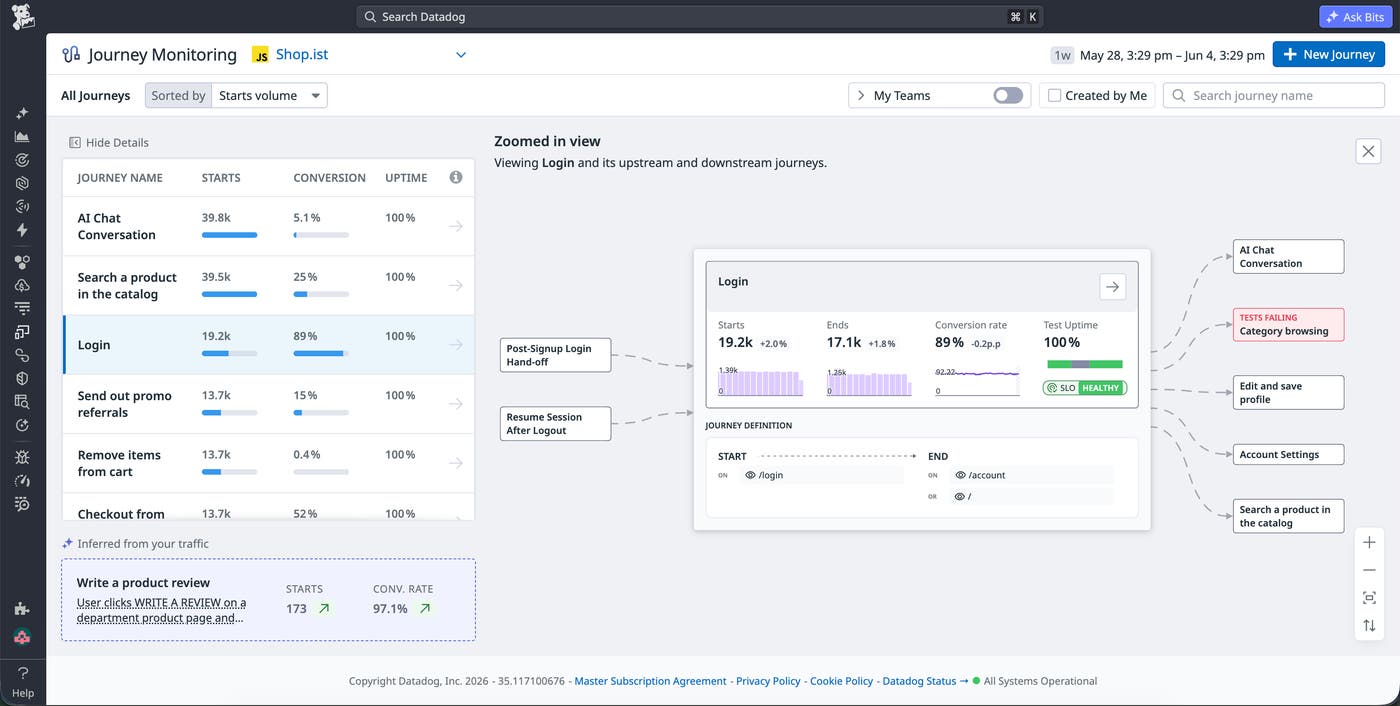
Journey Monitoring gives teams a centralized entry point for Digital Experience Monitoring (DEM), replacing fragmented views of individual pages, tests, and analytics funnels with a journey-focused view of application health. From this hub, teams can evaluate real user activity and technical performance in one view. Journey Monitoring surfaces metrics such as the number of starts, conversion rate, and time to convert alongside system health indicators, including RUM availability SLOs and Synthetics uptime. This combined view helps teams determine whether a journey is degraded because of technical failures, user friction, or another behavioral pattern.
For example, a product manager investigating a decline in checkout conversions can review conversion trends and time-to-convert data in Journey Monitoring. If the same journey also shows breached RUM availability SLOs or failing Synthetic tests, an engineering team can use that context to prioritize triage. If technical signals look healthy, the product team can focus instead on UX changes, pricing, or other nontechnical factors that might be affecting user behavior.
Spot the source of journey issues at a glance
When a critical journey degrades, the journey map shows you where to look first. Instead of reviewing a journey in isolation, teams can see the broader experience topology, including the pages and paths that users take before and after a key journey.
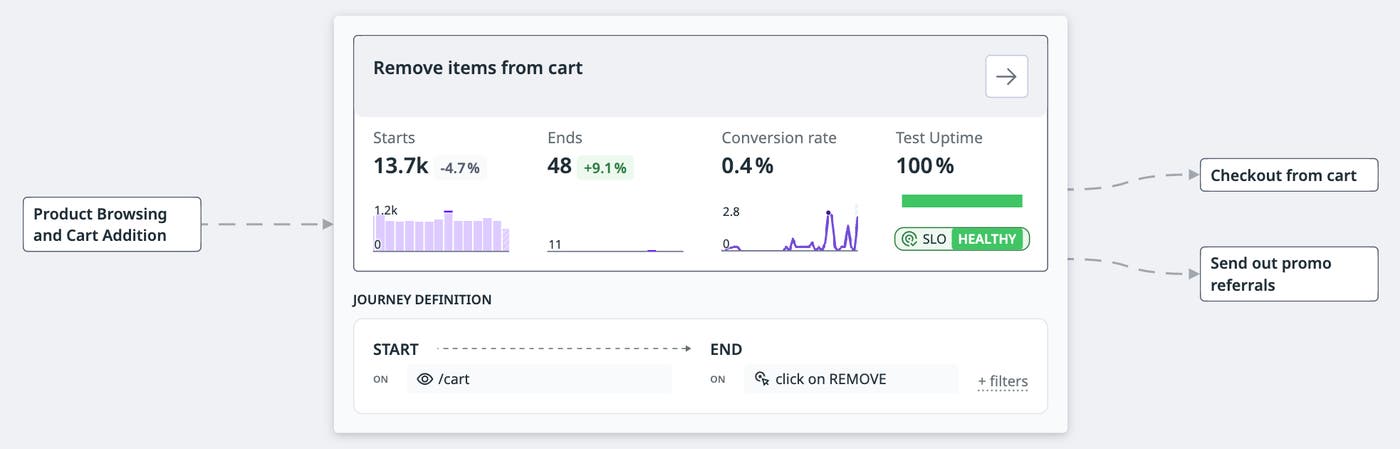
This context is especially useful when an issue affects more than one experience. A failure in an authentication journey, for example, may prevent users from reaching checkout, account management, or subscription workflows. By showing upstream and downstream relationships, the journey map helps teams understand the potential blast radius of a technical or behavioral issue before they start investigating.
Visual health cues on the map make it easy to see which areas need attention. Status indicators such as breached SLO badges highlight where the journey may be experiencing technical issues, while journey starts show how users are distributed across paths. Teams can then focus on a specific journey to review detailed timeseries indicators and variant-level performance without losing the surrounding application context.
Investigate root causes without losing journey context
Once you’ve identified a degraded journey, the next question is which step or dependency is causing the problem. Journey Monitoring keeps you in the same workflow while you investigate, pulling behavioral and technical data from across Datadog into a single journey view so you don’t lose sight of the experience you’re troubleshooting.
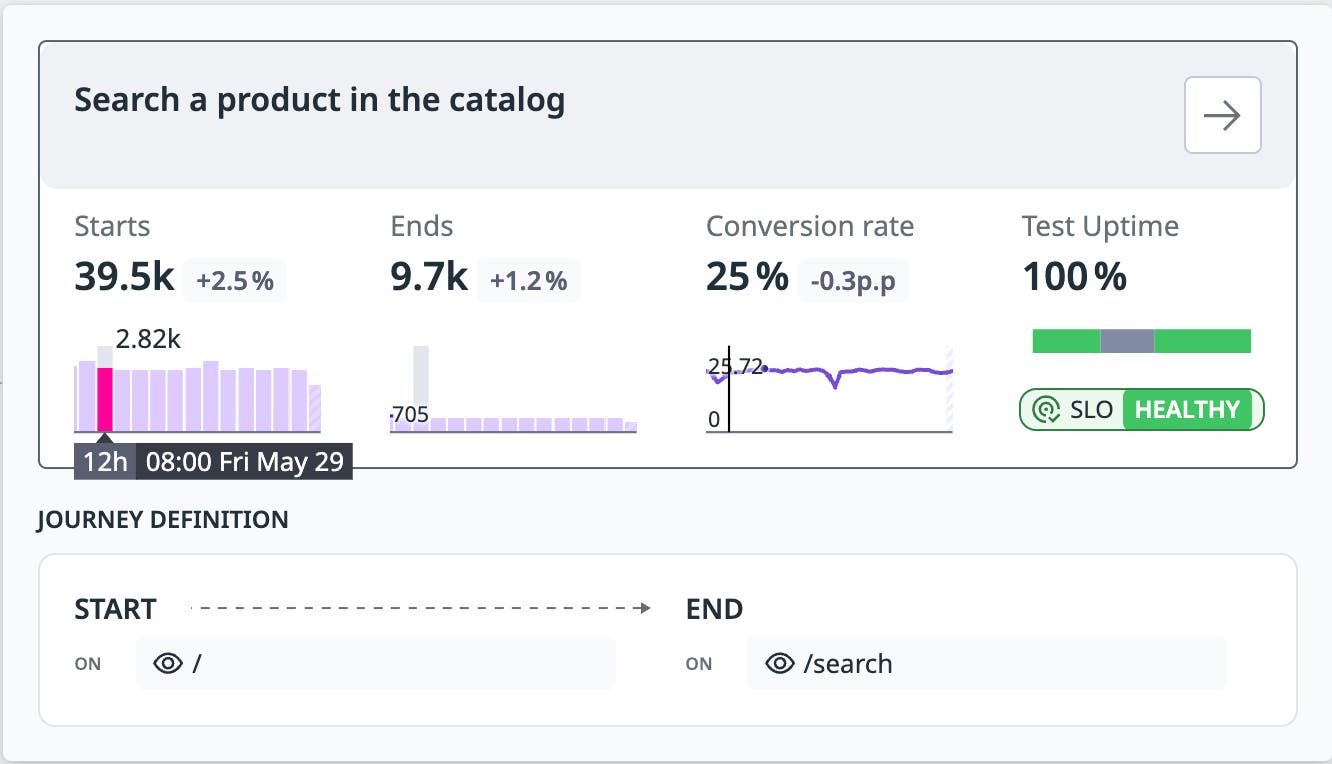
Users can also break down the same conversion indicators into a journey’s most important variants, which represent the intermediate paths users take before completion. This makes it possible to compare variants and identify whether friction is concentrated in a specific path, step, or interaction.
Journey Monitoring also prioritizes the technical drivers most likely to be affecting the experience. RUM operations and Synthetic tests with breached SLOs or decreasing success rates are automatically correlated and appear at the top of the journey details view, so the most relevant signals are the first thing teams see. From there, a single pivot opens the RUM Sessions Explorer, Session Replay, or Synthetic test results. For example, when a checkout journey shows a breached RUM availability SLO, you can jump from the journey details page into Session Replay and watch a user encounter a frontend error on the payment form without leaving the broader journey context behind.
Keep pace with your product as new journeys emerge
Your product changes constantly. New flows get built, user behavior shifts, and critical paths emerge that no one thought to monitor. When monitoring depends entirely on manual configuration, important experiences can go unmonitored for weeks or until something breaks.
Journey Monitoring continuously analyzes real user activity to infer critical journeys from traffic patterns, so your monitoring coverage keeps pace with your product without any manual upkeep. Traffic-led discovery surfaces emerging paths as they become important, and Journey Monitoring also identifies high-volume variants so teams can see the different intermediate steps users take to reach the same outcome.
For example, a media company might launch a new subscription flow that quickly becomes the primary path for paid users. Journey Monitoring surfaces that emerging path based on real user traffic, giving product and engineering teams a starting point for monitoring its conversion rate, reliability, and technical health. As teams refine their monitoring strategy, they can promote these discovered journeys into their standard operational view.
Start monitoring critical user journeys in Datadog
Journey Monitoring gives product, engineering, and reliability teams a shared business and technical context to evaluate digital experiences. By bringing journey conversion, user volume, time to convert, RUM availability SLOs, Synthetic uptime SLOs, journey variants, and session-level troubleshooting into one workflow, Datadog helps teams understand whether users can complete critical journeys and where to focus when they cannot.
Journey Monitoring is currently available in Preview for existing Datadog customers using RUM, Synthetic Monitoring, and Product Analytics. To learn more, see the Journey Monitoring documentation, Real User Monitoring documentation, Synthetic Monitoring documentation, and Product Analytics documentation. If you’re new to Datadog, sign up for a 14-day free trial to start building out your DEM coverage.
