RUM Without Limits™ reference architecture with RUM Managed Archive, RUM Export and RUM Profiling use cases.
September 14, 2026
Introduction
Real User Monitoring (RUM) gives engineering and product teams end-to-end visibility into how users experience their web and mobile applications. However, traditional RUM implementations have long forced a difficult trade-off: You can either capture every session and face unpredictable costs at scale, or apply fixed sampling rates and risk missing the critical sessions that matter most.
The introduction of RUM without Limits™ decouples session ingestion from retention, allowing teams to ingest 100% of session data while retaining only the sessions that deliver the most observability value. Built-in metrics to measure availability and performance remain accurate and complete regardless of how much session data is retained, providing long-term visibility into application health without increasing storage costs. This new model includes several new SKUs:
- RUM Measure: Ingests all user sessions, generates more than 30 metrics from them, and retains those metrics for 15 months to support longer-term trend analysis and full-traffic alerting.
- RUM Investigate: Retains selected sessions for 30 days by using retention filters based on session attributes (e.g., duration or user ID) or events (e.g., a click on the Contact Support button).
- Session Replay Add-On: Provides visual replays of user sessions. You pay only for the replays attached to the RUM sessions you retain.
Building on that foundation, Datadog has introduced three additional capabilities for storing, recovering, and consuming RUM data:
- RUM Managed Archive: Automatically stores all ingested sessions for a configurable retention period (1, 3, or 6 months), allowing you to recover sessions that were not retained by your retention filters. This makes sessions available for later recovery during unanticipated issues like compliance audits, retroactive investigations, and support escalations. This is an insurance policy to catch sessions that were not retained by retention filters in the first place.
- Recovery: Makes archived sessions available in RUM Explorer on demand, with complete event and attribute fidelity.
- Export Pipelines: Exports session data for use outside of Datadog.
This reference architecture covers the key differences between the legacy RUM model and RUM without Limits. It explains how Managed Archive, Recovery, and Export change the data flow and billing model and provides guidance on implementing RUM in your organization.
The Legacy RUM Model
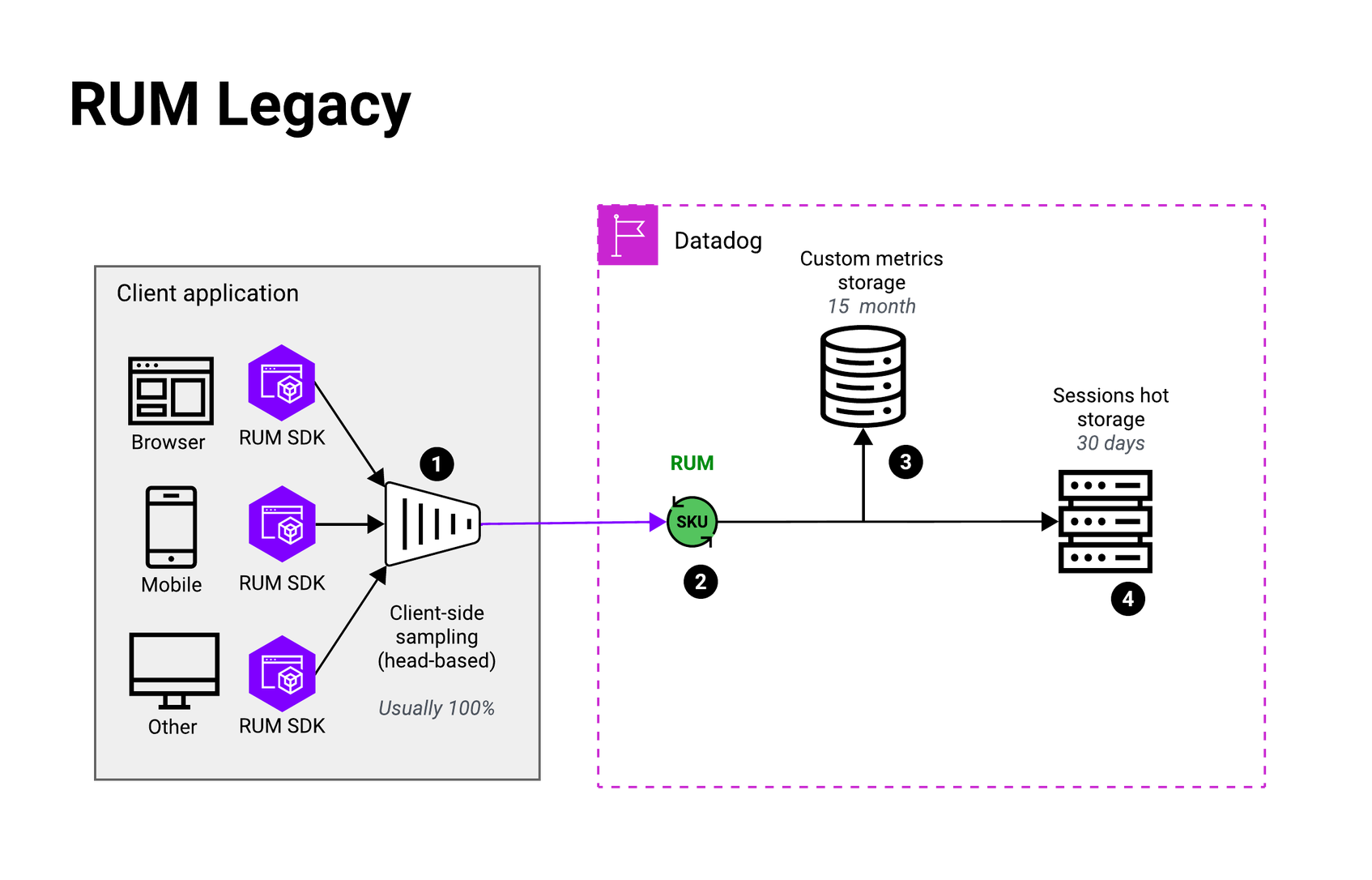
As shown in the diagram, the legacy RUM model consists of two main parts: the front-end client application and Datadog.
Step 1: SDK Instrumentation & Client-Side Sampling
On the front-end side, the RUM SDK is integrated directly into your application. Client-side sampling (also referred to as head-based sampling) is the only mechanism for controlling how much data is sent to Datadog. You define this sampling rate in your SDK configuration.
Before a session begins, the sampling decision is made using a randomized value between 0 and 1 generated at session start. If the value falls within the configured sample rate, the session is captured; otherwise, it is dropped. Because this setting is configured in the SDK, updating it typically requires either a code change and redeployment or a remote configuration system—which Datadog RUM does not provide.
Step 2: Ingestion & Billing
All sampled sessions flow into Datadog’s ingestion pipeline. In the legacy model, billing is based on ingested sessions. A session is counted and billed as soon as it is ingested. There is no separation between ingestion and retention, what you send is what you pay for.
Step 3: Custom Metrics (Optional)
Before sessions are stored, they pass through the Datadog pipeline where data points can be extracted and used to generate custom metrics. In practice, this capability sees limited use in the legacy model. Since metrics are derived from the same sampled data already available in the RUM Explorer, they are only as accurate as the underlying sample. The primary benefits of generating metrics in this model are:
Extended retention: Metrics are retained for 15 months, compared to 30 days for session data.
Platform integrations: Metrics can be used with native Datadog features such as SLOs, anomaly detection, and other platform capabilities built around the metrics infrastructure.
Understanding how RUM metrics work provides important context for what follows because the RUM without Limits model builds on these concepts.
Step 4: Session Storage
All ingested sessions are stored in the RUM Explorer for 30 days. There is no mechanism to selectively retain or discard sessions after ingestion. Everything that was sampled and sent to Datadog is retained for the full retention window.
RUM Without Limits™
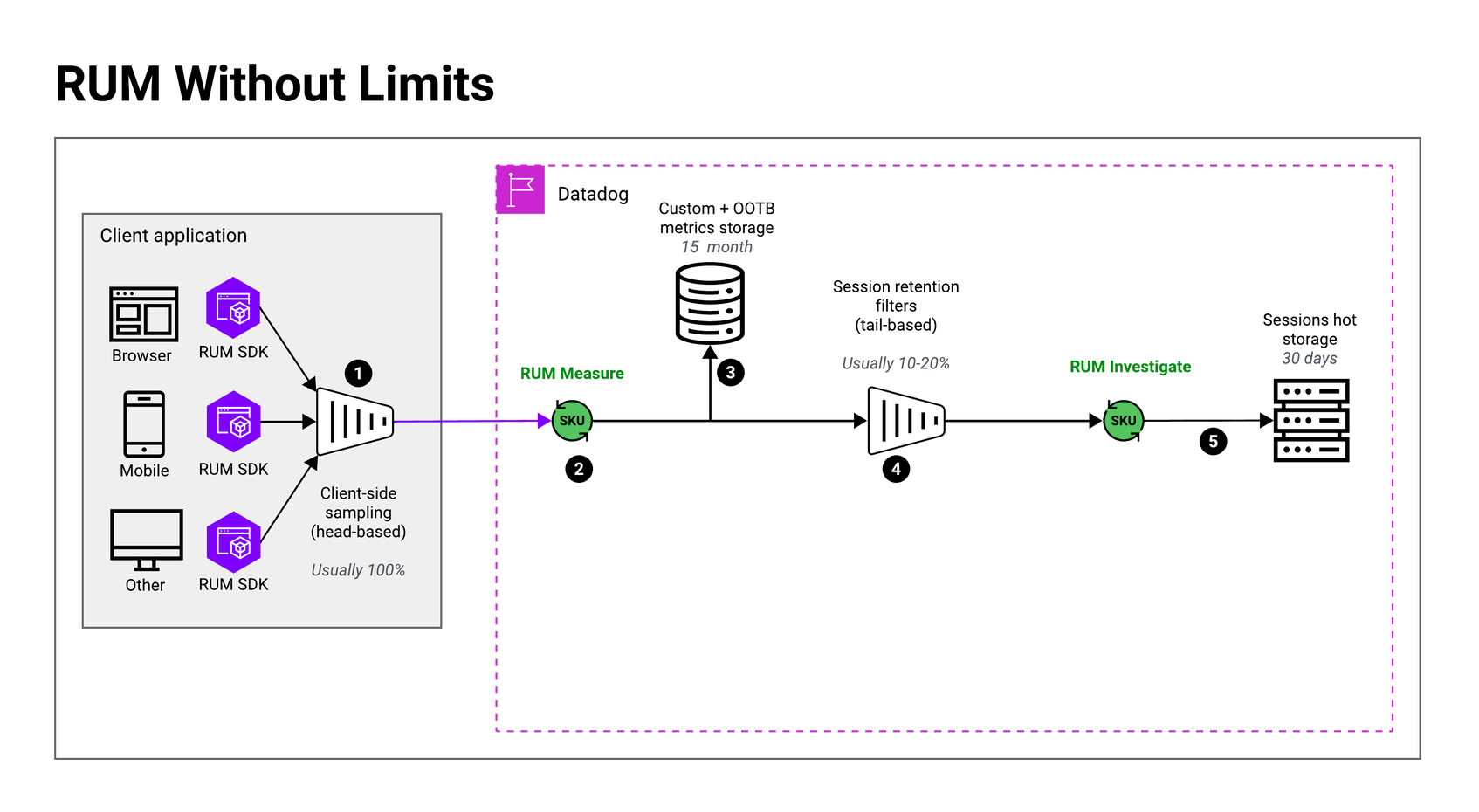
With RUM without Limits, the data flow changes significantly compared to the legacy model. Most of the changes happen on the Datadog side. The client-side setup remains largely the same.
Step 1: SDK Instrumentation (Front-End Side)
In most cases, you do not need to update your SDK version for RUM without Limits to work. That said, Datadog recommends keeping your SDK reasonably up to date, as updates continuously improve tracking accuracy and address bugs.
However, one significant change is recommended: Set your client-side sample rate to 100% and send all sessions to Datadog. The entire RUM without Limits model is designed around this approach. Sampling below 100% at this stage will affect the accuracy of your data later in the pipeline, particularly your metrics.
Step 2: Ingestion & the RUM Measure SKU
When sessions arrive at Datadog’s ingestion pipeline, they are counted and billed under the RUM Measure SKU (sometimes also referred to as the ingest SKU). This SKU is very affordable, which is the primary reason the model is designed around sending 100% of sessions. Billing under the RUM Measure SKU covers all ingested sessions and also includes the 30+ out-of-the-box metrics that Datadog generates from your session data at no additional cost.
Step 3: Metrics Calculation
As sessions flow through the ingestion pipeline, Datadog automatically calculates 30+ out-of-the-box metrics at no additional cost, derived from 100% of the sessions you send. Any custom metrics you configure are also calculated from this full traffic volume.
This is a foundational shift from the legacy model. Because metrics are derived from all ingested sessions rather than a sampled subset, they are highly accurate and reflect your true application performance. Key characteristics of RUM metrics in this model:
They are retained for 15 months.
More than 30 out-of-the-box metrics are provided, some with high cardinality. For example, view-related metrics such as Core Web Vitals and error rates are broken down per view name, browser name and version, country, app name and version, etc.
They are available for use with native Datadog platform features such as SLOs and anomaly detection.
| Important: In RUM without Limits™, Datadog recommends migrating all dashboards and monitors to use metrics rather than events. In the legacy model, dashboards and monitors are typically built on top of RUM Explorer events. In the new model, metrics provide the most accurate and cost-efficient foundation for performance monitoring and alerting, since session data may be sampled at the retention filters layer. The RUM Monitor creation flow has been updated accordingly and emphasises the use of metrics, and new metric-based monitor templates are available. |
|---|
Step 4: Session Retention Filters
After metrics are calculated, all sessions pass through retention filters. This is one of the key concepts introduced with RUM without Limits. Retention filters allow you to precisely define which sessions are kept for full investigation in the RUM Explorer.
Retention filters are evaluated against all ingested session data as it arrives. You can use the same query syntax available in the RUM Explorer to define your filter rules. Importantly, Datadog buffers sessions for up to 4 hours (the maximum session duration), ensuring that events occurring late in a session are still evaluated correctly before a retention decision is made. For example, a session where a checkout event occurs 3 hours and 59 minutes in will still be correctly captured by a retention filter targeting checkout events.
For a deeper dive into retention filters, Datadog provides detailed documentation as well as an interactive learning course on the Datadog Learning Portal.
Step 5: Session Storage & the RUM Investigate SKU
Sessions that match a retention filter are stored in the RUM Explorer and billed under the RUM Investigate SKU. (Note that this SKU is also referred to as the index or indexing SKU. The terminology is borrowed from Datadog’s Logging without Limits™ model, where the ingest/index distinction is already well established.) You are only billed under this SKU for the sessions you choose to retain. This is the second billing event in the RUM without Limits flow.
Two Data Sources, Two Purposes
In RUM without Limits, you now have two distinct sources of data, each serving a different purpose:
Metrics: Used for dashboards, monitors, SLOs, and long-term performance tracking. Accurate, lightweight, and retained for 15 months.
Sessions / Events (RUM Explorer): Used for deep investigation. When you need to understand exactly what a user experienced, replay a session, inspect a waterfall, or troubleshoot a slow Core Web Vital, retained sessions provide full event-level detail.
This distinction drives the recommended retention strategy: Ingest 100% of sessions to ensure metric accuracy, but apply retention filters thoughtfully to keep only the sessions you are likely to investigate. In practice, when troubleshooting an issue, you typically need one or two representative session examples, not thousands of instances of the same problem. RUM without Limits is designed with that reality in mind.
RUM Managed Archive & Recovery
This year, Datadog introduced two new capabilities designed to address a use case that RUM without Limits alone does not fully cover: long-term session retention for customer support workflows.
As described in the previous section, RUM without Limits is built around intelligent sampling at the retention filters layer, retaining only the sessions most valuable for performance investigation. However, a very common use case is the need to retain 100% of sessions, particularly for B2B companies with high-touch customer support SLOs. In this scenario, one can never know who will end up reaching out to support, and RUM and Session Replay are the primary tool for troubleshooting customer-reported issues. This pattern is also increasingly common in more mature B2C organizations, where support teams rely on session data to understand exactly what a customer experienced. Session data is used either to resolve the issue directly or provide meaningful context to engineering teams.
To address this use case, Datadog has introduced new add-on SKU: RUM Managed Archive.
| Note: RUM Managed Archive is an optional add-ons It is not required as part of a RUM without Limits™ implementation and is designed specifically for organizations that need full session coverage beyond what retention filters provide. |
|---|
Step 6 (optional): RUM Managed Archive
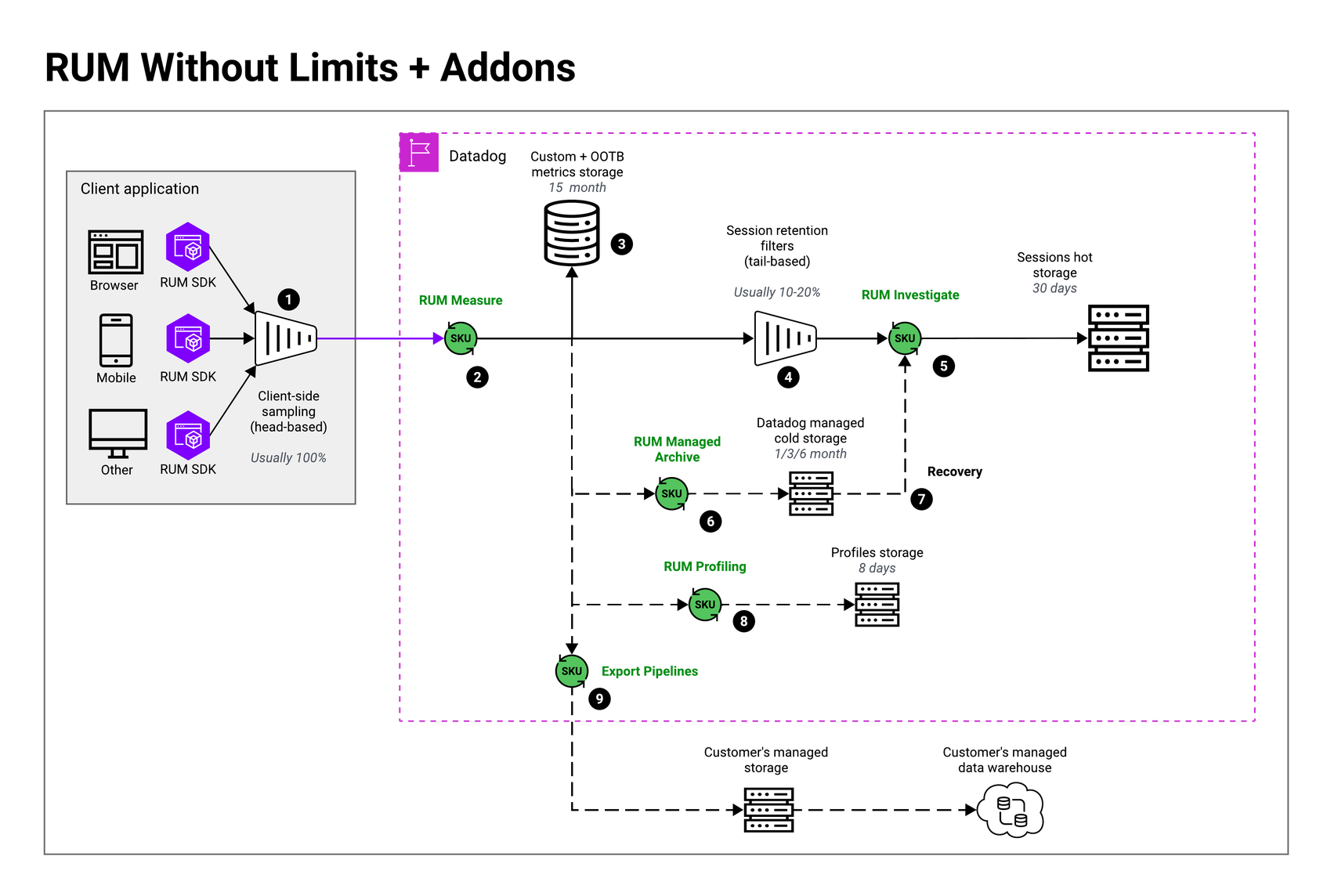
All sessions sent to Datadog can be automatically forwarded to a Datadog-managed cold storage archive. The RUM Managed Archive SKU is billed per session stored, and sessions can be retained in the archive for 1, 3, or 6 months, depending on your organization’s needs.
To make archived sessions searchable without the overhead of full session storage, Datadog maintains a lightweight index of up to eight attributes per session. The most commonly used attributes include:
Date & time
Session ID
User ID
Service
Account ID (part of the RUM data model—useful for mapping to your own internal customer or account identifiers, or other proprietary session metadata you want to search by)
This lightweight index allows support teams to quickly locate the specific sessions they need without requiring full session retrieval.
Step 7 (optional): Recovery
Once you have identified the sessions you need, recovering them is as simple as clicking a single button. The selected sessions are pulled from cold storage and made available in the RUM Explorer with full event and attribute fidelity—behaving exactly like regularly retained sessions—for 30 days.
Technically, recovered sessions are billed under the RUM Investigate SKU and charged at a premium. One recovered session is worth 10 sessions initially retained by retention filters. This is intentional, as it allows you to avoid contracting on a separate SKU (and avoid the hurdle of having to size the volume of sessions you expect to recover). At the same time, it allows you to benefit from eventually negotiated rates on the RUM Investigate SKU if you are entitled to volume-based discounts. In practice, based on early testing and feedback from design partners, support teams rarely need to recover sessions in bulk. For a typical support case, the ability to narrow down to one, two, or three specific sessions from a particular user on a particular day is sufficient.
Additional Use Case: Recovery from APM Traces
RUM Managed Archive and Recovery also support a secondary use case for teams using the RUM + APM integration. When a backend trace is generated by a front-end interaction, the originating RUM session ID is attached to the trace. If that session was not retained by a retention filter and is therefore unavailable in the RUM Explorer, it can still be recovered from the Managed Archive, giving you full end-to-end trace-to-session visibility even for sessions that were not explicitly retained.
RUM Profiling
RUM Profiling is an add-on SKU to RUM Measure that surfaces the code behind slow moments in your application to show not just what happened and where, but why. The profiler samples the call stack every few milliseconds while a session is active, producing method-level flame charts tied to the most important and impactful RUM events, including mobile app launch time (TTID/TTFD), crashes, errors, and long tasks. RUM Profiling is supported on Chromium-based browsers, Electron (only main process), iOS, and Android. Profiles contain stack frames, function names, file paths, and line numbers. They are retained for 8 days, independently of RUM session retention.
Step 8 (optional): RUM Profiling
Profiling attaches at the ingest stage, alongside RUM Measure, and offers less downstream control than the other RUM SKUs. There is no tail-based sampling for profiling: Profiles are large relative to RUM events, and both ingestion and processing are compute-intensive, so the decision to profile has to be made at session start rather than after the fact. The lever is therefore the head-based sample rate in the RUM SDK — profilingSampleRate per application, plus applicationLaunchSampleRate on mobile — which sets the percentage of your sampled RUM sessions that get profiled on a client side. You can also configure retention filters to explicitly keep user sessions with profiles attached using the “@profiling.has_profile” session attribute
Aggregated profiling, currently in development, complements this by rolling up method-level timings across all sessions with profiles, so you can see how long a given method takes on average without relying on any single session being retained by filters.
Export Pipelines
Step 9 (optional): Export Pipelines
Export Pipelines is a new add-on SKU and capability that allows you to forward your Real User Monitoring and Product Analytics session data to your own external storage. Supported destinations include:
Amazon S3
Google Cloud Storage
Azure Blob Storage
Data can be exported in two formats:
Parquet: Optimized for loading into data warehouses such as BigQuery or Snowflake
JSON: For more flexible downstream consumption
Similar to RUM Managed Archive, Export Pipelines operates on all sessions ingested by Datadog, forwarding the full dataset to your chosen external destination. From there, you can load the data into your own data warehouse or data lakehouse—such as Snowflake or Databricks—for further processing.
Export Pipelines was built to address one of the most frequent customer requests: access to raw RUM or PA data for internal analytics teams. Common use cases include training proprietary models, feeding internal BI tooling, and enabling data science workflows that require full session-level granularity outside of the Datadog platform.
| Note: Export Pipelines is an optional add-on SKU. Like RUM Managed Archive, it is not required as part of a RUM without Limits™ implementation. Billing is per 1,000 sessions exported, consistent with the broader RUM and PA billing model. |
|---|
Authors
Egor Vorotnikov, Product Solutions Architect - RUM
Mael Lilensten, Product manager - RUM
Quentine Sellem, Product manager - RUM