Kubernetes workload autoscaling with Datadog
August 3, 2026
Introduction
Kubernetes workloads rarely run at a constant scale. Traffic spikes, batch jobs, and usage patterns create demand that static resource configurations cannot match efficiently. Overprovisioned pods waste cluster capacity. Underprovisioned pods throttle under load or trigger OOM kills.
The Datadog Pod Autoscaler (DPA) addresses this by continuously evaluating real-time and historical metrics from your Datadog Agents. It applies scaling actions directly to your workloads based on actual demand. The DPA supports horizontal scaling (adjusting pod count), vertical scaling (adjusting resource requests), or both. Scaling is driven by CPU, memory, or custom Datadog metrics.
This article describes the reference architecture for deploying the DatadogPodAutoscaler custom resource in a Kubernetes cluster. It covers:
- How the
DatadogPodAutoscaleris defined and reconciled by the Datadog Cluster Agent - How the Cluster Agent communicates with Datadog to retrieve metric-based scaling recommendations
- How scaling decisions flow from Datadog to the Kubernetes API
- What runs in the cluster and what runs in Datadog
Requirements
Three prerequisites must be in place before creating any DatadogPodAutoscaler objects:
- The Admission Controller must be enabled. The DPA will not start without it.
- Remote Configuration (RC) must be enabled at the org level and on the Datadog Cluster Agent (DCA). The DCA uses RC to receive scaling settings and recommendations from Datadog (see Step 3 later in this article). Without it, no recommendations are delivered regardless of the custom resource definition (CRD) configuration.
- The
DatadogPodAutoscalerCRD is installed automatically by the Operator or thedatadog-crdssubchart.
If using the Datadog Operator, ensure that the following options are set in your DatadogAgent manifest:
spec:
  features:
    admissionController:
      enabled: true   # required
    autoscaling:
      workload:
        enabled: true
If using Helm, ensure that the following options are set in your values.yaml:
clusterAgent:
  enabled: true
datadog:
  autoscaling:
    workload:
      enabled: true
Explanation of the architecture
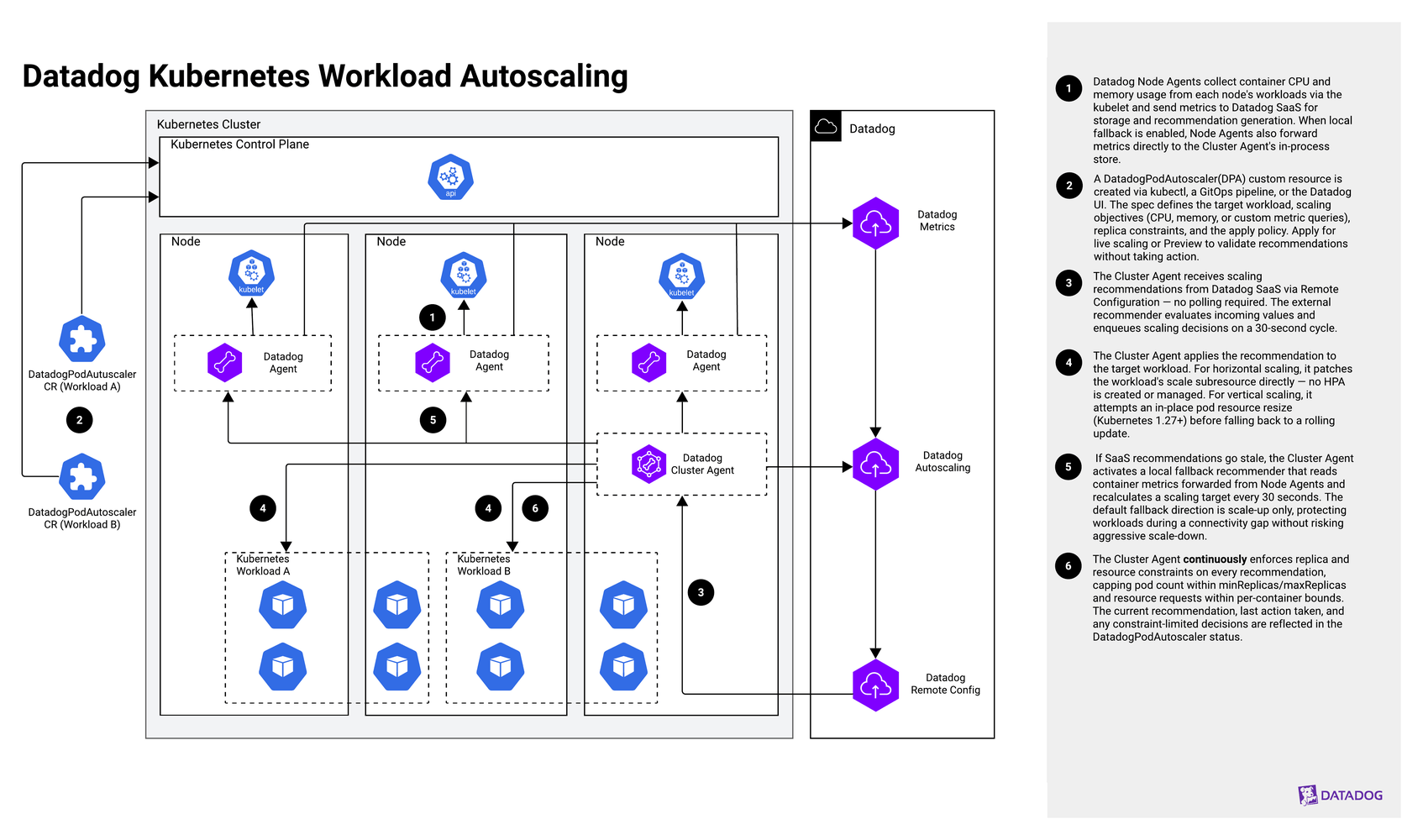
The Datadog Kubernetes workload autoscaling architecture runs on a Kubernetes cluster with the Datadog Node Agent DaemonSet and Cluster Agent deployed. The DPA scales Deployments, StatefulSets, or Argo Rollouts using real-time and historical metrics from Datadog.
- Step 1
Datadog Node Agents collect container CPU, memory, and custom metrics from each node's workloads via the kubelet. These metrics flow through the standard Agent metrics pipeline to Datadog, where they are stored and used to generate scaling recommendations. No additional checks or integrations are required beyond a standard Agent deployment. When local fallback is enabled, Node Agents also forward these metrics directly to the Cluster Agent's in-process store for offline use.
- Step 2
A
DatadogPodAutoscalerobject (API versiondatadoghq.com/v1alpha2) is created by the user viakubectl, a GitOps pipeline, or the Datadog UI. The spec defines the target workload (targetRef), scaling objectives (CPU/memory utilization or custom metric queries), constraints (replica, CPU, and memory), and the apply policy. SetapplyPolicy.mode: Applyfor live scaling, orapplyPolicy.mode: Previewto surface recommendations without taking action. Settingowner: Remotelets the Datadog UI manage the DPA spec and push it down via Remote Configuration. - Step 3
The Cluster Agent subscribes to two Remote Configuration products pushed by Datadog:
CONTAINER_AUTOSCALING_SETTINGSfor spec updates andCONTAINER_AUTOSCALING_VALUESfor scaling recommendations. Recommendations are pushed by the Datadog backend and consumed by the Cluster Agent on arrival. The DCA does not poll Datadog or push metrics to request them. The external recommender runs a 30-second cycle to evaluate incoming values and enqueue scaling decisions. - Step 4
The Cluster Agent applies the received recommendation to the target workload. For horizontal scaling, the DCA patches the
*/scalesubresource of the target Deployment or StatefulSet directly. No HPA is created or managed. For vertical scaling, the DCA attempts in-place pod resource resize (Kubernetes 1.27+) before falling back to a rolling update by annotating the pod template spec. - Step 5
If Datadog recommendations go stale, the Cluster Agent activates a local fallback recommender. When no
spec.fallbackblock is configured, the stale threshold is 30 minutes. Whenspec.fallback.horizontalis explicitly set,staleRecommendationThresholdSecondsdefaults to 600 seconds (configurable, range 100–3,600). The local recommender reads container CPU and memory metrics forwarded from Node Agents and recalculates a scaling target every 30 seconds. The default fallback direction is scale-up only, protecting workloads during a connectivity gap without risking aggressive scale-down. - Step 6
The external recommender and the Cluster Agent both enforce the objectives and constraints defined in the DPA spec before a scaling decision is applied to the workload. The DPA's
statusfields reflect the current recommendation, last action taken, and any decisions limited by constraints. Inspect them withkubectl get datadogpodautoscaler.
Autoscaling with custom Datadog metrics
CPU utilization is a lagging indicator. By the time CPU registers pressure, worker queues are already backed up, API latency is climbing, or connection pools are near capacity. Custom metrics let the DatadogPodAutoscaler act on leading signals and scale before users experience degradation.
The DatadogPodAutoscaler supports custom scaling signals through the CustomQuery objective type. Custom query objectives drive horizontal scaling only: They adjust pod count, not resource requests.
There are two data sources:
Metrics: A standard Datadog metrics query string, using the same syntax as dashboards and monitors. This covers the full breadth of Datadog integrations: queue depth (rabbitmq.queue.messages, kafka.request.channel.queue.size), request rate (nginx.net.request_per_s), and database connection counts (postgresql.numbackends, mysql.threads_running). Domain-specific signals, such as active WebSocket connections or open checkout sessions, work the same way.
APM metrics: Predefined APM statistics derived from trace data flowing through the Datadog Agent. The stat field specifies the signal; supported values include hits_per_second, errors_per_second, error_rate, latency_p50, latency_p75, latency_p90, latency_p95, latency_p99, latency_p999, latency_avg, latency_max, apdex, and others. No query string is required.
Key considerations for this architecture
A working DatadogPodAutoscaler deployment depends on operational decisions that are outside of the CRD spec. This section covers how to avoid conflicts between GitOps and Datadog’s backend recommender, why Preview mode belongs in every rollout, specific requirements for in-place resizing, and how cluster profiles accelerate onboarding autoscaling across many workloads.
GitOps and owner: Remote
Don’t mix owner: Remote with GitOps-managed DPA objects. A backend-managed object fights GitOps for control of the spec, since Remote Configuration and Argo CD each revert the other’s changes. A Git-authored object with owner: Remote set but never registered with Datadog’s backend recommender gets no recommendations at all. Use owner: Local for any DPA object managed by GitOps; only scaling recommendations flow from Datadog, and the spec stays under Git control.
Preview mode before Apply
Set applyPolicy.mode: Preview when first deploying a DPA object. In Preview mode, the Cluster Agent consumes external recommendations and writes them to the DPA’s status fields but takes no scaling action. Use kubectl get datadogpodautoscaler -o yaml to inspect status.horizontal.target.desiredReplicas and validate recommendation behavior against your workload’s traffic patterns. The DatadogPodAutoscaler metrics available in your Datadog account provide a dashboard view of recommendations, scaling events, and constraint violations across all DPA objects. Switch to Apply once the recommendations look correct.
Vertical scaling and Kubernetes version
Vertical scaling uses in-place pod resize automatically when the cluster API server exposes the pods/resize subresource. The Cluster Agent detects this via API discovery rather than checking a hardcoded Kubernetes version. Datadog’s supported baseline for this feature is Cluster Agent 7.78.0+ on Kubernetes 1.33+.
- Clean in-place resize: When a container’s
resizePolicyallowsNotRequiredfor the changing resource, the kubelet applies the new CPU or memory value without restarting the container. No pod disruption. - Disruptive in-place resize: If a container’s
resizePolicyis set toRestartContainerfor CPU or memory, the kubelet restarts the container to apply the resize. Because this restart happens directly through the kubelet rather than pod eviction, yourPodDisruptionBudgetdoes not protect against it. - Full rollout: Set
applyPolicy.update.strategy: TriggerRolloutin the DPA spec to force a rolling update of the target workload instead of any in-place resize. StandardPodDisruptionBudgetprotections apply to this path, because it’s a normal Kubernetes rolling update.
Onboarding at scale with cluster profiles
Managing individual DatadogPodAutoscaler objects across dozens of Deployments, ArgoRollout, or StatefulSets is operationally heavy. Cluster profiles solve this by letting a single DatadogPodAutoscalerClusterProfile resource govern many workloads at once. The Cluster Agent watches for the autoscaling.datadoghq.com/profile label on Deployments and StatefulSets (Cluster Agent 7.78+) or namespaces (Cluster Agent 7.79+) and automatically creates and manages the corresponding DatadogPodAutoscaler instances. No per-workload authoring is required.
Three built-in profiles cover most stateless workload shapes: datadog-optimize-cost (85% CPU target, minimum 1 replica), datadog-optimize-balance (70% CPU, minimum 2 replicas), and datadog-optimize-performance (60% CPU, minimum 3 replicas). Add the label to a workload or namespace to activate one immediately. Custom profiles support the full DatadogPodAutoscaler spec, excluding targetRef, which the Cluster Agent fills in automatically.
When applying profiles at the namespace level, individual workloads can opt out by setting autoscaling.datadoghq.com/profile: excluded on the workload. Workload-level labels always take precedence over namespace-level ones, so critical or stateful services can carry their own profile assignment regardless of what the namespace declares.
Because the Cluster Agent manages the lifecycle of profile-generated DatadogPodAutoscaler objects, avoid manually editing them. Changes will be reconciled away. Use a custom DatadogPodAutoscalerClusterProfile when the built-in profiles don’t fit, rather than patching the generated DPA directly.
Admission Controller dependency
If the Admission Controller is disabled or omitted from your DatadogAgent resource, the Datadog Operator fails to reconcile the DatadogAgent CR with an explicit error: "admission controller feature must be enabled to use the workload autoscaling feature". Enable the Admission Controller before setting features.autoscaling.workload.enabled: true.
Conclusion
The DatadogPodAutoscaler gives platform teams a single control plane for horizontal and vertical scaling that is grounded in the same metrics data already flowing through Datadog. There is no separate Horizontal Pod Autoscaler (HPA) or Vertical Pod Autoscaler (VPA) configuration to manage, no external metrics server to maintain, and no manual tuning loop.
Starting in Preview mode lets you validate recommendations against real traffic before any scaling action is taken. The local fallback mechanism keeps scaling active even when Datadog connectivity is interrupted. Because scaling objectives can combine CPU, memory, and custom APM signals, the DPA adapts to workloads that don’t fit a simple utilization model.
To get started, see the Datadog Kubernetes workload autoscaling documentation.
Authors
Kennon Kwok - Senior Product Solutions Architect
References
- DatadogPodAutoscaler CRD reference — setup guide and spec field reference
- Resize CPU and memory resources assigned to containers — Kubernetes (version 1.27+) documentation on in-place pod resource resize